light DODGE VIPER 2009 ZB II / 2.G Manual Online
[x] Cancel search | Manufacturer: DODGE, Model Year: 2009, Model line: VIPER, Model: DODGE VIPER 2009 ZB II / 2.GPages: 299, PDF Size: 5.14 MB
Page 240 of 299
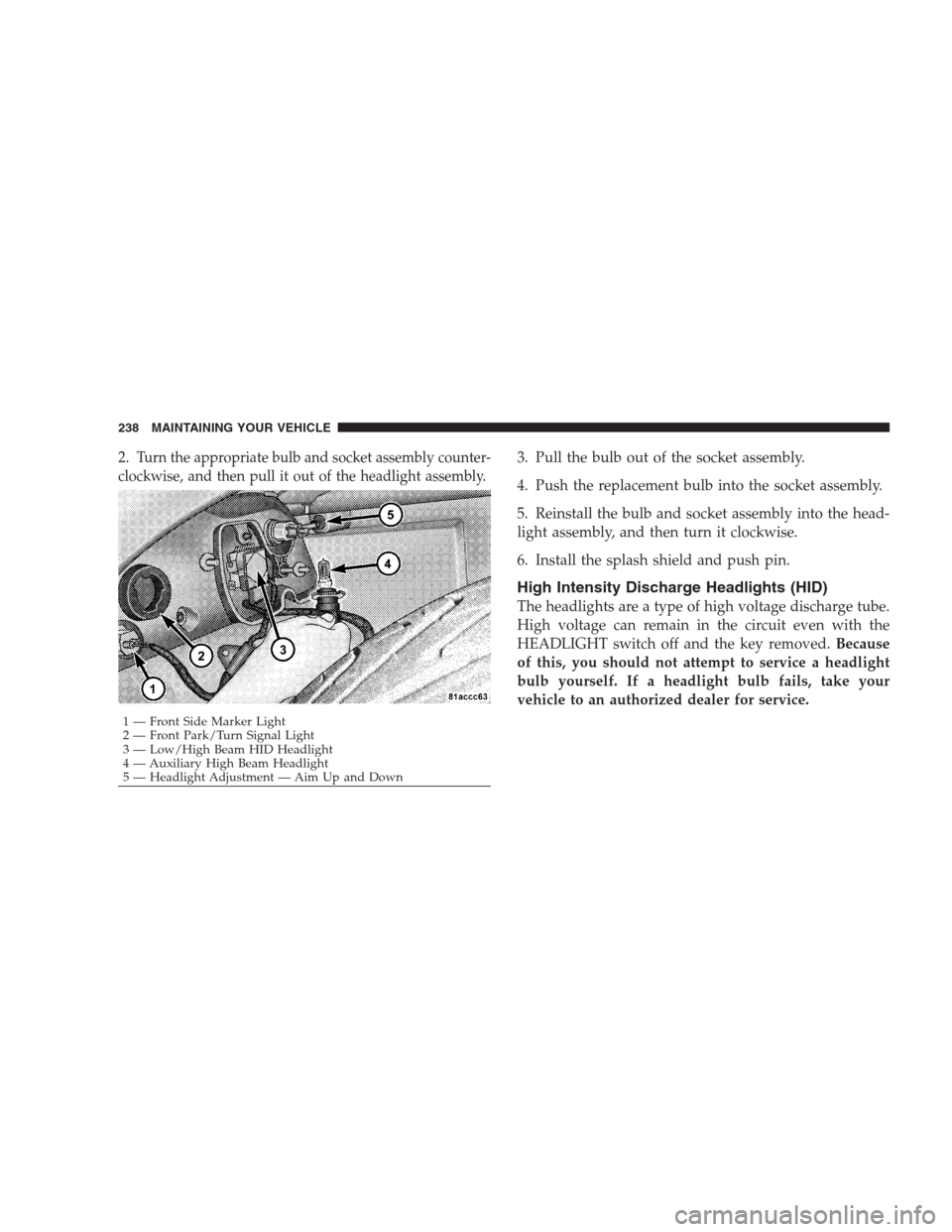
2.Turn the appropriate bulb and socket assembly counter-
clockwise, and then pull it out of the headlight assembly.3. Pull the bulb out of the socket assembly.
4. Push the replacement bulb into the socket assembly.
5. Reinstall the bulb and socket assembly into the head-
light assembly, and then turn it clockwise.
6. Install the splash shield and push pin.
High Intensity Discharge Headlights (HID)
The headlights are a type of high voltage discharge tube.
High voltage can remain in the circuit even with the
HEADLIGHT switch off and the key removed.Because
of this, you should not attempt to service a headlight
bulb yourself. If a headlight bulb fails, take your
vehicle to an authorized dealer for service.
1 — Front Side Marker Light
2 — Front Park/Turn Signal Light
3 — Low/High Beam HID Headlight
4 — Auxiliary High Beam Headlight
5 — Headlight Adjustment — Aim Up and Down 238 MAINTAINING YOUR VEHICLE
Page 241 of 299
WARNING!
A transient high tension occurs at the bulb sockets of
High Intensity Discharge (HID) headlights when the
HEADLIGHT switch is turned ON. It may cause
serious electrical shock or electrocution if not ser-
viced properly. See your authorized dealer for ser-
vice.
NOTE:
•When the High Intensity Discharge Headlights (HID)
are turned on, there is a blue hue to the lights. This
diminishes and becomes more white after approxi-
mately 10 seconds as the system charges.
•If High Intensity Discharge (HID) lights are not work-
ing, cycle the HEADLIGHT switch four times to see if
it will restrike.
Front Fog Light
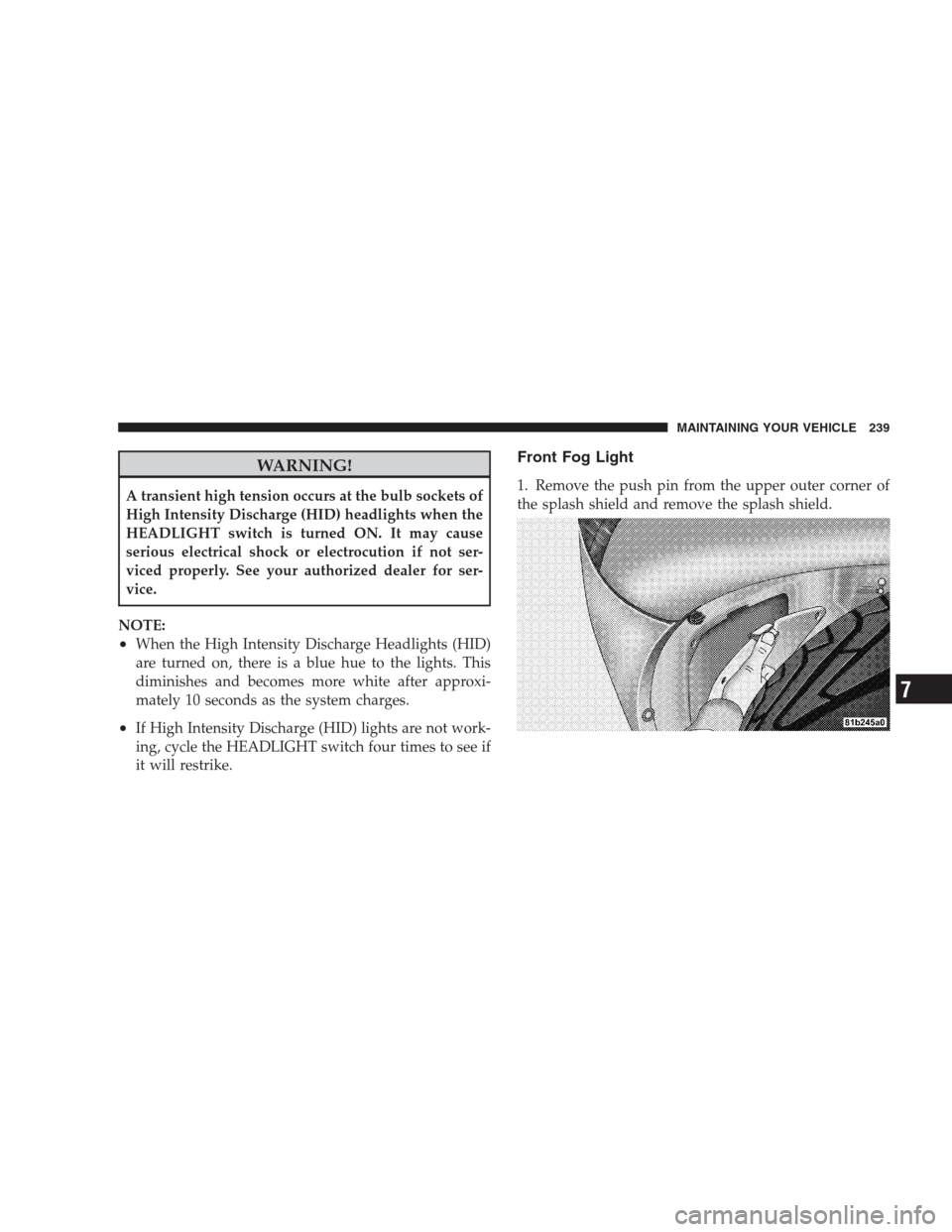
1. Remove the push pin from the upper outer corner of
the splash shield and remove the splash shield.
MAINTAINING YOUR VEHICLE 239
7
Page 242 of 299

2. Turn the bulb and socket assembly counterclockwise,
and then pull it out of the front fog light assembly.
3. Pull the bulb out of the socket assembly.
4. Push the replacement bulb into the socket assembly.
5. Reinstall the bulb and socket assembly into the front
fog light assembly, and then turn it clockwise.6. Install the splash shield and push pin.
Taillight, Tail/Stop Light, Rear Marker Light
1. Open the trunk
2. Remove the two fasteners and then remove the access
panel.
240 MAINTAINING YOUR VEHICLE
Page 243 of 299

3. Turn the appropriate bulb and socket assembly coun-
terclockwise, and then pull it out of the upper light
assembly.4. Pull the bulb out of the socket assembly.
5. Push the replacement bulb into the socket assembly.
6. Reinstall the bulb and socket assembly into the upper
light assembly, and then turn it clockwise.
7. Install the access panel and the two fasteners.
8. Close the trunk.
Taillight, Tail/Stop Light, Rear Marker Light
(Coupe Models)
For bulb replacement, see your authorized dealer.
1 — Rear Marker Light
2 — Tail/Stop Light
3 — TaillightMAINTAINING YOUR VEHICLE 241
7
Page 244 of 299

Backup Light, Rear Turn Signal Light
1. Open the trunk.
2. Remove the two fasteners and then remove the access
panel.3. Remove the three upper light assembly retaining nuts.
242 MAINTAINING YOUR VEHICLE
Page 245 of 299

4. Remove the three bulb and socket assemblies from the
upper light assembly by turning them counterclockwise
and then pulling them out of the upper light assembly.5. Remove the upper light assembly.
MAINTAINING YOUR VEHICLE 243
7
Page 246 of 299
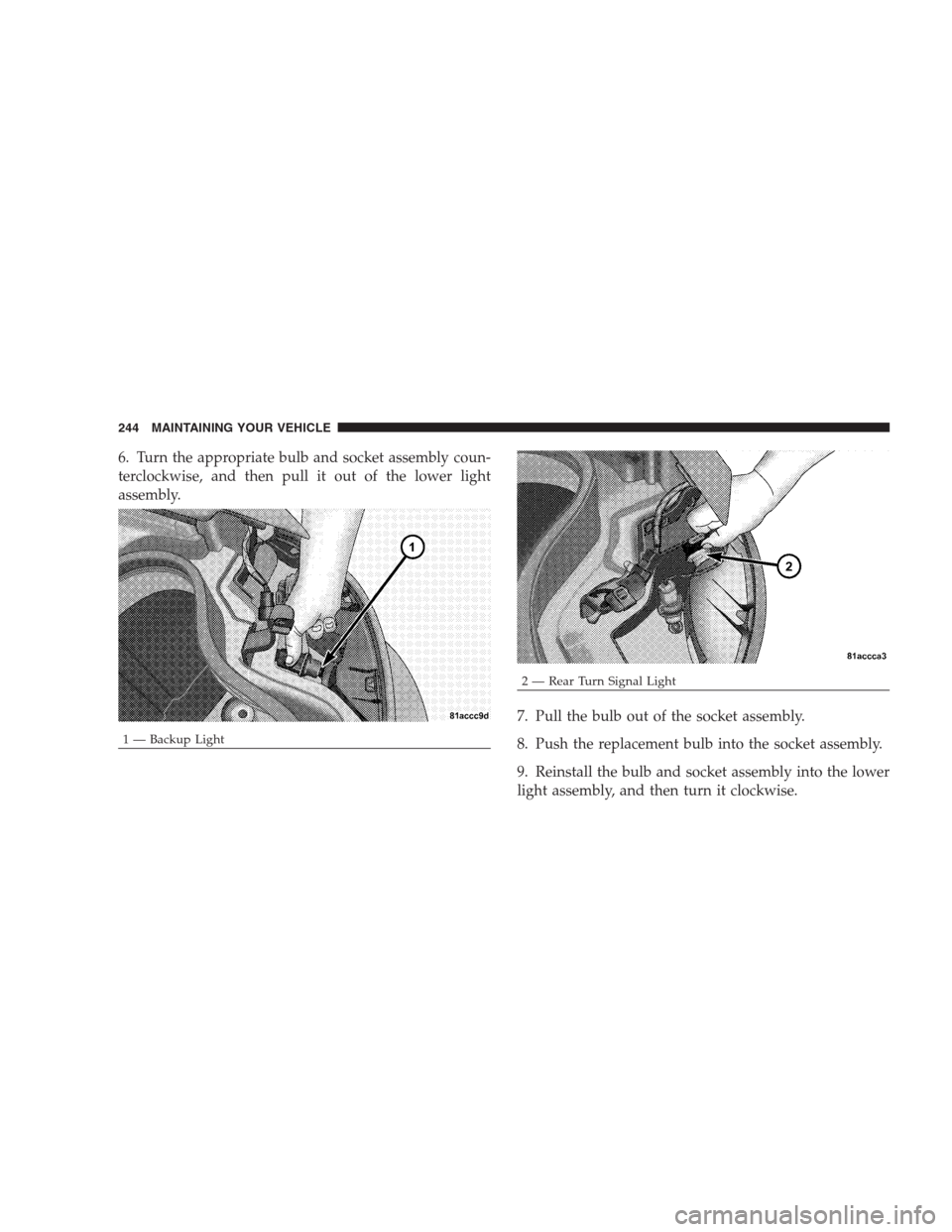
6. Turn the appropriate bulb and socket assembly coun-
terclockwise, and then pull it out of the lower light
assembly.
7. Pull the bulb out of the socket assembly.
8. Push the replacement bulb into the socket assembly.
9. Reinstall the bulb and socket assembly into the lower
light assembly, and then turn it clockwise.
1 — Backup Light
2 — Rear Turn Signal Light 244 MAINTAINING YOUR VEHICLE
Page 247 of 299

10. Reinstall the three bulb and socket assemblies into
the upper light assembly, and turn them clockwise.
11. Reinstall the upper light assembly and the three
retaining nuts.
12. Install the access panel and the two fasteners.
13. Close the trunk.
License Light
1. Open the trunk.
2. Turn the bulb and socket assembly counterclockwise,
and then pull it out of the housing.3. Pull the bulb out of the socket assembly.
4. Push the replacement bulb into the socket assembly.
5. Reinstall the bulb and socket assembly into the hous-
ing, and then turn it clockwise.
6. Close the trunk.
MAINTAINING YOUR VEHICLE 245
7
Page 254 of 299
At Each Stop for Fuel
•Check the engine oil level about five minutes after a
fully warmed engine is shut off. Checking the oil level
while the vehicle is on level ground will improve the
accuracy of the oil level reading. Add oil only when
the level is at or below the ADD or MIN mark.
•Check the windshield washer solvent and add if
required.
Once a Month
•Check tire pressure and look for unusual wear or
damage.
•Inspect the battery, and clean and tighten the terminals
as required.
•Check the fluid levels of the coolant reservoir, brake
master cylinder, power steering, and transmission,
and add as needed.
•Check all lights and all other electrical items for correct
operation.
At Each Oil Change
•Change the engine oil filter.
•Inspect the exhaust system.
NOTE:Also, inspect the exhaust system if you notice a
change in the sound of the exhaust system, or if the
exhaust fumes can be detected inside the vehicle.
•Inspect the brake hoses.
•Inspect the suspension components.
•Lubricate door hinges and check springs.
•Check the engine coolant level, hoses, and clamps.
•Check power steering fluid level.
252 MAINTENANCE SCHEDULES
8
M
A
I
N
T
E
N
A
N
C
E
S
C
H
E
D
U
L
E
S
Page 275 of 299
Customer Assistance For The Hearing Or Speech
Impaired (TDD/TTY)
To assist customers who have hearing difficulties, the
manufacturer has installed special TDD (Telecommuni-
cation Devices for the Deaf) equipment at its customer
center. Any hearing or speech impaired customer, who
has access to a TDD or a conventional teletypewriter
(TTY) in the United States, can communicate with the
manufacturer by dialing 1–800–380–CHRY.
Service Contract
You may have purchased a service contract for a vehicle
to help protect you from the high cost of unexpected
repairs after the manufacturer’s New Vehicle Limited
Warranty expires. The manufacturer stands behind only
the manufacturer’s service contracts. If you purchased a
manufacturer’s service contract, you will receive Plan
Provisions and an Owner Identification Card in the mail
within three weeks of the vehicle delivery date. If youhave any questions about the service contract, call the
manufacturer’s Service Contract National Customer Hot-
line at 1-800-521-9922.
The manufacturer will not stand behind any service con-
tract that is not the manufacturer’s service contract. It is not
responsible for any service contract other than the manu-
facturer’s service contract. If you purchased a service con-
tract that is not a manufacturer’s service contract, and you
require service after the manufacturer’s New Vehicle Lim-
ited Warranty expires, please refer to the contract docu-
ments, and contact the person listed in those documents.
We appreciate that you have made a major investment
when you purchased the vehicle. An authorized dealer
has also made a major investment in facilities, tools, and
training to assure that you are absolutely delighted with
the ownership experience. You’ll be pleased with their
sincere efforts to resolve any warranty issues or related
concerns.
IF YOU NEED CONSUMER ASSISTANCE 273
9