display FIAT 500 ABARTH 2013 2.G Workshop Manual
[x] Cancel search | Manufacturer: FIAT, Model Year: 2013, Model line: 500 ABARTH, Model: FIAT 500 ABARTH 2013 2.GPages: 388, PDF Size: 9.03 MB
Page 238 of 388
SPORT MODE
In Sport mode, the engine is more responsive to the
throttle pedal, and provides more maximum torque by
increasing turbo boost pressure. Steering feedback is
improved, and steering effort is slightly higher. This
driving mode is useful for spirited driving.
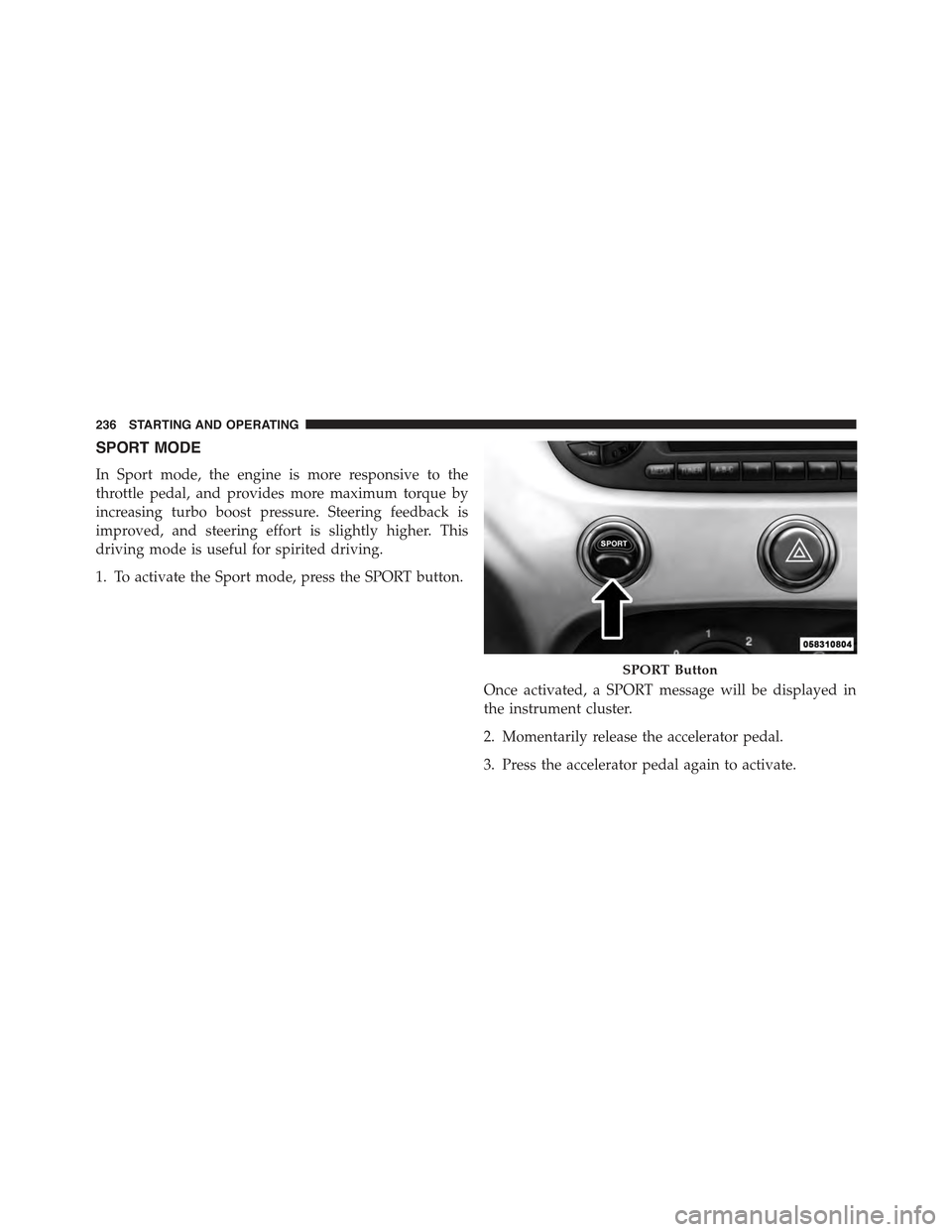
1. To activate the Sport mode, press the SPORT button.
Once activated, a SPORT message will be displayed in
the instrument cluster.
2. Momentarily release the accelerator pedal.
3. Press the accelerator pedal again to activate.
SPORT Button
236 STARTING AND OPERATING
Page 246 of 388
OFF switch for five seconds. After five seconds, the ESC
OFF Indicator Light will illuminate, and the “ESC OFF”
message will display in the EVIC. To turn ESC ON again,
momentarily press the ESC OFF switch.
WARNING!
In the ESC “Full Off” mode, the engine torque
reduction and stability features are cancelled. There-
fore, the enhanced vehicle stability offered by ESC is
unavailable. The “Full Off” ESC mode is intended
for off-highway or offroad use only.
ESC Activation/Malfunction Indicator Light And
ESC OFF Indicator Light
The ESC Activation/Malfunction Indicator
Light in the instrument cluster will come on
when the ignition switch is turned to the MAR
(ACC/ON/RUN) position for four seconds. If the ESC
Activation/Malfunction Indicator Light comes on con-
tinuously with the engine running, a malfunction has
been detected in the ESC system. If this light remains on
after several ignition cycles, and the vehicle has been
driven several miles (kilometers) at speeds greater than
30 mph (48 km/h), see your authorized studio as soon as
possible to have the problem diagnosed and corrected.
The ESC Activation/Malfunction Indicator Light (located
in the instrument cluster) starts to flash as soon as the
tires lose traction and the ESC system becomes active.
The ESC Activation/Malfunction Indicator Light also
flashes when TCS is active. If the ESC Activation/
Malfunction Indicator Light begins to flash during accel-
eration, ease up on the accelerator and apply as little
throttle as possible. Be sure to adapt your speed and
driving to the prevailing road conditions.
244 STARTING AND OPERATING
Page 271 of 388
•Seasonal temperature changes will affect tire pressure,
and the TPMS will monitor the actual tire pressure in
the tire.
Base System
This is the TPMS warning indicator located in the
instrument cluster.
The TPMS uses wireless technology with wheel rim
mounted electronic sensors to monitor tire pressure lev-
els. Sensors, mounted to each wheel as part of the valve
stem, transmit tire pressure readings to the Receiver
Module.
NOTE:It is particularly important for you to check the
tire pressure in all of the tires on your vehicle regularly
and to maintain the proper pressure.
The TPMS consists of the following components:
•Receiver Module
•Four Tire Pressure Monitoring Sensors
•Tire Pressure Monitoring Telltale Light
Tire Pressure Monitoring Low Pressure Warnings
The Tire Pressure Monitoring Telltale Light will illumi-
nate in the instrument cluster, an audible chime will be
activated, and the “Check left or right front/rear tire
xxx.x psi” text message will display when one or more of
the four active road tire pressures are low. Should this
occur, you should stop as soon as possible, check the
inflation pressure of each tire on your vehicle, and inflate
each tire to the vehicle’s recommended cold placard
pressure value. The system will automatically update
and the Tire Pressure Monitoring Light will extinguish
once the updated tire pressures have been received. The
5
STARTING AND OPERATING 269
Page 272 of 388
vehicle may need to be driven for up to 20 minutes above
15 mph (24 km/h) to receive this information.
Check TPMS Warnings
The Tire Pressure Monitoring Telltale Light will flash on
and off for 75 seconds and remain on solid when a system
fault is detected, and the “Tire Pressure Monitoring
Unavailable” text message will display. If the ignition key
is cycled, this sequence will repeat providing the system
fault still exists. The Tire Pressure Monitoring Telltale
Light will turn off when the fault condition no longer
exists. A system fault can occur with any of the following
scenarios:
1. Jamming due to electronic devices or driving next to
facilities emitting the same radio frequencies as the
TPM sensors.
2. Installing some form of aftermarket window tinting
that affects radio wave signals.
3. Snow or ice around the wheels or wheel housings.
4. Using tire chains on the vehicle.
5. Using wheels/tires not equipped with TPM sensors.
NOTE:Your vehicle is equipped with a compact spare
wheel and tire assembly.
1. The compact spare tire does not have a tire pressure
monitoring sensor. Therefore, the TPMS will not moni-
tor the tire pressure in the compact spare tire.
2. If you install the compact spare tire in place of a road
tire that has a pressure below the low-pressure warn-
ing limit, upon the next ignition key cycle, a chime will
sound and the Tire Pressure Monitoring Telltale Light
and the “Check Tire Pressure” message will still turn
ON due to the low tire.
3. However, after driving the vehicle for up to 20 min-
utes above 15 mph (24 km/h), the Tire Pressure
270 STARTING AND OPERATING
Page 273 of 388
Monitoring Telltale Light will flash on and off for 75
seconds and then remain on solid and the#Ti re
Pressure Monitoring Unavailable#message will be
displayed.
4. For each subsequent ignition key cycle, a chime will
sound and the Tire Pressure Monitoring Telltale Light
will flash on and off for 75 seconds and then remain on
solid and the “Tire Pressure Monitoring Unavailable”
message will be displayed.
5. Once you repair or replace the original road tire and
reinstall it on the vehicle in place of the compact spare
tire, the TPMS will update automatically and the Tire
Pressure Monitoring Telltale Light will turn OFF, as
long as no tire pressure is below the low-pressure
warning limit in any of the four active road tires. The
vehicle may need to be driven for up to 20 minutes
above 15 mph (24 km/h) in order for the TPMS to
receive this information.
Enhanced TPM System
When the vehicle is equipped with an enhanced TPM
system, the driver can view text messages showing the
actual tire pressure value by position by selecting the tire
pressure menu command in the instrument cluster. Refer
to ”Instrument Panel Features” in “Understanding Your
Instrument Panel” for further information.
General Information
This device complies with Part 15 of the FCC rules and
RSS 210 of Industry Canada. Operation is subject to the
following conditions:
•This device may not cause harmful interference.
•This device must accept any interference received,
including interference that may cause undesired op-
eration.
5
STARTING AND OPERATING 271
Page 280 of 388
WARNING!
•Never have any smoking materials lit in or near the
vehicle when the gas cap is removed or the tank is
being filled.
•Never add fuel when the engine is running. It may
cause the MIL to turn on and could cause a fire.
•A fire may result if gasoline is pumped into a
portable container that is inside of a vehicle. You
could be burned. Always place gas containers on
the ground while filling.
NOTE:
•When the fuel nozzle “clicks” or shuts off, the fuel tank
is full.
•Tighten the gas cap about 1/4 turn until you hear one
click. This is an indication that the cap is properly
tightened.
•If the gas cap is not tightened properly, the MIL will
come on. Be sure the gas cap is tightened every time
the vehicle is refueled.
Loose Fuel Filler Cap Message
After fuel has been added, the vehicle diagnostic system
can determine if the fuel filler cap is possibly loose,
improperly installed, or damaged. If the system detects a
malfunction, the “gASCAP” message will display in the
odometer display. Tighten the gas cap until a#clicking#
sound is heard. This is an indication that the gas cap is
properly tightened. Press the odometer reset button to
turn the message off. If the problem persists, the message
will appear the next time the vehicle is started. This
might indicate a damaged cap. If the problem is detected
twice in a row, the system will turn on the MIL. Resolving
the problem will turn the MIL off.
TRAILER TOWING
Trailer towing with this vehicle is not recommended.
278 STARTING AND OPERATING
Page 358 of 388
MAINTENANCE SCHEDULE
Your vehicle is equipped with an automatic oil change
indicator system. The oil change indicator system will
remind you that it is time to take your vehicle in for
scheduled maintenance.
Based on engine operation conditions, the oil change
indicator message will illuminate. This means that ser-
vice is required for your vehicle. Operating conditions
such as frequent short-trips, trailer tow, extremely hot or
cold ambient temperatures, and E85 fuel usage will
influence when the “Change Oil” message is displayed.
Severe Operating Conditions can cause the change oil
message to illuminate as early as 3,500 miles (5,600 km)
since last reset. Have your vehicle serviced as soon as
possible, within the next 500 miles (805 km).
NOTE:Under no circumstances should oil change inter-
vals exceed 10,000 miles (16,000 km) or twelve months,
whichever comes first.
Once A Month Or Before A Long Trip:
•Check engine oil level
•Check windshield washer fluid level
•Check the tire inflation pressures and look for unusual
wear or damage
•Check the fluid levels of the coolant reservoir, brake
master cylinder, and transmission as needed
•Check function of all interior and exterior lights
356 MAINTENANCE SCHEDULES