air condition FIAT 500 ABARTH 2013 2.G Owners Manual
[x] Cancel search | Manufacturer: FIAT, Model Year: 2013, Model line: 500 ABARTH, Model: FIAT 500 ABARTH 2013 2.GPages: 388, PDF Size: 9.03 MB
Page 22 of 388
General Information
This device complies with Part 15 of the FCC rules and
RSS 210 of Industry Canada. Operation is subject to the
following conditions:
•This device may not cause harmful interference.
•This device must accept any interference received,
including interference that may cause undesired op-
eration.
NOTE:Changes or modifications not expressly approved
by the party responsible for compliance could void the
user’s authority to operate the equipment.
If your RKE transmitter fails to operate from a normal
distance, check for these two conditions:
1. A weak battery in the transmitter. The expected life of
the battery is a minimum of three years.
2. Closeness to a radio transmitter such as a radio station
tower, airport transmitter, and some mobile or CB
radios.
DOOR LOCKS
The door locks can be manually locked or unlocked from
inside the vehicle by using the door handle. If the door
handle is pushed a red lock indicator will show on the
door handle (indicating locked) when the door is closed,
the door will lock.
20 THINGS TO KNOW BEFORE STARTING YOUR VEHICLE
Page 31 of 388
WARNING!(Continued)
•Being too close to the steering wheel or instrument
panel during Advanced Front Air Bag deployment
could cause serious injury, including death. Air
bags need room to inflate. Sit back, comfortably
extending your arms to reach the steering wheel or
instrument panel.
•Side air bags also need room to inflate. Do not lean
against the door or window. Sit upright in the
center of the seat.
•In a collision, you and your passengers can suffer
much greater injuries if you are not properly buck-
led up. You can strike the interior of your vehicle or
other passengers, or you can be thrown out of the
vehicle. Always be sure you and others in your
vehicle are buckled up properly.
Buckle up even though you are an excellent driver, even
on short trips. Someone on the road may be a poor driver
and cause a collision that includes you. This can happen
far away from home or on your own street.
Research has shown that seat belts save lives, and they
can reduce the seriousness of injuries in a collision. Some
of the worst injuries happen when people are thrown
from the vehicle. Seat belts reduce the possibility of
ejection and the risk of injury caused by striking the
inside of the vehicle. Everyone in a motor vehicle should
be belted at all times.
Lap/Shoulder Belts
All the seating positions in your vehicle are equipped
with combination lap/shoulder belts.
The belt webbing retractor is designed to lock during
very sudden stops or collisions. This feature allows the
shoulder part of the belt to move freely with you under
normal conditions. However in a collision, the belt will
lock and reduce the risk of you striking the inside of the
vehicle or being thrown out.
2
THINGS TO KNOW BEFORE STARTING YOUR VEHICLE 29
Page 57 of 388
NOTE:If the speedometer, tachometer, or any engine
related gauges are not working, the Occupant Restraint
Controller (ORC) may also be disabled. The air bags may
not be ready to inflate for your protection. Promptly
check the Body Control Module (BCM) fuse block inside
the vehicle for blown fuses. Refer to the label located on
the inside of the fuse block cover for the proper air bag
fuses. See your authorized studio if the fuse is good.
Event Data Recorder (EDR)
This vehicle is equipped with an event data recorder
(EDR). The main purpose of an EDR is to record, in
certain crash or near crash-like situations, such as an air
bag deployment or hitting a road obstacle, data that will
assist in understanding how a vehicle’s systems per-
formed. The EDR is designed to record data related to
vehicle dynamics and safety systems for a short period of
time, typically 30 seconds or less. The EDR in this vehicle
is designed to record such data as:
•How various systems in your vehicle were operating;
•Whether or not the driver and passenger safety belts
were buckled/fastened;
•How far (if at all) the driver was depressing the
accelerator and/or brake pedal; and,
•How fast the vehicle was traveling.
These data can help provide a better understanding of
the circumstances in which crashes and injuries occur.
NOTE:EDR data are recorded by your vehicle only if a
non-trivial crash situation occurs; no data are recorded by
the EDR under normal driving conditions and no per-
sonal data (e.g., name, gender, age, and crash location)
are recorded. However, other parties, such as law en-
forcement, could combine the EDR data with the type of
personally identifying data routinely acquired during a
crash investigation.
2
THINGS TO KNOW BEFORE STARTING YOUR VEHICLE 55
Page 82 of 388
WARNING!(Continued)
•If it is necessary to sit in a parked vehicle with the
engine running, adjust your heating or cooling
controls to force outside air into the vehicle. Set the
blower at high speed.
The best protection against carbon monoxide entry into
the vehicle body is a properly maintained engine exhaust
system.
Whenever a change is noticed in the sound of the exhaust
system, when exhaust fumes can be detected inside the
vehicle, or when the underside or rear of the vehicle is
damaged, have a competent mechanic inspect the com-
plete exhaust system and adjacent body areas for broken,
damaged, deteriorated, or mispositioned parts. Open
seams or loose connections could permit exhaust fumes
to seep into the passenger compartment. In addition,
inspect the exhaust system each time the vehicle is raised
for lubrication or oil change. Replace as required.
Safety Checks You Should Make Inside The
Vehicle
Seat Belts
Inspect the belt system periodically, checking for cuts,
frays, and loose parts. Damaged parts must be replaced
immediately. Do not disassemble or modify the system.
Front seat belt assemblies must be replaced after a
collision. Rear seat belt assemblies must be replaced after
a collision if they have been damaged (i.e., bent retractor,
torn webbing, etc.). If there is any question regarding belt
or retractor condition, replace the belt.
80 THINGS TO KNOW BEFORE STARTING YOUR VEHICLE
Page 144 of 388
▫Quick Guide.........................178
▫General Information....................181
▫Functions And Adjustments..............183
▫Radio..............................191
▫SiriusXM Satellite Radio — If Equipped......193
▫CD Player...........................196
▫CD MP3 Player.......................198
▫Troubleshooting.......................200
!iPod®/USB/MEDIA PLAYER CONTROL — IF
EQUIPPED...........................202
!STEERING WHEEL AUDIO CONTROLS......203
▫Radio Operation......................204
▫CD Player Operation...................204
▫Operating Instructions — Hands-Free Phone (If
Equipped)...........................204
!CD/DVD DISC MAINTENANCE...........204
!RADIO OPERATION AND MOBILE PHONES . .205
!CLIMATE CONTROLS...................205
▫Manual Heating And Air Conditioning......206
▫Operating Tips Chart...................209
▫Automatic Temperature Control (ATC) — If
Equipped...........................210
▫Operating Tips Chart...................217
142 UNDERSTANDING YOUR INSTRUMENT PANEL
Page 158 of 388
26. Temperature Gauge
The temperature digital scale shows engine coolant tem-
perature. Any reading within the normal range indicates
that the engine cooling system is operating satisfactorily.
The gauge pointer will likely indicate a higher tempera-
ture when driving in hot weather, up mountain grades,
or when towing a trailer. It should not be allowed to
exceed the upper limits of the normal operating range.
CAUTION!
Driving with a hot engine cooling system could
damage your vehicle. If the temperature gauge reads
“260“, pull over and stop the vehicle. Idle the vehicle
with the air conditioner turned off until the pointer
drops back into the normal range. If the pointer
remains on the “260”, and you hear continuous
chimes, turn the engine off immediately and call an
authorized studio for service.
WARNING!
A hot engine cooling system is dangerous. You or
others could be badly burned by steam or boiling
coolant. You may want to call an authorized studio
for service if your vehicle overheats. If you decide to
look under the hood yourself, see “Maintaining Your
Vehicle.” Follow the warnings under the “Cooling
System Pressure Cap” paragraph.
27. Odometer / Trip Odometer / Electronic Vehicle Infor-
mation Center (EVIC) Display Area
This display indicates the total distance the vehicle has
been driven.
U.S. Federal regulations require that upon transfer of
vehicle ownership, the seller certify to the purchaser the
correct mileage that the vehicle has been driven. If your
odometer needs to be repaired or serviced, the repair
technician should leave the odometer reading the same
156 UNDERSTANDING YOUR INSTRUMENT PANEL
Page 207 of 388
5. Store the disc in its case after playing.
6. Do not expose the disc to direct sunlight.
7. Do not store the disc where temperatures may become
too high.
NOTE:If you experience difficulty in playing a particular
disc, it may be damaged (i.e., scratched, reflective coating
removed, a hair, moisture or dew on the disc) oversized,
or have protection encoding. Try a known good disc
before considering disc player service.
RADIO OPERATION AND MOBILE PHONES
Under certain conditions, the mobile phone being on in
your vehicle can cause erratic or noisy performance from
your radio. This condition may be lessened or eliminated
by relocating the mobile phone antenna. This condition is
not harmful to the radio. If your radio performance does
not satisfactorily “clear” by the repositioning of the
antenna, it is recommended that the radio volume be
turned down or off during mobile phone operation.
CLIMATE CONTROLS
The air conditioning and heating system is designed to
make you comfortable in all types of weather.
4
UNDERSTANDING YOUR INSTRUMENT PANEL 205
Page 208 of 388
Manual Heating And Air Conditioning
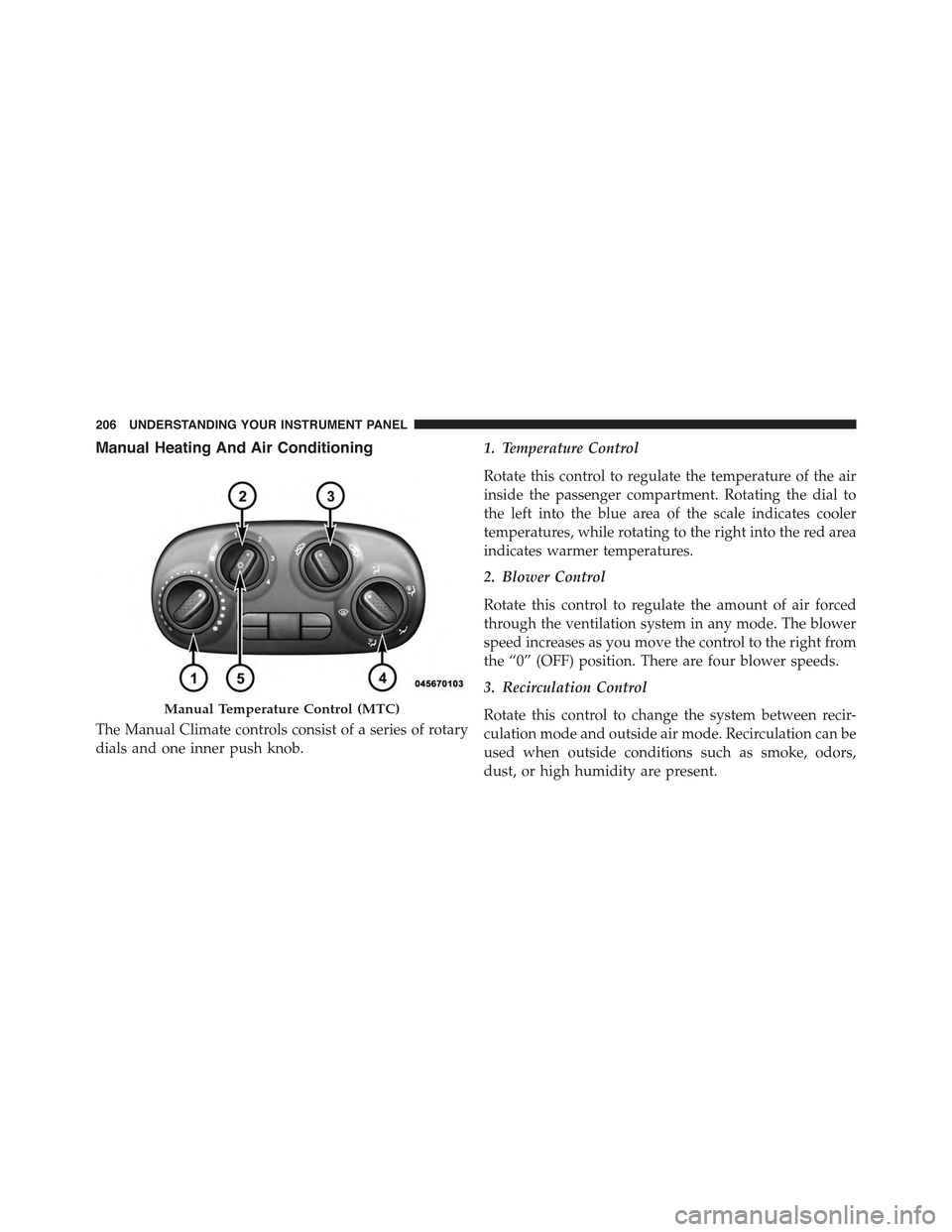
The Manual Climate controls consist of a series of rotary
dials and one inner push knob.
1. Temperature Control
Rotate this control to regulate the temperature of the air
inside the passenger compartment. Rotating the dial to
the left into the blue area of the scale indicates cooler
temperatures, while rotating to the right into the red area
indicates warmer temperatures.
2. Blower Control
Rotate this control to regulate the amount of air forced
through the ventilation system in any mode. The blower
speed increases as you move the control to the right from
the “0” (OFF) position. There are four blower speeds.
3. Recirculation Control
Rotate this control to change the system between recir-
culation mode and outside air mode. Recirculation can be
used when outside conditions such as smoke, odors,
dust, or high humidity are present.
Manual Temperature Control (MTC)
206 UNDERSTANDING YOUR INSTRUMENT PANEL
Page 209 of 388
NOTE:
•Continuous use of the Recirculation mode may make
the inside air stuffy and window fogging may occur.
Extended use of this mode is not recommended.
•The use of the Recirculation mode in cold or damp
weather could cause windows to fog on the inside,
because of moisture buildup inside the vehicle. Se-
lect the outside air position for maximum defogging.
•Recirculation can be used in all modes except for
Defrost.
•The A/C can be deselected manually without dis-
turbing the mode control selection.
4. Mode Control
Rotate this control to change the system between Modes
(Panel, Bi-Level, Floor, Mix, Defrost).
•Panel
Air is directed through the outlets in the instru-
ment panel. These outlets can be adjusted to direct
airflow.
NOTE:The center instrument panel outlets can be aimed
so that they are directed toward the rear seat passengers
for maximum airflow to the rear.
•Bi-Level
Air is directed through the panel and floor outlets.
•Floor
Air is directed through the floor outlets with a
small amount flowing through the defrost and
side window demister outlets.
•Mix
Air is directed through the floor, defrost, and
side window demister outlets. This setting
works best in cold or snowy conditions that
4
UNDERSTANDING YOUR INSTRUMENT PANEL 207
Page 210 of 388
require extra heat to the windshield. This setting is
good for maintaining comfort while reducing mois-
ture on the windshield.
•Defrost
Air is directed through the windshield and side
window demister outlets. Use this mode with
maximum blower and temperature settings for best
windshield and side window defrosting.
NOTE:The air conditioning compressor operates in Mix
or Defrost, even if the Air Conditioning (A/C) button is
not pressed. This dehumidifies the air to help dry the
windshield. To improve fuel economy, use these modes
only when necessary.
5. A/C Button
Press this button to engage the Air Conditioning. A light
will illuminate when the Air Conditioning system is
engaged.
MAX A/C
For maximum cooling, use the A/C and recirculation
modes at the same time.
ECONOMY MODE
If economy mode is desired, press the A/C button to turn
OFF the indicator light and the A/C compressor. Then,
move the temperature control to the desired temperature.
208 UNDERSTANDING YOUR INSTRUMENT PANEL