tire FIAT 500 ABARTH 2013 2.G Owners Manual
[x] Cancel search | Manufacturer: FIAT, Model Year: 2013, Model line: 500 ABARTH, Model: FIAT 500 ABARTH 2013 2.GPages: 388, PDF Size: 9.03 MB
Page 9 of 388
WARNINGS AND CAUTIONS
This Owners Manual containsWARNINGSagainst op-
erating procedures that could result in a collision or
bodily injury. It also containsCAUTIONSagainst proce-
dures that could result in damage to your vehicle. If you
do not read this entire Owners Manual, you may miss
important information. Observe all Warnings and Cau-
tions.
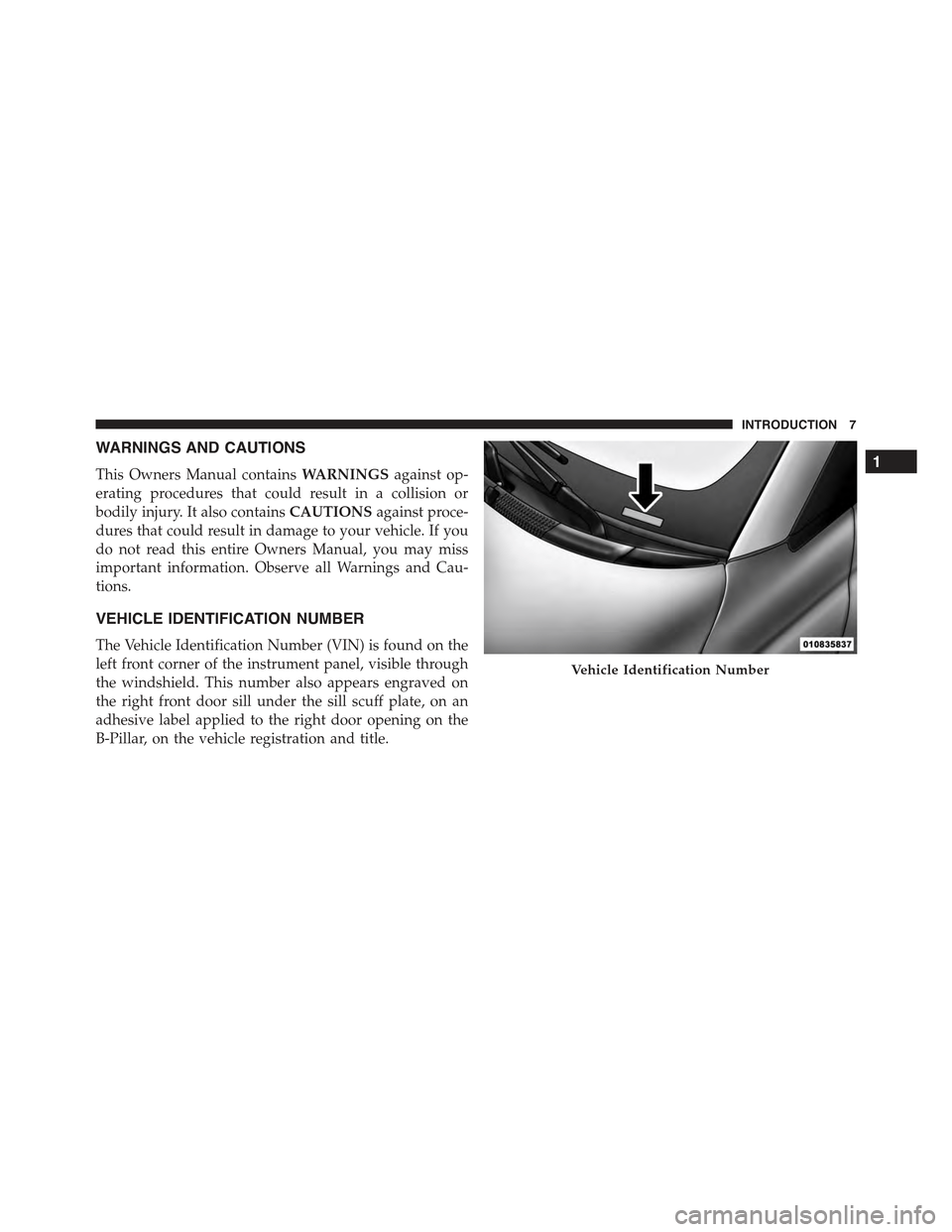
VEHICLE IDENTIFICATION NUMBER
The Vehicle Identification Number (VIN) is found on the
left front corner of the instrument panel, visible through
the windshield. This number also appears engraved on
the right front door sill under the sill scuff plate, on an
adhesive label applied to the right door opening on the
B-Pillar, on the vehicle registration and title.
Vehicle Identification Number
1
INTRODUCTION 7
Page 38 of 388
How To Engage The Automatic Locking Mode
1. Buckle the combination lap and shoulder belt.
2. Grasp the shoulder portion and pull downward until
the entire belt is extracted.
3. Allow the belt to retract. As the belt retracts, you will
hear a clicking sound. This indicates the safety belt is
now in the Automatic Locking Mode.
How To Disengage The Automatic Locking Mode
Unbuckle the combination lap/shoulder belt and allow it
to retract completely to disengage the Automatic Locking
Mode and activate the vehicle sensitive (emergency)
locking mode.
WARNING!
•The belt and retractor assembly must be replaced if
the seat belt assembly Automatic Locking Retractor
(ALR) feature or any other seat belt function is not
working properly when checked according to the
procedures in the Service Manual.
•Failure to replace the belt and retractor assembly
could increase the risk of injury in collisions.
Energy Management Feature
This vehicle has a safety belt system with an Energy
Management feature in the front seating positions to help
further reduce the risk of injury in the event of a head-on
collision.
This safety belt system has a retractor assembly that is
designed to release webbing in a controlled manner. This
feature is designed to help reduce the belt force acting on
the occupant’s chest.
36 THINGS TO KNOW BEFORE STARTING YOUR VEHICLE
Page 39 of 388
Seat Belt Pretensioners
The seat belts for both front seating positions are
equipped with pretensioning devices that are designed to
remove slack from the seat belt in the event of a collision.
These devices may improve the performance of the seat
belt by assuring that the belt is tight about the occupant
early in a collision. Pretensioners work for all size occu-
pants, including those in child restraints.
NOTE:These devices are not a substitute for proper seat
belt placement by the occupant. The seat belt still must be
worn snugly and positioned properly.
The pretensioners are triggered by the Occupant Re-
straint Controller (ORC). Like the air bags, the preten-
sioners are single use items. A deployed pretensioner or
a deployed air bag must be replaced immediately.
Enhanced Seat Belt Use Reminder System
(BeltAlert®)
BeltAlert® is a feature intended to remind the driver and
front passenger (if equipped with front passenger
BeltAlert®) to fasten their seat belts. The feature is active
whenever the ignition is on. If the driver or front seat
passenger is unbelted, the Seat Belt Reminder Light will
turn on and remain on until both front seat belts are
fastened.
The BeltAlert® warning sequence begins after the vehicle
speed is over 5 mph (8 km/h), by blinking the Seat Belt
Reminder Light and sounding an intermittent chime.
Once the sequence starts, it will continue for the entire
duration or until the respective seatbelts are fastened.
After the sequence completes, the Seat Belt Reminder
Light remains illuminated until the respective seat belts
are fastened. The driver should instruct all other occu-
pants to fasten their seat belts. If a front seat belt is
2
THINGS TO KNOW BEFORE STARTING YOUR VEHICLE 37
Page 85 of 388
Periodic Safety Checks You Should Make Outside
The Vehicle
Tires
Examine tires for excessive tread wear and uneven wear
patterns. Check for stones, nails, glass, or other objects
lodged in the tread or sidewall. Inspect the tread for cuts
and cracks. Inspect sidewalls for cuts, cracks and bulges.
Check the wheel bolts for tightness. Check the tires for
proper cold inflation pressure.
Lights
Have someone observe the operation of brake lights and
exterior lights while you work the controls. Check turn
signal and high beam indicator lights on the instrument
panel.
Door Latches
Check for positive closing, latching, and locking.
Fluid Leaks
Check area under vehicle after overnight parking for fuel,
engine coolant, oil, or other fluid leaks. Also, if gasoline
fumes are detected or if fuel, power steering fluid (if
equipped), or brake fluid leaks are suspected, the cause
should be located and corrected immediately.
2
THINGS TO KNOW BEFORE STARTING YOUR VEHICLE 83
Page 103 of 388
•To call the SMS text sender using the buttons on the
steering wheel or voice commands.
•To delete individual messages or the entire inbox using
the buttons on the steering wheel or voice commands.
The BLUE&ME™ system can also recognize and read
abbreviations, if any (e.g. “ILUVU” will be read like “I
love you”) and interpret the most usual emoticons (e.g. :-)
will be read like “Smile”), that are currently used to write
SMS texts.
Media Player
With the BLUE&ME™ media player you can play, the
digital audio files stored on a USB device by simply
connecting it to the USB port located in the glove box of
the car.
In this way, while you are driving you can play your
favorite music collections.
•iPod® Player— see dedicated paragraph under Me-
dia Player Functions.
The media player enables the following operations:
•Digital Audio Playback— you can play all your
digital audio files (.mp3,.wma,.wav,.aac) or play a
customized playlist (.m3u or. wpl format).
•Audio File Selection By Category— you can play all
audio files of a certain category, e.g.: album, artist or
genre.
•Playback Options— while playing tracks you can
select the following options: Play, Stop, Next track,
Previous track, Shuffle and Loop track.
3
UNDERSTANDING THE FEATURES OF YOUR VEHICLE 101
Page 129 of 388
While audible signals are emitted, the audio system is not
muted.
The audible signal is turned off immediately if the
distance increases. The tone cycle remains constant if the
distance measured by the inner sensors is constant. If this
condition occurs for the external sensors, the signal is
turned off after 3 seconds (stopping warnings during
maneuvers parallel to walls).
Failure Indications
A malfunction of the Rear Park Assist sensors or system
is indicated, during REVERSE gear engagement, by the
instrument panel warning icon.
The warning icon is illuminated and a message
is displayed on the multifunction display (if
equipped). Refer to “Instrument Cluster De-
scriptions” in “Understanding Your Instrument
Panel” for further information.
The sensors and wiring are tested continuously when the
ignition is in the ON/RUN position. Failures are indi-
cated immediately if they occur when the system is ON.
Even if the system is able to identify that a specific sensor
is in failure condition, the instrument cluster display
shall indicate that the Rear Park Assist system is unavail-
able, without reference to the sensor in failure condition.
If even a single sensor fails, the entire system must be
disabled. The system is turned off automatically.
Cleaning The Rear Park Assist System
Clean the Rear Park Assist sensors with water, car wash
soap and a soft cloth. Do not use rough or hard cloths. In
washing stations, clean sensors quickly keeping the va-
por jet/high pressure washing nozzles at least 4 in
(10 cm) from the sensors. Do not scratch or poke the
sensors. Otherwise, you could damage the sensors.
3
UNDERSTANDING THE FEATURES OF YOUR VEHICLE 127
Page 151 of 388
vehicle is experiencing a problem with the charging
system. Obtain SERVICE IMMEDIATELY. See an autho-
rized studio.
If jump starting is required, refer to “Jump Starting
Procedures” in “What To Do In Emergencies”.
13. Power Steering System Warning
This light is used to manage the electrical
warning of the EPS (Power Steering System).
Refer to “Power Steering” in “Starting and
Operating” for further information.
14. Electronic Throttle Control (ETC) Light
This light informs you of a problem with the
Electronic Throttle Control (ETC) system. If a
problem is detected, the light will come on
while the engine is running. Cycle the ignition
key when the vehicle has completely stopped and the
shift lever is placed in the NEUTRAL position. The light
should turn off. If the light remains lit with the engine
running, your vehicle will usually be drivable; however,
see an authorized studio for service as soon as possible. If
the light is flashing when the engine is running, imme-
diate service is required and you may experience reduced
performance, an elevated/rough idle or engine stall and
your vehicle may require towing. The light will come on
when the ignition is first turned to ON/RUN and remain
on briefly as a bulb check. If the light does not come on
during starting, have the system checked by an autho-
rized studio.
15. Tire Pressure Monitoring Telltale Light
Each tire, including the spare (if provided),
should be checked monthly when cold and
inflated to the inflation pressure recommended
by the vehicle manufacturer on the vehicle
placard or tire inflation pressure label. (If your vehicle
has tires of a different size than the size indicated on the
4
UNDERSTANDING YOUR INSTRUMENT PANEL 149
Page 152 of 388
vehicle placard or tire inflation pressure label, you should
determine the proper tire inflation pressure for those
tires.)
As an added safety feature, your vehicle has been
equipped with a Tire Pressure Monitoring System
(TPMS) that illuminates a low tire pressure telltale when
one or more of your tires is significantly under-inflated.
Accordingly, when the low tire pressure telltale illumi-
nates, you should stop and check your tires as soon as
possible, and inflate them to the proper pressure. Driving
on a significantly under-inflated tire causes the tire to
overheat and can lead to tire failure. Under-inflation also
reduces fuel efficiency and tire tread life, and may affect
the vehicle’s handling and stopping ability.
Please note that the TPMS is not a substitute for proper
tire maintenance, and it is the driver ’s responsibility to
maintain correct tire pressure, even if under-inflation has
not reached the level to trigger illumination of the TPMS
low tire pressure telltale.
Your vehicle has also been equipped with a TPMS
malfunction indicator to indicate when the system is not
operating properly. The TPMS malfunction indicator is
combined with the low tire pressure telltale. When the
system detects a malfunction, the telltale will flash for
approximately one minute and then remain continuously
illuminated. This sequence will continue upon subse-
quent vehicle start-ups as long as the malfunction exists.
When the malfunction indicator is illuminated, the sys-
tem may not be able to detect or signal low tire pressure
as intended. TPMS malfunctions may occur for a variety
of reasons, including the installation of replacement or
alternate tires or wheels on the vehicle that prevent the
TPMS from functioning properly. Always check the
TPMS malfunction telltale after replacing one or more
tires or wheels on your vehicle, to ensure that the
replacement or alternate tires and wheels allow the TPMS
to continue to function properly.
150 UNDERSTANDING YOUR INSTRUMENT PANEL
Page 153 of 388
CAUTION!
The TPMS has been optimized for the original
equipment tires and wheels. TPMS pressures and
warning have been established for the tire size
equipped on your vehicle. Undesirable system opera-
tion or sensor damage may result when using re-
placement equipment that is not of the same size,
type, and/or style. Aftermarket wheels can cause
sensor damage. Do not use tire sealant from a can or
balance beads if your vehicle is equipped with a
TPMS, as damage to the sensors may result.
16. Automatic Gearbox Failure
This light will illuminate when there is an
automatic transmission fault.
17. Oil Pressure Warning Light
This light indicates low engine oil pressure. The
light should turn on momentarily when the engine is
started. If the light turns on while driving, stop the
vehicle and shut off the engine as soon as possible. A
chime will sound when this light turns on.
Do not operate the vehicle until the cause is corrected.
This light does not indicate how much oil is in the engine.
The engine oil level must be checked under the hood.
18. Malfunction Indicator Light (MIL)
The Malfunction Indicator Light (MIL) is part of
an onboard diagnostic system, called OBDII, that
monitors engine and automatic transmission con-
trol systems. The light will illuminate when the key is in
the ON/RUN position before engine start. If the bulb
does not come on when turning the key from OFF/LOCK
to ON/RUN, have the condition checked promptly.
4
UNDERSTANDING YOUR INSTRUMENT PANEL 151
Page 166 of 388
NOTE:The range depends on several factors: driving
style, type of route (freeway, residential, mountain roads,
etc.), conditions of use of the car (load, tire pressure, etc.).
Trip planning must take into account the above notes.
Distance Traveled
This value shows the distance covered since the last reset.
Average Consumption
This value shows the approximate average consumption
since the last reset.
Instant Consumption
This indicates the fuel consumption. The value is con-
stantly updated. The message “----” will appear on the
display if the car is parked with the engine running.
Average Speed
This value shows the vehicle’s average speed as a func-
tion of the overall time elapsed since the last reset.
Travel Time
This value shows the time elapsed since the last reset.
Personal Settings (Customer-Programmable
Features)
Dimmer
The EVIC display is provided with a light sensor capable
of detecting environmental light conditions and adjust-
ing the brightness of the instruments accordingly.
NOTE:The brightness of the instrument panel may
change while travelling following an event that causes
switching from “day” to “night” conditions (or vice
versa) in the passenger compartment (e.g. in a tunnel, on
avenues in shadows, under bridges, etc.).
To adjust the brightness, proceed as follows:
1. Press the UPor DOWNbutton to set the
required brightness level.
164 UNDERSTANDING YOUR INSTRUMENT PANEL