air condition FIAT 500 ABARTH CABRIO 2017 2.G Owners Manual
[x] Cancel search | Manufacturer: FIAT, Model Year: 2017, Model line: 500 ABARTH CABRIO, Model: FIAT 500 ABARTH CABRIO 2017 2.GPages: 338, PDF Size: 2.78 MB
Page 45 of 338
Event Data Recorder (EDR)
This vehicle is equipped with an event data recorder
(EDR). The main purpose of an EDR is to record, in
certain crash or near crash-like situations, such as an air
bag deployment or hitting a road obstacle, data that will
assist in understanding how a vehicle’s systems per-
formed.
The EDR is designed to record data related to vehicle
dynamics and safety systems for a short period of time,
typically 30 seconds or less. The EDR in this vehicle is
designed to record such data as:
•How various systems in your vehicle were operating;
• Whether or not the driver and passenger safety belts
were buckled/fastened;
• How far (if at all) the driver was depressing the
accelerator and/or brake pedal; and,
• How fast the vehicle was traveling. •
These data can help provide a better understanding
of the circumstances in which crashes and injuries
occur.
NOTE: EDR data are recorded by your vehicle only if a
non-trivial crash situation occurs; no data are recorded
by the EDR under normal driving conditions and no
personal data (e.g., name, gender, age, and crash loca-
tion) are recorded. However, other parties, such as law
enforcement, could combine the EDR data with the type
of personally identifying data routinely acquired dur-
ing a crash investigation.
To read data recorded by an EDR, special equipment is
required, and access to the vehicle or the EDR is needed.
In addition to the vehicle manufacturer, other parties,
such as law enforcement, that have the special equip-
ment, can read the information if they have access to the
vehicle or the EDR.
2
THINGS TO KNOW BEFORE STARTING YOUR VEHICLE 43
Page 63 of 338
Exhaust Gas
WARNING!
Exhaust gases can injure or kill. They contain
carbon monoxide (CO), which is colorless and odor-
less. Breathing it can make you unconscious and
can eventually poison you. To avoid breathing
(CO), follow these safety tips:
•Do not run the engine in a closed garage or in
confined areas any longer than needed to move
your vehicle in or out of the area.
• If you are required to drive with the trunk/
liftgate/rear doors open, make sure that all win-
dows are closed and the climate control BLOWER
switch is set at high speed. DO NOT use the
recirculation mode.
• If it is necessary to sit in a parked vehicle with the
engine running, adjust your heating or cooling
controls to force outside air into the vehicle. Set
the blower at high speed.
The best protection against carbon monoxide entry into
the vehicle body is a properly maintained engine ex-
haust system. Whenever a change is noticed in the sound of the
exhaust system, when exhaust fumes can be detected
inside the vehicle, or when the underside or rear of the
vehicle is damaged, have a competent mechanic inspect
the complete exhaust system and adjacent body areas
for broken, damaged, deteriorated, or mispositioned
parts. Open seams or loose connections could permit
exhaust fumes to seep into the passenger compartment.
In addition, inspect the exhaust system each time the
vehicle is raised for lubrication or oil change. Replace as
required.
Safety Checks You Should Make Inside The
Vehicle
Seat Belts
Inspect the seat belt system periodically, checking for
cuts, frays, and loose parts. Damaged parts must be
replaced immediately. Do not disassemble or modify
the system.
Front seat belt assemblies must be replaced after a
collision. Rear seat belt assemblies must be replaced
after a collision if they have been damaged (i.e., bent
retractor, torn webbing, etc.). If there is any question
regarding seat belt or retractor condition, replace the
seat belt.
2
THINGS TO KNOW BEFORE STARTING YOUR VEHICLE 61
Page 113 of 338
•The digital gauge will likely indicate a higher
temperature when driving in hot weather, or up
mountain grades. It should not be allowed to
exceed the upper limits of the normal operating
range.
WARNING!
Driving with a hot engine cooling system could
damage your vehicle. If the temperature gauge reads
“H” pull over and stop the vehicle. Idle the vehicle
with the air conditioner turned off until the pointer
drops back into the normal range. If the pointer
remains on the “H,” turn the engine off immediately
and call an authorized dealer for service.
WARNING!
A hot engine cooling system is dangerous. You or
others could be badly burned by steam or boiling
coolant. You may want to call an authorized dealer
for service if your vehicle overheats. If you decide
to look under the hood yourself, see “Maintaining
Your Vehicle.” Follow the warnings under the Cool-
ing System Pressure Cap paragraph.
3. Speedometer
• Indicates vehicle speed.
4. Fuel Gauge
• The digital display shows the amount of fuel in the
tank.
• The switching on of the digital warning light
indicates that 1 – 1.3 gallons of fuel are left in the
tank; in this situation, refuel as soon as possible.
• Do not travel with the fuel tank almost empty; any
gaps in fuel delivery could damage the catalytic
converter.
4
UNDERSTANDING YOUR INSTRUMENT PANEL 111
Page 117 of 338
1.Tachometer
•
This gauge measures engine revolutions per minute
(RPM x 1000). Before the pointer reaches the red area,
ease up on the accelerator to prevent engine damage.
2. Temperature Gauge
• The temperature gauge shows engine coolant tem-
perature. Any reading within the normal range
indicates that the engine cooling system is operat-
ing satisfactorily.
•
The digital gauge will likely indicate a higher tem-
perature when driving in hot weather, or up moun-
tain grades. It should not be allowed to exceed the
upper limits of the normal operating range.
WARNING!
Driving with a hot engine cooling system could
damage your vehicle. If the temperature gauge reads
“H” pull over and stop the vehicle. Idle the vehicle
with the air conditioner turned off until the pointer
drops back into the normal range. If the pointer
remains on the “H,” turn the engine off immediately
and call an authorized dealer for service.
WARNING!
A hot engine cooling system is dangerous. You or
others could be badly burned by steam or boiling
coolant. You may want to call an authorized dealer
for service if your vehicle overheats. If you decide
to look under the hood yourself, see “Maintaining
Your Vehicle.” Follow the warnings under the Cool-
ing System Pressure Cap paragraph.
3. Speedometer
• Indicates vehicle speed.
4. Fuel Gauge
• The digital display shows the amount of fuel in the
tank.
• The switching on of the digital warning light
indicates that 1 – 1.3 gallons of fuel are left in the
tank; in this situation, refuel as soon as possible.
• Do not travel with the fuel tank almost empty; any
gaps in fuel delivery could damage the catalytic
converter.
4
UNDERSTANDING YOUR INSTRUMENT PANEL 115
Page 120 of 338
•The digital gauge will likely indicate a higher
temperature when driving in hot weather, or up
mountain grades. It should not be allowed to
exceed the upper limits of the normal operating
range.
WARNING!
Driving with a hot engine cooling system could
damage your vehicle. If the temperature gauge reads
“H” pull over and stop the vehicle. Idle the vehicle
with the air conditioner turned off until the pointer
drops back into the normal range. If the pointer
remains on the “H,” turn the engine off immediately
and call an authorized dealer for service.
WARNING!
A hot engine cooling system is dangerous. You or
others could be badly burned by steam or boiling
coolant. You may want to call an authorized dealer
for service if your vehicle overheats. If you decide
to look under the hood yourself, see “Maintaining
Your Vehicle.” Follow the warnings under the Cool-
ing System Pressure Cap paragraph. 3.
Speedometer
• Indicates vehicle speed.
4. Fuel Gauge
• The digital display shows the amount of fuel in the
tank.
• The switching on of the digital warning light
indicates that 1 – 1.3 gallons of fuel are left in the
tank; in this situation, refuel as soon as possible.
• Do not travel with the fuel tank almost empty; any
gaps in fuel delivery could damage the catalytic
converter.
5. Gas Pedal Percentage Gauge/Turbo Gauge
Depending on what options and trim level, your vehicle
is equipped with there are three gauges available. •Gas Pedal Percentage Gauge: This gauge shows
what percent the gas pedal is currently depressed
at.
• Turbo Gauge: This gauge shows the current turbo
usage.
118 UNDERSTANDING YOUR INSTRUMENT PANEL
Page 129 of 338
Hood Open Warning Light — If Equipped
Red TelltaleLight What It Means
Hood Open Warning Light
This indicator will illuminate when the hood is ajar/open and not fully closed.
Yellow Telltale Indicator Lights
Tire Pressure Monitoring Indicator Light
Yellow Telltale
Light What It Means
Tire Pressure Monitoring Indicator Light
The warning light switches on and a message is displayed to indicate that the tire pressure
is lower than the recommended value and/or that slow pressure loss is occurring. In these
cases, optimal tire duration and fuel consumption may not be guaranteed.
Should one or more tires be in the condition mentioned above, the display will show the
indications corresponding to each tire in sequence.
IMPORTANT: Do not continue driving with one or
more flat tires as handling may be compromised. Stop
the vehicle, avoiding sharp braking and steering. Repair
immediately using the dedicated tire repair kit and
contact your authorized dealership as soon as possible. Each tire, including the spare (if provided), should be
checked monthly when cold and inflated to the inflation
pressure recommended by the vehicle manufacturer on
the vehicle placard or tire inflation pressure label. If
your vehicle has tires of a different size than the size
4
UNDERSTANDING YOUR INSTRUMENT PANEL 127
Page 167 of 338
Voice Text Reply
Uconnect will announceincomingtext messages. Push the
PHONE button
and say Listen.(Must have com-
patible mobile phone paired to Uconnect system.)
1.Once an incoming text message is read to you, push the
PHONE button
. After the beep, say... “Reply.”
2. Listen to the Uconnect prompts. After the beep,
repeat one of the pre-defined messages and follow
the system prompts.
PRE-DEFINED VOICE TEXT REPLY RESPONSES
Yes. Stuck in traffic. See you later.No. Start without me.I’ll be late.
Okay. Where are you?I will be
Call me. Are you there
yet?
I’ll call you later. I need direc-
tions. See you in
I’m on my way. Can’t talk right
now.
I’m lost. Thanks.
TIP: Your mobile phone must have the full implemen-
tation of the Message Access Profile (MAP) to take
advantage of this feature. For details about MAP, visit
UconnectPhone.com. Apple iPhone iOS6 or later sup-
ports reading incomingtext messages only.
Radio Operation And Mobile Phones
Under certain conditions, the mobile phone being on in
your vehicle can cause erratic or noisy performance
from your radio. This condition may be lessened or
eliminated by relocating the mobile phone antenna.
Uconnect 5.0/5.0 NAV Media
4
UNDERSTANDING YOUR INSTRUMENT PANEL 165
Page 170 of 338
Manual Climate Control Descriptions
IconDescription
A/C Button
Push the A/C button to engage the Air Conditioning (A/C). A LED will illuminate when
the A/C system is engaged.
Recirculation Setting
When this setting is on, the system between recirculation mode and outside air mode. Re-
circulation can be used when outside conditions such as smoke, odors, dust, or high hu-
midity are present.
NOTE:
•Continuous use of the Recirculation mode may make the inside air stuffy and window
fogging may occur. Extended use of this mode is not recommended.
•The use of the Recirculation mode in cold or damp weather could cause windows to fog
on the inside, because of moisture buildup inside the vehicle. Select the outside air posi-
tion for maximum defogging.
•Recirculation can be used in all modes except for Defrost.
•The A/C can be deselected manually without disturbing the mode control selection.
168 UNDERSTANDING YOUR INSTRUMENT PANEL
Page 172 of 338
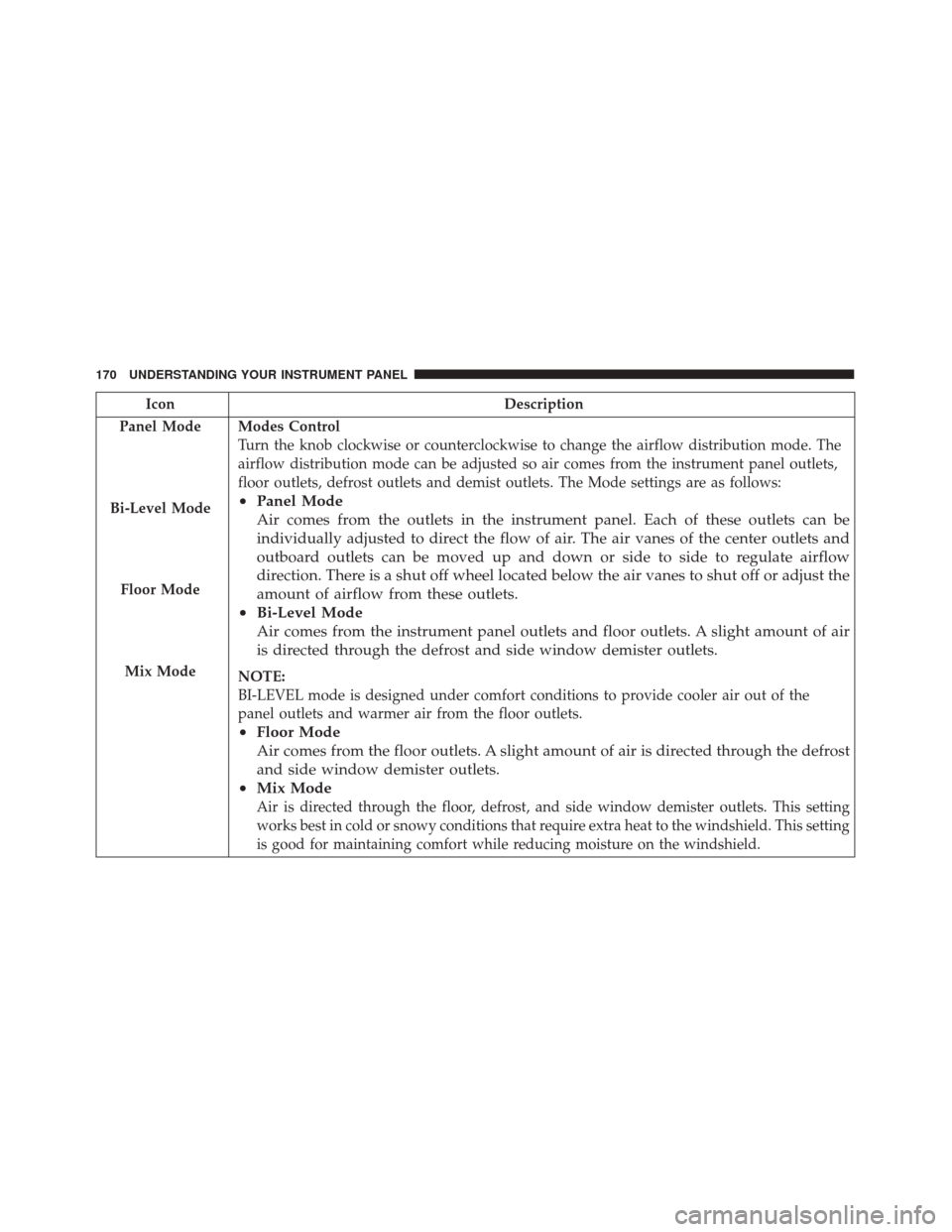
IconDescription
Panel Mode
Bi-Level Mode
Floor Mode
Mix Mode
Modes Control
Turn the knob clockwise or counterclockwise to change the airflow distribution mode. The
airflow distribution mode can be adjusted so air comes from the instrument panel outlets,
floor outlets, defrost outlets and demist outlets. The Mode settings are as follows:
• Panel Mode
Air comes from the outlets in the instrument panel. Each of these outlets can be
individually adjusted to direct the flow of air. The air vanes of the center outlets and
outboard outlets can be moved up and down or side to side to regulate airflow
direction. There is a shut off wheel located below the air vanes to shut off or adjust the
amount of airflow from these outlets.
• Bi-Level Mode
Air comes from the instrument panel outlets and floor outlets. A slight amount of air
is directed through the defrost and side window demister outlets.
NOTE:
BI-LEVEL mode is designed under comfort conditions to provide cooler air out of the
panel outlets and warmer air from the floor outlets.
•Floor Mode
Air comes from the floor outlets. A slight amount of air is directed through the defrost
and side window demister outlets.
• Mix Mode
Air is directed through the floor, defrost, and side window demister outlets. This setting
works best in cold or snowy conditions that require extra heat to the windshield. This setting
is good for maintaining comfort while reducing moisture on the windshield.
170 UNDERSTANDING YOUR INSTRUMENT PANEL
Page 174 of 338
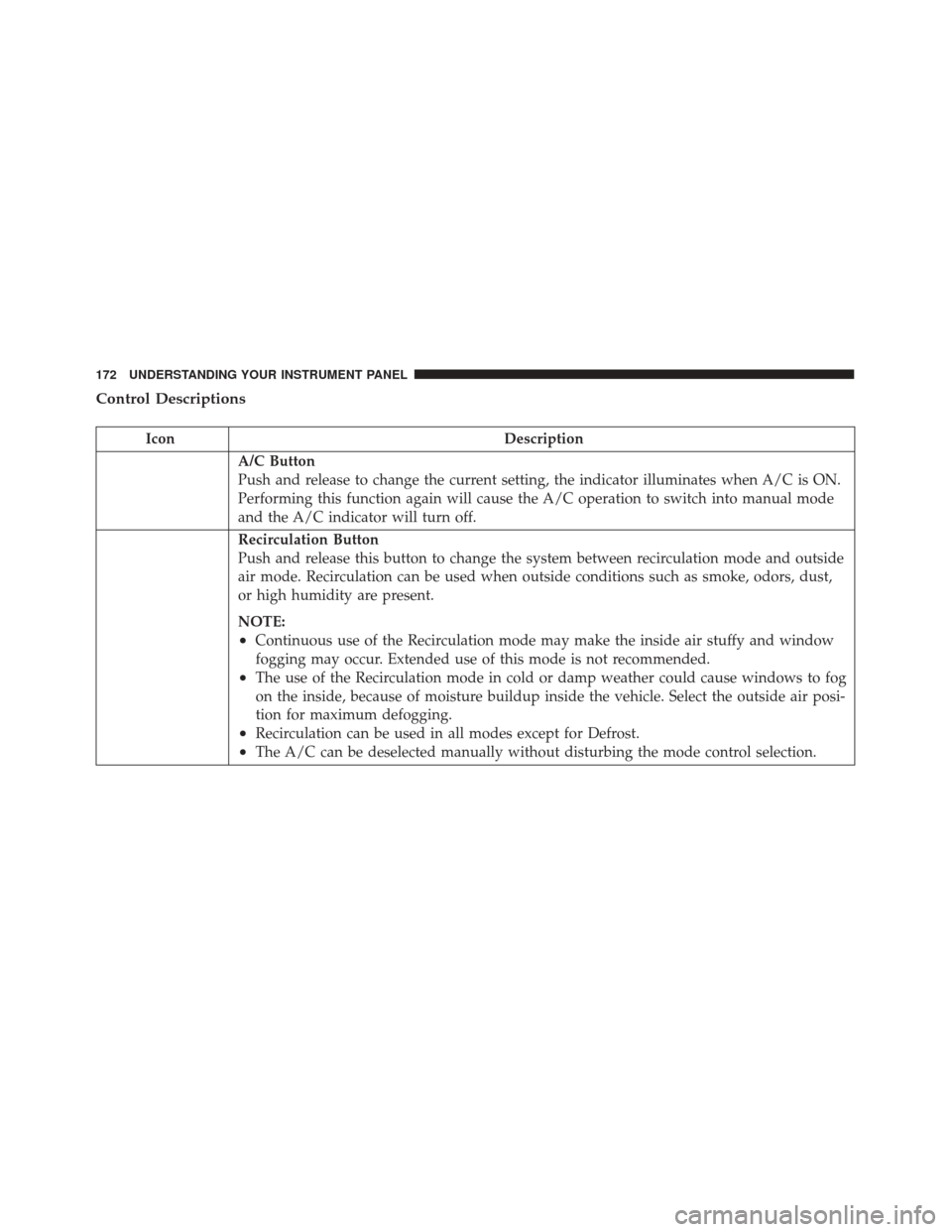
Control Descriptions
IconDescription
A/C Button
Push and release to change the current setting, the indicator illuminates when A/C is ON.
Performing this function again will cause the A/C operation to switch into manual mode
and the A/C indicator will turn off.
Recirculation Button
Push and release this button to change the system between recirculation mode and outside
air mode. Recirculation can be used when outside conditions such as smoke, odors, dust,
or high humidity are present.
NOTE:
•Continuous use of the Recirculation mode may make the inside air stuffy and window
fogging may occur. Extended use of this mode is not recommended.
•The use of the Recirculation mode in cold or damp weather could cause windows to fog
on the inside, because of moisture buildup inside the vehicle. Select the outside air posi-
tion for maximum defogging.
•Recirculation can be used in all modes except for Defrost.
•The A/C can be deselected manually without disturbing the mode control selection.
172 UNDERSTANDING YOUR INSTRUMENT PANEL