charging FIAT 500E 2018 User Guide
[x] Cancel search | Manufacturer: FIAT, Model Year: 2018, Model line: 500E, Model: FIAT 500E 2018Pages: 302, PDF Size: 3.32 MB
Page 32 of 302
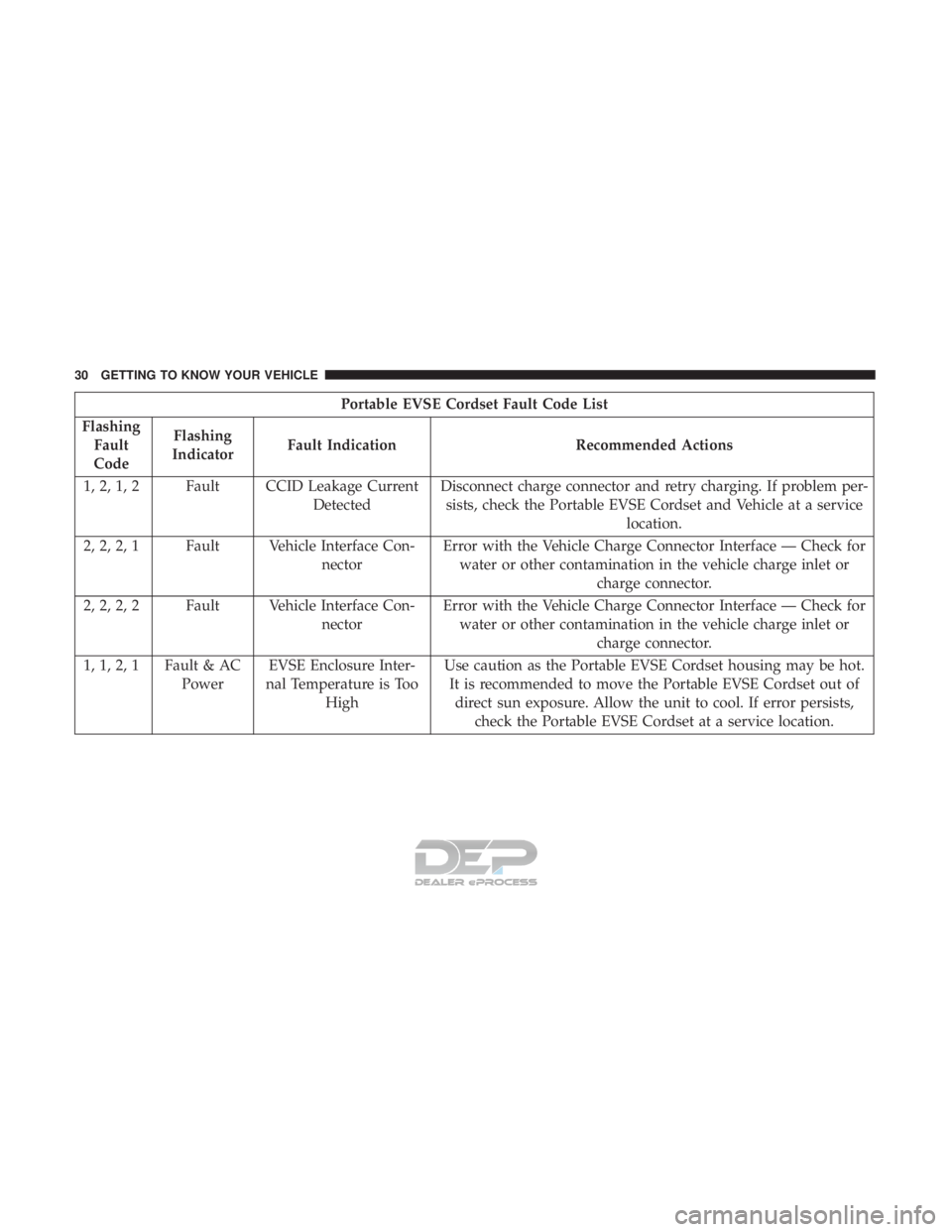
Portable EVSE Cordset Fault Code List
Flashing Fault
Code Flashing
Indicator Fault Indication Recommended Actions
1, 2, 1, 2 Fault CCID Leakage Current DetectedDisconnect charge connector and retry charging. If problem per-
sists, check the Portable EVSE Cordset and Vehicle at a service location.
2, 2, 2, 1 Fault Vehicle Interface Con- nectorError with the Vehicle Charge Connector Interface — Check for
water or other contamination in the vehicle charge inlet or charge connector.
2, 2, 2, 2 Fault Vehicle Interface Con- nectorError with the Vehicle Charge Connector Interface — Check for
water or other contamination in the vehicle charge inlet or charge connector.
1, 1, 2, 1 Fault & AC PowerEVSE Enclosure Inter-
nal Temperature is Too High Use caution as the Portable EVSE Cordset housing may be hot.
It is recommended to move the Portable EVSE Cordset out of direct sun exposure. Allow the unit to cool. If error persists, check the Portable EVSE Cordset at a service location.
30 GETTING TO KNOW YOUR VEHICLE
Page 33 of 302
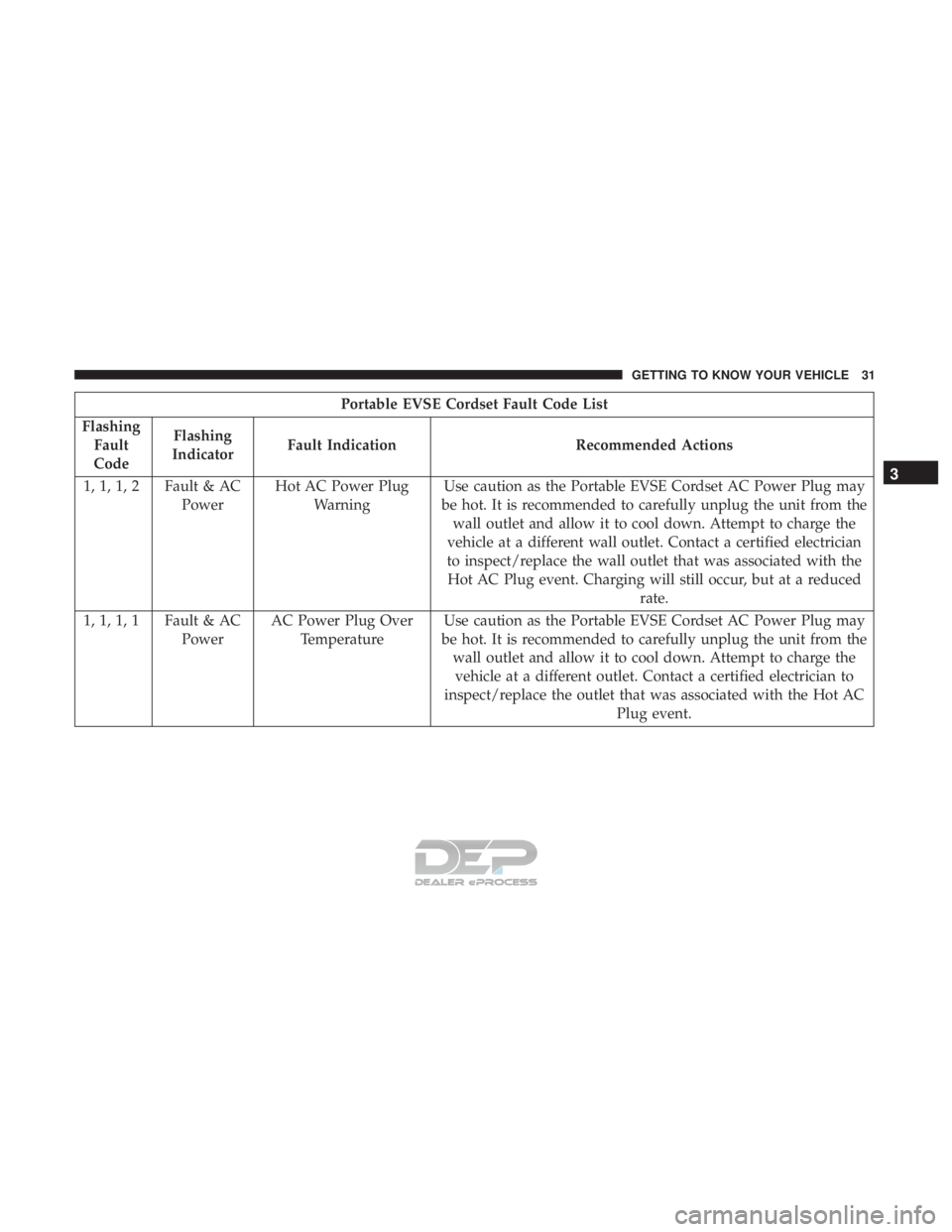
Portable EVSE Cordset Fault Code List
Flashing Fault
Code Flashing
Indicator Fault Indication Recommended Actions
1, 1, 1, 2 Fault & AC PowerHot AC Power Plug
Warning Use caution as the Portable EVSE Cordset AC Power Plug may
be hot. It is recommended to carefully unplug the unit from the wall outlet and allow it to cool down. Attempt to charge the
vehicle at a different wall outlet. Contact a certified electrician
to inspect/replace the wall outlet that was associated with the Hot AC Plug event. Charging will still occur, but at a reduced rate.
1, 1, 1, 1 Fault & AC PowerAC Power Plug Over
Temperature Use caution as the Portable EVSE Cordset AC Power Plug may
be hot. It is recommended to carefully unplug the unit from the wall outlet and allow it to cool down. Attempt to charge thevehicle at a different outlet. Contact a certified electrician to
inspect/replace the outlet that was associated with the Hot AC Plug event.
3
GETTING TO KNOW YOUR VEHICLE 31
Page 34 of 302
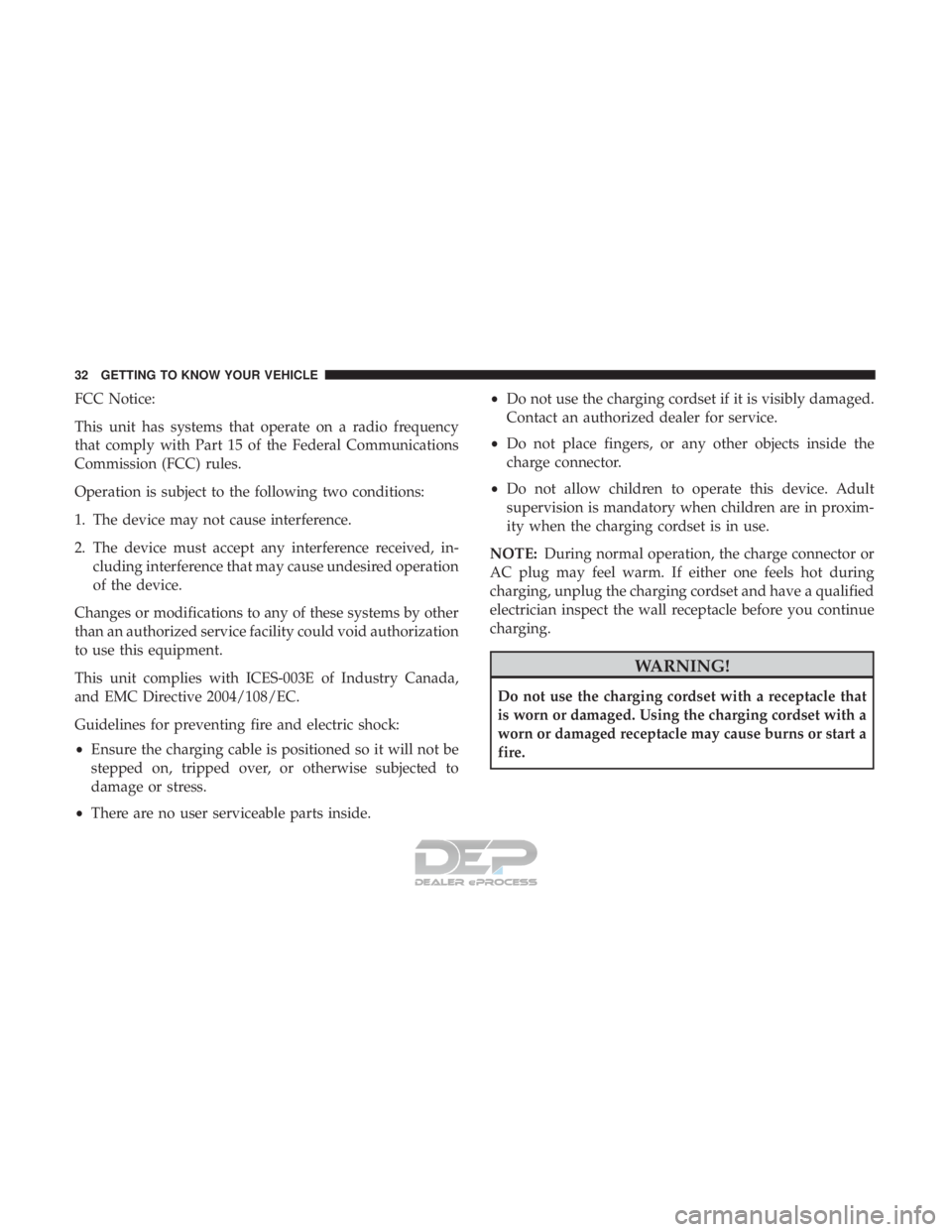
FCC Notice:
This unit has systems that operate on a radio frequency
that comply with Part 15 of the Federal Communications
Commission (FCC) rules.
Operation is subject to the following two conditions:
1. The device may not cause interference.
2. The device must accept any interference received, in-cluding interference that may cause undesired operation
of the device.
Changes or modifications to any of these systems by other
than an authorized service facility could void authorization
to use this equipment.
This unit complies with ICES-003E of Industry Canada,
and EMC Directive 2004/108/EC.
Guidelines for preventing fire and electric shock:
• Ensure the charging cable is positioned so it will not be
stepped on, tripped over, or otherwise subjected to
damage or stress.
• There are no user serviceable parts inside. •
Do not use the charging cordset if it is visibly damaged.
Contact an authorized dealer for service.
• Do not place fingers, or any other objects inside the
charge connector.
• Do not allow children to operate this device. Adult
supervision is mandatory when children are in proxim-
ity when the charging cordset is in use.
NOTE: During normal operation, the charge connector or
AC plug may feel warm. If either one feels hot during
charging, unplug the charging cordset and have a qualified
electrician inspect the wall receptacle before you continue
charging.
WARNING!
Do not use the charging cordset with a receptacle that
is worn or damaged. Using the charging cordset with a
worn or damaged receptacle may cause burns or start a
fire.
32 GETTING TO KNOW YOUR VEHICLE
Page 37 of 302
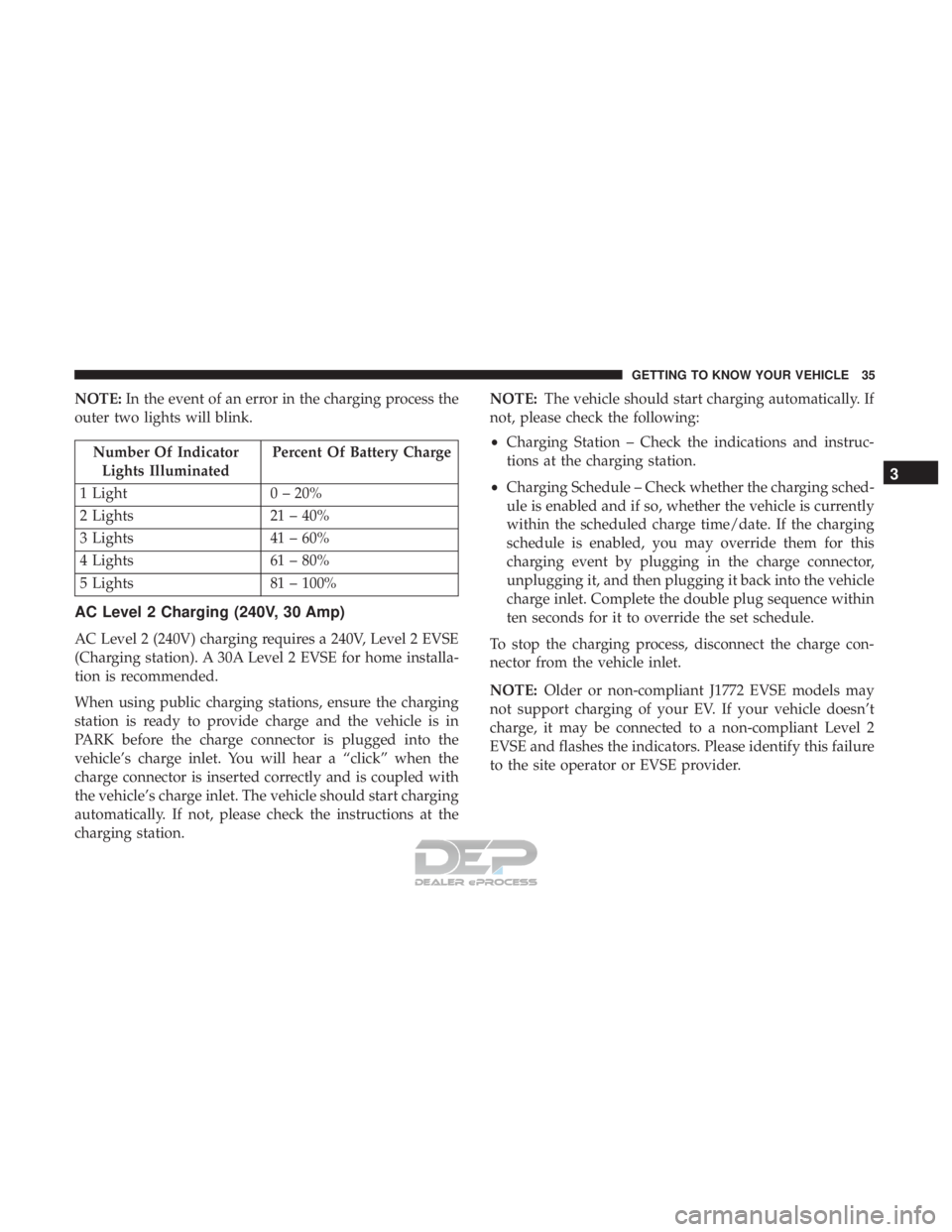
NOTE:In the event of an error in the charging process the
outer two lights will blink.
Number Of Indicator Lights Illuminated Percent Of Battery Charge
1 Light 0 – 20%
2 Lights 21 – 40%
3 Lights 41 – 60%
4 Lights 61 – 80%
5 Lights 81 – 100%
AC Level 2 Charging (240V, 30 Amp)
AC Level 2 (240V) charging requires a 240V, Level 2 EVSE
(Charging station). A 30A Level 2 EVSE for home installa-
tion is recommended.
When using public charging stations, ensure the charging
station is ready to provide charge and the vehicle is in
PARK before the charge connector is plugged into the
vehicle’s charge inlet. You will hear a “click” when the
charge connector is inserted correctly and is coupled with
the vehicle’s charge inlet. The vehicle should start charging
automatically. If not, please check the instructions at the
charging station. NOTE:
The vehicle should start charging automatically. If
not, please check the following:
• Charging Station – Check the indications and instruc-
tions at the charging station.
• Charging Schedule – Check whether the charging sched-
ule is enabled and if so, whether the vehicle is currently
within the scheduled charge time/date. If the charging
schedule is enabled, you may override them for this
charging event by plugging in the charge connector,
unplugging it, and then plugging it back into the vehicle
charge inlet. Complete the double plug sequence within
ten seconds for it to override the set schedule.
To stop the charging process, disconnect the charge con-
nector from the vehicle inlet.
NOTE: Older or non-compliant J1772 EVSE models may
not support charging of your EV. If your vehicle doesn’t
charge, it may be connected to a non-compliant Level 2
EVSE and flashes the indicators. Please identify this failure
to the site operator or EVSE provider.
3
GETTING TO KNOW YOUR VEHICLE 35
Page 38 of 302
Charge Times
The following factors determine the time it takes to charge
the high voltage battery:
•The high voltage battery’s current state of charge
• What level EVSE is being used (Level 1 – 120V or Level
2 – 240V)
• Ambient temperature
• Whether the vehicle is (keyed) on during charging
NOTE:
• The charging times are estimates based on a completely
discharged high voltage battery.
• Charging times will vary based on the age, condition,
state of charge and temperature of the high voltage
battery.
• Charging times may be longer if a thermal self-
protection reduces the charging current from the EVSE.
Type of Charge Estimated Charge Time
Level 1 (120V/15A) Approximately 23 hours
Level 2 (240V/30A) Approximately 4 hours
KEYS
Key With Remote Control
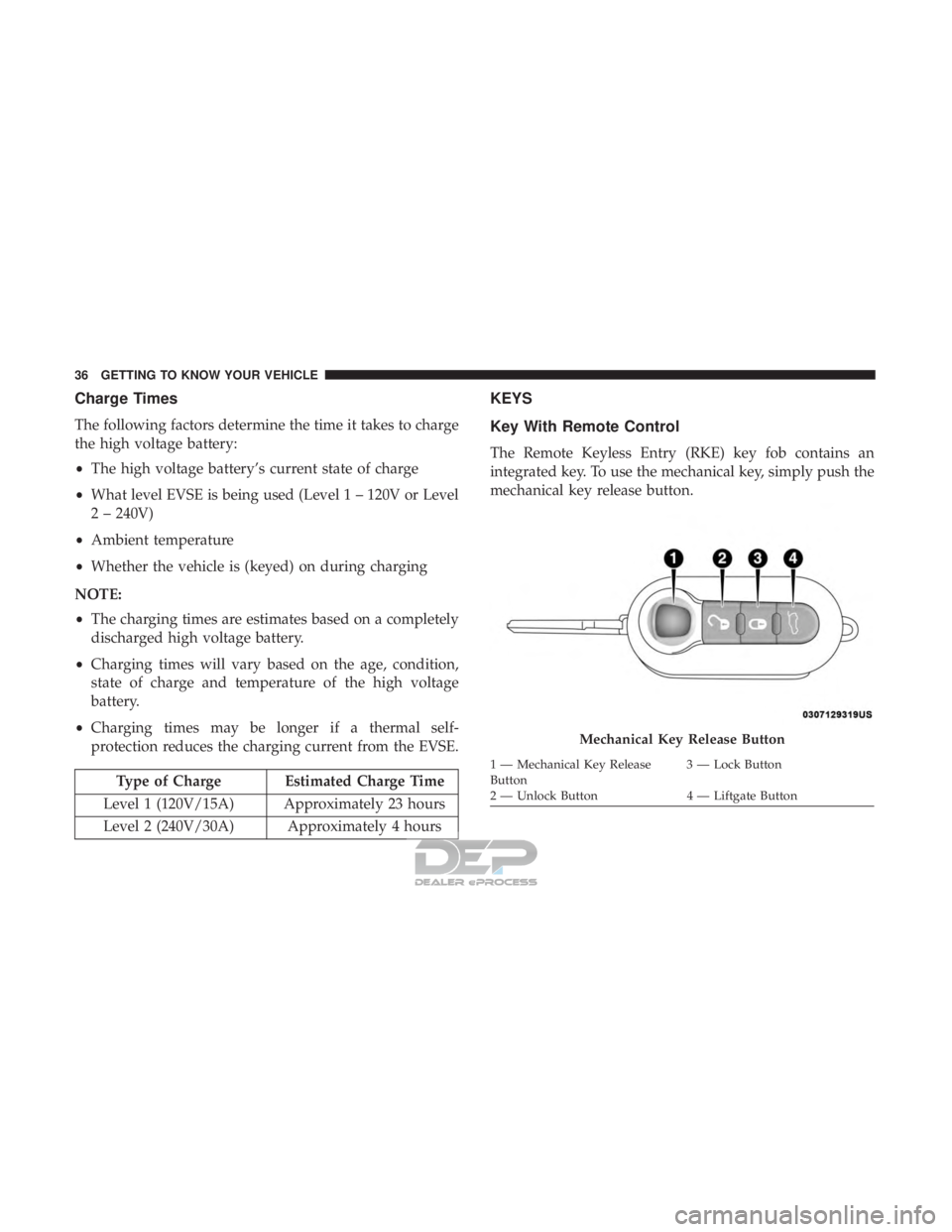
The Remote Keyless Entry (RKE) key fob contains an
integrated key. To use the mechanical key, simply push the
mechanical key release button.
Mechanical Key Release Button
1 — Mechanical Key Release
Button 3 — Lock Button
2 — Unlock Button 4 — Liftgate Button
36 GETTING TO KNOW YOUR VEHICLE
Page 94 of 302
The light also will turn on when the parking brake is
applied with the ignition switch in the ON/RUN position.
NOTE:This light shows only that the parking brake is
applied. It does not show the degree of brake application.
— Battery Charge Warning Light
This light illuminates when the battery is not charging
properly. If it stays on while the vehicle is running, there
may be a malfunction with the charging system. Contact
your authorized dealer as soon as possible.
This indicates a possible problem with the electrical system
or a related component.
— Door Open Warning Light
This indicator will illuminate when one or more door(s) are
not fully closed.
NOTE: If the vehicle is moving and a door is opened, there
will also be a single chime.
— Electric Power Steering Fault Warning Light
This warning light will turn on when there’s a fault with
the EPS (Electric Power Steering) system. Refer to “Power
Steering” in “Starting And Operating” for further informa-
tion.
WARNING!
Continued operation with reduced assist could pose a
safety risk to yourself and others. Service should be
obtained as soon as possible.
— Hood Open Warning Light — If Equipped
This warning light will illuminate when the hood is left
open and not fully closed.
— Liftgate Open Warning Light
This indicator will illuminate when the liftgate is open and
not fully closed.
— Plugged In Malfunction Indicator Light
This warning light will illuminate red if there is a malfunc-
tion or interruption during the vehicle charging process.
This warning light will also appear red alongside a “Charg-
ing Interrupted” message in the Instrument Cluster Dis-
play.
— Seat Belt Reminder Warning Light
This warning light indicates when the driver or passenger
seat belt is unbuckled. When the ignition is first placed in
the ON/RUN or ACC/ON/RUN position and if the
92 GETTING TO KNOW YOUR INSTRUMENT PANEL
Page 98 of 302
CAUTION!
The TPMS has been optimized for the original equip-
ment tires and wheels. TPMS pressures and warning
have been established for the tire size equipped on
your vehicle. Undesirable system operation or sensor
damage may result when using replacement equip-
ment that is not of the same size, type, and/or style.
Aftermarket wheels can cause sensor damage. Using
aftermarket tire sealants may cause the Tire Pressure
Monitoring System (TPMS) sensor to become inoper-
able. After using an aftermarket tire sealant it is
recommended that you take your vehicle to your au-
thorized dealer to have your sensor function checked.
— Immobilizer Vehicle Theft Alarm Warning
Light
This warning light will illuminate when the vehicle secu-
rity alarm system has detected an attempt to break into the
vehicle.
— Regenerative Brake System (RBS) Indicator
Light
If the light turns on and remains on while driving, it
suggests that there is a potential problem with the Regen- erative Brake System (RBS) and the need for system
service. See an authorized dealer as soon as possible.
Refer to “Regenerative Braking” in “Safety” for further
information.
Yellow Indicator Lights
— EV System Malfunction Indicator Light
This indicator will illuminate when there is a malfunction
in the Electric Vehicle (EV) System. If the EV System
Malfunction Indicator light comes on while driving or
charging see your authorized dealer as soon as possible.
— Icy Road Condition Indicator Light — If
Equipped
This light will illuminate during an icy road condition.
— Rear Defrost Light
This indicator will illuminate when the rear window
defroster is on. The rear window defroster automatically
turns off after 20 minutes.
96 GETTING TO KNOW YOUR INSTRUMENT PANEL
Page 178 of 302
hot or cold temperatures for an extended period, it is
recommended that the car be preconditioned using the
Uconnect smartphone app (not available in Canada) while
still plugged into a charging source. This will allow 500e to
use external power to establish a comfortable cabin tem-
perature before the drive and allow the battery to maintain
the temperature at significantly lower energy levels.
Additional tips:
•Keep tires properly inflated.
• When practical, choose surface streets over the highway,
and work to maintain a steady speed.
• Avoid carrying nonessential cargo.
• Be mindful of adding external accessories that may
increase aerodynamic drag.
• Perform all scheduled maintenance at recommended
intervals.
Driver Behavior Gauge
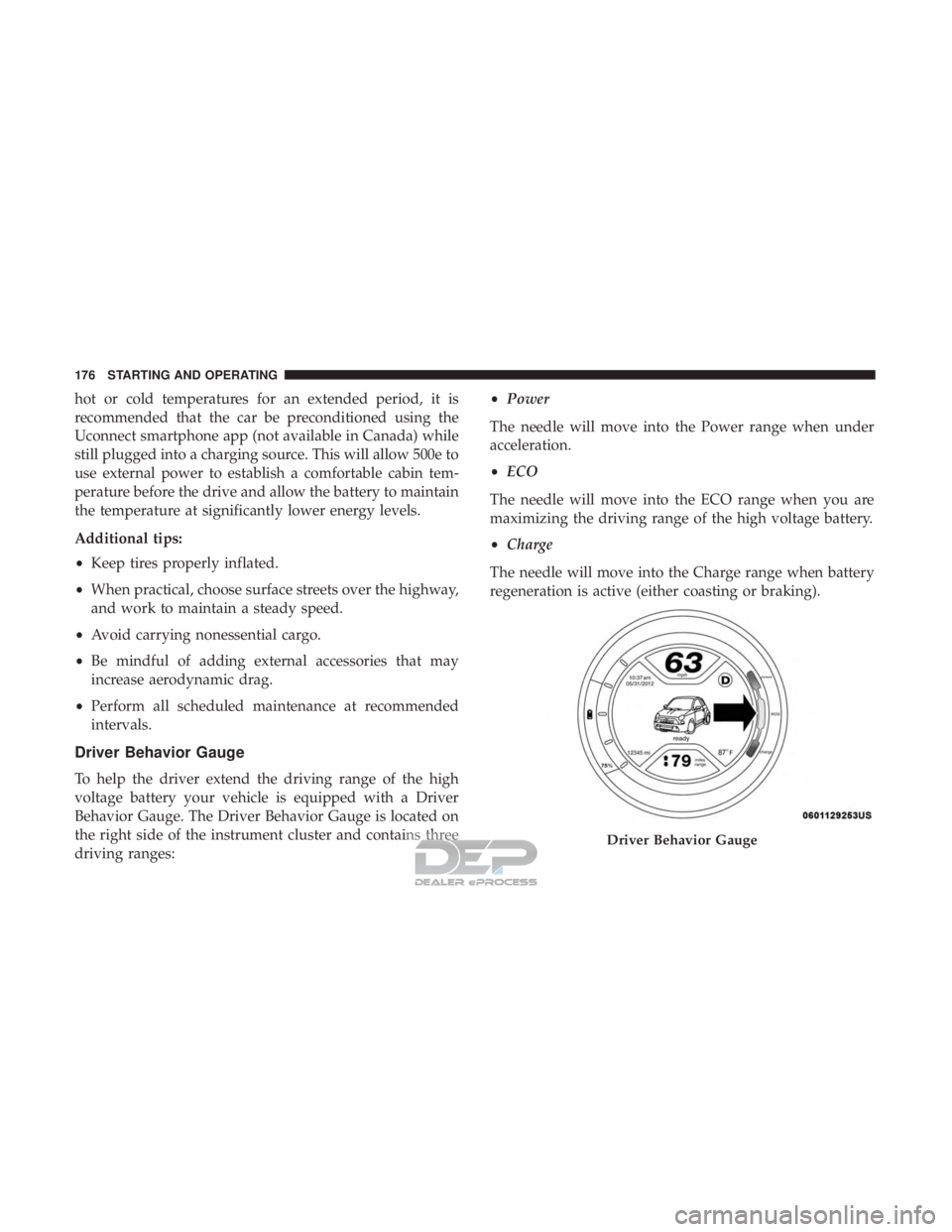
To help the driver extend the driving range of the high
voltage battery your vehicle is equipped with a Driver
Behavior Gauge. The Driver Behavior Gauge is located on
the right side of the instrument cluster and contains three
driving ranges: •
Power
The needle will move into the Power range when under
acceleration.
• ECO
The needle will move into the ECO range when you are
maximizing the driving range of the high voltage battery.
• Charge
The needle will move into the Charge range when battery
regeneration is active (either coasting or braking).
Driver Behavior Gauge
176 STARTING AND OPERATING
Page 191 of 302
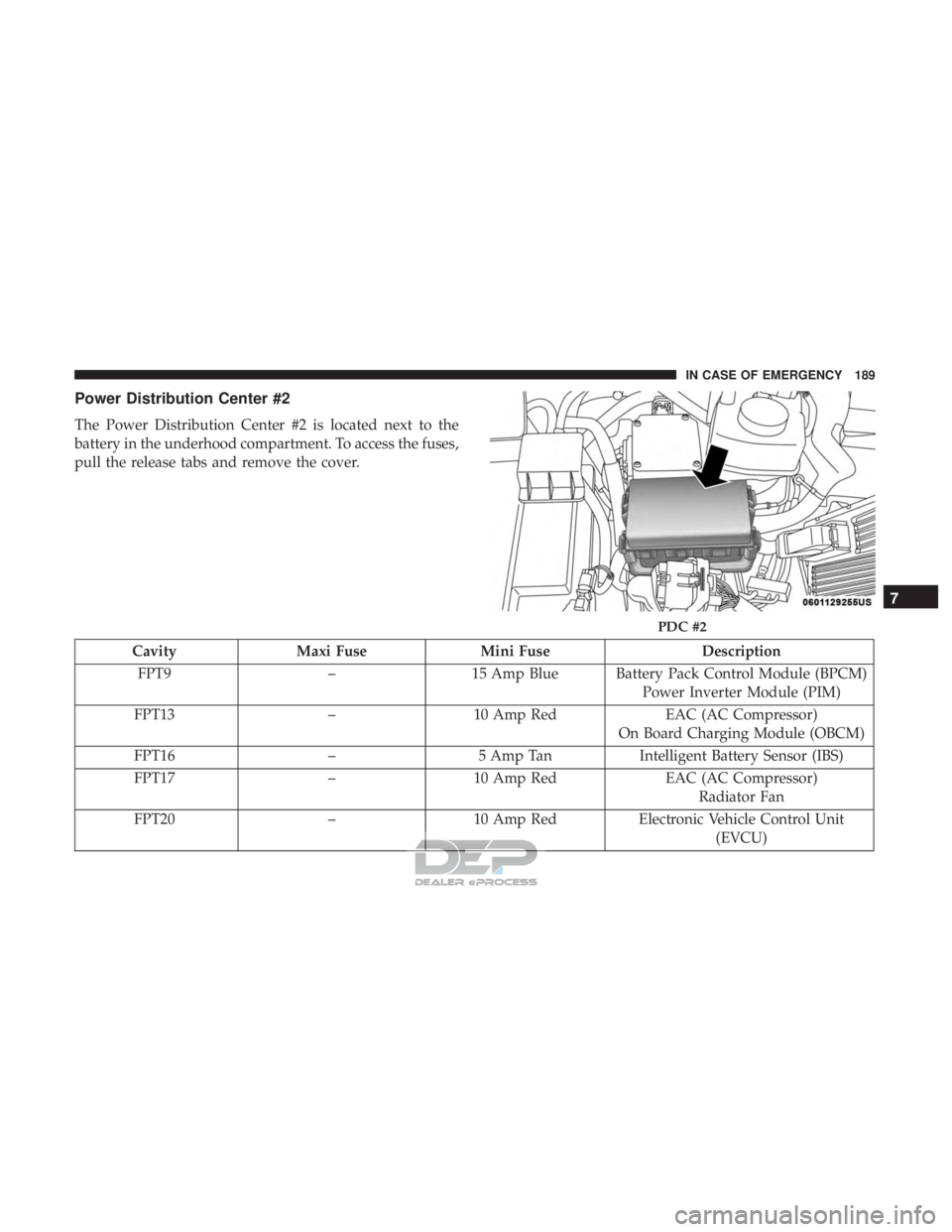
Power Distribution Center #2
The Power Distribution Center #2 is located next to the
battery in the underhood compartment. To access the fuses,
pull the release tabs and remove the cover.
CavityMaxi Fuse Mini Fuse Description
FPT9 –15 Amp Blue Battery Pack Control Module (BPCM)
Power Inverter Module (PIM)
FPT13 –10 Amp Red EAC (AC Compressor)
On Board Charging Module (OBCM)
FPT16 –5 Amp Tan Intelligent Battery Sensor (IBS)
FPT17 –10 Amp Red EAC (AC Compressor)
Radiator Fan
FPT20 –10 Amp Red Electronic Vehicle Control Unit
(EVCU)
PDC #2
7
IN CASE OF EMERGENCY 189
Page 209 of 302
WARNING!
•Take care to avoid the radiator cooling fan whenever
the hood is raised. It can start anytime the ignition
switch is ON. You can be injured by moving fan
blades.
• Remove any metal jewelry such as rings, watch
bands and bracelets that could make an inadvertent
electrical contact. You could be seriously injured.
• Batteries contain sulfuric acid that can burn your
skin or eyes and generate hydrogen gas which is
flammable and explosive. Keep open flames or
sparks away from the battery.
1. Apply the parking brake, place the transmission into PARK and turn the ignition to LOCK.
2. Turn off the heater, radio, and all unnecessary electrical accessories.
3. Remove the protective cover over the positive (+)bat-
tery post.
4. If using another vehicle to jump start the battery, park the vehicle within the jumper cables reach, apply the
parking brake and make sure the ignition is OFF.
WARNING!
Do not allow vehicles to touch each other as this could
establish a ground connection and personal injury
could result.
Jump Starting Procedure
WARNING!
Failure to follow this jump starting procedure could
result in personal injury or property damage due to
battery explosion.
CAUTION!
Failure to follow these procedures could result in
damage to the charging system of the booster vehicle
or the discharged vehicle.
Connecting The Jumper Cables
1. Connect the positive (+)end of the jumper cable to the
positive (+)post of the discharged vehicle.
2. Connect the opposite end of the positive (+)jumper
cable to the positive (+)post of the booster battery.
7
IN CASE OF EMERGENCY 207