battery FIAT 500E 2019 User Guide
[x] Cancel search | Manufacturer: FIAT, Model Year: 2019, Model line: 500E, Model: FIAT 500E 2019Pages: 300, PDF Size: 3.03 MB
Page 39 of 300
NOTE:
•The authorized dealer that sold you your vehicle has the
key code numbers for your vehicle locks. These numbers
can be used to order duplicate keys from your autho-
rized dealer.
• When exiting the vehicle, remember to cycle the ignition
to the STOP (OFF/LOCK) position and remove the key
from the ignition switch to avoid draining the battery.
To Unlock The Doors And Liftgate
Push and release the unlock button on the key fob once to
unlock the driver ’s door or twice, within five seconds, to
unlock all doors, and the liftgate. The turn signal lights will
flash to acknowledge the unlock signal. The illuminated
entry system will also turn on.
To Lock The Doors And Liftgate
Push and release the lock button on the key fob to lock all
doors and the liftgate. The turn signal lights will flash and
the horn will chirp to acknowledge the signal.
Locking Doors With A Key
1. Insert the key with either side up.
2. Turn the key to the right to lock the door.
3. Turn the key to the left to unlock the door.
3
GETTING TO KNOW YOUR VEHICLE 37
Page 40 of 300
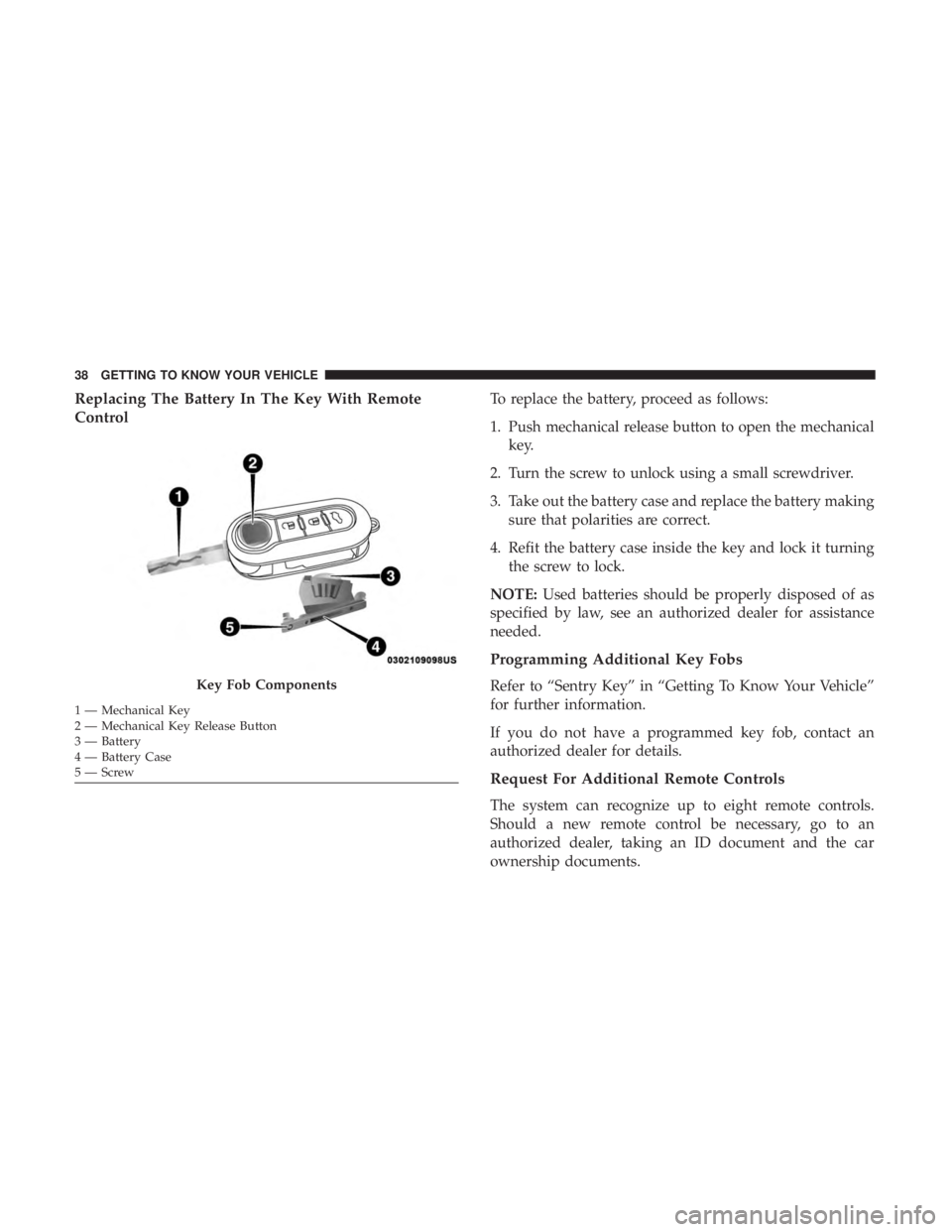
Replacing The Battery In The Key With Remote
ControlTo replace the battery, proceed as follows:
1. Push mechanical release button to open the mechanicalkey.
2. Turn the screw to unlock using a small screwdriver.
3. Take out the battery case and replace the battery making sure that polarities are correct.
4. Refit the battery case inside the key and lock it turning the screw to lock.
NOTE: Used batteries should be properly disposed of as
specified by law, see an authorized dealer for assistance
needed.
Programming Additional Key Fobs
Refer to “Sentry Key” in “Getting To Know Your Vehicle”
for further information.
If you do not have a programmed key fob, contact an
authorized dealer for details.
Request For Additional Remote Controls
The system can recognize up to eight remote controls.
Should a new remote control be necessary, go to an
authorized dealer, taking an ID document and the car
ownership documents.
Key Fob Components
1 — Mechanical Key
2 — Mechanical Key Release Button
3 — Battery
4 — Battery Case
5—Screw 38 GETTING TO KNOW YOUR VEHICLE
Page 63 of 300
NOTE:The indicators will automatically turn off when the
turn has been completed and the steering wheel is returned
to a straight position.
Lane Change Assist
Tap the lever up or down once, without moving beyond
the detent, and the turn signal (right or left) will flash three
times. Then, the turn signal (right or left) will automatically
turn off.
INTERIOR LIGHTS
The interior light switches are located in the overhead
console. The interior lights can be set to three different
positions (Off/Left Position, Center Position, On/Right
Position).
Using the switch on the left overhead, push the switch to
the right from its center position and the lights are always
on. Push the switch to the left from its center position and
the lights are always off. Leave the switch in the center
position, and the lights are turned on and off when the
doors are opened or closed. The switch on the right side of
the overhead console controls the map or reading function
of the lights. Push the switch to the right to turn on the
right light and push the switch to the left to turn on the left
light.
CAUTION!
Before getting out of the vehicle be sure that the switch
is in the center position or that the lights are off to
avoid draining the battery.
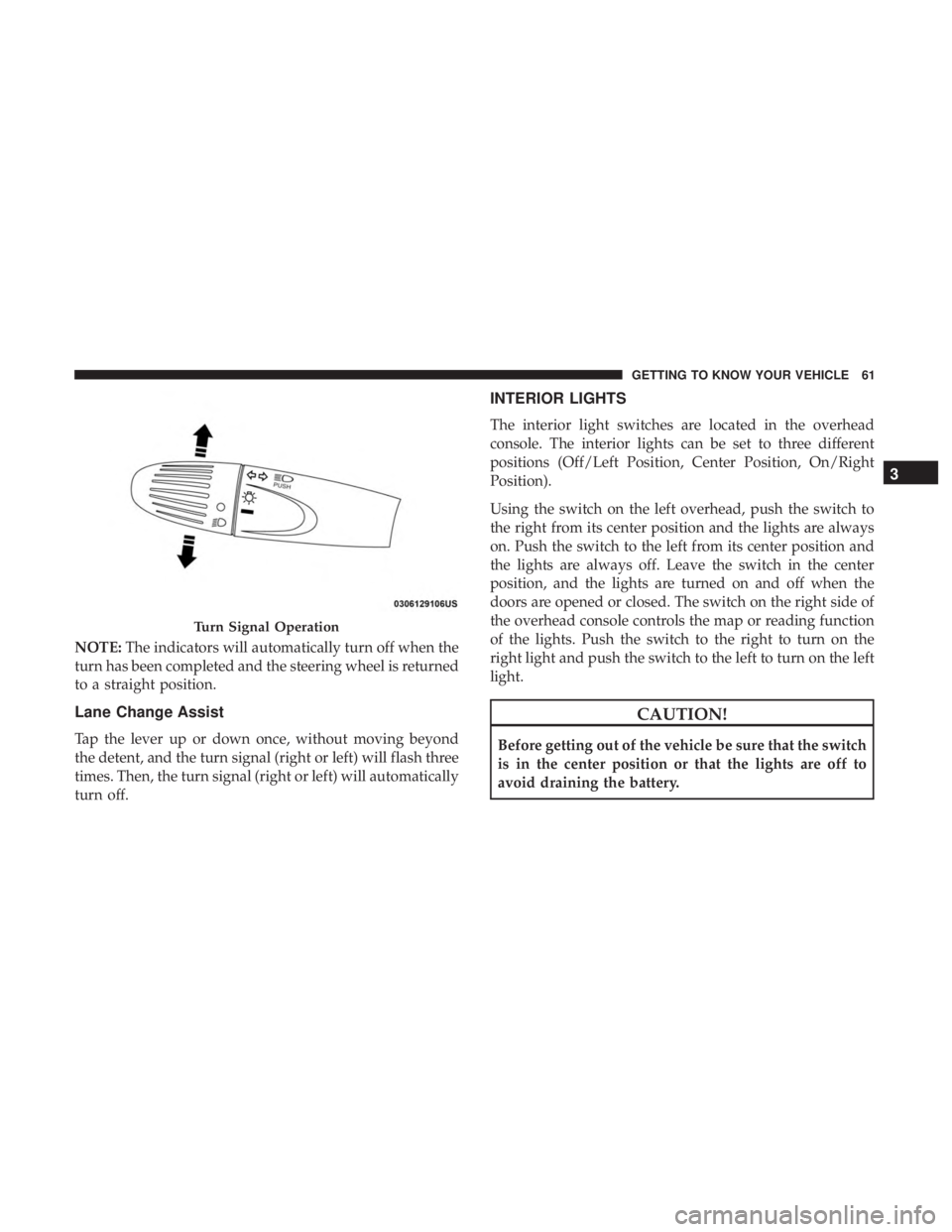
Turn Signal Operation
3
GETTING TO KNOW YOUR VEHICLE 61
Page 75 of 300
NOTE:If the vehicle is parked and off charge for longer
than two months, the 12V battery should be disconnected.
Window Fogging
Vehicle windows tend to fog on the inside in mild, rainy
and/or humid weather. To clear the windows, select De-
frost or Mix mode and increase the front blower speed. Do
not use the Recirculation mode without A/C for long
periods, as fogging may occur.
CAUTION!
Failure to follow these cautions can cause damage to
the heating elements:
• Use care when washing the inside of the rear win-
dow. Do not use abrasive window cleaners on the
interior surface of the window. Use a soft cloth and a
mild washing solution, wiping parallel to the heat-
ing elements. Labels can be peeled off after soaking
with warm water.
• Do not use scrapers, sharp instruments, or abrasive
window cleaners on the interior surface of the win-
dow.
• Keep all objects a safe distance from the window.
Outside Air Intake
Make sure the air intake, located directly in front of the
windshield, is free of obstructions such as leaves. Leaves
collected in the air intake may reduce airflow, and if they
enter the plenum, they could plug the water drains. In
winter months, make sure the air intake is clear of ice,
slush, and snow.
A/C Air Filter
The climate control system filters out dust and pollen from
the air. Contact an authorized dealer to service your A/C
air filter, and to have it replaced when needed.
3
GETTING TO KNOW YOUR VEHICLE 73
Page 85 of 300
WARNING!
To avoid serious injury or death:
•Only devices designed for use in this type of outlet
should be inserted into any 12 Volt outlet.
• Do not touch with wet hands.
• Close the lid when not in use and while driving the
vehicle.
(Continued)
WARNING! (Continued)
•If this outlet is mishandled, it may cause an electric
shock and failure.
CAUTION!
• Many accessories that can be plugged in draw power
from the vehicle’s battery, even when not in use (i.e.,
cellular phones, etc.). Eventually, if plugged in long
enough, the vehicle’s battery will discharge suffi-
ciently to degrade battery life and/or prevent the
vehicle from moving.
• Accessories that draw higher power (i.e., coolers,
vacuum cleaners, lights, etc.) will degrade the battery
even more quickly. Only use these intermittently and
with great caution.
• After the use of high power draw accessories, or long
periods of the vehicle not being charged (with acces-
sories still plugged in), the vehicle will likely need to
be charged.
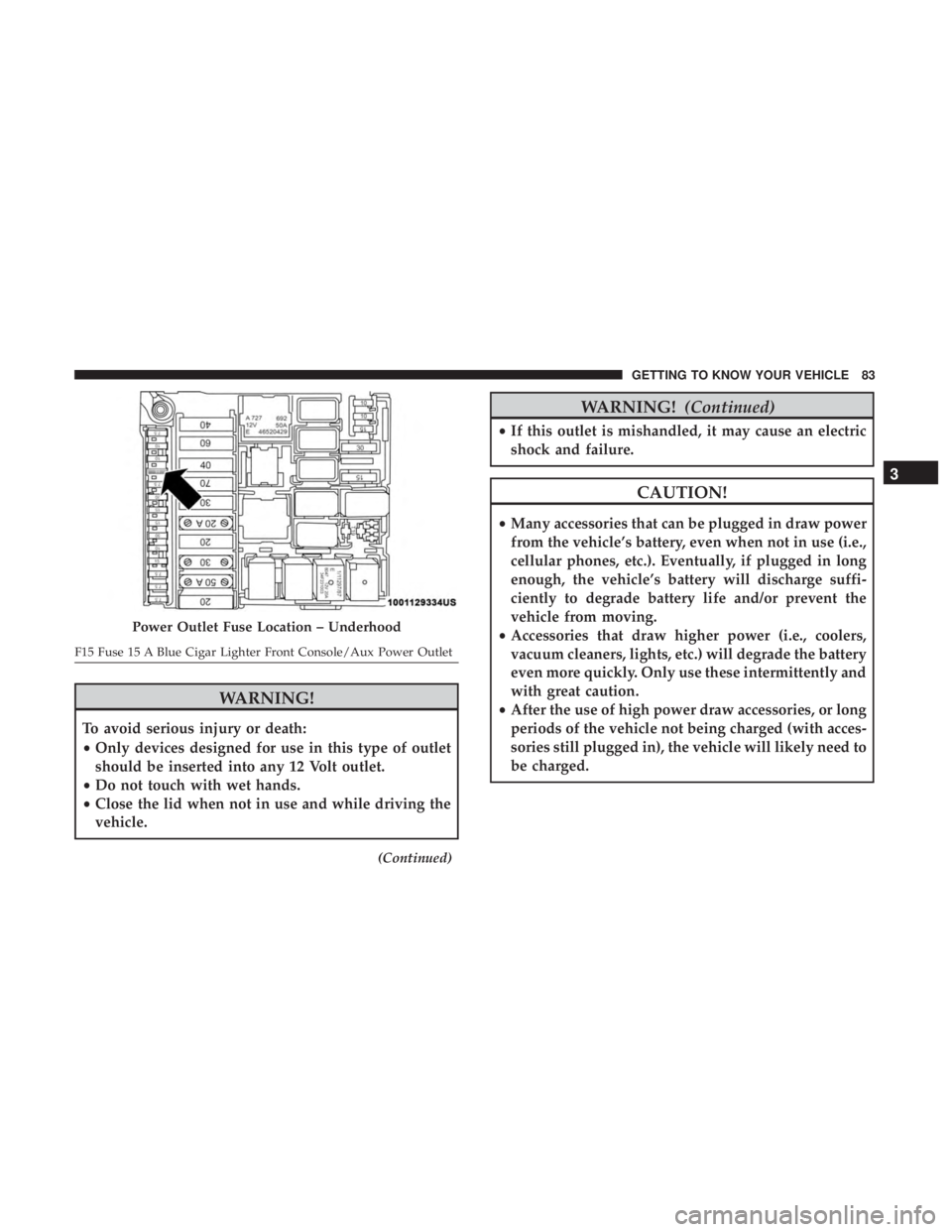
Power Outlet Fuse Location – Underhood
F15 Fuse 15 A Blue Cigar Lighter Front Console/Aux Power Outlet
3
GETTING TO KNOW YOUR VEHICLE 83
Page 88 of 300
INSTRUMENT CLUSTER
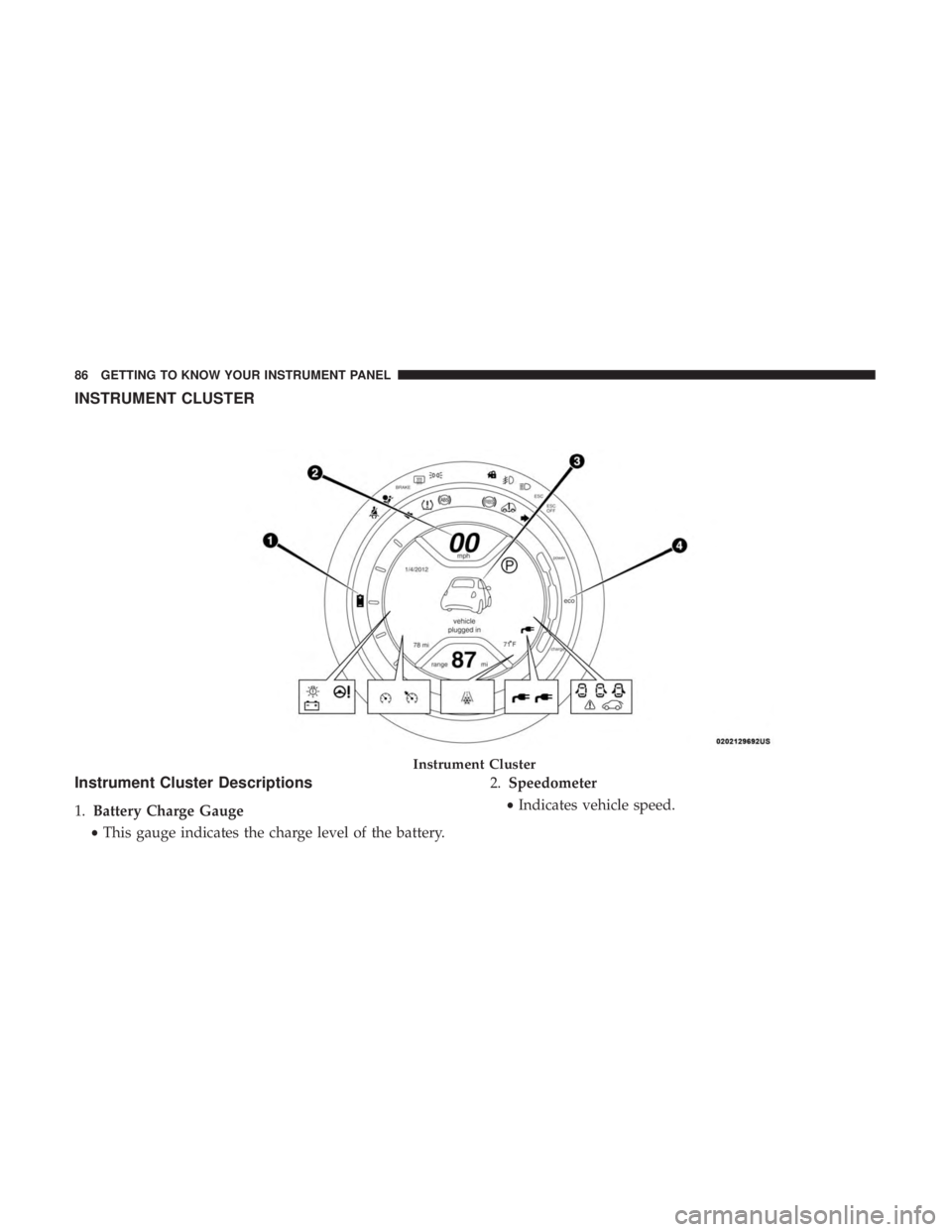
Instrument Cluster Descriptions
1.Battery Charge Gauge
• This gauge indicates the charge level of the battery. 2.
Speedometer
• Indicates vehicle speed.
Instrument Cluster
86 GETTING TO KNOW YOUR INSTRUMENT PANEL
Page 89 of 300
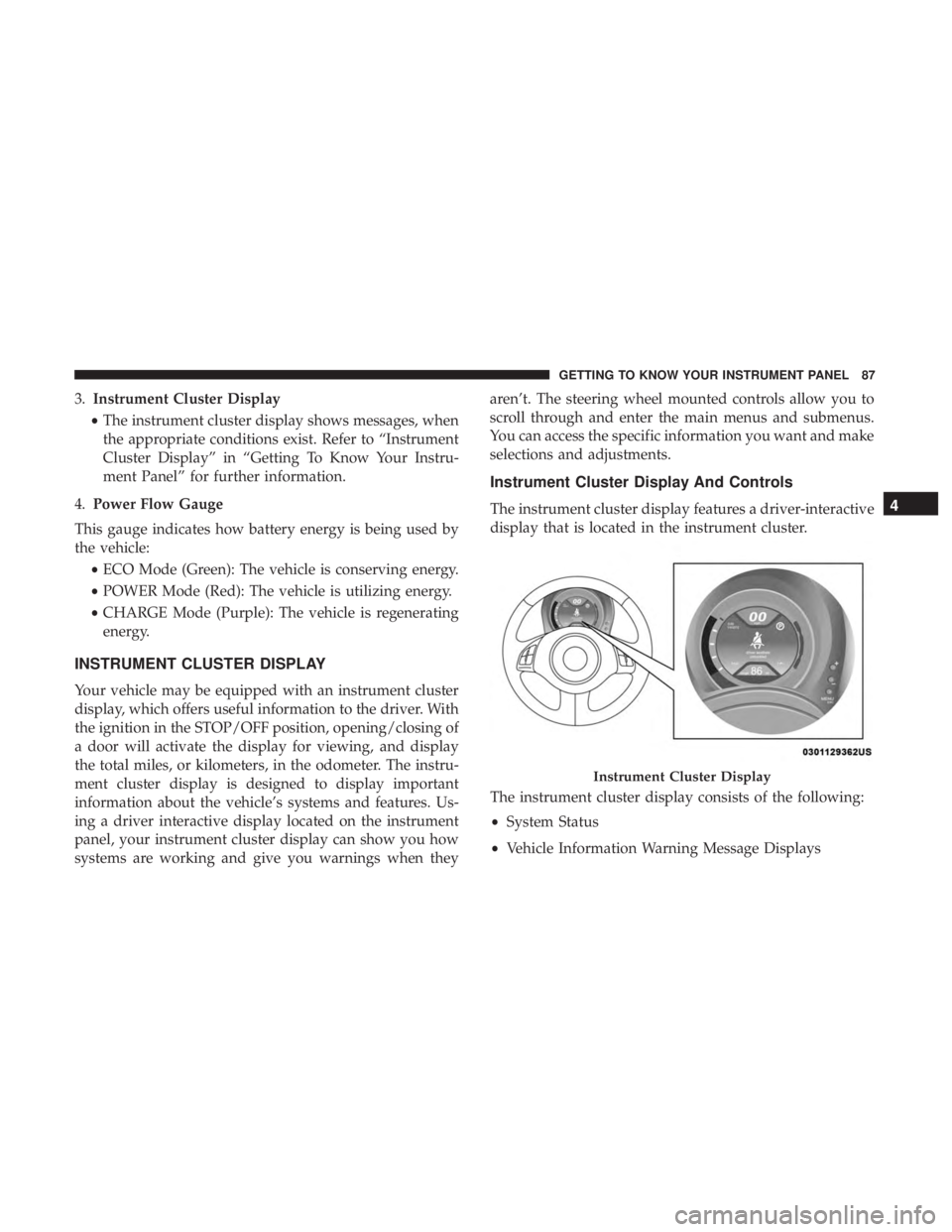
3.Instrument Cluster Display
• The instrument cluster display shows messages, when
the appropriate conditions exist. Refer to “Instrument
Cluster Display” in “Getting To Know Your Instru-
ment Panel” for further information.
4. Power Flow Gauge
This gauge indicates how battery energy is being used by
the vehicle: •ECO Mode (Green): The vehicle is conserving energy.
• POWER Mode (Red): The vehicle is utilizing energy.
• CHARGE Mode (Purple): The vehicle is regenerating
energy.
INSTRUMENT CLUSTER DISPLAY
Your vehicle may be equipped with an instrument cluster
display, which offers useful information to the driver. With
the ignition in the STOP/OFF position, opening/closing of
a door will activate the display for viewing, and display
the total miles, or kilometers, in the odometer. The instru-
ment cluster display is designed to display important
information about the vehicle’s systems and features. Us-
ing a driver interactive display located on the instrument
panel, your instrument cluster display can show you how
systems are working and give you warnings when they aren’t. The steering wheel mounted controls allow you to
scroll through and enter the main menus and submenus.
You can access the specific information you want and make
selections and adjustments.
Instrument Cluster Display And Controls
The instrument cluster display features a driver-interactive
display that is located in the instrument cluster.
The instrument cluster display consists of the following:
•
System Status
• Vehicle Information Warning Message Displays
Instrument Cluster Display
4
GETTING TO KNOW YOUR INSTRUMENT PANEL 87
Page 91 of 300
NOTE:The Up and Down buttons activate different func-
tions according to the following situations:
• To scroll the menu options upwards or downwards.
• To increase or decrease values during settings.
NOTE: When opening one of the front doors, the instru-
ment cluster display will turn on the clock and the miles or
kilometers covered (if equipped) for a few seconds.
NOTE: When the Uconnect “Display Mode” feature is set
to “Auto”, the instrument cluster display Up and Down
control buttons may be used to adjust the brightness of the
entire Instrument Panel (e.g. Instrument Cluster, Radio,
and Climate Controls). Refer to “Uconnect Settings” in
“Multimedia” for further information.
Display Menu Set-Up
The menu comprises a series of functions arranged in a
cycle. Push and release the uparrow and downarrow to
access the different options and settings (setup).
The setup menu can be activated by pushing the MENU
button. Single pushes on the uparrow or downarrow will
scroll through the setup menu options. The menu includes
the following functions:
• Battery % Display •
Button Volume
• Stored Warnings
• Tutorial
• Connectivity ID
• Restore Factory Settings
• Exit Menu
Selecting An Option Of The Main Menu Without Sub-
menu:
1. Briefly push and release the MENUbutton to select the
main menu option to set.
2. Push and release the uparrow and downarrow (by
single pushes) to select the new setting.
3. Briefly push and release the MENUbutton to store the
new setting and go back to the main menu option
previously selected.
Selecting An Option Of The Main Menu With Submenu:
1. Briefly push and release the MENUbutton to display
the first submenu option.
2. Push and release the uparrow and downarrow (by
single pushes) to scroll through all the submenu options.
4
GETTING TO KNOW YOUR INSTRUMENT PANEL 89
Page 93 of 300
New Trip
To reset:
•Push and hold the TRIP button manually.
• When the “Trip Distance” reaches 9999.9 miles/
kilometers or when the “Elapsed Time” reaches 29.59 (29
hours and 59 minutes) the system will reset automati-
cally.
• Trip can also be reset remotely through the radio.
Trip Functions
Both trip functions are resettable (reset — start of new trip).
“Trip A” can be used to display the figures relating to:
•Distance
• Avg. Energy
• Avg. Speed
• Elapsed Time (Driving Time)
“Trip B” can be used to display the figures relating to:
• Distance
• Avg. Energy •
Avg. Speed
• Elapsed Time (Driving Time)
Values Displayed
Range
This indicates the distance which may be travelled with the
remaining battery charge, assuming that driving condi-
tions will not change. The message “----” will appear when
the system is initializing.
NOTE: The range depends on several factors: driving style,
type of route (freeway, residential, mountain roads, etc.),
conditions of use of the car (load, tire pressure, etc.). Trip
planning must take into account the above notes.
Distance Traveled
This value shows the distance covered since the last reset.
Average Speed
This value shows the vehicle’s average speed as a function
of the overall time elapsed since the last reset.
Average Energy
This value shows the vehicle’s average energy consump-
tion as a function of the overall time elapsed since the last
reset.
4
GETTING TO KNOW YOUR INSTRUMENT PANEL 91
Page 95 of 300
indicated by the Brake Warning Light, which will turn on
when the brake fluid level in the master cylinder has
dropped below a specified level.
The light will remain on until the cause is corrected.
NOTE:The light may flash momentarily during sharp
cornering maneuvers, which change fluid level conditions.
The vehicle should have service performed, and the brake
fluid level checked.
If brake failure is indicated, immediate repair is necessary.
WARNING!
Driving a vehicle with the red brake light on is
dangerous. Part of the brake system may have failed. It
will take longer to stop the vehicle. You could have a
collision. Have the vehicle checked immediately.
Vehicles equipped with the Anti-Lock Brake System (ABS)
are also equipped with Electronic Brake Force Distribution
(EBD). In the event of an EBD failure, the Brake Warning
Light will turn on along with the ABS Light. Immediate
repair to the ABS system is required.
Operation of the Brake Warning Light can be checked by
turning the ignition switch from the OFF position to the ON/RUN position. The light should illuminate for ap-
proximately two seconds. The light should then turn off
unless the parking brake is applied or a brake fault is
detected. If the light does not illuminate, have the light
inspected by an authorized dealer.
The light also will turn on when the parking brake is
applied with the ignition switch in the ON/RUN position.
NOTE:
This light shows only that the parking brake is
applied. It does not show the degree of brake application.
— Battery Charge Warning Light
This light illuminates when the battery is not charging
properly. If it stays on while the vehicle is running, there
may be a malfunction with the charging system. Contact
your authorized dealer as soon as possible.
This indicates a possible problem with the electrical system
or a related component.
— Door Open Warning Light
This indicator will illuminate when one or more door(s) are
not fully closed.
NOTE: If the vehicle is moving and a door is opened, there
will also be a single chime.
4
GETTING TO KNOW YOUR INSTRUMENT PANEL 93