steering wheel FIAT 500L 2019 Owner handbook (in English)
[x] Cancel search | Manufacturer: FIAT, Model Year: 2019, Model line: 500L, Model: FIAT 500L 2019Pages: 248, PDF Size: 5.74 MB
Page 164 of 248
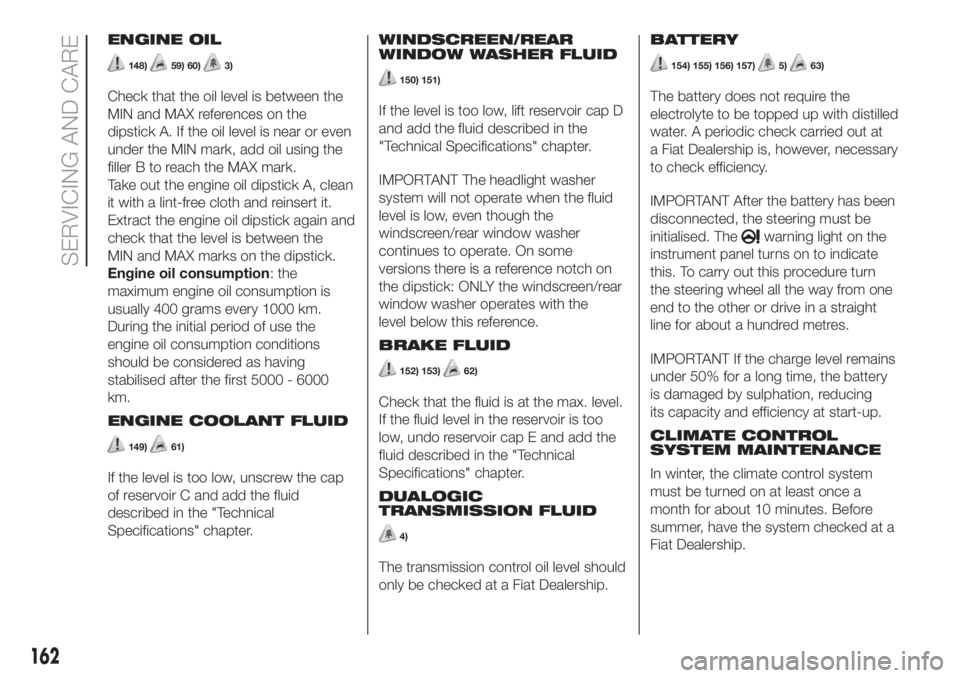
ENGINE OIL
148)59) 60)3)
Check that the oil level is between the
MIN and MAX references on the
dipstick A. If the oil level is near or even
under the MIN mark, add oil using the
filler B to reach the MAX mark.
Take out the engine oil dipstick A, clean
it with a lint-free cloth and reinsert it.
Extract the engine oil dipstick again and
check that the level is between the
MIN and MAX marks on the dipstick.
Engine oil consumption: the
maximum engine oil consumption is
usually 400 grams every 1000 km.
During the initial period of use the
engine oil consumption conditions
should be considered as having
stabilised after the first 5000 - 6000
km.
ENGINE COOLANT FLUID
149)61)
If the level is too low, unscrew the cap
of reservoir C and add the fluid
described in the "Technical
Specifications" chapter.WINDSCREEN/REAR
WINDOW WASHER FLUID
150) 151)
If the level is too low, lift reservoir cap D
and add the fluid described in the
"Technical Specifications" chapter.
IMPORTANT The headlight washer
system will not operate when the fluid
level is low, even though the
windscreen/rear window washer
continues to operate. On some
versions there is a reference notch on
the dipstick: ONLY the windscreen/rear
window washer operates with the
level below this reference.
BRAKE FLUID
152) 153)62)
Check that the fluid is at the max. level.
If the fluid level in the reservoir is too
low, undo reservoir cap E and add the
fluid described in the "Technical
Specifications" chapter.
DUALOGIC
TRANSMISSION FLUID
4)
The transmission control oil level should
only be checked at a Fiat Dealership.BATTERY
154) 155) 156) 157)5)63)
The battery does not require the
electrolyte to be topped up with distilled
water. A periodic check carried out at
a Fiat Dealership is, however, necessary
to check efficiency.
IMPORTANT After the battery has been
disconnected, the steering must be
initialised. The
warning light on the
instrument panel turns on to indicate
this. To carry out this procedure turn
the steering wheel all the way from one
end to the other or drive in a straight
line for about a hundred metres.
IMPORTANT If the charge level remains
under 50% for a long time, the battery
is damaged by sulphation, reducing
its capacity and efficiency at start-up.
CLIMATE CONTROL
SYSTEM MAINTENANCE
In winter, the climate control system
must be turned on at least once a
month for about 10 minutes. Before
summer, have the system checked at a
Fiat Dealership.
162
SERVICING AND CARE
Page 170 of 248
WHEELS AND TYRES
SUGGESTIONS ABOUT
THE ROTATION OF THE
TYRES
162)66) 67) 68) 69)
The front and rear tyres are subject to
different loads and stress due to
steering, manoeuvres and braking. For
this reason they are subject to uneven
wear.
To resolve this problem, tyres should be
rotated at the appropriate time. This
operation is recommended for tyres
with a deep tread pattern, suitable both
for on-road and off-road driving.
Tyre rotation contributes to the
preservation of the grip and traction
performance on wet, muddy or snowy
roads, guaranteeing optimal driveability
of the car.
In the case of irregular wear of the
tyres, the reason must be identified and
corrected before rotating them.
WARNING
162)Do not cross switch the tyres if they
are "unidirectional" type. In this case,
always take care not to fit the tyres with a
direction of rotation that is opposite to that
indicated: you would risk losing grip and
control of the vehicle.
WARNING
66)The road holding qualities of the car
also depend on the correct inflation
pressure of the tyres.
67)If tyre pressure is too low, the tyre may
overheat and be severely damaged as a
result.
68)Do not switch tyres from the righthand
side of the vehicle to the lefthand side,
and vice versa.
69)Never submit alloy rims to repainting
treatments requiring the use of
temperatures exceeding 150°C. The
mechanical properties of the wheels could
be impaired.
BODYWORK
PRESERVING THE
BODYWORK
Paintwork
70)6)
Touch up abrasions and scratches
immediately to prevent the formation of
rust.
Versions with matt paint
(for versions/markets, where provided)
On some versions the car may have
an exclusive opaque paint on the roof,
which requires special care to keep it
in good condition.
71)
Washing the car
To correctly wash the car, follow these
instructions:
if the vehicle is washed remove the
aerial from the roof;
if high pressure jets or cleaners are
used to wash the vehicle, keep a
distance of at least 40 cm from the
bodywork to avoid damage or
alteration. Build up of water could
cause damage to the car in the long
term;
wash the bodywork using a low
pressure jet of water;
168
SERVICING AND CARE
Page 207 of 248
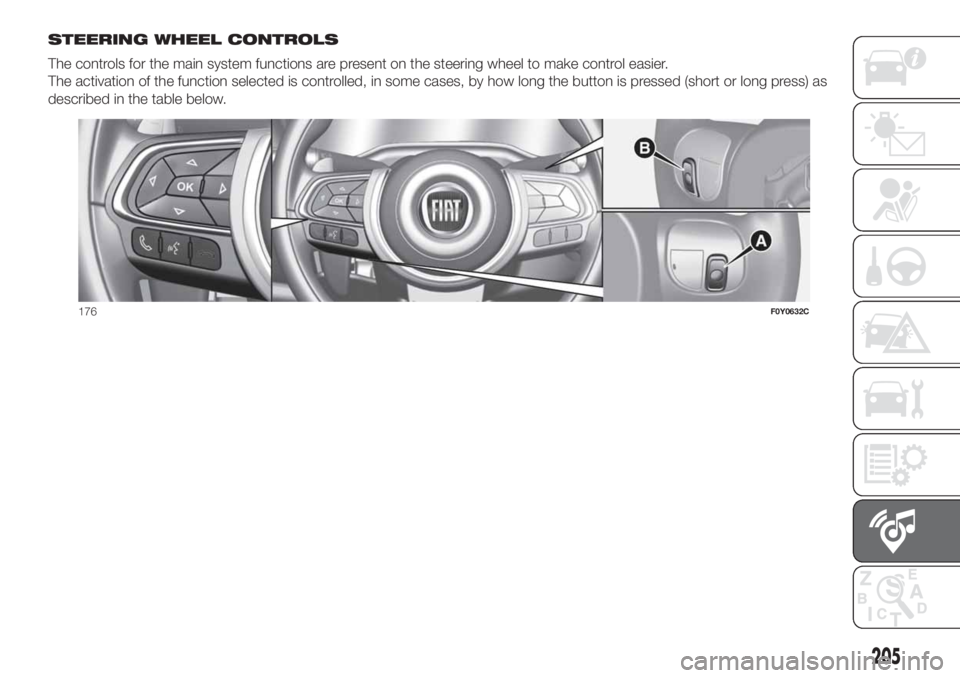
STEERING WHEEL CONTROLS
The controls for the main system functions are present on the steering wheel to make control easier.
The activation of the function selected is controlled, in some cases, by how long the button is pressed (short or long press) as
described in the table below.
176F0Y0632C
205
Page 208 of 248
STEERING WHEEL CONTROL SUMMARY TABLE
Button Interaction
Acceptance of incoming call
Acceptance of the second incoming call and putting the active call on hold
Display on the instrument panel of the list of the last 10 calls (only with call browsing active)
Activation of voice recognition
Interruption of the voice message in order to give a new voice command
Interruption of voice recognition
Rejection of incoming call
Ending of call in progress
Exit the display of the last calls on the instrument panel display (only with call browsing active) (for
versions/markets, where provided)
Short press (Phone mode): selection, on the instrument panel display, of the last calls/text messages
(only with call browsing active)
206
MULTIMEDIA
Page 209 of 248
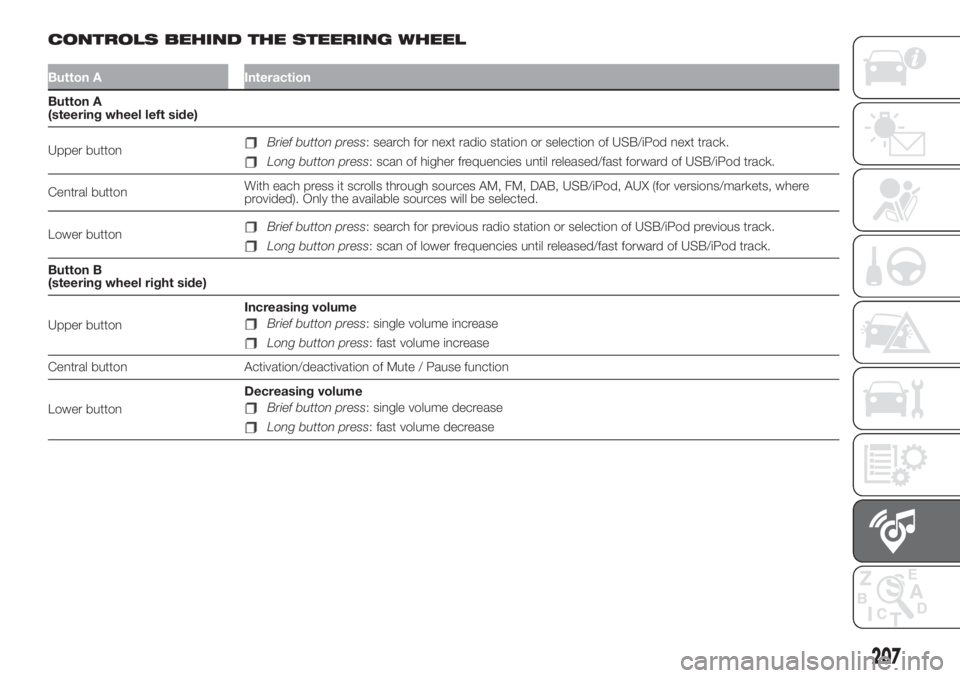
CONTROLS BEHIND THE STEERING WHEEL
Button A Interaction
Button A
(steering wheel left side)
Upper button
Brief button press: search for next radio station or selection of USB/iPod next track.
Long button press: scan of higher frequencies until released/fast forward of USB/iPod track.
Central buttonWith each press it scrolls through sources AM, FM, DAB, USB/iPod, AUX (for versions/markets, where
provided). Only the available sources will be selected.
Lower button
Brief button press: search for previous radio station or selection of USB/iPod previous track.
Long button press: scan of lower frequencies until released/fast forward of USB/iPod track.
Button B
(steering wheel right side)
Upper buttonIncreasing volume
Brief button press: single volume increase
Long button press: fast volume increase
Central button Activation/deactivation of Mute / Pause function
Lower buttonDecreasing volume
Brief button press: single volume decrease
Long button press: fast volume decrease
207
Page 213 of 248
Browsing text messages
(for versions/markets, where provided)
Using the steering wheel commands,
you can view and manage the last
10 SMS messages received on the
instrument panel display. To use this
function the mobile phone must
support the SMS exchange function
throughBluetooth®.
Select “Phone” on the instrument panel
Setup menu and then select “SMS
reader” using the
/steering
wheel controls. The "SMS reader"
submenu allows the last 10 SMS
messages to be displayed.
Uconnect™ LIVE
SERVICES
(where provided)
Press the APPS button to access the
menu where all the application
functions of the system are present,
such as: time display,eco:Drive™
function data, Trip Computer, Outdoor
temperature, Settings,Uconnect™
LIVEapplications.
If there is aUconnect™ LIVEicon, the
system is set up for the connected
services and allows the applications to
be used directly from the radio menu,
for a more efficient and advanced
use of the car.The application functions are present
according to the vehicle configuration
and to the market.
To use theUconnect™ LIVEservices,
you need to:
to downloadUconnect™LIVEApp
from "App Store" or "Google play" on
your compatible smartphone, making
sure that the data connection is
enabled;
register, through theUconnect™
LIVE Appon the
www.driveuconnect.eu or www.fiat.it
website
start theUconnect™LIVEapp on
your smart phone and enter your
credentials.
For more information relating to the
services available on the market,
consult the www.driveucoinnect.eu site.
First access to the car
After starting theUconnect™ LIVE
App and entering your credentials,
to access theUconnect™LIVEApp
services in the car you needBlu-
etooth® pairing between your smart
phone and theUnconnect ™system
as described in the "Registering your
cell phone" section. The list of sup-
ported mobile phones is available on
www.driveuconnect.euAfter pairing, press theUconnect™
LIVEbutton on the display to access
the connected services.
When the activation process is
completed, the display shows a
dedicated message. In the case of
services that require a personal profile,
you can connect your own account
through theUconnect™ LIVEApp or
in the reserved area on the
www.driveuconnect.eu site.
User not connected
If the device is not paired to aBlu-
etooth® telephone, if theUconnect™
LIVEbutton is pressed, the system
menu has its icons disabled, except for
eco:Drive™.
For further details on theeco:Drive™
function refer to the dedicated
paragraph.
Uconnect™ LIVE services setup
using the dedicated menu
Using theUconnect™system menu
dedicated toUconnect ™LIVE
services the “Settings” section can be
accessed by pressing the
icon. In
this section you can check the system
options and change them according
to your preferences.
211
Page 216 of 248
Lights
Doors & Locks
Engine Off Options
Audio
Phone/Bluetooth
Radio Setup
SiriusXM Setup (for versions/
markets, where provided)
Restore Default Settings
Clear Personal Data
VOICE CONTROLS
NOTE For languages not supported by
the system, voice controls are not
available.
To use the voice commands, press the
button ("Voice" button) on the
steering wheel controls and say the
function you want to activate aloud.
Phone functions
The
button activates the following
functions:
Call
Dial
Re-dial
Call back
Recent calls
Calls made
Missed calls
Calls received
PhoneBook
Search
Show SMS
Radio functions
The
button activates the following
functions:
Tune to XXX FM
Tune to XXX AM
Tune to Radio XXX
Tune to DAB channel
Media function
The
button activates the following
functions:
Play song...
Play album…
Play artist…
Play genre…
Play playlist…
Play podcast…
Play audiobook…
Play the track number...
Select the support
View
214
MULTIMEDIA
Page 220 of 248
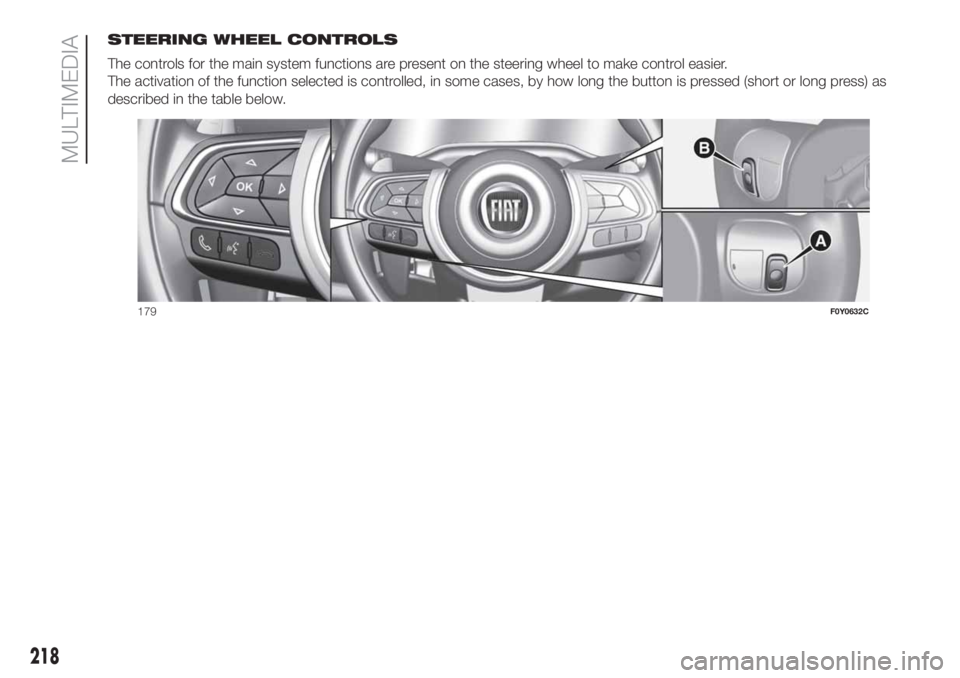
STEERING WHEEL CONTROLS
The controls for the main system functions are present on the steering wheel to make control easier.
The activation of the function selected is controlled, in some cases, by how long the button is pressed (short or long press) as
described in the table below.
179F0Y0632C
218
MULTIMEDIA
Page 221 of 248
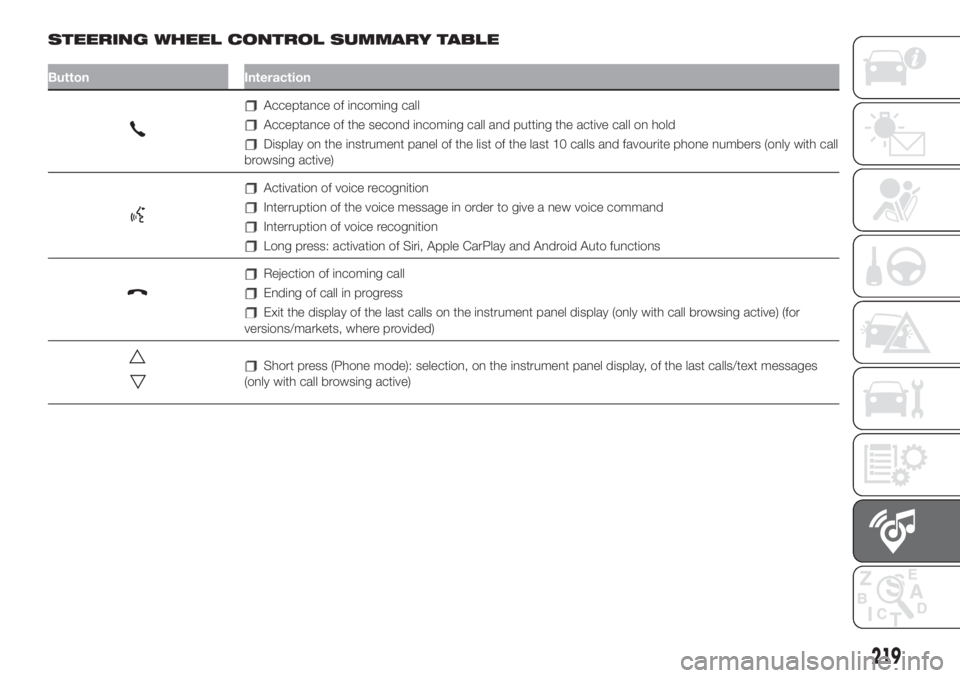
STEERING WHEEL CONTROL SUMMARY TABLE
Button Interaction
Acceptance of incoming call
Acceptance of the second incoming call and putting the active call on hold
Display on the instrument panel of the list of the last 10 calls and favourite phone numbers (only with call
browsing active)
Activation of voice recognition
Interruption of the voice message in order to give a new voice command
Interruption of voice recognition
Long press: activation of Siri, Apple CarPlay and Android Auto functions
Rejection of incoming call
Ending of call in progress
Exit the display of the last calls on the instrument panel display (only with call browsing active) (for
versions/markets, where provided)
Short press (Phone mode): selection, on the instrument panel display, of the last calls/text messages
(only with call browsing active)
219
Page 222 of 248
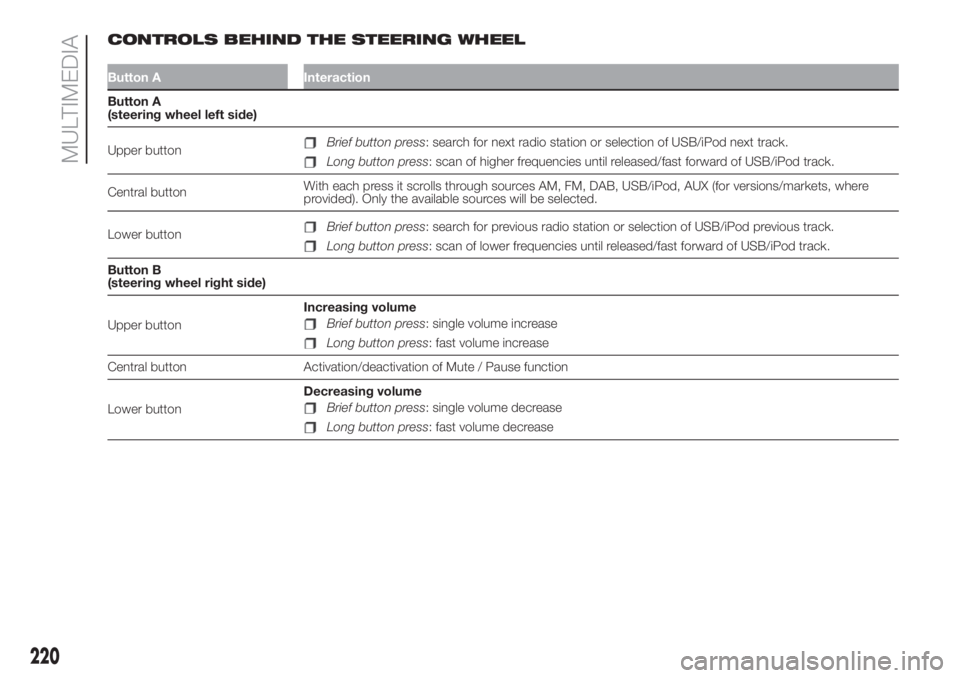
CONTROLS BEHIND THE STEERING WHEEL
Button A Interaction
Button A
(steering wheel left side)
Upper button
Brief button press: search for next radio station or selection of USB/iPod next track.
Long button press: scan of higher frequencies until released/fast forward of USB/iPod track.
Central buttonWith each press it scrolls through sources AM, FM, DAB, USB/iPod, AUX (for versions/markets, where
provided). Only the available sources will be selected.
Lower button
Brief button press: search for previous radio station or selection of USB/iPod previous track.
Long button press: scan of lower frequencies until released/fast forward of USB/iPod track.
Button B
(steering wheel right side)
Upper buttonIncreasing volume
Brief button press: single volume increase
Long button press: fast volume increase
Central button Activation/deactivation of Mute / Pause function
Lower buttonDecreasing volume
Brief button press: single volume decrease
Long button press: fast volume decrease
220
MULTIMEDIA