display FIAT 500L LIVING 2014 2.G User Guide
[x] Cancel search | Manufacturer: FIAT, Model Year: 2014, Model line: 500L LIVING, Model: FIAT 500L LIVING 2014 2.GPages: 420, PDF Size: 9.77 MB
Page 19 of 420
Activation/Trip B data
(Activating Trip B)
With this function it is possible to activate ("On") or
deactivate ("Off") the Trip B display (partial trip).
For more information see the "Trip computer"
paragraph.
For activation/deactivation, proceed as follows:
❒press the
button briefly to make the display flash
On or Off according to the previous setting;
❒press theor
button to make the
adjustment;
❒press the
button briefly to return to the menu
screen or give the button a long press to return
to the standard screen without storing.
Time adjustment (Clock adjustment)
This function enables the clock to be set through
two submenus: “Time” and “Format”.
To carry out the adjustment, proceed as follows:
❒press button
briefly. The display shows the two
submenus "Time" and "Format";
❒press theor
button to switch between
the two submenus;
❒once you have selected the submenu to be
changed, press the button
briefly;
❒if the "Time" submenu is selected and button
is
pressed briefly, "hours" will flash on the display.
Press the
or
button to make the
adjustment;❒pressing the
button briefly again: the "minutes"
flash on the display. Press the
or
button
to make the adjustment;
❒if the "Format" submenu is selected and button
is pressed briefly, the display mode will flash
on the display. Press the
or
button to
select "12h" or "24h" mode. When you have
carried out the required settings, briefly press the
button to go back to the submenu screen or
hold the button down to go back to the main
menu screen without storing the new settings.
Hold down the
button again to return to the
standard screen or to the main menu according to
the menu items where you are in.
IMPORTANT The setting will increase or decrease
by one unit each time the button
or
is
pressed. Keeping the button pressed causes an
automatic rapid speed increase/decrease. Complete
the setting by briefly pressing the button when
you approach the required value.
15GETTING TO
KNOW YOUR CARSAFETY
STARTING AND
DRIVING
WARNING LIGHTS
AND MESSAGES
IN AN EMERGENCY
SERVICING AND
MAINTENANCE
TECHNICAL
SPECIFICATIONS
INDEX
Page 20 of 420
Set date (Setting the date)
Using this function it is possible to update the date
(year - month - day).
To carry out the adjustment, proceed as follows:
❒press button
briefly. The "year" flashes on the
display;
❒press theor
button to make the
adjustment;
❒press button
briefly. The "month" flashes on the
display;
❒press theor
button to make the
adjustment;
❒press button
briefly. The "day" flashes on the
display;
❒press theor
button to make the
adjustment;
❒press the
button briefly to return to the menu
screen or give the button a long press to return
to the standard screen without storing.
IMPORTANT The setting will increase or decrease
by one unit each time the button
or
is
pressed. Keeping the button pressed causes an
automatic rapid speed increase/decrease. Complete
the setting by briefly pressing the button when
you approach the required value.Autoclose
(Automatic door lock operation with car
running)
If this function is On, it automatically locks the doors
when a speed of 20 km/h is exceeded.
Proceed as follows to activate or deactivate this
function:
❒press button
briefly. "On" or "Off" flash on the
display, according to what has been previously set;
❒press
or
to make your choice;
❒press the
button briefly to return to the
submenu screen or hold the button down
to return to the main menu screen without saving;
❒hold down the
button again to return to the
standard screen or to the main menu according
to the menu items where you are in.
16GETTING TO
KNOW YOUR CAR
SAFETY
STARTING AND
DRIVING
WARNING LIGHTS
AND MESSAGES
IN AN EMERGENCY
SERVICING AND
MAINTENANCE
TECHNICAL
SPECIFICATIONS
INDEX
Page 21 of 420
Unit of measurement
(Setting the unit of measurement)
With this function it is possible to set the units
through three submenus: "Distances",
"Consumption" and "Temperature".
To set the desired measurement unit, proceed as
follows:
❒press button
briefly. The display will show the
three submenus;
❒press buttonor
to scroll through the
three submenus;
❒once you have selected the submenu to be
changed, press the button
briefly;
❒if the "Distances" submenu is selected and button
is pressed briefly, the display shows "km" or
"mi" depending on the previous setting;
❒press
or
to make your choice;
❒if the "Consumption" submenu is selected and
button
is pressed briefly, the display shows
"km/l", "l/100km" or "mpg" depending on
the previous setting. If the measurement unit set
for "Distances" is "km", the display allows the
measurement unit ("km/l" or "l/100km") for
Consumption to be set. If the measurement unit
set for "Distances" is "mi", the display will show
Consumption in "mpg";
❒pressor
to make your choice;❒if the "Temperature" submenu is selected and
button
is pressed briefly, the display shows "°C"
or "°F" depending on the previous setting;
❒pressor
to make your choice;
Once the required settings are made, briefly press
button
to go back to the submenu screen or hold
the button down to return to the main menu screen
without storing.
Hold down the
button again to return to the
standard screen or to the main menu according to
the menu items where you are in.
Language (Language selection)
Display messages can be set to be shown in different
languages: Italian, German, English, Spanish, French,
Portuguese, Polish, Dutch, Turkish (the list varies
according to the market).
To set the desired language, proceed as follows:
❒press buttonbriefly. The “language” set
previously flashes on the display;
❒press
or
to make your choice;
❒press the
button briefly to return to the menu
screen or hold the button down to return to the
standard screen without storing.
17GETTING TO
KNOW YOUR CARSAFETY
STARTING AND
DRIVING
WARNING LIGHTS
AND MESSAGES
IN AN EMERGENCY
SERVICING AND
MAINTENANCE
TECHNICAL
SPECIFICATIONS
INDEX
Page 22 of 420
Warnings volume
(Adjusting the alert/warning acoustic signal
volume)
With this function the volume of the buzzer which
accompanies the display of any failure/warning can be
adjusted to 8 levels.
To set the desired volume, proceed as follows:
❒press button
briefly. The volume “level” set
previously flashes on the display;
❒press
or
to make your choice;
❒press the
button briefly to return to the menu
screen or hold the button down to return to the
standard screen without storing.
Seat belt buzzer
(SBR buzzer reactivation)
This function can only be displayed after a Fiat
Dealership has deactivated the SBR system (see
paragraph “SBR system” in the “Safety” chapter).
To reactivate this function, proceed as follows:
❒press thebutton briefly; "Off" will flash on the
display. Press the
or
button and "On"
will appear;
❒press the
button briefly to return to the
submenu screen or hold the button down
to return to the main menu screen without saving.Service (Scheduled servicing)
With this function it is possible to view information
on mileage or time intervals for servicing.
To consult this display, proceed as follows:
❒press button
briefly. The display shows the
service interval in kilometres (km) or miles (mi)
according to the previous setting (see the "Units of
measurement" paragraph);
❒press the
button briefly to return to the menu
screen or hold it down to return to the standard
screen.
18GETTING TO
KNOW YOUR CAR
SAFETY
STARTING AND
DRIVING
WARNING LIGHTS
AND MESSAGES
IN AN EMERGENCY
SERVICING AND
MAINTENANCE
TECHNICAL
SPECIFICATIONS
INDEX
NoteThe “Scheduled Servicing Plan” includes car
maintenance at fixed intervals, refer to the
"Maintenance and care" chapter. This message is
displayed automatically - when the key is turned to
MAR-ON - 2,000 km (or equivalent value in miles)
before these deadlines and reappears every 200
km (or equivalent value in miles). Below 200 km
servicing indications are more frequent. The display
will be in km or mi depending on the measurement
unit settings. When one of the next scheduled
deadlines is approaching, the word “Service” will
appear on the display, followed by the number of
kilometres or miles left, when the key is turned to
MAR-ON. Contact a Fiat Dealership. The operations
in the “Scheduled servicing plan” will be performed
and the message will be reset.
Page 23 of 420
Airbag/Passenger bag
(Activation/deactivation of passenger side
front airbag and side bag for pelvis, chest and
shoulder protection - for versions/markets,
where provided)
This function allows the passenger airbag to be
activated / deactivated.
Proceed as follows:
❒press the
button and, after the message "Bag
pass: Off" (to deactivate) or "Bag pass: On" (to
activate) is displayed by pressing buttons
and
, press the
button again;
❒a confirmation request message will appear on the
display;
❒by pressing theor
buttons select "Yes" (to
confirm activation/deactivation) or "No" (to
cancel);
❒press the
button briefly; a message confirming
the selection is displayed and you return to the
menu screen; Hold down the button to return to
the standard screen without storing.
Daytime running lights (D.R.L.)
(for versions/markets, where provided)
This function can be used to activate/deactivate the
daytime running lights.
Proceed as follows to activate or deactivate this
function:
❒press button
briefly. The display shows a
submenu;❒press button
briefly. "On" or "Off" flash on the
display, according to what has been previously set;
❒press
or
to make your choice;
❒press the
button briefly to return to the
submenu screen or hold the button down
to return to the main menu screen without saving;
❒hold down the
button again to return to the
standard screen or to the main menu according
to the menu items where you are in.
City Brake Control - "Collision Mitigation"
(for versions/markets, where provided)
This function allows to activate ("On") or de-activate
("Off") the City Brake Control - "Collision
Mitigation" system.
To adjust proceed as follows:
❒press buttonbriefly. "On" or "Off" flash on the
display, according to what has been previously set;
❒a confirmation request message will appear on the
display;
❒by pressing the
or
buttons select "Yes" (to
confirm activation/deactivation) or "No" (to
cancel);
❒press the
button briefly; a message confirming
the selection is displayed and you return to the
menu screen; Hold down the button to return to
the standard screen without storing.
When the system is deactivated the dedicated
warning light in the instrument panel switches on
(see chapter "Warning lights and messages").
19GETTING TO
KNOW YOUR CARSAFETY
STARTING AND
DRIVING
WARNING LIGHTS
AND MESSAGES
IN AN EMERGENCY
SERVICING AND
MAINTENANCE
TECHNICAL
SPECIFICATIONS
INDEX
Page 24 of 420
Exit menu
The last function closing the cycle of settings listed in
the menu screen.
Pressing the
button briefly will return the display
to the standard screen without saving.
Press thebutton to return to the first menu
option (Lighting).
TRIP COMPUTERGENERAL INFORMATION
The Trip computer is used to display information on
car operation when the key is turned to MAR-ON.
This function allows you to define two separate trips
called “Trip A” and “Trip B” where the car's
"complete journeys" are monitored in a reciprocally
independent manner.
Both journeys can be reset (reset - start of a new
journey).
“Trip A” is used to display the figures relating to:
❒Outside temperature (for versions/markets, where
provided)
❒Range
❒Distance travelled A
❒Average consumption A
❒Instantaneous consumption
❒Average speed A
❒Trip time A (driving time).
“Trip B” may be used to display the figures relating
to:
❒Distance travelled B
❒Average consumption B
❒Average speed B
❒Trip time B (driving time).
20GETTING TO
KNOW YOUR CAR
SAFETY
STARTING AND
DRIVING
WARNING LIGHTS
AND MESSAGES
IN AN EMERGENCY
SERVICING AND
MAINTENANCE
TECHNICAL
SPECIFICATIONS
INDEX
Page 25 of 420
Note“Trip B” may be disabled (see “Activating Trip
B”). “Range” and “Instantaneous fuel consumption"
parameters cannot be reset.
VALUES DISPLAYED
Outside temperature (for versions/markets, where
provided)
Indicates the temperature outside the passenger
compartment.
Range
This indicates the approximate distance which can be
travelled with the amount of fuel present in the
tank.“----”will appear on the display in the
following cases:
❒range value lower than 50 km (or 30 mi)
❒car parked with engine running for a long period.
IMPORTANT The range value variation can be
affected by several factors: driving style, type of route
(motorway, urban, mountain roads, etc.), conditions
of use (load, tyre pressures, etc.). Trip planning
must therefore take the above into account.
Distance travelled
Shows the distance covered since the start of the
new journey.Average consumption
Shows the approximate average fuel consumption
since the start of the new journey.
Instantaneous consumption
This value shows the fuel consumption. The value is
constantly updated. The display will show “----”
if the car is parked with the engine running.
Average speed
This shows the car average speed as a function of the
overall time elapsed since the start of the new
mission.
Tr i p t i me
Shows the time elapsed since the start of a new
journey.
IMPORTANT If there is no information, the Trip
computer displays "----"inplaceofthevalue.
When normal operating condition is restored,
calculation of different units will restart regularly. No
values displayed before the failure will be reset nor
will a new mission be started.
21GETTING TO
KNOW YOUR CARSAFETY
STARTING AND
DRIVING
WARNING LIGHTS
AND MESSAGES
IN AN EMERGENCY
SERVICING AND
MAINTENANCE
TECHNICAL
SPECIFICATIONS
INDEX
Page 26 of 420
DISPLAYED INFORMATION
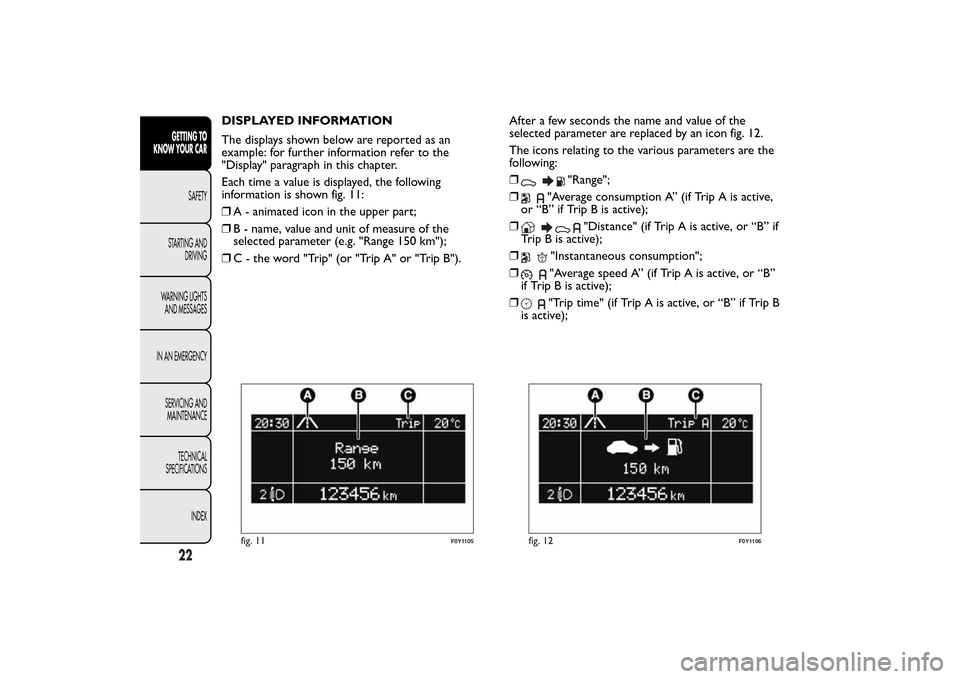
The displays shown below are reported as an
example: for further information refer to the
"Display" paragraph in this chapter.
Each time a value is displayed, the following
information is shown fig. 11:
❒A - animated icon in the upper part;
❒B - name, value and unit of measure of the
selected parameter (e.g. "Range 150 km");
❒C - the word "Trip" (or "Trip A" or "Trip B").After a few seconds the name and value of the
selected parameter are replaced by an icon fig. 12.
The icons relating to the various parameters are the
following:
❒
"Range";
❒
"Average consumption A” (if Trip A is active,
or “B” if Trip B is active);
❒
"Distance" (if Trip A is active, or “B” if
Trip B is active);
❒
"Instantaneous consumption";
❒"Average speed A” (if Trip A is active, or “B”
if Trip B is active);
❒"Trip time" (if Trip A is active, or “B” if Trip B
is active);
fig. 11
F0Y1105
fig. 12
F0Y1106
22GETTING TO
KNOW YOUR CAR
SAFETY
STARTING AND
DRIVING
WARNING LIGHTS
AND MESSAGES
IN AN EMERGENCY
SERVICING AND
MAINTENANCE
TECHNICAL
SPECIFICATIONS
INDEX
Page 27 of 420
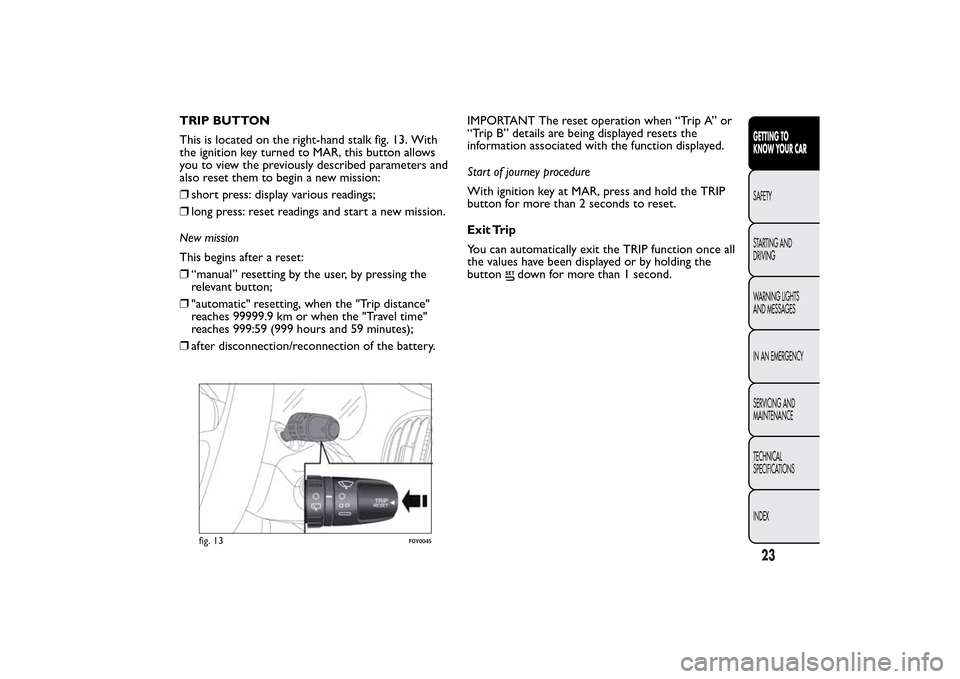
TRIP BUTTON
This is located on the right-hand stalk fig. 13. With
the ignition key turned to MAR, this button allows
you to view the previously described parameters and
also reset them to begin a new mission:
❒short press: display various readings;
❒long press: reset readings and start a new mission.
New mission
This begins after a reset:
❒“manual” resetting by the user, by pressing the
relevant button;
❒"automatic" resetting, when the "Trip distance"
reaches 99999.9 km or when the "Travel time"
reaches 999:59 (999 hours and 59 minutes);
❒after disconnection/reconnection of the battery.IMPORTANT The reset operation when “Trip A” or
“Trip B” details are being displayed resets the
information associated with the function displayed.
Start of journey procedure
With ignition key at MAR, press and hold the TRIP
button for more than 2 seconds to reset.
Exit Trip
You can automatically exit the TRIP function once all
the values have been displayed or by holding the
button
down for more than 1 second.
fig. 13
F0Y0045
23GETTING TO
KNOW YOUR CARSAFETY
STARTING AND
DRIVING
WARNING LIGHTS
AND MESSAGES
IN AN EMERGENCY
SERVICING AND
MAINTENANCE
TECHNICAL
SPECIFICATIONS
INDEX
Page 30 of 420
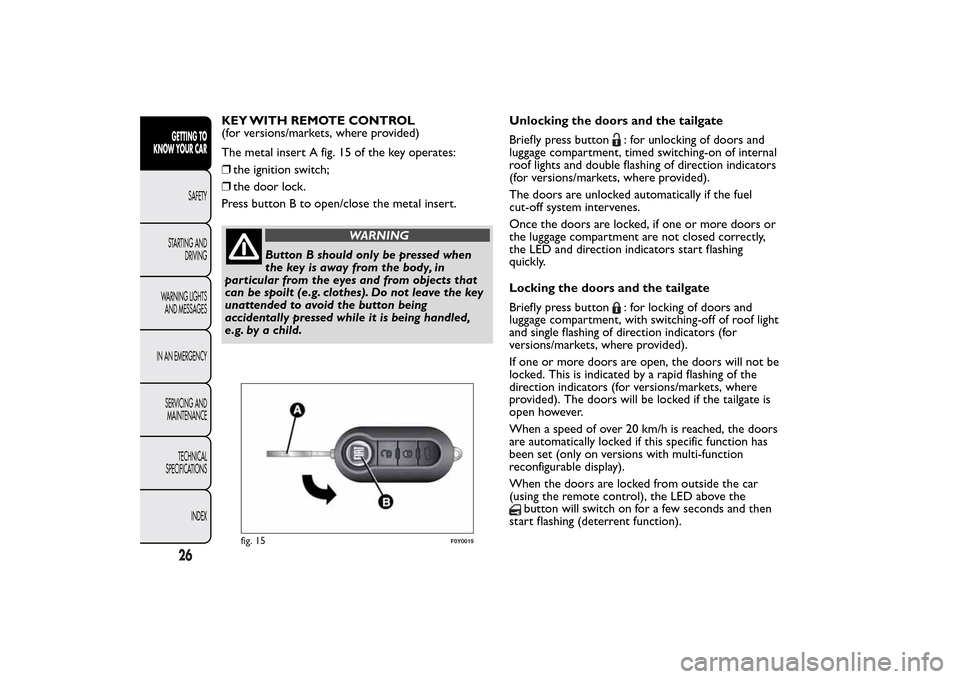
KEY WITH REMOTE CONTROL
(for versions/markets, where provided)
The metal insert A fig. 15 of the key operates:
❒the ignition switch;
❒the door lock.
Press button B to open/close the metal insert.
WARNING
Button B should only be pressed when
the key is away from the body, in
particular from the eyes and from objects that
can be spoilt (e.g. clothes). Do not leave the key
unattended to avoid the button being
accidentally pressed while it is being handled,
e.g. by a child.Unlocking the doors and the tailgate
Briefly press button
: for unlocking of doors and
luggage compartment, timed switching-on of internal
roof lights and double flashing of direction indicators
(for versions/markets, where provided).
The doors are unlocked automatically if the fuel
cut-off system intervenes.
Once the doors are locked, if one or more doors or
the luggage compartment are not closed correctly,
the LED and direction indicators start flashing
quickly.
Locking the doors and the tailgate
Briefly press button: for locking of doors and
luggage compartment, with switching-off of roof light
and single flashing of direction indicators (for
versions/markets, where provided).
If one or more doors are open, the doors will not be
locked. This is indicated by a rapid flashing of the
direction indicators (for versions/markets, where
provided). The doors will be locked if the tailgate is
open however.
When a speed of over 20 km/h is reached, the doors
are automatically locked if this specific function has
been set (only on versions with multi-function
reconfigurable display).
When the doors are locked from outside the car
(using the remote control), the LED above the
button will switch on for a few seconds and then
start flashing (deterrent function).
fig. 15
F0Y0019
26GETTING TO
KNOW YOUR CAR
SAFETY
STARTING AND
DRIVING
WARNING LIGHTS
AND MESSAGES
IN AN EMERGENCY
SERVICING AND
MAINTENANCE
TECHNICAL
SPECIFICATIONS
INDEX