display FIAT 500L LIVING 2014 2.G Owners Manual
[x] Cancel search | Manufacturer: FIAT, Model Year: 2014, Model line: 500L LIVING, Model: FIAT 500L LIVING 2014 2.GPages: 420, PDF Size: 9.77 MB
Page 8 of 420
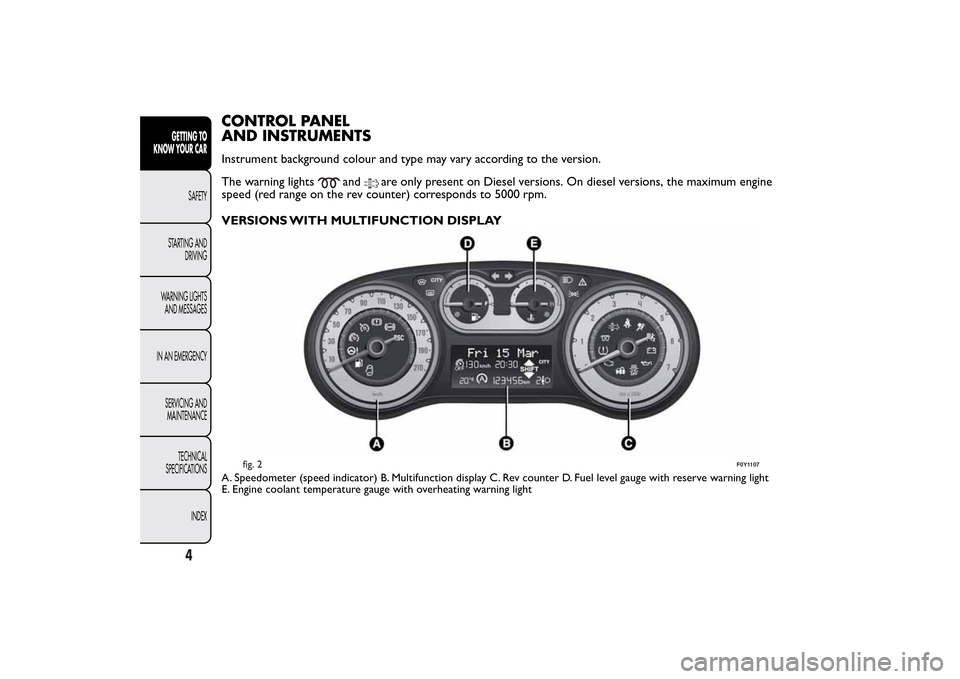
CONTROL PANEL
AND INSTRUMENTSInstrument background colour and type may vary according to the version.
The warning lights
and
are only present on Diesel versions. On diesel versions, the maximum engine
speed (red range on the rev counter) corresponds to 5000 rpm.
VERSIONS WITH MULTIFUNCTION DISPLAY
A. Speedometer (speed indicator) B. Multifunction display C. Rev counter D. Fuel level gauge with reserve warning light
E. Engine coolant temperature gauge with overheating warning light
fig. 2
F0Y1107
4
GETTING TO
KNOW YOUR CAR
SAFETY
STARTING AND
DRIVING
WARNING LIGHTS
AND MESSAGES
IN AN EMERGENCY
SERVICING AND
MAINTENANCE
TECHNICAL
SPECIFICATIONS
INDEX
Page 9 of 420
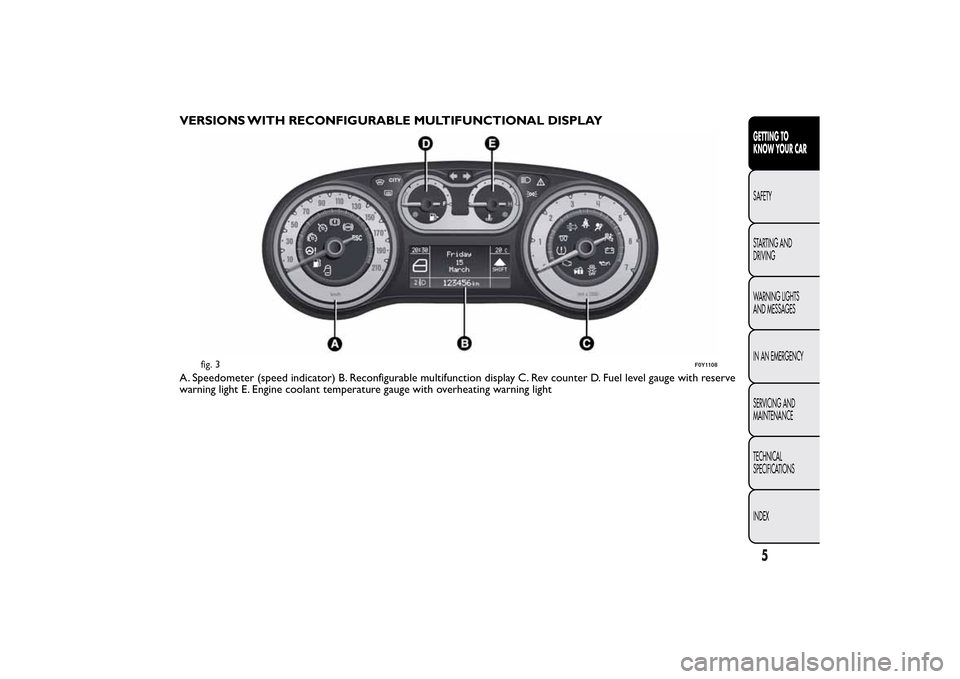
VERSIONS WITH RECONFIGURABLE MULTIFUNCTIONAL DISPLAYA. Speedometer (speed indicator) B. Reconfigurable multifunction display C. Rev counter D. Fuel level gauge with reserve
warning light E. Engine coolant temperature gauge with overheating warning light
fig. 3
F0Y1108
5GETTING TO
KNOW YOUR CARSAFETY
STARTING AND
DRIVING
WARNING LIGHTS
AND MESSAGES
IN AN EMERGENCY
SERVICING AND
MAINTENANCE
TECHNICAL
SPECIFICATIONS
INDEX
Page 10 of 420
SPEEDOMETER (SPEED INDICATOR)
Shows the car speed (speedometer).
REV COUNTER
This indicates the engine rpm.
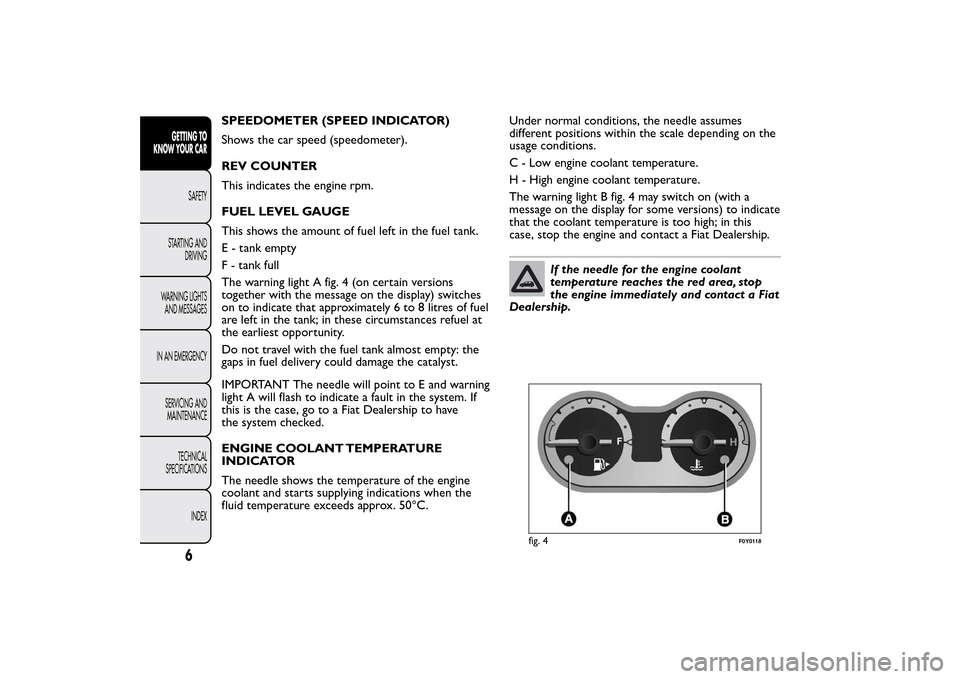
FUEL LEVEL GAUGE
This shows the amount of fuel left in the fuel tank.
E - tank empty
F - tank full
The warning light A fig. 4 (on certain versions
together with the message on the display) switches
on to indicate that approximately 6 to 8 litres of fuel
are left in the tank; in these circumstances refuel at
the earliest opportunity.
Do not travel with the fuel tank almost empty: the
gaps in fuel delivery could damage the catalyst.
IMPORTANT The needle will point to E and warning
light A will flash to indicate a fault in the system. If
this is the case, go to a Fiat Dealership to have
the system checked.
ENGINE COOLANT TEMPERATURE
INDICATOR
The needle shows the temperature of the engine
coolant and starts supplying indications when the
fluid temperature exceeds approx. 50°C.Under normal conditions, the needle assumes
different positions within the scale depending on the
usage conditions.
C - Low engine coolant temperature.
H - High engine coolant temperature.
The warning light B fig. 4 may switch on (with a
message on the display for some versions) to indicate
that the coolant temperature is too high; in this
case, stop the engine and contact a Fiat Dealership.
If the needle for the engine coolant
temperature reaches the red area, stop
the engine immediately and contact a Fiat
Dealership.
fig. 4
F0Y0118
6
GETTING TO
KNOW YOUR CAR
SAFETY
STARTING AND
DRIVING
WARNING LIGHTS
AND MESSAGES
IN AN EMERGENCY
SERVICING AND
MAINTENANCE
TECHNICAL
SPECIFICATIONS
INDEX
Page 11 of 420
DISPLAYThe car may be provided with a multifunction or
reconfigurable multifunction display that shows useful
information, according to the previous settings,
when driving.
With the ignition key removed, the display activates
and shows the time and total milometer reading
(in km or miles) for a few seconds when a front door
is opened/closed.
NOTE With a very low outside temperature (below
0°C) it may take longer than normal for information
to appear on the display.MULTIFUNCTION DISPLAY "STANDARD"
SCREEN
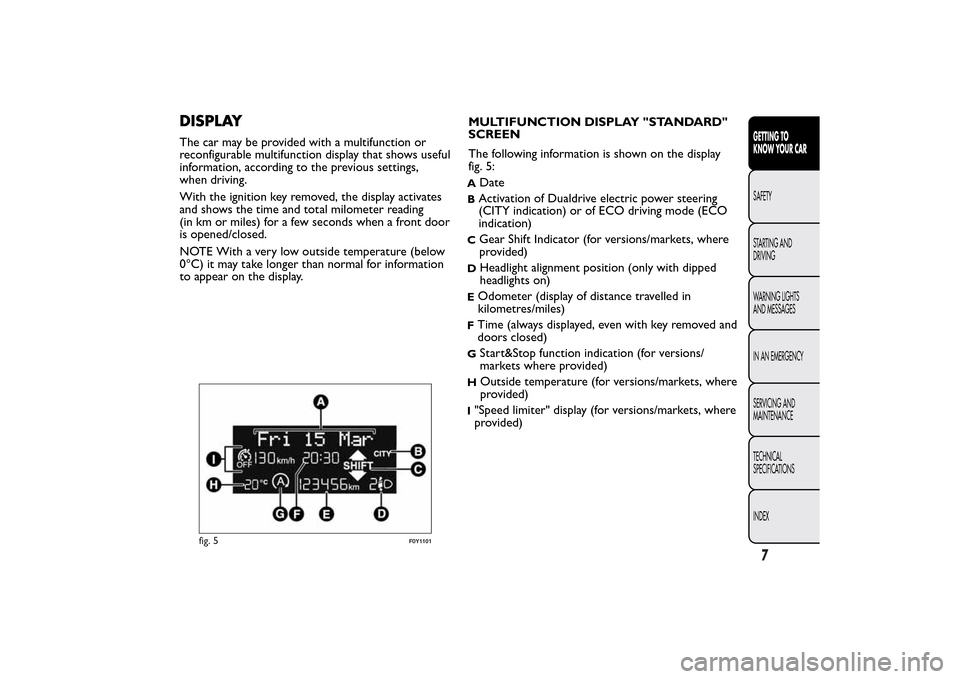
The following information is shown on the display
fig. 5:
A
Date
BActivation of Dualdrive electric power steering
(CITY indication) or of ECO driving mode (ECO
indication)C
Gear Shift Indicator (for versions/markets, where
provided)
D
Headlight alignment position (only with dipped
headlights on)
EOdometer (display of distance travelled in
kilometres/miles)FTime (always displayed, even with key removed and
doors closed)G
Start&Stop function indication (for versions/
markets where provided)
H
Outside temperature (for versions/markets, where
provided)
I"Speed limiter" display (for versions/markets, where
provided)
fig. 5
F0Y1101
7GETTING TO
KNOW YOUR CARSAFETY
STARTING AND
DRIVING
WARNING LIGHTS
AND MESSAGES
IN AN EMERGENCY
SERVICING AND
MAINTENANCE
TECHNICAL
SPECIFICATIONS
INDEX
Page 12 of 420
RECONFIGURABLE MULTIFUNCTION
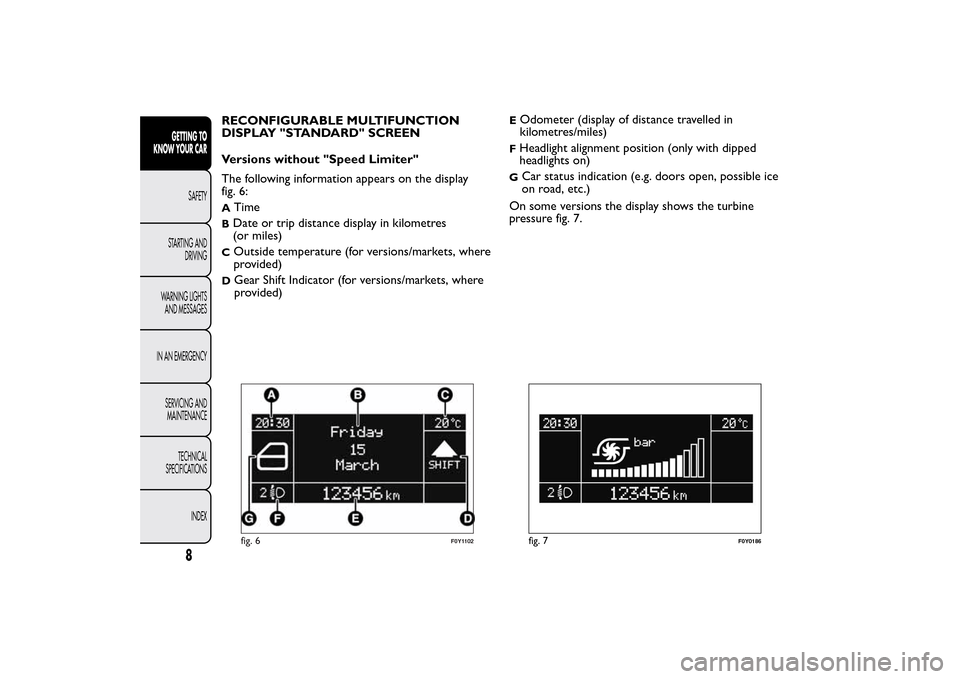
DISPLAY "STANDARD" SCREEN
Versions without "Speed Limiter"
The following information appears on the display
fig. 6:A
Time
BDate or trip distance display in kilometres
(or miles)C
Outside temperature (for versions/markets, where
provided)
D
Gear Shift Indicator (for versions/markets, where
provided)
EOdometer (display of distance travelled in
kilometres/miles)FHeadlight alignment position (only with dipped
headlights on)G
Car status indication (e.g. doors open, possible ice
on road, etc.)
On some versions the display shows the turbine
pressure fig. 7.
fig. 6
F0Y1102
fig. 7
F0Y0186
8
GETTING TO
KNOW YOUR CAR
SAFETY
STARTING AND
DRIVING
WARNING LIGHTS
AND MESSAGES
IN AN EMERGENCY
SERVICING AND
MAINTENANCE
TECHNICAL
SPECIFICATIONS
INDEX
Page 13 of 420
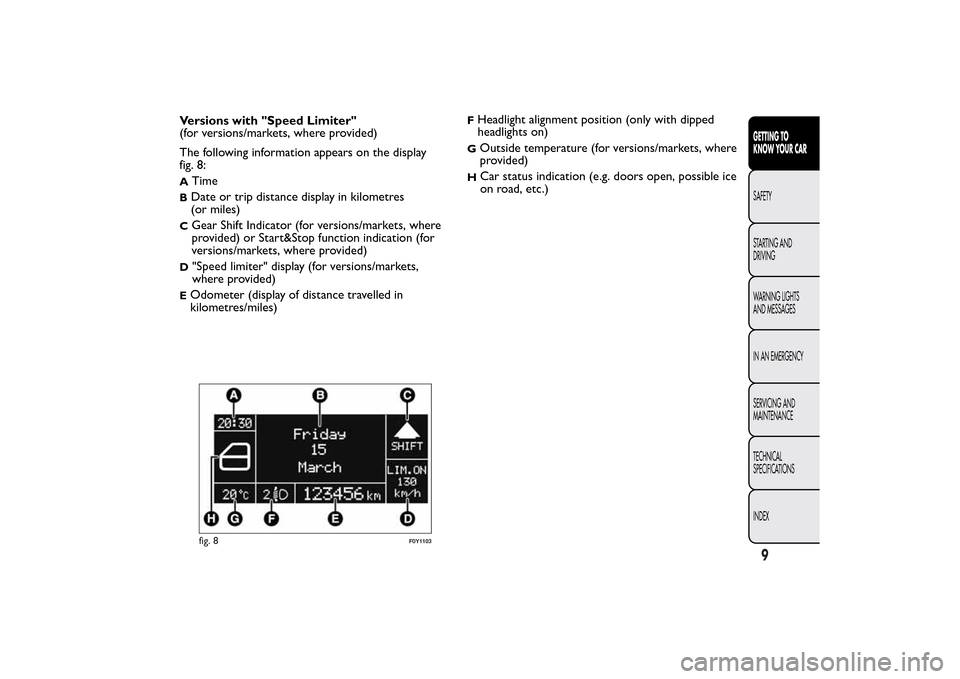
Versions with "Speed Limiter"
(for versions/markets, where provided)
The following information appears on the display
fig. 8:A
Time
BDate or trip distance display in kilometres
(or miles)C
Gear Shift Indicator (for versions/markets, where
provided) or Start&Stop function indication (for
versions/markets, where provided)
D
"Speed limiter" display (for versions/markets,
where provided)
EOdometer (display of distance travelled in
kilometres/miles)
FHeadlight alignment position (only with dipped
headlights on)G
Outside temperature (for versions/markets, where
provided)
H
Car status indication (e.g. doors open, possible ice
on road, etc.)
fig. 8
F0Y1103
9GETTING TO
KNOW YOUR CARSAFETY
STARTING AND
DRIVING
WARNING LIGHTS
AND MESSAGES
IN AN EMERGENCY
SERVICING AND
MAINTENANCE
TECHNICAL
SPECIFICATIONS
INDEX
Page 14 of 420
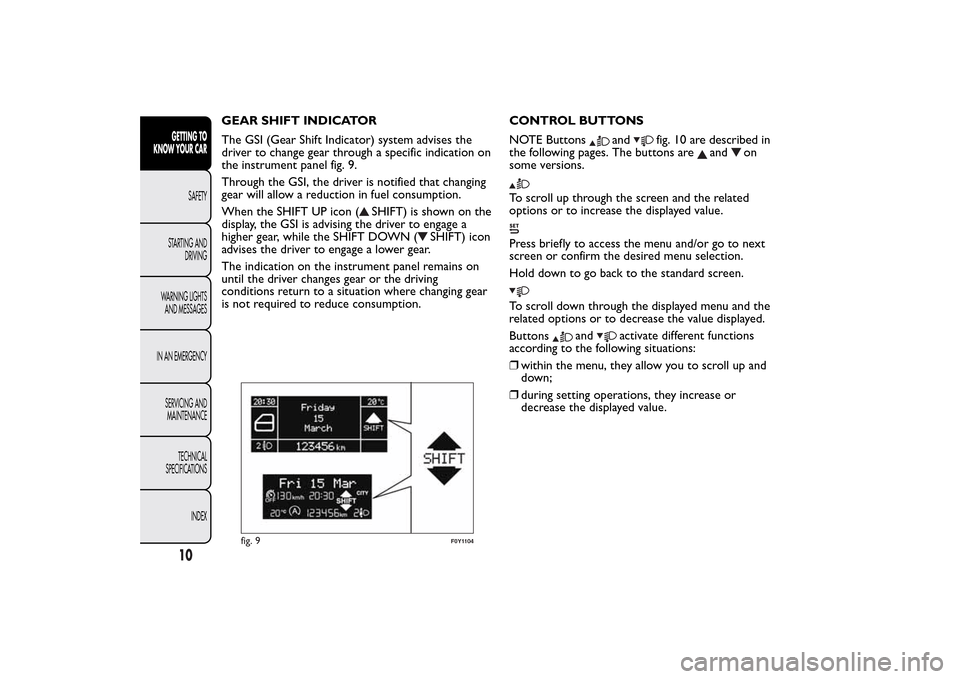
GEAR SHIFT INDICATOR
The GSI (Gear Shift Indicator) system advises the
driver to change gear through a specific indication on
the instrument panel fig. 9.
Through the GSI, the driver is notified that changing
gear will allow a reduction in fuel consumption.
When the SHIFT UP icon (
SHIFT) is shown on the
display, the GSI is advising the driver to engage a
higher gear, while the SHIFT DOWN (
SHIFT) icon
advises the driver to engage a lower gear.
The indication on the instrument panel remains on
until the driver changes gear or the driving
conditions return to a situation where changing gear
is not required to reduce consumption.CONTROL BUTTONS
NOTE Buttons
and
fig. 10 are described in
the following pages. The buttons are
and
on
some versions.
To scroll up through the screen and the related
options or to increase the displayed value.Press briefly to access the menu and/or go to next
screen or confirm the desired menu selection.
Hold down to go back to the standard screen.To scroll down through the displayed menu and the
related options or to decrease the value displayed.
Buttons
and
activate different functions
according to the following situations:
❒within the menu, they allow you to scroll up and
down;
❒during setting operations, they increase or
decrease the displayed value.
fig. 9
F0Y1104
10GETTING TO
KNOW YOUR CAR
SAFETY
STARTING AND
DRIVING
WARNING LIGHTS
AND MESSAGES
IN AN EMERGENCY
SERVICING AND
MAINTENANCE
TECHNICAL
SPECIFICATIONS
INDEX
Page 16 of 420
Selecting an option from the main menu without a
submenu:
❒briefly press the
button to select the main menu
option to be set;
❒press buttonsor
(with single presses) to
select the new setting;
❒briefly press the
button to store the new setting
and to go back to the same main menu option
selected previously.
Selecting an option from the main menu with a
submenu:
❒briefly press thebutton to display the first
submenu option;
❒press buttonsor
(with single presses) to
scroll through all the submenu options;
❒briefly press the
button to select the displayed
submenu option and to open the relevant setup
menu;
❒press buttonsor
(with single presses) to
select the new setting for this submenu option;
❒briefly press button
to store the new setting and
at the same time go back to the previously
selected menu option.
MENU ITEMSMenu
This option allows you to access the Setup Menu.
Press the
or
button to select the various
Menu items.
Hold down the
button to return to the standard
screen.
Lighting
(Interior light adjustment)
(with side lights on only)
With the side lights on, this function is used to set
the brightness of the instrument panel, uconnect™
system controls (for versions/markets where
provided) and automatic climate control system
controls (for versions/markets where provided) to 8
levels.
Proceed as follows to adjust the brightness:
❒press buttonbriefly. The level set previously
flashes on the display;
12GETTING TO
KNOW YOUR CAR
SAFETY
STARTING AND
DRIVING
WARNING LIGHTS
AND MESSAGES
IN AN EMERGENCY
SERVICING AND
MAINTENANCE
TECHNICAL
SPECIFICATIONS
INDEX
❒press button
or
to set the required
brightness level;
❒press the
button briefly to return to the menu
screen or hold the button down to return to the
standard screen without saving. NoteWith uconnect™ system (for versions/
markets where provided), some Menu items are
shown and managed on the display of the latter and
not on the instrument panel display (refer to the
uconnect™ supplement).
Page 17 of 420
NoteOn versions with reconfigurable multifunction
display adjustment can be made both with lights off
("daytime" mode brightness level) and with lights
on ("nighttime" mode brightness level).
Headlamp alignment (Headlamp alignment
corrector position adjustment)
(for versions/markets, where provided)
This function allows the headlamp alignment
corrector position to be adjusted (on 4 levels).
To carry out the adjustment, proceed as follows:
❒press button
briefly. The level set previously
flashes on the display;
❒press buttonor
to adjust the position;
❒press the
button briefly to return to the menu
screen or hold the button down to return to the
standard screen without storing.
Speed Beep (Speed limit)
This function is used to set the car speed limit (km/h
or mph); the driver is immediately alerted when
this limit is exceeded.
To set the desired speed limit, proceed as follows:
❒briefly press the
button: the display will show
the text "Speed Beep";
❒press buttonor
to select speed limit
activation (On) or deactivation (Off );
❒if the function is on, press
or
to select the
desired speed limit and then pressto confirm.NoteSetting is possible between 30 and 200 km/h,
or 20 and 125 mph, according to the previously
set unit. See the "Measurement unit (Measurement
unit adjustment)" paragraph described below. The
setting will increase/decrease by 5 units each time
button
/
is pressed. Hold down the
/
button to automatically increase/decrease
the setting rapidly. Complete the adjustment with
single presses of the button when you approach the
desired value.
❒press the
button briefly to return to the menu
screen or hold the button down to return to the
standard screen without storing.
To cancel the setting, proceed as follows:
❒briefly press the
button: "On" will flash on the
display;
❒press button: "Off" will flash on the display;
❒press the
button briefly to return to the menu
screen or give the button a long press to return
to the standard screen without storing.
13GETTING TO
KNOW YOUR CARSAFETY
STARTING AND
DRIVING
WARNING LIGHTS
AND MESSAGES
IN AN EMERGENCY
SERVICING AND
MAINTENANCE
TECHNICAL
SPECIFICATIONS
INDEX
Page 18 of 420
Headlight sensor
(Automatic headlight/dusk sensor sensitivity
adjustment)
(for versions/markets, where provided)
This function is used to turn the headlights on or off
according to external light conditions.
The dusk sensor sensitivity can be adjusted according
to 3 levels (level 1 = minimum sensitivity, level 2 =
medium sensitivity, level 3 = maximum sensitivity);
the greater the sensitivity set, the less the external
light variation needed to turn on the lights (e.g. with
a setting on level 3 at sunset the headlights switch
on earlier than in levels 1 and 2).
Proceed as follows to set:
❒press button
briefly. The level set previously
flashes on the display;
❒press theor
button to make the
adjustment;
❒press the
button briefly to return to the menu
screen or hold the button down to return to the
standard screen without storing.
Cornering lights
(Activation/deactivation of cornering lights)
(for versions/markets, where provided)
This function activates/deactivates ("On"/"Off") the
cornering lights (see the description in the “Exterior
lights” paragraph).Proceed as follows to activate/deactivate the lights:
❒press button
briefly. "On" or "Off" flash on
the display, according to what has been previously
set;
❒press
or
to make your choice;
❒press the
button briefly to return to the menu
screen or hold the button down to return to the
standard screen without storing.
Rain sensor
(Rain sensor sensitivity adjustment)
(for versions/markets, where provided)
This function allows you to adjust the rain sensor
sensitivity to 4 levels.
To set the required sensitivity level, proceed as
follows:
❒press button
briefly. The sensitivity “level” set
previously flashes on the display;
❒press theor
button to make the
adjustment;
❒press the
button briefly to return to the menu
screen or hold the button down to return to the
standard screen without storing.
14GETTING TO
KNOW YOUR CAR
SAFETY
STARTING AND
DRIVING
WARNING LIGHTS
AND MESSAGES
IN AN EMERGENCY
SERVICING AND
MAINTENANCE
TECHNICAL
SPECIFICATIONS
INDEX