engine FIAT 500L LIVING 2016 2.G Manual Online
[x] Cancel search | Manufacturer: FIAT, Model Year: 2016, Model line: 500L LIVING, Model: FIAT 500L LIVING 2016 2.GPages: 240, PDF Size: 5.27 MB
Page 204 of 240
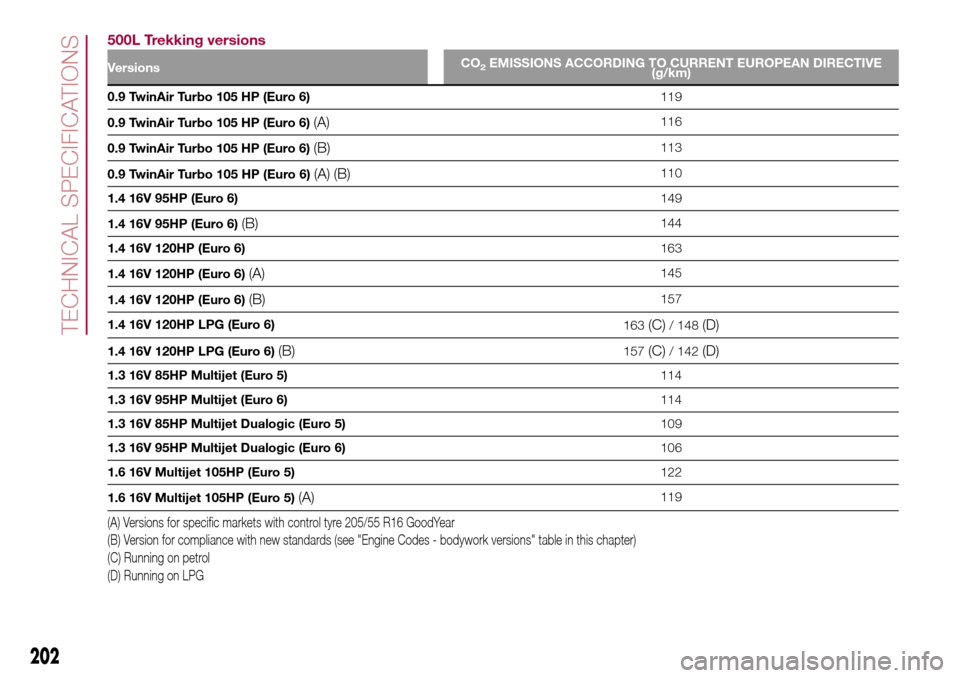
500L Trekking versions
VersionsCO2EMISSIONS ACCORDING TO CURRENT EUROPEAN DIRECTIVE
(g/km)
0.9 TwinAir Turbo 105 HP (Euro 6)119
0.9 TwinAir Turbo 105 HP (Euro 6)
(A)116
0.9 TwinAir Turbo 105 HP (Euro 6)
(B)113
0.9 TwinAir Turbo 105 HP (Euro 6)
(A) (B)110
1.4 16V 95HP (Euro 6)149
1.4 16V 95HP (Euro 6)
(B)144
1.4 16V 120HP (Euro 6)163
1.4 16V 120HP (Euro 6)
(A)145
1.4 16V 120HP (Euro 6)
(B)157
1.4 16V 120HP LPG (Euro 6)
163
(C)/ 148(D)
1.4 16V 120HP LPG (Euro 6)(B)157(C)/ 142(D)
1.3 16V 85HP Multijet (Euro 5)114
1.3 16V 95HP Multijet (Euro 6)114
1.3 16V 85HP Multijet Dualogic (Euro 5)109
1.3 16V 95HP Multijet Dualogic (Euro 6)106
1.6 16V Multijet 105HP (Euro 5)122
1.6 16V Multijet 105HP (Euro 5)
(A)119
(A) Versions for specific markets with control tyre 205/55 R16 GoodYear
(B) Version for compliance with new standards (see "Engine Codes - bodywork versions" table in this chapter)
(C) Running on petrol
(D) Running on LPG
202
TECHNICAL SPECIFICATIONS
Page 206 of 240
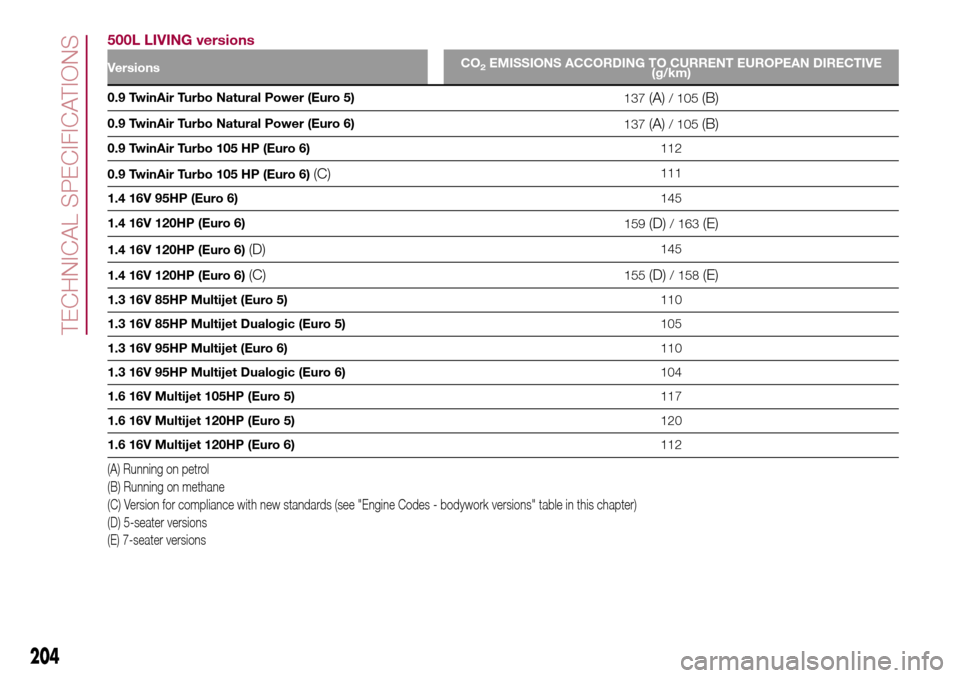
500L LIVING versions
VersionsCO2EMISSIONS ACCORDING TO CURRENT EUROPEAN DIRECTIVE
(g/km)
0.9 TwinAir Turbo Natural Power (Euro 5)
137(A)/ 105(B)
0.9 TwinAir Turbo Natural Power (Euro 6)
137(A)/ 105(B)
0.9 TwinAir Turbo 105 HP (Euro 6)112
0.9 TwinAir Turbo 105 HP (Euro 6)
(C)111
1.4 16V 95HP (Euro 6)145
1.4 16V 120HP (Euro 6)
159
(D)/ 163(E)
1.4 16V 120HP (Euro 6)(D)145
1.4 16V 120HP (Euro 6)
(C)155(D)/ 158(E)
1.3 16V 85HP Multijet (Euro 5)110
1.3 16V 85HP Multijet Dualogic (Euro 5)105
1.3 16V 95HP Multijet (Euro 6)110
1.3 16V 95HP Multijet Dualogic (Euro 6)104
1.6 16V Multijet 105HP (Euro 5)117
1.6 16V Multijet 120HP (Euro 5)120
1.6 16V Multijet 120HP (Euro 6)112
(A) Running on petrol
(B) Running on methane
(C) Version for compliance with new standards (see "Engine Codes - bodywork versions" table in this chapter)
(D) 5-seater versions
(E) 7-seater versions
204
TECHNICAL SPECIFICATIONS
Page 220 of 240
IMPORTANT Do not remove the USB
memory stick nor unpair the
smartphone and theApp Uconnect™
LIVEbefore the system has
downloaded the data, since these
could be lost. During the data transfer
phase on the devices, the display of
Uconnect™could show messages to
properly carry out the operation: refer
to the information provided. These
messages are only displayed with the
ignition key at STOP and when a delay
in the system switching off is set.
Uconnect™. The data are
automatically transferred to the devices
when the engine is switched off. The
data transferred are deleted from the
system memory. You can choose
to store the trip data or not, by pressing
the "Settings" button and by setting
the storage activation and the USB or
Cloud transfer mode.
When the USB memory stick is full, the
dedicated messagesUconnect™
are shown on the radio display.
When theeco:Drive™data are not
transferred to USB memory stick for a
long time, the internal memory of the
systemUconnect™may be
exhausted: in this case follow the
recommendations provided by the
messages on the display.my:Car
my:Car allows you to keep the "health
condition" of your vehicle always under
control. The my:Car application can
detect malfunction in real time and
inform the driver about the expiry of the
servicing interval.
To interact with the application press
the "my: Car" button: the display will
show a screen with the "care:Index"
section, which provides all the detailed
information about the status of the
vehicle. Pressing the "Active warnings"
button it is possible to show (if present)
the details of the vehicle faults which
caused a warning light to switch on.
The vehicle status can be shown both
on www.driveuconnect.eu or through
theUconnect™LIVEapplication.
"SETTINGS" MENU
"Settings" menu display
Versions with Uconnect 5" Radio LIVE:
press the SETTINGS button on the
front panel.
Versions with Uconnect 5" Radio Nav
LIVE: press the "Settings" button on the
display.
The menu comprises the following
options:
❒Display;
❒Clock & Date;❒Safety/Assistance (for versions/
markets, where provided);
❒Lights (for versions/markets where
provided);
❒Doors & Locks;
❒Audio;
❒Phone/Bluetooth;
❒Radio;
❒Restore default settings;
❒Clear Personal Data.
NAVIGATION MODE(Uconnect 5" Radio Nav LIVE versions
only)
Programming a route
IMPORTANT In the interest of safety
and to reduce distractions while you are
driving, you should always plan a route
before you start driving.
To plan a route, do the following:
❒tap the screen to display the Main
menu;
❒select "Navigate to" or "Drive to";
❒select "Address": you can change the
country or state setting by tapping the
flag before you select a city;
❒enter the town or city name, or the
postcode. Towns with similar names
are shown in the list while you type;
Tip: Tap the arrow to the right of the list
to expand the list of suggested towns.
218
MULTIMEDIA
Page 222 of 240
❒connect the prepared USB device to
the computer: TomTom HOME is
launched automatically.
❒select "Enter" in the top right corner
of TomTom HOME;
❒select "Create account" and enter the
required details to create a MyTomTom
account. A MyTomTom account is
required to receive map updates.
After the account is created, you are
asked whether you wish to connect the
Uconnect™system to your account.
The USB device prepared represents
theUconnect™system.
❒select "Connect device", then select
"Close".
A map can now be downloaded to the
USB device.
Download the map
To check whether you are entitled to
download a free map update using the
Most Recent Maps Guarantee, select
"Tools", "Use most recent maps
guarantee" in TomTom HOME.
To purchase a map update, select
"Purchase maps" in TomTom HOME.
If an update has already been
purchased, select "Update device" in
TomTom HOME.
Downloading a map
If a map update is available for the
system, this update is included in the
list of updates available.
NOTE If the most recent map is already
installed on the system, the update is
not proposed.
Select the map that you wish to
download, then select "Update and
install". The map is downloaded and
copied to the USB device.
Select "Done" when the process is
complete.
NOTE Don’t disconnect the USB device
from the computer while map
downloading and copying is in
progress.
The map can now be installed on the
system.
Installing the map
NOTES
❒The update must be carried out
with engine on and might last more
than 30 minutes.
❒Never remove the USB stick in
order not do jeopardize the map
update.
After downloading a map to the USB
device, it can be installed on the
system.Proceed as follows:
❒insert the USB device containing the
new map in theUconnect™system.
The system detects a new map on
the USB device;
❒select "Start": the system starts
updating the map.
NOTE Do not remove the USB device
and do not disconnect the system’s
power supply before the update is
complete. The system cannot be used
until the update is completed correctly.
If the system update is interrupted, start
it again.
Once the map has been updated, the
display shows a dedicated message:
select "Close". The new map is now
available on the system.
Troubleshooting
The following problems may occur
during the update:
❒the map on the USB device is not
valid. In this case, download the map to
the USB device again, using TomTom
HOME. It may be necessary to prepare
the USB device again;
❒the version of the map on the USB
device is the same as or is a previous
version of the one already on the
system. If this occurs, download the
map to the USB device again, using
TomTom HOME. It may be necessary to
prepare the USB device again.
220
MULTIMEDIA
Page 226 of 240
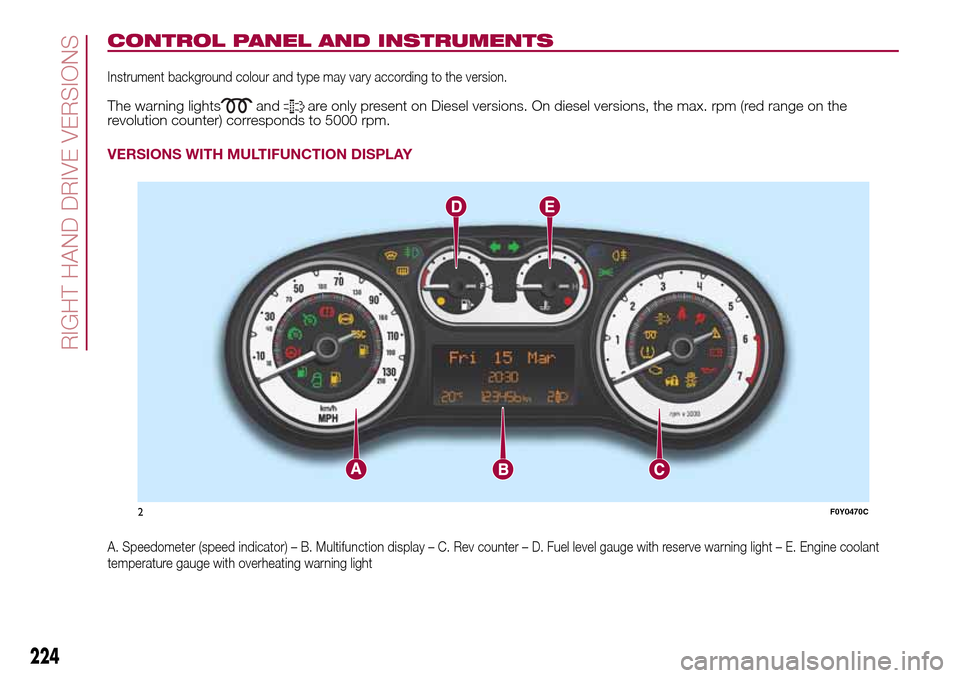
CONTROL PANEL AND INSTRUMENTS
Instrument background colour and type may vary according to the version.
The warning lightsandare only present on Diesel versions. On diesel versions, the max. rpm (red range on the
revolution counter) corresponds to 5000 rpm.
VERSIONS WITH MULTIFUNCTION DISPLAY
A. Speedometer (speed indicator) – B. Multifunction display – C. Rev counter – D. Fuel level gauge with reserve warning light – E. Engine coolant
temperature gauge with overheating warning light
2F0Y0470C
224
RIGHT HAND DRIVE VERSIONS
Page 227 of 240
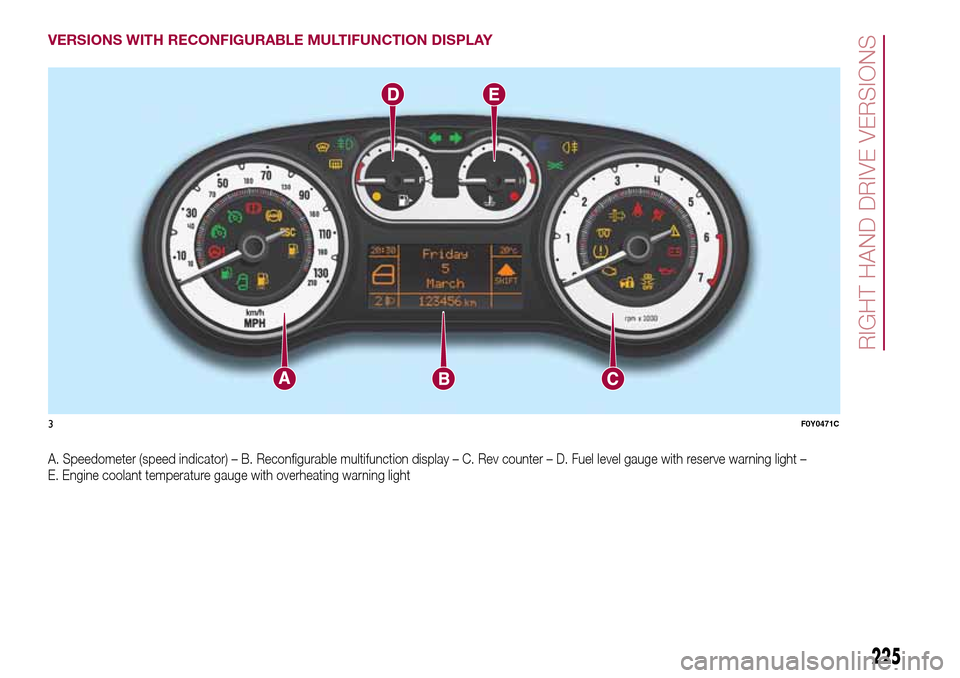
VERSIONS WITH RECONFIGURABLE MULTIFUNCTION DISPLAY
A. Speedometer (speed indicator) – B. Reconfigurable multifunction display – C. Rev counter – D. Fuel level gauge with reserve warning light –
E. Engine coolant temperature gauge with overheating warning light
3F0Y0471C
225
RIGHT HAND DRIVE VERSIONS
Page 230 of 240
WARNING
ROOF RACK/SKI RACK
❒Fully comply with the regulations in force concerning maximum clearance.
LAVAZZA 500 ESPRESSO EXPERIENCE SETUP
❒Use the accessory with engine on, in order to protect the battery charge. If several devices absorbing a high amount of current (e.g.
activation of climate control unit or heated rear window defrosting) are used simultaneously, the accessory could fail to operate.
WIRING FOR RADIO SYSTEM
❒For connection to the radio system set-up, contact a Fiat Dealership to prevent any problem that could impair vehicle safety.
INTERIORS
❒Never use alcohol, petrols and derivatives to clean the dashboard and instrument panel lens.
Page 236 of 240
INDEX
3
rd brake light (changing bulbs)..... 121
ABS (system) ................................ 65
Active safety systems ..................... 65
ASR (system) ................................. 65
Automatic dual-zone climate
control system ............................. 18
Battery (recharging)....................... 153
Bodywork (cleaning and
maintenance) ............................... 157
Bonnet ........................................... 31
Bulb (replacement) ......................... 115
Cargo Magic Space ...................... 30
Checking levels .............................. 145
Child protection systems ................ 76
City Brake Control - Collision
Mitigation System......................... 68
Climate control system ................... 16
CO2 emissions............................... 200
Control buttons .............................. 42
Control panel and on-board
instruments .................................. 40
Cornering lights .............................. 20
Cruise Control (constant speed
regulator)...................................... 99
Dashboard.................................... 7
Daytime running lights (DRL) .......... 19
Dimensions .................................... 174Dipped headlights (bulb
replacement) ................................ 118
Direction indicators (bulb
replacement) ................................ 118
Direction indicators ........................ 20
Display ........................................... 42
Doors ............................................. 26
Driving assistance systems ............ 67
DST (system).................................. 66
Dualdrive (electric power
steering) ....................................... 32
Dusk sensor ................................... 20
Electric sun roof ............................ 24
Electric windows ............................ 28
Engine compartment...................... 145
ERM (system) ................................. 66
ESC (system) ................................. 65
Exterior lights ................................. 19
Fiat CODE (system) ....................... 8
Fixed glass roof .............................. 23
Fix&Go Automatic kit...................... 113
Flashing ......................................... 20
Fluids and lubricants ...................... 193
Fog lights (bulb replacement) ......... 120
Follow Me Home (device) ............... 21
Front airbags .................................. 86
Front seats ..................................... 11
Fuel consumption .......................... 195
Fuel cut-off system......................... 129
Fuses (replacement) ....................... 122
Gear Shift Indicator (system) ......... 42
Handbrake.................................... 94
Hazard warning lights..................... 109
Head restraints............................... 13
Heating and ventilation ................... 16
Hill Holder (system) ........................ 65
Identification data .......................... 160
Ignition device ................................ 10
Important information and
recommendations ........................ 222
iTPMS ............................................ 69
Jump starting ................................ 128
"Lane Change" function ................ 20
Lifting the vehicle .......................... 156
Luggage compartment................... 29
Main beam headlights (bulb
replacement) ................................ 118
Main beam headlights .................... 20
Manual climate control system ....... 17
Multifunction display....................... 42
Number plate lights (bulb
replacement) ................................ 121
Occupant protection systems ....... 71
On-board instruments
– multifunction display .................. 40
– reconfigurable multifunction
display....................................... 41
Parking sensors ............................ 101
INDEX
Page 237 of 240
Performance (top speed) ................ 177
Prescriptions for handling the
vehicle at the end of its life ........... 205
Pretensioners ................................. 74
Rain sensor .................................. 22
Rear seats...................................... 11
Rear view camera .......................... 103
Rear view mirrors ........................... 15
Rear window wiper/washer ............ 22
Reconfigurable multifunction
display ......................................... 42
Refuelling the vehicle ...................... 105
Rims and tyres provided................. 167
Roof lights...................................... 23
SBR (Seat Belt Reminder)
system ......................................... 73
Scheduled servicing ....................... 133
Seat belts....................................... 72
Seats ............................................. 11
Setup menu ................................... 43
Side bags....................................... 90side direction indicators (bulb
replacement) ................................ 119
Side lights/daytime running lights
(DRL) (bulb replacement) .............. 119
Side/taillights - dipped beam
headlights .................................... 20
Speed Limiter................................. 100
Starting the engine ......................... 93
Steering lock .................................. 10
Steering wheel ............................... 14
Stop/Start system .......................... 98
Supplementary Restraint System
(SRS) - Airbag .............................. 86
Supplies ......................................... 191
Symbols......................................... 4The keys ....................................... 8
Third-row rear seats ....................... 12
Tips, controls and general
information ................................... 207
Towing the vehicle .......................... 130
Towing trailers ................................ 104Traction Plus system ...................... 67
Tyre inflation pressure ..................... 171
Uconnect 5 Radio/Uconnect 5
Radio Nav .................................... 209
Use of the Owner Handbook.......... 3
Using the Dualogic gearbox ........... 96
Using the manual gearbox ............. 95
Version with LPG system .............. 33
Version with methane system
(Natural Power) ............................ 36
Warning lights and messages ....... 45
Weights.......................................... 180
Wheel (changing)............................ 109
Wheels and tyres ........................... 157
Wheels ........................................... 167
Window bag .................................. 90
Window cleaning............................ 21
Windscreen/rear window wiper ...... 155
Windscreen wiper/washer .............. 21
Page 238 of 240
FCA Italy S.p.A. - MOPAR
- Technical Services - ServiceEngineering
Largo Senatore G. Agnelli, 3 - 10040
Volvera - Torino (Italia)
Print no. 603.99.746 - 09/201 6 - 4 Edition