AUX FIAT 500X 2015 2.G User Guide
[x] Cancel search | Manufacturer: FIAT, Model Year: 2015, Model line: 500X, Model: FIAT 500X 2015 2.GPages: 240, PDF Size: 10.72 MB
Page 201 of 240
SETTINGSPress the MENU button on the front
panel to display the "Settings" menu.
NOTE The menu items displayed can
vary according to the versions.
The menu includes the following items:
❒System Settings: Language, Reset
Default Value, Ignition time, Volume
limit, Audio-On Radio.
❒Radio Settings: FM Browse, Traffic
Announcement, Regional, Alternative
Frequency.
❒Radio off delay: permits the system
to be kept on for a preset time after
the ignition key is turned to STOP.
AUDIO MODETo access the "Audio" settings menu
briefly press the AUDIO button on
the front panel.
The menu includes the following items:
❒TREBLE: adjustment of high tones;
❒MID: adjustment of mid tones;
❒BASS: adjustment of bass tones;
❒FADER: balancing of front/rear
speakers;
❒BALANCE: balancing of left/right
speakers;
❒SVC: speed adjustment according to
vehicle speed;
❒LOUDNESS: audio improvement at
low volume;
❒AUX OFFSET: radio on or off when
the vehicle is started.
199
15-12-2014 8:23 Pagina 199
Page 203 of 240
Button Functions Mode
Switching on/offBrief button press
Left/right rotation of knob
Volume adjustmentVolume activation/deactivation (Mute/Pause) Brief button pressDisplay on/off Brief button pressExit the selection/return to previous screen Brief button pressSettings Brief button press
BROWSE ENTERScrolling the list or tuning to a radio station Left/right rotation of knob
Confirmation of the option displayed Brief button press
APPSAccess to the additional functions [e.g.: display of time,
compass, outside temperature, Media/Radio, and
Uconnect™LIVEservices (where provided)]Brief button press
PHONEPhone data display Brief button press
TRIP(*) Access to the TRIP menu Brief button press
NAV(**) Access to the Navigation menu Brief button press
MEDIASource selection: USB/iPod or AUX,
Bluetooth
®, SD
(where provided)Brief button press
RADIOAccess to the Radio mode Brief button press
(*)Uconnect™5" Radio LIVE only
(**)Uconnect™5" Radio Nav LIVE only
The system uses the "touch screen" function; to interact with the different functions, press the "graphic buttons" displayed. To
confirm the selection, press the "OK" button. To go back to the previous screen, press the
(delete) button or, depending on
the active screen,
/ Done.
.
201
15-12-2014 8:23 Pagina 201
Page 205 of 240
Buttons InteractionButton A (left side, behind the steering wheel)
Upper button❒Brief button press: search for next radio station or selection of next track on USB/
iPod and SD card (where provided).
❒Long button press: scan of higher frequencies until released/fast forward of track on
USB/iPod and SD card (where provided).
Central buttonWith each press it scrolls through sources AM, FM, USB/iPod, AUX and SD card
(where provided). Only the available sources will be selected.
Lower button❒Brief button press: search for previous radio station or selection of next track on
USB/iPod and SD card (where provided).
❒Long button press: scan of lower frequencies until released/fast forward of track on
USB/iPod and SD card (where provided).
Button B (right side, behind the steering wheel)
Upper buttonVolume increase
❒Brief button press: single volume increase
❒Long button press: fast volume increase
Central button Activation/deactivation of Mute function
Lower buttonVolume decrease
❒Brief button press: single volume decrease
❒Long button press: fast volume decrease
203
15-12-2014 8:23 Pagina 203
Page 206 of 240
SWITCHING THE SYSTEM
ON/OFFThe system is switched on/off by
pressing the
(ON/OFF) button/knob.
Turn the button/knob clockwise to
increase the radio volume or
anticlockwise to decrease it.
USB/iPOD SOURCEThe vehicle is equipped with USB port
and AUX socket. Some versions are
equipped with an SD-SDHC reader
able to read/manage cards with SPI
technology.
Some versions are also equipped with
another USB port, located in the front
armrest compartment.RADIO MODEAfter the desired radio station is
selected, the following information is
shown on the display:
At the top: the list of radio stations
stored (preset) is displayed; the station
being listened to is highlighted.
In the middle: the name of the radio
station being listened to and the
buttons to select the previous or the
next radio station are displayed.
At the bottom: display of the following
buttons:
❒"Browse": list of the radio stations
available;❒"AM/FM", "AM/DAB", "FM/DAB":
selection of the desired frequency band
(button reconfigurable according to
the band selected: AM, FM or DAB);
❒"Tune" : manual radio station tuning
(not available for DAB radios);
❒"Info": additional information on the
source being listened to;
❒"Audio": access to the "Audio
settings" screen.
Audio menuThe following adjustments can be
carried out using the "Audio" menu:
❒"Equaliser" (where provided);
❒"Balance/Fader" (left/right and
front/rear sound balance adjustment);
❒"Speed/Volume" (speed-dependent
automatic volume control);
❒"Loudness" (where provided);
❒"Radio Auto-On";
❒"Radio Off Delay".
To exit the "Audio" menu, press the
/Done button.
MEDIA MODE
Audio source selectionPress the "choose source" button to
select the desired audio source among
those available: AUX, USB / iPod, SD
(where provided) orBluetooth®.
Note: Applications used on portable
devices may be not compatible with the
Uconnect™system.Track selection
(Browse)With Media mode active, briefly press
the
/
buttons to play the
previous/next track or keep the
/
buttons pressed to fast rewind/
forward the track.
Note: For languages not supported by
the system which feature special
characters (e.g. Greek), the keyboard is
not available. In these cases this
function will be limited.
Bluetooth® SOURCE
Pairing a Bluetooth®
audio deviceTo pair aBluetooth® audio device,
proceed as follows:
❒activate theBluetooth® function on
the device;
❒Press the MEDIA button on the front
panel;
❒if the "Media" source is active, press
the "Source" button;
204
MULTIMEDIA
15-12-2014 8:23 Pagina 204
Page 217 of 240
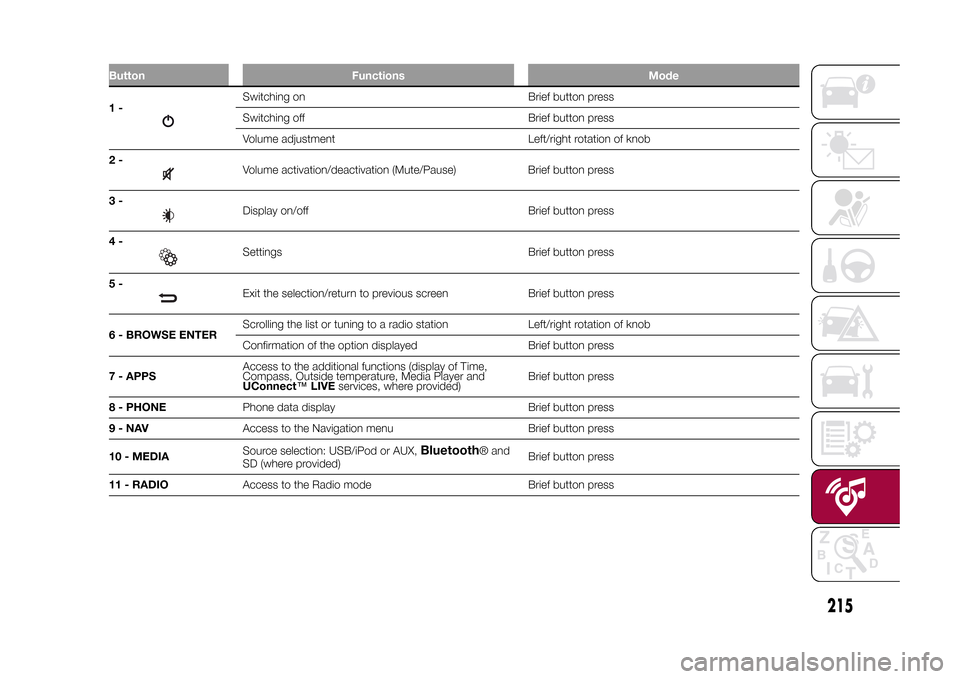
Button Functions Mode1-
Switching on Brief button press
Switching off Brief button press
Volume adjustment Left/right rotation of knob
2-Volume activation/deactivation (Mute/Pause) Brief button press
3-Display on/off Brief button press
4-Settings Brief button press
5-Exit the selection/return to previous screen Brief button press
6 - BROWSE ENTERScrolling the list or tuning to a radio station Left/right rotation of knob
Confirmation of the option displayed Brief button press
7 - APPSAccess to the additional functions (display of Time,
Compass, Outside temperature, Media Player and
UConnect™LIVEservices, where provided)Brief button press
8 - PHONEPhone data display Brief button press
9-NAVAccess to the Navigation menu Brief button press
10 - MEDIASource selection: USB/iPod or AUX,
Bluetooth
® and
SD (where provided)Brief button press
11 - RADIOAccess to the Radio mode Brief button press
.
215
15-12-2014 8:23 Pagina 215
Page 219 of 240
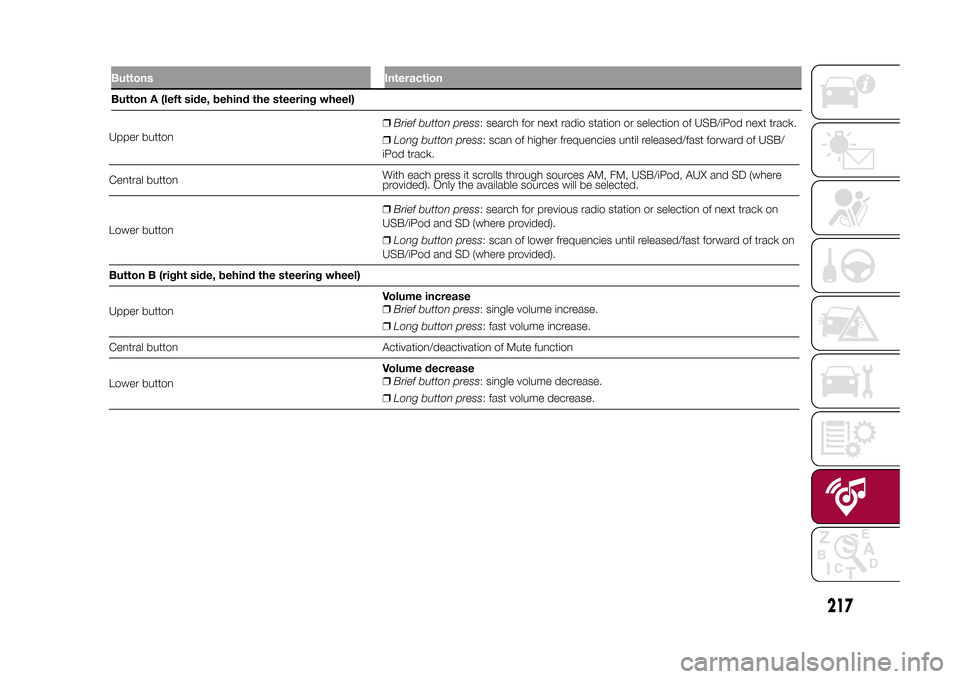
Upper button❒Brief button press: search for next radio station or selection of USB/iPod next track.
❒Long button press: scan of higher frequencies until released/fast forward of USB/
iPod track.
Central buttonWith each press it scrolls through sources AM, FM, USB/iPod, AUX and SD (where
provided). Only the available sources will be selected.
Lower button❒Brief button press: search for previous radio station or selection of next track on
USB/iPod and SD (where provided).
❒Long button press: scan of lower frequencies until released/fast forward of track on
USB/iPod and SD (where provided).
Button B (right side, behind the steering wheel)
Upper buttonVolume increase
❒Brief button press: single volume increase.
❒Long button press: fast volume increase.
Central button Activation/deactivation of Mute function
Lower buttonVolume decrease
❒Brief button press: single volume decrease.
❒Long button press: fast volume decrease.
217
15-12-2014 8:23 Pagina 217
Buttons InteractionButton A (left side, behind the steering wheel)
Page 221 of 240
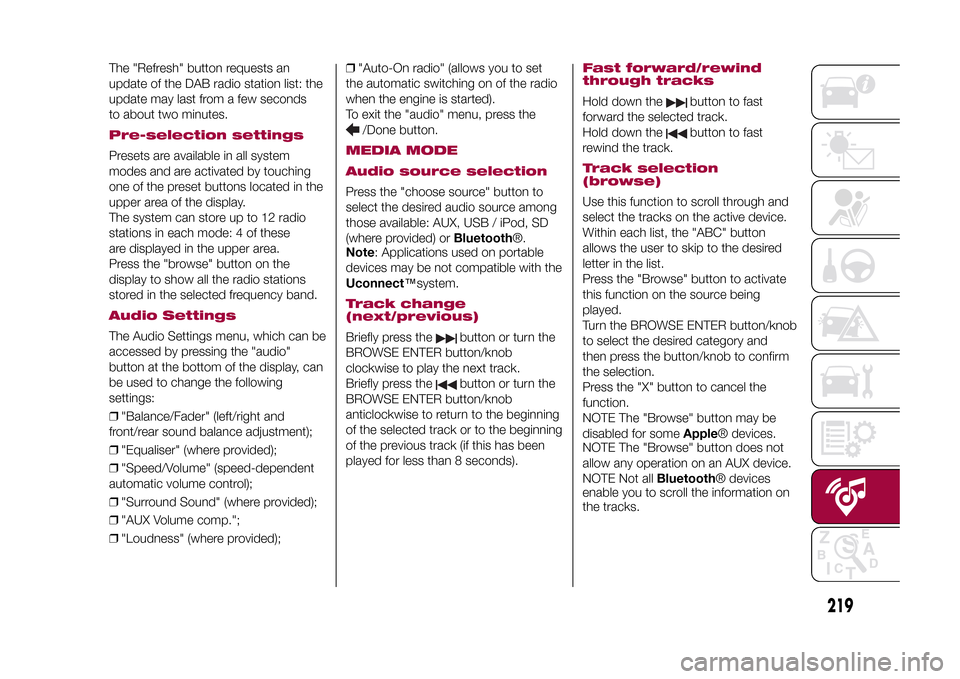
The "Refresh" button requests an
update of the DAB radio station list: the
update may last from a few seconds
to about two minutes.Pre-selection settingsPresets are available in all system
modes and are activated by touching
one of the preset buttons located in the
upper area of the display.
The system can store up to 12 radio
stations in each mode: 4 of these
are displayed in the upper area.
Press the "browse" button on the
display to show all the radio stations
stored in the selected frequency band.Audio SettingsThe Audio Settings menu, which can be
accessed by pressing the "audio"
button at the bottom of the display, can
be used to change the following
settings:
❒"Balance/Fader" (left/right and
front/rear sound balance adjustment);
❒"Equaliser" (where provided);
❒"Speed/Volume" (speed-dependent
automatic volume control);
❒"Surround Sound" (where provided);
❒"AUX Volume comp.";
❒"Loudness" (where provided);❒"Auto-On radio" (allows you to set
the automatic switching on of the radio
when the engine is started).
To exit the "audio" menu, press the
/Done button.
MEDIA MODE
Audio source selectionPress the "choose source" button to
select the desired audio source among
those available: AUX, USB / iPod, SD
(where provided) orBluetooth®.
Note: Applications used on portable
devices may be not compatible with the
Uconnect™system.Track change
(next/previous)Briefly press the
button or turn the
BROWSE ENTER button/knob
clockwise to play the next track.
Briefly press thebutton or turn the
BROWSE ENTER button/knob
anticlockwise to return to the beginning
of the selected track or to the beginning
of the previous track (if this has been
played for less than 8 seconds).
Fast forward/rewind
through tracksHold down the
button to fast
forward the selected track.
Hold down thebutton to fast
rewind the track.
Track selection
(browse)Use this function to scroll through and
select the tracks on the active device.
Within each list, the "ABC" button
allows the user to skip to the desired
letter in the list.
Press the "Browse" button to activate
this function on the source being
played.
Turn the BROWSE ENTER button/knob
to select the desired category and
then press the button/knob to confirm
the selection.
Press the "X" button to cancel the
function.
NOTE The "Browse" button may be
disabled for someApple® devices.
NOTE The "Browse" button does not
allow any operation on an AUX device.
NOTE Not allBluetooth® devices
enable you to scroll the information on
the tracks.
219
15-12-2014 8:23 Pagina 219
Page 223 of 240
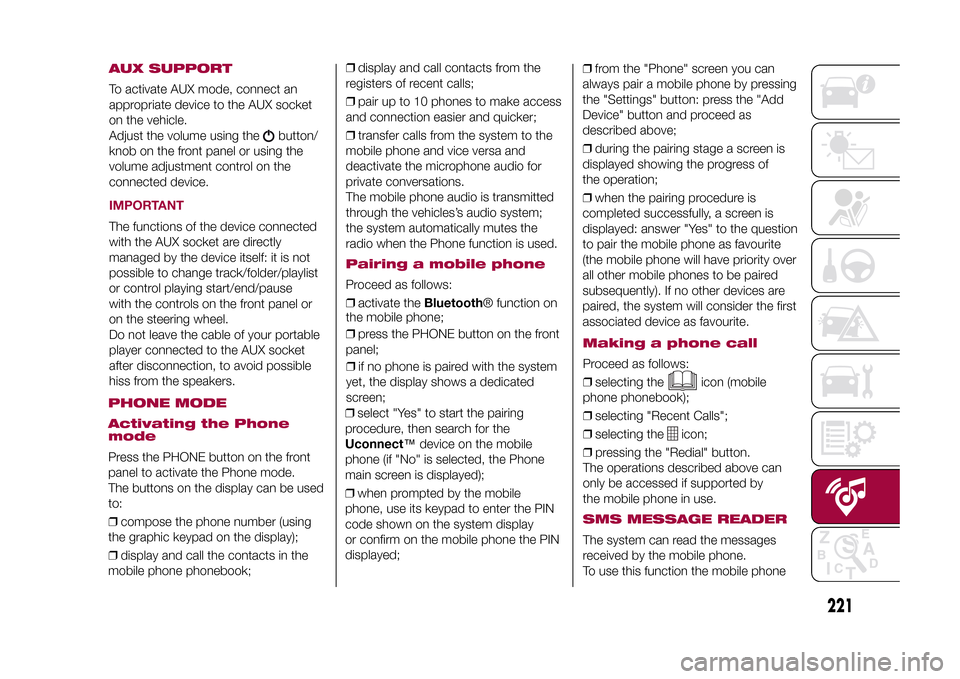
AUX SUPPORTTo activate AUX mode, connect an
appropriate device to the AUX socket
on the vehicle.
Adjust the volume using the
button/
knob on the front panel or using the
volume adjustment control on the
connected device.
IMPORTANTThe functions of the device connected
with the AUX socket are directly
managed by the device itself: it is not
possible to change track/folder/playlist
or control playing start/end/pause
with the controls on the front panel or
on the steering wheel.
Do not leave the cable of your portable
player connected to the AUX socket
after disconnection, to avoid possible
hiss from the speakers.PHONE MODE
Activating the Phone
modePress the PHONE button on the front
panel to activate the Phone mode.
The buttons on the display can be used
to:
❒compose the phone number (using
the graphic keypad on the display);
❒display and call the contacts in the
mobile phone phonebook;❒display and call contacts from the
registers of recent calls;
❒pair up to 10 phones to make access
and connection easier and quicker;
❒transfer calls from the system to the
mobile phone and vice versa and
deactivate the microphone audio for
private conversations.
The mobile phone audio is transmitted
through the vehicles’s audio system;
the system automatically mutes the
radio when the Phone function is used.
Pairing a mobile phoneProceed as follows:
❒activate theBluetooth® function on
the mobile phone;
❒press the PHONE button on the front
panel;
❒if no phone is paired with the system
yet, the display shows a dedicated
screen;
❒select "Yes" to start the pairing
procedure, then search for the
Uconnect™device on the mobile
phone (if "No" is selected, the Phone
main screen is displayed);
❒when prompted by the mobile
phone, use its keypad to enter the PIN
code shown on the system display
or confirm on the mobile phone the PIN
displayed;❒from the "Phone" screen you can
always pair a mobile phone by pressing
the "Settings" button: press the "Add
Device" button and proceed as
described above;
❒during the pairing stage a screen is
displayed showing the progress of
the operation;
❒when the pairing procedure is
completed successfully, a screen is
displayed: answer "Yes" to the question
to pair the mobile phone as favourite
(the mobile phone will have priority over
all other mobile phones to be paired
subsequently). If no other devices are
paired, the system will consider the first
associated device as favourite.
221
15-12-2014 8:23 Pagina 221
Making a phone callProceed as follows:
❒selecting the
icon (mobile
phone phonebook);
❒selecting "Recent Calls";
❒selecting the
icon;
❒pressing the "Redial" button.
The operations described above can
only be accessed if supported by
the mobile phone in use.
SMS MESSAGE READERThe system can read the messages
received by the mobile phone.
To use this function the mobile phone