change time FIAT 500X 2015 2.G User Guide
[x] Cancel search | Manufacturer: FIAT, Model Year: 2015, Model line: 500X, Model: FIAT 500X 2015 2.GPages: 240, PDF Size: 10.72 MB
Page 79 of 240
SBR (Seat Belt
Reminder) SYSTEMThe SBR system warns the passengers
of the front and rear (where provided)
seats if their seat belt is not fastened.
The system signals unfastened seat
belts with visual warnings (warning light
on in the instrument panel and symbols
on the display) and an acoustic signal
(see the following paragraphs).
NOTE To deactivate the acoustic
warning permanently go to a
Fiat Dealership. The acoustic warning
can be reactivated at any time through
the display Menu (see the "Display"
paragraph in the “Knowing the
instrument panel” chapter).FRONT SEAT BELT
WARNING LIGHT
BEHAVIOURWhen the ignition device is turned to
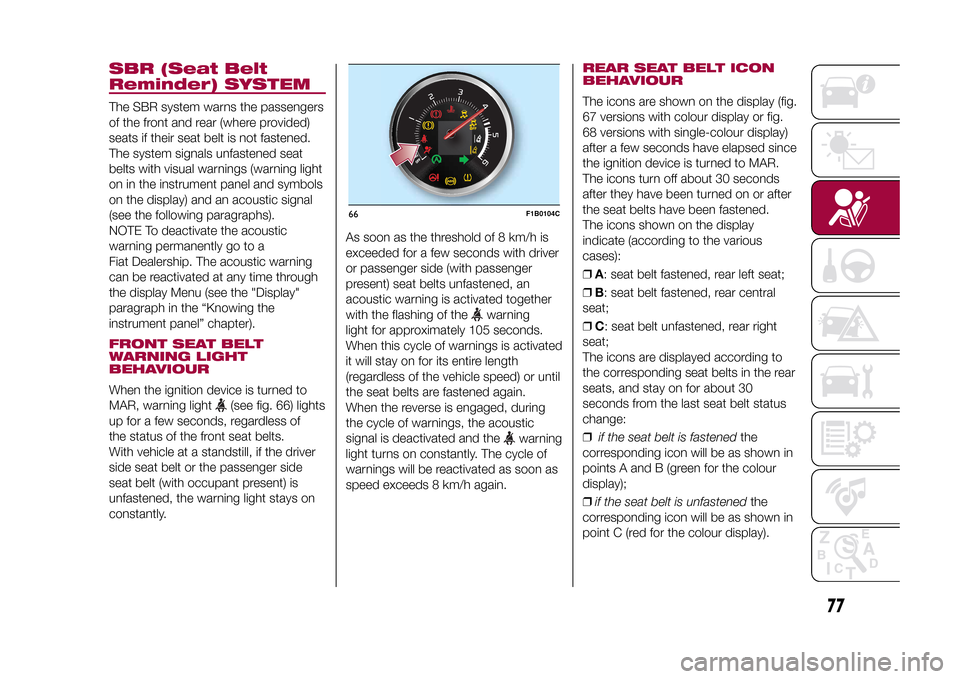
MAR, warning light
(see fig. 66) lights
up for a few seconds, regardless of
the status of the front seat belts.
With vehicle at a standstill, if the driver
side seat belt or the passenger side
seat belt (with occupant present) is
unfastened, the warning light stays on
constantly.As soon as the threshold of 8 km/h is
exceeded for a few seconds with driver
or passenger side (with passenger
present) seat belts unfastened, an
acoustic warning is activated together
with the flashing of the
warning
light for approximately 105 seconds.
When this cycle of warnings is activated
it will stay on for its entire length
(regardless of the vehicle speed) or until
the seat belts are fastened again.
When the reverse is engaged, during
the cycle of warnings, the acoustic
signal is deactivated and the
warning
light turns on constantly. The cycle of
warnings will be reactivated as soon as
speed exceeds 8 km/h again.
REAR SEAT BELT ICON
BEHAVIOURThe icons are shown on the display (fig.
67 versions with colour display or fig.
68 versions with single-colour display)
after a few seconds have elapsed since
the ignition device is turned to MAR.
The icons turn off about 30 seconds
after they have been turned on or after
the seat belts have been fastened.
The icons shown on the display
indicate (according to the various
cases):
❒A: seat belt fastened, rear left seat;
❒B: seat belt fastened, rear central
seat;
❒C: seat belt unfastened, rear right
seat;
The icons are displayed according to
the corresponding seat belts in the rear
seats, and stay on for about 30
seconds from the last seat belt status
change:
❒if the seat belt is fastenedthe
corresponding icon will be as shown in
points A and B (green for the colour
display);
❒if the seat belt is unfastenedthe
corresponding icon will be as shown in
point C (red for the colour display).
66
F1B0104C
77
15-12-2014 8:23 Pagina 77
Page 80 of 240

If a rear seat belt is unfastened, an
acoustic warning (3 "beeps") will be
activated along with the relevant icon
lighting up in the display.
Furthermore the icons will light up again
for 30 seconds each time one of the
doors is closed.
The icon will turn green after the
corresponding seat belt has been
fastened.The rear seat icons will go out,
regardless of the state of the belt (red
icon or green icon), approximately
30 seconds after the last signal.
IMPORTANTAs far as the rear seats are concerned,
the SBR system will only indicate
whether the seat belts are unfastened
(red icon) or fastened (green icon),
not the presence of any passengers.For the rear seats, the icons will
activate a few seconds after the ignition
device has been turned to MAR,
regardless of the status of the seat
belts (even if the seat belts are all
fastened).
All the warning lights/icons will come on
when at least one belt changes from
fastened to unfastened status or vice
versa.
67
F1B0105C
08:30
KM/H
120
22°C
04/07/2014
1230km
68
F1B0106C
78
SAFETY
15-12-2014 8:23 Pagina 78
Page 81 of 240
PRETENSIONERSThe vehicle is equipped with front seat
belt pretensioners, which draw back
the seat belts by several centimetres in
the event of a strong frontal impact.
This guarantees the perfect adherence
of the seat belts to the occupant's
bodies before the retention action
begins.
It is evident that the pretensioners have
been activated when the safety belt
withdraws toward the retractor.
This vehicle is also equipped with a
second pretensioner (in the kick plate
area). Its activation is signalled by
the shortening of the metal cable and
rolling up of the protective sheath.
A slight discharge of smoke may be
produced during the activation of the
pretensioner which is not harmful and
does not indicate any fire hazard.
The pretensioner does not require any
maintenance or lubrication: any
changes to its original conditions will
invalidate its efficiency.
If, due to unusual natural events (floods,
sea storms, etc.), the device has been
affected by water and/or mud, contact
a Fiat Dealership to have it replaced.IMPORTANT To obtain the highest
degree of protection from the action of
the pretensioner, wear the seat belt
tight to the torso and pelvis.
LOAD LIMITERS
72)32)
To increase safety in the event of an
accident, the front seat belt retractors
contain a load limiter which controls the
force acting on the chest and
shoulders during the belt restraining
action in the event of a head-on
collision.GENERAL
INSTRUCTIONS FOR
USING THE SEAT BELTS
73) 74) 75)
Respect and ensure that all the other
occupants of the vehicle comply with
the local laws in force regarding the use
of seat belts. Always fasten the seat
belts before setting off.
Seat belts must also be worn by
pregnant women: the risk of injury in
the event of an accident is reduced for
them and the unborn child if they are
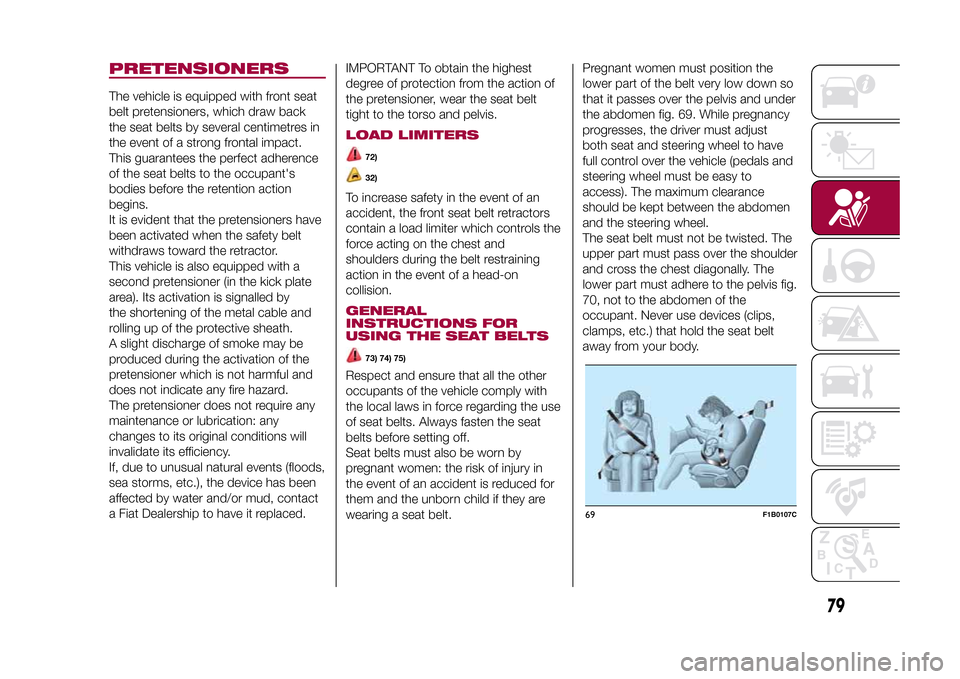
wearing a seat belt.Pregnant women must position the
lower part of the belt very low down so
that it passes over the pelvis and under
the abdomen fig. 69. While pregnancy
progresses, the driver must adjust
both seat and steering wheel to have
full control over the vehicle (pedals and
steering wheel must be easy to
access). The maximum clearance
should be kept between the abdomen
and the steering wheel.
The seat belt must not be twisted. The
upper part must pass over the shoulder
and cross the chest diagonally. The
lower part must adhere to the pelvis fig.
70, not to the abdomen of the
occupant. Never use devices (clips,
clamps, etc.) that hold the seat belt
away from your body.
69
F1B0107C
79
15-12-2014 8:23 Pagina 79
Page 106 of 240
MANUAL GEARBOX
110)37)
To engage the gears, press the clutch
pedal fully and put the gear lever into
the required position (the diagram
for gear engagement is shown on the
knob ).
To engage 6
th
gear, operate the lever by
pressing it towards the right in order to
avoid engaging 4
th
gear by mistake.
The same applies to the shift from 6
th
to 5
th
gear.
1.4 Turbo MultiAir - 1.6 MultiJet -
2.0 MultiJet versions with manual
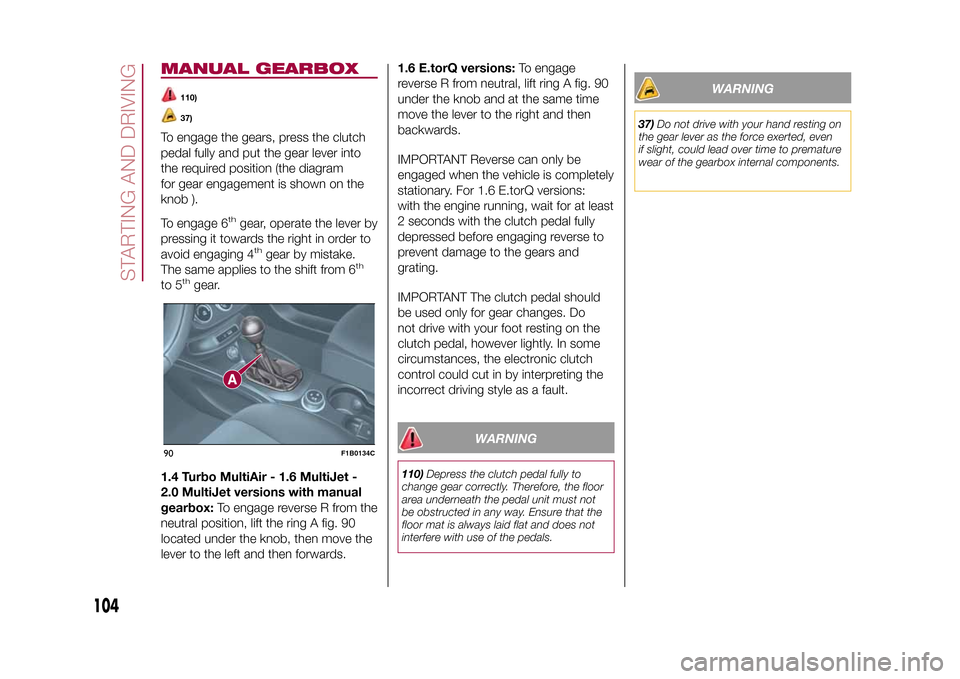
gearbox:To engage reverse R from the
neutral position, lift the ring A fig. 90
located under the knob, then move the
lever to the left and then forwards.1.6 E.torQ versions:To engage
reverse R from neutral, lift ring A fig. 90
under the knob and at the same time
move the lever to the right and then
backwards.
IMPORTANT Reverse can only be
engaged when the vehicle is completely
stationary. For 1.6 E.torQ versions:
with the engine running, wait for at least
2 seconds with the clutch pedal fully
depressed before engaging reverse to
prevent damage to the gears and
grating.
IMPORTANT The clutch pedal should
be used only for gear changes. Do
not drive with your foot resting on the
clutch pedal, however lightly. In some
circumstances, the electronic clutch
control could cut in by interpreting the
incorrect driving style as a fault.
WARNING
110)Depress the clutch pedal fully to
change gear correctly. Therefore, the floor
area underneath the pedal unit must not
be obstructed in any way. Ensure that the
floor mat is always laid flat and does not
interfere with use of the pedals.
WARNING
37)Do not drive with your hand resting on
the gear lever as the force exerted, even
if slight, could lead over time to premature
wear of the gearbox internal components.
90
F1B0134C
104
STARTING AND DRIVING
12-1-2015 15:6 Pagina 104
Page 136 of 240
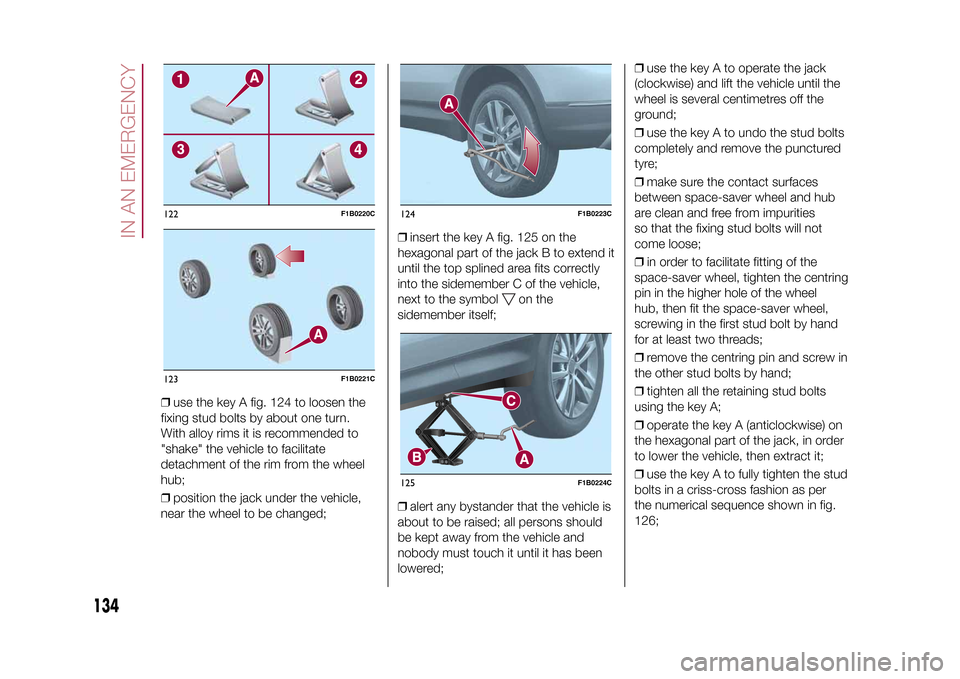
❒use the key A fig. 124 to loosen the
fixing stud bolts by about one turn.
With alloy rims it is recommended to
"shake" the vehicle to facilitate
detachment of the rim from the wheel
hub;
❒position the jack under the vehicle,
near the wheel to be changed;❒insert the key A fig. 125 on the
hexagonal part of the jack B to extend it
until the top splined area fits correctly
into the sidemember C of the vehicle,
next to the symbol
on the
sidemember itself;
❒alert any bystander that the vehicle is
about to be raised; all persons should
be kept away from the vehicle and
nobody must touch it until it has been
lowered;❒use the key A to operate the jack
(clockwise) and lift the vehicle until the
wheel is several centimetres off the
ground;
❒use the key A to undo the stud bolts
completely and remove the punctured
tyre;
❒make sure the contact surfaces
between space-saver wheel and hub
are clean and free from impurities
so that the fixing stud bolts will not
come loose;
❒in order to facilitate fitting of the
space-saver wheel, tighten the centring
pin in the higher hole of the wheel
hub, then fit the space-saver wheel,
screwing in the first stud bolt by hand
for at least two threads;
❒remove the centring pin and screw in
the other stud bolts by hand;
❒tighten all the retaining stud bolts
using the key A;
❒operate the key A (anticlockwise) on
the hexagonal part of the jack, in order
to lower the vehicle, then extract it;
❒use the key A to fully tighten the stud
bolts in a criss-cross fashion as per
the numerical sequence shown in fig.
126;
122
F1B0220C
123
F1B0221C
124
F1B0223C
125
F1B0224C
134
IN AN EMERGENCY
15-12-2014 8:23 Pagina 134
Page 137 of 240
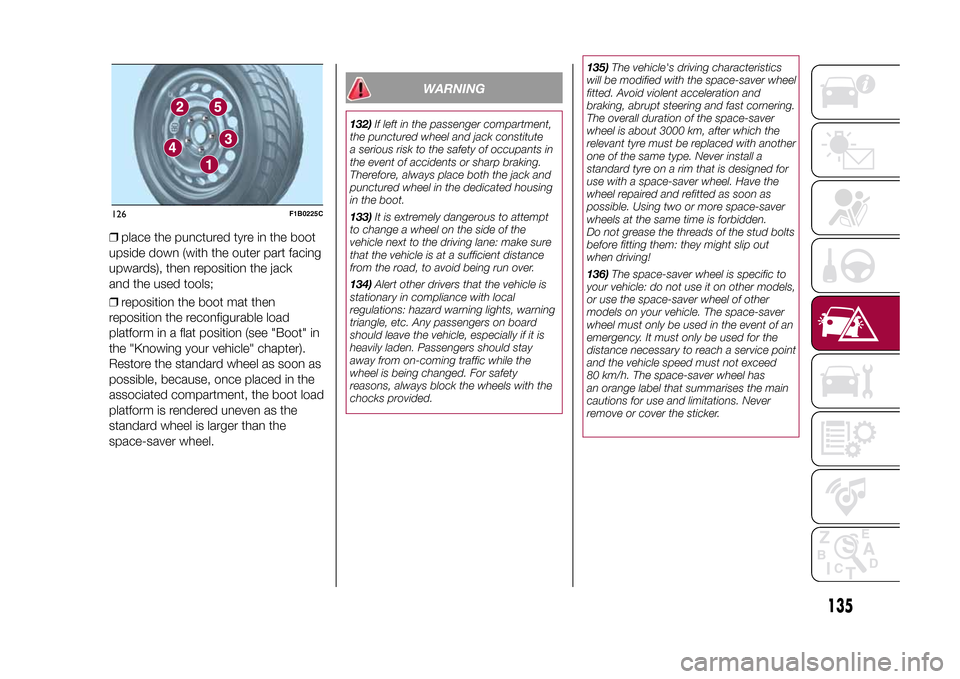
❒place the punctured tyre in the boot
upside down (with the outer part facing
upwards), then reposition the jack
and the used tools;
❒reposition the boot mat then
reposition the reconfigurable load
platform in a flat position (see "Boot" in
the "Knowing your vehicle" chapter).
Restore the standard wheel as soon as
possible, because, once placed in the
associated compartment, the boot load
platform is rendered uneven as the
standard wheel is larger than the
space-saver wheel.
WARNING
132)If left in the passenger compartment,
the punctured wheel and jack constitute
a serious risk to the safety of occupants in
the event of accidents or sharp braking.
Therefore, always place both the jack and
punctured wheel in the dedicated housing
in the boot.
133)It is extremely dangerous to attempt
to change a wheel on the side of the
vehicle next to the driving lane: make sure
that the vehicle is at a sufficient distance
from the road, to avoid being run over.
134)Alert other drivers that the vehicle is
stationary in compliance with local
regulations: hazard warning lights, warning
triangle, etc. Any passengers on board
should leave the vehicle, especially if it is
heavily laden. Passengers should stay
away from on-coming traffic while the
wheel is being changed. For safety
reasons, always block the wheels with the
chocks provided.135)The vehicle's driving characteristics
will be modified with the space-saver wheel
fitted. Avoid violent acceleration and
braking, abrupt steering and fast cornering.
The overall duration of the space-saver
wheel is about 3000 km, after which the
relevant tyre must be replaced with another
one of the same type. Never install a
standard tyre on a rim that is designed for
use with a space-saver wheel. Have the
wheel repaired and refitted as soon as
possible. Using two or more space-saver
wheels at the same time is forbidden.
Do not grease the threads of the stud bolts
before fitting them: they might slip out
when driving!
136)The space-saver wheel is specific to
your vehicle: do not use it on other models,
or use the space-saver wheel of other
models on your vehicle. The space-saver
wheel must only be used in the event of an
emergency. It must only be used for the
distance necessary to reach a service point
and the vehicle speed must not exceed
80 km/h. The space-saver wheel has
an orange label that summarises the main
cautions for use and limitations. Never
remove or cover the sticker.
126
F1B0225C
135
15-12-2014 8:23 Pagina 135
Page 164 of 240
160)Do not travel if the windscreen washer
reservoir is empty: using the windscreen
washer is essential for improving visibility.
Repeated operation of the system without
fluid could damage or cause rapid
deterioration of some system components.
161)Certain commercial additives for
windscreen washer fluids are inflammable.
The engine compartment contains hot
components which may set it on fire.
162)Brake fluid is poisonous and highly
corrosive. In the event of accidental
contact, immediately wash the affected
parts with water and mild soap. Then rinse
thoroughly. In the case of swallowing
immediately call a doctor.
163)The symbol
, which is on the
container, indicates a synthetic brake fluid,
which is different from a mineral fluid.
Use of a mineral-based fluid will damage
the special rubber seals of the braking
system beyond repair.
164)Battery fluid is poisonous and
corrosive. Avoid contact with the skin and
eyes. Keep naked flames or possible
sources of sparks away from the battery:
risk of explosion or fire.
165)Using the battery when the fluid is too
low can damage it irreparably and generate
a risk of explosion.
166)When performing any operation on
the battery or near it, always protect your
eyes with special goggles.
WARNING
58)Be careful not to confuse the various
types of fluids while topping up: they
are not compatible with each other!
Topping up with an unsuitable fluid could
severely damage your vehicle.
59)The oil level should never exceed the
MAX mark.
60)Do not add oil with specifications other
than those of the oil already in the engine.
61)PARAFLU
UP
anti-freeze is used in
the engine cooling system. Use fluid of the
same type as that contained in the cooling
system for any top-ups. PARAFLU
UP
cannot be mixed with any other type of
fluid. If this happens, do not start the
engine under any circumstances
and contact a Fiat Dealership.
62)Avoid allowing brake fluid, which is
extremely corrosive, to come into contact
with painted areas. Should it happen, wash
immediately with water.
63)If the vehicle must remain unused for a
long time at a very low temperature,
remove the battery and take it to a warm
place, to avoid freezing.
64)Incorrect assembly of electrical and
electronic accessories may cause severe
damage to your vehicle. Go to a Fiat
Dealership if you want to install accessories
(e.g. anti-theft, radio phone, etc.): they will
suggest the most suitable devices and
advise you whether a higher capacity
battery needs to be installed.
WARNING
4)The used engine oil and the filter that
has been replaced contain substances that
are harmful to the environment. It is
advisable to contact a Fiat Dealership to
have the oil and filters changed.
5)Used transmission fluid contains
substances that are harmful to the
environment. It is advisable to contact a
Fiat Dealership to have the fluid changed.
6)Batteries contain substances which
are very dangerous for the environment.
For battery replacement, contact a Fiat
Dealership.
162
SERVICING AND MAINTENANCE
15-12-2014 8:23 Pagina 162
Page 199 of 240
SWITCHING THE SYSTEM
ON/OFFThe system is switched on/off by
pressing the
button/knob.
Turn the button/knob clockwise to
increase the radio volume or
anticlockwise to decrease it.
RADIO (TUNER) MODEThe system features the following
tuners: AM, FM.Radio mode selectionPress the RADIO button on the front
panel to activate radio mode.Selecting a frequency
bandThe different tuning modes can be
selected by pressing the RADIO button
on the front panel.Indications on displayAfter the desired radio station is
selected on the display, the following
information is shown (INFO mode
activated):
In the upper part: the preset station, the
time and the other active radio settings
are highlighted.
In the central part: the name of the
current station, the frequency and the
radio text information (if any) are
highlighted.
FM station listPress the BROWSE ENTER button/
knob to display the complete list of the
FM stations that can be received.AM/FM radio station
storageThe preset stations are available in all
system modes and are selected by
touching one of the presetting buttons
1-2-3-4-5-6on the front panel.
If you are tuned to a radio station that
you wish to store, hold down the button
on the display which corresponds to
the desired preset until an acoustic
confirmation signal is emitted.AM/FM radio station
selectionTo search for the desired radio station
press the
or
button or use
the wheel of the steering wheel controls
, or turn the "BROWSE ENTER"
knob.
Previous/next radio
station searchPress briefly the
or
button or
use the wheel of the steering wheel
controls
: when the button is
released the previous or next
radio station is displayed.
Previous/next radio
station fast searchHold down the
or
button to
start the fast search: when the button is
released, the first tunable radio is
played.
MEDIA MODEInteraction modes for AUX, USB/iPod
operation.Track change
(next/previous)Briefly press the
button or turn the
BROWSE ENTER button/knob
clockwise to play the next track.
Briefly press thebutton or turn the
BROWSE ENTER button/knob
anticlockwise to return to the beginning
of the selected track or to the beginning
of the previous track (if this has been
played for less than 3 seconds).
Fast forward/rewind
through tracksHold down the
button to fast
forward the selected track.
Hold down thebutton to fast
rewind the track.
197
15-12-2014 8:23 Pagina 197
Page 200 of 240
Track selection
(browse)Use this function to scroll through and
select the tracks on the active device.
The choices available depend on the
device connected.
For example, on an USB/iPod device
you can also scroll through the list
of artists, genres and albums available
depending on the information present
on the tracks using the BROWSE
ENTER button/knob.
Within each alphabetical list, theA-B-C
button on the front panel allows the
user to skip to the desired letter in the
list.
NOTE This button might be disabled for
someApple® devices.
NOTE The BROWSE ENTER button
does not allow any operation on an
AUX device.
Press the BROWSE ENTER button to
activate this function on the source
being played.
Turn the BROWSE ENTER button/knob
to select the desired category and
then press the button/knob to confirm
the selection.
Press the
button to cancel the
function.
Audio source selectionPress theMEDIAbutton to select the
desired audio source among those
available: AUX or USB/iPod.Track information
displayPress theINFObutton to select the
information displayed while playing
(Artist, Album, Genre, Name, Folder,
File name).
Press the
button to exit the screen.
ShufflePress the
button to play the tracks
on USB/iPod in a random order.
Press again to deactivate the function.
RepeatTo listen to the track again, press the
button.
Press again to deactivate the function.
AUX SUPPORTTo activate AUX mode, insert an
appropriate device in the AUX socket
on the vehicle.
Adjust the volume using the
button/
knob on the front panel or using the
volume adjustment control on the
connected device.
For the "Audio source selection"
function, see the "Media mode"
chapter.
IMPORTANTThe functions of the device connected
with the AUX socket are directly
managed by the device itself: it is not
possible to change track/folder/playlist
or control playing start/end/pause
with the controls on the front panel or
on the steering wheel.
Do not leave the cable of your portable
player connected to the AUX socket
after disconnection, to avoid possible
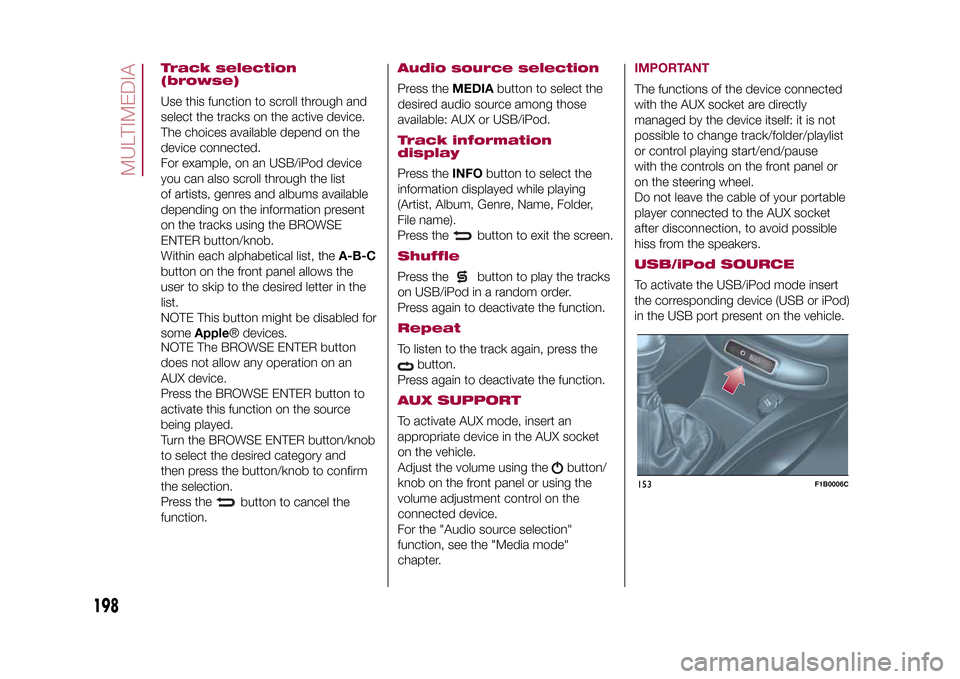
hiss from the speakers.USB/iPod SOURCETo activate the USB/iPod mode insert
the corresponding device (USB or iPod)
in the USB port present on the vehicle.153
F1B0006C
198
MULTIMEDIA
15-12-2014 8:23 Pagina 198
Page 208 of 240
Making a phone callThe operations described below can
only be accessed if supported by
the mobile phone in use.
Proceed as follows:
❒selecting the
icon (mobile
phone phonebook);
❒selecting "Recent Calls";
❒selecting the
icon;
❒pressing the "Redial" button.
SMS message readerThe system can read the messages
received by the mobile phone.
To use this function the mobile phone
must support the SMS exchange
function throughBluetooth®.
If this function is not supported by the
phone, the corresponding
button is
deactivated (greyed out).
When a text message is received, the
display will show a screen where the
options "Listen", "Call" or "Ignore" can
be selected.
Press the
button to access the list
of SMS messages received by the
mobile phone (the list displays a
maximum of 60 messages received).
Uconnect™ LIVE
SERVICESPress the APPS button to access the
Radio menu, where all the system
application functions are present, such
as: Trip computer, Settings, Compass (if
the navigation system is available),
Uconnect™LIVE applications.
If theUconnect™icon is present, the
system is set up for the connected
services and allows the applications to
be used directly from the radio, for a
more efficient and advanced use of the
vehicle. The application functions are
present according to the vehicle
configuration and to the market.
To use theUconnect™LIVEservices
it is necessary to:
❒download theApp Uconnect™
LIVEfrom the "App Store" or "Google
play" on your compatible smartphone,
making sure that the data connection is
enabled
❒register on www.DriveUconnect.eu or
www.fiat.it through theApp
Uconnect™LIVE.
❒start theApp Uconnect™LIVEon
your smartphone and enter your details.
For further information about the
services available in your market, visit
www.DriveUconnect.eu.
First access to the
vehicleOnce you have launched theApp
Uconnect™LIVEand entered your
details, you have to pair the Bluetooth
with your smartphone and the radio, as
described in the "Pairing a mobile
phone" chapter, to access the
Uconnect™LIVEservices in your
vehicle. The list of supported mobile
phones is available on
www.DriveUconnect.eu.
When pairing is complete, the
connected services can be accessed
by pressing theUconnect™icon
on the radio.
When the activation process is
complete, a message will inform the
user. If a personal profile is necessary
for the services, your accounts can
be connected through theApp
Uconnect™LIVE, or in your personal
area on www.driveUconnect.eu.
IMPORTANT The my:Car application
does not replace the information in the
Owner Handbook of the vehicle.
206
MULTIMEDIA
15-12-2014 8:23 Pagina 206