engine FIAT 500X 2015 2.G Manual Online
[x] Cancel search | Manufacturer: FIAT, Model Year: 2015, Model line: 500X, Model: FIAT 500X 2015 2.GPages: 240, PDF Size: 10.72 MB
Page 184 of 240
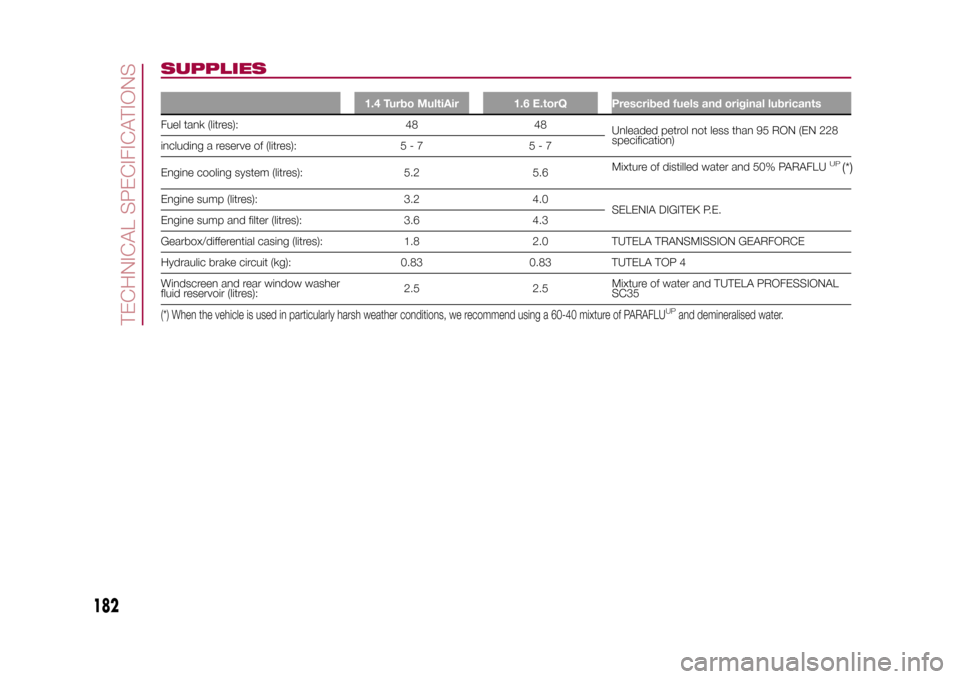
SUPPLIES
1.4 Turbo MultiAir 1.6 E.torQ Prescribed fuels and original lubricants
Fuel tank (litres): 48 48
Unleaded petrol not less than 95 RON (EN 228
specification)
including a reserve of (litres): 5 - 7 5 - 7
Engine cooling system (litres): 5.2 5.6Mixture of distilled water and 50% PARAFLU
UP
(*)
Engine sump (litres): 3.2 4.0
SELENIA DIGITEK P.E.
Engine sump and filter (litres): 3.6 4.3
Gearbox/differential casing (litres): 1.8 2.0 TUTELA TRANSMISSION GEARFORCE
Hydraulic brake circuit (kg): 0.83 0.83 TUTELA TOP 4
Windscreen and rear window washer
fluid reservoir (litres):2.5 2.5Mixture of water and TUTELA PROFESSIONAL
SC35(*) When the vehicle is used in particularly harsh weather conditions, we recommend using a 60-40 mixture of PARAFLU
UP
and demineralised water.
182
TECHNICAL SPECIFICATIONS
15-12-2014 8:23 Pagina 182
Page 185 of 240
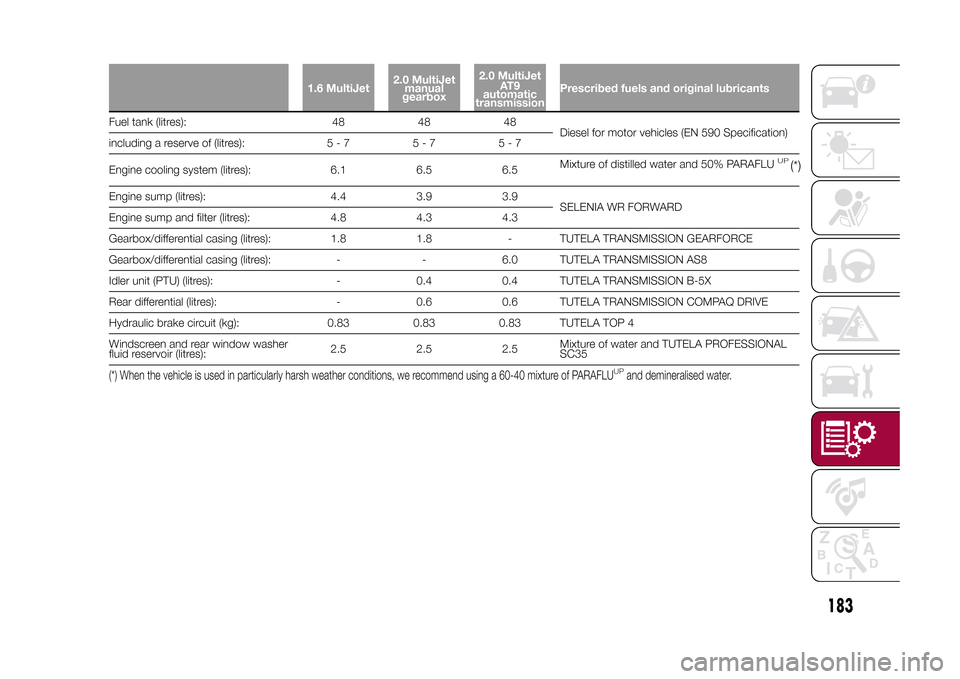
1.6 MultiJet2.0 MultiJet
manual
gearbox2.0 MultiJet
AT 9
automatic
transmissionPrescribed fuels and original lubricants
Fuel tank (litres): 48 48 48
Diesel for motor vehicles (EN 590 Specification)
including a reserve of (litres): 5 - 7 5 - 7 5 - 7
Engine cooling system (litres): 6.1 6.5 6.5Mixture of distilled water and 50% PARAFLU
UP
(*)
Engine sump (litres): 4.4 3.9 3.9
SELENIA WR FORWARD
Engine sump and filter (litres): 4.8 4.3 4.3
Gearbox/differential casing (litres): 1.8 1.8 - TUTELA TRANSMISSION GEARFORCE
Gearbox/differential casing (litres): - - 6.0 TUTELA TRANSMISSION AS8
Idler unit (PTU) (litres): - 0.4 0.4 TUTELA TRANSMISSION B-5X
Rear differential (litres): - 0.6 0.6 TUTELA TRANSMISSION COMPAQ DRIVE
Hydraulic brake circuit (kg): 0.83 0.83 0.83 TUTELA TOP 4
Windscreen and rear window washer
fluid reservoir (litres):2.5 2.5 2.5Mixture of water and TUTELA PROFESSIONAL
SC35(*) When the vehicle is used in particularly harsh weather conditions, we recommend using a 60-40 mixture of PARAFLU
UP
and demineralised water.
183
15-12-2014 8:23 Pagina 183
Page 186 of 240
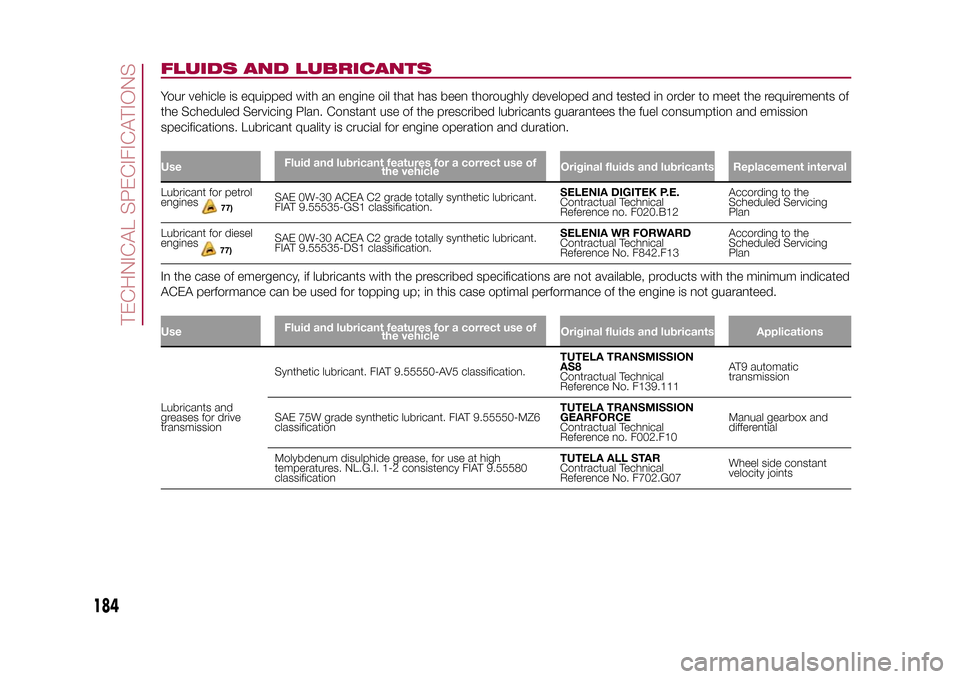
FLUIDS AND LUBRICANTSYour vehicle is equipped with an engine oil that has been thoroughly developed and tested in order to meet the requirements of
the Scheduled Servicing Plan. Constant use of the prescribed lubricants guarantees the fuel consumption and emission
specifications. Lubricant quality is crucial for engine operation and duration.UseFluid and lubricant features for a correct use of
the vehicleOriginal fluids and lubricants Replacement intervalLubricant for petrol
enginesSAE 0W-30 ACEA C2 grade totally synthetic lubricant.
FIAT 9.55535-GS1 classification.SELENIA DIGITEK P.E.
Contractual Technical
Reference no. F020.B12According to the
Scheduled Servicing
Plan
Lubricant for diesel
engines
77)
SAE 0W-30 ACEA C2 grade totally synthetic lubricant.
FIAT 9.55535-DS1 classification.SELENIA WR FORWARD
Contractual Technical
Reference No. F842.F13According to the
Scheduled Servicing
Plan
In the case of emergency, if lubricants with the prescribed specifications are not available, products with the minimum indicated
ACEA performance can be used for topping up; in this case optimal performance of the engine is not guaranteed.UseFluid and lubricant features for a correct use of
the vehicleOriginal fluids and lubricants ApplicationsLubricants and
greases for drive
transmissionSynthetic lubricant. FIAT 9.55550-AV5 classification.TUTELA TRANSMISSION
AS8
Contractual Technical
Reference No. F139.111AT9 automatic
transmission
SAE 75W grade synthetic lubricant. FIAT 9.55550-MZ6
classificationTUTELA TRANSMISSION
GEARFORCE
Contractual Technical
Reference no. F002.F10Manual gearbox and
differential
Molybdenum disulphide grease, for use at high
temperatures. NL.G.I. 1-2 consistency FIAT 9.55580
classificationTUTELA ALL STAR
Contractual Technical
Reference No. F702.G07Wheel side constant
velocity joints
184
TECHNICAL SPECIFICATIONS
15-12-2014 8:23 Pagina 184
77)
Page 187 of 240
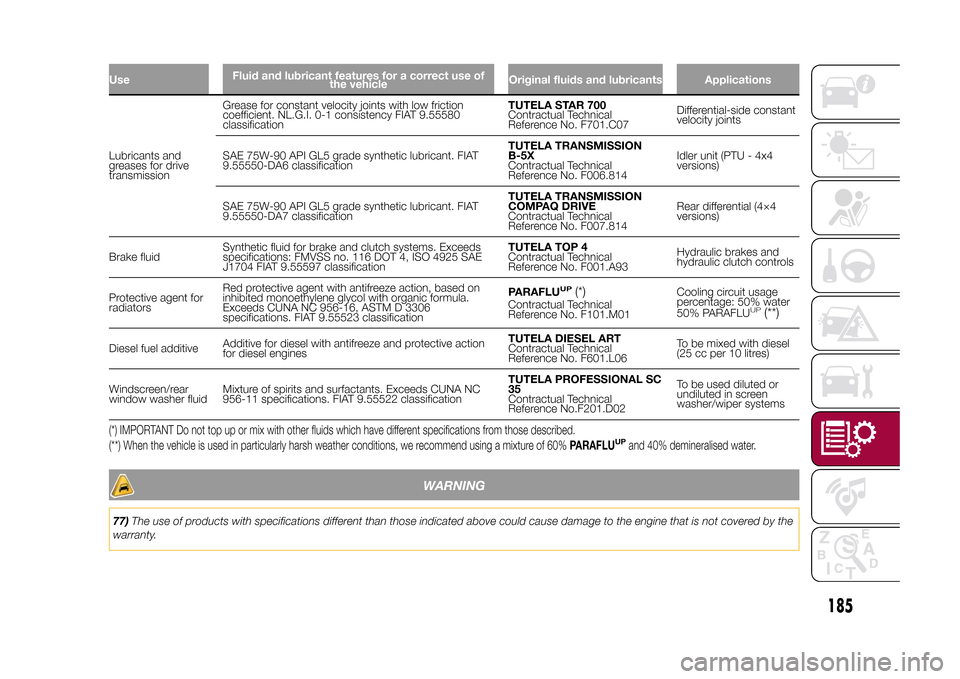
UseFluid and lubricant features for a correct use of
the vehicleOriginal fluids and lubricants ApplicationsLubricants and
greases for drive
transmissionGrease for constant velocity joints with low friction
coefficient. NL.G.I. 0-1 consistency FIAT 9.55580
classificationTUTELA STAR 700
Contractual Technical
Reference No. F701.C07Differential-side constant
velocity joints
SAE 75W-90 API GL5 grade synthetic lubricant. FIAT
9.55550-DA6 classificationTUTELA TRANSMISSION
B-5X
Contractual Technical
Reference No. F006.814Idler unit (PTU - 4x4
versions)
SAE 75W-90 API GL5 grade synthetic lubricant. FIAT
9.55550-DA7 classificationTUTELA TRANSMISSION
COMPAQ DRIVE
Contractual Technical
Reference No. F007.814Rear differential (4×4
versions)
Brake fluidSynthetic fluid for brake and clutch systems. Exceeds
specifications: FMVSS no. 116 DOT 4, ISO 4925 SAE
J1704 FIAT 9.55597 classificationTUTELA TOP 4
Contractual Technical
Reference No. F001.A93Hydraulic brakes and
hydraulic clutch controls
Protective agent for
radiatorsRed protective agent with antifreeze action, based on
inhibited monoethylene glycol with organic formula.
Exceeds CUNA NC 956-16, ASTM D 3306
specifications. FIAT 9.55523 classificationPARAFLU
UP
(*)
Contractual Technical
Reference No. F101.M01Cooling circuit usage
percentage: 50% water
50% PARAFLU
UP
(**)
Diesel fuel additiveAdditive for diesel with antifreeze and protective action
for diesel enginesTUTELA DIESEL ART
Contractual Technical
Reference No. F601.L06To be mixed with diesel
(25 cc per 10 litres)
Windscreen/rear
window washer fluidMixture of spirits and surfactants. Exceeds CUNA NC
956-11 specifications. FIAT 9.55522 classificationTUTELA PROFESSIONAL SC
35
Contractual Technical
Reference No.F201.D02To be used diluted or
undiluted in screen
washer/wiper systems(*) IMPORTANT Do not top up or mix with other fluids which have different specifications from those described.
(**) When the vehicle is used in particularly harsh weather conditions, we recommend using a mixture of 60%PARAFLU
UP
and 40% demineralised water.
WARNING
77)The use of products with specifications different than those indicated above could cause damage to the engine that is not covered by the
warranty.
185
15-12-2014 8:23 Pagina 185
Page 210 of 240
In addition, the data can be saved on
an USB device or through theApp
Uconnect™LIVE; the data analysis
can be made on your personal
computer thanks to theeco:Drive™
desktop application, available on
www.fiat.it or www.DriveUconnect.eu.
Evaluation of the driving style is
dependent on four indices that monitor
the following parameters:
❒Acceleration
❒Deceleration
❒Gearbox
❒SpeedDisplay of the
eco:Drive™Press theeco:Drive™button to use
the function
A screen will be displayed on the radio,
showing the 4 indices described above.
These indices are grey until the system
has enough data to evaluate the driving
style.
Once sufficient data is available, the
indices will have 5 colours depending
on the evaluation: dark green (very
good), light green, yellow, orange and
red (very bad).
"Current route index" refers to the entire
value calculated in real time based on
the average of the described indices. It
represents eco-friendliness of the
driving style: from 0 (low) to 100 (high).In the event of extended inactivity the
display will show the average of the
indices until that moment (the "Average
index"), then the indices will be
coloured again in real time as soon as
the vehicle is restarted.
To check the data average of previous
route (the "route" starts when the
ignition key is turned to MAR and stops
when it is turned to STOP), select the
"Previous route" button.
The details of the previous trip can also
be displayed by pressing the "Details"
button, in which journey duration (time
and mileage) and average speed will be
reported.
Trip data storage and
transferThe trip data can be stored in the
system memory and transferred
through a properly configured USB
memory stick or theApp Uconnect™
LIVE. This allows you to display the
history of the collected data, showing
the complete analysis of the trip data
and of your driving style.
Further information is available at
www.DriveUconnect.eu.IMPORTANT Do not remove the USB
memory stick nor unpair the
smartphone and theApp Uconnect™
LIVEbefore the system has
downloaded the data, since these
could be lost. During the transfer of
data to the devices, messages may
appear on the radio display to guide the
user correctly through the operation;
follow these instructions. These
messages are only displayed with the
ignition key at STOP and when a delay
in the system switching off is set. The
data are automatically transferred to the
devices when the engine is switched
off. The data transferred are deleted
from the system memory. You can
choose to store the trip data or not, by
pressing the "Settings" button and by
setting the storage activation and
the USB or Cloud transfer mode.
When the USB memory stick is full, the
dedicated messages are shown on
the radio display.
When theeco:Drive™data are not
transferred to the USB memory stick for
a long time, the internal memory of the
Uconnect™LIVEsystem may be
full. Follow the instructions given by the
messages on the radio display.
208
MULTIMEDIA
15-12-2014 8:23 Pagina 208
Page 214 of 240
The map can now be installed on the
system.Installing a mapThe map update MUST be made
with the vehicle engine running and
may require more than 30 minutes.
Do not disconnect the USB device
during the map installation process,
otherwise installation will be
interrupted.
After downloading a map to your USB
device, it can be installed on your
system.
❒Insert the USB device containing the
new map in theUconnect™system.
The system detects a new map on
the USB device.
❒Select "Start".
Keep the device inserted. Before
updating the map, the system indicates
that this process may take several
minutes. Select "OK".
Note: do not remove the USB device
and do not disconnect the system's
power supply before the update is
complete. The system cannot be used
until the update is completed correctly.
If the update is interrupted, the system
update is started again.
Once the map has been updated, a
dedicated message is displayed.
❒Click on "Close".The new map is now available on the
system.
TroubleshootingThe following problems may occur
during the update:
❒The map on the USB device is not
valid. In this case, download the map to
the USB device again, using TomTom
HOME. It may be necessary to prepare
the USB device again.
❒The version of the map on the USB
device is the same as or is a previous
version of the one already on the
system. In this case, download the map
to the USB device again, using
TomTom HOME. It may be necessary to
prepare the USB device again.VOICE COMMANDSNote: for languages not supported by
the system, voice commands are
not available.
To use the voice commands, press the
button ("Voice" button)on the steering
wheel and give the command you want
to activate, out loud.
GlobalThe following voice commands can be
given after pressing the
button
on the steering wheel:
❒Help❒Cancel
❒Redial
❒Repeat
❒Voice Prompts
PhoneThe following voice commands can be
given after pressing the button on
the steering wheel:
❒Call
❒Dial
❒Redial
❒Call back
❒Last calls
❒Outgoing calls
❒Missed calls
❒Incoming calls
❒Phonebook
❒Search
❒Show SMSRadioThe following voice commands can be
given after pressing the
button on
the steering wheel:
❒Tune to XXX FM
❒Tune to XXX AM
❒Tune to Radio XXX
❒Tune to DAB channel
212
MULTIMEDIA
15-12-2014 8:23 Pagina 212
Page 221 of 240
The "Refresh" button requests an
update of the DAB radio station list: the
update may last from a few seconds
to about two minutes.Pre-selection settingsPresets are available in all system
modes and are activated by touching
one of the preset buttons located in the
upper area of the display.
The system can store up to 12 radio
stations in each mode: 4 of these
are displayed in the upper area.
Press the "browse" button on the
display to show all the radio stations
stored in the selected frequency band.Audio SettingsThe Audio Settings menu, which can be
accessed by pressing the "audio"
button at the bottom of the display, can
be used to change the following
settings:
❒"Balance/Fader" (left/right and
front/rear sound balance adjustment);
❒"Equaliser" (where provided);
❒"Speed/Volume" (speed-dependent
automatic volume control);
❒"Surround Sound" (where provided);
❒"AUX Volume comp.";
❒"Loudness" (where provided);❒"Auto-On radio" (allows you to set
the automatic switching on of the radio
when the engine is started).
To exit the "audio" menu, press the
/Done button.
MEDIA MODE
Audio source selectionPress the "choose source" button to
select the desired audio source among
those available: AUX, USB / iPod, SD
(where provided) orBluetooth®.
Note: Applications used on portable
devices may be not compatible with the
Uconnect™system.Track change
(next/previous)Briefly press the
button or turn the
BROWSE ENTER button/knob
clockwise to play the next track.
Briefly press thebutton or turn the
BROWSE ENTER button/knob
anticlockwise to return to the beginning
of the selected track or to the beginning
of the previous track (if this has been
played for less than 8 seconds).
Fast forward/rewind
through tracksHold down the
button to fast
forward the selected track.
Hold down thebutton to fast
rewind the track.
Track selection
(browse)Use this function to scroll through and
select the tracks on the active device.
Within each list, the "ABC" button
allows the user to skip to the desired
letter in the list.
Press the "Browse" button to activate
this function on the source being
played.
Turn the BROWSE ENTER button/knob
to select the desired category and
then press the button/knob to confirm
the selection.
Press the "X" button to cancel the
function.
NOTE The "Browse" button may be
disabled for someApple® devices.
NOTE The "Browse" button does not
allow any operation on an AUX device.
NOTE Not allBluetooth® devices
enable you to scroll the information on
the tracks.
219
15-12-2014 8:23 Pagina 219
Page 226 of 240
❒"Auto high beams" (where provided):
allows you to deactivate the main
beam headlights when approaching a
vehicle coming from the opposite
direction;
❒"Flash Lights w/Lock" (where
provided): permits the activation of light
flashing when the doors are locked.
MAIN NAVIGATION MENUIMPORTANT Navigation maps are
pre-loaded on the system, therefore no
external support is needed.
To activate the main navigation menu,
press the NAV button on the front
panel, then press one of the following
buttons:
❒"Where to?": it searches or navigates
to the destination;
❒"View map": it displays the map;
❒"Info": it displays all info about
navigation;
❒"Emergency": it searches for
Hospitals or Police Stations located
near the destination. It is also possible
to view your current position on the
display and save, in "Favourites", the
location of the Hospitals or Police
Stations.
VIEW MAPPress the "View Map" button in the
main Navigation Menu to display the
map relative to the current position.
When the display shows the map, the
following options are available:
❒"Menu": press this button to return
to the main Navigation Menu;
❒"+/–": press the "+" or " –" button to
change the dimension of the map (it
is not possible to zoom in on minor
roads);
❒"Time of Arrival/Time to
Destination/Distance"(only during
navigation): press this button at the top
right of the display to view one of the
following options: "Time of Arrival",
"Time to Destination", "Distance".
❒"Turn List"(only during navigation):
press the list of turns along the route
at the middle of the top of the display.
Select a turn through the following
options: "Show on Map" or "Avoid
Street".
❒"Options": press this button to
display the map display options.
224
MULTIMEDIA
15-12-2014 8:23 Pagina 224
Lights (where provided)This function can be used to carry out
the following adjustments:
❒"Interior lights" (where provided):
allows you to select the interior light
brightness;
❒"Headlamp sensor" (where provided):
adjustment of headlamp activation
sensitivity;
❒"Follow me" (where provided):
permits the setting of the headlamp
deactivation delay after switching off
the engine;
❒"Courtesy lights": activation/
deactivation of courtesy lights (where
provided);
❒"Day lights": activation/deactivation of
the daytime running lights (DRLs)
(where provided);
Page 236 of 240
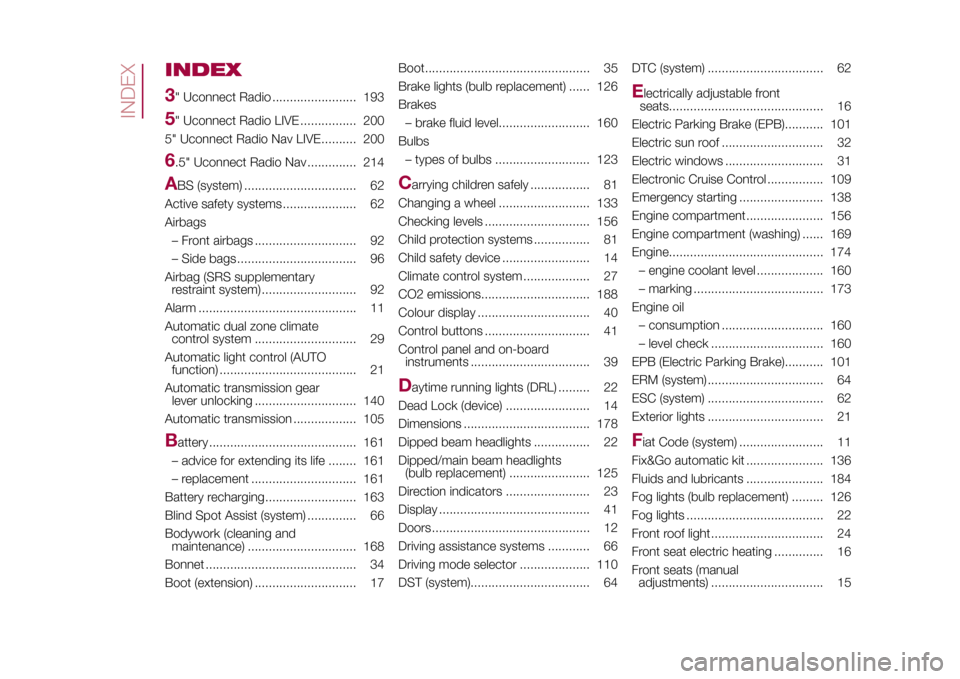
INDEX
3" Uconnect Radio ........................ 1935" Uconnect Radio LIVE ................ 200
5" Uconnect Radio Nav LIVE.......... 2006.5" Uconnect Radio Nav .............. 214A
BS (system) ................................ 62
Active safety systems ..................... 62
Airbags
– Front airbags ............................. 92
– Side bags .................................. 96
Airbag (SRS supplementary
restraint system) ........................... 92
Alarm ............................................. 11
Automatic dual zone climate
control system ............................. 29
Automatic light control (AUTO
function) ....................................... 21
Automatic transmission gear
lever unlocking ............................. 140
Automatic transmission .................. 10
B
attery .......................................... 161
– advice for extending its life ........ 161
– replacement .............................. 161
Battery recharging.......................... 163
Blind Spot Assist (system) .............. 66
Bodywork (cleaning and
maintenance) ............................... 168
Bonnet ........................................... 34
Boot (extension) ............................. 17Boot............................................... 35
Brake lights (bulb replacement) ...... 126
Brakes
– brake fluid level.......................... 160
Bulbs
– types of bulbs ........................... 123
C
arrying children safely ................. 81
Changing a wheel .......................... 133
Checking levels .............................. 156
Child protection systems ................ 81
Child safety device ......................... 14
Climate control system ................... 27
CO2 emissions............................... 188
Colour display ................................ 40
Control buttons .............................. 41
Control panel and on-board
instruments .................................. 39
D
aytime running lights (DRL) ......... 22
Dead Lock (device) ........................ 14
Dimensions .................................... 178
Dipped beam headlights ................ 22
Dipped/main beam headlights
(bulb replacement) ....................... 125
Direction indicators ........................ 23
Display ........................................... 41
Doors ............................................. 12
Driving assistance systems ............ 66
Driving mode selector .................... 110
DST (system).................................. 64DTC (system) ................................. 62
E
lectrically adjustable front
seats............................................ 16
Electric Parking Brake (EPB)........... 101
Electric sun roof ............................. 32
Electric windows ............................ 31
Electronic Cruise Control ................ 109
Emergency starting ........................ 138
Engine compartment...................... 156
Engine compartment (washing) ...... 169
Engine............................................ 174
– engine coolant level ................... 160
– marking ..................................... 173
Engine oil
– consumption ............................. 160
– level check ................................ 160
EPB (Electric Parking Brake)........... 101
ERM (system) ................................. 64
ESC (system) ................................. 62
Exterior lights ................................. 21
Fiat Code (system) ........................ 11
Fix&Go automatic kit ...................... 136
Fluids and lubricants ...................... 184
Fog lights (bulb replacement) ......... 126
Fog lights ....................................... 22
Front roof light ................................ 24
Front seat electric heating .............. 16
Front seats (manual
adjustments) ................................ 15
INDEX
5
Page 237 of 240
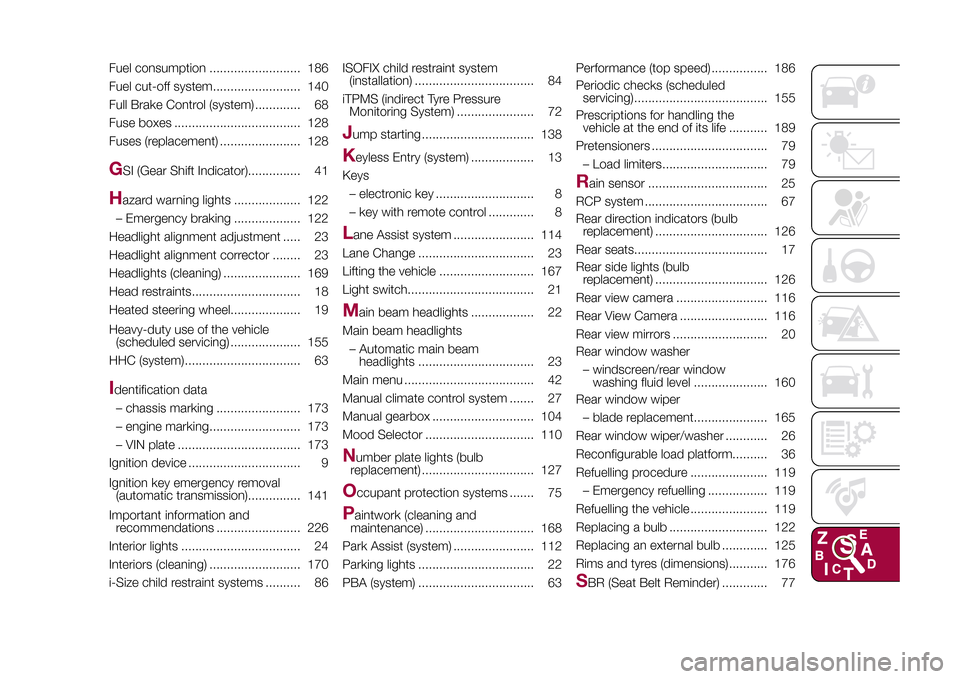
Fuel consumption .......................... 186
Fuel cut-off system......................... 140
Full Brake Control (system) ............. 68
Fuse boxes .................................... 128
Fuses (replacement) ....................... 128G
SI (Gear Shift Indicator)............... 41
H
azard warning lights ................... 122
– Emergency braking ................... 122
Headlight alignment adjustment ..... 23
Headlight alignment corrector ........ 23
Headlights (cleaning) ...................... 169
Head restraints............................... 18
Heated steering wheel.................... 19
Heavy-duty use of the vehicle
(scheduled servicing) .................... 155
HHC (system)................................. 63
Identification data
– chassis marking ........................ 173
– engine marking.......................... 173
– VIN plate ................................... 173
Ignition device ................................ 9
Ignition key emergency removal
(automatic transmission)............... 141
Important information and
recommendations ........................ 226
Interior lights .................................. 24
Interiors (cleaning) .......................... 170
i-Size child restraint systems .......... 86ISOFIX child restraint system
(installation) .................................. 84
iTPMS (indirect Tyre Pressure
Monitoring System) ...................... 72
Jump starting ................................ 138K
eyless Entry (system) .................. 13
Keys
– electronic key ............................ 8
– key with remote control ............. 8
Lane Assist system ....................... 114
Lane Change ................................. 23
Lifting the vehicle ........................... 167
Light switch.................................... 21M
ain beam headlights .................. 22
Main beam headlights
– Automatic main beam
headlights ................................. 23
Main menu ..................................... 42
Manual climate control system ....... 27
Manual gearbox ............................. 104
Mood Selector ............................... 110
N
umber plate lights (bulb
replacement) ................................ 127
O
ccupant protection systems ....... 75
P
aintwork (cleaning and
maintenance) ............................... 168
Park Assist (system) ....................... 112
Parking lights ................................. 22
PBA (system) ................................. 63Performance (top speed) ................ 186
Periodic checks (scheduled
servicing)...................................... 155
Prescriptions for handling the
vehicle at the end of its life ........... 189
Pretensioners ................................. 79
– Load limiters.............................. 79
R
ain sensor .................................. 25
RCP system ................................... 67
Rear direction indicators (bulb
replacement) ................................ 126
Rear seats...................................... 17
Rear side lights (bulb
replacement) ................................ 126
Rear view camera .......................... 116
Rear View Camera ......................... 116
Rear view mirrors ........................... 20
Rear window washer
– windscreen/rear window
washing fluid level ..................... 160
Rear window wiper
– blade replacement..................... 165
Rear window wiper/washer ............ 26
Reconfigurable load platform.......... 36
Refuelling procedure ...................... 119
– Emergency refuelling ................. 119
Refuelling the vehicle ...................... 119
Replacing a bulb ............................ 122
Replacing an external bulb ............. 125
Rims and tyres (dimensions)........... 176
S
BR (Seat Belt Reminder) ............. 77