USB FIAT 500X 2018 Owner handbook (in English)
[x] Cancel search | Manufacturer: FIAT, Model Year: 2018, Model line: 500X, Model: FIAT 500X 2018Pages: 276, PDF Size: 7.08 MB
Page 12 of 276
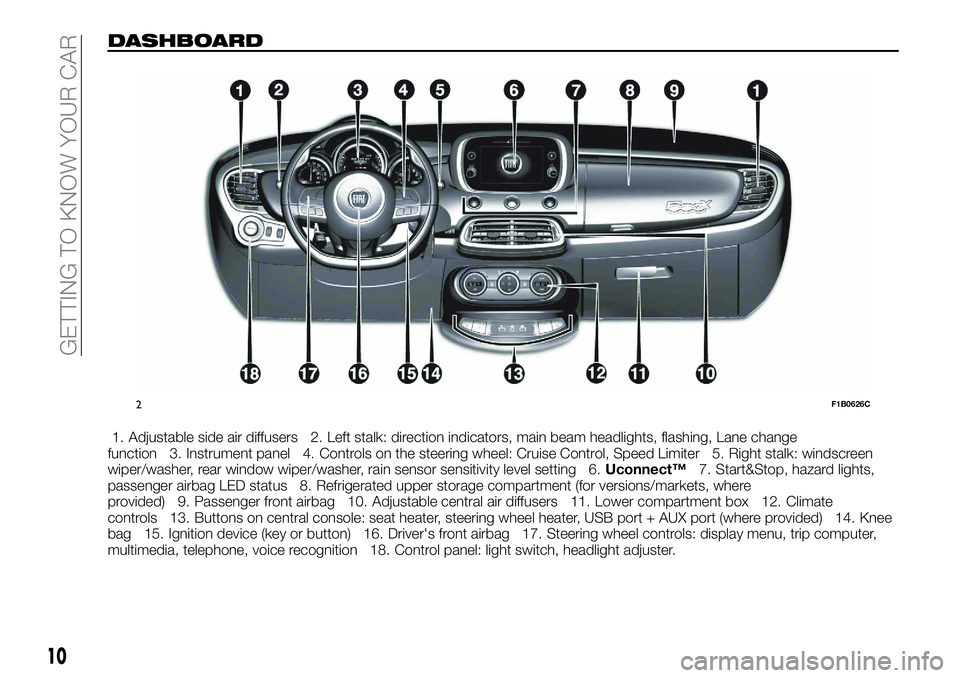
DASHBOARD
1. Adjustable side air diffusers 2. Left stalk: direction indicators, main beam headlights, flashing, Lane change
function 3. Instrument panel 4. Controls on the steering wheel: Cruise Control, Speed Limiter 5. Right stalk: windscreen
wiper/washer, rear window wiper/washer, rain sensor sensitivity level setting 6. Uconnect™7. Start&Stop, hazard lights,
passenger airbag LED status 8. Refrigerated upper storage compartment (for versions/markets, where
provided) 9. Passenger front airbag 10. Adjustable central air diffusers 11. Lower compartment box 12. Climate
controls 13. Buttons on central console: seat heater, steering wheel heater, USB port + AUX port (where provided) 14. Knee
bag 15. Ignition device (key or button) 16. Driver's front airbag 17. Steering wheel controls: display menu, trip computer,
multimedia, telephone, voice recognition 18. Control panel: light switch, headlight adjuster.
2F1B0626C
10
GETTING TO KNOW YOUR CAR
Page 159 of 276
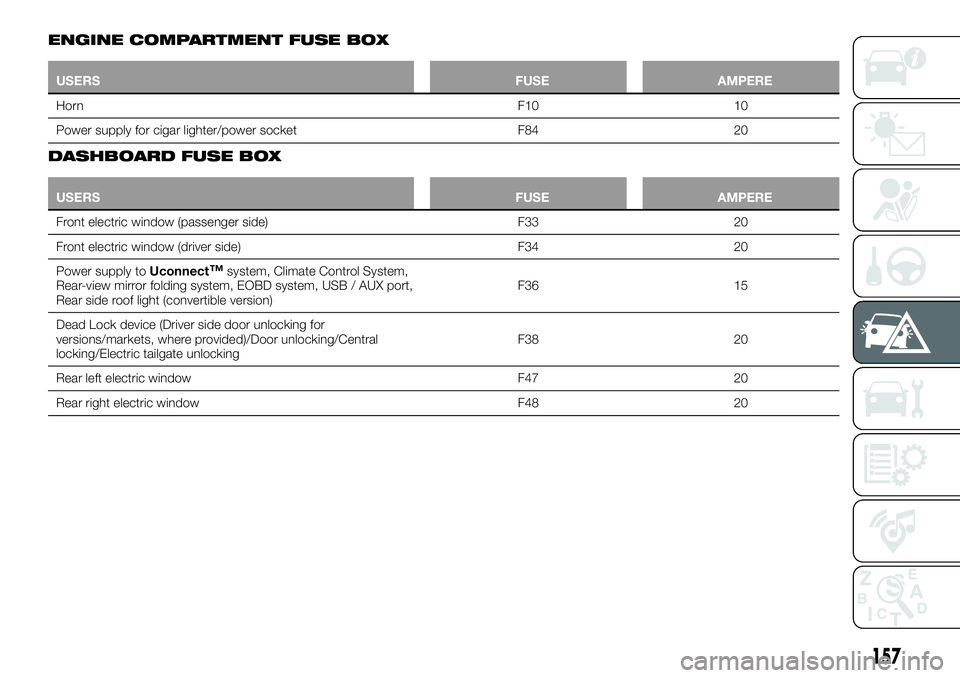
ENGINE COMPARTMENT FUSE BOX
USERSFUSE AMPERE
Horn F10
10
Power supply for cigar lighter/power socket F8420
DASHBOARD FUSE BOX
USERS FUSE AMPERE
Front electric window (passenger side) F3320
Fr
ont electric window (driver side) F3420
Power supply to Uconnect
™system, Climate Control System,
Rear-view mirror folding system, EOBD system, USB / AUX port,
Rear side roof light (convertible version) F36 15
Dead Lock device (Driver side door unlocking for
versions/markets, where provided)/Door unlocking/Central
locking/Electric tailgate unlocking F38 20
Rear left electric window F47 20
Rear right electric window F48 20
157
Page 235 of 276
TIPS, CONTROLS
AND GENERAL
INFORMATION
ROAD SAFETY
Learn how to use the various system
functions before setting off.
Read the instructions for the system
carefully before setting off.
192) 193)
RECEPTION CONDITIONS
Reception conditions change
constantly while driving. Reception may
be interfered with by the presence of
mountains, buildings or bridges,
especially when you are far away from
the broadcaster.
IMPORTANT The volume may be
increased when receiving traffic alerts
and news.CARE AND
MAINTENANCE
Observe the following precautions to
ensure the system is fully operational:
the display lens should not come into
contact with pointed or rigid objects
which could damage its surface; use a
soft, dry anti-static cloth to clean and
do not press.
never use alcohol, petrols and
derivatives to clean the display lens.
prevent any liquid from entering the
system: this could damage it beyond
repair.
105) 106)
MULTIMEDIA DEVICES
IMPORTANT Some multimedia players
may not be compatible with the
Uconnect™.
Only use devices (e.g. USB flash drives)
from safe sources on the car. Devices
from unknown sources could contain
software infected by viruses which, if
installed on the car, could increase the
vulnerability of the car's electric/
electronic systems to hacking.
ANTITHEFT PROTECTION
The system is equipped with an
anti-theft protection system based on
the exchange of information with the
electronic control unit (Body Computer)
on the vehicle.
This guarantees maximum safety and
prevents the secret code from being
entered after the power supply has
been disconnected.
If the check has a positive outcome, the
system will start to operate, whereas if
the comparison codes are not the same
or if the electronic control unit (Body
Computer) is replaced, the system will
ask the user to enter the secret code
according to the procedure described
in the paragraph below.
Entering the secret code
When the system is switched on, if the
code is requested, the display will show
"Please enter Anti-Theft Code" followed
by the screen showing a keypad to
enter the secret code.
The secret code is made up of four
digits, from 0 to 9: to insert the code,
turn the "BROWSE ENTER" right knob
and press to confirm.
After inserting the fourth digit, move the
cursor to "OK" and press the
"BROWSE ENTER" right knob: the
system will start to operate.
233
Page 238 of 276
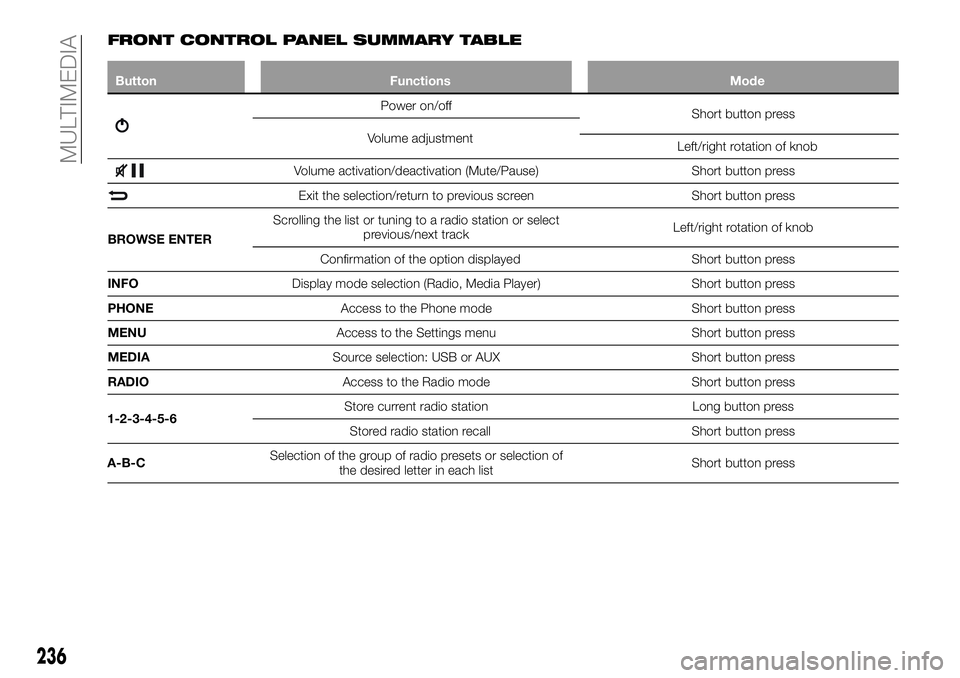
FRONT CONTROL PANEL SUMMARY TABLE
ButtonFunctions Mode
Power on/off
Short button press
Volume adjustment Left/right rotation of knob
Volume activation/deactivation (Mute/Pause) Short button press
Exit the selection/return to previous screenShort button press
BROWSE ENTER Scrolling the list or tuning to a radio station or select
previous/next track Left/right rotation of knob
Confirmation of the option displayed Short button press
INFO Display mode selection (Radio, Media Player) Short button press
PHONE Access to the Phone mode Short button press
MENU Access to the Settings menu Short button press
MEDIA Source selection: USB or AUX Short button press
RADIO Access to the Radio mode Short button press
1-2-3-4-5-6 Store current radio station
Long button press
Stored radio station recall Short button press
A-B-C Selection of the group of radio presets or selection of
the desired letter in each list Short button press
236
MULTIMEDIA
Page 239 of 276
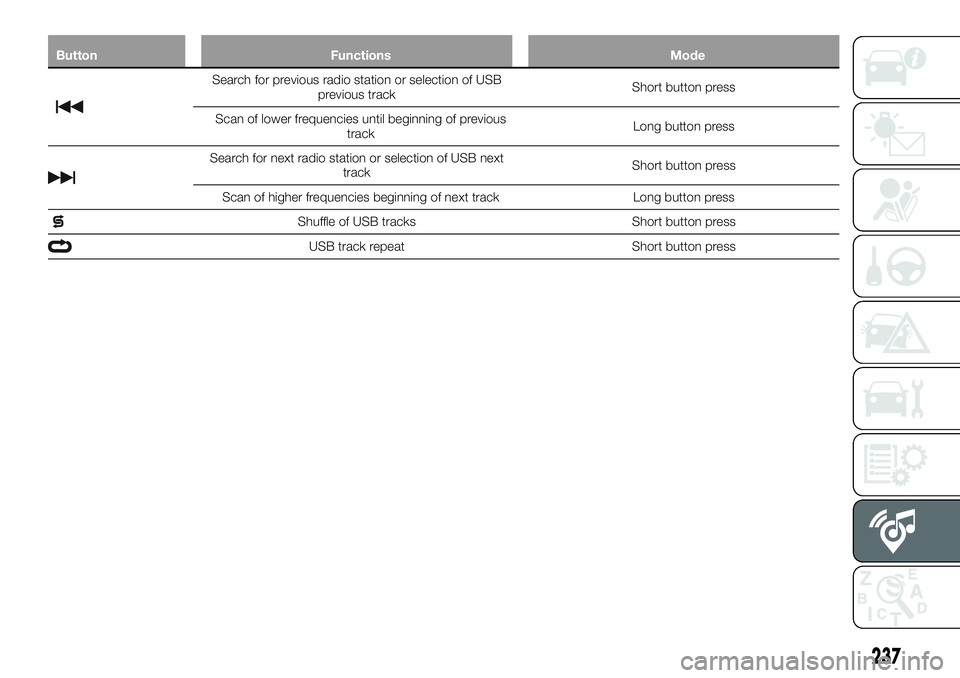
ButtonFunctions Mode
Search for previous radio station or selection of USB
previous track Short button press
Scan of lower frequencies until beginning of previous track Long button press
Search for next radio station or selection of USB next
track Short button press
Scan of higher frequencies beginning of next track Long button press
Shuffle of USB tracks Short button press
USB track repeatShort button press
237
Page 242 of 276
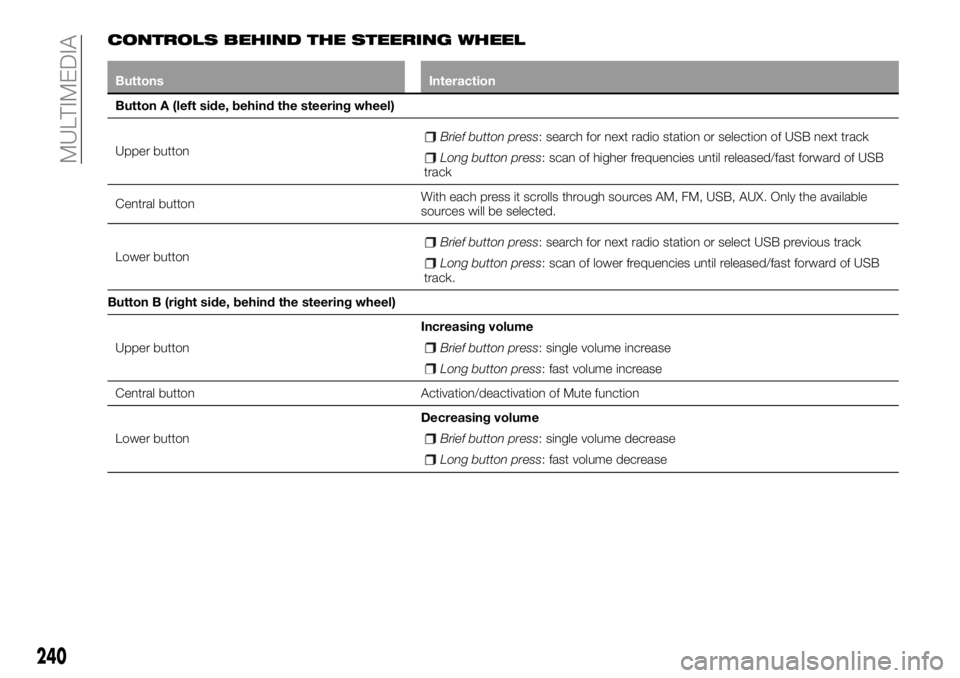
CONTROLS BEHIND THE STEERING WHEEL
ButtonsInteraction
Button A (left side, behind the steering wheel)
Upper
button
Brief button press: search for next radio station or selection of USB next track
Long button press: scan of higher frequencies until released/fast forward of USB
track
Central button With each press it scrolls through sources AM, FM, USB, AUX. Only the available
sources will be selected.
Lower button
Brief button press: search for next radio station or select USB previous track
Long button press: scan of lower frequencies until released/fast forward of USB
track.
Button B (right side, behind the steering wheel)
Upper button Increasing volume
Brief button press: single volume increase
Long button press: fast volume increase
Central button Activation/deactivation of Mute function
Lower button Decreasing volume
Brief button press: single volume decrease
Long button press: fast volume decrease
240
MULTIMEDIA
Page 243 of 276
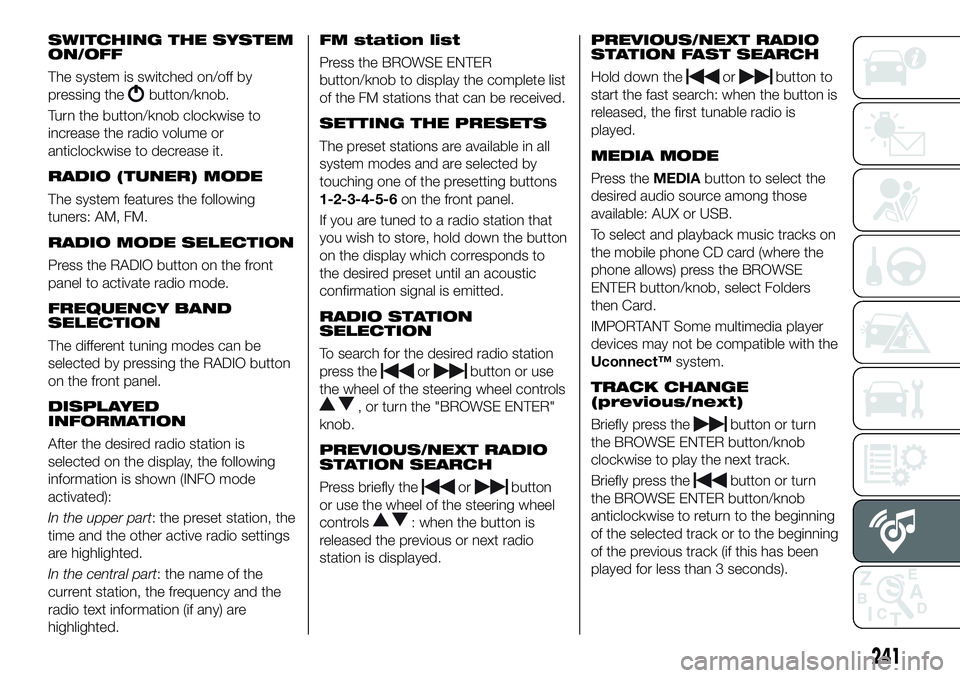
SWITCHING THE SYSTEM
ON/OFF
The system is switched on/off by
pressing the
button/knob.
Turn the button/knob clockwise to
increase the radio volume or
anticlockwise to decrease it.
RADIO (TUNER) MODE
The system features the following
tuners: AM, FM.
RADIO MODE SELECTION
Press the RADIO button on the front
panel to activate radio mode.
FREQUENCY BAND
SELECTION
The different tuning modes can be
selected by pressing the RADIO button
on the front panel.
DISPLAYED
INFORMATION
After the desired radio station is
selected on the display, the following
information is shown (INFO mode
activated):
In the upper part: the preset station, the
time and the other active radio settings
are highlighted.
In the central part: the name of the
current station, the frequency and the
radio text information (if any) are
highlighted.
FM station list
Press the BROWSE ENTER
button/knob to display the complete list
of the FM stations that can be received.
SETTING THE PRESETS
The preset stations are available in all
system modes and are selected by
touching one of the presetting buttons
1-2-3-4-5-6 on the front panel.
If you are tuned to a radio station that
you wish to store, hold down the button
on the display which corresponds to
the desired preset until an acoustic
confirmation signal is emitted.
RADIO STATION
SELECTION
To search for the desired radio station
press the
orbutton or use
the wheel of the steering wheel controls
, or turn the "BROWSE ENTER"
knob.
PREVIOUS/NEXT RADIO
STATION SEARCH
Press briefly theorbutton
or use the wheel of the steering wheel
controls
: when the button is
released the previous or next radio
station is displayed.
PREVIOUS/NEXT RADIO
STATION FAST SEARCH
Hold down theorbutton to
start the fast search: when the button is
released, the first tunable radio is
played.
MEDIA MODE
Press the MEDIAbutton to select the
desired audio source among those
available: AUX or USB.
To select and playback music tracks on
the mobile phone CD card (where the
phone allows) press the BROWSE
ENTER button/knob, select Folders
then Card.
IMPORTANT Some multimedia player
devices may not be compatible with the
Uconnect™ system.
TRACK CHANGE
(previous/next)
Briefly press thebutton or turn
the BROWSE ENTER button/knob
clockwise to play the next track.
Briefly press the
button or turn
the BROWSE ENTER button/knob
anticlockwise to return to the beginning
of the selected track or to the beginning
of the previous track (if this has been
played for less than 3 seconds).
241
Page 244 of 276
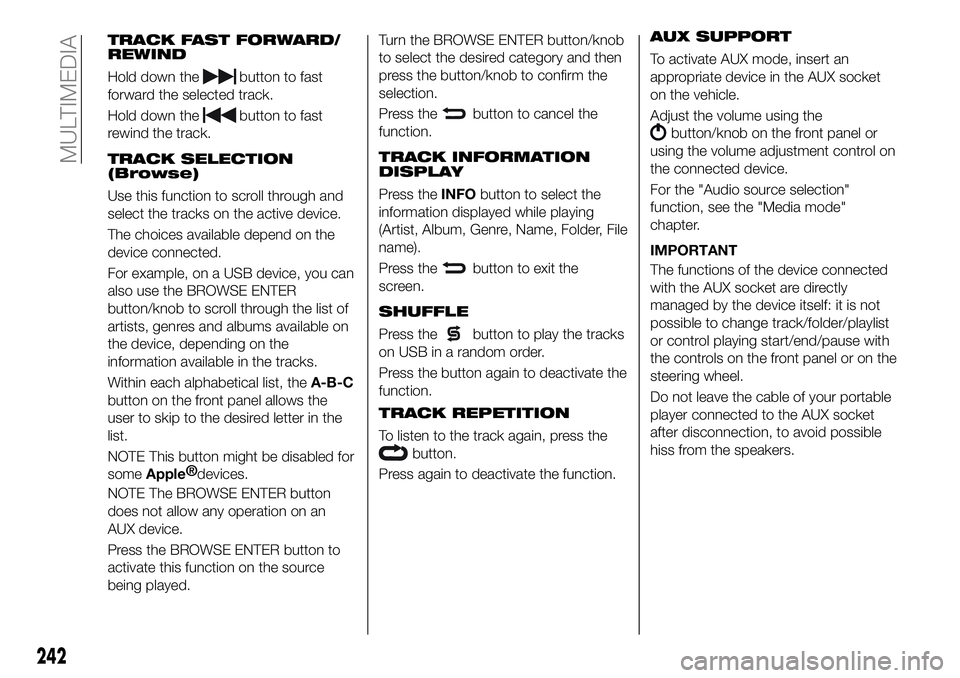
TRACK FAST FORWARD/
REWIND
Hold down thebutton to fast
forward the selected track.
Hold down the
button to fast
rewind the track.
TRACK SELECTION
(Browse)
Use this function to scroll through and
select the tracks on the active device.
The choices available depend on the
device connected.
For example, on a USB device, you can
also use the BROWSE ENTER
button/knob to scroll through the list of
artists, genres and albums available on
the device, depending on the
information available in the tracks.
Within each alphabetical list, the A-B-C
button on the front panel allows the
user to skip to the desired letter in the
list.
NOTE This button might be disabled for
some
Apple® devices.
NOTE The BROWSE ENTER button
does not allow any operation on an
AUX device.
Press the BROWSE ENTER button to
activate this function on the source
being played. Turn the BROWSE ENTER button/knob
to select the desired category and then
press the button/knob to confirm the
selection.
Press the
button to cancel the
function.
TRACK INFORMATION
DISPLAY
Press the INFObutton to select the
information displayed while playing
(Artist, Album, Genre, Name, Folder, File
name).
Press the
button to exit the
screen.
SHUFFLE
Press thebutton to play the tracks
on USB in a random order.
Press the button again to deactivate the
function.
TRACK REPETITION
To listen to the track again, press the
button.
Press again to deactivate the function.
AUX SUPPORT
To activate AUX mode, insert an
appropriate device in the AUX socket
on the vehicle.
Adjust the volume using the
button/knob on the front panel or
using the volume adjustment control on
the connected device.
For the "Audio source selection"
function, see the "Media mode"
chapter.
IMPORTANT
The functions of the device connected
with the AUX socket are directly
managed by the device itself: it is not
possible to change track/folder/playlist
or control playing start/end/pause with
the controls on the front panel or on the
steering wheel.
Do not leave the cable of your portable
player connected to the AUX socket
after disconnection, to avoid possible
hiss from the speakers.
242
MULTIMEDIA
Page 245 of 276
USB SOURCE
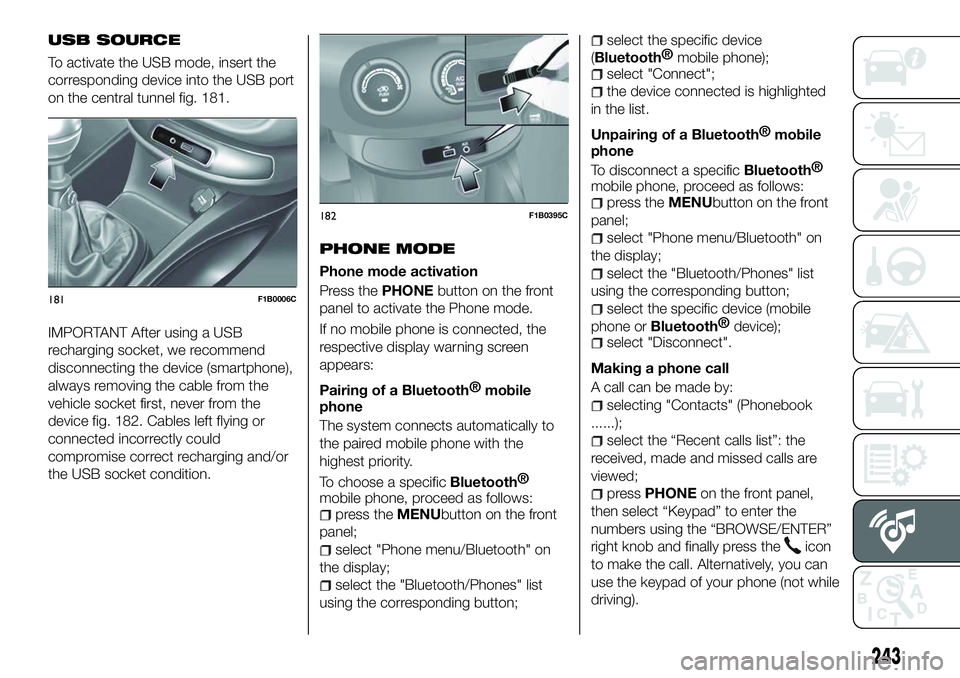
To activate the USB mode, insert the
corresponding device into the USB port
on the central tunnel fig. 181.
IMPORTANT After using a USB
recharging socket, we recommend
disconnecting the device (smartphone),
always removing the cable from the
vehicle socket first, never from the
device fig. 182. Cables left flying or
connected incorrectly could
compromise correct recharging and/or
the USB socket condition.PHONE MODE
Phone mode activation
Press the
PHONEbutton on the front
panel to activate the Phone mode.
If no mobile phone is connected, the
respective display warning screen
appears:
Pairing of a
Bluetooth® mobile
phone
The system connects automatically to
the paired mobile phone with the
highest priority.
To choose a specific
Bluetooth®
mobile phone, proceed as follows:
press the MENUbutton on the front
panel;
select "Phone menu/Bluetooth" on
the display;
select the "Bluetooth/Phones" list
using the corresponding button;
select the specific device
(
Bluetooth® mobile phone);
select "Connect";
the device connected is highlighted
in the list.
Unpairing of a
Bluetooth® mobile
phone
To disconnect a specific
Bluetooth®
mobile phone, proceed as follows:
press the MENUbutton on the front
panel;
select "Phone menu/Bluetooth" on
the display;
select the "Bluetooth/Phones" list
using the corresponding button;
select the specific device (mobile
phone or
Bluetooth® device);
select "Disconnect".
Making a phone call
A call can be made by:
selecting "Contacts" (Phonebook
......);
select the “Recent calls list”: the
received, made and missed calls are
viewed;
press PHONE on the front panel,
then select “Keypad” to enter the
numbers using the “BROWSE/ENTER”
right knob and finally press the
icon
to make the call. Alternatively, you can
use the keypad of your phone (not while
driving).
181F1B0006C
182F1B0395C
243
Page 249 of 276
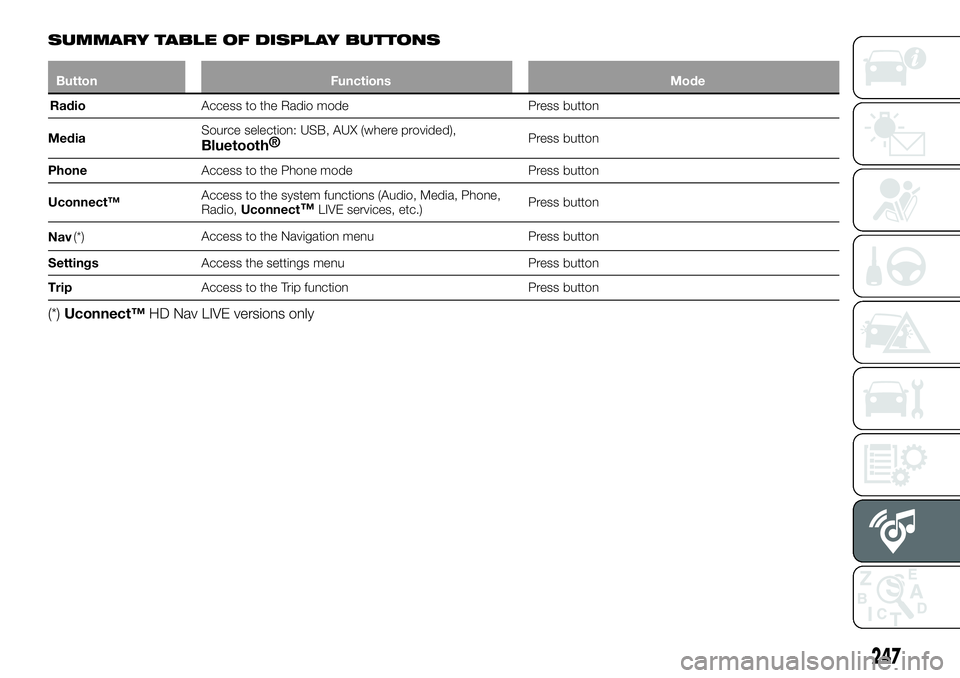
SUMMARY TABLE OF DISPLAY BUTTONS
ButtonFunctions Mode
Radio Access
to the Radio mode Press button
Media Source selection: USB, AUX (where provided),
Bluetooth
®Press button
Phone Access to the Phone mode Press button
Uconnect™ Access to the system functions (Audio, Media, Phone,
Radio,
Uconnect
™LIVE services, etc.) Press button
Nav (*) Access to the Navigation menu Press button
Settings Access the settings menu Press button
Trip Access to the Trip function Press button
(*)Uconnect™ HD Nav LIVE versions only
247