reset FIAT 500X 2022 Owner's Manual
[x] Cancel search | Manufacturer: FIAT, Model Year: 2022, Model line: 500X, Model: FIAT 500X 2022Pages: 312, PDF Size: 13.26 MB
Page 149 of 312
MULTIMEDIA147
Deleting A Preset
A preset can be deleted in the Presets Browse
screen by pressing the Trash Can icon for the
corresponding preset.
Favorites
Press the Favorites button on the Browse screen.
The Favorites menu provides a means to edit the
Favorites list and to configure the Alert Settings,
along with providing a list of Channels currently
airing any of the items in the Favorites list.
You can scroll the Favorites list by pressing the Up
and Down arrows located at the right side of the
screen. Scrolling can also be done by operating the
Tune/Scroll knob as well.
Remove Favorites
Press the Remove Favorites tab at the top of the
screen. Press the Delete All button on the
touchscreen to delete all of the Favorites or press
the Trash Can icon next to the Favorite to be
deleted.
Alert Settings
Press the Alert Settings tab at the top of the
Favorites screen. The Alert Settings menu allows
you to choose from a visual alert or audible and
visual alert when one of your favorites is airing on
any of the SiriusXM® channels. Game Zone
Press the Game Zone button, located at the left of
the Browse screen. This feature provides you with
the ability to select teams, edit the selection, and
set alerts.
On-Air
Press the On-Air tab at the top of the screen. The
On-Air list provides a list of Channels currently
airing any of the items in the Selections list, and
pressing any of the items in the list tunes the radio
to that channel.
Select Team — If Equipped
Press the Select Team button on the touchscreen
to activate the League Scroll list. Press the chosen
league and a scroll list of all teams within the
league will appear, then you can select a team by
pressing the corresponding box. A check mark
appears for all teams that are chosen.
Remove Selection/Trash Can Icon
Press the Remove Selection tab at the top of the
screen. Press the Delete All button on the
touchscreen to delete all of the selections or press
the Trash Can icon next to the selection to be
deleted. Alert Settings
Press the Alert Setting tab at the top of the screen.
The Alert Settings menu allows you to choose from
“Alert me to on-air games upon start” or “Alert
upon score update” or both when one or more of
your selections is airing on any of the SiriusXM®
channels.
Tune Start
Tune Start begins playing the current song from
the beginning when you tune to a music channel
using one of the 12 presets. This feature occurs
the first time the preset is selected during that
current song.
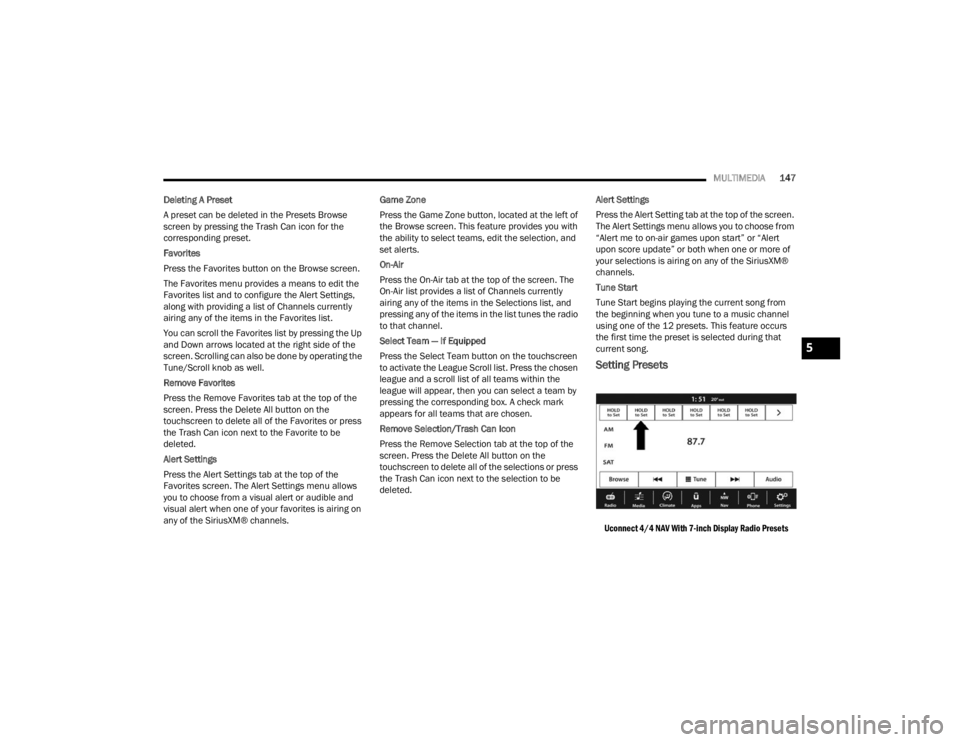
Setting Presets
Uconnect 4/4 NAV With 7-inch Display Radio Presets
5
22_FD_OM_EN_USC_t.book Page 147
Page 150 of 312
148MULTIMEDIA
The Presets are available for all Radio Modes, and
are activated by pressing any of the Preset
buttons, located at the top of the screen.
When you are on a station that you wish to save as
a preset, press and hold the numbered button on
the touchscreen for more than two seconds.
The Radio stores up to 12 presets in each of the
Radio Modes.
A total of six presets will appear on the screen. You
can switch between the radio presets list by
pressing the Arrow button located in the upper
right of the radio touchscreen.
PRESET FEATURES — IF EQUIPPED
Browse In AM/FM
When in either AM or FM, the Browse Screen
provides a means to edit the Presets List and is
entered by pushing the Enter/Browse button.
Scrolling Preset List
Once in the Browse Presets screen, you can scroll
the preset list by rotation of the Tune/Scroll knob
or by pressing the Up or Down Arrow keys, located
on the right of the screen. Preset Selection From List
A preset can be selected by pressing any of the
listed Presets, or by pushing the Enter/Browse
button on the Tune/Scroll knob to select the
currently highlighted Preset.
When selected, the radio tunes to the station
stored in the Presets.
Deleting Presets
A preset can be deleted in the Presets Browse
screen by pressing the Trash Can icon for the
corresponding preset.
Return To Main Radio Screen
You can return to the Main Radio Screen by
pressing the X button or the Back Arrow button
when in the Browse Presets screen.
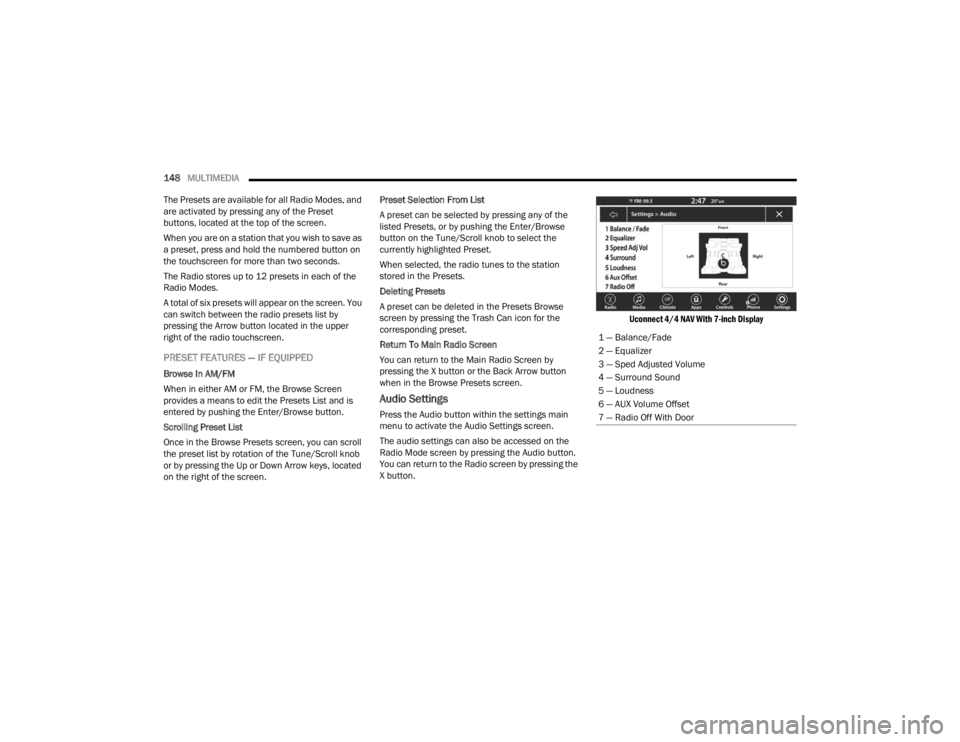
Audio Settings
Press the Audio button within the settings main
menu to activate the Audio Settings screen.
The audio settings can also be accessed on the
Radio Mode screen by pressing the Audio button.
You can return to the Radio screen by pressing the
X button.
Uconnect 4/4 NAV With 7-inch Display
1 — Balance/Fade
2 — Equalizer
3 — Sped Adjusted Volume
4 — Surround Sound
5 — Loudness
6 — AUX Volume Offset
7 — Radio Off With Door
22_FD_OM_EN_USC_t.book Page 148
Page 175 of 312
MULTIMEDIA173
RADIO OPERATION AND MOBILE PHONES
Under certain conditions, the mobile phone being
on in your vehicle can cause erratic or noisy
performance from your radio. This condition may
be lessened or eliminated by repositioning the
mobile phone within the vehicle. This condition is
not harmful to the radio. If your radio performance
does not satisfactorily improve from repositioning
the mobile phone, it is recommended that the
volume be turned down or off during mobile phone
operation when not using the Uconnect system.
REGULATORY AND SAFETY
I
NFORMATION
US/CANADA
Exposure to Radio Frequency Radiation
The radiated output power of the internal wireless
radio is far below the FCC and IC radio frequency
exposure limits. Nevertheless, the wireless radio
will be used in such a manner that the radio is 8 in
(20 cm) or further from the human body.
The internal wireless radio operates within
guidelines found in radio frequency safety standards and recommendations, which reflect
the consensus of the scientific community.
The radio manufacturer believes the internal
wireless radio is safe for use by consumers. The
level of energy emitted is far less than the
electromagnetic energy emitted by wireless
devices such as mobile phones. However, the use
of wireless radios may be restricted in some
situations or environments, such as aboard
airplanes. If you are unsure of restrictions, you are
encouraged to ask for authorization before turning
on the wireless radio Ú
page 297.
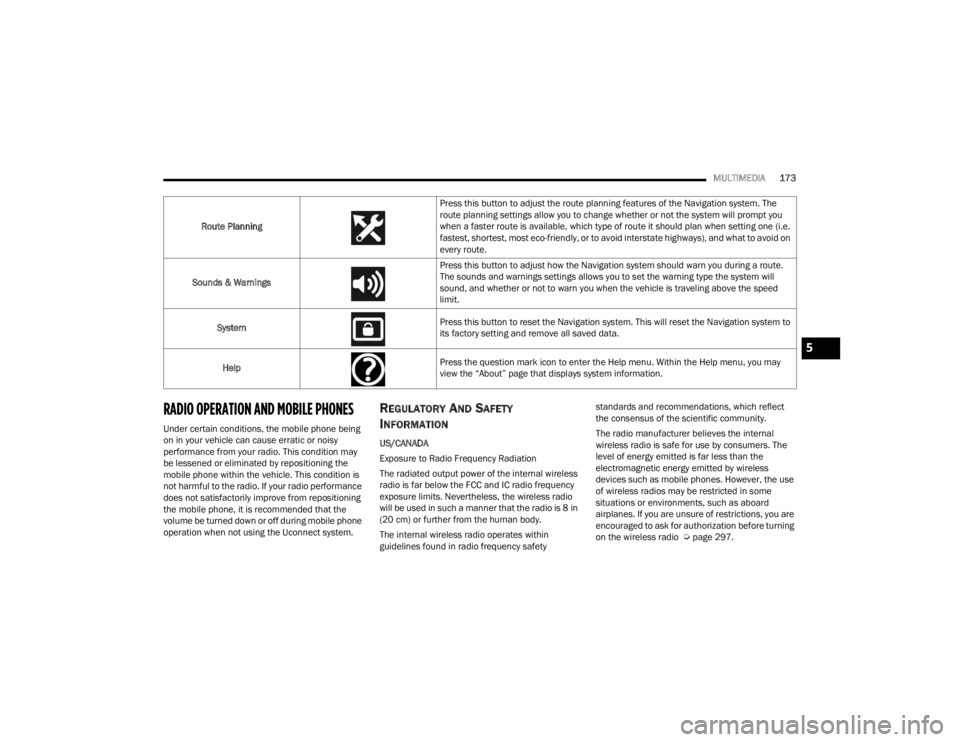
Route Planning
Press this button to adjust the route planning features of the Navigation system. The
route planning settings allow you to change whether or not the system will prompt you
when a faster route is available, which type of route it should plan when setting one (i.e.
fastest, shortest, most eco-friendly, or to avoid interstate highways), and what to avoid on
every route.
Sounds & Warnings Press this button to adjust how the Navigation system should warn you during a route.
The sounds and warnings settings allows you to set the warning type the system will
sound, and whether or not to warn you when the vehicle is traveling above the speed
limit.
System Press this button to reset the Navigation system. This will reset the Navigation system to
its factory setting and remove all saved data.
Help Press the question mark icon to enter the Help menu. Within the Help menu, you may
view the “About” page that displays system information.
5
22_FD_OM_EN_USC_t.book Page 173
Page 204 of 312
202SAFETY
NOTE:After an accident, remember to cycle the ignition to
the STOP (OFF/LOCK) position and remove the key
from the ignition switch to avoid draining the
battery. Carefully check the vehicle for fuel leaks in
the engine compartment and on the ground near
the engine compartment and fuel tank before
resetting the system and starting the engine. If
there are no fuel leaks or damage to the vehicle
electrical devices (e.g. headlights) after an
accident, reset the system by following the procedure described below. If you have any doubt,
contact an authorized dealer.
Enhanced Accident Response System
Reset Procedure
After the event occurs, when the system is active,
a message regarding fuel cutoff is displayed. Turn
the ignition switch from ignition AVV/START or
MAR/ACC/ON/RUN to ignition STOP/OFF/LOCK.
Carefully check the vehicle for fuel leaks in the
engine compartment and on the ground near the
engine compartment and fuel tank before
resetting the system and starting the engine.
Depending on the nature of the event the left and
right turn signal lights, located in the instrument
panel, may both be blinking and will continue to
blink. In order to move your vehicle to the side of
the road, you must follow the system reset
procedure.
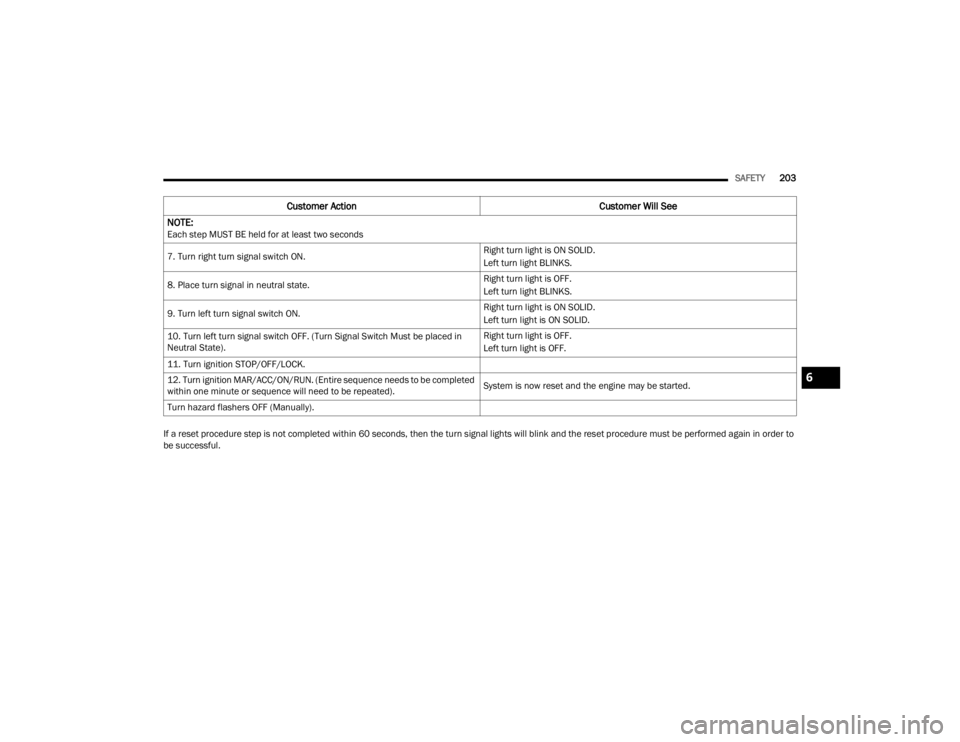
Customer Action
Customer Will See
NOTE:
Each step MUST BE held for at least two seconds
1. Turn ignition STOP/OFF/LOCK. (Turn Signal Switch Must be placed in
Neutral State).
2. Turn ignition MAR/ACC/ON/RUN. Right turn light BLINKS.
Left turn light is OFF.
3. Turn right turn signal switch ON. Right turn light is ON SOLID.
Left turn light BLINKS.
4. Place turn signal in neutral state. Right turn light is OFF.
Left turn light BLINKS.
5. Turn left turn signal switch ON. Right turn light BLINKS.
Left turn light is ON SOLID.
6. Place turn signal in neutral state. Right turn light BLINKS.
Left turn light is OFF.
22_FD_OM_EN_USC_t.book Page 202
Page 205 of 312
SAFETY203
If a reset procedure step is not completed within 60 seconds, then the turn signal lights will blink and the reset procedure must be performed again in order to
be successful. 7. Turn right turn signal switch ON.
Right turn light is ON SOLID.
Left turn light BLINKS.
8. Place turn signal in neutral state. Right turn light is OFF.
Left turn light BLINKS.
9. Turn left turn signal switch ON. Right turn light is ON SOLID.
Left turn light is ON SOLID.
10. Turn left turn signal switch OFF. (Turn Signal Switch Must be placed in
Neutral State). Right turn light is OFF.
Left turn light is OFF.
11. Turn ignition STOP/OFF/LOCK.
12. Turn ignition MAR/ACC/ON/RUN. (Entire sequence needs to be completed
within one minute or sequence will need to be repeated). System is now reset and the engine may be started.
Turn hazard flashers OFF (Manually).
Customer Action Customer Will See
NOTE:
Each step MUST BE held for at least two seconds
6
22_FD_OM_EN_USC_t.book Page 203
Page 237 of 312
235
SERVICING AND MAINTENANCE
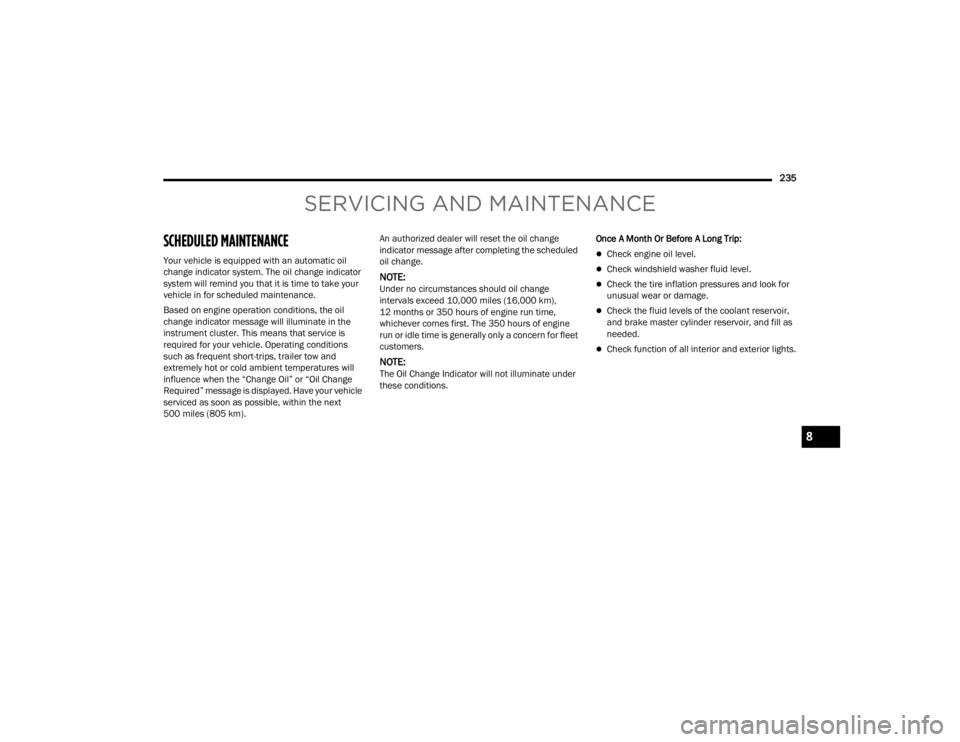
SCHEDULED MAINTENANCE
Your vehicle is equipped with an automatic oil
change indicator system. The oil change indicator
system will remind you that it is time to take your
vehicle in for scheduled maintenance.
Based on engine operation conditions, the oil
change indicator message will illuminate in the
instrument cluster. This means that service is
required for your vehicle. Operating conditions
such as frequent short-trips, trailer tow and
extremely hot or cold ambient temperatures will
influence when the “Change Oil” or “Oil Change
Required” message is displayed. Have your vehicle
serviced as soon as possible, within the next
500 miles (805 km).An authorized dealer will reset the oil change
indicator message after completing the scheduled
oil change.
NOTE:Under no circumstances should oil change
intervals exceed 10,000 miles (16,000 km),
12 months or 350 hours of engine run time,
whichever comes first. The 350 hours of engine
run or idle time is generally only a concern for fleet
customers.
NOTE:The Oil Change Indicator will not illuminate under
these conditions.
Once A Month Or Before A Long Trip:
Check engine oil level.
Check windshield washer fluid level.
Check the tire inflation pressures and look for
unusual wear or damage.
Check the fluid levels of the coolant reservoir,
and brake master cylinder reservoir, and fill as
needed.
Check function of all interior and exterior lights.
8
22_FD_OM_EN_USC_t.book Page 235
Page 247 of 312
SERVICING AND MAINTENANCE245
a lithium based grease, such as Mopar® Spray
White Lube to ensure quiet, easy operation and to
protect against rust and wear. Prior to the
application of any lubricant, the parts concerned
should be wiped clean to remove dust and grit;
after lubricating excess oil and grease should be
removed. Particular attention should also be given
to hood latching components to ensure proper
function. When performing other underhood
services, the hood latch, release mechanism and
safety catch should be cleaned and lubricated.
The external lock cylinders should be lubricated
twice a year, preferably in the Autumn and Spring.
Apply a small amount of a high quality lubricant,
such as Mopar® Lock Cylinder Lubricant directly
into the lock cylinder.
WINDSHIELD WIPER BLADES
Clean the rubber edges of the wiper blades and the
windshield periodically with a sponge or soft cloth
and a mild nonabrasive cleaner. This will remove
accumulations of salt or road film.
Operation of the wipers on dry glass for long
periods may cause deterioration of the wiper
blades. Always use washer fluid when using the
wipers to remove salt or dirt from a dry windshield.
Avoid using the wiper blades to remove frost or ice
from the windshield. Keep the blade rubber out of
contact with petroleum products such as engine
oil, gasoline, etc.
NOTE:Life expectancy of wiper blades varies depending
on geographical area and frequency of use. Poor
performance of blades may be present with chat -
tering, marks, water lines or wet spots. If any of
these conditions are present, clean the wiper
blades or replace as necessary.
The wiper blades and wiper arms should be
inspected periodically, not just when wiper
performance problems are experienced. This
inspection should include the following points:
Wear or uneven edges
Foreign material
Hardening or cracking
Deformation or fatigue
If a wiper blade or wiper arm is damaged, replace
the affected wiper arm or blade with a new unit. Do
not attempt to repair a wiper arm or blade that is
damaged.
Service Position Strategy
The service position allows the wiper blades to be
placed in a position that allows the wiper blades to
be easily changed.
To enable the Service Position Strategy, the wipers
must be in the Park position before placing the
ignition in the OFF position. Service Mode must be activated within two
minutes after the ignition is placed in the OFF
position.
To have a correct activation of strategy, the Service
Position command (anti-panic) must be active for
at least half a second.
At every valid activation of Service Position
command, the wiper blades are activated for
250 ms.
The Service Position command can be repeated
several times to bring the blades into the desired
position, up to a maximum of three times.
After three subsequent activations the strategy is
disabled.
Function Deactivation:
The functionality is reset if:
The ignition is turned to the RUN position.
Number of subsequent activations is three.
Two minute timer has expired after placing the
ignition OFF.
NOTE:When turning the ignition ON, the blades will go
into the parking position.
8
22_FD_OM_EN_USC_t.book Page 245
Page 253 of 312
SERVICING AND MAINTENANCE251
AUTOMATIC TRANSMISSION
Special Additives
The manufacturer strongly recommends against
using any special additives in the transmission.
Automatic Transmission Fluid (ATF) is an
engineered product and its performance may be
impaired by supplemental additives. Therefore, do
not add any fluid additives to the transmission.
Avoid using transmission sealers as they may
adversely affect seals.
Fluid Level Check
The fluid level is preset at the factory and does not
require adjustment under normal operating
conditions. Routine fluid level checks are not
required, therefore the transmission has no
dipstick. An authorized dealer can check your
transmission fluid level using special service tools.
If you notice fluid leakage or transmission
malfunction, visit an authorized dealer
immediately to have the transmission fluid level
checked. Operating the vehicle with an improper
fluid level can cause severe transmission damage.
Fluid And Filter Changes
Under normal operating conditions, the fluid
installed at the factory will provide satisfactory
lubrication for the life of the vehicle.
Routine fluid and filter changes are not required.
However, change the fluid and filter if the fluid
becomes contaminated (with water, etc.), or if the
transmission is disassembled for any reason.
Selection Of Lubricant
It is important to use the proper transmission fluid
to ensure optimum transmission performance and
life. Use the manufacturer specified transmission
fluid Úpage 293. It is important to maintain the
transmission fluid at the correct level using the
recommended fluid.
NOTE:No chemical flushes should be used in any trans -
mission; only the approved lubricant should be
used.
Do not allow petroleum based fluid to contam -
inate the brake fluid. Brake seal components
could be damaged, causing partial or
complete brake failure. This could result in a
collision.
CAUTION!
Use of improper brake fluids will affect overall
clutch system performance. Improper brake
fluids may damage the clutch system resulting in
loss of clutch function and the ability to shift the
transmission.
WARNING!CAUTION!
Do not use chemical flushes in your
transmission as the chemicals can damage your
transmission components. Such damage is not
covered by the New Vehicle Limited Warranty.
CAUTION!
If a transmission fluid leak occurs, visit an
authorized dealer immediately. Severe
transmission damage may occur. An authorized
dealer has the proper tools to adjust the fluid
level accurately.CAUTION!
Using a transmission fluid other than the
manufacturer recommended fluid may cause
deterioration in transmission shift quality and/or
torque converter shudder Ú page 293.
8
22_FD_OM_EN_USC_t.book Page 251
Page 303 of 312

301
Disposal Antifreeze (Engine Coolant)
....................... 249Disturb........................................................... 159Door Ajar.......................................................... 71Door Ajar Light................................................. 71Door LocksAutomatic.................................................... 24Remote Keyless Entry................................. 22Drag & Drop................................................... 140Driver Memory Presets.................................. 147Driver’s Seat Back Tilt..................................... 26DrivingThrough Flowing, Rising, Or Shallow Standing Water
..................................... 120
E
Electric Brake Control System....................... 175Anti-Lock Brake System............................. 174Traction Control System............................ 178Electric Park Brake.......................................... 82Electric Parking Brake..................................... 82Electrical Outlet, Auxiliary (Power Outlet)......... 52Electrical Power Outlets................................... 52Electronic Stability Control (ESC)...................176Electronic Throttle Control Warning Light........ 71Emergency Refueling..................................... 229Emergency, In Case OfHazard Warning Flasher............................ 218Jacking...................................................... 218Jump Starting............................................ 226
Overheating.............................................. 229Towing...................................................... 232Emission Control System Maintenance........... 78Engine........................................................... 240Air Cleaner................................................ 243Break-In Recommendations........................ 82Checking Oil Level.................................... 241Compartment........................................... 240Coolant (Antifreeze).................................. 293Cooling..................................................... 247Exhaust Gas Caution....................... 216, 217Fails To Start............................................... 81Flooded, Starting......................................... 81Jump Starting........................................... 226Oil........................................... 242, 292, 293Oil Filler Cap............................................. 240Oil Filter.................................................... 243Oil Selection.................................... 242, 292Overheating.............................................. 229Starting........................................................ 80Enhanced Accident Response
Feature................................................ 201, 234Ethanol......................................................... 291Exhaust Gas Cautions.......................... 216, 217Exhaust System................................... 216, 246Exterior Lighting............................................... 36Exterior Lights.........................................36, 216
F
FiltersAir Cleaner
................................................ 243Air Conditioning................................. 49, 244Engine Oil........................................ 243, 293Engine Oil Disposal................................... 243FlashersHazard Warning........................................ 218Turn Signals................................ 38, 77, 216Flash-To-Pass...................................................37Flooded Engine Starting...................................81Floor Console...................................................51Fluid Capacities............................................ 292Fluid Leaks.................................................... 216Fluid Level ChecksEngine Oil................................................. 241Fluid, Brake................................................... 293Fog Lights........................................................38Folding Rear Seats...........................................26Freeing A Stuck Vehicle................................. 231Front And Rear Park Assist System............... 102Fuel............................................................... 290Adding...................................................... 111Additives................................................... 290Clean Air................................................... 290Ethanol..................................................... 291Gasoline................................................... 29011
22_FD_OM_EN_USC_t.book Page 301
Page 306 of 312

304 Monitor, Tire Pressure System
....................... 185Mopar Parts................................................... 296MP3 Control.................................................... 51
N
New Vehicle Break-In Period............................ 82
O
Occupant Restraints...................................... 188Octane Rating, Gasoline (Fuel)............ 290, 293Oil Change Indicator........................................ 65Reset........................................................... 65Oil Filter, Change........................................... 243Oil Filter, Selection......................................... 243Oil Pressure Light............................................ 71Oil, Engine........................................... 242, 293Capacity.................................................... 292Checking................................................... 241Dipstick..................................................... 241Disposal.................................................... 243Filter................................................ 243, 293Filter Disposal........................................... 243Identification Logo..................................... 242Materials Added To................................... 243Pressure Warning Light............................... 71Recommendation............................ 242, 292Viscosity.................................................... 292Onboard Diagnostic System............................ 78Operating Precautions..................................... 78
Operator Manual Owner's Manual........................................ 296Outside Rearview Mirrors................................ 34Overheating, Engine...................................... 229
P
Paint Care..................................................... 286Pair (Link) Uconnect Phone To A Mobile
Phone
S
..................................................... 154Park Assist.................................................... 102Park Assist System, Front And Rear.............. 102Parking Brake.................................................. 82Personalized Main Menu Bar........................ 140Pets.............................................................. 215Phone Mode................................................. 152Pinch Protection.............................................. 55Placard, Tire And Loading Information.......... 273PowerBrakes...................................................... 289Mirrors......................................................... 34Sunroof........................................................ 55Power Folding Roof.......................................... 57Pregnant Women And Seat Belts.................. 193Preparation For Jacking................................ 218Presets......................................................... 147
R
Radial Ply Tires............................................. 277Radiator Cap (Coolant Pressure Cap)........... 249
RadioPresets..................................................... 147Radio Controls.............................................. 142Radio Mode................................................... 142Radio Operation................................... 142, 173Radio Remote Controls................................. 141Rain Sensitive Wiper System...........................41Rear Camera................................................. 110Rear Cross Path............................................ 181Rear Seats, Folding..........................................26Rear Window Defroster....................................42Rear Wiper/Washer.........................................42Recreational Towing...................................... 119Reformulated Gasoline................................. 290Refrigerant.................................................... 244Release, Hood..................................................58Reminder, Lights On........................................37Reminder, Seat Belt...................................... 189Remote ControlStarting System...........................................18Remote Keyless Entry......................................14Arm The Alarm.............................................21Disarm The Alarm........................................21Keyless Enter-N-Go......................................23Remote Sound System (Radio) Control......... 141Remote StartingUconnect Customer ProgrammableFeatures
..................................................20Uconnect Settings.......................................20Remote Starting System..................................18
22_FD_OM_EN_USC_t.book Page 304