stop start FIAT 500X 2022 Service Manual
[x] Cancel search | Manufacturer: FIAT, Model Year: 2022, Model line: 500X, Model: FIAT 500X 2022Pages: 312, PDF Size: 13.26 MB
Page 144 of 312
142MULTIMEDIA
RADIO MODE
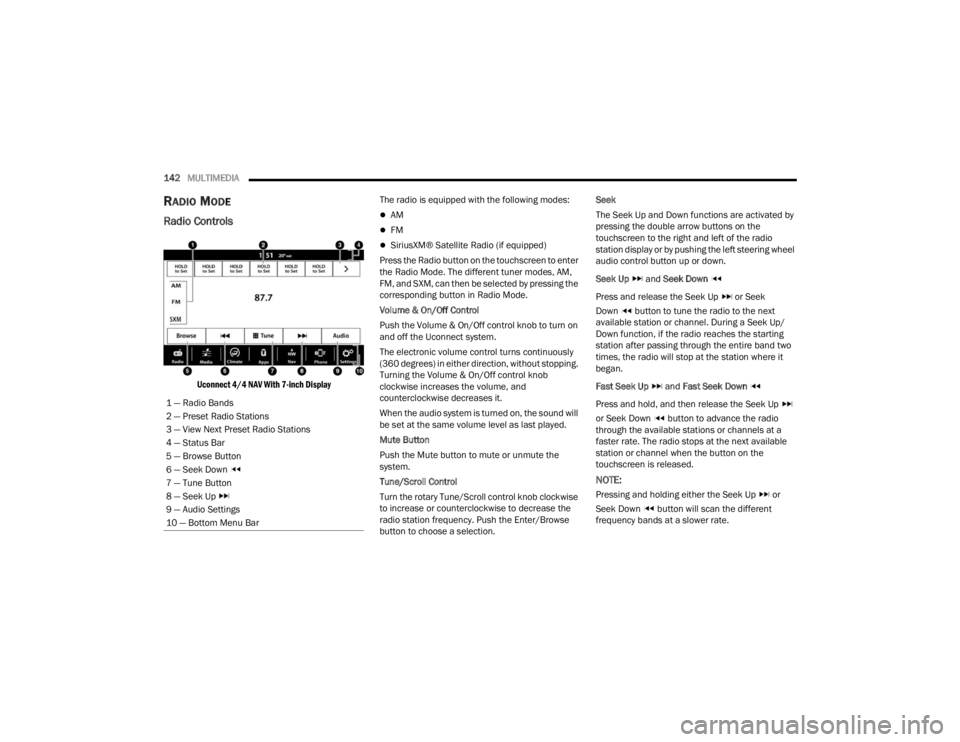
Radio Controls
Uconnect 4/4 NAV With 7-inch Display
The radio is equipped with the following modes:
AM
FM
SiriusXM® Satellite Radio (if equipped)
Press the Radio button on the touchscreen to enter
the Radio Mode. The different tuner modes, AM,
FM, and SXM, can then be selected by pressing the
corresponding button in Radio Mode.
Volume & On/Off Control
Push the Volume & On/Off control knob to turn on
and off the Uconnect system.
The electronic volume control turns continuously
(360 degrees) in either direction, without stopping.
Turning the Volume & On/Off control knob
clockwise increases the volume, and
counterclockwise decreases it.
When the audio system is turned on, the sound will
be set at the same volume level as last played.
Mute Button
Push the Mute button to mute or unmute the
system.
Tune/Scroll Control
Turn the rotary Tune/Scroll control knob clockwise
to increase or counterclockwise to decrease the
radio station frequency. Push the Enter/Browse
button to choose a selection. Seek
The Seek Up and Down functions are activated by
pressing the double arrow buttons on the
touchscreen to the right and left of the radio
station display or by pushing the left steering wheel
audio control button up or down.
Seek Up
and Seek Down
Press and release the Seek Up or Seek
Down button to tune the radio to the next
available station or channel. During a Seek Up/
Down function, if the radio reaches the starting
station after passing through the entire band two
times, the radio will stop at the station where it
began.
Fast Seek Up and Fast Seek Down
Press and hold, and then release the Seek Up
or Seek Down button to advance the radio
through the available stations or channels at a
faster rate. The radio stops at the next available
station or channel when the button on the
touchscreen is released.
NOTE:
Pressing and holding either the Seek Up or
Seek Down button will scan the different
frequency bands at a slower rate.
1 — Radio Bands
2 — Preset Radio Stations
3 — View Next Preset Radio Stations
4 — Status Bar
5 — Browse Button
6 — Seek Down
7 — Tune Button
8 — Seek Up
9 — Audio Settings
10 — Bottom Menu Bar
22_FD_OM_EN_USC_t.book Page 142
Page 170 of 312
168MULTIMEDIA
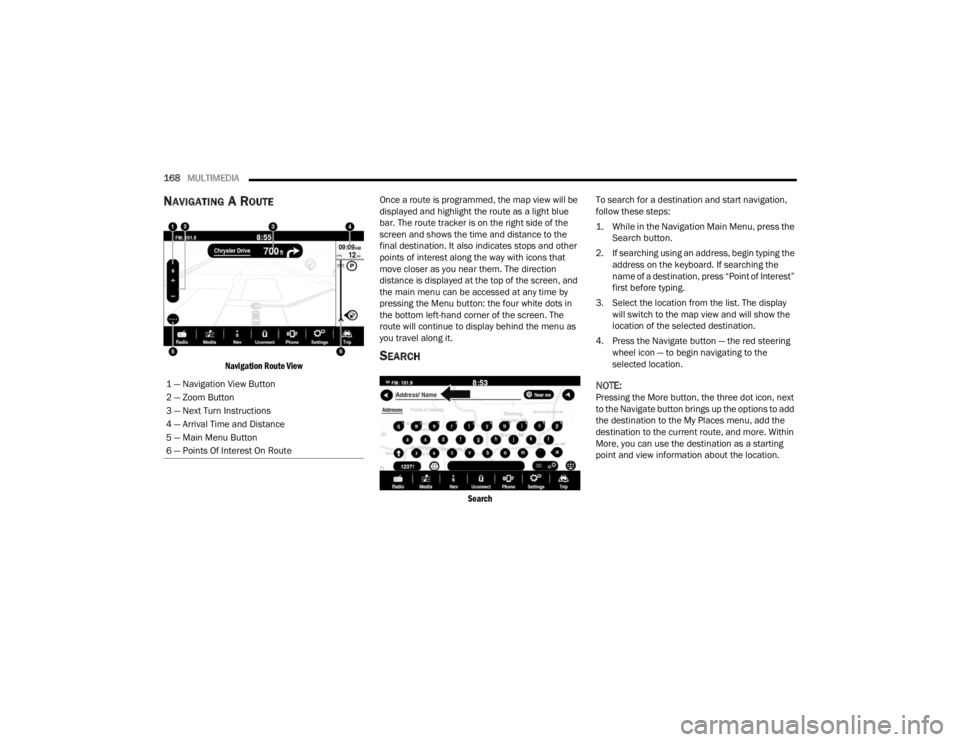
NAVIGATING A ROUTE
Navigation Route View
Once a route is programmed, the map view will be
displayed and highlight the route as a light blue
bar. The route tracker is on the right side of the
screen and shows the time and distance to the
final destination. It also indicates stops and other
points of interest along the way with icons that
move closer as you near them. The direction
distance is displayed at the top of the screen, and
the main menu can be accessed at any time by
pressing the Menu button: the four white dots in
the bottom left-hand corner of the screen. The
route will continue to display behind the menu as
you travel along it.SEARCH
Search
To search for a destination and start navigation,
follow these steps:
1. While in the Navigation Main Menu, press the
Search button.
2. If searching using an address, begin typing the address on the keyboard. If searching the
name of a destination, press “Point of Interest”
first before typing.
3. Select the location from the list. The display will switch to the map view and will show the
location of the selected destination.
4. Press the Navigate button — the red steering wheel icon — to begin navigating to the
selected location.
NOTE:Pressing the More button, the three dot icon, next
to the Navigate button brings up the options to add
the destination to the My Places menu, add the
destination to the current route, and more. Within
More, you can use the destination as a starting
point and view information about the location.
1 — Navigation View Button
2 — Zoom Button
3 — Next Turn Instructions
4 — Arrival Time and Distance
5 — Main Menu Button
6 — Points Of Interest On Route
22_FD_OM_EN_USC_t.book Page 168
Page 176 of 312
174 (Continued)
SAFETY
SAFETY FEATURES
ANTI-LOCK BRAKE SYSTEM (ABS)
The ABS provides increased vehicle stability and
brake performance under most braking conditions.
The system automatically prevents wheel lock and
enhances vehicle control during braking.
The ABS performs a self-check cycle to ensure that
the ABS is working properly each time the vehicle
is started and driven. During this self-check, you
may hear a slight clicking sound as well as some
related motor noises.
The ABS is activated during braking when the
system detects one or more wheels are beginning
to lock. Road conditions such as ice, snow, gravel,
bumps, railroad tracks, loose debris, or panic stops
may increase the likelihood of ABS activation(s).
You also may experience the following normal
characteristics when the ABS activates:
The ABS motor noise or clicking sounds (you may
continue to hear for a short time after the stop).
Brake pedal pulsations.
A slight drop of the brake pedal at the end of the
stop.The ABS is designed to function with the Original
Equipment Manufacturer (OEM) tires. Modification
may result in degraded ABS performance.
Anti-Lock Brake System (ABS) Warning
Light
The yellow ABS Warning Light will turn on when the
ignition is placed in the ON/RUN mode and may
stay on for as long as four seconds.
If the ABS Warning Light remains on or comes on
while driving, it indicates that the anti-lock portion
of the brake system is not functioning and that
service is required. However, the conventional
brake system will continue to operate normally if
the ABS Warning Light is on.
If the ABS Warning Light is on, the brake system
should be serviced as soon as possible to restore
the benefits of Anti-Lock Brakes. If the ABS
WARNING!
The ABS contains sophisticated electronic
equipment that may be susceptible to interfer
-
ence caused by improperly installed or high
output radio transmitting equipment. This
interference can cause possible loss of
anti-lock braking capability. Installation of
such equipment should be performed by qual -
ified professionals.
Pumping of the Anti-Lock Brakes will diminish
their effectiveness and may lead to a collision.
Pumping makes the stopping distance longer.
Just press firmly on your brake pedal when you
need to slow down or stop.
The ABS cannot prevent the natural laws of
physics from acting on the vehicle, nor can it
increase braking or steering efficiency beyond
that afforded by the condition of the vehicle
brakes and tires or the traction afforded.
The ABS cannot prevent collisions, including
those resulting from excessive speed in turns,
following another vehicle too closely, or hydro -
planing.
The capabilities of an ABS equipped vehicle
must never be exploited in a reckless or
dangerous manner that could jeopardize the
user’s safety or the safety of others.
WARNING!
22_FD_OM_EN_USC_t.book Page 174
Page 177 of 312
SAFETY175
Warning Light does not come on when the ignition
is placed in ON/RUN mode, have the light repaired
as soon as possible.
ELECTRONIC BRAKE CONTROL (EBC)
S
YSTEM
Your vehicle is equipped with an advanced
Electronic Brake Control (EBC) system. This system
includes Anti-Lock Brake System (ABS), Brake
Assist System (BAS), Dynamic Steering Torque
(DST), Electronic Brake Force Distribution (EBD),
Electronic Stability Control (ESC), Electronic Roll
Mitigation (ERM), Hill Start Assist (HSA), and
Traction Control System (TCS). These systems work
together to enhance both vehicle stability and
control in various driving conditions.
Brake System Warning Light
The red Brake System Warning Light will turn on
when the ignition is placed in the ON/RUN mode
and may stay on for as long as four seconds.
If the Brake System Warning Light remains on or
comes on while driving, it indicates that the brake
system is not functioning properly and that
immediate service is required. If the Brake System
Warning Light does not come on when the ignition
is placed in the ON/RUN mode, have the light
repaired as soon as possible.
Brake Assist System (BAS)
The BAS is designed to optimize the vehicle’s
braking capability during emergency braking
maneuvers. The system detects an emergency
braking situation by sensing the rate and amount
of brake application and then applies optimum
pressure to the brakes. This can help reduce
braking distances. The BAS complements the
Anti-Lock Brake System (ABS). Applying the brakes
very quickly results in the best BAS assistance. To
receive the benefit of the system, you must apply
continuous braking pressure during the stopping
sequence (do not “pump” the brakes). Do not
reduce brake pedal pressure unless braking is no
longer desired. Once the brake pedal is released,
the BAS is deactivated.
Dynamic Steering Torque (DST)
DST is a feature of the ESC and Electric Power
Steering (EPS) modules that provides torque at the
steering wheel for certain driving conditions in
which the ESC module is detecting vehicle
instability. The torque that the steering wheel
receives is only meant to help the driver realize
optimal steering behavior in order to reach/
maintain vehicle stability. The only notification the
driver receives that the feature is active is the
torque applied to the steering wheel.
NOTE:The DST feature is only meant to help the driver
realize the correct course of action through small
torques on the steering wheel, which means the
effectiveness of the DST feature is highly
dependent on the driver’s sensitivity and overall
reaction to the applied torque. It is very important
to realize that this feature will not steer the vehicle,
meaning the driver is still responsible for steering
the vehicle.
Electronic Brake Force Distribution (EBD)
EBD manages the distribution of the braking
torque between the front and rear axles by limiting
braking pressure to the rear axle. This is done to
prevent overslip of the rear wheels to avoid vehicle
instability, and to prevent the rear axle from
entering ABS before the front axle.
WARNING!
The Brake Assist System (BAS) cannot prevent
the natural laws of physics from acting on the
vehicle, nor can it increase the traction afforded
by prevailing road conditions. BAS cannot
prevent collisions, including those resulting from
excessive speed in turns, driving on very slippery
surfaces, or hydroplaning. The capabilities of a
BAS-equipped vehicle must never be exploited in
a reckless or dangerous manner, which could
jeopardize the user's safety or the safety of
others.
6
22_FD_OM_EN_USC_t.book Page 175
Page 179 of 312

SAFETY177
ESC Operation Modes
To disable ESC and other active safety systems,
follow the instruction below.
There are two operation modes of active safety
systems on the vehicle:
ESC On
Partial Off ESC On
All active safety systems are enabled. This is the
normal operating mode when driving a vehicle.
This mode should be used in most driving
conditions. The system will be in "ESC On" mode
every time the engine is started
NOTE:You are advised to select "Partial Off " mode only
for specific driving requirements.
Partial Off
By pressing the ESC OFF button located below the
radio screen when driving, the intervention of the
ESC and TCS systems is limited to braking action
on the single wheels.
The other systems remain enabled. Activation of
this mode is indicated by the warning lamp on the
instrument panel switching on (if equipped,
together with a message on the display).
To restore "ESC On" operating mode, press the
button below the radio screen again.
"ESC On" mode will automatically reactivate every
time the engine is started.
NOTE:When traveling on snowy roads with snow chains,
it may be helpful to activate "Partial Off" mode: in
these conditions, you can obtain better traction by
slipping the drive wheels.
Hill Start Assist (HSA)
HSA is designed to mitigate roll back from a
complete stop while on an incline. If the driver
releases the brake while stopped on an incline,
HSA will continue to hold the brake pressure for a
short period. If the driver does not apply the
throttle before this time expires, the system will
release brake pressure and the vehicle will roll
down the hill as normal.
The following conditions must be met in order for
HSA to activate:
The feature must be enabled.
The vehicle must be stopped.
The parking brake must be off.
The driver door must be closed.
The vehicle must be on a sufficient grade.
Vehicle modifications, or failure to properly
maintain your vehicle, may change the
handling characteristics of your vehicle, and
may negatively affect the performance of the
ESC system. Changes to the steering system,
suspension, braking system, tire type and size
or wheel size may adversely affect ESC perfor
-
mance. Improperly inflated and unevenly worn
tires may also degrade ESC performance. Any
vehicle modification or poor vehicle mainte -
nance that reduces the effectiveness of the
ESC system can increase the risk of loss of
vehicle control, vehicle rollover, personal
injury and death.
WARNING!WARNING!
When in “Partial Off” mode, the TCS functionality
of ESC, except for the limited slip feature
described in the Traction Control System (TCS)
section, has been disabled and the ESC OFF
Indicator Light will be illuminated. When in
“Partial Off” mode, the engine power reduction
feature of TCS is disabled, and the enhanced
vehicle stability offered by the ESC system is
reduced.
6
22_FD_OM_EN_USC_t.book Page 177
Page 184 of 312

182SAFETY
NOTE:The BSM system will store the current operating
mode when the vehicle is shut off. Each time the
vehicle is started the previously stored mode will
be recalled and used.
Blind Spot Monitoring Fault Warnings
Blinded Sensor
In the case of a blinded sensor:
BSM Mirror Warning Lights are turned on contin -
uously.
An instrument cluster message will display
“Blind Spot Monitoring Unavailable - Wipe Rear
Bumper Corners.”
NOTE:The rear fascia/bumper must be clean and free of
any obstructing debris.
System Not Available
In the case of the system being temporarily
unavailable:
BSM Mirror Warning Lights are turned on contin -
uously.
An instrument cluster message will display
“Blind Spot Monitoring Temporarily Unavail -
able.” In the case of the system being completely
unavailable:
A chime will turn on.
An instrument cluster message will display
“Blind Spot Monitoring Unavailable - Service
Required.”
NOTE:The vehicle must be taken to the nearest autho
-
rized dealer for service.
FULL BRAKE CONTROL SYSTEM WITH
M
ITIGATION
The Full Brake Control system with Mitigation
provides the driver with audible warnings (through
the radio), visual warnings (within the instrument
cluster display), and may apply a brake jerk to warn
the driver when it detects a potential frontal
collision. The warnings and limited braking are
intended to provide the driver with enough time to
react, avoid or mitigate the potential collision.
NOTE:
The Full Brake Control system monitors the
information from the forward looking sensors as
well as the Electronic Brake Controller (EBC), to
calculate the probability of a forward collision.
When the system determines that a forward
collision is probable, the driver will be provided with audible and visual warnings and may
provide a brake jerk warning.
If the driver does not take action based upon
these progressive warnings, then the system
will provide a limited level of active braking to
help slow the vehicle and mitigate the potential
forward collision. If the driver reacts to the warn
-
ings by braking and the system determines that
the driver intends to avoid the collision by
braking but has not applied sufficient brake
force, the system will compensate and provide
additional brake force as required.
After the end of the intervention of automatic
braking, the transmission may remain in last gear
stored; therefore the car could lurch forward, once
the brakes release a few seconds later. If the Full
Brake Control system event stops the vehicle
completely, the system will hold the vehicle at
standstill for two seconds and then release the
brakes.
If a Full Brake Control system event begins at a
speed below 26 mph (42 km/h), the system may
provide the maximum braking possible to mitigate
the potential forward collision. If the Full Brake
Control system event stops the vehicle completely,
the system will hold the vehicle at standstill for two
seconds and then release the brakes.
22_FD_OM_EN_USC_t.book Page 182
Page 185 of 312
SAFETY183
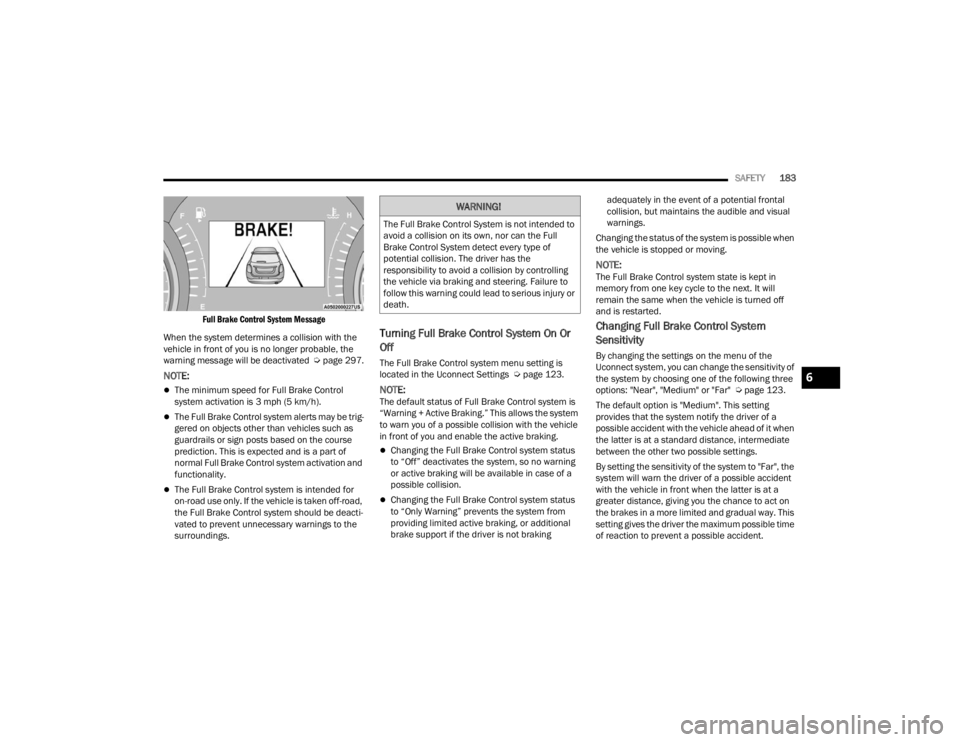
Full Brake Control System Message
When the system determines a collision with the
vehicle in front of you is no longer probable, the
warning message will be deactivated Úpage 297.
NOTE:
The minimum speed for Full Brake Control
system activation is 3 mph (5 km/h).
The Full Brake Control system alerts may be trig -
gered on objects other than vehicles such as
guardrails or sign posts based on the course
prediction. This is expected and is a part of
normal Full Brake Control system activation and
functionality.
The Full Brake Control system is intended for
on-road use only. If the vehicle is taken off-road,
the Full Brake Control system should be deacti -
vated to prevent unnecessary warnings to the
surroundings.
Turning Full Brake Control System On Or
Off
The Full Brake Control system menu setting is
located in the Uconnect Settings Ú page 123.
NOTE:The default status of Full Brake Control system is
“Warning + Active Braking.” This allows the system
to warn you of a possible collision with the vehicle
in front of you and enable the active braking.
Changing the Full Brake Control system status
to “Off” deactivates the system, so no warning
or active braking will be available in case of a
possible collision.
Changing the Full Brake Control system status
to “Only Warning” prevents the system from
providing limited active braking, or additional
brake support if the driver is not braking adequately in the event of a potential frontal
collision, but maintains the audible and visual
warnings.
Changing the status of the system is possible when
the vehicle is stopped or moving.
NOTE:The Full Brake Control system state is kept in
memory from one key cycle to the next. It will
remain the same when the vehicle is turned off
and is restarted.
Changing Full Brake Control System
Sensitivity
By changing the settings on the menu of the
Uconnect system, you can change the sensitivity of
the system by choosing one of the following three
options: "Near", "Medium" or "Far" Ú page 123.
The default option is "Medium". This setting
provides that the system notify the driver of a
possible accident with the vehicle ahead of it when
the latter is at a standard distance, intermediate
between the other two possible settings.
By setting the sensitivity of the system to "Far", the
system will warn the driver of a possible accident
with the vehicle in front when the latter is at a
greater distance, giving you the chance to act on
the brakes in a more limited and gradual way. This
setting gives the driver the maximum possible time
of reaction to prevent a possible accident.
WARNING!
The Full Brake Control System is not intended to
avoid a collision on its own, nor can the Full
Brake Control System detect every type of
potential collision. The driver has the
responsibility to avoid a collision by controlling
the vehicle via braking and steering. Failure to
follow this warning could lead to serious injury or
death.
6
22_FD_OM_EN_USC_t.book Page 183
Page 197 of 312
SAFETY195
SUPPLEMENTAL RESTRAINT SYSTEMS
(SRS)
Some of the safety features described in this
section may be standard equipment on some
models, or may be optional equipment on others. If
you are not sure, ask an authorized dealer.
The air bag system must be ready to protect you in
a collision. The Occupant Restraint Controller
(ORC) monitors the internal circuits and
interconnecting wiring associated with the
electrical Air Bag System Components. Your
vehicle may be equipped with the following Air Bag
System Components:
Air Bag System Components
Occupant Restraint Controller (ORC)
Air Bag Warning Light
Steering Wheel and Column
Instrument Panel
Knee Impact Bolsters
Driver and Front Passenger Air Bags
Seat Belt Buckle Switch
Supplemental Side Air Bags
Supplemental Knee Air Bags
Front and Side Impact Sensors
Seat Belt Pretensioners
Seat Track Position Sensors
Air Bag Warning Light
The Occupant Restraint Controller (ORC)
monitors the readiness of the electronic
parts of the air bag system whenever the
ignition switch is in the AVV/START or
MAR/ACC/ON/RUN position. If the ignition switch
is in the STOP/OFF/LOCK position the air bag
system is not on and the air bags will not inflate.
The ORC contains a backup power supply system
that may deploy the air bag system even if the
battery loses power or it becomes disconnected
prior to deployment.
The ORC turns on the Air Bag Warning Light in the
instrument panel for approximately four to eight
seconds for a self-check when the ignition switch is
in the MAR/ACC/ON/RUN position. After the
self-check, the Air Bag Warning Light will turn off. If
the ORC detects a malfunction in any part of the
system, it turns on the Air Bag Warning Light, either
momentarily or continuously. A single chime will
sound to alert you if the light comes on again after
initial startup.
The ORC also includes diagnostics that will
illuminate the instrument panel Air Bag Warning
Light if a malfunction is detected that could affect
the air bag system. The diagnostics also record the
nature of the malfunction. While the air bag system is designed to be maintenance free, if any of the
following occurs, have an authorized dealer
service the air bag system immediately.The Air Bag Warning Light does not come on
during the four to eight seconds when the igni
-
tion switch is first in the MAR/ACC/ON/RUN
position.
The Air Bag Warning Light remains on after the
four to eight-second interval.
The Air Bag Warning Light comes on intermit -
tently or remains on while driving.
NOTE:If the speedometer, tachometer, or any engine
related gauges are not working, the Occupant
Restraint Controller (ORC) may also be disabled. In
this condition the air bags may not be ready to
inflate for your protection. Have an authorized
dealer service the air bag system immediately.
WARNING!
Ignoring the Air Bag Warning Light in your
instrument panel could mean you won’t have the
air bag system to protect you in a collision. If the
light does not come on as a bulb check when the
ignition is first turned on, stays on after you start
the vehicle, or if it comes on as you drive, have
an authorized dealer service the air bag system
immediately.
6
22_FD_OM_EN_USC_t.book Page 195
Page 204 of 312

202SAFETY
NOTE:After an accident, remember to cycle the ignition to
the STOP (OFF/LOCK) position and remove the key
from the ignition switch to avoid draining the
battery. Carefully check the vehicle for fuel leaks in
the engine compartment and on the ground near
the engine compartment and fuel tank before
resetting the system and starting the engine. If
there are no fuel leaks or damage to the vehicle
electrical devices (e.g. headlights) after an
accident, reset the system by following the procedure described below. If you have any doubt,
contact an authorized dealer.
Enhanced Accident Response System
Reset Procedure
After the event occurs, when the system is active,
a message regarding fuel cutoff is displayed. Turn
the ignition switch from ignition AVV/START or
MAR/ACC/ON/RUN to ignition STOP/OFF/LOCK.
Carefully check the vehicle for fuel leaks in the
engine compartment and on the ground near the
engine compartment and fuel tank before
resetting the system and starting the engine.
Depending on the nature of the event the left and
right turn signal lights, located in the instrument
panel, may both be blinking and will continue to
blink. In order to move your vehicle to the side of
the road, you must follow the system reset
procedure.
Customer Action
Customer Will See
NOTE:
Each step MUST BE held for at least two seconds
1. Turn ignition STOP/OFF/LOCK. (Turn Signal Switch Must be placed in
Neutral State).
2. Turn ignition MAR/ACC/ON/RUN. Right turn light BLINKS.
Left turn light is OFF.
3. Turn right turn signal switch ON. Right turn light is ON SOLID.
Left turn light BLINKS.
4. Place turn signal in neutral state. Right turn light is OFF.
Left turn light BLINKS.
5. Turn left turn signal switch ON. Right turn light BLINKS.
Left turn light is ON SOLID.
6. Place turn signal in neutral state. Right turn light BLINKS.
Left turn light is OFF.
22_FD_OM_EN_USC_t.book Page 202
Page 205 of 312

SAFETY203
If a reset procedure step is not completed within 60 seconds, then the turn signal lights will blink and the reset procedure must be performed again in order to
be successful. 7. Turn right turn signal switch ON.
Right turn light is ON SOLID.
Left turn light BLINKS.
8. Place turn signal in neutral state. Right turn light is OFF.
Left turn light BLINKS.
9. Turn left turn signal switch ON. Right turn light is ON SOLID.
Left turn light is ON SOLID.
10. Turn left turn signal switch OFF. (Turn Signal Switch Must be placed in
Neutral State). Right turn light is OFF.
Left turn light is OFF.
11. Turn ignition STOP/OFF/LOCK.
12. Turn ignition MAR/ACC/ON/RUN. (Entire sequence needs to be completed
within one minute or sequence will need to be repeated). System is now reset and the engine may be started.
Turn hazard flashers OFF (Manually).
Customer Action Customer Will See
NOTE:
Each step MUST BE held for at least two seconds
6
22_FD_OM_EN_USC_t.book Page 203