stop start FIAT 500X 2022 User Guide
[x] Cancel search | Manufacturer: FIAT, Model Year: 2022, Model line: 500X, Model: FIAT 500X 2022Pages: 312, PDF Size: 13.26 MB
Page 34 of 312
32GETTING TO KNOW YOUR VEHICLE
UCONNECT VOICE RECOGNITION
INTRODUCING VOICE RECOGNITION
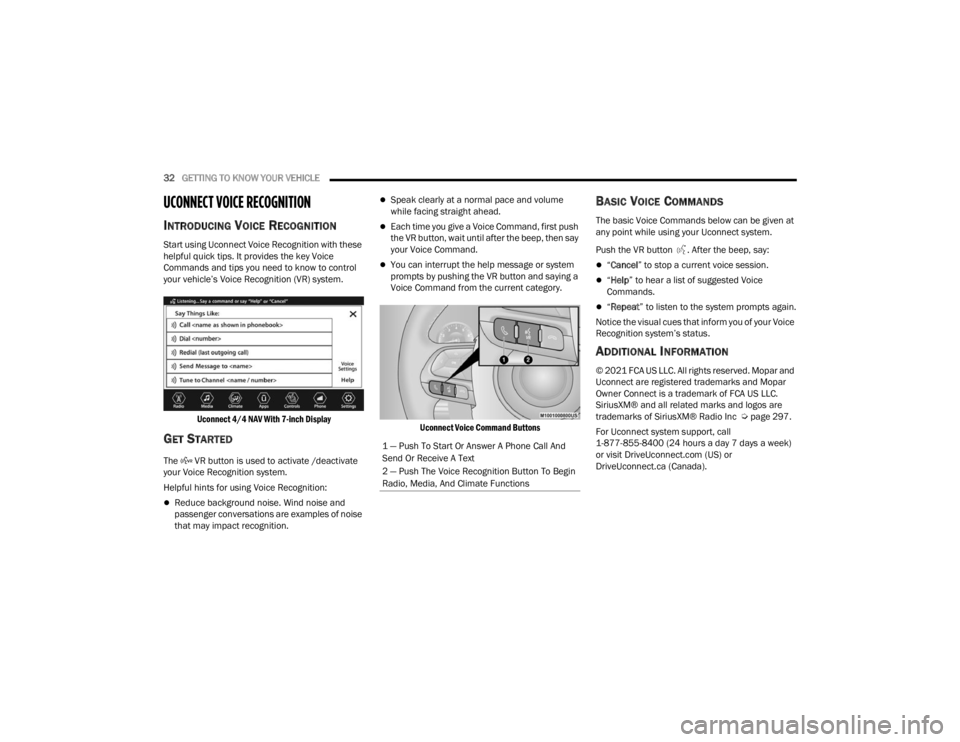
Start using Uconnect Voice Recognition with these
helpful quick tips. It provides the key Voice
Commands and tips you need to know to control
your vehicle’s Voice Recognition (VR) system.
Uconnect 4/4 NAV With 7-inch Display
GET STARTED
The VR button is used to activate /deactivate
your Voice Recognition system.
Helpful hints for using Voice Recognition:
Reduce background noise. Wind noise and
passenger conversations are examples of noise
that may impact recognition.
Speak clearly at a normal pace and volume
while facing straight ahead.
Each time you give a Voice Command, first push
the VR button, wait until after the beep, then say
your Voice Command.
You can interrupt the help message or system
prompts by pushing the VR button and saying a
Voice Command from the current category.
Uconnect Voice Command Buttons
BASIC VOICE COMMANDS
The basic Voice Commands below can be given at
any point while using your Uconnect system.
Push the VR button . After the beep, say:
“Cancel ” to stop a current voice session.
“Help ” to hear a list of suggested Voice
Commands.
“ Repeat ” to listen to the system prompts again.
Notice the visual cues that inform you of your Voice
Recognition system’s status.
ADDITIONAL INFORMATION
© 2021 FCA US LLC. All rights reserved. Mopar and
Uconnect are registered trademarks and Mopar
Owner Connect is a trademark of FCA US LLC.
SiriusXM® and all related marks and logos are
trademarks of SiriusXM® Radio Inc Ú page 297.
For Uconnect system support, call
1-877-855-8400 (24 hours a day 7 days a week)
or visit DriveUconnect.com (US) or
DriveUconnect.ca (Canada).
1 — Push To Start Or Answer A Phone Call And
Send Or Receive A Text
2 — Push The Voice Recognition Button To Begin
Radio, Media, And Climate Functions
22_FD_OM_EN_USC_t.book Page 32
Page 44 of 312
42GETTING TO KNOW YOUR VEHICLE
(Continued)
in the intermittent position, no wipe cycle is
performed for safety reasons. This temporary
inhibition avoids accidental activations of the
wiping (e.g. during the hand washing of the
windshield, blocking the blades in ice/snow
conditions).
The user can activate the Rain Sensing Wipers in
three ways:
Moving the lever from the O (off) position to the
intermittent positions.
One Mist command actuation.
The vehicle speed exceeds 3 mph (5 km/h) and
the rain sensor detects the presence of rain.
REAR WINDOW WIPER/WASHER
The rear wiper/washer controls are located on the
windshield wiper lever on the right side of the
steering column. The rear wiper/washer is
operated by rotating a switch, located at the
middle of the lever.
NOTE:If the front wiper is moving and the vehicle is
shifted in REVERSE, the rear wiper will perform one
round up to clean the rear window. Rotate the center portion of the lever
upward to the first detent for intermittent
operation and to the second detent for
continuous rear wiper operation. To use the washer, push the lever
forward and hold while spray is desired. If
the lever is pushed while in the
intermittent setting, the wiper will turn on
and operate for several wipe cycles after the end of
the lever is released, and then resume the
intermittent interval previously selected.
NOTE:As a protective measure, the pump will stop if the
switch is held for more than 30 seconds. Once the
lever is released, the pump will resume normal
operation.
If the lever is pushed while the wiper is in the off
position, the wiper will operate for several wipe
cycles, then turn off.
If the rear wiper is operating when the ignition is
placed in the OFF position, the wiper will
automatically return to the “park” position.WINDSHIELD WIPER DE-ICER —
I
F EQUIPPED
Your vehicle may be equipped with a Windshield
Wiper De-Icer feature that may be activated under
the following conditions:
Activation By Rear Defrost — The Windshield
Wiper De-Icer will be activated automatically
when the rear defrost is turned on and the
ambient temperature is below 40°F (4.4°C).
Activation By Remote Start Operation — When
Remote Start is active and the outside ambient
temperature is less than 40°F (4.4°C), the
Windshield Wiper De-Icer will activate. Exiting
Remote Start will resume its previous operation.
If the Windshield Wiper De-Icer was active, the
timer and operation will continue.CAUTION!
Failure to follow these cautions can cause
damage to the heating elements:
Use care when washing the inside of the rear
window. Do not use abrasive window cleaners
on the interior surface of the window. Use a
soft cloth and a mild washing solution, wiping
parallel to the heating elements. Labels can
be peeled off after soaking with warm water.
Do not use scrapers, sharp instruments, or
abrasive window cleaners on the interior
surface of the window.
Keep all objects a safe distance from the
window.
CAUTION!
22_FD_OM_EN_USC_t.book Page 42
Page 52 of 312
50GETTING TO KNOW YOUR VEHICLE
Climate Control System Compressor
Push the A/C Control button to activate/deactivate
the compressor (activation is indicated by the LED
on the button turning on).
The system remembers that the compressor has
been turned off, even after the engine has
stopped.
Pushing the A/C button will stop AUTO mode (AUTO
LED will turn off). To restore automatic control of
compressor, push the AUTO button again.
NOTE:With the compressor off, air cannot be introduced
to the passenger compartment with a temperature
lower than the outside temperature. Under certain
environmental conditions, windows could fog
rapidly since the air is not dehumidified.
Operating Tips Chart
INTERIOR STORAGE AND EQUIPMENT
STORAGE
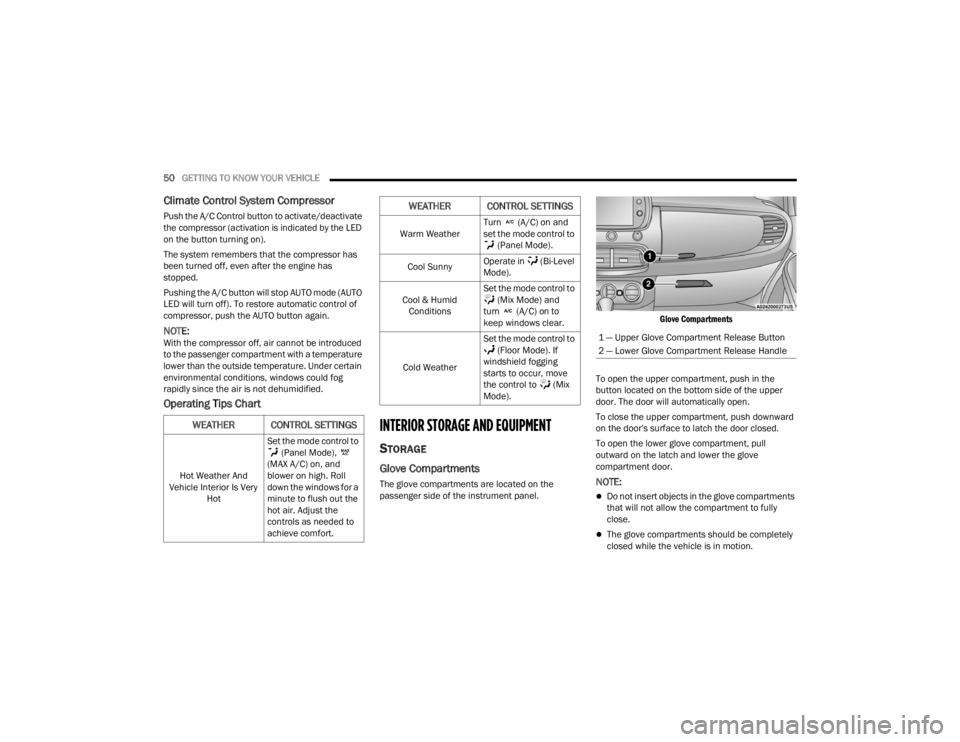
Glove Compartments
The glove compartments are located on the
passenger side of the instrument panel.
Glove Compartments
To open the upper compartment, push in the
button located on the bottom side of the upper
door. The door will automatically open.
To close the upper compartment, push downward
on the door's surface to latch the door closed.
To open the lower glove compartment, pull
outward on the latch and lower the glove
compartment door.NOTE:
Do not insert objects in the glove compartments
that will not allow the compartment to fully
close.
The glove compartments should be completely
closed while the vehicle is in motion.
WEATHER CONTROL SETTINGS
Hot Weather And
Vehicle Interior Is Very Hot Set the mode control to
(Panel Mode),
(MAX A/C) on, and
blower on high. Roll
down the windows for a
minute to flush out the
hot air. Adjust the
controls as needed to
achieve comfort.
Warm Weather Turn (A/C) on and
set the mode control to
(Panel Mode).
Cool Sunny Operate in (Bi-Level
Mode).
Cool & Humid Conditions Set the mode control to
(Mix Mode) and
turn (A/C) on to
keep windows clear.
Cold Weather Set the mode control to
(Floor Mode). If
windshield fogging
starts to occur, move
the control to (Mix
Mode).
WEATHER CONTROL SETTINGS
1 — Upper Glove Compartment Release Button
2 — Lower Glove Compartment Release Handle
22_FD_OM_EN_USC_t.book Page 50
Page 60 of 312
58GETTING TO KNOW YOUR VEHICLE
CLOSING THE POWER ROOF
Express Mode
Push the close switch and release it within one-half
second. The power roof will close fully and stop
automatically. This is called “Express Close”.
During Express Close operation, any movement of
the switch will stop the power roof.
Manual Mode
To close the power roof manually, push and hold
the close switch. The power roof will move forward
and automatically stop at the fully closed position.
Any release of the switch will stop the movement.
The power roof will remain in a partially closed
position until the switch is pushed and held again.
If the power roof switch fails, the sunroof can be
operated manually. See, Úpage 56 for further
information.
POWER ROOF MAINTENANCE
Use only a non-abrasive cleaner and a soft cloth to
clean the window glass. For important information
on cleaning and caring for your vehicle
Ú page 286.
IGNITION OFF OPERATION
The power sliding roof switch can remain active in
Accessory Delay for up to approximately
10 minutes after the vehicle’s ignition is placed to the OFF position. Opening either front door will
cancel this feature.
NOTE:Ignition Off timing is programmable through the
Uconnect system Ú
page 123.
RELEARN PROCEDURE
For vehicles equipped with a power sliding roof,
there is a relearn procedure that allows you to
calibrate the power roof when the “Express Mode”
stops working. To reset the power sliding roof,
follow these steps:
1. Place the ignition in the RUN position, and
start the vehicle.
NOTE:The engine must be running to perform the relearn
procedure.
2. Ensure the power sliding roof is in the fully closed position.
3. Push and hold the open/close switch for 10 seconds. This will put the power sliding roof
into calibration mode.
4. Continue holding down the close button while the top goes fully open and then back to fully
close. 5. Once the power sliding roof has stopped in the
fully closed position, release the open/close
switch. The power sliding roof is now reset and
ready to use.
NOTE:If the open/close switch is released anytime during
the relearning process, the relearn may not be
complete, and the procedure must be repeated.
HOOD
TO OPEN THE HOOD
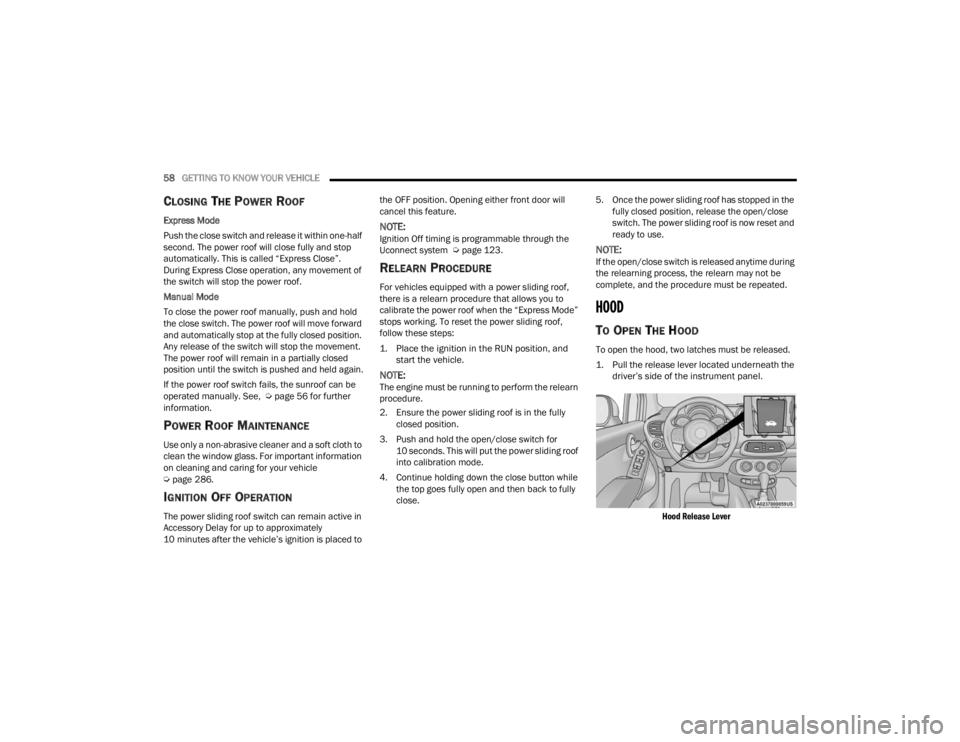
To open the hood, two latches must be released.
1. Pull the release lever located underneath the driver’s side of the instrument panel.
Hood Release Lever
22_FD_OM_EN_USC_t.book Page 58
Page 66 of 312
64GETTING TO KNOW YOUR INSTRUMENT PANEL
INSTRUMENT CLUSTER DESCRIPTIONS
1. Speedometer
Indicates the speed of the car.
2. Fuel Level Gauge
The fuel gauge in the instrument panel indi -
cates the amount of fuel left in the tank.
The light comes on, together with a chime
and the display of a message in the instru -
ment cluster display, when the gas tank has
1.5 to 2 gallons (5 to 7 liters) of fuel
remaining.
3. Instrument Cluster Display
The vehicle can be equipped with multi
functional instrument cluster display which
offers useful information to the driver.
With the ignition in the OFF position (and
the key removed, for vehicles with a
mechanical key), opening/closing of a door
will activate the instrument cluster display
for viewing, and display the total miles or
kilometers in the odometer.
4. Engine Coolant Temperature
The temperature gauge on the instrument
panel displays the temperature of the
engine coolant and starts providing indica -
tions when the coolant temperature
exceeds approximately 122°F (50°C). In the normal use of the car, the temperature
gauge can move in different directions
based on the use of the car. The light comes
on, together with a chime and the display of
a message in the instrument cluster display,
to indicate an excessive increase in the
temperature of the engine coolant. Stop the
engine and contact an authorized dealer.
5. Tachometer
Indicates the engine speed in Revolutions
Per Minute (RPM x 1000).
INSTRUMENT CLUSTER DISPLAY
The vehicle is equipped with multi functional
instrument cluster display which offers useful
information to the driver. With the ignition in the
OFF position (and the key removed, for vehicles
with a mechanical key), opening/closing of a door
will activate the instrument cluster display for
viewing, and display the total miles or kilometers in
the odometer. The instrument cluster display is
designed to display important information about
the vehicle’s systems and features. Using a driver
interactive display located on the instrument
panel, your instrument cluster display can show
you how systems are working and give you
warnings when they aren’t. The steering wheel
mounted controls allow you to scroll through and enter the main menus and submenus. You can
access the specific information you want and
make selections and adjustments.
INSTRUMENT CLUSTER DISPLAY
C
ONTROL BUTTONS
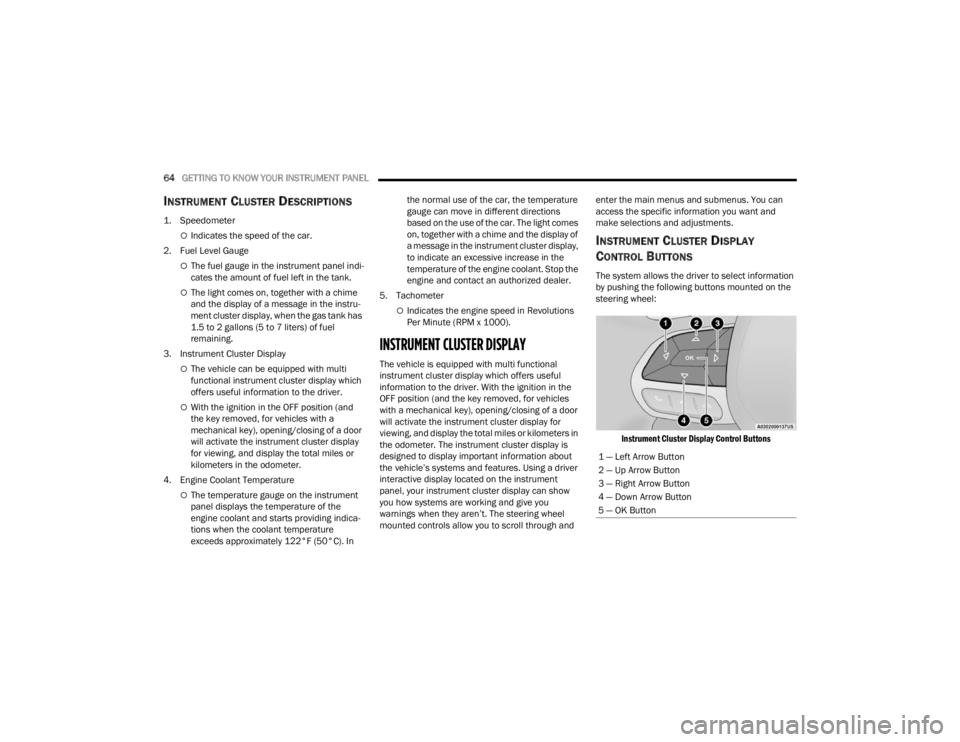
The system allows the driver to select information
by pushing the following buttons mounted on the
steering wheel:
Instrument Cluster Display Control Buttons
1 — Left Arrow Button
2 — Up Arrow Button
3 — Right Arrow Button
4 — Down Arrow Button
5 — OK Button
22_FD_OM_EN_USC_t.book Page 64
Page 68 of 312
66GETTING TO KNOW YOUR INSTRUMENT PANEL
Vehicle Info
Tire Pressure
Oil Temperature
Battery Voltage
Driver Assist
Lane Departure Warning
Adaptive Cruise Control
Stop/Start — If Equipped
Audio
Phone
Navigation
Messages
Settings
Display
Units
Clock and Date
Security
Safety & Assistance
Lights
Doors & Locks
Engine OFF Procedure — If Equipped
Speedometer
View and change the speedometer scale from mph
to km/h (km/h to mph).
Trip
This instrument cluster display menu item allows
you to view and select information about the "Trip
Computer”:
Instantaneous info
View the distance to empty (miles or km).
View the instantaneous consumption (mpg,
or l/100km or km/l).
Trip A
View Trip A distance (miles or km).
View travel time A (hours/minutes/
seconds).
View average consumption A (mpg, or
l/100km or km/l).
View average speed A (mph or km/h).
Trip B
View Trip B distance (miles or km).
View travel time B (hours/minutes/
seconds).
View average consumption B (mpg, or
l/100km or km/l).
View average speed B (mph or km/h).
Drive Mode Selector
This instrument cluster display menu/submenu
items allows you to view and select information
about the "Drive Mode".
Vehicle Info
Push and release the up or down arrow
button until "Vehicle Info" is highlighted in the
instrument cluster display. Push and release the
right arrow button and Coolant Temp will be
displayed. Push the right or left arrow button
to scroll through the following information displays:
Tire pressure
View the information relating to the Tire
Pressure Monitoring System (TPMS) (if
equipped).
Oil Temperature
View the engine oil temperature.
Battery Voltage
View the voltage value (state of charge) of
the battery.
22_FD_OM_EN_USC_t.book Page 66
Page 69 of 312

GETTING TO KNOW YOUR INSTRUMENT PANEL67
Driver Assist
This menu item allows you to change the settings
(Notice LaneSense and Intensity LaneSense)
relating to the LaneSense system (if equipped):
Notice LaneSense
By selecting this function, you can select the
“readiness” of LaneSense, choosing between
the options "Near," "Medium," or "Far."
Intensity LaneSense
Using this function, you can select the force
applied to the steering wheel to keep the car in
the roadway through the electrical drive system
due to LaneSense.
Stop/Start – If Equipped
Automatically stops the engine during a vehicle
stop under the right conditions to reduce fuel
consumption.
Push and release the up or down arrow
button until the Stop/Start menu title is displayed
in the instrument cluster. This menu shows
messages related to Stop/Start. Only one message
can be viewed at a time until the condition is
cleared.
When the Stop/Start is engaged (and the engine is
off), the associated hardware indicator light is
turned on. When the Stop/Start button on the central stack is pushed, a Stop/Start status
message will appear in the instrument cluster
display.
Audio
This menu item allows you to view the instrument
cluster display and the information present on the
display of the Uconnect system.
The information displayed is:
“Radio (AM or FM)”: view Radio Station Name (if
equipped), frequency, and graphical icon.
MP3: title display or song number playing.
USB: title display or song number playing.
Ipod: display the song title and graphic element.
Bluetooth®: displays the song title and a
graphic element.
SAT: displays the station name and a graphic
element.
APP: displays strings and a graphic element.
Phone
This menu displays the current status of a phone
connected to the vehicle via Bluetooth®.
If no phone is connected, the menu will not
function when the
OK button is pushed. Otherwise,
if a phone is connected, push the OK button to
enter the menu. The following items will display:
Recent calls: displays a list of the last 10 calls.
SMS reader: displays the last 10 text messages
and if they are read or unread.
Favorite numbers: displays a maximum of six
favorite numbers.
Navigation
If activated, this menu item will display navigation
status and directions.
Messages (Stored)
This menu item allows you to display the
information messages/malfunction stored.
The background color of the display varies
according to the priorities of the failure:
Failed Messages with low priority display in
yellow.
Failed Messages with high priority display in red.
Settings
This menu item allows you to change the settings
for the following:
Display
Units
Clock and Date
Security
Safety and Assistance
3
22_FD_OM_EN_USC_t.book Page 67
Page 73 of 312
GETTING TO KNOW YOUR INSTRUMENT PANEL71
Door Open Warning Light
This indicator will illuminate when one or
more door(s) are not fully closed.
NOTE:If the vehicle is moving and a door is opened, there
will also be a single chime.
Drowsiness Detected Warning —
If Equipped
Driver drowsiness detection helps to
avoid crashes caused by fatigue by
advising drivers to take a break in time.
Once Drowsy Driver is detected, A pop-up
will display continuously until the driver presses
the OK button to clear.
Once the pop-up message is cleared, it is stored
until the condition is no longer true.
Electric Power Steering (EPS) Fault
Warning Light
This warning light will turn on when
there's a fault with the EPS system
Ú page 90.
Electronic Throttle Control (ETC) Warning
Light
This warning light will illuminate to
indicate a problem with the ETC system.
If a problem is detected while the vehicle
is running, the light will either stay on or
flash depending on the nature of the problem.
Cycle the ignition when the vehicle is safely and
completely stopped and the transmission is placed
in the PARK position. The light should turn off. If
the light remains on with the vehicle running, your
vehicle will usually be drivable; however, see an
authorized dealer for service as soon as possible.
NOTE:This light may turn on if the accelerator and brake
pedals are pressed at the same time.
If the light continues to flash when the vehicle is
running, immediate service is required and you
may experience reduced performance, an
elevated/rough idle, or engine stall and your
vehicle may require towing. The light will come on
when the ignition is placed in the ON/RUN position
and remain on briefly as a bulb check. If the light
does not come on during starting, have the system
checked by an authorized dealer.
Hood Open Warning Light — If Equipped
This warning light will illuminate when the
hood is left open and not fully closed.
Oil Pressure Warning Light
This warning light will illuminate to
indicate low engine oil pressure. If the
light turns on while driving, stop the
vehicle, shut off the engine as soon as
possible, and contact an authorized dealer. A
chime will sound when this light turns on.
Do not operate the vehicle until the cause is
corrected. This light does not indicate how much oil
is in the engine. The engine oil level must be
checked under the hood.
Seat Belt Reminder Warning Light
This warning light indicates when the
driver or passenger seat belt is
unbuckled. When the ignition is first
placed in the ON/RUN position and if the
driver’s seat belt is unbuckled, a chime will sound
and the light will turn on. When driving, if the driver
or front passenger seat belt remains unbuckled,
the Seat Belt Reminder Light will flash or remain on
continuously and a chime will sound Ú page 188.
WARNING!
Continued operation with reduced assist could
pose a safety risk to yourself and others. Service
should be obtained as soon as possible.
3
22_FD_OM_EN_USC_t.book Page 71
Page 74 of 312
72GETTING TO KNOW YOUR INSTRUMENT PANEL
Transmission Fault Warning Light
This light will illuminate (together with a
message in the instrument cluster
display and a buzzer) to indicate a
transmission fault. Contact an authorized
dealer if the message remains after restarting the
engine.
Vehicle Security Warning Light —
If Equipped
This light will flash at a fast rate for
approximately 15 seconds when the
vehicle security system is arming, and
then will flash slowly until the vehicle is
disarmed.
Trunk Open Warning Light
This indicator will illuminate when the
trunk is open and not fully closed.
YELLOW WARNING LIGHTS
Adaptive Cruise Control (ACC) Fault
Warning Light — If Equipped
This warning light will illuminate to
indicate a fault in the ACC system.
Contact a local authorized dealer for
service Ú page 94.
Anti-Lock Brake System (ABS) Warning
Light
This warning light monitors the ABS. The
light will turn on when the ignition is
placed in the ON/RUN position and may
stay on for as long as four seconds.
If the ABS light remains on or turns on while
driving, then the Anti-Lock portion of the brake
system is not functioning and service is required as
soon as possible. However, the conventional brake
system will continue to operate normally,
assuming the Brake Warning Light is not also on.
If the ABS light does not turn on when the ignition
is placed in the ON/RUN position, have the brake
system inspected by an authorized dealer.
Audio System Failure Light — If Equipped
This light will illuminate to report a failure
of the Audio System. Contact an
authorized dealership as soon as
possible.
Electronic Park Brake Warning Light
This warning light will illuminate to
indicate the Electronic Park Brake is not
functioning properly and service is
required. Contact an authorized dealer.
Electronic Stability Control (ESC) Active
Warning Light — If Equipped
This warning light will indicate when the
ESC system is Active. The ESC Indicator
Light in the instrument cluster will come
on when the ignition is placed in the ON/
RUN position, and when ESC is activated. It should
go out with the engine running. If the ESC Indicator
Light comes on continuously with the engine
running, a malfunction has been detected in the
ESC system. If this warning light remains on after
several ignition cycles, and the vehicle has been
driven several miles (kilometers) at speeds greater
than 30 mph (48 km/h), see an authorized dealer
as soon as possible to have the problem
diagnosed and corrected.
The ESC OFF Indicator Light and the ESC Indi -
cator Light come on momentarily each time the
ignition is placed in the ON/RUN position.
The ESC system will make buzzing or clicking
sounds when it is active. This is normal; the
sounds will stop when ESC becomes inactive.
This light will come on when the vehicle is in an
ESC event.
22_FD_OM_EN_USC_t.book Page 72
Page 76 of 312
74GETTING TO KNOW YOUR INSTRUMENT PANEL
position before engine start. If the bulb does not
come on when turning the ignition switch from OFF
to ON/RUN, have the condition checked promptly.
Certain conditions, such as a loose or missing gas
cap, poor quality fuel, etc., may illuminate the light
after engine start. The vehicle should be serviced if
the light stays on through several typical driving
styles. In most situations, the vehicle will drive
normally and will not require towing.
When the engine is running, the MIL may flash to
alert serious conditions that could lead to
immediate loss of power or severe catalytic
converter damage. The vehicle should be serviced
by an authorized dealer as soon as possible if this
occurs.
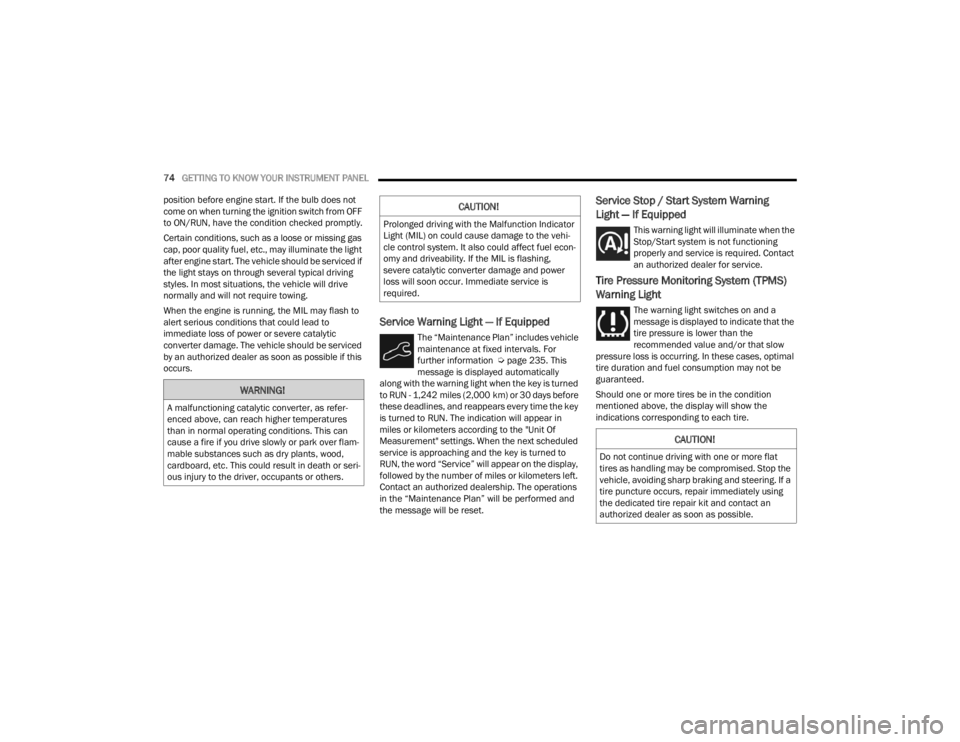
Service Warning Light — If Equipped
The “Maintenance Plan” includes vehicle
maintenance at fixed intervals. For
further information Ú page 235. This
message is displayed automatically
along with the warning light when the key is turned
to RUN - 1,242 miles (2,000 km) or 30 days before
these deadlines, and reappears every time the key
is turned to RUN. The indication will appear in
miles or kilometers according to the "Unit Of
Measurement" settings. When the next scheduled
service is approaching and the key is turned to
RUN, the word “Service” will appear on the display,
followed by the number of miles or kilometers left.
Contact an authorized dealership. The operations
in the “Maintenance Plan” will be performed and
the message will be reset.
Service Stop / Start System Warning
Light — If Equipped
This warning light will illuminate when the
Stop/Start system is not functioning
properly and service is required. Contact
an authorized dealer for service.
Tire Pressure Monitoring System (TPMS)
Warning Light
The warning light switches on and a
message is displayed to indicate that the
tire pressure is lower than the
recommended value and/or that slow
pressure loss is occurring. In these cases, optimal
tire duration and fuel consumption may not be
guaranteed.
Should one or more tires be in the condition
mentioned above, the display will show the
indications corresponding to each tire.
WARNING!
A malfunctioning catalytic converter, as refer -
enced above, can reach higher temperatures
than in normal operating conditions. This can
cause a fire if you drive slowly or park over flam -
mable substances such as dry plants, wood,
cardboard, etc. This could result in death or seri -
ous injury to the driver, occupants or others.
CAUTION!
Prolonged driving with the Malfunction Indicator
Light (MIL) on could cause damage to the vehi -
cle control system. It also could affect fuel econ -
omy and driveability. If the MIL is flashing,
severe catalytic converter damage and power
loss will soon occur. Immediate service is
required.
CAUTION!
Do not continue driving with one or more flat
tires as handling may be compromised. Stop the
vehicle, avoiding sharp braking and steering. If a
tire puncture occurs, repair immediately using
the dedicated tire repair kit and contact an
authorized dealer as soon as possible.
22_FD_OM_EN_USC_t.book Page 74