climate settings FIAT 500X 2022 Owners Manual
[x] Cancel search | Manufacturer: FIAT, Model Year: 2022, Model line: 500X, Model: FIAT 500X 2022Pages: 312, PDF Size: 13.26 MB
Page 22 of 312

20GETTING TO KNOW YOUR VEHICLE
message “Remote Start Active — Push Start
Button” will display in the instrument cluster
display until you push the START/STOP ignition
button.
To avoid unintentional shutdowns, the system
will disable for two seconds after receiving a
valid Remote Start request.
REMOTE START FRONT DEFROST
A
CTIVATION — IF EQUIPPED
When Remote Start is active, and the outside
ambient temperature is 40°F (4.5°C) or below, the
system will automatically activate front defrost for
15 minutes or less. The timing is dependent on the
ambient temperature. Once the timer expires, the
system will automatically adjust the settings
depending on ambient conditions. See “Remote
Start Comfort Systems — If Equipped” in the next
section for detailed operation.
REMOTE START COMFORT SYSTEMS —
I
F EQUIPPED
When Remote Start is activated, the front and rear
defrost will automatically turn on in cold weather.
The heated steering wheel and driver heated seat
feature will turn on if selected in the comfort menu
screen within Uconnect Settings Úpage 123. The
vehicle will adjust the climate control settings
depending on the outside ambient temperature. Automatic Temperature Control (ATC) —
If Equipped
The climate controls will be automatically adjusted
to the optimal temperature and mode settings
depending on the outside ambient temperature.
This will occur until the ignition is placed in the ON/
RUN position where the climate controls will
resume their previous settings.
Manual Temperature Control (MTC) — If Equipped
In ambient temperatures at 40°F (4.5°C) or
below, the climate settings will default to
maximum heat, with fresh air entering the
cabin. If the front defrost timer expires, the
vehicle will enter Mix Mode.
In ambient temperatures from 40°F (4.5°C) to
78°F (26°C), the climate settings will be based
on the last settings selected by the driver.
In ambient temperatures at 78°F (26°C) or
above, the climate settings will default to MAX
A/C, Bi-Level Mode, with Recirculation on.
For more information on ATC, MTC, and climate
control settings, see Ú page 43.
NOTE:These features will stay on through the duration of
Remote Start until the ignition is placed in the ON/
RUN position. The climate control settings will
change if manually adjusted by the driver while the
vehicle is in Remote Start mode, and exit auto -matic override. This includes the OFF button on the
climate controls, which will turn the system off.
REMOTE START WINDSHIELD WIPER
D
E–ICER AND REAR DEFROST
A
CTIVATION — IF EQUIPPED
When Remote Start is active and the outside
ambient temperature is less than 40°F (4.4°C),
the Windshield Wiper De-Icer will activate. Exiting
Remote Start will resume its previous operation. If
the Windshield Wiper De-Icer was active, the timer
and operation will continue.
REMOTE START CANCEL MESSAGE —
I
F EQUIPPED
The following messages will display in the
instrument cluster if the vehicle fails to remote
start or exits Remote Start prematurely:
Remote Start Cancelled — Door Open
Remote Start Cancelled — Hood Open
Remote Start Cancelled — Fuel Low
Remote Start Cancelled — Liftgate Open
Remote Start Cancelled — Too Cold
Remote Start Cancelled — Time Expired
Remote Start Disabled — Start Vehicle To Reset
The message will stay active until the ignition is
placed in the ON/RUN position.
22_FD_OM_EN_USC_t.book Page 20
Page 45 of 312
GETTING TO KNOW YOUR VEHICLE43
CLIMATE CONTROLS
The Climate Control system allows you to regulate
the temperature, air flow, and direction of air
circulating throughout the vehicle. The controls are
located on the touchscreen (if equipped) and on
the instrument panel below the radio.
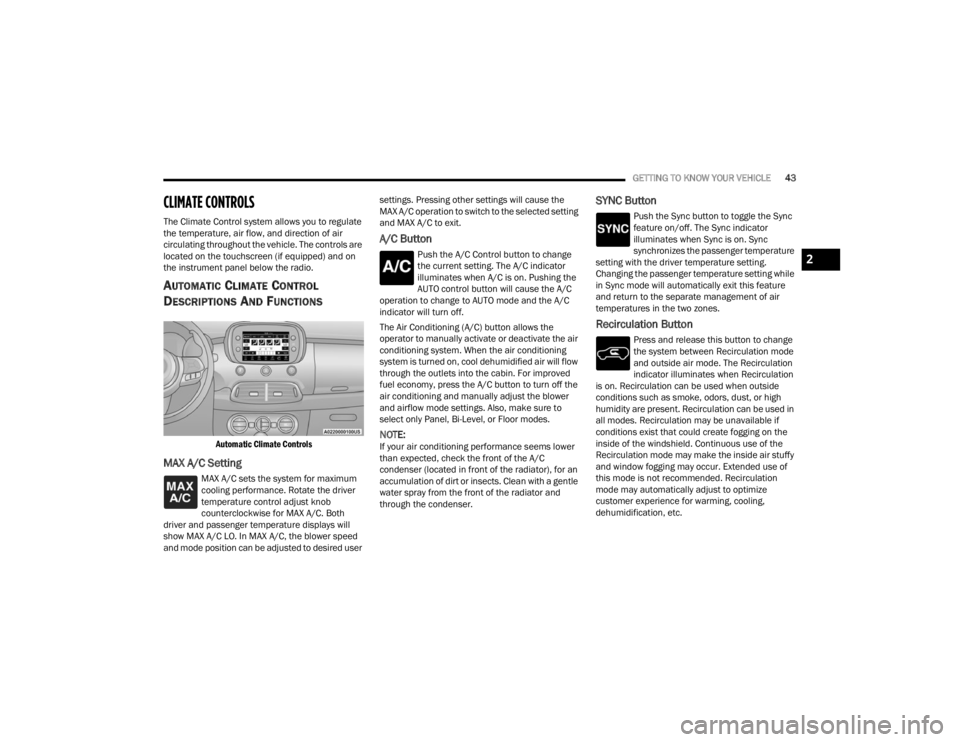
AUTOMATIC CLIMATE CONTROL
D
ESCRIPTIONS AND FUNCTIONS
Automatic Climate Controls
MAX A/C Setting
MAX A/C sets the system for maximum
cooling performance. Rotate the driver
temperature control adjust knob
counterclockwise for MAX A/C. Both
driver and passenger temperature displays will
show MAX A/C LO. In MAX A/C, the blower speed
and mode position can be adjusted to desired user settings. Pressing other settings will cause the
MAX A/C operation to switch to the selected setting
and MAX A/C to exit.
A/C Button
Push the A/C Control button to change
the current setting. The A/C indicator
illuminates when A/C is on. Pushing the
AUTO control button will cause the A/C
operation to change to AUTO mode and the A/C
indicator will turn off.
The Air Conditioning (A/C) button allows the
operator to manually activate or deactivate the air
conditioning system. When the air conditioning
system is turned on, cool dehumidified air will flow
through the outlets into the cabin. For improved
fuel economy, press the A/C button to turn off the
air conditioning and manually adjust the blower
and airflow mode settings. Also, make sure to
select only Panel, Bi-Level, or Floor modes.
NOTE:If your air conditioning performance seems lower
than expected, check the front of the A/C
condenser (located in front of the radiator), for an
accumulation of dirt or insects. Clean with a gentle
water spray from the front of the radiator and
through the condenser.
SYNC Button
Push the Sync button to toggle the Sync
feature on/off. The Sync indicator
illuminates when Sync is on. Sync
synchronizes the passenger temperature
setting with the driver temperature setting.
Changing the passenger temperature setting while
in Sync mode will automatically exit this feature
and return to the separate management of air
temperatures in the two zones.
Recirculation Button
Press and release this button to change
the system between Recirculation mode
and outside air mode. The Recirculation
indicator illuminates when Recirculation
is on. Recirculation can be used when outside
conditions such as smoke, odors, dust, or high
humidity are present. Recirculation can be used in
all modes. Recirculation may be unavailable if
conditions exist that could create fogging on the
inside of the windshield. Continuous use of the
Recirculation mode may make the inside air stuffy
and window fogging may occur. Extended use of
this mode is not recommended. Recirculation
mode may automatically adjust to optimize
customer experience for warming, cooling,
dehumidification, etc.
2
22_FD_OM_EN_USC_t.book Page 43
Page 47 of 312
GETTING TO KNOW YOUR VEHICLE45
Blower Control Knob
Blower Control is used to regulate the
amount of air forced through the Climate
Control system. Adjusting the blower will
cause automatic mode to switch to
manual operation. The speeds can be selected by
rotating the Blower Control adjustment knob.
Mode Control
Select Mode by pressing one of the Mode
buttons to change the airflow distribution
mode. The airflow distribution mode can
be adjusted so air comes from the
instrument panel outlets, floor outlets, defrost
outlets and demist outlets.
Front Defrost Button
Push and release the button on the
faceplate to change the current airflow
setting to Defrost mode. The Front
Defrost indicator illuminates when Front
Defrost is on. Air comes from the windshield and
side window demist outlets. When the defrost
button is selected, the blower level may increase.
Use Defrost mode with maximum temperature
settings for best windshield and side window
defrosting and defogging. When toggling the front
defrost mode button, the Climate Control system
will return to the previous setting.
Panel Mode
Air comes from the outlets in the
instrument panel. Each of these outlets
can be individually adjusted to direct the
flow of air. The air vanes of the center
outlets and outboard outlets can be moved up and
down or side to side to regulate airflow direction.
There is a shut-off wheel located below the air
vanes to shut-off or adjust the amount of airflow
from these outlets.
Floor Mode
Air comes from the floor outlets. A slight
amount of air is directed through the
defrost and side window demister
outlets.
Bi-Level Mode
Bi-Level Mode is obtained by pressing
both the Panel Mode button and the
Floor Mode button, activating them both.
Air comes from the instrument panel
outlets and floor outlets. A slight amount of air is
directed through the defrost and side window
demister outlets.
NOTE:Bi-Level Mode is designed under comfort condi -
tions to provide cooler air out of the panel outlets
and warmer air from the floor outlets.
Mix Mode
Mix Mode is obtained by pressing both
the Windshield Mode button and the
Floor Mode button, activating them both.
Air is directed through the floor, defrost,
and side window demister outlets. This setting
works best in cold or snowy conditions that require
extra heat to the windshield. This setting is good
for maintaining comfort while reducing moisture
on the windshield.
Hi-Level Mode
Hi-Level Mode is obtained by pushing the
Defrost Mode button and the Panel Mode
button. Air comes from the instrument
panel outlets and the defrost outlets. A
slight amount of air is directed through the side
window demister outlets.
Tri-Level Mode
Tri-Level Mode is obtained by pressing
the Defrost Mode button, the Panel Mode
button, and the Floor Mode button. Air
comes from the instrument panel
outlets, the defrost outlets, and floor outlets. A
slight amount of air is directed through the side
window demister outlets.
2
22_FD_OM_EN_USC_t.book Page 45
Page 48 of 312
46GETTING TO KNOW YOUR VEHICLE
Climate Control Power Button
Press and release the Climate Control
Power button to turn the Climate Control
on/off.
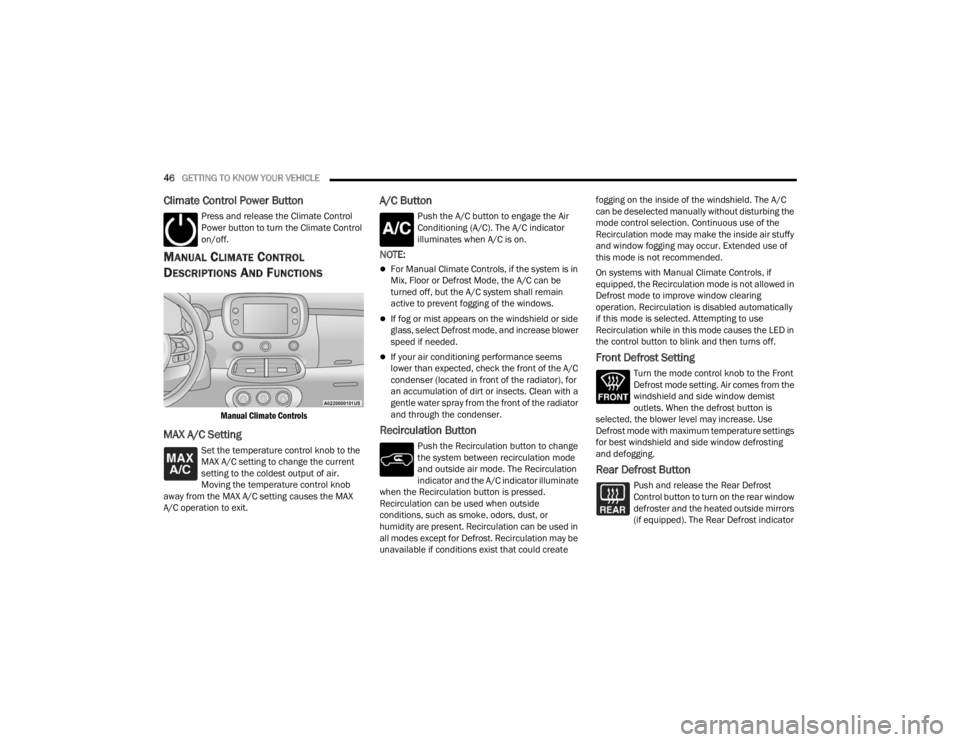
MANUAL CLIMATE CONTROL
D
ESCRIPTIONS AND FUNCTIONS
Manual Climate Controls
MAX A/C Setting
Set the temperature control knob to the
MAX A/C setting to change the current
setting to the coldest output of air.
Moving the temperature control knob
away from the MAX A/C setting causes the MAX
A/C operation to exit.
A/C Button
Push the A/C button to engage the Air
Conditioning (A/C). The A/C indicator
illuminates when A/C is on.
NOTE:
For Manual Climate Controls, if the system is in
Mix, Floor or Defrost Mode, the A/C can be
turned off, but the A/C system shall remain
active to prevent fogging of the windows.
If fog or mist appears on the windshield or side
glass, select Defrost mode, and increase blower
speed if needed.
If your air conditioning performance seems
lower than expected, check the front of the A/C
condenser (located in front of the radiator), for
an accumulation of dirt or insects. Clean with a
gentle water spray from the front of the radiator
and through the condenser.
Recirculation Button
Push the Recirculation button to change
the system between recirculation mode
and outside air mode. The Recirculation
indicator and the A/C indicator illuminate
when the Recirculation button is pressed.
Recirculation can be used when outside
conditions, such as smoke, odors, dust, or
humidity are present. Recirculation can be used in
all modes except for Defrost. Recirculation may be
unavailable if conditions exist that could create fogging on the inside of the windshield. The A/C
can be deselected manually without disturbing the
mode control selection. Continuous use of the
Recirculation mode may make the inside air stuffy
and window fogging may occur. Extended use of
this mode is not recommended.
On systems with Manual Climate Controls, if
equipped, the Recirculation mode is not allowed in
Defrost mode to improve window clearing
operation. Recirculation is disabled automatically
if this mode is selected. Attempting to use
Recirculation while in this mode causes the LED in
the control button to blink and then turns off.
Front Defrost Setting
Turn the mode control knob to the Front
Defrost mode setting. Air comes from the
windshield and side window demist
outlets. When the defrost button is
selected, the blower level may increase. Use
Defrost mode with maximum temperature settings
for best windshield and side window defrosting
and defogging.
Rear Defrost Button
Push and release the Rear Defrost
Control button to turn on the rear window
defroster and the heated outside mirrors
(if equipped). The Rear Defrost indicator
22_FD_OM_EN_USC_t.book Page 46
Page 50 of 312
48GETTING TO KNOW YOUR VEHICLE
Climate Control OFF
To turn the Climate Controls off, turn the
blower control knob to the OFF (O)
position.
AUTOMATIC TEMPERATURE CONTROL
(ATC)
Automatic Operation
1. Push the AUTO button on the front ATC panel
and the word “AUTO” will illuminate in the
front ATC display, along with two
temperatures for the driver and front
passenger. The system will then automat -
ically regulate the amount of airflow.
2. Adjust the temperature you would like the system to maintain, by adjusting the driver,
and passenger temperatures. Once the
desired temperature is displayed, the system
will achieve and automatically maintain that
comfort level.
3. When the system is set up for your comfort level, it is not necessary to change the
settings. You will experience the greatest
efficiency by simply allowing the system to
function automatically.
NOTE:It is not necessary to move the temperature
settings. The system automatically adjusts the
temperature, mode, and fan speed to provide
comfort as quickly as possible.
To provide you with maximum comfort in the
automatic mode, during cold start-ups, the blower
fan will remain on low until the engine warms up.
The fan will engage immediately if the Defrost
mode is selected, or by changing the front blower
knob setting.
Manual Operation Override
This system offers a full complement of manual
override features. The AUTO symbol in the front
ATC display will be turned off when the system is
being used in the manual mode.
CLIMATE VOICE RECOGNITION
Adjust vehicle temperatures hands-free and keep
everyone comfortable while you keep moving
ahead. (If vehicle is equipped with climate control.)
Push the VR button . After the beep, say one of
the following commands:
“Set the driver temperature to 70 degrees ”
“Set the passenger temperature to 70 degrees ”Did You Know:
Voice Command for Climate may
only be used to adjust the interior temperature of
your vehicle. Voice Command will not work to
adjust the heated seats or steering wheel if
equipped.
OPERATING TIPS
Refer to the chart at the end of this section for
suggested control settings for various weather
conditions.
Summer Operation
The engine cooling system must be protected with
a high-quality antifreeze coolant to provide proper
corrosion protection and to protect against engine
overheating. OAT coolant (conforming to
MS.90032) is recommended.
Winter Operation
To ensure the best possible heater and defroster
performance, make sure the engine cooling
system is functioning properly and the proper
amount, type, and concentration of coolant is
used. Use of the Air Recirculation mode during
Winter months is not recommended, because it
may cause window fogging.
22_FD_OM_EN_USC_t.book Page 48
Page 52 of 312
50GETTING TO KNOW YOUR VEHICLE
Climate Control System Compressor
Push the A/C Control button to activate/deactivate
the compressor (activation is indicated by the LED
on the button turning on).
The system remembers that the compressor has
been turned off, even after the engine has
stopped.
Pushing the A/C button will stop AUTO mode (AUTO
LED will turn off). To restore automatic control of
compressor, push the AUTO button again.
NOTE:With the compressor off, air cannot be introduced
to the passenger compartment with a temperature
lower than the outside temperature. Under certain
environmental conditions, windows could fog
rapidly since the air is not dehumidified.
Operating Tips Chart
INTERIOR STORAGE AND EQUIPMENT
STORAGE
Glove Compartments
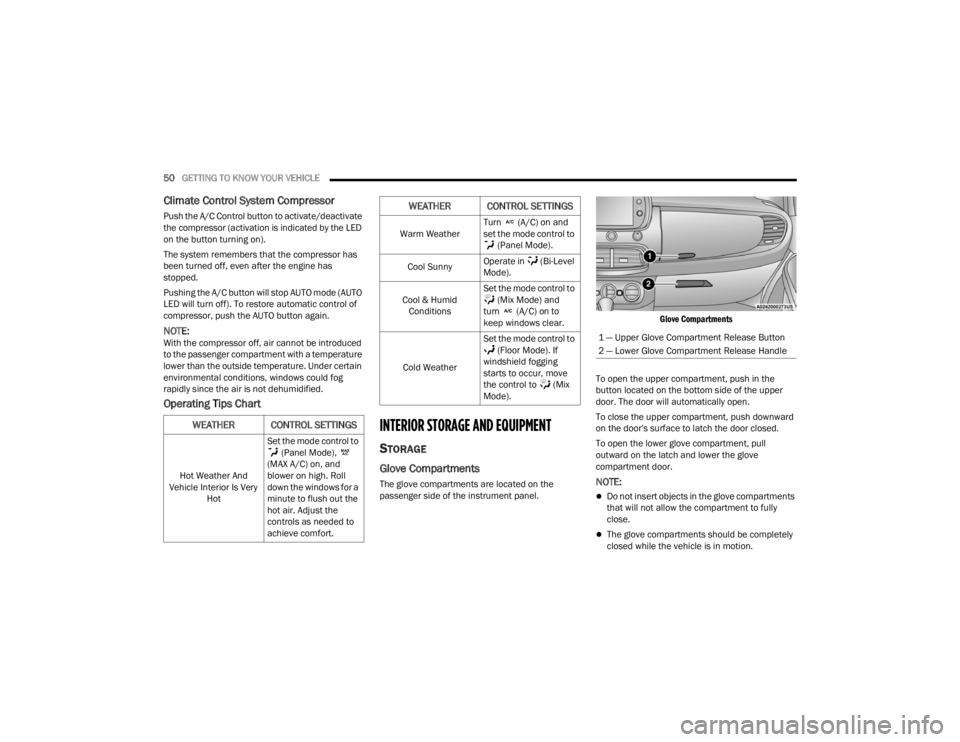
The glove compartments are located on the
passenger side of the instrument panel.
Glove Compartments
To open the upper compartment, push in the
button located on the bottom side of the upper
door. The door will automatically open.
To close the upper compartment, push downward
on the door's surface to latch the door closed.
To open the lower glove compartment, pull
outward on the latch and lower the glove
compartment door.NOTE:
Do not insert objects in the glove compartments
that will not allow the compartment to fully
close.
The glove compartments should be completely
closed while the vehicle is in motion.
WEATHER CONTROL SETTINGS
Hot Weather And
Vehicle Interior Is Very Hot Set the mode control to
(Panel Mode),
(MAX A/C) on, and
blower on high. Roll
down the windows for a
minute to flush out the
hot air. Adjust the
controls as needed to
achieve comfort.
Warm Weather Turn (A/C) on and
set the mode control to
(Panel Mode).
Cool Sunny Operate in (Bi-Level
Mode).
Cool & Humid Conditions Set the mode control to
(Mix Mode) and
turn (A/C) on to
keep windows clear.
Cold Weather Set the mode control to
(Floor Mode). If
windshield fogging
starts to occur, move
the control to (Mix
Mode).
WEATHER CONTROL SETTINGS
1 — Upper Glove Compartment Release Button
2 — Lower Glove Compartment Release Handle
22_FD_OM_EN_USC_t.book Page 50
Page 84 of 312
82STARTING AND OPERATING
When the ignition is in the OFF position, the
window switches remains active for three minutes.
Opening a front door will cancel this function.
After severe driving, idle the engine to allow the
temperature inside the engine compartment to
cool before shutting off the engine.
TURBOCHARGER “COOL DOWN” —
I
F EQUIPPED
This vehicle is equipped with an after-run pump to
cool the turbocharger after the engine is shut off.
Depending on the type of driving and the amount
of cargo, the pump will run for up to 10 minutes
after the engine has been shut off to circulate
coolant through the turbocharger. Although the
pump is rubber-mounted for quiet operation, it is
normal to hear it running during this time.
ENGINE BREAK-IN RECOMMENDATIONS
A long break-in period is not required for the engine
and drivetrain (transmission and axle) in your
vehicle.
Drive moderately during the first 300 miles
(500 km). After the initial 60 miles (100 km),
speeds up to 50 or 55 mph (80 or 90 km/h) are
desirable.
While cruising, brief full-throttle acceleration within
the limits of local traffic laws contributes to a good break-in. Wide-open throttle acceleration in low
gear can be detrimental and should be avoided.
The engine oil installed in the engine at the factory
is a high-quality energy conserving type lubricant.
Oil changes should be consistent with anticipated
climate conditions under which vehicle operations
will occur. For the recommended viscosity and
quality grades Ú
page 293.
NOTE:A new engine may consume some oil during its first
few thousand miles (kilometers) of operation. This
should be considered a normal part of the break-in
and not interpreted as a problem.
ELECTRIC PARK BRAKE (EPB)
Your vehicle is equipped with an EPB that offers
simple operation, and some additional features
that make the parking brake more convenient and
useful.
The parking brake is primarily intended to prevent
the vehicle from rolling while parked. Before
leaving the vehicle, make sure that the parking
brake is applied. Also, be certain to leave the
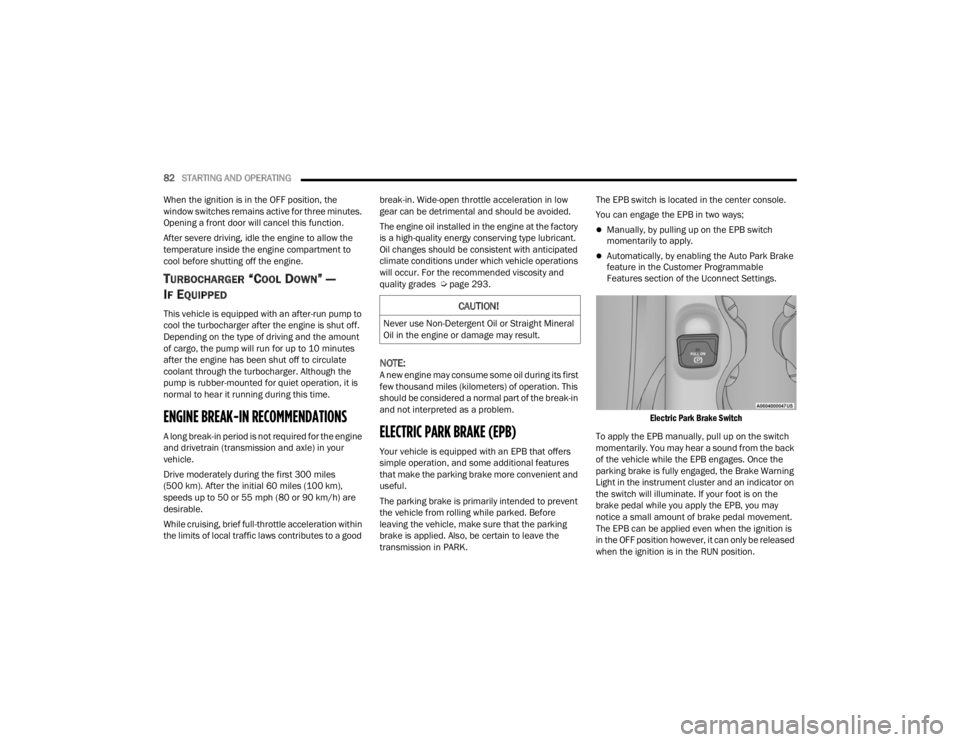
transmission in PARK. The EPB switch is located in the center console.
You can engage the EPB in two ways;
Manually, by pulling up on the EPB switch
momentarily to apply.
Automatically, by enabling the Auto Park Brake
feature in the Customer Programmable
Features section of the Uconnect Settings.
Electric Park Brake Switch
To apply the EPB manually, pull up on the switch
momentarily. You may hear a sound from the back
of the vehicle while the EPB engages. Once the
parking brake is fully engaged, the Brake Warning
Light in the instrument cluster and an indicator on
the switch will illuminate. If your foot is on the
brake pedal while you apply the EPB, you may
notice a small amount of brake pedal movement.
The EPB can be applied even when the ignition is
in the OFF position however, it can only be released
when the ignition is in the RUN position.
CAUTION!
Never use Non-Detergent Oil or Straight Mineral
Oil in the engine or damage may result.
22_FD_OM_EN_USC_t.book Page 82
Page 140 of 312
138MULTIMEDIA
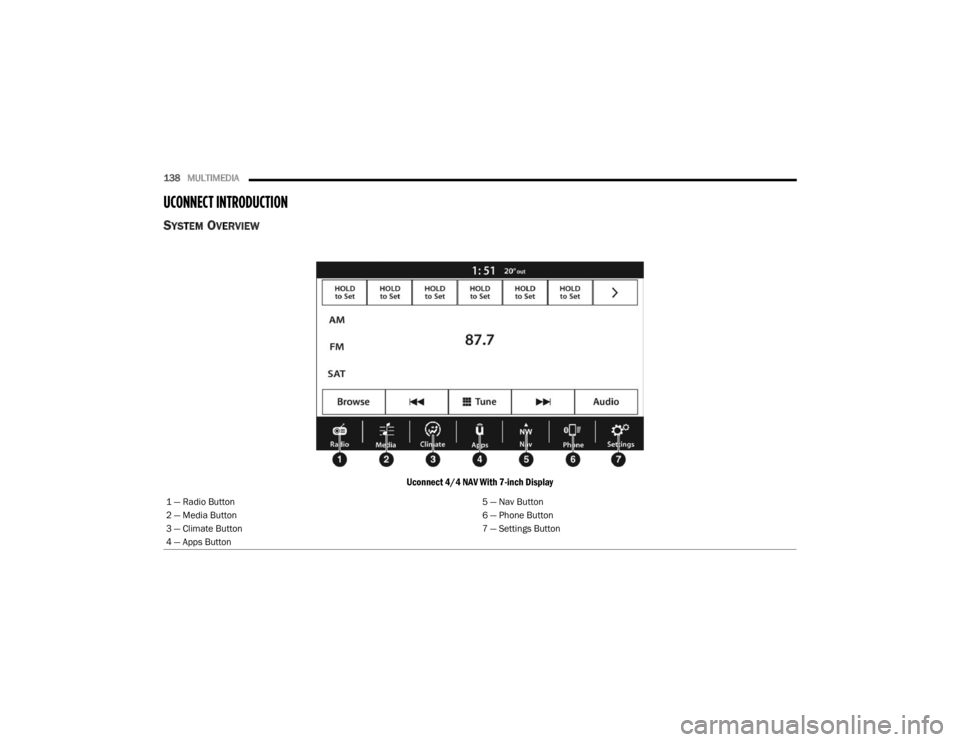
UCONNECT INTRODUCTION
SYSTEM OVERVIEW
Uconnect 4/4 NAV With 7-inch Display
1 — Radio Button 5 — Nav Button
2 — Media Button 6 — Phone Button
3 — Climate Button 7 — Settings Button
4 — Apps Button
22_FD_OM_EN_USC_t.book Page 138
Page 141 of 312
MULTIMEDIA139
NOTE:Uconnect screen images are for illustration purposes only and may not reflect exact software for your vehicle.
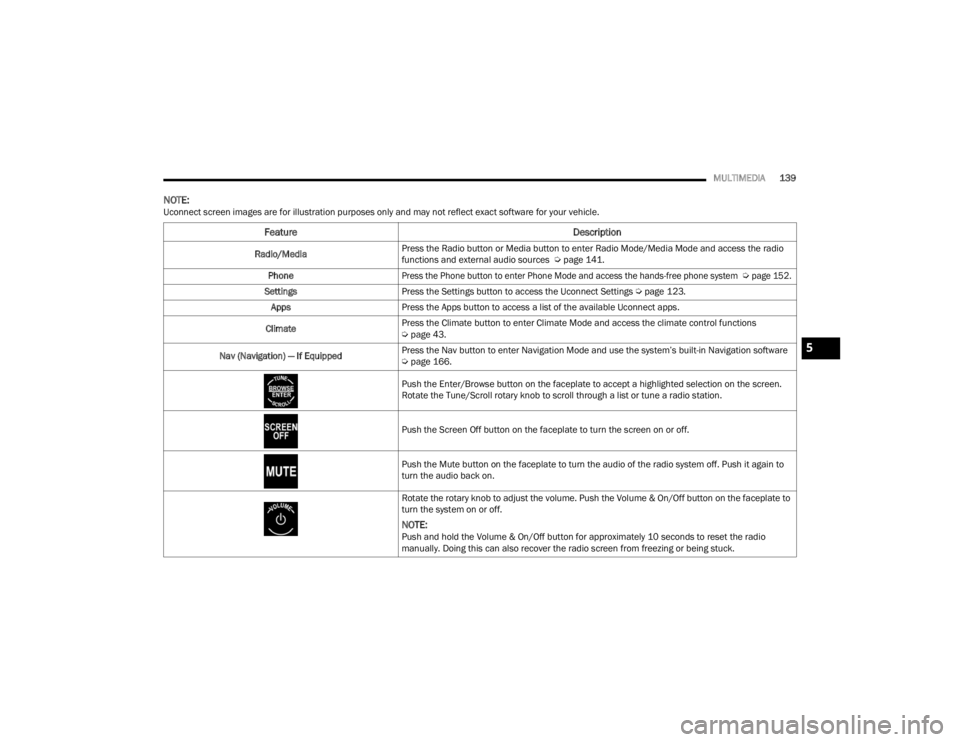
Feature Description
Radio/MediaPress the Radio button or Media button to enter Radio Mode/Media Mode and access the radio
functions and external audio sources Ú
page 141.
Phone
Press the Phone button to enter Phone Mode and access the hands-free phone system
Ú
page 152.
Settings Press the Settings button to access the Uconnect Settings Ú page 123.
Apps Press the Apps button to access a list of the available Uconnect apps.
Climate Press the Climate button to enter Climate Mode and access the climate control functions
Ú
page 43.
Nav (Navigation) — If Equipped Press the Nav button to enter Navigation Mode and use the system’s built-in Navigation software
Ú
page 166.
Push the Enter/Browse button on the faceplate to accept a highlighted selection on the screen.
Rotate the Tune/Scroll rotary knob to scroll through a list or tune a radio station.
Push the Screen Off button on the faceplate to turn the screen on or off.
Push the Mute button on the faceplate to turn the audio of the radio system off. Push it again to
turn the audio back on.
Rotate the rotary knob to adjust the volume. Push the Volume & On/Off button on the faceplate to
turn the system on or off.
NOTE:Push and hold the Volume & On/Off button for approximately 10 seconds to reset the radio
manually. Doing this can also recover the radio screen from freezing or being stuck.
5
22_FD_OM_EN_USC_t.book Page 139