turn signal FIAT 500X 2022 Owners Manual
[x] Cancel search | Manufacturer: FIAT, Model Year: 2022, Model line: 500X, Model: FIAT 500X 2022Pages: 312, PDF Size: 13.26 MB
Page 4 of 312

2
INTRODUCTION
SYMBOLS KEY ...........................................................8
ROLLOVER WARNING ............................................. 8
VEHICLE MODIFICATIONS/ALTERATIONS .............9
SYMBOL GLOSSARY.................................................9
GETTING TO KNOW YOUR VEHICLE
KEYS ....................................................................... 14 Key Fob .............................................................14
SENTRY KEY ........................................................... 17
IGNITION SWITCH .................................................. 17
Keyless Enter ‘n Go™ Ignition .........................17
REMOTE START — IF EQUIPPED .......................... 18
How To Use Remote Start ................................19
To Exit Remote Start Mode ..............................19
Remote Start Front Defrost Activation —
If Equipped........................................................20
Remote Start Comfort Systems —
If Equipped .......................................................20
Remote Start Windshield Wiper De–Icer
And Rear Defrost Activation — If Equipped.....20
Remote Start Cancel Message —
If Equipped........................................................20
VEHICLE SECURITY SYSTEM — IF EQUIPPED ..... 21
To Arm The System .........................................21
To Disarm The System ....................................21
Disabling ...........................................................21 DOORS .....................................................................22
Manual Door Locks ..........................................22
Power Door Locks ............................................22
Keyless Enter ‘n Go™ — Passive Entry
(If Equipped) .....................................................23
Automatic Door Locks — If Equipped .............24
Child-Protection Door Lock System —
Rear Doors ........................................................24
STEERING WHEEL ..................................................25
Manual Tilt/Telescoping Steering Column .....25
SEATS ......................................................................26
Manual Adjustment (Front Seats) ...................26
Manual Adjustment (Rear Seats) ....................27
Power Adjustment Front Seats —
If Equipped........................................................28
Heated Seats — If Equipped ...........................29
Head Restraints ..............................................30
UCONNECT VOICE RECOGNITION .........................32
Introducing Voice Recognition.........................32
Get Started .......................................................32
Basic Voice Commands ...................................32
Additional Information .....................................32
MIRRORS ...............................................................33
Inside Rearview Mirror .....................................33
Illuminated Vanity Mirrors —
If Equipped .......................................................33
Outside Mirrors ................................................34
Power Mirrors ...................................................34
Folding Mirror ...................................................34
Power Folding Mirrors — If Equipped ..............35
Heated Mirrors — If Equipped..........................35 EXTERIOR LIGHTS.................................................. 36
Headlight Switch ............................................. 36
Daytime Running Lights (DRLs) —
If Equipped ...................................................... 36
High Beams ...................................................... 36
Automatic High Beam Headlamp Control —
If Equipped .......................................................37
Flash-To-Pass ................................................... 37
Automatic Headlights — If Equipped .............. 37
Parking Lights ................................................... 37
Headlight Time Delay ...................................... 37
Front Fog Lights — If Equipped .......................38
Turn Signals...................................................... 38
Lane Change Assist ......................................... 38
Courtesy Lights/Approaching Lights ............... 38
INTERIOR LIGHTS ................................................. 38
Front Courtesy Light......................................... 38
Cargo Area Lights ............................................. 40
WINDSHIELD WIPERS AND WASHERS .............. 40
Windshield Wiper Operation ........................... 40
Rain Sensing Wipers — If Equipped ................41
Rear Window Wiper/Washer ........................... 42
Windshield Wiper De-Icer — If Equipped ........ 42
CLIMATE CONTROLS ............................................ 43
Automatic Climate Control Descriptions And
Functions .......................................................... 43
Manual Climate Control Descriptions And
Functions .......................................................... 46
Automatic Temperature Control (ATC) ........... 48
Climate Voice Recognition............................... 48
Operating Tips .................................................48
22_FD_OM_EN_USC_t.book Page 2
Page 14 of 312
12
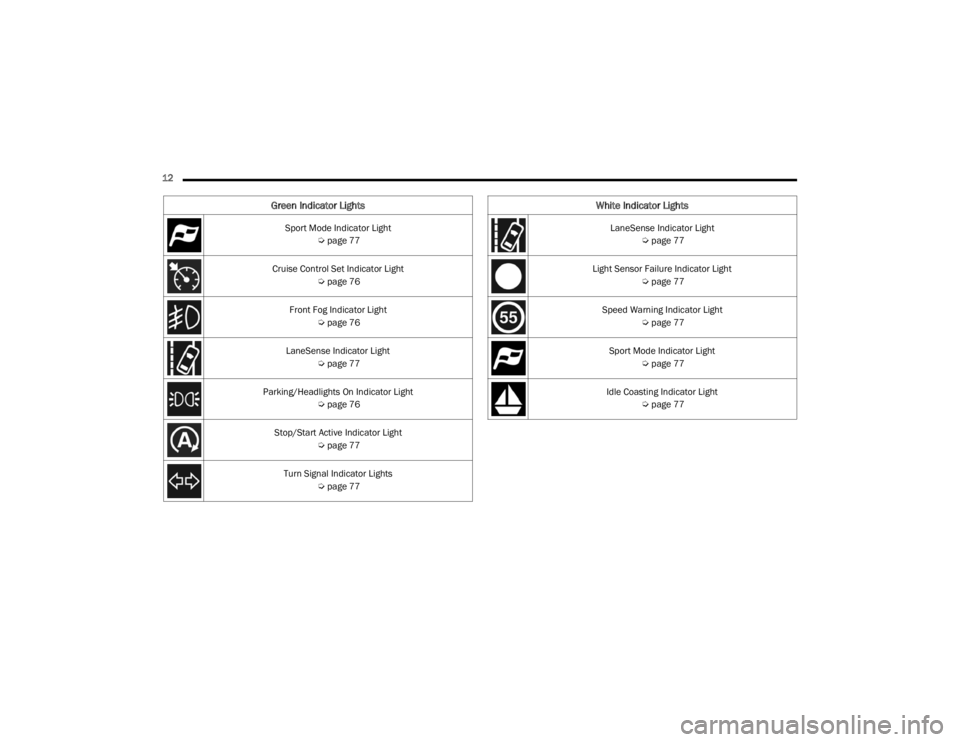
Green Indicator Lights
Sport Mode Indicator Light Úpage 77
Cruise Control Set Indicator Light Úpage 76
Front Fog Indicator Light Úpage 76
LaneSense Indicator Light Úpage 77
Parking/Headlights On Indicator Light Úpage 76
Stop/Start Active Indicator Light Úpage 77
Turn Signal Indicator Lights Úpage 77
White Indicator Lights
LaneSense Indicator Light
Úpage 77
Light Sensor Failure Indicator Light Úpage 77
Speed Warning Indicator Light Úpage 77
Sport Mode Indicator Light Úpage 77
Idle Coasting Indicator Light Úpage 77
22_FD_OM_EN_USC_t.book Page 12
Page 16 of 312
14
GETTING TO KNOW YOUR VEHICLE
KEYS
KEY FOB
Your vehicle is equipped with a key fob which
supports Passive Entry, Remote Keyless Entry
(RKE), Keyless Enter ‘n Go™ (if equipped), and
Remote Start (if equipped). The key fob allows you
to lock or unlock the doors and liftgate or activate
the Panic Alarm from distances up to
approximately 66 ft (20 m). The key fob does not need to be pointed at the vehicle to activate the
system. The key fob also contains an emergency
key, which is stored in the rear of the key fob.
NOTE:The key fob’s wireless signal may be blocked if the
key fob is located next to a mobile phone, laptop,
or other electronic device. This may result in poor
performance.
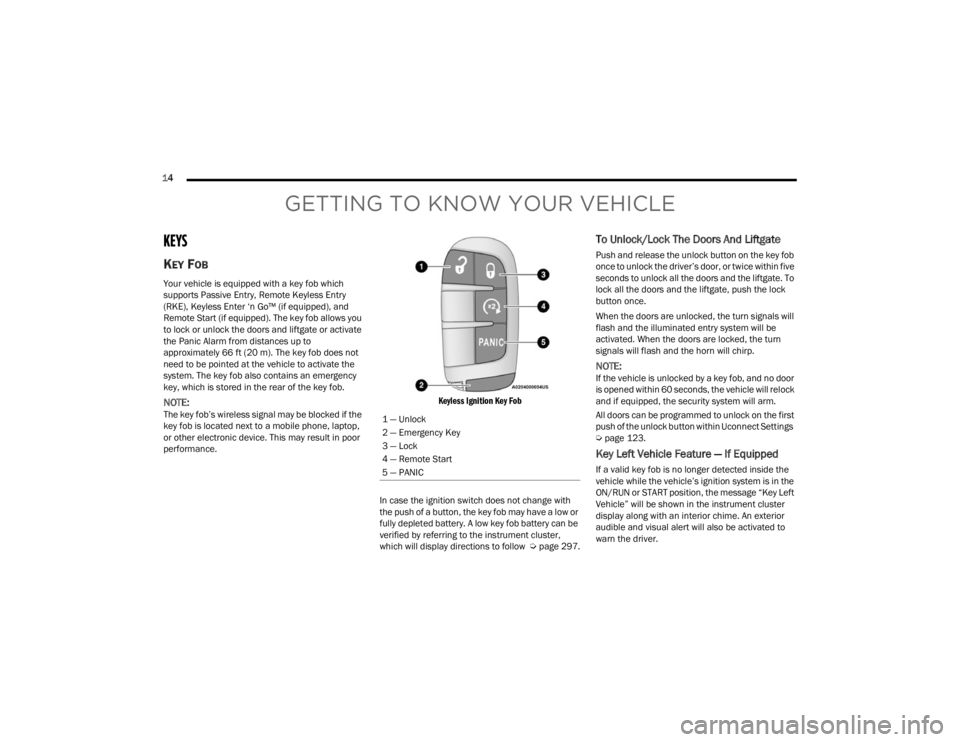
Keyless Ignition Key Fob
In case the ignition switch does not change with
the push of a button, the key fob may have a low or
fully depleted battery. A low key fob battery can be
verified by referring to the instrument cluster,
which will display directions to follow Úpage 297.
To Unlock/Lock The Doors And Liftgate
Push and release the unlock button on the key fob
once to unlock the driver’s door, or twice within five
seconds to unlock all the doors and the liftgate. To
lock all the doors and the liftgate, push the lock
button once.
When the doors are unlocked, the turn signals will
flash and the illuminated entry system will be
activated. When the doors are locked, the turn
signals will flash and the horn will chirp.
NOTE:If the vehicle is unlocked by a key fob, and no door
is opened within 60 seconds, the vehicle will relock
and if equipped, the security system will arm.
All doors can be programmed to unlock on the first
push of the unlock button within Uconnect Settings
Úpage 123.
Key Left Vehicle Feature — If Equipped
If a valid key fob is no longer detected inside the
vehicle while the vehicle’s ignition system is in the
ON/RUN or START position, the message “Key Left
Vehicle” will be shown in the instrument cluster
display along with an interior chime. An exterior
audible and visual alert will also be activated to
warn the driver.
1 — Unlock
2 — Emergency Key
3 — Lock
4 — Remote Start
5 — PANIC
22_FD_OM_EN_USC_t.book Page 14
Page 21 of 312

GETTING TO KNOW YOUR VEHICLE19
HOW TO USE REMOTE START
Push and release the Remote Start button on the
key fob twice within five seconds. The vehicle
doors will lock, the parking lights will flash, and the
horn will chirp twice (if programmed). Then the
engine will start and the vehicle will remain in the
Remote Start mode for a 15 minute cycle. Pushing
the Remote Start button a third time shuts the
engine off.
With Remote Start, the engine will only run for
15 minutes.
If an engine fault is present or fuel level is low,
the vehicle will start and then shut down in 10
seconds.
The parking lights will turn on and remain on
during Remote Start mode.
For security, power window and power sunroof
operation (if equipped) are disabled when the
vehicle is in the Remote Start mode.
The ignition must be placed in the ON/RUN posi -
tion before the Remote Start sequence can be
repeated for a third cycle. All of the following conditions must be met before
the engine will remote start:
Gear Selector in PARK
Doors closed
Hood closed
Liftgate closed
Hazard switch off
Brake switch inactive (brake pedal not pressed)
Battery at an acceptable charge level
PANIC button not pushed
System not disabled from previous Remote
Start event
Vehicle Security Light flashing
Ignition in OFF position
Fuel level meets minimum requirement
Vehicle Security system is not signaling an intru
-
sion
Malfunction Indicator Light (MIL) is not illumi -
nated
TO EXIT REMOTE START MODE
To drive the vehicle after starting the Remote Start
system, push and release the START/STOP ignition
button while pressing the brake pedal prior to the
end of the 15 minute cycle.
The Remote Start system will turn the engine off
with another push and release of the Remote Start
button on the key fob, or if the engine is allowed to
run for the entire 15 minute cycle. Once the
ignition is placed in the ON/RUN position, the
climate controls will resume the previously set
operations (temperature, blower control, etc.).
NOTE:
For vehicles equipped with the Keyless
Enter ‘n Go™ — Passive Entry feature, the
WARNING!
Do not start or run an engine in a closed
garage or confined area. Exhaust gas contains
Carbon Monoxide (CO) which is odorless and
colorless. Carbon Monoxide is poisonous and
can cause serious injury or death when
inhaled.
Keep key fobs away from children. Operation
of the Remote Start system, windows, door
locks or other controls could cause serious
injury or death.
2
22_FD_OM_EN_USC_t.book Page 19
Page 23 of 312

GETTING TO KNOW YOUR VEHICLE21
VEHICLE SECURITY SYSTEM — IF EQUIPPED
The Vehicle Security system monitors the vehicle
doors, hood, liftgate, and the Keyless Enter ‘n Go™
Ignition for unauthorized operation. While the
Vehicle Security system is armed, interior switches
for door locks and liftgate release are disabled. If
something triggers the alarm, the Vehicle Security
system will provide the following audible and
visible signals:
The horn will pulse
The turn signals will flash
The Vehicle Security Light in the instrument
cluster will flash
TO ARM THE SYSTEM
Follow these steps to arm the Vehicle Security
system:
1. Make sure the vehicle’s ignition is placed in
the OFF position.
2. Perform one of the following methods to lock the vehicle:
Push the lock button on the interior power
door lock switch with the driver and/or
passenger door open.
Push the lock button on the exterior Passive
Entry door handle with a valid key fob avail -
able in the same exterior zone Ú page 23.
Push the lock button on the key fob.
3. If any doors are open, close them.
TO DISARM THE SYSTEM
The Vehicle Security system can be disarmed using
any of the following methods:
Push the unlock button on the key fob.
Grab the Passive Entry door handle to unlock
the door Ú page 23.
Cycle the ignition out of the OFF position to
disarm the system.
NOTE:
The driver's door key cylinder cannot arm or
disarm the Vehicle Security system.
The Vehicle Security system remains armed
during liftgate entry. If someone enters the
vehicle through the liftgate and opens any door,
the alarm will sound.
When the Vehicle Security system is armed, the
interior power door lock switches will not unlock
the doors. The Vehicle Security system is designed to protect
your vehicle. However, you can create conditions
where the system will give you a false alarm. If one
of the previously described arming sequences has
occurred, the Vehicle Security system will arm,
regardless of whether you are in the vehicle or not.
If you remain in the vehicle and open a door, the
alarm will sound. If this occurs, disarm the Vehicle
Security system.
If the Vehicle Security system is armed and the
battery becomes disconnected, the Vehicle
Security system will remain armed when the
battery is reconnected; the exterior lights will flash,
and the horn will sound. If this occurs, disarm the
Vehicle Security system.
DISABLING
To completely disable the alarm (e.g. in the case of
long inactivity of the car), lock the doors by turning
the emergency key in the exterior door lock
cylinder.
NOTE:If the batteries in the key fob discharge in the event
of a failure to the system or to switch off the alarm,
place the ignition in the ON/RUN position.
2
22_FD_OM_EN_USC_t.book Page 21
Page 38 of 312
36GETTING TO KNOW YOUR VEHICLE
EXTERIOR LIGHTS
HEADLIGHT SWITCH
The headlight switch is located on the left side of
the instrument panel. The headlight switch
controls the operation of the headlights, parking
lights, daytime running lights, fog lights and the
dimming of the instrument cluster and interior
lighting.
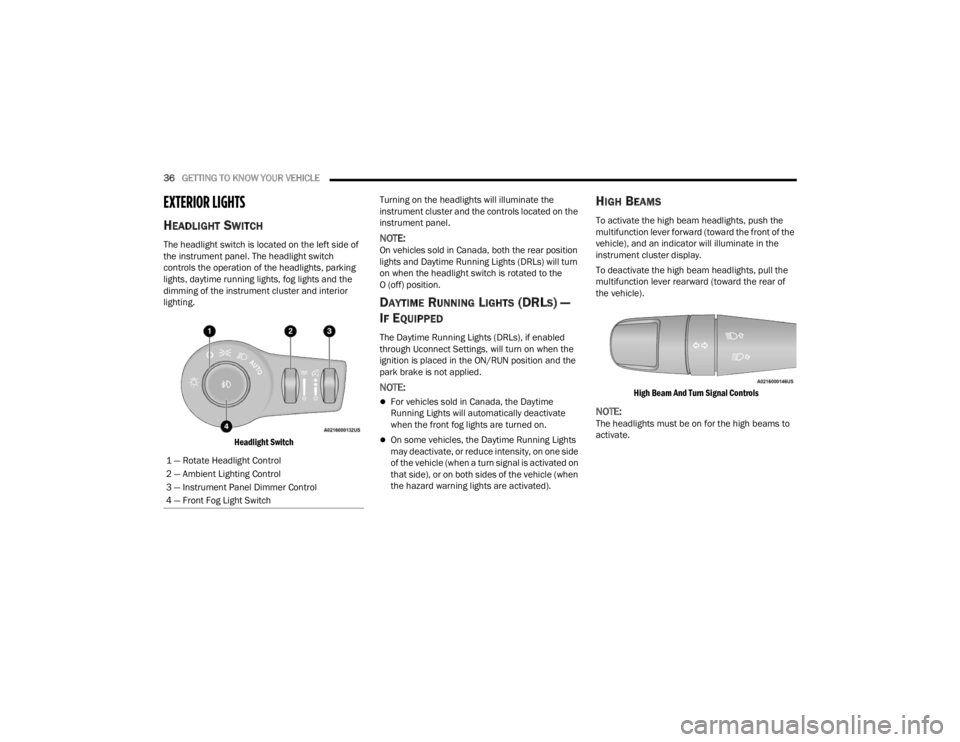
Headlight Switch
Turning on the headlights will illuminate the
instrument cluster and the controls located on the
instrument panel.NOTE:On vehicles sold in Canada, both the rear position
lights and Daytime Running Lights (DRLs) will turn
on when the headlight switch is rotated to the
O (off) position.
DAYTIME RUNNING LIGHTS (DRLS) —
I
F EQUIPPED
The Daytime Running Lights (DRLs), if enabled
through Uconnect Settings, will turn on when the
ignition is placed in the ON/RUN position and the
park brake is not applied.
NOTE:
For vehicles sold in Canada, the Daytime
Running Lights will automatically deactivate
when the front fog lights are turned on.
On some vehicles, the Daytime Running Lights
may deactivate, or reduce intensity, on one side
of the vehicle (when a turn signal is activated on
that side), or on both sides of the vehicle (when
the hazard warning lights are activated).
HIGH BEAMS
To activate the high beam headlights, push the
multifunction lever forward (toward the front of the
vehicle), and an indicator will illuminate in the
instrument cluster display.
To deactivate the high beam headlights, pull the
multifunction lever rearward (toward the rear of
the vehicle).
High Beam And Turn Signal Controls
NOTE:The headlights must be on for the high beams to
activate.
1 — Rotate Headlight Control
2 — Ambient Lighting Control
3 — Instrument Panel Dimmer Control
4 — Front Fog Light Switch
22_FD_OM_EN_USC_t.book Page 36
Page 39 of 312

GETTING TO KNOW YOUR VEHICLE37
AUTOMATIC HIGH BEAM HEADLAMP
C
ONTROL — IF EQUIPPED
The Automatic High Beam Headlamp Control
system provides increased forward lighting at night
by automating high beam control through the use
of a digital camera mounted on the windshield.
This camera detects vehicle specific light and
automatically switches from high beams to low
beams until the approaching vehicle is out of view.
NOTE:
The Automatic High Beam Headlamp Control
can be turned on or off through Uconnect
Settings Ú page 123.
Broken, muddy, or obstructed headlights and
taillights of vehicles in the field of view will
cause headlights to remain on longer (closer to
the vehicle). Also, dirt, film, and other obstruc -
tions on the windshield or camera lens will
cause the system to function improperly.
FLASH-TO-PASS
You can signal another vehicle with your headlights
by lightly pulling the multifunction lever toward you.
This will cause the high beam headlights to turn on,
and remain on, until the lever is released.
AUTOMATIC HEADLIGHTS — IF EQUIPPED
This system automatically turns the headlights on
or off according to ambient light levels. To turn the
system on, rotate the headlight switch clockwise to
the last detent (AUTO position) for automatic
headlight operation. To turn the automatic system
off, move the headlight switch out of the AUTO
position.
NOTE:The ignition must be in the ON/RUN or START
position before the headlights will come on in the
automatic mode.
Light Sensor
The light sensor is equipped with an infrared LED,
located on the windshield. It detects changes in
light intensity outside the vehicle, based on the
sensitivity of light set by using the menu on the
display or on the Uconnect system.
The higher the sensitivity, the lesser the amount of
external light required for controlling the lighting.
PARKING LIGHTS
Rotate the headlight switch to the first position to
turn on the parking lights. The parking light
indicator in the cluster will illuminate.
HEADLIGHT TIME DELAY
This feature provides the safety of headlight
illumination for up to 90 seconds when leaving
your vehicle in an unlit area.
The time delay of the headlights is programmable
between 0, 30, 60 and 90 seconds within
Uconnect Settings Ú page 123.
Headlight Delay Activation
To activate the delay feature, place the ignition in
the OFF position while the headlights are still on.
Then, turn off the headlights within two minutes.
The delay interval begins when the headlight
switch is turned off.
Headlight Delay Deactivation
The feature is disabled by turning on the
headlights, the parking lights or by placing the
ignition in the ON/RUN position.
If you shut off the lights before the ignition is
turned on, they will turn off in the normal manner.
NOTE:The lights must be turned off within two minutes of
placing the ignition in the OFF position to activate
this feature.
2
22_FD_OM_EN_USC_t.book Page 37
Page 40 of 312
38GETTING TO KNOW YOUR VEHICLE
FRONT FOG LIGHTS — IF EQUIPPED
The front fog light switch is built into the headlight
switch.
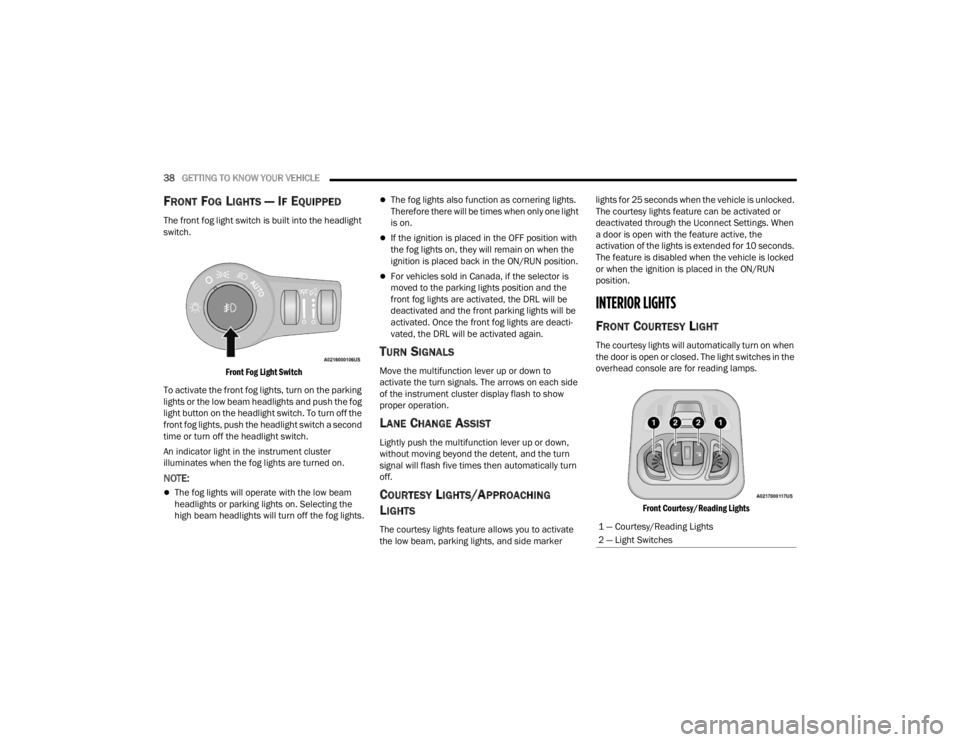
Front Fog Light Switch
To activate the front fog lights, turn on the parking
lights or the low beam headlights and push the fog
light button on the headlight switch. To turn off the
front fog lights, push the headlight switch a second
time or turn off the headlight switch.
An indicator light in the instrument cluster
illuminates when the fog lights are turned on.
NOTE:
The fog lights will operate with the low beam
headlights or parking lights on. Selecting the
high beam headlights will turn off the fog lights.
The fog lights also function as cornering lights.
Therefore there will be times when only one light
is on.
If the ignition is placed in the OFF position with
the fog lights on, they will remain on when the
ignition is placed back in the ON/RUN position.
For vehicles sold in Canada, if the selector is
moved to the parking lights position and the
front fog lights are activated, the DRL will be
deactivated and the front parking lights will be
activated. Once the front fog lights are deacti -
vated, the DRL will be activated again.
TURN SIGNALS
Move the multifunction lever up or down to
activate the turn signals. The arrows on each side
of the instrument cluster display flash to show
proper operation.
LANE CHANGE ASSIST
Lightly push the multifunction lever up or down,
without moving beyond the detent, and the turn
signal will flash five times then automatically turn
off.
COURTESY LIGHTS/APPROACHING
L
IGHTS
The courtesy lights feature allows you to activate
the low beam, parking lights, and side marker lights for 25 seconds when the vehicle is unlocked.
The courtesy lights feature can be activated or
deactivated through the Uconnect Settings. When
a door is open with the feature active, the
activation of the lights is extended for 10 seconds.
The feature is disabled when the vehicle is locked
or when the ignition is placed in the ON/RUN
position.
INTERIOR LIGHTS
FRONT COURTESY LIGHT
The courtesy lights will automatically turn on when
the door is open or closed. The light switches in the
overhead console are for reading lamps.
Front Courtesy/Reading Lights
1 — Courtesy/Reading Lights
2 — Light Switches
22_FD_OM_EN_USC_t.book Page 38
Page 71 of 312
GETTING TO KNOW YOUR INSTRUMENT PANEL69
Lights
By selecting the item "Lights," you can make the
following adjustments:
Headlight Off Delay: Set the delay for headlight
shutoff after engine shutoff.
Headlight Sensitivity: Adjust the sensitivity of
headlight brightness.
Interior Ambient Lights: Increase or decrease
the brightness of the Interior Ambient Lights.
Greeting Lights: Enable/disable the vehicle’s
Greeting Lights.
Auto High Beam: Activate/deactivate the auto -
matic main beam headlights — If Equipped.
Daytime Lights: Activate/deactivate the daytime
running lights.
Cornering Lights: Activate/deactivate the
cornering lights — If Equipped.
Doors And Locks
By selecting the item "Doors & Locks," you can
make the following adjustments:
Auto Door Lock: Activate/deactivate the auto -
matic locking of the doors with the vehicle
moving.
Auto Unlock On Exit: Automatic unlocking of the
doors when exiting the vehicle.
Flash Light With Lock: Activate the direction indi -
cators when closing the doors.
Sound Horn With Lock: Activate/deactivate the
horn when pushing the lock button on the
Remote Keyless Entry. The options are "Off,"
"First Press,” and "Second Press."
Horn With Remote Start: Activate/deactivate
the horn at the Remote Starting of the engine
with the Remote Keyless Entry.
Remote Door Unlock Without Passive Entry:
Allows you to choose whether to unlock all the
doors or only the driver’s side door on the first
push of the unlock button on the Remote
Keyless Entry.
Door Unlock With Passive Entry: Allows you to
open the driver door only on the first push of the
unlock button on the Remote Keyless Entry or
using the passive entry handles on the doors or
liftgates.
Passive Entry — If Equipped: Activate the auto -
matic locking of the doors.
Engine OFF Procedure — If Equipped: Allows you
to turn off the engine from the instrument
cluster in the event of an ignition switch failure.
Instructions for turning off the engine via the
instrument cluster display controls will display in
the instrument cluster.
WARNING LIGHTS AND MESSAGES
The warning/indicator lights will illuminate in the
instrument panel together with a dedicated
message and/or acoustic signal when applicable.
These indications are indicative and precautionary
and as such must not be considered as exhaustive
and/or alternative to the information contained in
the Owner’s Manual, which you are advised to read
carefully in all cases. Always refer to the
information in this chapter in the event of a failure
indication. All active telltales will display first if
applicable. The system check menu may appear
different based upon equipment options and
current vehicle status. Some telltales are optional
and may not appear.
RED WARNING LIGHTS
Air Bag Warning Light
This warning light will illuminate to
indicate a fault with the air bag, and will
turn on for four to eight seconds as a bulb
check when the ignition is placed in the
ON/RUN position. This light will illuminate with a
single chime when a fault with the air bag has been
detected, it will stay on until the fault is cleared. If
the light is either not on during startup, stays on, or
turns on while driving, have the system inspected
at an authorized dealer as soon as possible.
3
22_FD_OM_EN_USC_t.book Page 69
Page 77 of 312
GETTING TO KNOW YOUR INSTRUMENT PANEL75
Each tire, including the spare (if provided), should
be checked monthly when cold and inflated to the
inflation pressure recommended by the vehicle
manufacturer on the vehicle placard or tire
inflation pressure label. If your vehicle has tires of
a different size than the size indicated on the
vehicle placard or tire inflation pressure label, you
should determine the proper tire inflation pressure
for those tires.
As an added safety feature, your vehicle has been
equipped with a TPMS that illuminates a low tire
pressure telltale when one or more of your tires is
significantly underinflated. Accordingly, when the
low tire pressure telltale illuminates, you should stop
and check your tires as soon as possible, and inflate
them to the proper pressure. Driving on a
significantly underinflated tire causes the tire to
overheat and can lead to tire failure. Underinflation
also reduces fuel efficiency and tire tread life, and
may affect the vehicle’s handling and stopping
ability.
Please note that the TPMS is not a substitute for
proper tire maintenance, and it is the driver’s
responsibility to maintain correct tire pressure, even
if underinflation has not reached the level to trigger
illumination of the TPMS low tire pressure telltale.
Your vehicle has also been equipped with a TPMS
malfunction indicator to indicate when the system
is not operating properly. The TPMS malfunction
indicator is combined with the low tire pressure telltale. When the system detects a malfunction,
the telltale will flash for approximately one minute
and then remain continuously illuminated. This
sequence will continue upon subsequent vehicle
start-ups as long as the malfunction exists. When
the malfunction indicator is illuminated, the
system may not be able to detect or signal low tire
pressure as intended. TPMS malfunctions may
occur for a variety of reasons, including the
installation of replacement or alternate tires or
wheels on the vehicle that prevent the TPMS from
functioning properly. Always check the TPMS
malfunction telltale after replacing one or more
tires or wheels on your vehicle to ensure that the
replacement or alternate tires and wheels allow
the TPMS to continue to function properly.
Transmission Temperature Warning Light
This light indicates that the transmission
fluid temperature is running hot. This
may occur with severe usage, such as
trailer towing. If this light turns on, safely
pull over and stop the vehicle. Then, shift the
transmission into PARK and run the engine at idle
or slightly higher until the light turns off.
CAUTION!
The TPMS has been optimized for the original
equipment tires and wheels. TPMS pressures and
warning have been established for the tire size
equipped on your vehicle. Undesirable system
operation or sensor damage may result when
using replacement equipment that is not of the
same size, type, and/or style. Aftermarket wheels
can cause sensor damage. Using aftermarket tire
sealants may cause the Tire Pressure Monitoring
System (TPMS) sensor to become inoperable.
After using an aftermarket tire sealant it is recom -
mended that you take your vehicle to an autho -
rized dealer to have your sensor function checked.
WARNING!
If you continue operating the vehicle when the
Transmission Temperature Warning Light is
illuminated you could cause the fluid to boil over,
come in contact with hot engine or exhaust
components and cause a fire.
CAUTION!
Continuous driving with the Transmission
Temperature Warning Light illuminated will
eventually cause severe transmission damage
or transmission failure.
3
22_FD_OM_EN_USC_t.book Page 75