engine FIAT BRAVO 2007 2.G User Guide
[x] Cancel search | Manufacturer: FIAT, Model Year: 2007, Model line: BRAVO, Model: FIAT BRAVO 2007 2.GPages: 246, PDF Size: 3.75 MB
Page 24 of 246
23
SAFETY
DEVICES
CORRECT USE
OF THE CAR
WARNING
LIGHTS AND
MESSAGES
IN AN
EMERGENCY
CAR
MAINTENANCE
TECHNICAL
SPECIFICATIONS
INDEX
DASHBOARD
AND CONTROLS
RECONFIGURABLE
MULTIFUNCTION
DISPLAY
(where provided)
The car can be provided with the recon-
figurable multifunction display that shows
useful information, according to the pre-
vious settings made, necessary when dri-
ving.
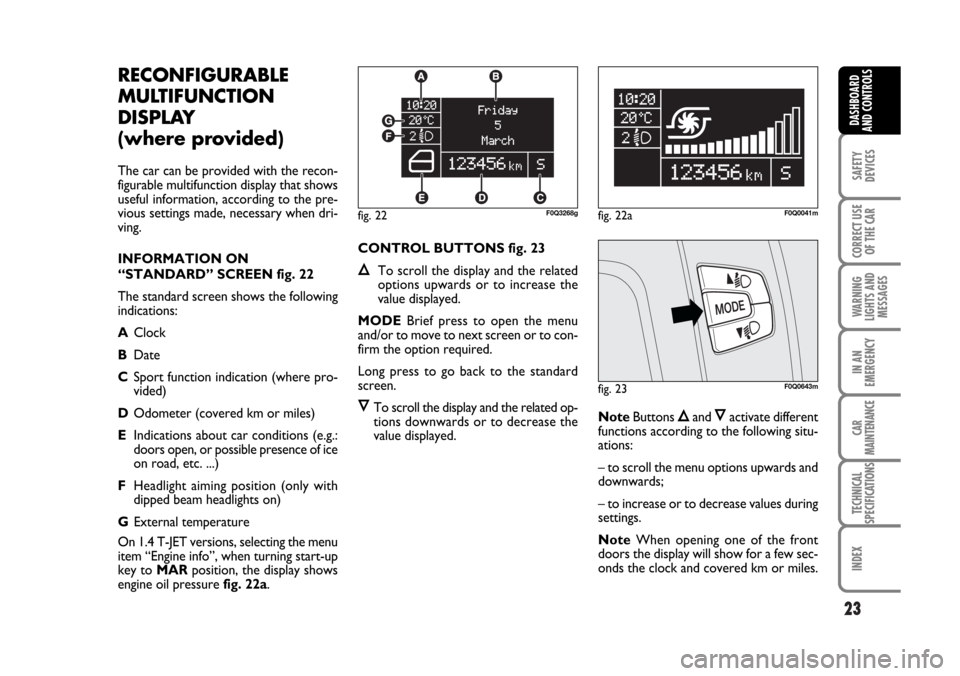
INFORMATION ON
“STANDARD” SCREEN fig. 22
The standard screen shows the following
indications:
AClock
BDate
CSport function indication (where pro-
vided)
DOdometer (covered km or miles)
EIndications about car conditions (e.g.:
doors open, or possible presence of ice
on road, etc. ...)
FHeadlight aiming position (only with
dipped beam headlights on)
GExternal temperature
On 1.4 T-JET versions, selecting the menu
item “Engine info”, when turning start-up
key to MARposition, the display shows
engine oil pressure fig. 22a.CONTROL BUTTONS fig. 23
ÕTo scroll the display and the related
options upwards or to increase the
value displayed.
MODEBrief press to open the menu
and/or to move to next screen or to con-
firm the option required.
Long press to go back to the standard
screen.
ÔTo scroll the display and the related op-
tions downwards or to decrease the
value displayed.NoteButtons Õand Ôactivate different
functions according to the following situ-
ations:
– to scroll the menu options upwards and
downwards;
– to increase or to decrease values during
settings.
NoteWhen opening one of the front
doors the display will show for a few sec-
onds the clock and covered km or miles.
fig. 23F0Q0643m
fig. 22F0Q3268gfig. 22aF0Q0041m
023-036 BRAVO GB 10-05-2007 10:05 Pagina 23
Page 27 of 246
26
SAFETY
DEVICES
CORRECT USE
OF THE CAR
WARNING
LIGHTS AND
MESSAGES
IN AN
EMERGENCY
CAR
MAINTENANCE
TECHNICAL
SPECIFICATIONS
INDEX
DASHBOARD
AND CONTROLS
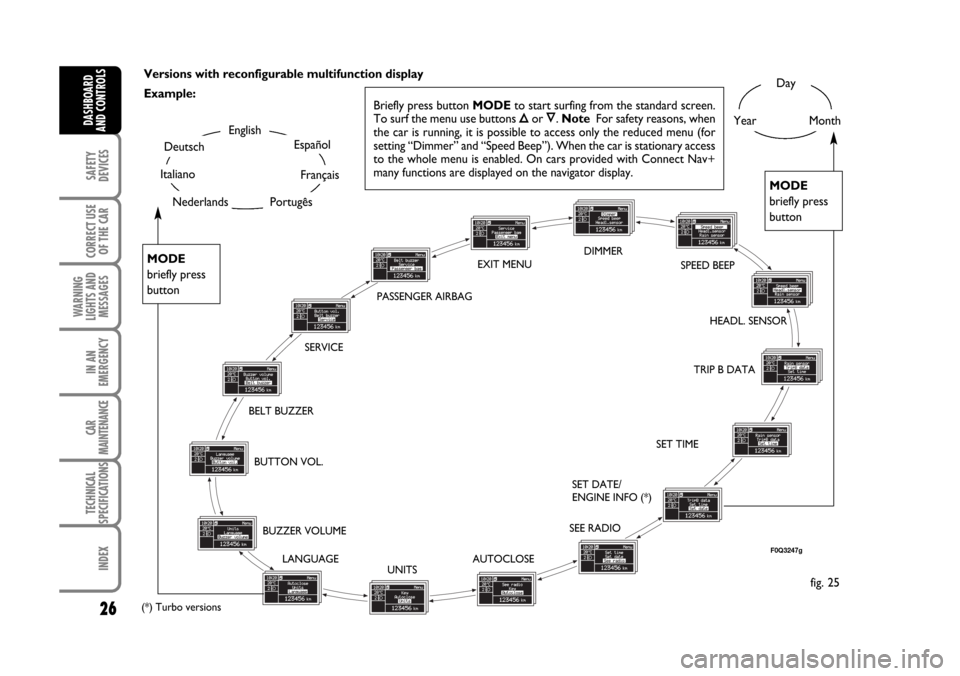
Versions with reconfigurable multifunction display
Example:Day
YearMonthEnglish
Portugês
Español
Français
Deutsch
Italiano
BELT BUZZERSPEED BEEP
HEADL. SENSOR
SET TIME
SET DATE/
ENGINE INFO (*)
SEE RADIO
AUTOCLOSE
UNITS LANGUAGE BUZZER VOLUME BUTTON VOL.
MODE
briefly press
button
MODE
briefly press
button
fig. 25
SERVICE
F0Q3247g
TRIP B DATA DIMMER
EXIT MENU
PASSENGER AIRBAG
NederlandsBriefly press button MODEto start surfing from the standard screen.
To surf the menu use buttons Õor Ô. Note For safety reasons, when
the car is running, it is possible to access only the reduced menu (for
setting “Dimmer” and “Speed Beep”). When the car is stationary access
to the whole menu is enabled. On cars provided with Connect Nav+
many functions are displayed on the navigator display.
(*) Turbo versions
023-036 BRAVO GB 10-05-2007 10:05 Pagina 26
Page 30 of 246

29
SAFETY
DEVICES
CORRECT USE
OF THE CAR
WARNING
LIGHTS AND
MESSAGES
IN AN
EMERGENCY
CAR
MAINTENANCE
TECHNICAL
SPECIFICATIONS
INDEX
DASHBOARD
AND CONTROLS
NoteEvery press on button Õor Ôin-
creases/decreases by 1 unit. Keeping the
button pressed obtains automatic fast in-
crease or decrease. When you are near
the required setting complete adjustment
by single presses.
– if selecting “Mode”: briefly press but-
ton MODE, “24h” or “12h mode will
flash on the display;
– press button
Õor Ôto select “24h” or
“12h”.
After setting, briefly press button MODE
to go back to the submenu screen or
press the button for long to go back to the
main menu screen without storing set-
tings.
– press again button MODEfor long to
go back to the standard screen or to the
main menu according to the current menu
level.Set date (Setting the date)
This function enables to update the date
(day – month – year).
To correct the date proceed as follows:
– briefly press button MODE: “year” will
flash on the display;
– press button
Õor Ôfor setting;
– briefly press button MODE: “month”
will flash on the display;
– press button
Õor Ôfor setting;
– briefly press button MODE: “day” will
flash on the display;
– press button
Õor Ôfor setting.
NoteEvery press on button
Õor Ôin-
creases/decreases by 1 unit. Keeping the
button pressed obtains automatic fast in-
crease or decrease. When you are near
the required setting complete adjustment
by single presses.
– briefly press button MODEto go back
to the menu screen or press the button
for long to go back to the standard screen
without storing settings.Engine oil information
(Engine info) (where provided)
You can display engine oil information
(pressure) in place of the date. Follow the
instructions below to turn on/off engine
oil information display:
– briefly press button MODE: on the dis-
play you will see “Engine info repetition”;
– press button
Õor Ôand select “ON”
to turn on or “OFF” to turn off;
– briefly press button MODEin order to
return to the menu screen or keep the
pushbutton pressed in order to return to
the standard screen without memorizing.
Turn the ignition key on MAR, after the
initial check stage the multifunction display
that can be reconfigured, will show (if pre-
viously enabled) engine oil information.
023-036 BRAVO GB 10-05-2007 10:05 Pagina 29
Page 36 of 246

35
SAFETY
DEVICES
CORRECT USE
OF THE CAR
WARNING
LIGHTS AND
MESSAGES
IN AN
EMERGENCY
CAR
MAINTENANCE
TECHNICAL
SPECIFICATIONS
INDEX
DASHBOARD
AND CONTROLS
“Trip B” displays the figures relating to:
– Trip distance B
– Average consumption B
– Average speed B
– Travel time B (driving time).
Note“Trip B” function can be excluded
(see paragraph “Trip B On/Off”). “Range”
and “Instant consumption” cannot be re-
set.Values displayed
Range
This value shows the distance in km (or
mi) that the car can still cover before
needing fuel, assuming that driving condi-
tions are kept unvaried. The display will
show “----” in the following cases:
– value lower than 50 km (or 30 mi)
– car left parked with engine running for
long.
IMPORTANT The variation of the auton-
omy value can be influenced by different
factors: driving style (see what is described
in paragraph “Driving style” in the chap-
ter “Start-up and driving”), type of route
(highways, urban, mountain, etc…), use
conditions of the car (load transported,
tire pressure, etc…). What was described
previously must be taken in consideration
when planning a trip.
Trip distance
This value shows the distance covered
from the start of the new mission.Average consumption
This value shows the average consump-
tion from the start of the new mission.
Instant consumption
Represents the indicative average of con-
sumptions from the beginning of the new
mission.
Average speed
This value shows the car average speed as
a function of the overall time elapsed since
the start of the new mission.
Travel time
This value shows the time elapsed since
the start of the new mission.
023-036 BRAVO GB 10-05-2007 10:06 Pagina 35
Page 41 of 246
40
SAFETY
DEVICES
CORRECT USE
OF THE CAR
WARNING
LIGHTS AND
MESSAGES
IN AN
EMERGENCY
CAR
MAINTENANCE
TECHNICAL
SPECIFICATIONS
INDEX
DASHBOARD
AND CONTROLS
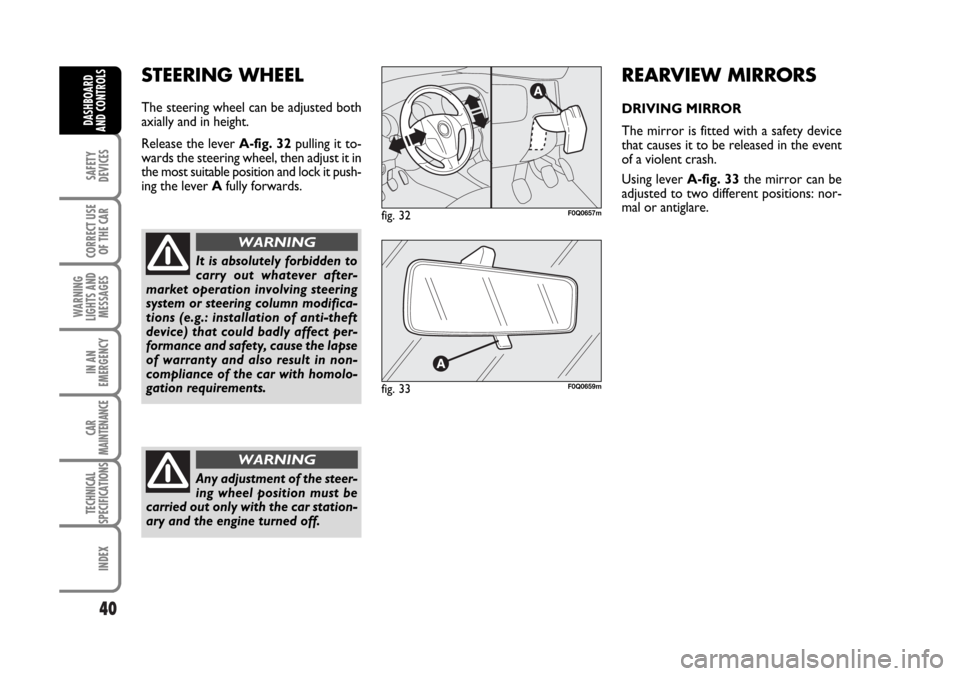
STEERING WHEEL
The steering wheel can be adjusted both
axially and in height.
Release the lever A-fig. 32pulling it to-
wards the steering wheel, then adjust it in
the most suitable position and lock it push-
ing the lever Afully forwards.
It is absolutely forbidden to
carry out whatever after-
market operation involving steering
system or steering column modifica-
tions (e.g.: installation of anti-theft
device) that could badly affect per-
formance and safety, cause the lapse
of warranty and also result in non-
compliance of the car with homolo-
gation requirements.
WARNING
Any adjustment of the steer-
ing wheel position must be
carried out only with the car station-
ary and the engine turned off.
WARNING
REARVIEW MIRRORS
DRIVING MIRROR
The mirror is fitted with a safety device
that causes it to be released in the event
of a violent crash.
Using lever A-fig. 33the mirror can be
adjusted to two different positions: nor-
mal or antiglare.
fig. 32F0Q0657m
fig. 33F0Q0659m
037-056 BRAVO GB 10-05-2007 9:00 Pagina 40
Page 46 of 246

45
SAFETY
DEVICES
CORRECT USE
OF THE CAR
WARNING
LIGHTS AND
MESSAGES
IN AN
EMERGENCY
CAR
MAINTENANCE
TECHNICAL
SPECIFICATIONS
INDEX
DASHBOARD
AND CONTROLS
Preventive demisting procedure
In the event of considerable outside mois-
ture and/or rain and/or considerable dif-
ferences in temperature inside and out-
side the passenger compartment, perform
the following preventive demisting proce-
dure:
❒air recirculation off (button led Toff);
❒knob Aturned to red section;
❒turn knob Cto 2ndspeed;
❒turn knob Eto -or to ≤if the win-
dows do not demist.
HEATED REAR WINDOW
AND DOOR MIRROR
DEMISTING/DEFROSTING
Pressing button
(turns on this function
which is shown by the turning on of the
led on the button
(.
This function is timed and switches off au-
tomatically after 20 minutes. To cut out
this function press again button
(.
IMPORTANT Do not apply stickers on
the inside of the rear window over the
heating filaments to avoid damage that
might cause it to stop working properly.FAN SPEED ADJUSTMENT
To ventilate the passenger’s compartment
properly, proceed as follows:
❒Central and side vents: completely
open;
❒Knob pointer Aon blue section;
❒knob pointer Con required speed;
❒Knob pointer Eto ¥;
❒air recirculation off (button led Toff).
AIR RECIRCULATION
Pressing button
Tturns on this func-
tion which is shown by the turning on of
the led on the button. This function is par-
ticularly useful when the outside air is
heavily polluted (in a traffic jam, tunnel,
etc.). However, it is better not to use it
for long periods, especially if there are sev-
eral people in the car.
IMPORTANT The inside air recirculation
system makes it possible to reach the re-
quired “heating” or “cooling” conditions
faster. Do not use the air recirculation
function on rainy/cold days as it would
considerably increase the possibility of the
windows misting inside.SUPPLEMENTARY HEATER
(where provided)
This device heats up the passenger com-
partment more rapidly in cold weather
conditions with the engine coolant tem-
perature very low.
The additional heater is activated auto-
matically by starting the engine, turning
knob Ato the last red sector and oper-
ating the fan (knob C) on at least first
speed.
The radiator is turned off automatically
when conditions of comfort are achieved.
IMPORTANT heater activation is pre-
vented if the battery voltage is too low.
037-056 BRAVO GB 10-05-2007 9:00 Pagina 45
Page 49 of 246

48
SAFETY
DEVICES
CORRECT USE
OF THE CAR
WARNING
LIGHTS AND
MESSAGES
IN AN
EMERGENCY
CAR
MAINTENANCE
TECHNICAL
SPECIFICATIONS
INDEX
DASHBOARD
AND CONTROLS
AIR RECIRCULATION
Pressing button
Tturns on this func-
tion which is shown by the turning on of
the led on the button.
This function is particularly useful when
the outside air is heavily polluted (in a traf-
fic jam, tunnel, etc.) However, it is better
not to use it for long periods, especially
if there are several people in the car.
IMPORTANT The inside air recirculation
system makes it possible to reach the re-
quired “heating” or “cooling” conditions
faster. Do not use the air recirculation
function on rainy/cold days as it would
considerably increase the possibility of the
windows misting inside.CLIMATE CONTROL (cooling)
Proceed as follows:
❒Knob pointer Aon blue section;
❒knob pointer Con required speed;
❒Knob pointer Fto ¥;
❒Press buttons ❄and T(button leds
on).
Cooling adjustment
Proceed as follows:
❒Turn off button T(button led off);
❒turn knob Ato the right to raise tem-
perature;
❒Turn knob Cto the left to reduce the
fan speed.SUPPLEMENTARY HEATER
(where provided)
This device heats up the passenger com-
partment more rapidly in cold weather
conditions with the engine coolant tem-
perature very low.
The additional heater is activated auto-
matically by starting the engine, turning
knob Ato the last red sector and oper-
ating the fan (knob C) on at least first
speed.
The radiator is turned off automatically
when conditions of comfort are achieved.
IMPORTANT heater activation is pre-
vented if the battery voltage is too low.
LOOKING AFTER THE SYSTEM
During winter, the climate control system
must be turned on at least once a month
for about 10 minutes. Before summer,
have the system checked at a Fiat Deal-
ership.
037-056 BRAVO GB 10-05-2007 9:00 Pagina 48
Page 51 of 246

50
SAFETY
DEVICES
CORRECT USE
OF THE CAR
WARNING
LIGHTS AND
MESSAGES
IN AN
EMERGENCY
CAR
MAINTENANCE
TECHNICAL
SPECIFICATIONS
INDEX
DASHBOARD
AND CONTROLS
SWITCHING THE CLIMATE
CONTROL SYSTEM ON
The system can be started by pressing any
button, but it is advisable to set the tem-
peratures required on the display;
then press button AUTO.
It is possible to personalise required tem-
peratures (driver and passenger) with a
maximum difference of 7°C.
The climate control system compressor
works only with the engine running and
outside temperature over 4°C.It is possible to personalise the choices
made automatically by the system inter-
vening manually on the following controls:
❒fan speed adjustment knob;
❒air distribution selection button;
❒inside air recirculation and AQS func-
tion on/off button;
❒climate control compressor button.
It is inadvisable to use air re-
circulation on rainy/cold
days as it would considerably increase
the possibility of windows misting up
inside.
WARNING
HOW TO USE THE
AUTOMATIC FUNCTION
(AUTO)
Press button AUTO; the system will au-
tomatically adjust:
❒air inlet in the passenger’s compart-
ment;
❒air distribution in the passenger’s com-
partment;
thus cancelling all the previous manual ad-
justments.
When the climate control system is work-
ing automatically, FULL AUTO is dis-
played.
037-056 BRAVO GB 10-05-2007 9:00 Pagina 50
Page 54 of 246

53
SAFETY
DEVICES
CORRECT USE
OF THE CAR
WARNING
LIGHTS AND
MESSAGES
IN AN
EMERGENCY
CAR
MAINTENANCE
TECHNICAL
SPECIFICATIONS
INDEX
DASHBOARD
AND CONTROLS
ALIGNMENT OF SET
TEMPERATURES
(MONO function)
Pressing button MONO automatically
aligns the temperature on the passenger’s
side with that on the driver’s side.
Turn the knob AUTO or MONO to
raise/reduce the temperature between the
two zones by the same value.
Press again MONO to disable the func-
tion.CLIMATE CONTROL
COMPRESSOR ON/OFF
Press button
❄to switch on the climate
control compressor.
Compressor on
❒button led ❄on;
❒symbol ❄on the display, lit.
Compressor off
❒button led ❄off;
❒symbol ❄on the display, off;
❒inside air recirculation off;
❒AQS function disabled.
With the climate control compressor off,
it is not possible to admit air to the pas-
senger compartment with a temperature
below the outside temperature; in this
case symbol ò flashes on the display.
The switching off of the climate control
compressor remains in storage even when
the engine has been stopped. To restore
automatic control for switching on the cli-
mate control compressor, press button
❄or AUTO, in which case, the other man-
ual settings set will be cancelled.AIR DISTRIBUTION SELECTION
Pressing one or more buttons
Q/E/Zit is possible to choose manually 7 of the
possible air distributions to the passenger
compartment:
QAir flow to the windscreen and
front side window vents to demist
or defrost them.
ZAir flow towards the front and
rear lower parts of the passenger
compartment. This type of distri-
bution allows heating of the pas-
senger compartment in the short-
est time.
Q
ZESplitting of the air flow between
front and rear vents, centre and
side dashboard outlets, rear out-
let, windscreen and front side win-
dow demisting vents.
EAir flow to the dashboard centre
and side outlets (passenger’s
body).
037-056 BRAVO GB 10-05-2007 9:00 Pagina 53
Page 55 of 246

54
SAFETY
DEVICES
CORRECT USE
OF THE CAR
WARNING
LIGHTS AND
MESSAGES
IN AN
EMERGENCY
CAR
MAINTENANCE
TECHNICAL
SPECIFICATIONS
INDEX
DASHBOARD
AND CONTROLS
QSplitting of the air flow between
Zfeet vents and windscreen and
front side window demisting/de-
frosting vents. This type of air dis-
tribution allows satisfactory heat-
ing of the passenger compartment
while preventing possible misting
of the windows.
ZE
Splitting of the air flow between
feet vents (warmest air) and the
dashboard centre and side outlets
and the rear outlet (coolest air).
E QSplitting of the air flow between
centre and side dashboard outlets,
rear outlet and windscreen and
side window demisting/defrosting
vents. This type of air distribution
allows satisfactory ventilation of
the passenger compartment while
preventing possible misting of the
windows.IMPORTANT For operation of the cli-
mate control system, at least one of but-
tons
Q/E/Zshall be activated. Deacti-
vation of all buttons
Q/E/Zis therefore
not enabled by the system.
IMPORTANT To switch the system on
again, press button OFF; this operation re-
sets all operating conditions stored before
switching off.
To restore automatic air distribution con-
trol after a manual selection, press button
AUTO.
SUPPLEMENTARY HEATER
(where provided)
This device heats up the passenger com-
partment more rapidly in cold weather
conditions with the engine coolant tem-
perature very low.
In the above climate conditions, the de-
vice comes on automatically when the en-
gine is started with at least one bar of the
fan speed indicator lit up.
The radiator is turned off automatically
when conditions of comfort are achieved.
IMPORTANT heater activation is pre-
vented if the battery voltage is too low.SWITCHING THE CLIMATE
CONTROL SYSTEM OFF
Press button OFF.
The following information is displayed:
❒writing OFF;
❒outside temperature;
❒inside air recirculation on (button led
Ton).
037-056 BRAVO GB 10-05-2007 9:00 Pagina 54