Distance FIAT BRAVO 2013 2.G Owners Manual
[x] Cancel search | Manufacturer: FIAT, Model Year: 2013, Model line: BRAVO, Model: FIAT BRAVO 2013 2.GPages: 299, PDF Size: 5.86 MB
Page 30 of 299
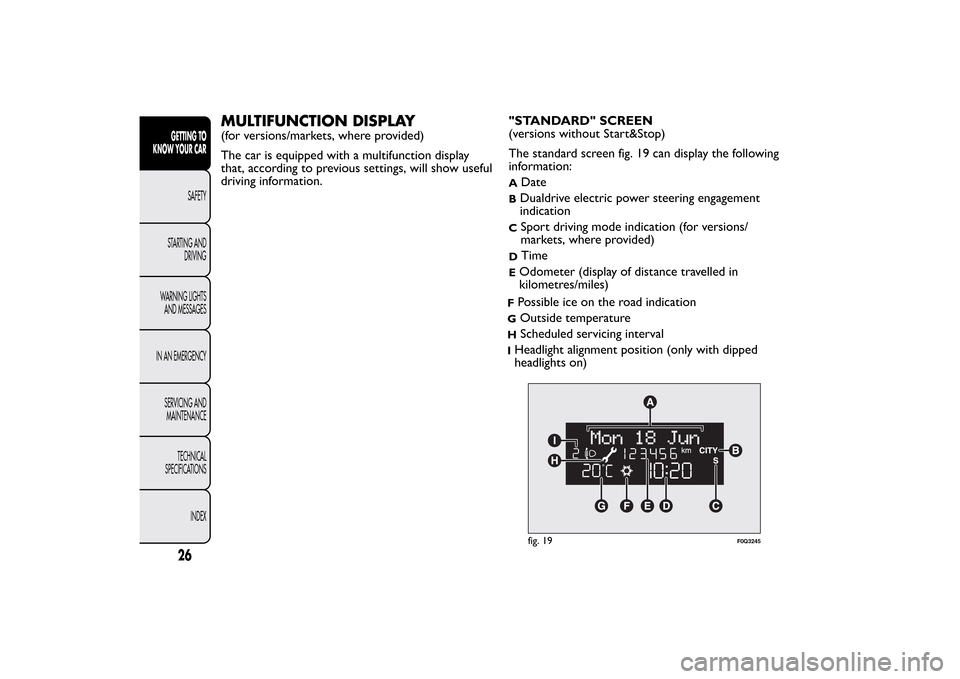
MULTIFUNCTION DISPLAY(for versions/markets, where provided)
The car is equipped with a multifunction display
that, according to previous settings, will show useful
driving information."STANDARD" SCREEN
(versions without Start&Stop)
The standard screen fig. 19 can display the following
information:
A
Date
BDualdrive electric power steering engagement
indicationC
Sport driving mode indication (for versions/
markets, where provided)
D
Time
EOdometer (display of distance travelled in
kilometres/miles)fig. 19
F0Q3245
26GETTING TO
KNOW YOUR CAR
SAFETY
STARTING AND
DRIVING
WARNING LIGHTS
AND MESSAGES
IN AN EMERGENCY
SERVICING AND
MAINTENANCE
TECHNICAL
SPECIFICATIONS
INDEX
FPossible ice on the road indicationG
Outside temperature
H
Scheduled servicing interval
IHeadlight alignment position (only with dipped
headlights on)
Page 31 of 299
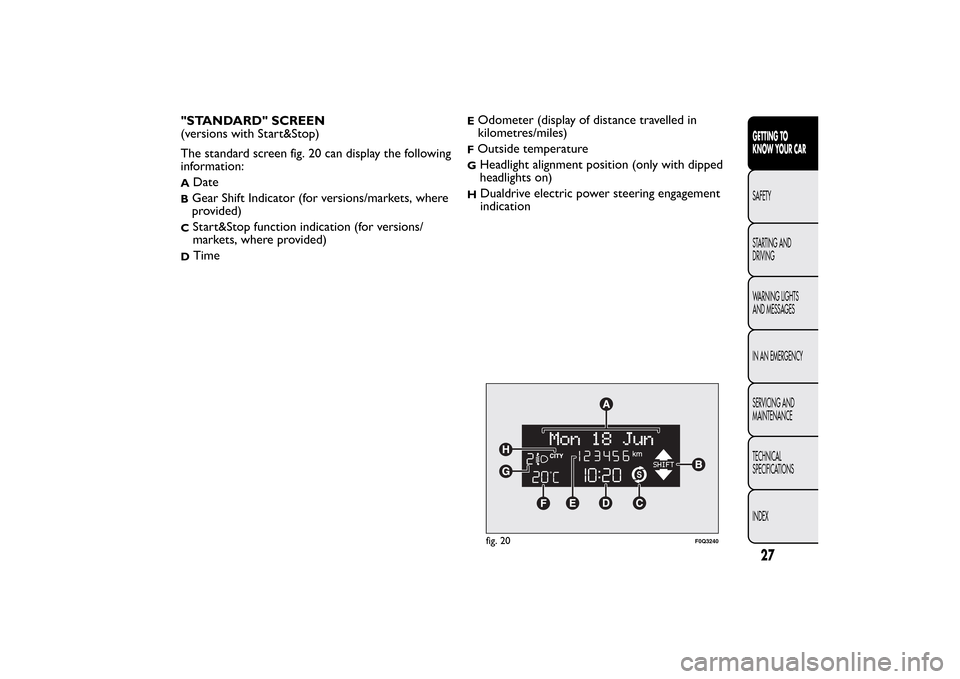
"STANDARD" SCREEN
(versions with Start&Stop)
The standard screen fig. 20 can display the following
information:A
Date
BGear Shift Indicator (for versions/markets, where
provided)C
Start&Stop function indication (for versions/
markets, where provided)
D
Time
fig. 20
F0Q3240
27GETTING TO
KNOW YOUR CARSAFETY
STARTING AND
DRIVING
WARNING LIGHTS
AND MESSAGES
IN AN EMERGENCY
SERVICING AND
MAINTENANCE
TECHNICAL
SPECIFICATIONS
INDEX
EOdometer (display of distance travelled in
kilometres/miles)FOutside temperatureG
Headlight alignment position (only with dipped
headlights on)
H
Dualdrive electric power steering engagement
indication
Page 32 of 299
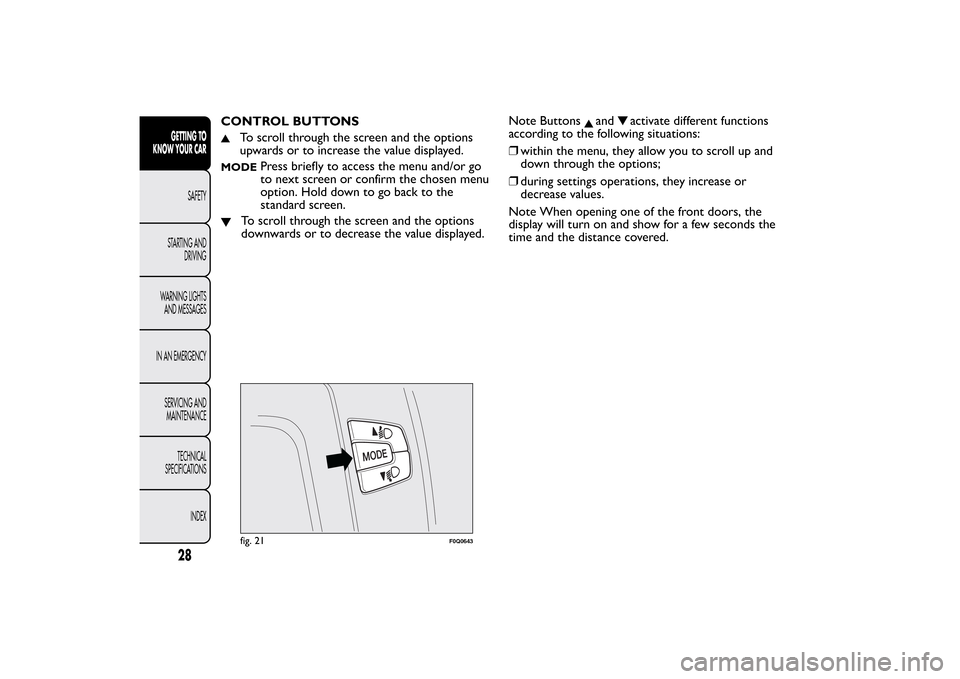
CONTROL BUTTONS
To scroll through the screen and the options
upwards or to increase the value displayed.
MODE
Press briefly to access the menu and/or go
to next screen or confirm the chosen menu
option. Hold down to go back to the
standard screen.
To scroll through the screen and the options
downwards or to decrease the value displayed.Note Buttons
and
activate different functions
according to the following situations:
❒within the menu, they allow you to scroll up and
down through the options;
❒during settings operations, they increase or
decrease values.
Note When opening one of the front doors, the
display will turn on and show for a few seconds the
time and the distance covered.
fig. 21
F0Q0643
28GETTING TO
KNOW YOUR CAR
SAFETY
STARTING AND
DRIVING
WARNING LIGHTS
AND MESSAGES
IN AN EMERGENCY
SERVICING AND
MAINTENANCE
TECHNICAL
SPECIFICATIONS
INDEX
Page 35 of 299
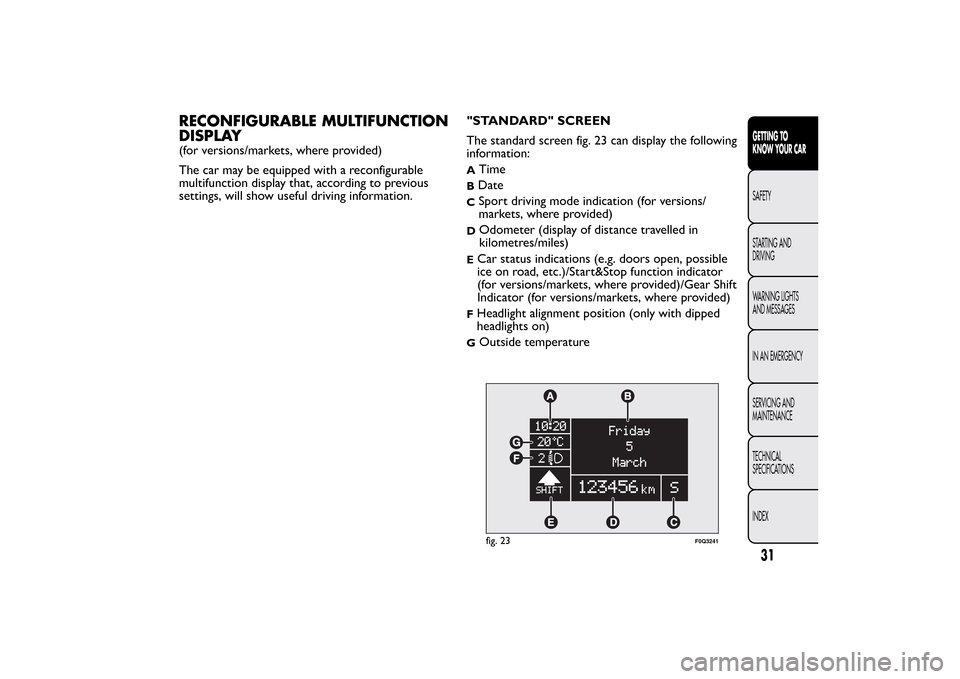
RECONFIGURABLE MULTIFUNCTION
DISPLAY(for versions/markets, where provided)
The car may be equipped with a reconfigurable
multifunction display that, according to previous
settings, will show useful driving information."STANDARD" SCREEN
The standard screen fig. 23 can display the following
information:
A
Time
BDateC
Sport driving mode indication (for versions/
markets, where provided)
D
Odometer (display of distance travelled in
kilometres/miles)
ECar status indications (e.g. doors open, possible
ice on road, etc.)/Start&Stop function indicator
(for versions/markets, where provided)/Gear Shift
Indicator (for versions/markets, where provided)FHeadlight alignment position (only with dipped
headlights on)G
Outside temperaturefig. 23
F0Q3241
31GETTING TO
KNOW YOUR CARSAFETY
STARTING AND
DRIVING
WARNING LIGHTS
AND MESSAGES
IN AN EMERGENCY
SERVICING AND
MAINTENANCE
TECHNICAL
SPECIFICATIONS
INDEX
Page 37 of 299
Note Buttons
and
activate different functions
according to the following situations:
❒within the menu, they allow you to scroll up and
down through the options;
❒during settings operations, they increase or
decrease values.
Note When opening one of the front doors, the
display will turn on and show for a few seconds the
time and the distance covered.GEAR SHIFT INDICATOR
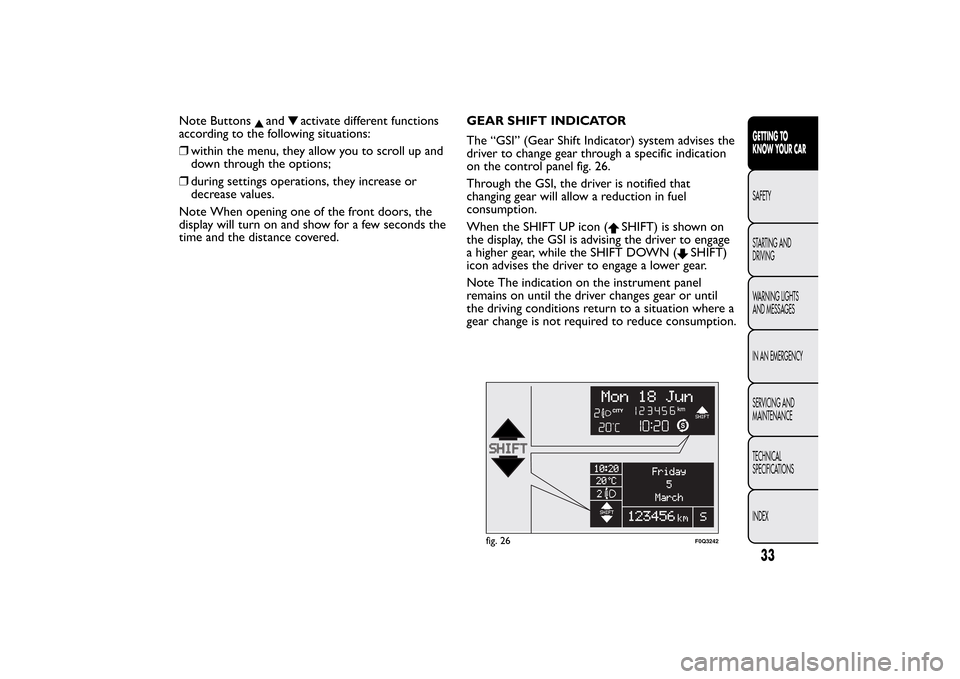
The “GSI” (Gear Shift Indicator) system advises the
driver to change gear through a specific indication
on the control panel fig. 26.
Through the GSI, the driver is notified that
changing gear will allow a reduction in fuel
consumption.
When the SHIFT UP icon (
SHIFT) is shown on
the display, the GSI is advising the driver to engage
a higher gear, while the SHIFT DOWN (
SHIFT)
icon advises the driver to engage a lower gear.
Note The indication on the instrument panel
remains on until the driver changes gear or until
the driving conditions return to a situation where a
gear change is not required to reduce consumption.
fig. 26
F0Q3242
33GETTING TO
KNOW YOUR CARSAFETY
STARTING AND
DRIVING
WARNING LIGHTS
AND MESSAGES
IN AN EMERGENCY
SERVICING AND
MAINTENANCE
TECHNICAL
SPECIFICATIONS
INDEX
Page 40 of 299
DISPLAY FUNCTIONS(see Multifunction display or Reconfigurable
multifunction display)
Lighting (Interior car lighting adjustment)
(with side lights on only)
With the side lights on, this function is used to set
the brightness of the instrument panel, radio
controls and automatic climate control system
controls (for versions/markets, where provided) to
8 levels.
Proceed as follows to adjust the brightness:
❒briefly press the MODE button: the previously
set level flashes on the display;
❒press button
or
to set the required
brightness level;
❒press the MODE button briefly to return to the
menu screen or hold the button down to return
to the standard screen without memorising.Speed Beep (Speed limit)
This function is used to set the car speed limit
(km/h or mph); the driver is immediately alerted
when this limit is exceeded (see “Warning lights
and messages” chapter).
To set the desired speed limit, proceed as follows:
❒briefly press the MODE button: the display
will show the wording ("Speed Beep");
❒press button
or
to select speed limit
activation ("On") or deactivation ("Off");
❒if the function has been activated ("On"), press
the
or
buttons to select the desired speed
limit and then press MODE to confirm.
Note The speed may be set in the range from 30 to
200 km/h, or from 20 to 125 mph according to
the previously chosen unit (see “Setting the
distance unit (Unit)” described below). The setting
will increase/decrease by five units each time button
/
is pressed. Hold down the
/
button to
automatically increase/decrease the setting rapidly.
36GETTING TO
KNOW YOUR CAR
SAFETY
STARTING AND
DRIVING
WARNING LIGHTS
AND MESSAGES
IN AN EMERGENCY
SERVICING AND
MAINTENANCE
TECHNICAL
SPECIFICATIONS
INDEX
Page 44 of 299
See radio (Audio information display)
With this function the display shows information
about the sound system.
❒Radio: selected radio station frequency or RDS
message, automatic tuning activation or
AutoSTore;
❒Audio CD, MP3 CDs: track number;
❒CD Changer: CD number and track number;
To show the radio information on the display
("On") or clear it ("Off"), proceed as follows:
❒briefly press the MODE button, the display will
show "On" or "Off" flashing depending on the
previous setting;
❒press
or
to make your choice;
❒briefly press the MODE button to return to the
menu screen or hold the button down to return
to the standard screen without memorising.
Autoclose (Automatic central locking with
the car in motion)
When activated (On), this function locks the doors
automatically when the vehicle speed exceeds 20
km/h.
Proceed as follows to activate or deactivate this
function:
❒briefly press the MODE button to display a
submenu;❒briefly press the MODE button: "On" or "Off"
flashes on the display (according to the previous
setting);
❒press
or
to make your choice;
❒briefly press the MODE button to return to the
submenu screen or hold the button down to
return to the main menu screen without storing;
❒hold down MODE button again to return to the
standard screen or to the main menu according
to where you are in the menu.
Unit of measurement (Setting the unit of
measurement)
With this function it is possible to set the units
through three submenus: "Distances",
"Consumption" and "Temperature".
To set the required unit proceed as follows:
❒briefly press the MODE button to display the
three submenus;
❒press buttonor
to navigate through the
three submenus;
❒once you have selected the submenu to be
changed, press the MODE button briefly;
❒when you select the “Distances” submenu, briefly
pressing the MODE button makes the display
show "km" or "mi" depending on the previous
setting;
40GETTING TO
KNOW YOUR CAR
SAFETY
STARTING AND
DRIVING
WARNING LIGHTS
AND MESSAGES
IN AN EMERGENCY
SERVICING AND
MAINTENANCE
TECHNICAL
SPECIFICATIONS
INDEX
Page 45 of 299
❒press
or
to make your choice;
❒when you select the “Consumption” submenu,
pressing the MODE button makes "km/l", "l/100
km" or "mpg" appear on the display depending on
the previous setting;
If the set distance unit is "km", the fuel
consumption unit will be displayed in km/l or l/100
km.
If the distance unit is set to "mi", fuel consumption
is displayed in "mpg".
❒press
or
to make your choice;
❒when you select the “Temperature” submenu,
briefly pressing the MODE button makes "°C"
or "°F" appear on the display depending on
the previous setting;
❒press
or
to make your choice;
When you have made the required settings, briefly
press the MODE button to go back to the submenu
screen or hold the button down to go back to the
main menu screen without storing the new settings.
❒hold down MODE button again to return to the
standard screen or to the main menu according
to where you are in the menu.Language (Language selection)
Display messages can be shown in different
languages: Italian, German, English, Spanish, French,
Portuguese and Dutch.
To set the desired language, proceed as follows:
❒briefly press the MODE button: the previously
set language starts flashing on the display;
❒press
or
to make your choice;
❒briefly press the MODE button to return to the
menu screen or hold the button down to return
to the standard screen without memorising.
Warnings volume (Adjusting the failure/
warning acoustic signal volume)
With this function the volume of the buzzer which
accompanies the display of any failure/warning
can be adjusted to 8 levels.
To set the desired volume, proceed as follows:
❒press the MODE button briefly, making the
display flash the previously set volume "level";
❒press theor
button to make the adjustment;
❒briefly press the MODE button to return to the
menu screen or hold the button down to return
to the standard screen without memorising.
41GETTING TO
KNOW YOUR CARSAFETY
STARTING AND
DRIVING
WARNING LIGHTS
AND MESSAGES
IN AN EMERGENCY
SERVICING AND
MAINTENANCE
TECHNICAL
SPECIFICATIONS
INDEX
Page 46 of 299
Button volume (adjusting the button
volume)
This function may be used to adjust (up to 8 levels)
the volume of the acoustic signal made when the
MODE,
and
buttons are pressed.
To set the desired volume, proceed as follows:
❒press the MODE button briefly, making the
display flash the previously set volume "level";
❒press the
or
button to make the adjustment;
❒briefly press the MODE button to return to the
menu screen or hold the button down to return
to the standard screen without memorising.
Belt buzzer (Buzzer activation for SBR
indication)
This function can only be displayed after a Fiat
Dealership has deactivated the SBR system (see
paragraph “SBR system” in the “Safety” chapter).Service (Scheduled servicing)
Using this function you can display information
about the mileage intervals for car servicing.
To consult this information, proceed as follows:
❒briefly press the MODE button: the display
shows service requirements in km or mi
according to the previous setting (see paragraph
“Distance unit of measurement”);
❒briefly press the MODE button to go back to the
menu screen or hold the button down to go back
to the standard screen.
Note The "Scheduled Servicing Plan" requires the
car to be serviced every 30,000 km (or 18,000
miles). This is automatically displayed, when the
ignition key is turned to MAR-ON, starting from
2,000 km (or the equivalent in miles) from this
point and reappears every 200 km (or the
equivalent in miles). Below 200 km servicing
indications are more frequent. The indication will
appear in kilometres or miles depending on the unit
of measurement settings. When the next
scheduled servicing is approaching, the message
"Service" will appear on the display, followed by the
number of kilometres or miles left, when the
ignition key is turned to MAR-ON. Go to a Fiat
Dealership, where the "Scheduled Servicing Plan"
operations will be performed and the message will
be reset.
42GETTING TO
KNOW YOUR CAR
SAFETY
STARTING AND
DRIVING
WARNING LIGHTS
AND MESSAGES
IN AN EMERGENCY
SERVICING AND
MAINTENANCE
TECHNICAL
SPECIFICATIONS
INDEX
Page 48 of 299
TRIP COMPUTERGeneral information
The Trip computer is used to display information
on car operation when the key is turned to
MAR-ON. Two separate trips, called “Trip A” and
“Trip B”, are provided to monitor the entire
mission (journey) in a reciprocally independent
manner.
Both functions can be reset (reset - start of a new
journey).
“Trip A” is used to display the figures relating to:
❒Range
❒Distance covered
❒Average consumption
❒Instantaneous consumption
❒Average speed
❒Trip time (driving time).
“Trip B” is used to display the figures relating to:
❒Distance travelled B
❒Average consumption B
❒Average speed B
❒Trip time B (driving time).
NoteThe “Trip B” function may be disabled (see
“Activating Trip B”). The “Range” and “Instant
consumption" parameters cannot be reset.Values displayed
Range
This indicates the approximate distance which can
be travelled with the amount of fuel present in
thetank.“----”will appear on the display in the
following cases:
❒range value lower than 50 km (or 30 mi)
❒car parked with engine running for an extended
period.
IMPORTANT The range value variation can be
affected by several factors: driving style, type of
route (motorway, urban, mountain roads, etc.),
conditions of use (load, tyre pressures, etc.). Trip
planning must therefore take the above into
account.
Distance covered
Shows the distance covered since the start of the
new journey.
Average consumption
Shows the approximate average fuel consumption
since the start of the new journey.
Instantaneous consumption
This indicates the fuel consumption. The value is
constantly updated. The display will show “----”if
the car is parked with the engine running.
44GETTING TO
KNOW YOUR CAR
SAFETY
STARTING AND
DRIVING
WARNING LIGHTS
AND MESSAGES
IN AN EMERGENCY
SERVICING AND
MAINTENANCE
TECHNICAL
SPECIFICATIONS
INDEX