lock FIAT CROMA 2008 2.G User Guide
[x] Cancel search | Manufacturer: FIAT, Model Year: 2008, Model line: CROMA, Model: FIAT CROMA 2008 2.GPages: 258, PDF Size: 5.86 MB
Page 20 of 258
19
SAFETY
DEVICES
CORRECT USE
OF THE CAR
WARNING
LIGHTS AND
MESSAGES
IN AN
EMERGENCY
CAR
MAINTENANCE
TECHNICAL
SPECIFICATIONS
INDEX
DASHBOARD
AND CONTROLS
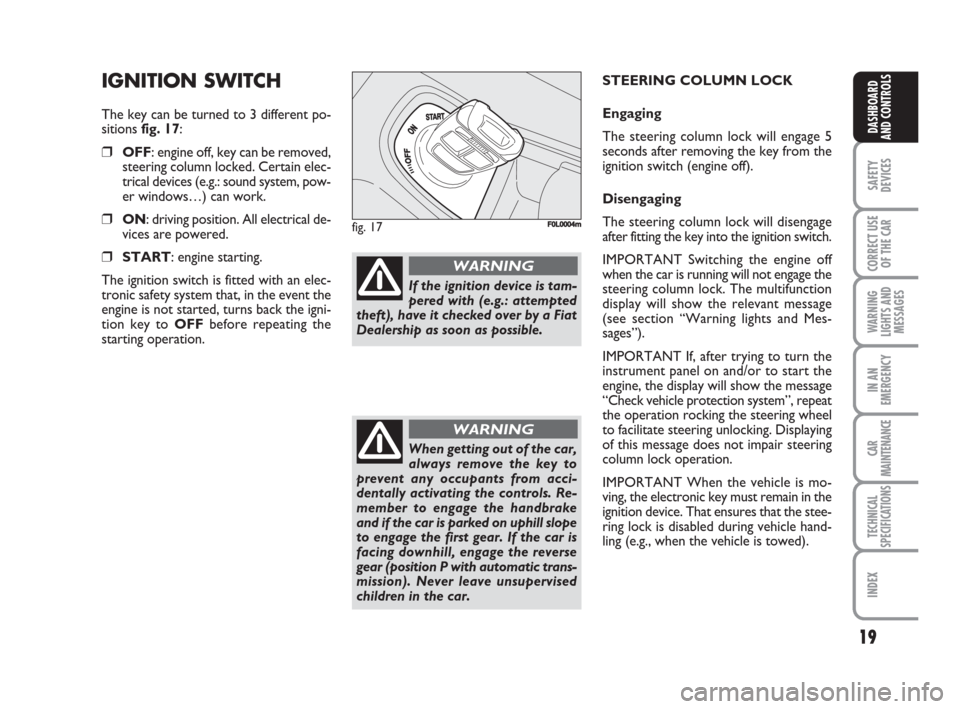
IGNITION SWITCH
The key can be turned to 3 different po-
sitions fig. 17:
❒OFF: engine off, key can be removed,
steering column locked. Certain elec-
trical devices (e.g.: sound system, pow-
er windows…) can work.
❒ON: driving position. All electrical de-
vices are powered.
❒START: engine starting.
The ignition switch is fitted with an elec-
tronic safety system that, in the event the
engine is not started, turns back the igni-
tion key to OFFbefore repeating the
starting operation.
fig. 17F0L0004m
If the ignition device is tam-
pered with (e.g.: attempted
theft), have it checked over by a Fiat
Dealership as soon as possible.
WARNING
When getting out of the car,
always remove the key to
prevent any occupants from acci-
dentally activating the controls. Re-
member to engage the handbrake
and if the car is parked on uphill slope
to engage the first gear. If the car is
facing downhill, engage the reverse
gear (position P with automatic trans-
mission). Never leave unsupervised
children in the car.
WARNING
STEERING COLUMN LOCK
Engaging
The steering column lock will engage 5
seconds after removing the key from the
ignition switch (engine off).
Disengaging
The steering column lock will disengage
after fitting the key into the ignition switch.
IMPORTANT Switching the engine off
when the car is running will not engage the
steering column lock. The multifunction
display will show the relevant message
(see section “Warning lights and Mes-
sages”).
IMPORTANT If, after trying to turn the
instrument panel on and/or to start the
engine, the display will show the message
“Check vehicle protection system”, repeat
the operation rocking the steering wheel
to facilitate steering unlocking. Displaying
of this message does not impair steering
column lock operation.
IMPORTANT When the vehicle is mo-
ving, the electronic key must remain in the
ignition device. That ensures that the stee-
ring lock is disabled during vehicle hand-
ling (e.g., when the vehicle is towed).
001-038 Croma TRW GB 28-05-2008 16:30 Pagina 19
Page 23 of 258
22
SAFETY
DEVICES
CORRECT USE
OF THE CAR
WARNING
LIGHTS AND
MESSAGES
IN AN
EMERGENCY
CAR
MAINTENANCE
TECHNICAL
SPECIFICATIONS
INDEX
DASHBOARD
AND CONTROLS
MULTIFUNCTION
DISPLAY
(where provided)
The vehicle may have a multifunctional dis-
play that provides the user with useful in-
formation, based on what was previously
set, while driving.
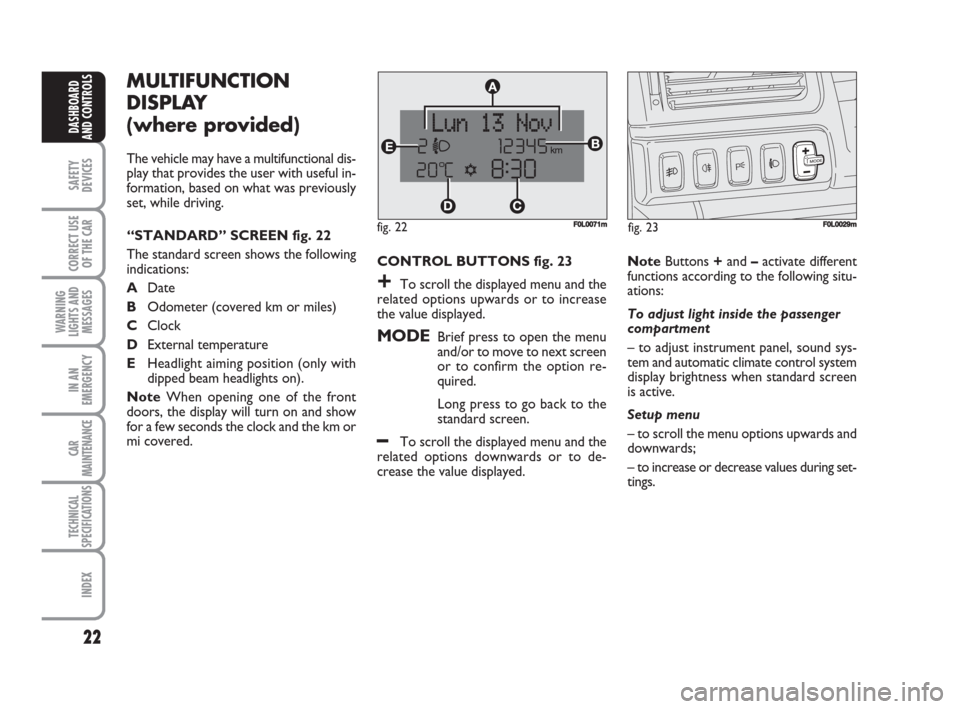
“STANDARD” SCREEN fig. 22
The standard screen shows the following
indications:
ADate
BOdometer (covered km or miles)
CClock
DExternal temperature
EHeadlight aiming position (only with
dipped beam headlights on).
NoteWhen opening one of the front
doors, the display will turn on and show
for a few seconds the clock and the km or
mi covered.CONTROL BUTTONS fig. 23
+To scroll the displayed menu and the
related options upwards or to increase
the value displayed.
MODEBrief press to open the menu
and/or to move to next screen
or to confirm the option re-
quired.
Long press to go back to the
standard screen.
–To scroll the displayed menu and the
related options downwards or to de-
crease the value displayed.NoteButtons +and –activate different
functions according to the following situ-
ations:
To adjust light inside the passenger
compartment
– to adjust instrument panel, sound sys-
tem and automatic climate control system
display brightness when standard screen
is active.
Setup menu
– to scroll the menu options upwards and
downwards;
– to increase or decrease values during set-
tings.
F0L0029mfig. 23 fig. 22F0L0071m
001-038 Croma TRW GB 28-05-2008 16:30 Pagina 22
Page 24 of 258
23
SAFETY
DEVICES
CORRECT USE
OF THE CAR
WARNING
LIGHTS AND
MESSAGES
IN AN
EMERGENCY
CAR
MAINTENANCE
TECHNICAL
SPECIFICATIONS
INDEX
DASHBOARD
AND CONTROLS
SETUP MENU fig. 24
The menu comprises a series of functions
arranged in a “circular fashion” which can
be selected through buttons +and –to
access the different select operations and
settings (setup) given in the following para-
graphs.
The setup menu can be activated by press-
ing briefly button MODE, only with the
car turned on (with car off, only the re-
duced menu can be displayed).
Single presses on buttons +or –will scroll
the setup menu options.
Handling modes differ with each other ac-
cording to the characteristic of the option
selected.
NOTE If the car is equipped with the Ra-
dionavigation System, the only functions
that can be adjusted/set through the in-
strument panel display are the following:
“Speed limit”, “Automatic headlight day-
light sensor” (where provided) and “S.B.R.
(Seat Belt Reminder) buzzer reactivation”
(where provided). The other functions are
displayed by and can be adjusted/set
through the Radionavigation System dis-
play.Selecting a menu option
– press briefly button MODEto select
the menu option to set;
– press buttons +or –(by single press-
es) to select the new setting;
– press briefly button MODEto store the
new setting and to go back to the previ-
ously selected menu option.
Selecting “Date” and “Set Clock”:
– briefly press button MODEto select
the first value to change (e.g. hours /min-
utes or year / month / day);
– press buttons +or –(by single press-
es) to select the new setting;
– briefly press button MODEto store the
new setting and to go to the next setup
menu option, if this is the last one you will
go back to the previously selected option of
the main menu.Press button MODE for long:
– to quit the setup menu and to save on-
ly the settings stored yet by the user (and
confirmed by pressing briefly button
MODE).
The setup menu displaying is timed; when
quitting the menu due to timing expiry,
only settings stored yet by the user (and
confirmed by pressing briefly button
MODE) will be saved.
001-038 Croma TRW GB 28-05-2008 16:30 Pagina 23
Page 26 of 258
25
SAFETY
DEVICES
CORRECT USE
OF THE CAR
WARNING
LIGHTS AND
MESSAGES
IN AN
EMERGENCY
CAR
MAINTENANCE
TECHNICAL
SPECIFICATIONS
INDEX
DASHBOARD
AND CONTROLS
RECONFIGURABLE
MULTIFUNCTION
DISPLAY
(where provided)
The car can be provided with the recon-
figurable multifunction display that shows
useful information, according to the pre-
vious settings made, necessary when dri-
ving.
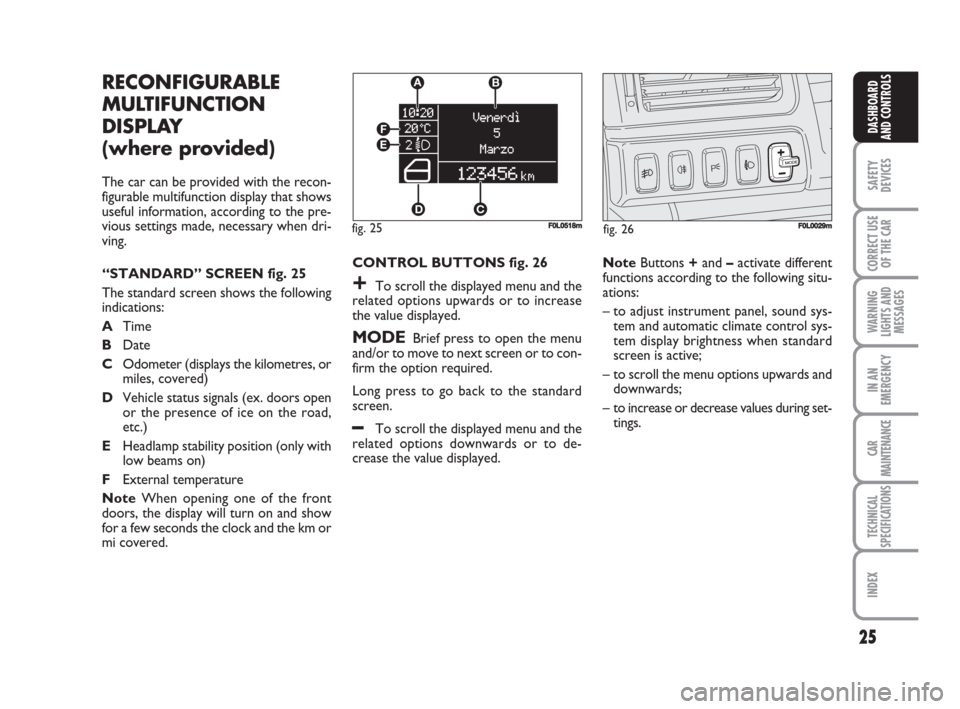
“STANDARD” SCREEN fig. 25
The standard screen shows the following
indications:
ATime
BDate
COdometer (displays the kilometres, or
miles, covered)
DVehicle status signals (ex. doors open
or the presence of ice on the road,
etc.)
EHeadlamp stability position (only with
low beams on)
FExternal temperature
NoteWhen opening one of the front
doors, the display will turn on and show
for a few seconds the clock and the km or
mi covered.CONTROL BUTTONS fig. 26
+To scroll the displayed menu and the
related options upwards or to increase
the value displayed.
MODEBrief press to open the menu
and/or to move to next screen or to con-
firm the option required.
Long press to go back to the standard
screen.
–To scroll the displayed menu and the
related options downwards or to de-
crease the value displayed.NoteButtons +and –activate different
functions according to the following situ-
ations:
– to adjust instrument panel, sound sys-
tem and automatic climate control sys-
tem display brightness when standard
screen is active;
– to scroll the menu options upwards and
downwards;
– to increase or decrease values during set-
tings.
F0L0029mfig. 26 fig. 25
EF
DC A
B
F0L0518m
001-038 Croma TRW GB 28-05-2008 16:30 Pagina 25
Page 30 of 258
29
SAFETY
DEVICES
CORRECT USE
OF THE CAR
WARNING
LIGHTS AND
MESSAGES
IN AN
EMERGENCY
CAR
MAINTENANCE
TECHNICAL
SPECIFICATIONS
INDEX
DASHBOARD
AND CONTROLS
Headlamp sensor
(Automatic headlight sensor
sensitivity adjustment)
(where provided)
With this function it is possible to adjust
the light sensor sensitivity according to 3
levels (level 1 = min. level, level 2 = av-
erage level, level 3 = max. level); the high-
er the sensitivity is, the lower is the ex-
ternal light intensity required to switch on
the lights.
To set the light level required, proceed as
follows:
– briefly press button MODE, the previ-
ously set level will flash on the display;
– press button +or –to select the re-
quired level;
– briefly press button MODEto go back
to the menu screen or press the button
for long to go back to the standard screen
without storing settings.Trip B data (Trip On/Off)
Through this option it is possible to acti-
vate (On) or deactivate (Off) the Trip B
(partial trip).
For further information see “Trip com-
puter”.
For activation / deactivation, proceed as
follows:
– briefly press button MODE: On or Off
will flash on the display according to pre-
vious setting;
– press button +or –to select the re-
quired level;
– briefly press button MODEto go back
to the menu screen or press the button
for long to go back to the standard screen
without storing settings.Set time (Setting the clock)
This function enables to set the clock
through two sub-menus: “Time” and
“Mode”.
Proceed as follows:
– briefly press button MODE, the display
will show the two submenus “Time” and
“Mode”;
– press button +or –to scroll the two
submenus;
– select the required submenu and then
press briefly MODE;
– if selecting “Time”: briefly press button
MODE, “hours” will flash on the display;
– press button +or –for setting;
– press button MODE, “minutes” will
flash on the display;
– press button +or –for setting.
001-038 Croma TRW GB 28-05-2008 16:30 Pagina 29
Page 32 of 258
31
SAFETY
DEVICES
CORRECT USE
OF THE CAR
WARNING
LIGHTS AND
MESSAGES
IN AN
EMERGENCY
CAR
MAINTENANCE
TECHNICAL
SPECIFICATIONS
INDEX
DASHBOARD
AND CONTROLS
Key
With this function it is possible to decide
the door opening mode by selecting one
of the following options:
– open doors: to unlock all doors, except
the tailgate
– open driver’s door (op. drv. door): to
unlock just the driver’s door (where pro-
vided)
– open all: to unlock every door includ-
ing the tailgate
The car is delivered with this function in
“Open all” mode.
Proceed as follows:
– briefly press button MODE, the previ-
ous setting will flash on the display;
– press button +or –for setting;
– briefly press button MODEto go back
to the menu screen or press the button
for long to go back to the standard screen
without storing settings.Autoclose (Automatic central
door locking when travelling)
When activated (On), this function locks
automatically the doors when the car
speed exceeds 20 km/h.
To activate or to deactivate this function
proceed as follows:
– briefly press button MODEto display
the submenu;
– briefly press button MODE: On or Off
will flash on the display according to pre-
vious setting;
– press button +or –to select the re-
quired level;
– briefly press button MODEto go back
to the menu screen or press the button
for long to go back to the standard screen
without storing settings;
– Press again button MODEfor long to
go back to the standard screen or to the
main menu according to the current menu
level.Units (Setting units)
With this function it is possible to set the
units through the submenu: “Distances”,
“Consumption” and “Temperature”
(where provided).
To set the required unit proceed as fol-
lows:
– briefly press button MODE, the display
will show the submenus;
– press button +or –to scroll the sub-
menus;
– select the required submenu and then
press briefly button MODE;
– if selecting “Distances”: pressing button
MODEbriefly, the display will show “km”
or “mi” according to previous setting;
– press button +or –to select the re-
quired level;
– if selecting “Consumption”: briefly press
button MODEthe display will show
“km/l”, “l/100km” or “mpg” according to
previous setting;
001-038 Croma TRW GB 28-05-2008 16:30 Pagina 31
Page 40 of 258
SEATS
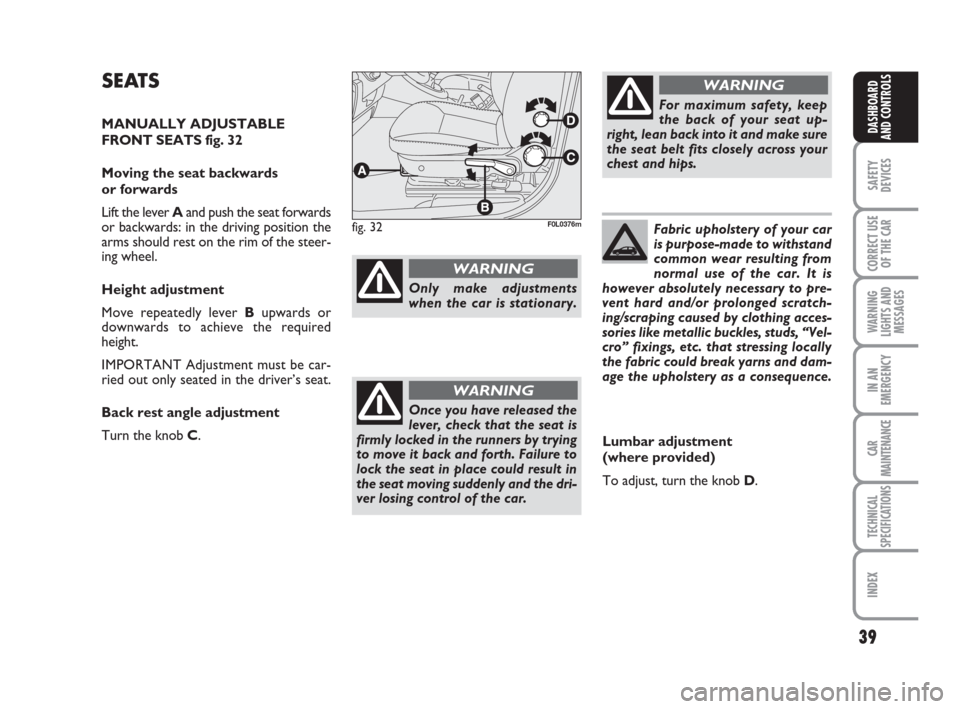
MANUALLY ADJUSTABLE
FRONT SEATS fig. 32
Moving the seat backwards
or forwards
Lift the lever Aand push the seat forwards
or backwards: in the driving position the
arms should rest on the rim of the steer-
ing wheel.
Height adjustment
Move repeatedly lever Bupwards or
downwards to achieve the required
height.
IMPORTANT Adjustment must be car-
ried out only seated in the driver’s seat.
Back rest angle adjustment
Turn the knob C.
39
SAFETY
DEVICES
CORRECT USE
OF THE CAR
WARNING
LIGHTS AND
MESSAGES
IN AN
EMERGENCY
CAR
MAINTENANCE
TECHNICAL
SPECIFICATIONS
INDEX
DASHBOARD
AND CONTROLS
fig. 32F0L0376m
For maximum safety, keep
the back of your seat up-
right, lean back into it and make sure
the seat belt fits closely across your
chest and hips.
WARNING
Only make adjustments
when the car is stationary.
WARNING
Once you have released the
lever, check that the seat is
firmly locked in the runners by trying
to move it back and forth. Failure to
lock the seat in place could result in
the seat moving suddenly and the dri-
ver losing control of the car.
WARNING
Lumbar adjustment
(where provided)
To adjust, turn the knob D. Fabric upholstery of your car
is purpose-made to withstand
common wear resulting from
normal use of the car. It is
however absolutely necessary to pre-
vent hard and/or prolonged scratch-
ing/scraping caused by clothing acces-
sories like metallic buckles, studs, “Vel-
cro” fixings, etc. that stressing locally
the fabric could break yarns and dam-
age the upholstery as a consequence.
039-069 Croma TRW GB 10-11-2008 13:15 Pagina 39
Page 41 of 258
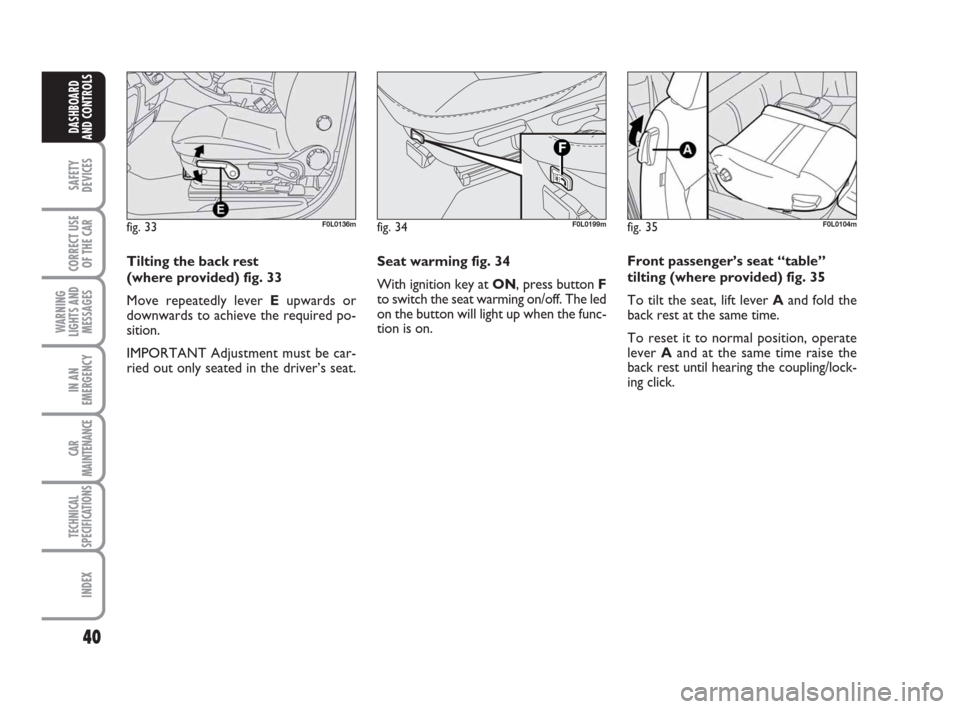
Seat warming fig. 34
With ignition key at ON, press button F
to switch the seat warming on/off. The led
on the button will light up when the func-
tion is on.
40
SAFETY
DEVICES
CORRECT USE
OF THE CAR
WARNING
LIGHTS AND
MESSAGES
IN AN
EMERGENCY
CAR
MAINTENANCE
TECHNICAL
SPECIFICATIONS
INDEX
DASHBOARD
AND CONTROLS
Tilting the back rest
(where provided) fig. 33
Move repeatedly lever Eupwards or
downwards to achieve the required po-
sition.
IMPORTANT Adjustment must be car-
ried out only seated in the driver’s seat.
fig. 33F0L0136mfig. 34F0L0199mfig. 35F0L0104m
Front passenger’s seat “table”
tilting (where provided) fig. 35
To tilt the seat, lift lever Aand fold the
back rest at the same time.
To reset it to normal position, operate
lever Aand at the same time raise the
back rest until hearing the coupling/lock-
ing click.
039-069 Croma TRW GB 10-11-2008 13:15 Pagina 40
Page 43 of 258
42
SAFETY
DEVICES
CORRECT USE
OF THE CAR
WARNING
LIGHTS AND
MESSAGES
IN AN
EMERGENCY
CAR
MAINTENANCE
TECHNICAL
SPECIFICATIONS
INDEX
DASHBOARD
AND CONTROLS
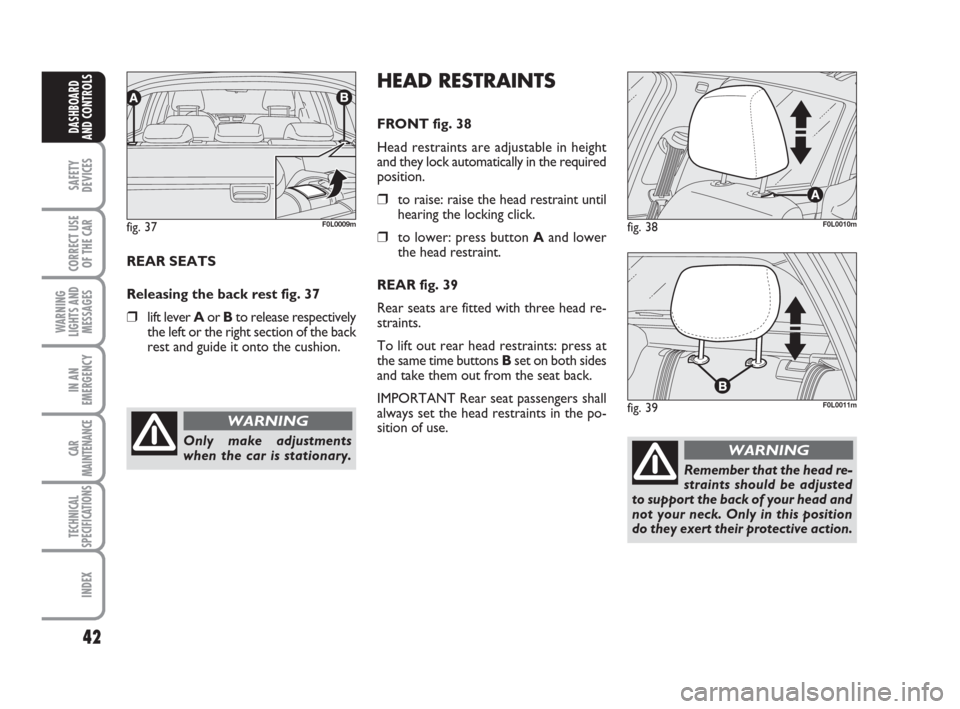
REAR SEATS
Releasing the back rest fig. 37
❒lift lever Aor Bto release respectively
the left or the right section of the back
rest and guide it onto the cushion.
fig. 37F0L0009m
Only make adjustments
when the car is stationary.
WARNING
HEAD RESTRAINTS
FRONT fig. 38
Head restraints are adjustable in height
and they lock automatically in the required
position.
❒to raise: raise the head restraint until
hearing the locking click.
❒to lower: press button Aand lower
the head restraint.
REAR fig. 39
Rear seats are fitted with three head re-
straints.
To lift out rear head restraints: press at
the same time buttonsB set on both sides
and take them out from the seat back.
IMPORTANT Rear seat passengers shall
always set the head restraints in the po-
sition of use.fig. 38F0L0010m
fig. 39F0L0011m
Remember that the head re-
straints should be adjusted
to support the back of your head and
not your neck. Only in this position
do they exert their protective action.
WARNING
039-069 Croma TRW GB 10-11-2008 13:15 Pagina 42
Page 44 of 258
43
SAFETY
DEVICES
CORRECT USE
OF THE CAR
WARNING
LIGHTS AND
MESSAGES
IN AN
EMERGENCY
CAR
MAINTENANCE
TECHNICAL
SPECIFICATIONS
INDEX
DASHBOARD
AND CONTROLS
To optimise head restraint
protective action, adjust the
seat back upright and keep your head
as close as possible to the head re-
straint.
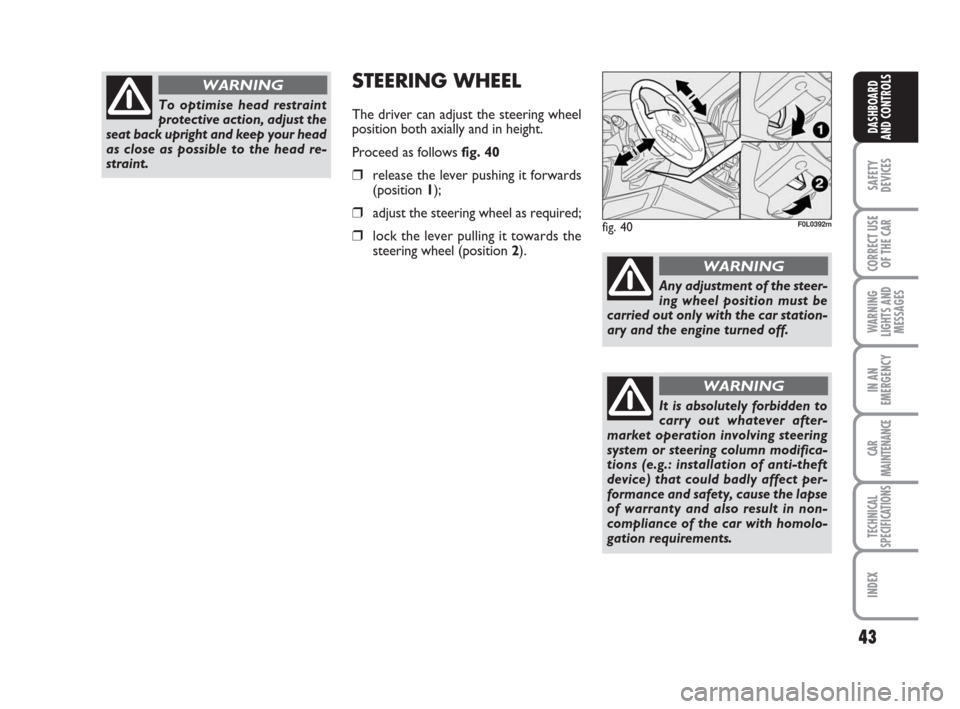
WARNINGSTEERING WHEEL
The driver can adjust the steering wheel
position both axially and in height.
Proceed as follows fig. 40
❒release the lever pushing it forwards
(position 1);
❒adjust the steering wheel as required;
❒lock the lever pulling it towards the
steering wheel (position 2).
Any adjustment of the steer-
ing wheel position must be
carried out only with the car station-
ary and the engine turned off.
WARNING
It is absolutely forbidden to
carry out whatever after-
market operation involving steering
system or steering column modifica-
tions (e.g.: installation of anti-theft
device) that could badly affect per-
formance and safety, cause the lapse
of warranty and also result in non-
compliance of the car with homolo-
gation requirements.
WARNING
fig. 40F0L0392m
039-069 Croma TRW GB 10-11-2008 13:15 Pagina 43