time FIAT CROMA 2008 2.G User Guide
[x] Cancel search | Manufacturer: FIAT, Model Year: 2008, Model line: CROMA, Model: FIAT CROMA 2008 2.GPages: 258, PDF Size: 5.86 MB
Page 28 of 258
27
SAFETY
DEVICES
CORRECT USE
OF THE CAR
WARNING
LIGHTS AND
MESSAGES
IN AN
EMERGENCY
CAR
MAINTENANCE
TECHNICAL
SPECIFICATIONS
INDEX
DASHBOARD
AND CONTROLS
Day
YearMonthEnglish
Portugês
Español
Français
Deutsch
Italiano
SEAT BELT BUZZERTRIP B DATA
SET DATE
SEE RADIO
KEY
AUTOCLOSE
UNITS LANGUAGE BUZZER VOLUME BUTTON VOLUMESERVICE
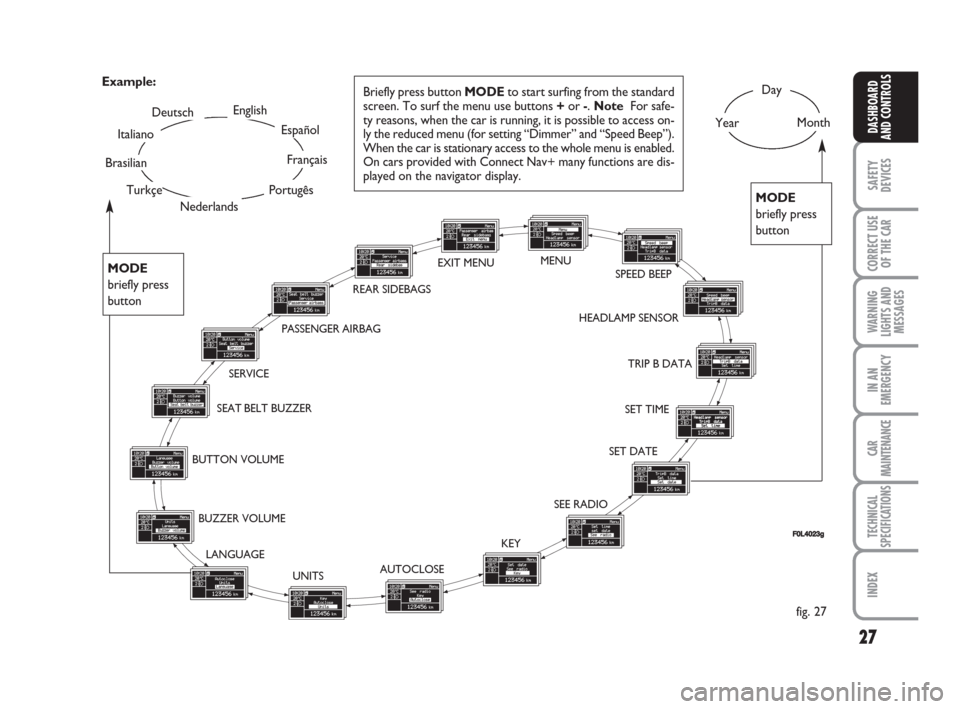
Briefly press button MODEto start surfing from the standard
screen. To surf the menu use buttons +or -. Note For safe-
ty reasons, when the car is running, it is possible to access on-
ly the reduced menu (for setting “Dimmer” and “Speed Beep”).
When the car is stationary access to the whole menu is enabled.
On cars provided with Connect Nav+ many functions are dis-
played on the navigator display. Example:
fig. 27
FF0L4023g
SET TIME HEADLAMP SENSORSPEED BEEP EXIT MENU
Nederlands
PASSENGER AIRBAG
Turkçe
Brasilian
MODE
briefly press
button
MODE
briefly press
button
REAR SIDEBAGSMENU
001-038 Croma TRW GB 28-05-2008 16:30 Pagina 27
Page 30 of 258
29
SAFETY
DEVICES
CORRECT USE
OF THE CAR
WARNING
LIGHTS AND
MESSAGES
IN AN
EMERGENCY
CAR
MAINTENANCE
TECHNICAL
SPECIFICATIONS
INDEX
DASHBOARD
AND CONTROLS
Headlamp sensor
(Automatic headlight sensor
sensitivity adjustment)
(where provided)
With this function it is possible to adjust
the light sensor sensitivity according to 3
levels (level 1 = min. level, level 2 = av-
erage level, level 3 = max. level); the high-
er the sensitivity is, the lower is the ex-
ternal light intensity required to switch on
the lights.
To set the light level required, proceed as
follows:
– briefly press button MODE, the previ-
ously set level will flash on the display;
– press button +or –to select the re-
quired level;
– briefly press button MODEto go back
to the menu screen or press the button
for long to go back to the standard screen
without storing settings.Trip B data (Trip On/Off)
Through this option it is possible to acti-
vate (On) or deactivate (Off) the Trip B
(partial trip).
For further information see “Trip com-
puter”.
For activation / deactivation, proceed as
follows:
– briefly press button MODE: On or Off
will flash on the display according to pre-
vious setting;
– press button +or –to select the re-
quired level;
– briefly press button MODEto go back
to the menu screen or press the button
for long to go back to the standard screen
without storing settings.Set time (Setting the clock)
This function enables to set the clock
through two sub-menus: “Time” and
“Mode”.
Proceed as follows:
– briefly press button MODE, the display
will show the two submenus “Time” and
“Mode”;
– press button +or –to scroll the two
submenus;
– select the required submenu and then
press briefly MODE;
– if selecting “Time”: briefly press button
MODE, “hours” will flash on the display;
– press button +or –for setting;
– press button MODE, “minutes” will
flash on the display;
– press button +or –for setting.
001-038 Croma TRW GB 28-05-2008 16:30 Pagina 29
Page 34 of 258
33
SAFETY
DEVICES
CORRECT USE
OF THE CAR
WARNING
LIGHTS AND
MESSAGES
IN AN
EMERGENCY
CAR
MAINTENANCE
TECHNICAL
SPECIFICATIONS
INDEX
DASHBOARD
AND CONTROLS
Button volume
(Adjusting the button volume)
With this function the volume of the
roger-beep accompanying the activation
of buttons MODE, +and –can be ad-
justed according to 8 levels.
To adjust the volume proceed as follows:
– briefly press button MODE: the previ-
ously set volume “level” will flash on the
display;
– press button +or –for setting;
– briefly press button MODEto go back
to the menu screen or press the button
for long to go back to the standard screen
without storing settings.
Seat belt buzzer
(S.B.R. buzzer reactivation)
This function can be only displayed after
Fiat Dealership has deactivated the S.B.R.
system (see paragraph “S.B.R. system” in
section “Safety devices”).Service (Scheduled Servicing)
This function displays information relat-
ed to kilometric or time based frequen-
cies for maintenance checks.
Proceed as follows:
– briefly press button MODE: service in
km or mi, according to previous setting,
will be displayed (see paragraph “Distance
unit”);
– briefly press button MODEto go back
to the menu screen or press the button
for long to go back to the standard screen
without storing settings.NoteThe “Service schedule” includes car
maintenance every 30,000 km (or 18,000
miles) or every year; this is shown auto-
matically, with the ignition key at ON,
starting from 2,000 km (or equivalent val-
ue in miles) or 30 days from this deadline
and it is shown again every 200 km (or
equivalent value in miles). Below 200 km
servicing indications are displayed more
frequently. Servicing indication will be dis-
played in km or mi according to previous
setting. When a programmed maintenance
interval (coupon) is near to come, turning
the ignition key to ON, the display will
show the message “Service” followed by
the number of km/mi or days to go before
car servicing. Contact a Fiat Dealership to
carry out any service operation provided
by the “Service schedule” and to reset the
display.
001-038 Croma TRW GB 28-05-2008 16:30 Pagina 33
Page 37 of 258
36
SAFETY
DEVICES
CORRECT USE
OF THE CAR
WARNING
LIGHTS AND
MESSAGES
IN AN
EMERGENCY
CAR
MAINTENANCE
TECHNICAL
SPECIFICATIONS
INDEX
DASHBOARD
AND CONTROLS
Exit Menu
This is the last function that closes the cir-
cular setting cycle listed in the initial menu
screen.
Briefly press button MODEto go back to
the standard screen without storing set-
tings.
Press button –to return to the first menu
option.Both functions are resettable (reset - start
of new mission).
“General Trip” displays the figures relat-
ing to:
– Range
– Trip distance
– Average consumption
– Instant consumption
– Average speed
– Travel time (driving time).
“Trip B” (only available on reconfigurable
multifunction display), displays the figures
relating to:
– Trip distance B
– Average consumption B
– Average speed B
– Travel time B (driving time).
NoteThe “Trip B” function can be ex-
cluded (see paragraph “Trip B On/Off”).
“Range” cannot be reset.TRIP COMPUTER
(where provided)
General features
The “Trip computer” is provided on cars
fitted with multifunction display or re-
configurable multifunction display.
The “Trip computer” displays information
(with ignition key at ON), relating to the
operating status of the car. This function
comprises the “General trip” concerning
the “complete mission” of the car (jour-
ney) and “Trip B”, (only available on re-
configurable multifunction display), con-
cerning the partial mission of the car; this
latter function(as shown in fig. 31) is “con-
tained” within the complete mission.
001-038 Croma TRW GB 28-05-2008 16:30 Pagina 36
Page 38 of 258
37
SAFETY
DEVICES
CORRECT USE
OF THE CAR
WARNING
LIGHTS AND
MESSAGES
IN AN
EMERGENCY
CAR
MAINTENANCE
TECHNICAL
SPECIFICATIONS
INDEX
DASHBOARD
AND CONTROLS
Values displayed
Range
Estimated distance which can be travelled
with the fuel currently in the tank, keep-
ing the same driving style. The display will
show “----” in the following cases:
– value lower than 50 km (or 30 mi)
– car left parked with engine running for
long.
IMPORTANT The variation of the auton-
omy value can be influenced by different
factors: driving style (see what is described
in paragraph “Driving style” in the chap-
ter “Start-up and driving”), type of route
(highways, urban, mountain, etc…), use
conditions of the car (load transported,
tire pressure, etc…). What was described
previously must be taken in consideration
when planning a trip.
Trip distance
This value shows estimated distance cov-
ered from the start of the new mission.
Average consumption
Average fuel consumption since the start
of the new mission.
Instant consumption
This value shows instant fuel consumption
(this value is updated second by second).
If parking the car with engine on,
the display will show “----”.Average speed
This value shows the car average speed as
a function of the overall time elapsed since
the start of the new mission.
Travel time
This value shows the time elapsed since
the start of the new mission.
IMPORTANT Lacking information, Trip
computer values are displayed with “----”.
When normal operating condition is re-
set, calculation of different units will
restart regularly. Values displayed before
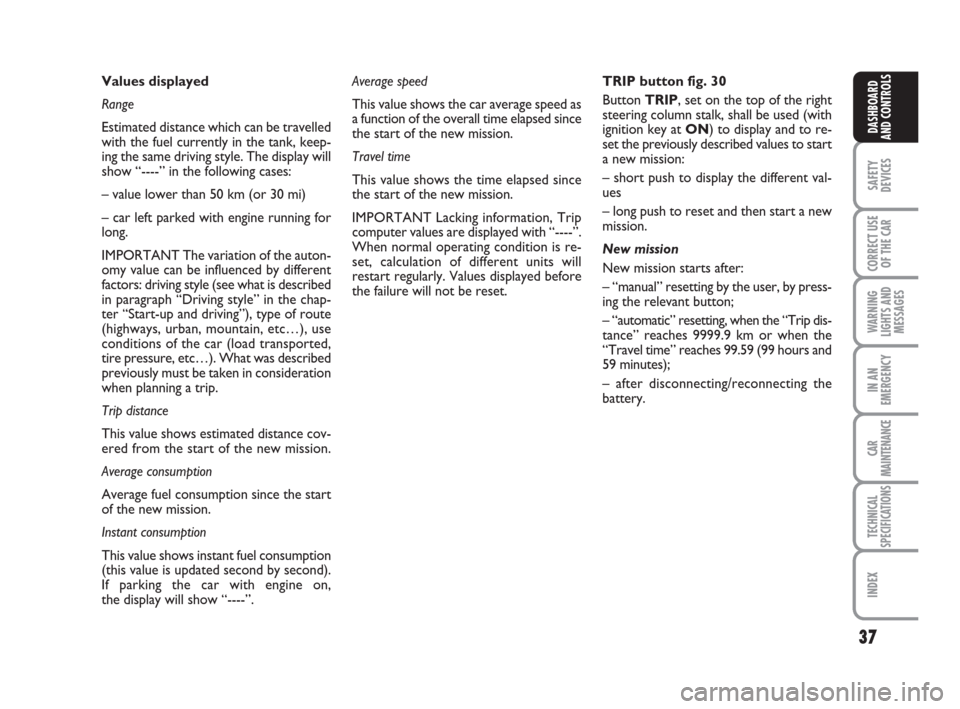
the failure will not be reset.TRIP button fig. 30
Button TRIP, set on the top of the right
steering column stalk, shall be used (with
ignition key at ON) to display and to re-
set the previously described values to start
a new mission:
– short push to display the different val-
ues
– long push to reset and then start a new
mission.
New mission
New mission starts after:
– “manual” resetting by the user, by press-
ing the relevant button;
– “automatic” resetting, when the “Trip dis-
tance” reaches 9999.9 km or when the
“Travel time” reaches 99.59 (99 hours and
59 minutes);
– after disconnecting/reconnecting the
battery.
001-038 Croma TRW GB 28-05-2008 16:30 Pagina 37
Page 41 of 258
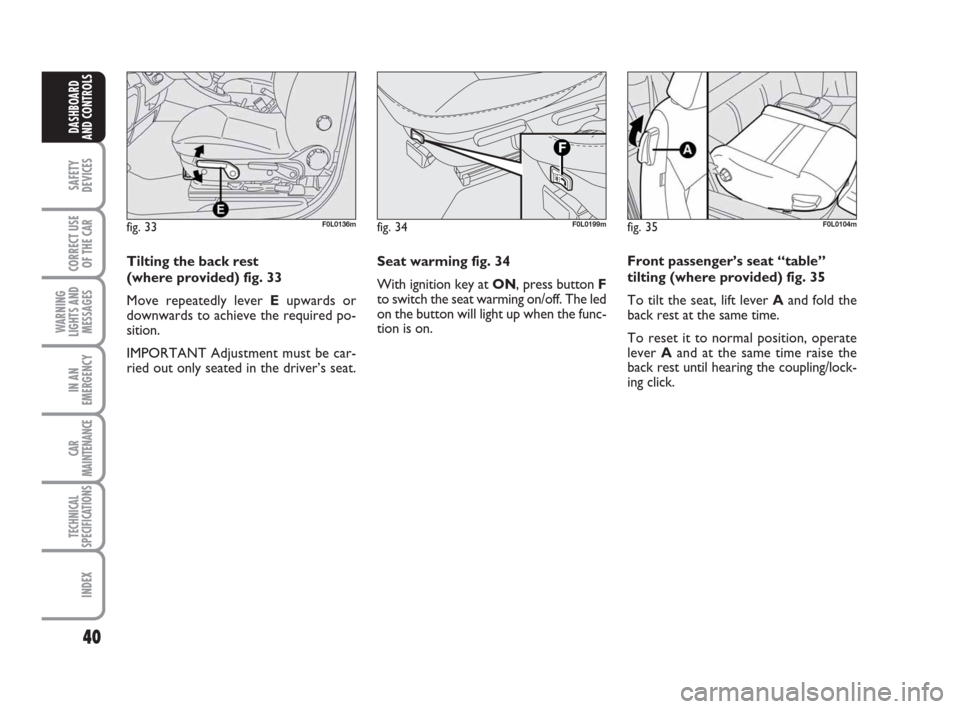
Seat warming fig. 34
With ignition key at ON, press button F
to switch the seat warming on/off. The led
on the button will light up when the func-
tion is on.
40
SAFETY
DEVICES
CORRECT USE
OF THE CAR
WARNING
LIGHTS AND
MESSAGES
IN AN
EMERGENCY
CAR
MAINTENANCE
TECHNICAL
SPECIFICATIONS
INDEX
DASHBOARD
AND CONTROLS
Tilting the back rest
(where provided) fig. 33
Move repeatedly lever Eupwards or
downwards to achieve the required po-
sition.
IMPORTANT Adjustment must be car-
ried out only seated in the driver’s seat.
fig. 33F0L0136mfig. 34F0L0199mfig. 35F0L0104m
Front passenger’s seat “table”
tilting (where provided) fig. 35
To tilt the seat, lift lever Aand fold the
back rest at the same time.
To reset it to normal position, operate
lever Aand at the same time raise the
back rest until hearing the coupling/lock-
ing click.
039-069 Croma TRW GB 10-11-2008 13:15 Pagina 40
Page 43 of 258
42
SAFETY
DEVICES
CORRECT USE
OF THE CAR
WARNING
LIGHTS AND
MESSAGES
IN AN
EMERGENCY
CAR
MAINTENANCE
TECHNICAL
SPECIFICATIONS
INDEX
DASHBOARD
AND CONTROLS
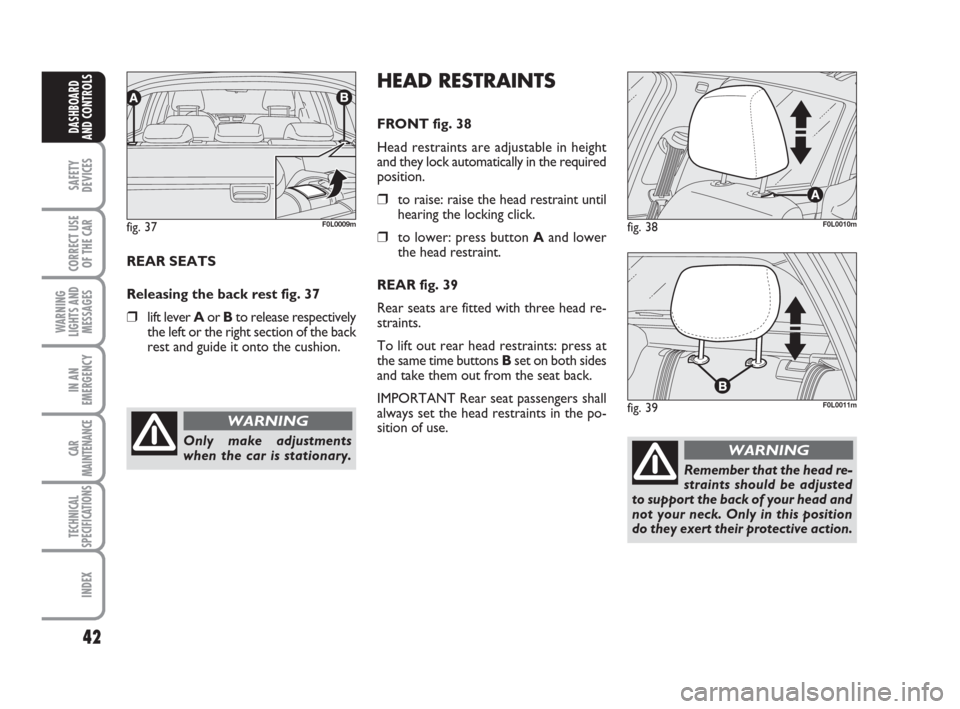
REAR SEATS
Releasing the back rest fig. 37
❒lift lever Aor Bto release respectively
the left or the right section of the back
rest and guide it onto the cushion.
fig. 37F0L0009m
Only make adjustments
when the car is stationary.
WARNING
HEAD RESTRAINTS
FRONT fig. 38
Head restraints are adjustable in height
and they lock automatically in the required
position.
❒to raise: raise the head restraint until
hearing the locking click.
❒to lower: press button Aand lower
the head restraint.
REAR fig. 39
Rear seats are fitted with three head re-
straints.
To lift out rear head restraints: press at
the same time buttonsB set on both sides
and take them out from the seat back.
IMPORTANT Rear seat passengers shall
always set the head restraints in the po-
sition of use.fig. 38F0L0010m
fig. 39F0L0011m
Remember that the head re-
straints should be adjusted
to support the back of your head and
not your neck. Only in this position
do they exert their protective action.
WARNING
039-069 Croma TRW GB 10-11-2008 13:15 Pagina 42
Page 46 of 258
45
SAFETY
DEVICES
CORRECT USE
OF THE CAR
WARNING
LIGHTS AND
MESSAGES
IN AN
EMERGENCY
CAR
MAINTENANCE
TECHNICAL
SPECIFICATIONS
INDEX
DASHBOARD
AND CONTROLS
To store the required mirror position
proceed as follows:
❒engage reverse with car stopped and
ignition key to ON;
❒turn selector B(to select the passen-
ger door mirror);
❒use selector Cto adjust the passenger
door mirror as required to obtain best
position for parking manoeuvres;
❒keep one of the seat storing/recalling
buttons pressed for 3 seconds at least;
Together with the passenger door mirror
“parking” position, also the driver seat and
door mirror positions will be stored.
The sound of a buzzer confirms that the
mirror position has been stored.Recalling the “parking” position of
the passenger door mirror
To recall automatically the “parking” po-
sition of the passenger door mirror, pro-
ceed as follows:
❒engage reverse with car stopped and
ignition key to ON;
❒turn selector Bto select the passen-
ger door mirror; the mirror will set
automatically to the previously stored
position.
If no parking position has been stored,
when engaging reverse the passenger door
mirror will slightly lower to aid the dri-
ver during parking.
The mirror will automatically return to its
original position in the following cases:
❒10 seconds after disengaging reverse;
❒when the car speed exceeds 10 km/h
in forward gear ;
❒when turning selector Bto neutral po-
sition or to driver mirror position.IMPORTANT “Parking” position can on-
ly be stored or recalled with ignition key
at ON.
Automatic door mirror
realignment
Each time the ignition key is turned to
ON, door mirrors return automatically to
the last position set and/or recalled at last
removal of the electronic key.
This enables mirror alignment if when
leaving the car parked one of the door
mirrors has been moved manually and/or
accidentally.
039-069 Croma TRW GB 10-11-2008 13:15 Pagina 45
Page 50 of 258
49
SAFETY
DEVICES
CORRECT USE
OF THE CAR
WARNING
LIGHTS AND
MESSAGES
IN AN
EMERGENCY
CAR
MAINTENANCE
TECHNICAL
SPECIFICATIONS
INDEX
DASHBOARD
AND CONTROLS
MANUAL CLIMATE
CONTROL SYSTEM
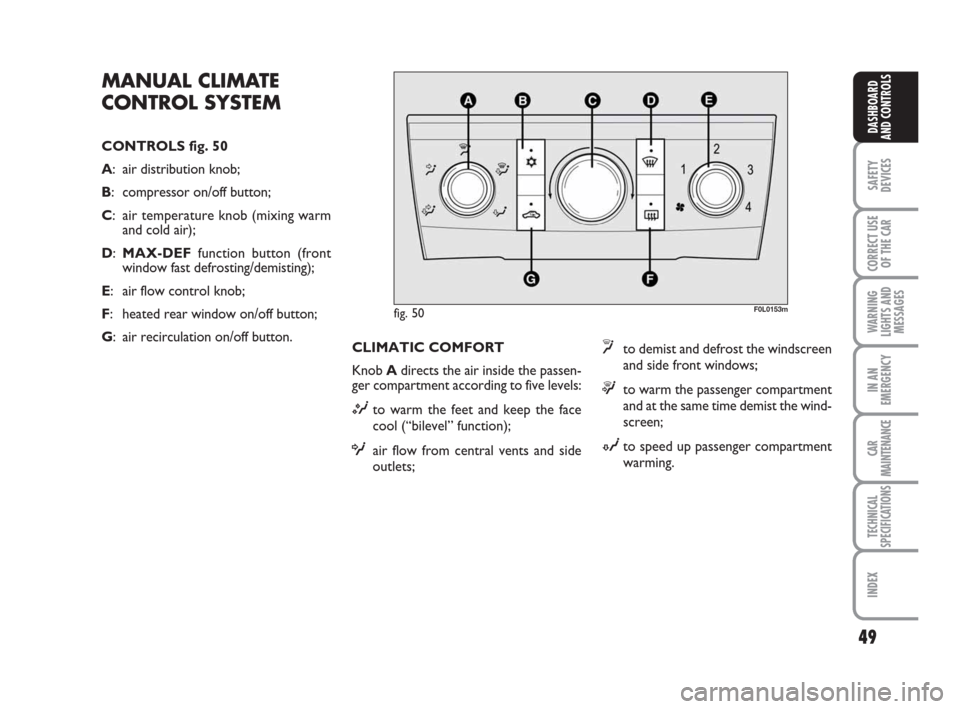
CONTROLS fig. 50
A: air distribution knob;
B: compressor on/off button;
C: air temperature knob (mixing warm
and cold air);
D:MAX-DEFfunction button (front
window fast defrosting/demisting);
E: air flow control knob;
F: heated rear window on/off button;
G: air recirculation on/off button.
F0L0153m
CLIMATIC COMFORT
Knob Adirects the air inside the passen-
ger compartment according to five levels:
Mto warm the feet and keep the face
cool (“bilevel” function);
Oair flow from central vents and side
outlets;
yto demist and defrost the windscreen
and side front windows;
™to warm the passenger compartment
and at the same time demist the wind-
screen;
Nto speed up passenger compartment
warming.
fig. 50
039-069 Croma TRW GB 10-11-2008 13:15 Pagina 49
Page 51 of 258
50
SAFETY
DEVICES
CORRECT USE
OF THE CAR
WARNING
LIGHTS AND
MESSAGES
IN AN
EMERGENCY
CAR
MAINTENANCE
TECHNICAL
SPECIFICATIONS
INDEX
DASHBOARD
AND CONTROLS
WARMING THE PASSENGER
COMPARTMENT
Proceed as follows:
❒turn knob C(pointer on red sector)
completely to the right;
❒turn knob Eto the required speed;
❒move knob Ato:
™to warm the feet and at the same
time demist the windscreen;
Mto warm the feet and convey cooler
air from central vents and dashboard
outlets;
Nfor quick warming.QUICK WARMING
Proceed as follows:
❒close all dashboard vents;
❒turn knob Cto red sector;
❒press button G;
❒turn knob Eto the required fan speed;
❒turn knob Ato N.WINDSCREEN AND FRONT
SIDE WINDOW FAST
DEMISTING/DEFROSTING
(MAX-DEF function)
Proceed as follows:
❒turn knob C(pointer on red sector)
completely to the right;
❒turn the MAX-DEFfunction on by
pressing button D(button led on);
Pressing this button will automatically acti-
vate the following functions:
❒air distribution to windscreen and side
vents;
❒fan activation at max. speed;
❒compressor activation (button led on);
❒automatic air recirculation (button led
off if previously on);
After demisting/defrosting, press button
Dto turn the MAX-DEFfunction off.
Use common control buttons to restore
the required comfort.
039-069 Croma TRW GB 10-11-2008 13:15 Pagina 50