time FIAT CROMA 2008 2.G Owner's Guide
[x] Cancel search | Manufacturer: FIAT, Model Year: 2008, Model line: CROMA, Model: FIAT CROMA 2008 2.GPages: 258, PDF Size: 5.86 MB
Page 69 of 258
68
SAFETY
DEVICES
CORRECT USE
OF THE CAR
WARNING
LIGHTS AND
MESSAGES
IN AN
EMERGENCY
CAR
MAINTENANCE
TECHNICAL
SPECIFICATIONS
INDEX
DASHBOARD
AND CONTROLS
CRUISE CONTROL
(where provided)
It is a device able to support the driver,
with electronic control, which allows dri-
ving at speed over 30 km/h on long and
straight dry roads (e.g.: motorways), at a
desired speed, without pressing the ac-
celerator pedal. Therefore it is not sug-
gested to use this device on extra-urban
roads with traffic. Do not use it in town.
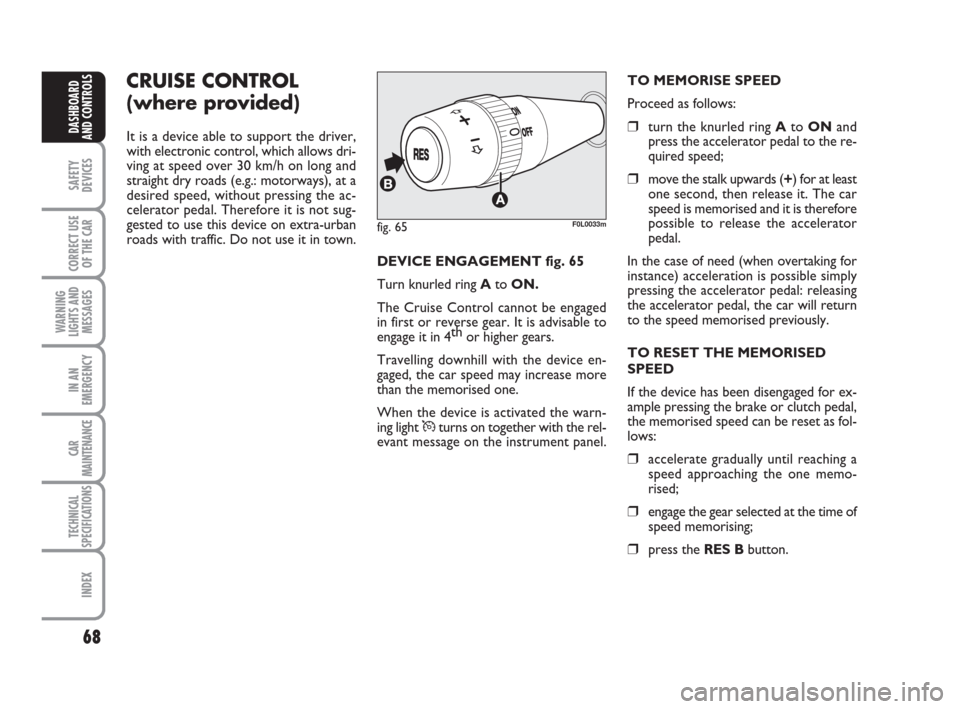
DEVICE ENGAGEMENT fig. 65
Turn knurled ring Ato ON.
The Cruise Control cannot be engaged
in first or reverse gear. It is advisable to
engage it in 4th
or higher gears.
Travelling downhill with the device en-
gaged, the car speed may increase more
than the memorised one.
When the device is activated the warn-
ing light
Üturns on together with the rel-
evant message on the instrument panel.TO MEMORISE SPEED
Proceed as follows:
❒turn the knurled ring AtoONand
press the accelerator pedal to the re-
quired speed;
❒move the stalk upwards (+) for at least
one second, then release it. The car
speed is memorised and it is therefore
possible to release the accelerator
pedal.
In the case of need (when overtaking for
instance) acceleration is possible simply
pressing the accelerator pedal: releasing
the accelerator pedal, the car will return
to the speed memorised previously.
TO RESET THE MEMORISED
SPEED
If the device has been disengaged for ex-
ample pressing the brake or clutch pedal,
the memorised speed can be reset as fol-
lows:
❒accelerate gradually until reaching a
speed approaching the one memo-
rised;
❒engage the gear selected at the time of
speed memorising;
❒press the RES Bbutton.
fig. 65F0L0033m
039-069 Croma TRW GB 10-11-2008 13:15 Pagina 68
Page 71 of 258
70
SAFETY
DEVICES
CORRECT USE
OF THE CAR
WARNING
LIGHTS AND
MESSAGES
IN AN
EMERGENCY
CAR
MAINTENANCE
TECHNICAL
SPECIFICATIONS
INDEX
DASHBOARD
AND CONTROLS
CEILING LIGHTS
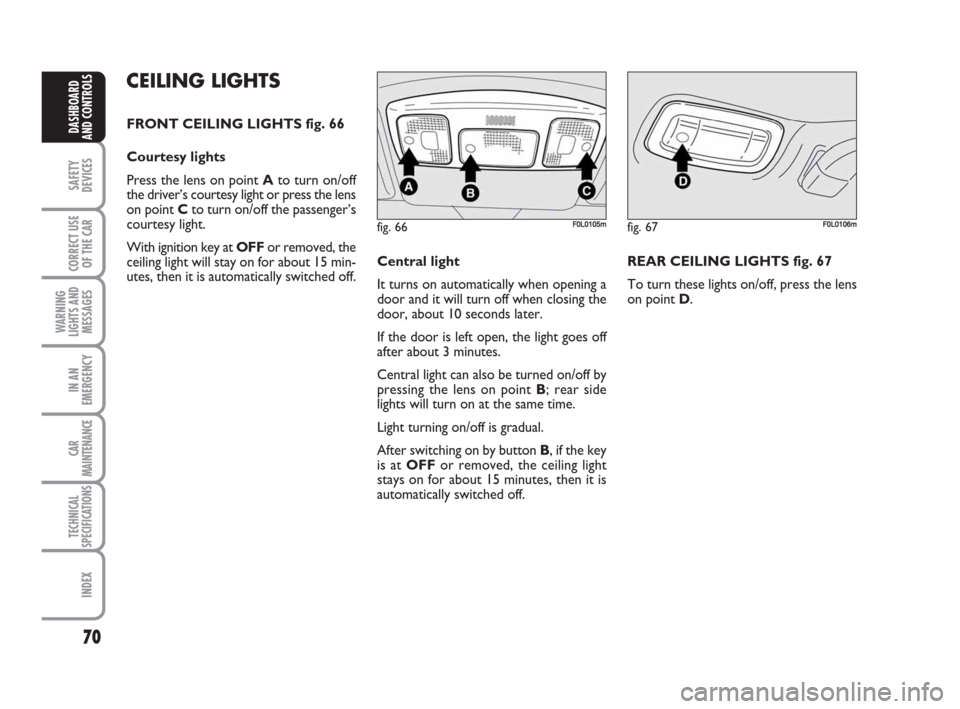
FRONT CEILING LIGHTS fig. 66
Courtesy lights
Press the lens on point Ato turn on/off
the driver’s courtesy light or press the lens
on point Cto turn on/off the passenger’s
courtesy light.
With ignition key at OFFor removed, the
ceiling light will stay on for about 15 min-
utes, then it is automatically switched off.Central light
It turns on automatically when opening a
door and it will turn off when closing the
door, about 10 seconds later.
If the door is left open, the light goes off
after about 3 minutes.
Central light can also be turned on/off by
pressing the lens on point B; rear side
lights will turn on at the same time.
Light turning on/off is gradual.
After switching on by button B, if the key
is at OFFor removed, the ceiling light
stays on for about 15 minutes, then it is
automatically switched off. REAR CEILING LIGHTS fig. 67
To turn these lights on/off, press the lens
on point D.
fig. 66F0L0105mfig. 67F0L0106m
070-106 Croma TRW GB 29-05-2008 8:57 Pagina 70
Page 72 of 258
71
SAFETY
DEVICES
CORRECT USE
OF THE CAR
WARNING
LIGHTS AND
MESSAGES
IN AN
EMERGENCY
MANUTENZIONE
E CURA
TECHNICAL
SPECIFICATIONS
INDEX
DASHBOARD
AND CONTROLS
CONTROLS
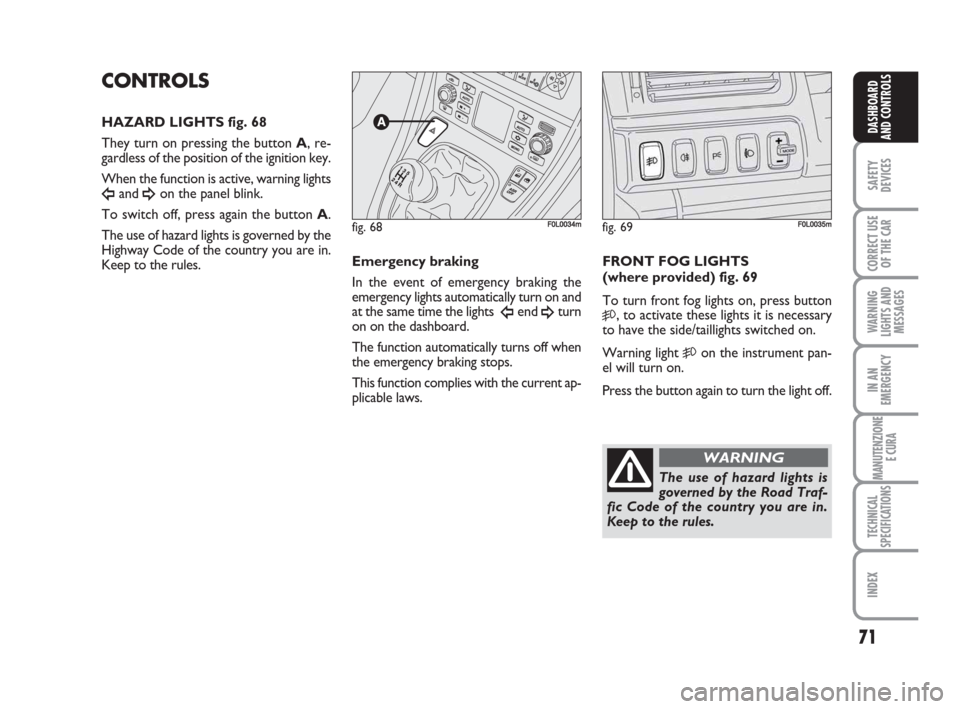
HAZARD LIGHTS fig. 68
They turn on pressing the button A, re-
gardless of the position of the ignition key.
When the function is active, warning lights
Îand ¥on the panel blink.
To switch off, press again the button A.
The use of hazard lights is governed by the
Highway Code of the country you are in.
Keep to the rules.
fig. 68F0L0034mfig. 69F0L0035m
The use of hazard lights is
governed by the Road Traf-
fic Code of the country you are in.
Keep to the rules.
WARNING
FRONT FOG LIGHTS
(where provided) fig. 69
To turn front fog lights on, press button
5, to activate these lights it is necessary
to have the side/taillights switched on.
Warning light
5on the instrument pan-
el will turn on.
Press the button again to turn the light off. Emergency braking
In the event of emergency braking the
emergency lights automatically turn on and
at the same time the lights
Îend ¥turn
on on the dashboard.
The function automatically turns off when
the emergency braking stops.
This function complies with the current ap-
plicable laws.
070-106 Croma TRW GB 29-05-2008 8:57 Pagina 71
Page 82 of 258
81
SAFETY
DEVICES
CORRECT USE
OF THE CAR
WARNING
LIGHTS AND
MESSAGES
IN AN
EMERGENCY
CAR
MAINTENANCE
TECHNICAL
SPECIFICATIONS
INDEX
DASHBOARD
AND CONTROLS
DOORS
CENTRAL DOOR LOCKING
SYSTEM
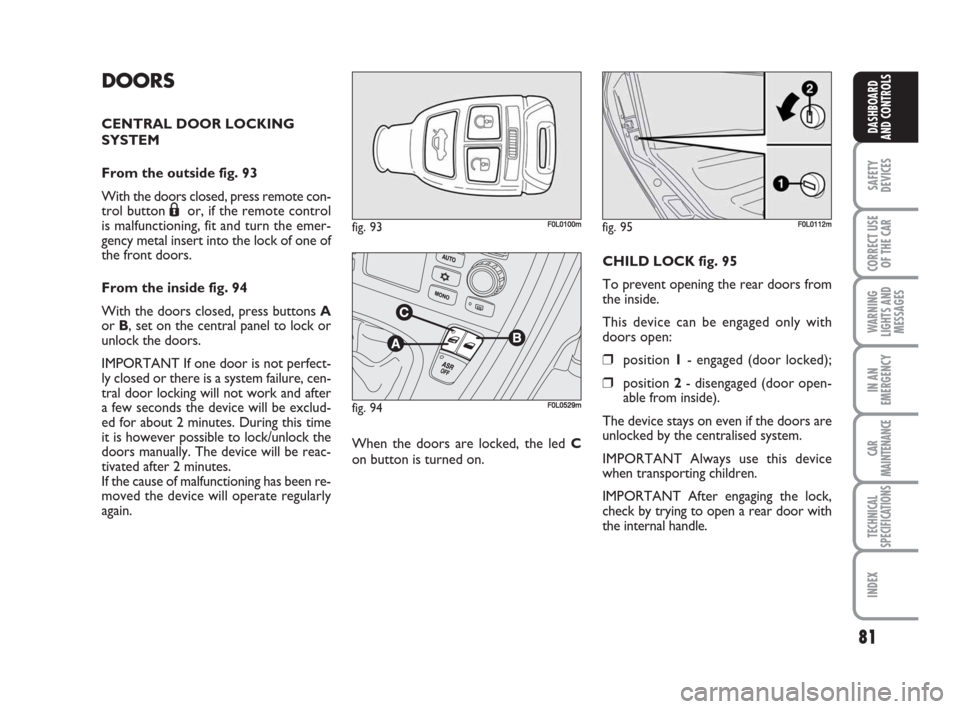
From the outside fig. 93
With the doors closed, press remote con-
trol button
Áor, if the remote control
is malfunctioning, fit and turn the emer-
gency metal insert into the lock of one of
the front doors.
From the inside fig. 94
With the doors closed, press buttons A
or B, set on the central panel to lock or
unlock the doors.
IMPORTANT If one door is not perfect-
ly closed or there is a system failure, cen-
tral door locking will not work and after
a few seconds the device will be exclud-
ed for about 2 minutes. During this time
it is however possible to lock/unlock the
doors manually. The device will be reac-
tivated after 2 minutes.
If the cause of malfunctioning has been re-
moved the device will operate regularly
again.When the doors are locked, the led C
on button is turned on.CHILD LOCK fig. 95
To prevent opening the rear doors from
the inside.
This device can be engaged only with
doors open:
❒position 1- engaged (door locked);
❒position 2- disengaged (door open-
able from inside).
The device stays on even if the doors are
unlocked by the centralised system.
IMPORTANT Always use this device
when transporting children.
IMPORTANT After engaging the lock,
check by trying to open a rear door with
the internal handle.
fig. 93F0L0100mfig. 95F0L0112m
fig. 94F0L0529m
070-106 Croma TRW GB 29-05-2008 8:57 Pagina 81
Page 83 of 258
82
SAFETY
DEVICES
CORRECT USE
OF THE CAR
WARNING
LIGHTS AND
MESSAGES
IN AN
EMERGENCY
CAR
MAINTENANCE
TECHNICAL
SPECIFICATIONS
INDEX
DASHBOARD
AND CONTROLS
POWER WINDOWS
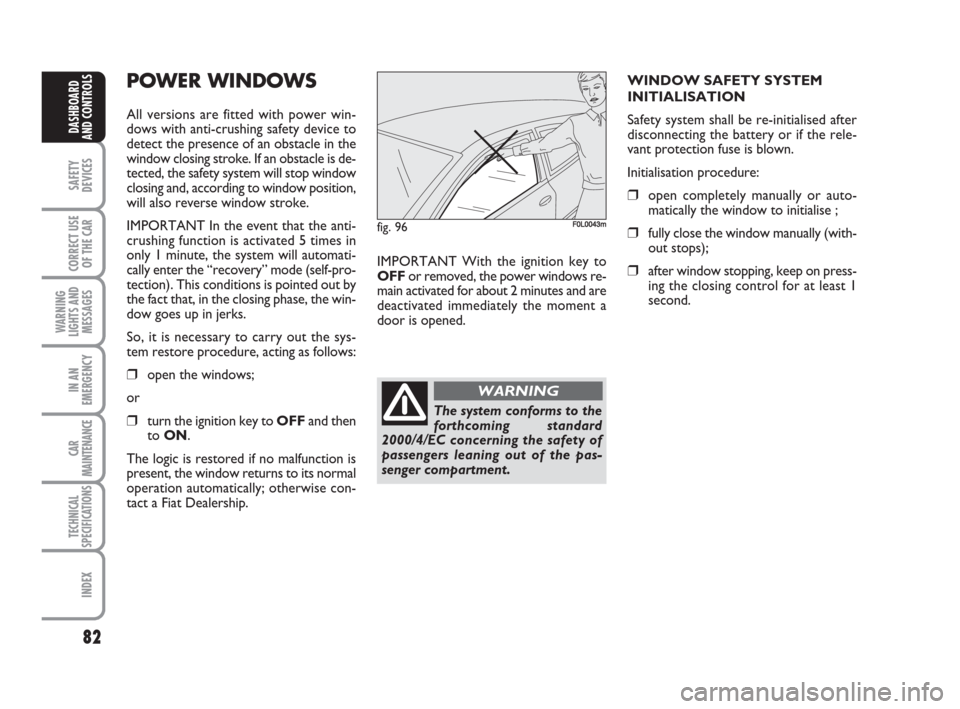
All versions are fitted with power win-
dows with anti-crushing safety device to
detect the presence of an obstacle in the
window closing stroke. If an obstacle is de-
tected, the safety system will stop window
closing and, according to window position,
will also reverse window stroke.
IMPORTANT In the event that the anti-
crushing function is activated 5 times in
only 1 minute, the system will automati-
cally enter the “recovery” mode (self-pro-
tection). This conditions is pointed out by
the fact that, in the closing phase, the win-
dow goes up in jerks.
So, it is necessary to carry out the sys-
tem restore procedure, acting as follows:
❒open the windows;
or
❒turn the ignition key to OFFand then
to ON.
The logic is restored if no malfunction is
present, the window returns to its normal
operation automatically; otherwise con-
tact a Fiat Dealership.IMPORTANT With the ignition key to
OFFor removed, the power windows re-
main activated for about 2 minutes and are
deactivated immediately the moment a
door is opened.WINDOW SAFETY SYSTEM
INITIALISATION
Safety system shall be re-initialised after
disconnecting the battery or if the rele-
vant protection fuse is blown.
Initialisation procedure:
❒open completely manually or auto-
matically the window to initialise ;
❒fully close the window manually (with-
out stops);
❒after window stopping, keep on press-
ing the closing control for at least 1
second.
fig. 96F0L0043m
The system conforms to the
forthcoming standard
2000/4/EC concerning the safety of
passengers leaning out of the pas-
senger compartment.
WARNING
070-106 Croma TRW GB 29-05-2008 8:57 Pagina 82
Page 85 of 258
84
SAFETY
DEVICES
CORRECT USE
OF THE CAR
WARNING
LIGHTS AND
MESSAGES
IN AN
EMERGENCY
CAR
MAINTENANCE
TECHNICAL
SPECIFICATIONS
INDEX
DASHBOARD
AND CONTROLS
BOOT
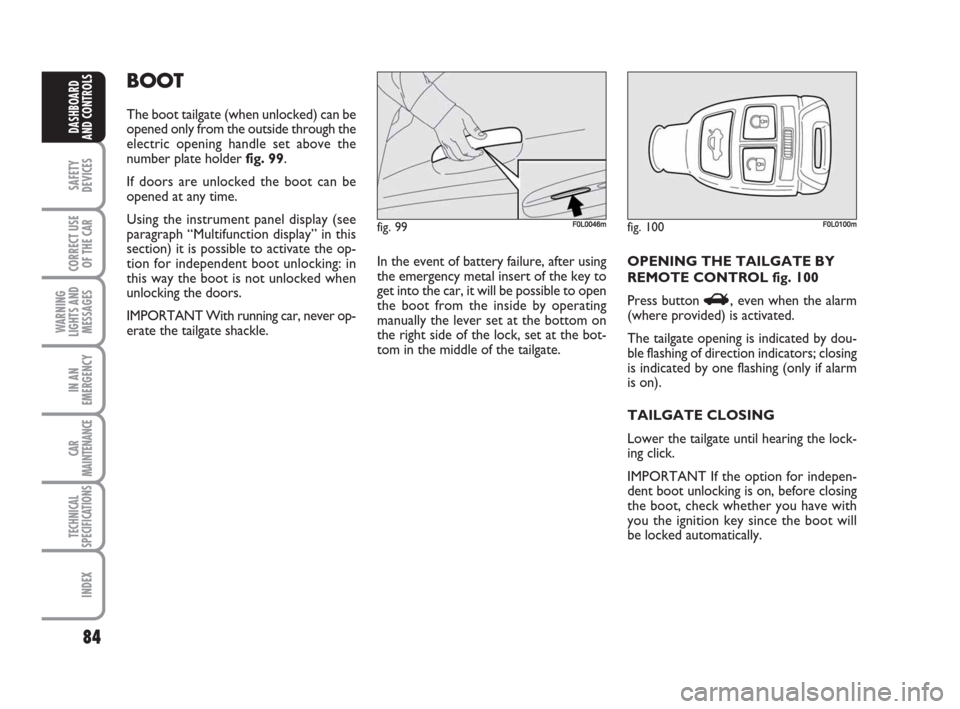
The boot tailgate (when unlocked) can be
opened only from the outside through the
electric opening handle set above the
number plate holder fig. 99.
If doors are unlocked the boot can be
opened at any time.
Using the instrument panel display (see
paragraph “Multifunction display” in this
section) it is possible to activate the op-
tion for independent boot unlocking: in
this way the boot is not unlocked when
unlocking the doors.
IMPORTANT With running car, never op-
erate the tailgate shackle.In the event of battery failure, after using
the emergency metal insert of the key to
get into the car, it will be possible to open
the boot from the inside by operating
manually the lever set at the bottom on
the right side of the lock, set at the bot-
tom in the middle of the tailgate. OPENING THE TAILGATE BY
REMOTE CONTROL fig. 100
Press button
R, even when the alarm
(where provided) is activated.
The tailgate opening is indicated by dou-
ble flashing of direction indicators; closing
is indicated by one flashing (only if alarm
is on).
TAILGATE CLOSING
Lower the tailgate until hearing the lock-
ing click.
IMPORTANT If the option for indepen-
dent boot unlocking is on, before closing
the boot, check whether you have with
you the ignition key since the boot will
be locked automatically.
fig. 99F0L0046mfig. 100F0L0100m
070-106 Croma TRW GB 29-05-2008 8:57 Pagina 84
Page 91 of 258
90
SAFETY
DEVICES
CORRECT USE
OF THE CAR
WARNING
LIGHTS AND
MESSAGES
IN AN
EMERGENCY
CAR
MAINTENANCE
TECHNICAL
SPECIFICATIONS
INDEX
DASHBOARD
AND CONTROLS
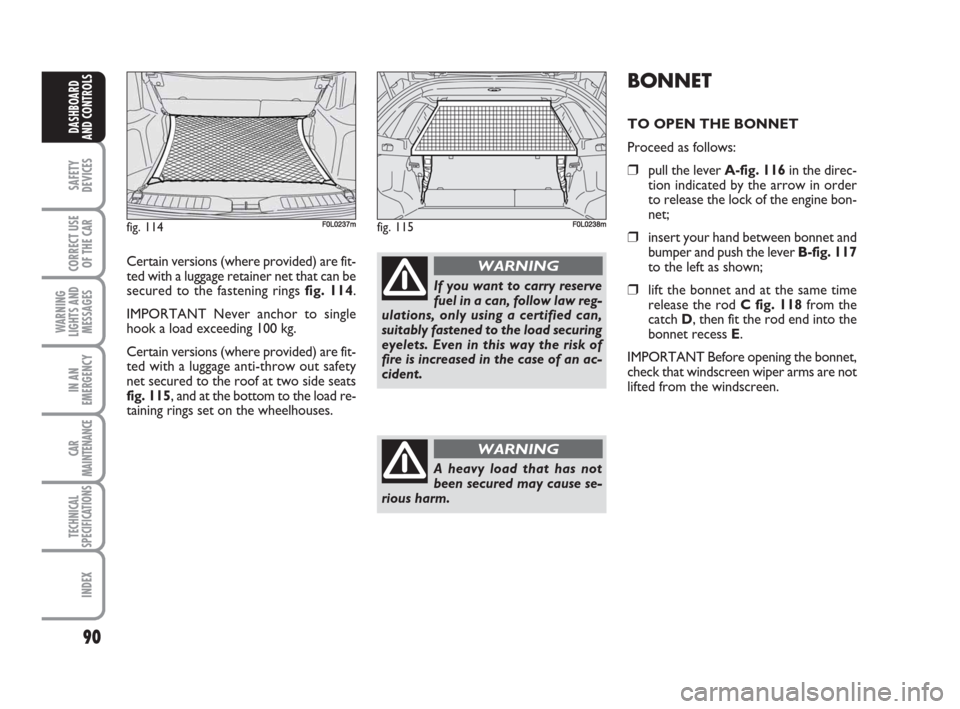
Certain versions (where provided) are fit-
ted with a luggage retainer net that can be
secured to the fastening rings fig. 114.
IMPORTANT Never anchor to single
hook a load exceeding 100 kg.
Certain versions (where provided) are fit-
ted with a luggage anti-throw out safety
net secured to the roof at two side seats
fig. 115, and at the bottom to the load re-
taining rings set on the wheelhouses.
BONNET
TO OPEN THE BONNET
Proceed as follows:
❒pull the lever A-fig. 116in the direc-
tion indicated by the arrow in order
to release the lock of the engine bon-
net;
❒insert your hand between bonnet and
bumper and push the lever B-fig. 117
to the left as shown;
❒lift the bonnet and at the same time
release the rod C fig. 118from the
catch D, then fit the rod end into the
bonnet recess E.
IMPORTANT Before opening the bonnet,
check that windscreen wiper arms are not
lifted from the windscreen.
fig. 114F0L0237mfig. 115F0L0238m
If you want to carry reserve
fuel in a can, follow law reg-
ulations, only using a certified can,
suitably fastened to the load securing
eyelets. Even in this way the risk of
fire is increased in the case of an ac-
cident.
WARNING
A heavy load that has not
been secured may cause se-
rious harm.
WARNING
070-106 Croma TRW GB 29-05-2008 8:57 Pagina 90
Page 92 of 258

91
SAFETY
DEVICES
CORRECT USE
OF THE CAR
WARNING
LIGHTS AND
MESSAGES
IN AN
EMERGENCY
CAR
MAINTENANCE
TECHNICAL
SPECIFICATIONS
INDEX
DASHBOARD
AND CONTROLS
TO CLOSE THE BONNET fig. 118
Proceed as follows:
❒hold the bonnet up with one hand and
with the other remove rod Cfrom re-
cess Eand fit it back into its catch D;
❒lower the bonnet at approx. 20 cen-
timetres from the engine compart-
ment and then let it drop, ensuring
that it is fully closed and not just held
in position by the safety catch. If the
bonnet does not close properly, do
not push it down but open it again and
repeat the above procedure.
IMPORTANT Always check that the bon-
net is closed properly to avoid its opening
while the car is travelling.
fig. 116F0L0048mfig. 118F0L0116m
For safety reasons the bon-
net must be closed properly
to avoid its opening while the car is
travelling. Therefore, always check it
is properly closed and the catch en-
gaged. Should you notice that the
catch is not perfectly engaged when
travelling, stop the car immediately
and close the bonnet.
WARNING
If the supporting rod is not
positioned correctly the bon-
net may fall violently.
WARNING
Carry out operations only
when the car is stationary.
WARNING
fig. 117F0L0524m
070-106 Croma TRW GB 29-05-2008 8:57 Pagina 91
Page 94 of 258
93
SAFETY
DEVICES
CORRECT USE
OF THE CAR
WARNING
LIGHTS AND
MESSAGES
IN AN
EMERGENCY
CAR
MAINTENANCE
TECHNICAL
SPECIFICATIONS
INDEX
DASHBOARD
AND CONTROLS
HEADLIGHTS
ADJUSTING THE HEADLIGHT
BEAM
Proper adjustment of the headlight beams
is of vital importance for your safety and
comfort and also for the other road users.
To ensure you and other drivers have the
best visibility conditions when travelling
with the headlights on, the headlights must
be set properly. Contact Fiat Dealership
to have the headlights properly adjusted.
IMPORTANT When turning on (Xenon)
gas discharge headlight lamps (where pro-
vided), it is normal that there should be a
vertical movement of reflectors, and con-
sequently the same will also happen to the
light beam, for the time required to
achieve the correct headlight trim stabili-
sation, equal to approx. 2 seconds.
Headlight aiming device
It works with ignition key at ONand
dipped beams on. When the car is loaded,
it slopes backwards. This means that the
headlight beam rises. In this case, it is nec-
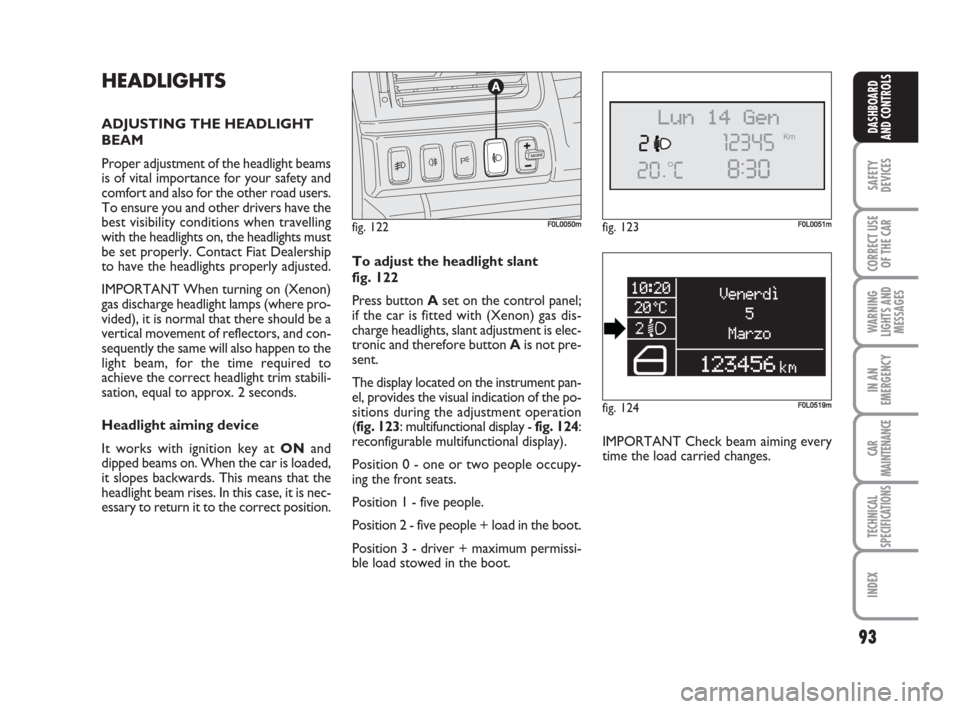
essary to return it to the correct position.To adjust the headlight slant
fig. 122
Press button Aset on the control panel;
if the car is fitted with (Xenon) gas dis-
charge headlights, slant adjustment is elec-
tronic and therefore button Ais not pre-
sent.
The display located on the instrument pan-
el, provides the visual indication of the po-
sitions during the adjustment operation
(fig. 123: multifunctional display - fig. 124:
reconfigurable multifunctional display).
Position 0 - one or two people occupy-
ing the front seats.
Position 1 - five people.
Position 2 - five people + load in the boot.
Position 3 - driver + maximum permissi-
ble load stowed in the boot.IMPORTANT Check beam aiming every
time the load carried changes.
fig. 122F0L0050mfig. 123F0L0051m
fig. 124F0L0519m
070-106 Croma TRW GB 29-05-2008 8:57 Pagina 93
Page 98 of 258
97
SAFETY
DEVICES
CORRECT USE
OF THE CAR
WARNING
LIGHTS AND
MESSAGES
IN AN
EMERGENCY
CAR
MAINTENANCE
TECHNICAL
SPECIFICATIONS
INDEX
DASHBOARD
AND CONTROLS
ASR SYSTEM
(AntiSlip Regulator)
(where provided)
The ASR function controls car drive and
cuts in automatically every time one or
both driving wheels slip.
According to slipping conditions, two dif-
ferent control systems are activated:
❒if slipping involves both driving wheels,
the ASR function intervenes reducing
the power transmitted by the engine;
❒if slipping involves only one driving
wheel, the TC (Traction Control)
function cuts in automatically braking
the wheel that is slipping.
The action of the ASR is particularly help-
ful in the following circumstances:
❒slipping of the inner wheel due to the
effect of dynamic load changes or ex-
cessive acceleration;
❒too much power transmitted to the
wheels also in relation to the condi-
tions of the road surface;
❒acceleration on slippery, snowy or
frozen surfaces;
❒in the case of loss of grip on a wet sur-
face (aquaplaning).
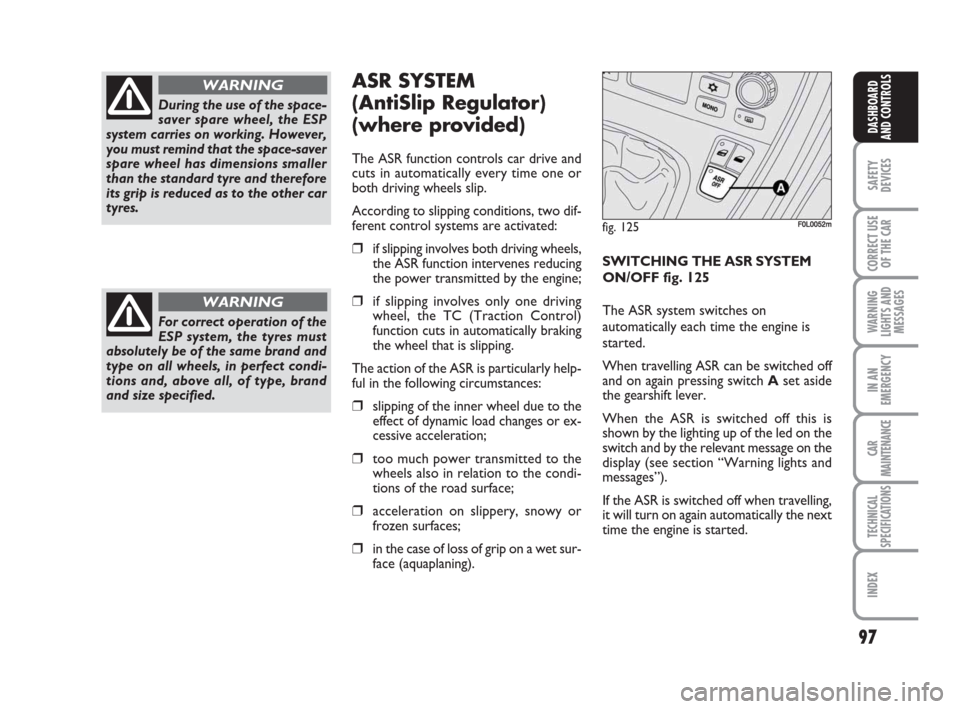
SWITCHING THE ASR SYSTEM
ON/OFF fig. 125
The ASR system switches on
automatically each time the engine is
started.
When travelling ASR can be switched off
and on again pressing switchAset aside
the gearshift lever.
When the ASR is switched off this is
shown by the lighting up of the led on the
switch and by the relevant message on the
display (see section “Warning lights and
messages”).
If the ASR is switched off when travelling,
it will turn on again automatically the next
time the engine is started.
During the use of the space-
saver spare wheel, the ESP
system carries on working. However,
you must remind that the space-saver
spare wheel has dimensions smaller
than the standard tyre and therefore
its grip is reduced as to the other car
tyres.
WARNING
For correct operation of the
ESP system, the tyres must
absolutely be of the same brand and
type on all wheels, in perfect condi-
tions and, above all, of type, brand
and size specified.
WARNING
fig. 125F0L0052m
070-106 Croma TRW GB 29-05-2008 8:57 Pagina 97