time FIAT CROMA 2008 2.G Owner's Manual
[x] Cancel search | Manufacturer: FIAT, Model Year: 2008, Model line: CROMA, Model: FIAT CROMA 2008 2.GPages: 258, PDF Size: 5.86 MB
Page 52 of 258
51
SAFETY
DEVICES
CORRECT USE
OF THE CAR
WARNING
LIGHTS AND
MESSAGES
IN AN
EMERGENCY
CAR
MAINTENANCE
TECHNICAL
SPECIFICATIONS
INDEX
DASHBOARD
AND CONTROLS
Window demisting
In the event of considerable outside mois-
ture and/or rain and/or considerable dif-
ferences in temperature inside and out-
side the passenger compartment, perform
the following preventive demisting proce-
dure:
❒turn air recirculation off by pressing
button G(button led off);
❒turn knob Cto red sector;
❒turn knob Eto 2;
❒turn knob Ato y, or to ™the win-
dows do not demist.
IMPORTANT Climate control system is
very useful to speed up window demist-
ing: therefore, just perform demisting as
previously described and turn the climate
control system on by pressing button B.HEATED REAR WINDOW AND
DOOR MIRROR DEMISTING/
DEFROSTING
Press button Fto start this function.
This function is timed and switches off au-
tomatically after 30 minutes. To cut out
this function press again button
O.
IMPORTANT Do not apply stickers on
the inside of the rear window over the
heating filaments to avoid damage that
might cause it to stop working properly.
FAN SPEED ADJUSTMENT
To ventilate the passenger’s compartment
properly, proceed as follows:
❒open completely central vents and side
outlets;
❒turn knob Cto the blue sector;
❒turn knob Eto the required speed;
❒turn air recirculation off by pressing
button G(button led off);
❒turn knob Ato O.RECIRCULATION
Turn this function on by pressing button
G(button led on).
This function is particularly useful when
the outside air is heavily polluted (in a traf-
fic jam, tunnel, etc.). However, it is bet-
ter not to use it for long periods, espe-
cially if there are several people in the car
to prevent window misting.
IMPORTANT The inside air recirculation
system makes it possible to reach the re-
quired “heating” or “cooling” conditions
faster. Do not use the air recirculation
function on rainy/cold days as it would
considerably increase the possibility of the
windows misting inside.
039-069 Croma TRW GB 10-11-2008 13:15 Pagina 51
Page 56 of 258
55
SAFETY
DEVICES
CORRECT USE
OF THE CAR
WARNING
LIGHTS AND
MESSAGES
IN AN
EMERGENCY
CAR
MAINTENANCE
TECHNICAL
SPECIFICATIONS
INDEX
DASHBOARD
AND CONTROLS
During fully automatic operation, the on-
ly manual settings required are the fol-
lowing:
❒MONO, to align the air temperature
and distribution set on the passenger’s
side (front or rear) with that on the
driver’s side;
❒ï, air recirculation, to keep it always
on or off;
❒-, to speed up demisting/defrosting
of windscreen, front side windows,
rear window and door mirrors;
❒(, to demist/defrost heated rear win-
dow and door mirrors.During full automatic system operation,
you can change at any time set tempera-
tures, air distribution and fan speed by us-
ing the relevant buttons or knobs: the sys-
tem will automatically change its settings
to adjust to the new requirements. Dur-
ing FULL AUTOoperation, changing air
distribution and/or flow and/or compres-
sor activation and/or air recirculation will
make the FULLwording disappear. In this
way functions will pass from automatic
control to manual control until pressing
again the AUTObutton. Fan speed is the
same for every area of the passenger com-
partment.
With one or more functions engaged man-
ually, the adjustment of the temperature
of the air admitted to the passenger com-
partment continues to be controlled au-
tomatically by the system, except with the
climate control compressor off: under this
condition in fact, the temperature of the
air admitted to the passenger compart-
ment cannot be lower than outside air
temperature.CONTROLS
Air temperature adjusting
knobs P-G
Turning the knobs clockwise or counter-
clockwise, respectively highers or lowers
the temperature of the air required re-
spectively in the front left zone (knob P)
or in the right zone (knob G) of the pas-
senger compartment.
Since the system controls two zones of
the passenger compartment, it is possi-
ble to personalise required temperatures
(driver and passenger).
The temperatures set are shown on the
displays near the relevant knobs.
Pressing button I (MONO) automatical-
ly aligns the temperature on the passen-
ger’s side with that on the driver’s side;
you can therefore set the same tempera-
ture for both zones by turning knob P on
driver side.
Separate operation of air temperatures
and distribution is restored by turning
knobs or pressing again button I
(MONO) when the button led is on.
039-069 Croma TRW GB 10-11-2008 13:15 Pagina 55
Page 57 of 258
56
SAFETY
DEVICES
CORRECT USE
OF THE CAR
WARNING
LIGHTS AND
MESSAGES
IN AN
EMERGENCY
CAR
MAINTENANCE
TECHNICAL
SPECIFICATIONS
INDEX
DASHBOARD
AND CONTROLS
Turning the knobs fully clockwise or
counter-clockwise until they reach the ex-
treme selections HI or LO, the maximum
heating or cooling functions are respec-
tively engaged:
❒HI function (highest heating power):
this is turned on by rotating the temper-
ature knob clockwise and passing the max.
temperature value (32°C). It can be acti-
vated independently from driver or front
passenger side or both (also when the
MONOfunction is selected).
When this function is on, the display
shows HI.
This function can be engaged when re-
quiring to heat the passenger compart-
ment as quickly as possible, exploiting the
maximum potential of the system. This
function uses the maximum temperature
of the coolant fluid, while air distribution
and fan speed are controlled according to
the system settings.
More particularly, max. fan speed will not
be immediately engaged if coolant is not
hot enough; this to prevent admitting air
that is not warm enough to the passenger
compartment.
All manual settings are possible with this
function on.To switch the function off, simply turn the
knob counter-clockwise and set the re-
quired temperature.
❒LOfunction (highest cooling power):
this is turned on by rotating the temper-
ature knob counter-clockwise and passing
the min. temperature value (16°C). It can
be activated independently from driver or
front passenger side or both (also when
the MONOfunction is selected).
When this function is on, the display
shows LO.
This function can be engaged when re-
quiring to cool the passenger compart-
ment as quickly as possible, exploiting the
maximum potential of the system. This
function activates automatically:
❒MONOfunction;
❒air distribution at central / side vents
(shown by the relevant symbol on the
display);
❒fan at max. speed;
❒climate control compressor.
All manual settings are possible with this
function on.
To switch the function off, simply turn the
knob clockwise and set the required tem-
perature.Front air distribution buttons B-F
Pressing these buttons it is possible to
choose manually one of the seven possi-
ble air distributions to the passenger com-
partment (right or left side):
▲Air flow to the windscreen and front
side window vents to demist or de-
frost them.
˙Air flow at central and side dash-
board vents to ventilate the chest
and the face during the hot season.
▼Air flow towards the front and rear
lower parts of the passenger com-
partment. Due to the natural ten-
dency of heat to spread upwards,
this type of distribution allows heat-
ing of the passenger compartment
in the shortest time, also giving a
prompt feeling of warmth.
˙
▼Splitting of the air flow between the
vents to the lower part of the pas-
senger compartment (warmest air)
and the dashboard centre and side
outlets (coolest air). This air flow
distribution is particularly useful in
spring and autumn when the sun is
shining.
039-069 Croma TRW GB 10-11-2008 13:15 Pagina 56
Page 58 of 258
57
SAFETY
DEVICES
CORRECT USE
OF THE CAR
WARNING
LIGHTS AND
MESSAGES
IN AN
EMERGENCY
CAR
MAINTENANCE
TECHNICAL
SPECIFICATIONS
INDEX
DASHBOARD
AND CONTROLS
▲
▼Splitting of the air flow between the
windscreen and side window
demisting/defrosting vents and the
lower part of the passenger com-
partment. This type of air distrib-
ution allows satisfactory heating of
the passenger compartment while
preventing possible misting of the
windows.
▲
˙Combined splitting of the air flow▼between the windscreen vents,
central/side outlets and vents at
the lower part of the passenger
compartment (feet area). This air
flow distribution enables to keep
good overall comfort conditions in
summer.
▲Splitting of the air flow between
˙the windscreen vents, central/side
outlets on the dashboard. This air
flow distribution enables to obtain
satisfactory cooling of the passen-
ger’s compartment and to keep the
required coolig condition in sum-
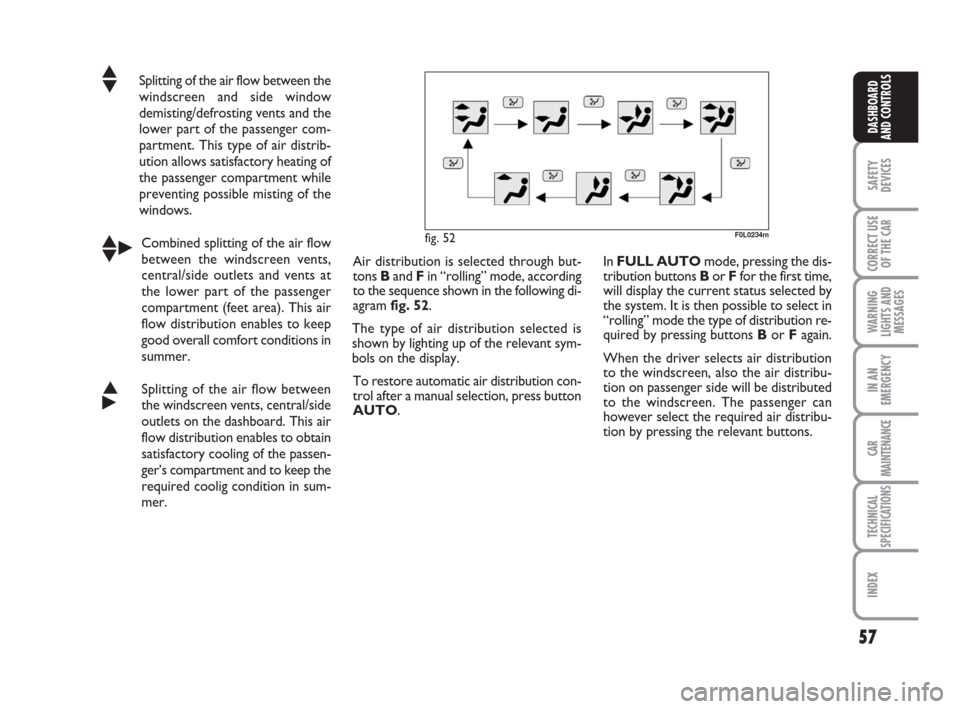
mer. Air distribution is selected through but-
tons Band F in “rolling” mode, according
to the sequence shown in the following di-
agram fig. 52.
The type of air distribution selected is
shown by lighting up of the relevant sym-
bols on the display.
To restore automatic air distribution con-
trol after a manual selection, press button
AUTO.
F0L0234m
In FULL AUTO mode, pressing the dis-
tribution buttons Bor Ffor the first time,
will display the current status selected by
the system. It is then possible to select in
“rolling” mode the type of distribution re-
quired by pressing buttons Bor Fagain.
When the driver selects air distribution
to the windscreen, also the air distribu-
tion on passenger side will be distributed
to the windscreen. The passenger can
however select the required air distribu-
tion by pressing the relevant buttons.
fig. 52
039-069 Croma TRW GB 10-11-2008 13:15 Pagina 57
Page 59 of 258
58
SAFETY
DEVICES
CORRECT USE
OF THE CAR
WARNING
LIGHTS AND
MESSAGES
IN AN
EMERGENCY
CAR
MAINTENANCE
TECHNICAL
SPECIFICATIONS
INDEX
DASHBOARD
AND CONTROLS
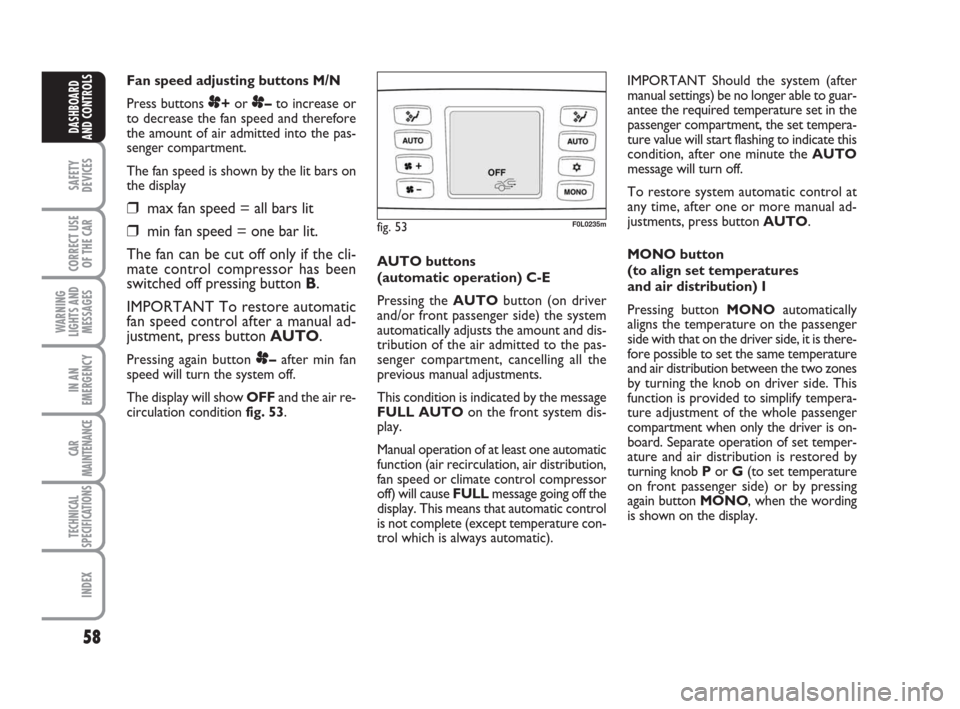
Fan speed adjusting buttons M/N
Press buttons
p+or p–to increase or
to decrease the fan speed and therefore
the amount of air admitted into the pas-
senger compartment.
The fan speed is shown by the lit bars on
the display
❒max fan speed = all bars lit
❒min fan speed = one bar lit.
The fan can be cut off only if the cli-
mate control compressor has been
switched off pressing button B.
IMPORTANT To restore automatic
fan speed control after a manual ad-
justment, press button AUTO.
Pressing again button p–after min fan
speed will turn the system off.
The display will show OFFand the air re-
circulation condition fig. 53. AUTO buttons
(automatic operation) C-E
Pressing the AUTObutton (on driver
and/or front passenger side) the system
automatically adjusts the amount and dis-
tribution of the air admitted to the pas-
senger compartment, cancelling all the
previous manual adjustments.
This condition is indicated by the message
FULL AUTOon the front system dis-
play.
Manual operation of at least one automatic
function (air recirculation, air distribution,
fan speed or climate control compressor
off) will cause FULL message going off the
display. This means that automatic control
is not complete (except temperature con-
trol which is always automatic).IMPORTANT Should the system (after
manual settings) be no longer able to guar-
antee the required temperature set in the
passenger compartment, the set tempera-
ture value will start flashing to indicate this
condition, after one minute the AUTO
message will turn off.
To restore system automatic control at
any time, after one or more manual ad-
justments, press button AUTO.
MONO button
(to align set temperatures
and air distribution) I
Pressing button MONOautomatically
aligns the temperature on the passenger
side with that on the driver side, it is there-
fore possible to set the same temperature
and air distribution between the two zones
by turning the knob on driver side. This
function is provided to simplify tempera-
ture adjustment of the whole passenger
compartment when only the driver is on-
board. Separate operation of set temper-
ature and air distribution is restored by
turning knob Por G(to set temperature
on front passenger side) or by pressing
again button MONO, when the wording
is shown on the display.
fig. 53F0L0235m
039-069 Croma TRW GB 10-11-2008 13:15 Pagina 58
Page 60 of 258
59
SAFETY
DEVICES
CORRECT USE
OF THE CAR
WARNING
LIGHTS AND
MESSAGES
IN AN
EMERGENCY
CAR
MAINTENANCE
TECHNICAL
SPECIFICATIONS
INDEX
DASHBOARD
AND CONTROLS
Air recirculation and AQS function
on/off button A
If the AQSsensor is not fitted, air recir-
culation works according to the following
operating logics:
❒forced switching on (inside air recir-
culation always on), indicated by sym-
bol íon the display;
❒forced switching off (air recirculation
always off with air inlet from the out-
side), indicated by symbol
êon the
display.
The above operating conditions are ob-
tained by pressing in sequence the air re-
circulation button A.
Due to safety reasons, after long recircu-
lation activation (over 25 minutes), the
system will deactivate automatically air re-
circulation for 60 seconds to enable out-
side air inlet.
IMPORTANT The inside air recirculation
system makes it possible to reach the re-
quired heating or cooling conditions faster. It is however inadvisable to use it on
rainy/cold days as it would considerably in-
crease the possibility of the windows mist-
ing inside, especially if the climate control
system is off.
When outside temperature is below 3°C,
recirculation is forced to off (outside air
inlet) to prevent window misting up.
It will be reactivated automatically if out-
side temperature becomes higher than 5
°C.
The AQSsensor (Air Quality System) in
addition to the above operating logics, en-
ables to control recirculation automati-
cally according to the quality of outside air:
❒automatic control indicated by symbol
≥on the display.
In this event the display will show symbol
ïor ñaccording to actual recircu-
lation operating conditions (on or off).
In automatic operation with AQS,inside
air recirculation is turned on automatical-
ly when the antipollution sensor detectsthe presence of polluted air, for example
when driving in the city, queues and tun-
nels.
With compressor on, in order to prevent
polluted air (exhaust gas) inlet at stops, the
system will stop air recirculation when the
car speed falls below 6 km/h. As the car
speed increases (over 25 km/h), the sys-
tem will restore the previous automatic
operating conditions.
In automatic operation, AQSis deacti-
vated when outside temperature is below
3°C, the system will activate air recircu-
lation (indicated by symbol ≥on the
display). The user can however set it man-
ually by operating in rolling mode the reir-
culation button: pressing the button for
the first time will display the current re-
circulation condition, indicated by symbol
ê.
It will be reactivated automatically if out-
side temperature becomes higher than 5
°C.
Press the button again to select the re-
quired recirculation condition, indicated
by the corresponding symbol on the dis-
play. Under these conditions manual ac-
tivation of the AQSfunction could cause
window misting up.
When air recirculation is set manually,
wording FULLwill turn off and A will dis-
appear from the recirculation symbol on
the display.
It is inadvisable to use the in-
side air recirculation func-
tion with low outside temperature as
windows may mist over quickly.
WARNING
039-069 Croma TRW GB 10-11-2008 13:15 Pagina 59
Page 62 of 258
61
SAFETY
DEVICES
CORRECT USE
OF THE CAR
WARNING
LIGHTS AND
MESSAGES
IN AN
EMERGENCY
CAR
MAINTENANCE
TECHNICAL
SPECIFICATIONS
INDEX
DASHBOARD
AND CONTROLS
When the max. demisting/defrosting func-
tion is on, the button led and the heated
rear window button led are on. FULL
AUTOwording on the display is off.
When the max. demisting/defrosting func-
tion is on, the only manual operations pos-
sible are manual adjustment of the fan
speed and switching heated rear window
off.
With max. demisting/defrosting function
on, the fan works according to the previ-
ously set air distribution in order to guar-
antee top climatic comfort under what-
ever condition.
Pressing the max. demisting/defrosting
button or the air distribution buttons or
operating the temperature knobs, the sys-
tem switches off the max. demisting/de-
frosting function and restores the operat-
ing conditions of the system prior to func-
tion activation.Heated rear window and door
mirror demisting/defrosting
button H
Press this button to activate heated rear
window demisting/defrosting. When this
function is on, the button led is on.
This function is timed and switches off au-
tomatically after about 20 minutes or by
pressing again the button or by turning the
engine off. It will not be switched on au-
tomatically when restarting the engine.
IMPORTANT Do not apply stickers on
the inside of the rear window over the
heating filaments to avoid damage that
might cause it to stop working properly.ADDITIONAL HEATER
(Multijet versions)
This device enables quick warming up of
the passenger’s compartment in cold en-
vironmental conditions.
The additional heater will switch on au-
tomatically after turning the ignition key
to ON.
IMPORTANT The additional heater
works only with outside temperature be-
low 12°C, engine coolant temperature be-
low 50°C and car battery voltage over
10.25 V.
IMPORTANT Do not park the car over
flammable material such as paper, dry
grass or leaves: fire danger.
039-069 Croma TRW GB 10-11-2008 13:15 Pagina 61
Page 64 of 258
63
SAFETY
DEVICES
CORRECT USE
OF THE CAR
WARNING
LIGHTS AND
MESSAGES
IN AN
EMERGENCY
CAR
MAINTENANCE
TECHNICAL
SPECIFICATIONS
INDEX
DASHBOARD
AND CONTROLS
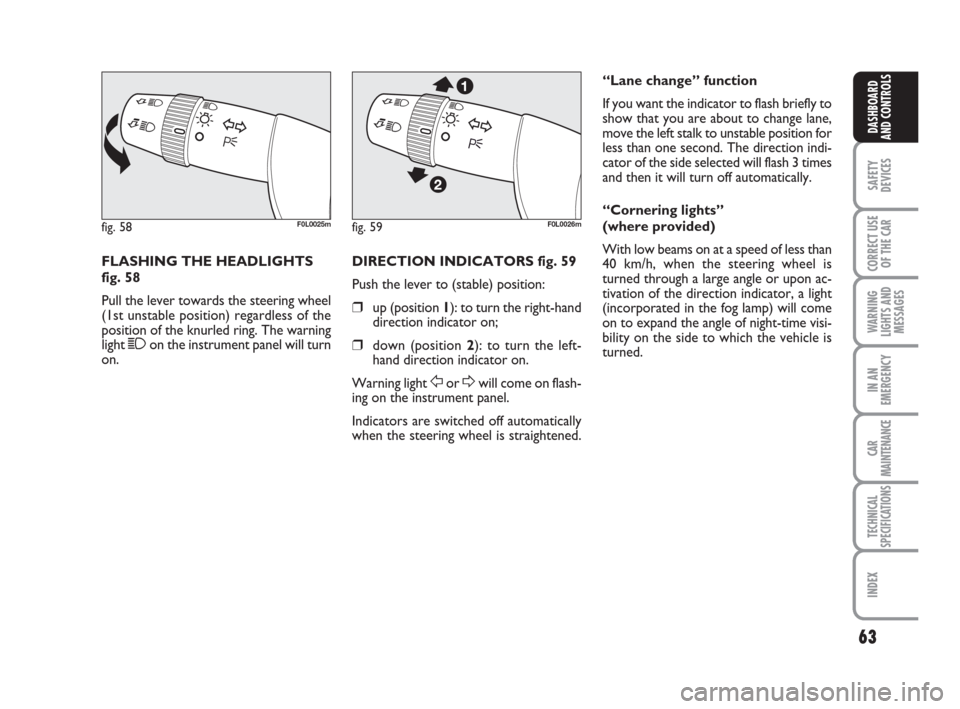
FLASHING THE HEADLIGHTS
fig. 58
Pull the lever towards the steering wheel
(1st unstable position) regardless of the
position of the knurled ring. The warning
light 1on the instrument panel will turn
on.DIRECTION INDICATORS fig. 59
Push the lever to (stable) position:
❒up (position 1): to turn the right-hand
direction indicator on;
❒down (position 2): to turn the left-
hand direction indicator on.
Warning light
ForDwill come on flash-
ing on the instrument panel.
Indicators are switched off automatically
when the steering wheel is straightened.
fig. 58F0L0025mfig. 59F0L0026m
“Lane change” function
If you want the indicator to flash briefly to
show that you are about to change lane,
move the left stalk to unstable position for
less than one second. The direction indi-
cator of the side selected will flash 3 times
and then it will turn off automatically.
“Cornering lights”
(where provided)
With low beams on at a speed of less than
40 km/h, when the steering wheel is
turned through a large angle or upon ac-
tivation of the direction indicator, a light
(incorporated in the fog lamp) will come
on to expand the angle of night-time visi-
bility on the side to which the vehicle is
turned.
039-069 Croma TRW GB 10-11-2008 13:15 Pagina 63
Page 65 of 258
64
SAFETY
DEVICES
CORRECT USE
OF THE CAR
WARNING
LIGHTS AND
MESSAGES
IN AN
EMERGENCY
CAR
MAINTENANCE
TECHNICAL
SPECIFICATIONS
INDEX
DASHBOARD
AND CONTROLS
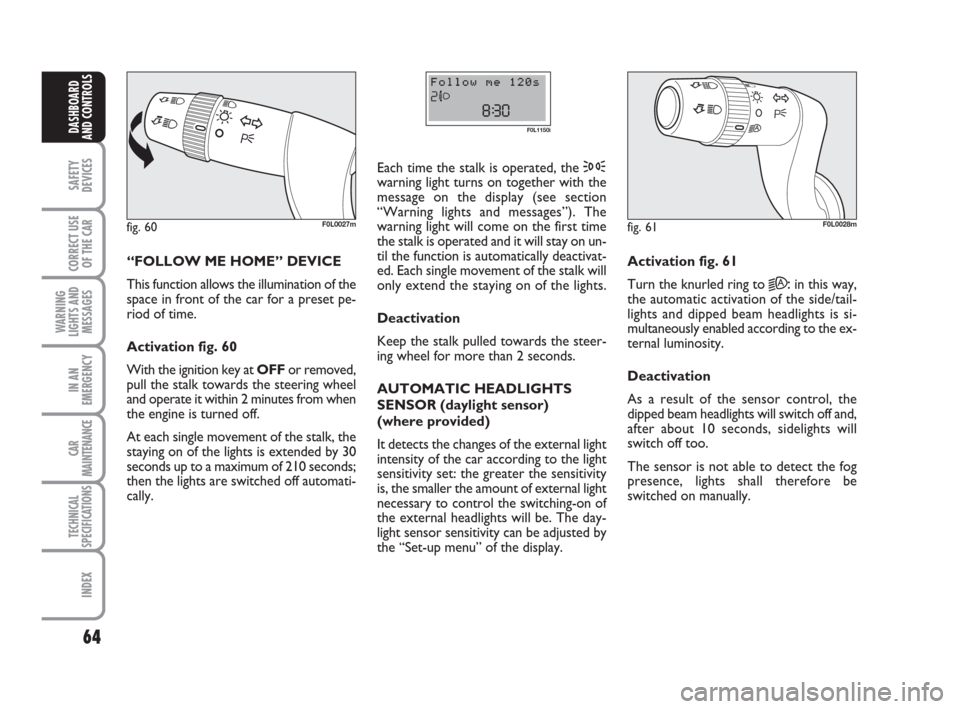
“FOLLOW ME HOME” DEVICE
This function allows the illumination of the
space in front of the car for a preset pe-
riod of time.
Activation fig. 60
With the ignition key at OFFor removed,
pull the stalk towards the steering wheel
and operate it within 2 minutes from when
the engine is turned off.
At each single movement of the stalk, the
staying on of the lights is extended by 30
seconds up to a maximum of 210 seconds;
then the lights are switched off automati-
cally. Each time the stalk is operated, the 3
warning light turns on together with the
message on the display (see section
“Warning lights and messages”). The
warning light will come on the first time
the stalk is operated and it will stay on un-
til the function is automatically deactivat-
ed. Each single movement of the stalk will
only extend the staying on of the lights.
Deactivation
Keep the stalk pulled towards the steer-
ing wheel for more than 2 seconds.
AUTOMATIC HEADLIGHTS
SENSOR (daylight sensor)
(where provided)
It detects the changes of the external light
intensity of the car according to the light
sensitivity set: the greater the sensitivity
is, the smaller the amount of external light
necessary to control the switching-on of
the external headlights will be. The day-
light sensor sensitivity can be adjusted by
the “Set-up menu” of the display.
fig. 60F0L0027m
F0L1150i
Activation fig. 61
Turn the knurled ring to
2A:in this way,
the automatic activation of the side/tail-
lights and dipped beam headlights is si-
multaneously enabled according to the ex-
ternal luminosity.
Deactivation
As a result of the sensor control, the
dipped beam headlights will switch off and,
after about 10 seconds, sidelights will
switch off too.
The sensor is not able to detect the fog
presence, lights shall therefore be
switched on manually.
fig. 61F0L0028m
039-069 Croma TRW GB 10-11-2008 13:15 Pagina 64
Page 66 of 258
Never use the window wiper
to remove ice or snow from
the windscreen. In these con-
ditions, the wiper is submitted
to excessive effort that results in mo-
tor protection cutting in and wiper op-
eration inhibition for few seconds as a
consequence. If operation is not re-
stored contact Fiat Dealership.
65
SAFETY
DEVICES
CORRECT USE
OF THE CAR
WARNING
LIGHTS AND
MESSAGES
IN AN
EMERGENCY
CAR
MAINTENANCE
TECHNICAL
SPECIFICATIONS
INDEX
DASHBOARD
AND CONTROLS
WINDOW WASHING
WINDSCREEN WASHER/
WIPER
This device can only work when the igni-
tion key is at ON.
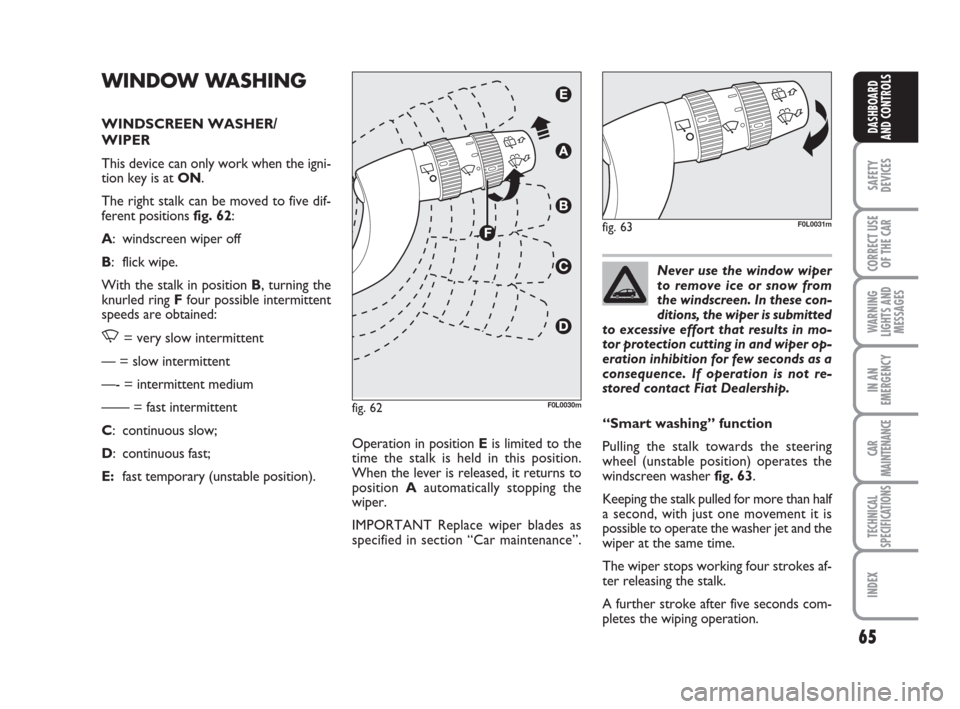
The right stalk can be moved to five dif-
ferent positions fig. 62:
A: windscreen wiper off
B: flick wipe.
With the stalk in position B, turning the
knurled ring Ffour possible intermittent
speeds are obtained:
,= very slow intermittent
— = slow intermittent
—- = intermittent medium
—— = fast intermittent
C: continuous slow;
D: continuous fast;
E:fast temporary (unstable position).Operation in position Eis limited to the
time the stalk is held in this position.
When the lever is released, it returns to
position Aautomatically stopping the
wiper.
IMPORTANT Replace wiper blades as
specified in section “Car maintenance”.
fig. 62F0L0030m
“Smart washing” function
Pulling the stalk towards the steering
wheel (unstable position) operates the
windscreen washer fig. 63.
Keeping the stalk pulled for more than half
a second, with just one movement it is
possible to operate the washer jet and the
wiper at the same time.
The wiper stops working four strokes af-
ter releasing the stalk.
A further stroke after five seconds com-
pletes the wiping operation.
fig. 63F0L0031m
039-069 Croma TRW GB 10-11-2008 13:15 Pagina 65