key FIAT CROMA 2009 2.G User Guide
[x] Cancel search | Manufacturer: FIAT, Model Year: 2009, Model line: CROMA, Model: FIAT CROMA 2009 2.GPages: 258, PDF Size: 5.69 MB
Page 18 of 258
17
SAFETY
DEVICES
CORRECT USE
OF THE CAR
WARNING
LIGHTS AND
MESSAGES
IN AN
EMERGENCY
CAR
MAINTENANCE
TECHNICAL
SPECIFICATIONS
INDEX
DASHBOARD
AND CONTROLS
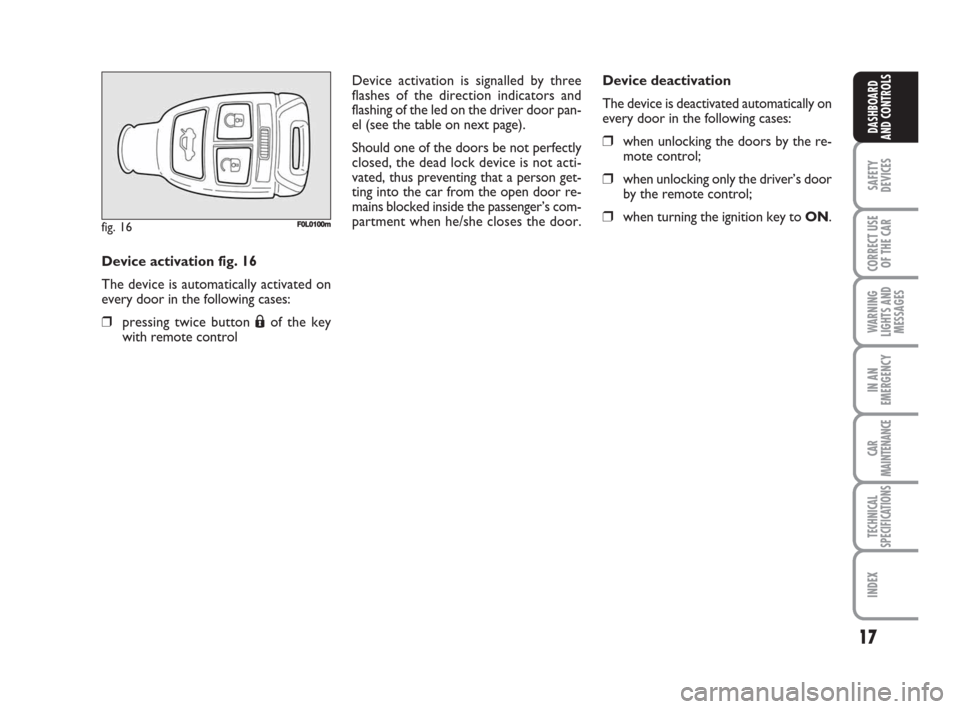
Device activation fig. 16
The device is automatically activated on
every door in the following cases:
❒pressing twice button
Áof the key
with remote control
fig. 16F0L0100m
Device deactivation
The device is deactivated automatically on
every door in the following cases:
❒when unlocking the doors by the re-
mote control;
❒when unlocking only the driver’s door
by the remote control;
❒when turning the ignition key to ON. Device activation is signalled by three
flashes of the direction indicators and
flashing of the led on the driver door pan-
el (see the table on next page).
Should one of the doors be not perfectly
closed, the dead lock device is not acti-
vated, thus preventing that a person get-
ting into the car from the open door re-
mains blocked inside the passenger’s com-
partment when he/she closes the door.
001-038 Croma TRW GB 28-05-2008 16:30 Pagina 17
Page 19 of 258
18
SAFETY
DEVICES
CORRECT USE
OF THE CAR
WARNING
LIGHTS AND
MESSAGES
IN AN
EMERGENCY
CAR
MAINTENANCE
TECHNICAL
SPECIFICATIONS
INDEX
DASHBOARD
AND CONTROLS
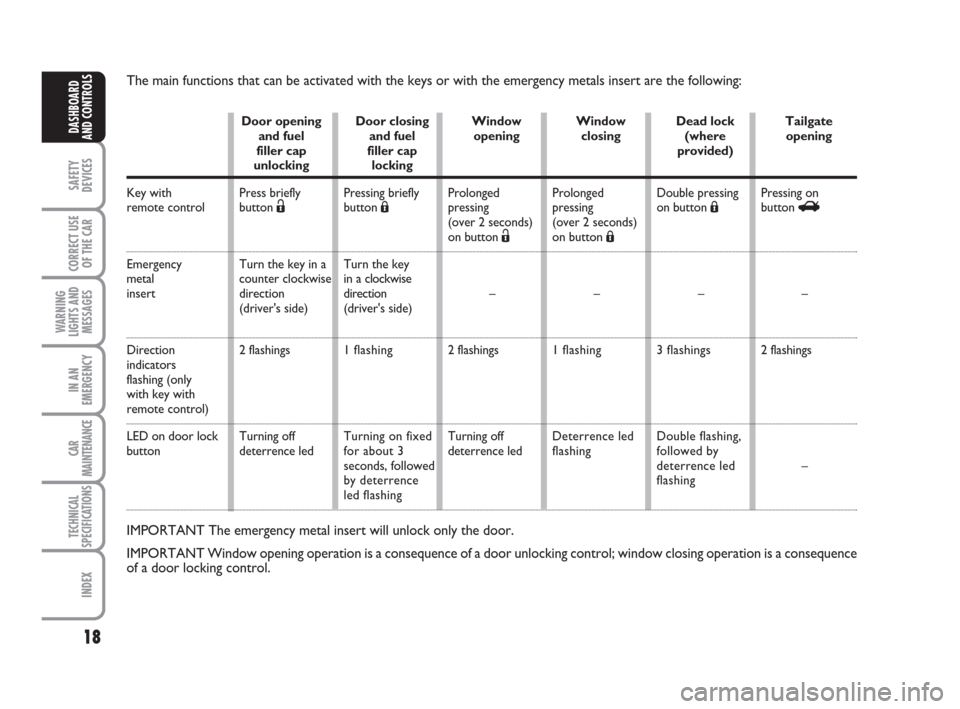
The main functions that can be activated with the keys or with the emergency metals insert are the following:
Key with
remote control
Emergency
metal
insert
Direction
indicators
flashing (only
with key with
remote control)
LED on door lock
button
IMPORTANT The emergency metal insert will unlock only the door.
IMPORTANT Window opening operation is a consequence of a door unlocking control; window closing operation is a consequence
of a door locking control.
Door opening
and fuel
filler cap
unlocking
Press briefly
button
Ë
Turn the key in a
counter clockwise
direction
(driver's side)
2 flashings
Turning off
deterrence ledDoor closing
and fuel
filler cap
locking
Pressing briefly
button Á
Turn the key
in a clockwise
direction
(driver's side)
1 flashing
Turning on fixed
for about 3
seconds, followed
by deterrence
led flashingWindow
opening
Prolonged
pressing
(over 2 seconds)
on button Ë
–
2 flashings
Turning off
deterrence ledWindow
closing
Prolonged
pressing
(over 2 seconds)
on button Á
–
1 flashing
Deterrence led
flashingDead lock
(where
provided)
Double pressing
on button Á
–
3 flashings
Double flashing,
followed by
deterrence led
flashingTailgate
opening
Pressing on
button R
–
2 flashings
–
001-038 Croma TRW GB 28-05-2008 16:30 Pagina 18
Page 20 of 258
19
SAFETY
DEVICES
CORRECT USE
OF THE CAR
WARNING
LIGHTS AND
MESSAGES
IN AN
EMERGENCY
CAR
MAINTENANCE
TECHNICAL
SPECIFICATIONS
INDEX
DASHBOARD
AND CONTROLS
IGNITION SWITCH
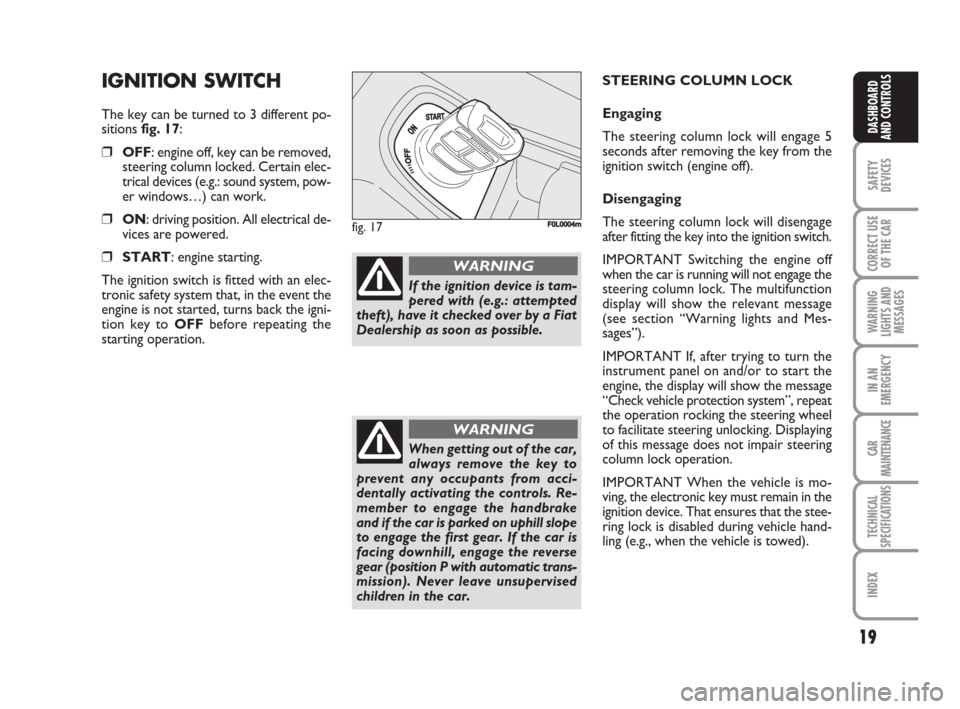
The key can be turned to 3 different po-
sitions fig. 17:
❒OFF: engine off, key can be removed,
steering column locked. Certain elec-
trical devices (e.g.: sound system, pow-
er windows…) can work.
❒ON: driving position. All electrical de-
vices are powered.
❒START: engine starting.
The ignition switch is fitted with an elec-
tronic safety system that, in the event the
engine is not started, turns back the igni-
tion key to OFFbefore repeating the
starting operation.
fig. 17F0L0004m
If the ignition device is tam-
pered with (e.g.: attempted
theft), have it checked over by a Fiat
Dealership as soon as possible.
WARNING
When getting out of the car,
always remove the key to
prevent any occupants from acci-
dentally activating the controls. Re-
member to engage the handbrake
and if the car is parked on uphill slope
to engage the first gear. If the car is
facing downhill, engage the reverse
gear (position P with automatic trans-
mission). Never leave unsupervised
children in the car.
WARNING
STEERING COLUMN LOCK
Engaging
The steering column lock will engage 5
seconds after removing the key from the
ignition switch (engine off).
Disengaging
The steering column lock will disengage
after fitting the key into the ignition switch.
IMPORTANT Switching the engine off
when the car is running will not engage the
steering column lock. The multifunction
display will show the relevant message
(see section “Warning lights and Mes-
sages”).
IMPORTANT If, after trying to turn the
instrument panel on and/or to start the
engine, the display will show the message
“Check vehicle protection system”, repeat
the operation rocking the steering wheel
to facilitate steering unlocking. Displaying
of this message does not impair steering
column lock operation.
IMPORTANT When the vehicle is mo-
ving, the electronic key must remain in the
ignition device. That ensures that the stee-
ring lock is disabled during vehicle hand-
ling (e.g., when the vehicle is towed).
001-038 Croma TRW GB 28-05-2008 16:30 Pagina 19
Page 25 of 258
24
SAFETY
DEVICES
CORRECT USE
OF THE CAR
WARNING
LIGHTS AND
MESSAGES
IN AN
EMERGENCY
CAR
MAINTENANCE
TECHNICAL
SPECIFICATIONS
INDEX
DASHBOARD
AND CONTROLS
Day
Year
MODE
briefly
press
button
Month
Deutsch
Português
English
Español
Français
Italiano
Nederland
Polski
Example:
BELT BUZZER SPEED BEEPHEADL. SENSORSET TIME
SET DATE
SEE RADIO
KEY
AUTOCLOSE
UNITS
LANGUAGE
BUZZER VOLUME
BUTTON VOL. EXIT MENU
SERVICETRIP B DATA
fig. 24Example:
MODE
briefly
press
button
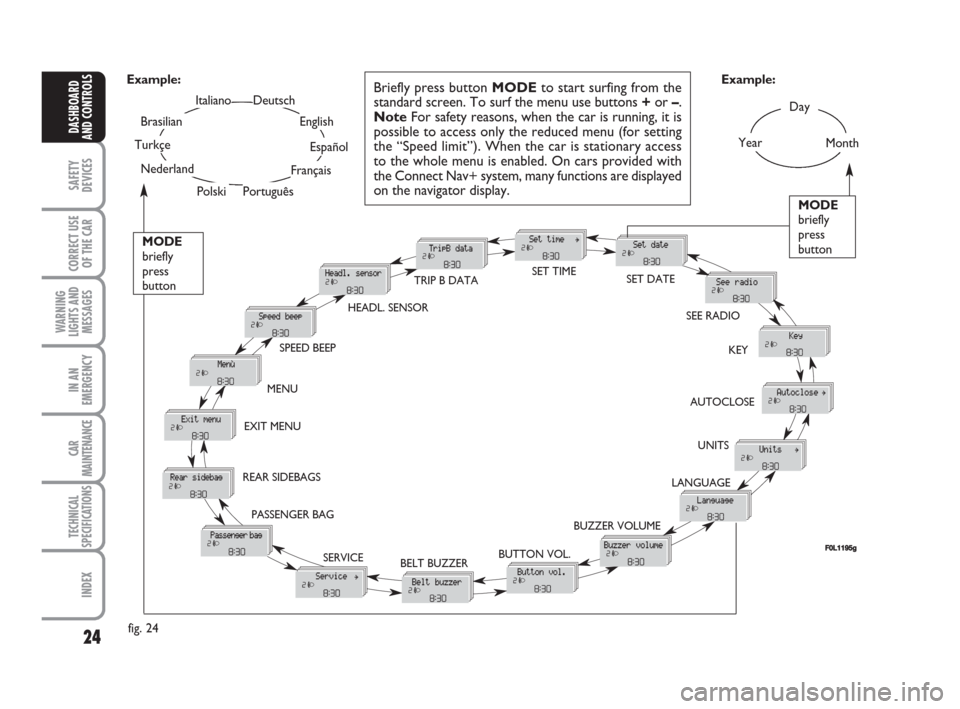
Briefly press button MODEto start surfing from the
standard screen. To surf the menu use buttons +or –.
NoteFor safety reasons, when the car is running, it is
possible to access only the reduced menu (for setting
the “Speed limit”). When the car is stationary access
to the whole menu is enabled. On cars provided with
the Connect Nav+ system, many functions are displayed
on the navigator display.
F0L1195g
Turkçe
Brasilian
PASSENGER BAG REAR SIDEBAGSMENU
001-038 Croma TRW GB 28-05-2008 16:30 Pagina 24
Page 28 of 258
27
SAFETY
DEVICES
CORRECT USE
OF THE CAR
WARNING
LIGHTS AND
MESSAGES
IN AN
EMERGENCY
CAR
MAINTENANCE
TECHNICAL
SPECIFICATIONS
INDEX
DASHBOARD
AND CONTROLS
Day
YearMonthEnglish
Portugês
Español
Français
Deutsch
Italiano
SEAT BELT BUZZERTRIP B DATA
SET DATE
SEE RADIO
KEY
AUTOCLOSE
UNITS LANGUAGE BUZZER VOLUME BUTTON VOLUMESERVICE
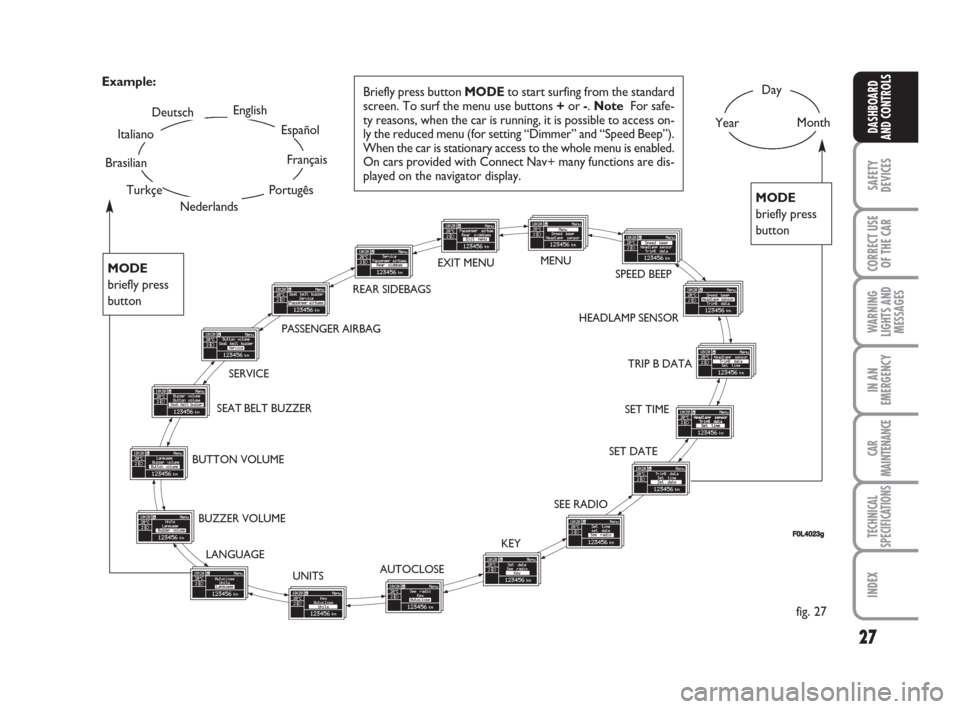
Briefly press button MODEto start surfing from the standard
screen. To surf the menu use buttons +or -. Note For safe-
ty reasons, when the car is running, it is possible to access on-
ly the reduced menu (for setting “Dimmer” and “Speed Beep”).
When the car is stationary access to the whole menu is enabled.
On cars provided with Connect Nav+ many functions are dis-
played on the navigator display. Example:
fig. 27
FF0L4023g
SET TIME HEADLAMP SENSORSPEED BEEP EXIT MENU
Nederlands
PASSENGER AIRBAG
Turkçe
Brasilian
MODE
briefly press
button
MODE
briefly press
button
REAR SIDEBAGSMENU
001-038 Croma TRW GB 28-05-2008 16:30 Pagina 27
Page 32 of 258
31
SAFETY
DEVICES
CORRECT USE
OF THE CAR
WARNING
LIGHTS AND
MESSAGES
IN AN
EMERGENCY
CAR
MAINTENANCE
TECHNICAL
SPECIFICATIONS
INDEX
DASHBOARD
AND CONTROLS
Key
With this function it is possible to decide
the door opening mode by selecting one
of the following options:
– open doors: to unlock all doors, except
the tailgate
– open driver’s door (op. drv. door): to
unlock just the driver’s door (where pro-
vided)
– open all: to unlock every door includ-
ing the tailgate
The car is delivered with this function in
“Open all” mode.
Proceed as follows:
– briefly press button MODE, the previ-
ous setting will flash on the display;
– press button +or –for setting;
– briefly press button MODEto go back
to the menu screen or press the button
for long to go back to the standard screen
without storing settings.Autoclose (Automatic central
door locking when travelling)
When activated (On), this function locks
automatically the doors when the car
speed exceeds 20 km/h.
To activate or to deactivate this function
proceed as follows:
– briefly press button MODEto display
the submenu;
– briefly press button MODE: On or Off
will flash on the display according to pre-
vious setting;
– press button +or –to select the re-
quired level;
– briefly press button MODEto go back
to the menu screen or press the button
for long to go back to the standard screen
without storing settings;
– Press again button MODEfor long to
go back to the standard screen or to the
main menu according to the current menu
level.Units (Setting units)
With this function it is possible to set the
units through the submenu: “Distances”,
“Consumption” and “Temperature”
(where provided).
To set the required unit proceed as fol-
lows:
– briefly press button MODE, the display
will show the submenus;
– press button +or –to scroll the sub-
menus;
– select the required submenu and then
press briefly button MODE;
– if selecting “Distances”: pressing button
MODEbriefly, the display will show “km”
or “mi” according to previous setting;
– press button +or –to select the re-
quired level;
– if selecting “Consumption”: briefly press
button MODEthe display will show
“km/l”, “l/100km” or “mpg” according to
previous setting;
001-038 Croma TRW GB 28-05-2008 16:30 Pagina 31
Page 34 of 258
33
SAFETY
DEVICES
CORRECT USE
OF THE CAR
WARNING
LIGHTS AND
MESSAGES
IN AN
EMERGENCY
CAR
MAINTENANCE
TECHNICAL
SPECIFICATIONS
INDEX
DASHBOARD
AND CONTROLS
Button volume
(Adjusting the button volume)
With this function the volume of the
roger-beep accompanying the activation
of buttons MODE, +and –can be ad-
justed according to 8 levels.
To adjust the volume proceed as follows:
– briefly press button MODE: the previ-
ously set volume “level” will flash on the
display;
– press button +or –for setting;
– briefly press button MODEto go back
to the menu screen or press the button
for long to go back to the standard screen
without storing settings.
Seat belt buzzer
(S.B.R. buzzer reactivation)
This function can be only displayed after
Fiat Dealership has deactivated the S.B.R.
system (see paragraph “S.B.R. system” in
section “Safety devices”).Service (Scheduled Servicing)
This function displays information relat-
ed to kilometric or time based frequen-
cies for maintenance checks.
Proceed as follows:
– briefly press button MODE: service in
km or mi, according to previous setting,
will be displayed (see paragraph “Distance
unit”);
– briefly press button MODEto go back
to the menu screen or press the button
for long to go back to the standard screen
without storing settings.NoteThe “Service schedule” includes car
maintenance every 30,000 km (or 18,000
miles) or every year; this is shown auto-
matically, with the ignition key at ON,
starting from 2,000 km (or equivalent val-
ue in miles) or 30 days from this deadline
and it is shown again every 200 km (or
equivalent value in miles). Below 200 km
servicing indications are displayed more
frequently. Servicing indication will be dis-
played in km or mi according to previous
setting. When a programmed maintenance
interval (coupon) is near to come, turning
the ignition key to ON, the display will
show the message “Service” followed by
the number of km/mi or days to go before
car servicing. Contact a Fiat Dealership to
carry out any service operation provided
by the “Service schedule” and to reset the
display.
001-038 Croma TRW GB 28-05-2008 16:30 Pagina 33
Page 37 of 258
36
SAFETY
DEVICES
CORRECT USE
OF THE CAR
WARNING
LIGHTS AND
MESSAGES
IN AN
EMERGENCY
CAR
MAINTENANCE
TECHNICAL
SPECIFICATIONS
INDEX
DASHBOARD
AND CONTROLS
Exit Menu
This is the last function that closes the cir-
cular setting cycle listed in the initial menu
screen.
Briefly press button MODEto go back to
the standard screen without storing set-
tings.
Press button –to return to the first menu
option.Both functions are resettable (reset - start
of new mission).
“General Trip” displays the figures relat-
ing to:
– Range
– Trip distance
– Average consumption
– Instant consumption
– Average speed
– Travel time (driving time).
“Trip B” (only available on reconfigurable
multifunction display), displays the figures
relating to:
– Trip distance B
– Average consumption B
– Average speed B
– Travel time B (driving time).
NoteThe “Trip B” function can be ex-
cluded (see paragraph “Trip B On/Off”).
“Range” cannot be reset.TRIP COMPUTER
(where provided)
General features
The “Trip computer” is provided on cars
fitted with multifunction display or re-
configurable multifunction display.
The “Trip computer” displays information
(with ignition key at ON), relating to the
operating status of the car. This function
comprises the “General trip” concerning
the “complete mission” of the car (jour-
ney) and “Trip B”, (only available on re-
configurable multifunction display), con-
cerning the partial mission of the car; this
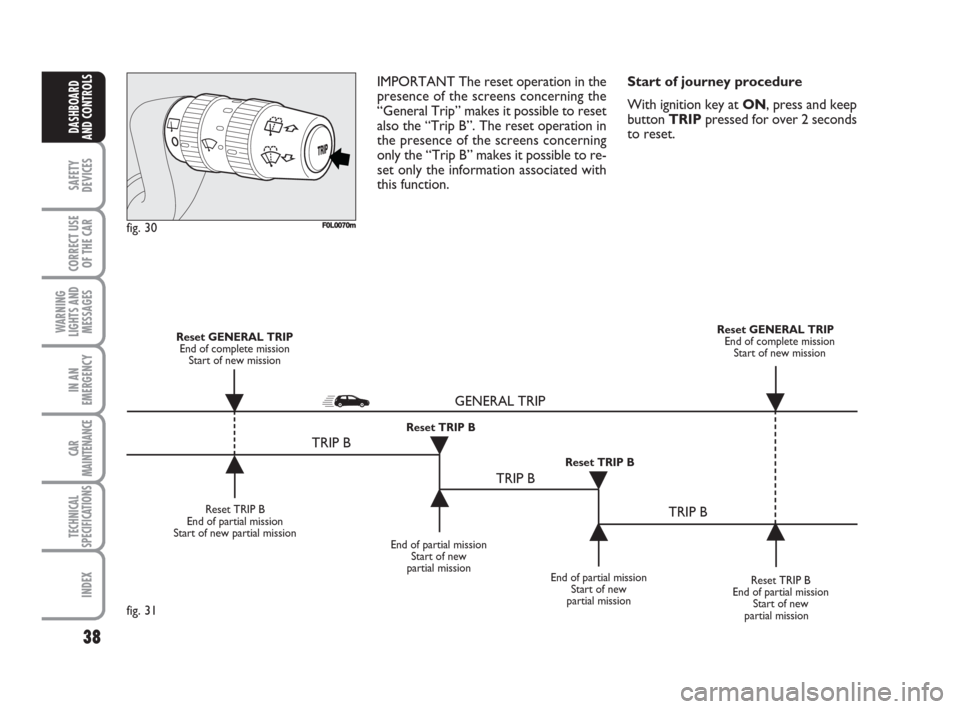
latter function(as shown in fig. 31) is “con-
tained” within the complete mission.
001-038 Croma TRW GB 28-05-2008 16:30 Pagina 36
Page 38 of 258
37
SAFETY
DEVICES
CORRECT USE
OF THE CAR
WARNING
LIGHTS AND
MESSAGES
IN AN
EMERGENCY
CAR
MAINTENANCE
TECHNICAL
SPECIFICATIONS
INDEX
DASHBOARD
AND CONTROLS
Values displayed
Range
Estimated distance which can be travelled
with the fuel currently in the tank, keep-
ing the same driving style. The display will
show “----” in the following cases:
– value lower than 50 km (or 30 mi)
– car left parked with engine running for
long.
IMPORTANT The variation of the auton-
omy value can be influenced by different
factors: driving style (see what is described
in paragraph “Driving style” in the chap-
ter “Start-up and driving”), type of route
(highways, urban, mountain, etc…), use
conditions of the car (load transported,
tire pressure, etc…). What was described
previously must be taken in consideration
when planning a trip.
Trip distance
This value shows estimated distance cov-
ered from the start of the new mission.
Average consumption
Average fuel consumption since the start
of the new mission.
Instant consumption
This value shows instant fuel consumption
(this value is updated second by second).
If parking the car with engine on,
the display will show “----”.Average speed
This value shows the car average speed as
a function of the overall time elapsed since
the start of the new mission.
Travel time
This value shows the time elapsed since
the start of the new mission.
IMPORTANT Lacking information, Trip
computer values are displayed with “----”.
When normal operating condition is re-
set, calculation of different units will
restart regularly. Values displayed before
the failure will not be reset.TRIP button fig. 30
Button TRIP, set on the top of the right
steering column stalk, shall be used (with
ignition key at ON) to display and to re-
set the previously described values to start
a new mission:
– short push to display the different val-
ues
– long push to reset and then start a new
mission.
New mission
New mission starts after:
– “manual” resetting by the user, by press-
ing the relevant button;
– “automatic” resetting, when the “Trip dis-
tance” reaches 9999.9 km or when the
“Travel time” reaches 99.59 (99 hours and
59 minutes);
– after disconnecting/reconnecting the
battery.
001-038 Croma TRW GB 28-05-2008 16:30 Pagina 37
Page 39 of 258
38
SAFETY
DEVICES
CORRECT USE
OF THE CAR
WARNING
LIGHTS AND
MESSAGES
IN AN
EMERGENCY
CAR
MAINTENANCE
TECHNICAL
SPECIFICATIONS
INDEX
DASHBOARD
AND CONTROLS
IMPORTANT The reset operation in the
presence of the screens concerning the
“General Trip” makes it possible to reset
also the “Trip B”. The reset operation in
the presence of the screens concerning
only the “Trip B” makes it possible to re-
set only the information associated with
this function.Start of journey procedure
With ignition key at ON, press and keep
button TRIPpressed for over 2 seconds
to reset.
F0L0070mfig. 30
Reset TRIP B
End of partial mission
Start of new partial mission
End of partial mission
Start of new
partial mission
Reset TRIP B
End of partial mission
Start of new
partial mission Reset GENERAL TRIP
End of complete mission
Start of new missionReset GENERAL TRIP
End of complete mission
Start of new mission
End of partial mission
Start of new
partial mission Reset TRIP B
Reset TRIP B
TRIP B
TRIP B
TRIP B GENERAL TRIP˙
˙
˙
˙˙
˙
˙ ˙
fig. 31
001-038 Croma TRW GB 28-05-2008 16:30 Pagina 38