Time FIAT DUCATO 250 2009 3.G Blue And Me Manual
[x] Cancel search | Manufacturer: FIAT, Model Year: 2009, Model line: DUCATO 250, Model: FIAT DUCATO 250 2009 3.GPages: 82, PDF Size: 0.51 MB
Page 63 of 82
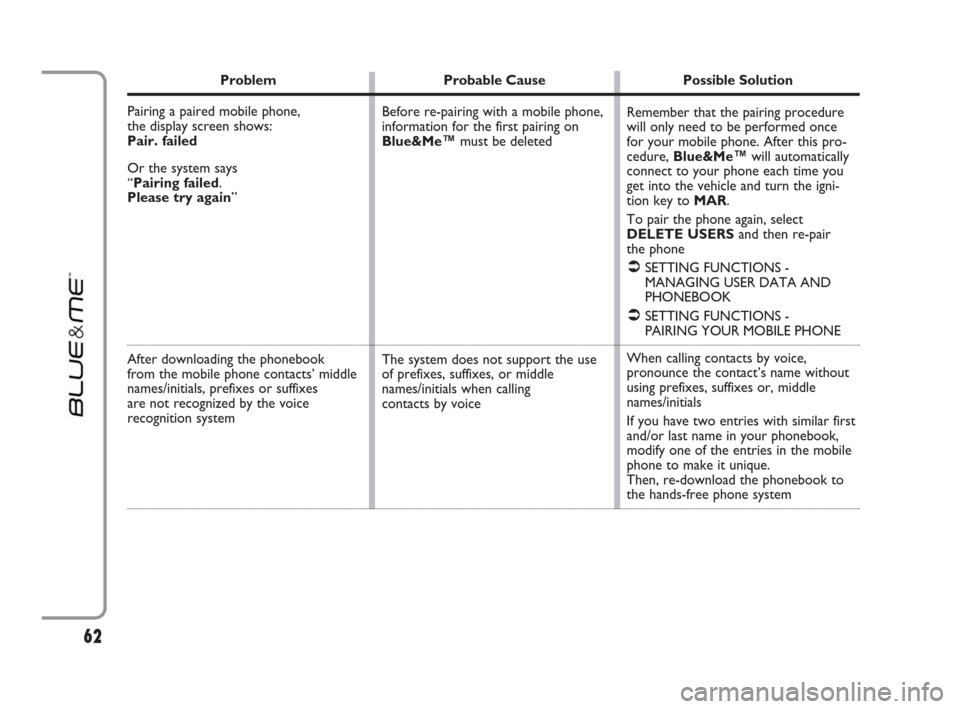
Problem Probable Cause Possible Solution
Pairing a paired mobile phone,
the display screen shows:
Pair. failed
Or the system says
“Pairing failed.
Please try again”
After downloading the phonebook
from the mobile phone contacts’ middle
names/initials, prefixes or suffixes
are not recognized by the voice
recognition system
Remember that the pairing procedure
will only need to be performed once
for your mobile phone. After this pro-
cedure, Blue&Me™will automatically
connect to your phone each time you
get into the vehicle and turn the igni-
tion key to MAR.
To pair the phone again, select
DELETE USERSand then re-pair
the phone
ÂSETTING FUNCTIONS -
MANAGING USER DATA AND
PHONEBOOK
ÂSETTING FUNCTIONS -
PAIRING YOUR MOBILE PHONE
When calling contacts by voice,
pronounce the contact’s name without
using prefixes, suffixes or, middle
names/initials
If you have two entries with similar first
and/or last name in your phonebook,
modify one of the entries in the mobile
phone to make it unique.
Then, re-download the phonebook to
the hands-free phone system Before re-pairing with a mobile phone,
information for the first pairing on
Blue&Me™must be deleted
The system does not support the use
of prefixes, suffixes, or middle
names/initials when calling
contacts by voice
62
603_97_223 DUCATO BLUE&ME PACK8.2 GB 1ed 5-08-2009 15:36 Pagina 62
Page 66 of 82
65
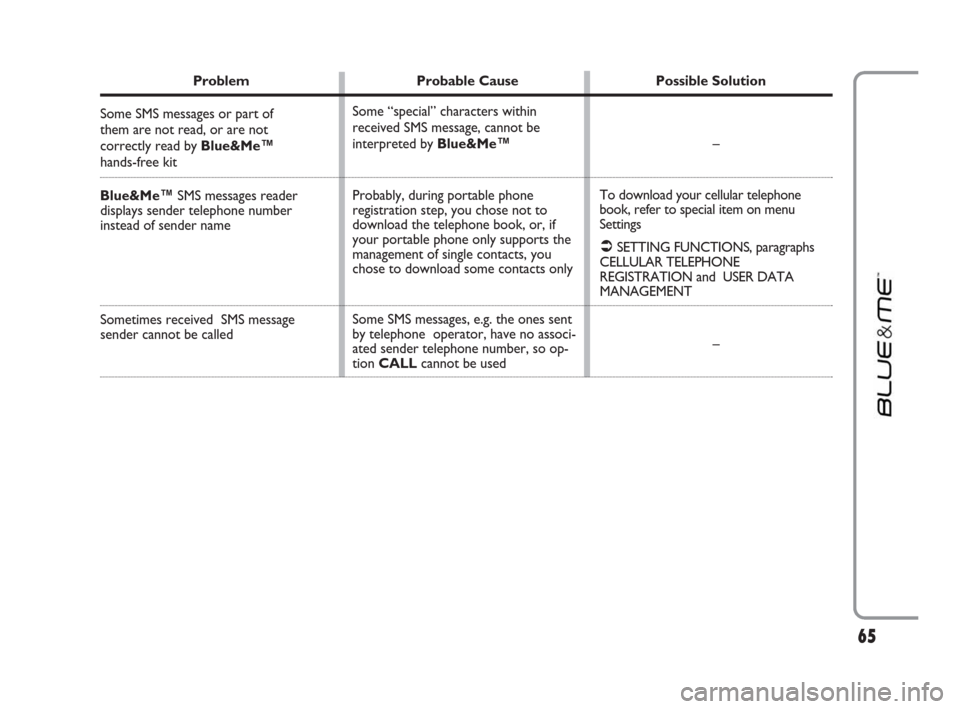
Problem Probable Cause Possible Solution
Some SMS messages or part of
them are not read, or are not
correctly read by Blue&Me™
hands-free kit
Blue&Me™SMS messages reader
displays sender telephone number
instead of sender name
Sometimes received SMS message
sender cannot be called
Some “special” characters within
received SMS message, cannot be
interpreted by Blue&Me™
Probably, during portable phone
registration step, you chose not to
download the telephone book, or, if
your portable phone only supports the
management of single contacts, you
chose to download some contacts only
Some SMS messages, e.g. the ones sent
by telephone operator, have no associ-
ated sender telephone number, so op-
tion CALLcannot be used–
To download your cellular telephone
book, refer to special item on menu
Settings
ÂSETTING FUNCTIONS, paragraphs
CELLULAR TELEPHONE
REGISTRATION and USER DATA
MANAGEMENT
–
603_97_223 DUCATO BLUE&ME PACK8.2 GB 1ed 5-08-2009 15:36 Pagina 65
Page 67 of 82
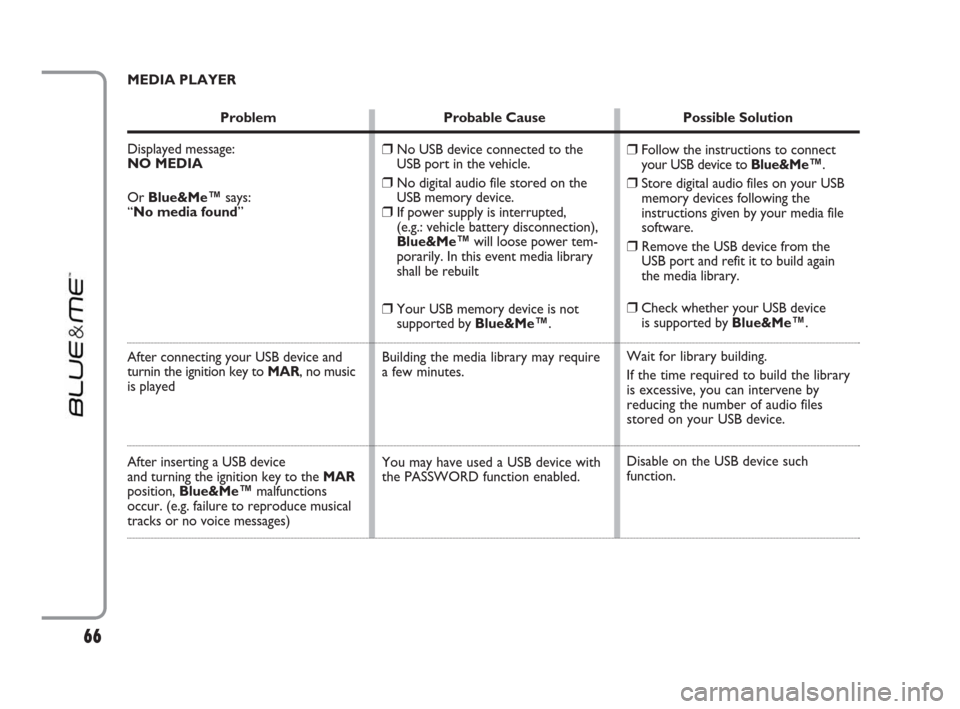
MEDIA PLAYER
Problem Probable Cause Possible Solution
Displayed message:
NO MEDIA
Or Blue&Me™says:
“No media found”
After connecting your USB device and
turnin the ignition key to MAR, no music
is played
After inserting a USB device
and turning the ignition key to the MAR
position, Blue&Me™malfunctions
occur. (e.g. failure to reproduce musical
tracks or no voice messages)
❒Follow the instructions to connect
your USB device to Blue&Me™.
❒Store digital audio files on your USB
memory devices following the
instructions given by your media file
software.
❒Remove the USB device from the
USB port and refit it to build again
the media library.
❒Check whether your USB device
is supported by Blue&Me™.
Wait for library building.
If the time required to build the library
is excessive, you can intervene by
reducing the number of audio files
stored on your USB device.
Disable on the USB device such
function.
❒No USB device connected to the
USB port in the vehicle.
❒No digital audio file stored on the
USB memory device.
❒If power supply is interrupted,
(e.g.: vehicle battery disconnection),
Blue&Me™will loose power tem-
porarily. In this event media library
shall be rebuilt
❒Your USB memory device is not
supported by Blue&Me™.
Building the media library may require
a few minutes.
You may have used a USB device with
the PASSWORD function enabled.
66
603_97_223 DUCATO BLUE&ME PACK8.2 GB 1ed 5-08-2009 15:36 Pagina 66