Time FIAT DUCATO 250 2009 3.G Blue And Me Manual
[x] Cancel search | Manufacturer: FIAT, Model Year: 2009, Model line: DUCATO 250, Model: FIAT DUCATO 250 2009 3.GPages: 82, PDF Size: 0.51 MB
Page 8 of 82
ROAD SAFETY
Read and Follow Instructions:before using your system, read and follow all instructions and safety information provided in this
end user manual (“User’s Guide”). Not following precautions found in this User’s Guide can lead to an accident or other serious con-
sequences.
Keep User’s Guide in the vehicle: when kept in the vehicle, the User’s Guide will be a ready reference for you and other users unfamiliar
with the system. Please make certain that before using the system for the first time, all persons have access to the User’s Guide and read its in-
structions and safety information carefully.
WARNING: Operating certain parts of this system while driving can distract your attention away from the road, and possibly
cause an accident or other serious consequences. Do not change system settings or enter data non-verbally (using your
hands) while driving. Stop the vehicle in a safe and legal manner before attempting these operations. This is important since
while setting up or changing some functions you might be required to distract your attention away from the road and re-
move your hands from the wheel.
GENERAL OPERATION
Voice Command Control: functions within the system may be accomplished using only voice commands. Using voice commands while dri-
ving allows you to operate the system without removing your hands from the wheel.
Prolonged Views of Screen: do not access any function requiring a prolonged view of the screen while you are driving. Pull over in a safe
and legal manner before attempting to access a function of the system requiring prolonged attention. Even occasional short scans to the screen
may be hazardous if your attention has been diverted away from your driving task at a critical time.
Volume Setting: do not raise the volume excessively. Keep the volume at a level where you can still hear outside traffic and emergency sig-
nals while driving. Driving while unable to hear these sounds could cause an accident.
Use of Speech Recognition Functions: speech recognition software is inherently a statistical process which is subject to errors. It is your
responsibility to monitor any speech recognition functions included in the system and address any errors.
Distraction Hazard: any features may require manual (non-verbal) setup. Attempting to perform such set-up or insert data while driving can
seriously distract your attention and could cause an accident or other serious consequences. Stop the vehicle in a safe and legal manner before
attempting these operations.
WARNING
Operating certain parts of this system while driving can distract your attention away from the road, and possi-
bly cause an accident or other serious consequences; for this reason certain functions shall only be used when
driving conditions are secure and, if required, only when the vehicle is stopped.
WARNING
7
603_97_223 DUCATO BLUE&ME PACK8.2 GB 1ed 5-08-2009 15:36 Pagina 7
Page 16 of 82
To issue a voice command to the system,
press
‘and wait for the tone indicating
that voice recognition is active. Then,
speak the command in your natural voice
at a moderate pace. When the system rec-
ognizes the command, it will acknowledge
your command by speaking a response or
acting on your command.
Voice commands are organized according
to three increasing levels: 1
stlevel, 2ndlev-
el and 3rdlevel.
When a valid* 1
stlevel keyword is pro-
nounced, the system will activate 2ndlev-
el keywords; when a valid 2ndlevel key-
word is pronounced, the system will ac-
tivate 3
rdlevel keywords.
If the user pronounces a valid 1
stlevel key-
word, then the submenu relevant to that
command will remain active until a key-
word leading to another level is given or
the interaction is interrupted; the same
rule applies for the other lower levels (2
nd
and 3rdlevel).
ÂFor the list of available keywords, re-
fer to section VOICE COMMANDS
(KEYWORDS) - SUMMARY.To repeat the last system voice an-
nouncement, press
‘for longer than 1
second or press shortly
‘and pro-
nounce “Repeat”.
The system can issue voice announce-
ments. A voice announcement is a spoken
message initiated by the system. To can-
cel a voice announcement, press ESC
ˆ,
or press
‘and pronounce “Cancel”.
A voice interaction is a two-way commu-
nication/spoken exchange between system
and user. To initiate a voice interaction,
press
‘and issue a command. To inter-
rupt a conversation and start a new one,
press
‘at any time during the conver-
sation and pronounce a vocal command.
To stop an ongoing interaction press
ESC
ˆ. You will hear a tone indicating
when voice recognition is deactivated.The hands-free kit help option can speak
the list of commands available to you at
any time, depending on the keyword lev-
el that you are currently on. To use the
help system, say “HelpListen to the list
of currently available commands and de-
cide on which command you’d like to is-
sue to the system.
Adjust the volume of phone calls to a lev-
el that is comfortable and safe while the
vehicle is in motion. To adjust the default
volume of Blue&Me™, see paragraph
“EXTERNAL AUDIO VOL function” in
the sound system owner handbook. To
temporarily adjust the volume of the cur-
rent phone call, press VOL+or VOL–.
After the phone call is disconnected, the
volume will revert back to the original lev-
el.
You can press VOL+or VOL–also to
adjust the volume of the current
Blue&Me™voice announcement.
Please remember that to interrupt a voice
announcement, you can always press
‘at any time during a voice interaction and
give a new voice command.
15
* Validmeans that the keyword pronounced is included in the Blue&Me™“dictionary” and that can therefore be recognized by
the system for the concerned level.
603_97_223 DUCATO BLUE&ME PACK8.2 GB 1ed 5-08-2009 15:36 Pagina 15
Page 18 of 82
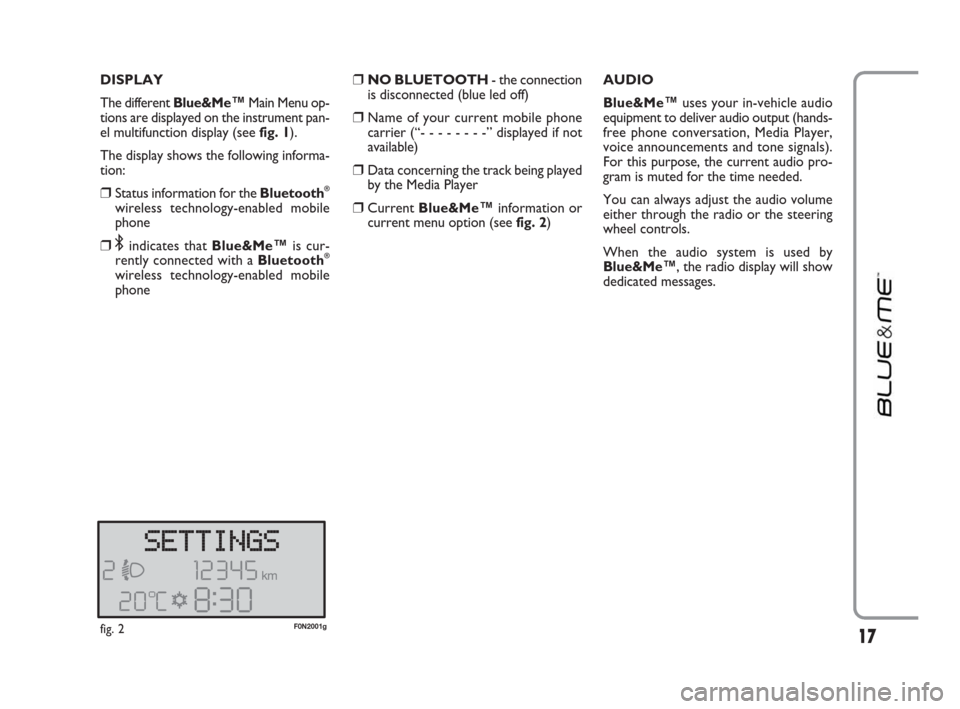
DISPLAY
The different Blue&Me
™Main Menu op-
tions are displayed on the instrument pan-
el multifunction display (see fig. 1).
The display shows the following informa-
tion:
❒Status information for the Bluetooth®
wireless technology-enabled mobile
phone
❒;indicates that Blue&Me™is cur-
rently connected with a Bluetooth®
wireless technology-enabled mobile
phone
❒NO BLUETOOTH - the connection
is disconnected (blue led off)
❒Name of your current mobile phone
carrier (“- - - - - - - -” displayed if not
available)
❒Data concerning the track being played
by the Media Player
❒CurrentBlue&Me™information or
current menu option (seefig. 2)AUDIO
Blue&Me™uses your in-vehicle audio
equipment to deliver audio output (hands-
free phone conversation, Media Player,
voice announcements and tone signals).
For this purpose, the current audio pro-
gram is muted for the time needed.
You can always adjust the audio volume
either through the radio or the steering
wheel controls.
When the audio system is used by
Blue&Me™, the radio display will show
dedicated messages.
17fig. 2F0N2001g
603_97_223 DUCATO BLUE&ME PACK8.2 GB 1ed 5-08-2009 15:36 Pagina 17
Page 25 of 82
Transferring a phone conversation
from the hands-free phone to your
mobile phone
To transfer a phone conversation from the
hands-free phone to your mobile phone,
press OK
ı.
You can talk on your mobile phone and
still use buttons on the front panel. Specif-
ically, you can press
˜MAINto switch
between two phone calls on your mobile
phone, or press
˜MAINfor longer than
1 second to end the phone conversation. Putting a phone call on hold
To put a phone call on hold and disable
the microphone so that you can talk with-
out being listened to by the caller, press
ESC
ˆ. CONFERENCE CALL FUNCTION
(only with Bluetooth
®phones
supporting this function)
With the Conference Call function you
can call another contact while you are en-
gaged in a phone conversation yet. In this
way you can speak with both contacts at
the same time.
To start a Conference call while you are
still engaged in a phone conversation, call
the second required contact as described
in section MAKING A PHONE CALL.
When Conference Call option is active the
display will show “CONFERENCE”.
To end both calls, press button
˜MAIN
for long.
24
603_97_223 DUCATO BLUE&ME PACK8.2 GB 1ed 5-08-2009 15:36 Pagina 24
Page 34 of 82
33
Changing audio source
To change the active audio source (Radio,
CD, CD Changer, Media Player), press the
keys FM, AM, CDon the radio panel.
Note
For further details on voice commands
(keywords) to be used with the Media
Player, refer to section VOICE COM-
MANDS (KEYWORDS) - SUMMARY.
To manage audio files from iPod or iPhone
devices, refer to "TECHNOLOGIES COM-
PATIBLE WITH Blue&Me™”.MEDIA PLAYER SETTINGS
Autoplay
When the Autoplay optionis on,
Blue&Me™will start to play the audio
files on your USB device as soon as you
turn the ignition key MAR. Once you ac-
tivate this option, the first time you use the
player, playback will start automatically.
The Autoplay optionshall be disabled
(when required) before connecting your
USB device to the USB port and building
or updating the media library.
?
To change Autoplay settingus-
ing manual interaction, proceed as
follows:
Open the Main Menu, select SET-
TINGS, MEDIA PLAYER, AU-
TOPLAYand then press
OK
ıor˜MAIN.
To activate Autoplay, select AU-
TOPLAY ONand press OK
ıor
˜MAIN. To deactivate Autoplay
select AUTOPLAY OFFand
press OK
ıor ˜MAIN.
}
Or, using voice interaction:
Press
‘and pronounce “Auto-
play on” or “Autoplay off”.
Note
If you change the Autoplaysettings after
connecting the USB device, new setting
will be activated the next time you con-
nect a different USB device (or the same
USB device with updated track library).
603_97_223 DUCATO BLUE&ME PACK8.2 GB 1ed 5-08-2009 15:36 Pagina 33
Page 36 of 82
35
PRACTICAL HINTS FOR USING
THE MEDIA PLAYER
Scrolling
❒To optimize scrolling of the FOLD-
ERSmenu, organize folders on your
USB device before connecting it to
Blue&Me™. To facilitate and to opti-
mize FOLDERSmenu selection, or-
ganize your tracks in folders with
prompt names for you.
Organizing media files
❒In order to make the musical selection
on Blue&Me™, based on predefined
selection criteria (author, album, type,
etc.) information contained in multi-
media files must be catalogues and up-
dated. To update file data, follow the in-
structions given on your software in-
struction manual.
❒If certain items in your library have no
Artist, Album, Title and Genre,
Blue&Me™will show UNKNOWN
in ALBUMSand GENRESmenus.
To enter the required data, follow the
instructions given on your software in-
struction manual.Building the media library on
Blue&Me™
❒Building the media library may require
a few minutes. If the time required is ex-
cessive, you can intervene by reducing
the number of audio files stored on
your USB device.
❒While building the library, it is howev-
er possible to play a selection of tracks.
Blue&Me™will build the library while
playing music.Building playlists for Blue&Me™
For building .m3uor .wplplaylist for
Blue&Me™using Microsoft
®Windows
Media®Player, proceed as follows:
❒Copy required tracks into a new fold-
er or to your USB memory device.
❒Open Microsoft®Windows Media®
Player. Select File, Openfrom the
menu.
❒Scroll the content of the USB device
connected to your computer and select
the audio files to be entered in the
playlist.
❒Click on Open.
❒Move to “File” and select “Save Now
Playing List As” .... In field “File
Name” enter the required name and
in field “Save as type” set the type:
.wpl or .m3u.
❒Click on Save.
When the above steps are over, the new
file .m3uor .wplwill be built.
603_97_223 DUCATO BLUE&ME PACK8.2 GB 1ed 5-08-2009 15:36 Pagina 35
Page 37 of 82
36
The SETTINGSmenu enables you to
perform the following functions:
❒Pairing a mobile phone
❒Managing user data
❒Media Player settings
❒Advanced Options.
To perform functions and adjustments in
the SETTINGSmenu, you may use but-
tons on the front panel or voice com-
mands at vehicle standstill. When the ve-
hicle is moving, you can use voice com-
mands only. Instructions are provided for
both methods.
ÂIf you encounter difficulties with any of
the Blue&Me™settings, consult section
TROUBLESHOOTING.PAIRING A MOBILE PHONE
Before you can use your mobile phone
with the hands-free phone function on
your vehicle, you must create a pairing re-
lationship between the mobile phone and
the hands-free phone system.
During the pairing procedure, the hands-
free phone system attempts to detect a
phone equipped with Bluetooth
®wire-
less technology within range, and then es-
tablishes the connection using a Personal
Identification Number (PIN). After a pair-
ing relationship is established, you can use
the hands-free phone system to make and
receive phone calls, and do other opera-
tions via your wirelessly-connected mo-
bile phone.
IMPORTANT The mobile phone pairing
PIN number is a special PIN generated
randomly at each new pairing and used
just for this operation. It is not your SIM
PIN and therefore it is not required to
store or to keep it in mind; loosing it will
not impair the hands-free phone system
operation.
The pairing procedure will only need to
be performed once for your mobile
phone. After this procedure Blue&Me™
will automatically connect to your phone
each time you get into the vehicle and turn
the ignition key to MAR.You can create a pairing relationship us-
ing the PAIRINGoption in the SET-
TINGSmenu.
?
To create a pairing relationship us-
ing manual interaction, proceed as
follows:
Press
˜MAINto open the Main
Menu, then select SETTINGSby
pressing OK
ıor ˜MAIN.
Select PAIRINGand then press
OK
ıor ˜MAIN. The system will
start the pairing procedure.
The system shows the mobile
phone pairing PIN on the instru-
ment panel display and repeats it.
Please note that this is a PIN used
just for this operation, it is not your
SIM PIN.
For the next two steps, consult your
mobile phone owner’s manual about
Bluetooth
®pairing.
SETTINGS FUNCTIONS
603_97_223 DUCATO BLUE&ME PACK8.2 GB 1ed 5-08-2009 15:36 Pagina 36
Page 38 of 82
37
On your mobile phone, query for
devices equipped with Bluetooth®
wireless technology that are within
range (this option on your mobile
phone might be called Discover,
New Device, etc.). View the list of
Bluetooth
®wireless technology
enabled devices and select
“Blue&Me” (item that identifies
Blue&Me™on your vehicle).
When prompted by the mobile
phone, enter the PIN number
shown on the instrument panel dis-
play. If pairing is successful, the sys-
tem will say “Connecting” and
then the display will show the paired
mobile phone ID.
It is of vital importance to wait un-
til this confirmation message is dis-
played since pressing
˜MAINor
ESC
ˆat this time may cancel the
pairing process. If pairing fails, an er-
ror message will be displayed and
the pairing procedure shall be re-
peated.At first pairing, the system will say
“Welcome” immediately after
connecting. This message will no
longer be heard at next pairing pro-
cedures.
The system asks if you would like to
copy your paired phone phone-
book. It is recommended to copy it.
To start copying the phonebook,
press OK
ıor ˜MAIN; otherwise
press ESC
ˆ. You can download
your phonebook at a later time us-
ing the menu option SETTINGS,
USER DATA, PHONEBOOK.
For certain mobile phones the
phonebook is not copied automat-
ically, in this case you must send the
contacts in your mobile phone
phonebook to the hands-free phone
system using your mobile phone
keypad. If the hands-free phone sys-
tem asks you to do this, then per-
form this procedure following the
instructions specific to your mobile
phone and press
˜MAINwhen
you have finished.
}
Or, using voice interaction:
Press
‘and pronounce “Set-
tings”, wait shortly for feedback
and then pronounce “Pairing”.
The system shows the mobile
phone pairing PIN on the instru-
ment panel display and repeats it.
For the next two steps, consult your
mobile phone owner’s manual about
Bluetooth
®pairing.
On your mobile phone, query for
devices equipped with Bluetooth
®
wireless technology that are within
range (this option on your mobile
phone might be called Discover,
New Device, etc.). View the list of
Bluetooth
®wireless technology
enabled devices and select
“Blue&Me” (item that identifies
the hands-free kit in your vehicle).
When prompted by the mobile
phone, enter the PIN number
shown on the instrument panel dis-
play using your mobile phone key-
pad. If pairing is successful, the sys-
tem will say “Connecting” and
then the display will show the paired
mobile phone ID.
603_97_223 DUCATO BLUE&ME PACK8.2 GB 1ed 5-08-2009 15:36 Pagina 37
Page 39 of 82
It is of vital importance to wait un-
til this confirmation message is dis-
played since pressing
˜MAINor
ESC
ˆat this time may cancel the
pairing process. If pairing fails, an er-
ror message will be displayed and
the pairing procedure shall be re-
peated.
At first pairing, the system will say
“Welcome” immediately after
connecting. This message will no
longer be heard at next pairing pro-
cedures.
The system asks if you would like to
copy your paired phone phone-
book. It is recommended to copy it.
To start copying the phonebook,
pronounce “Yes”; otherwise say
“No”.
For certain mobile phones the
phonebook is not copied automat-
ically, in this case you must send the
contacts in your mobile phone
phonebook to the hands-free phone
system using your mobile phone
keypad. If the hands-free phone sys-
tem asks you to do this, then per-
form this procedure following the
instructions specific to your mobile
phone and press
˜MAINwhen
you have finished.Practical hints
To improve both the voice recognition of
your phonebook entries and Blue&Me™
pronunciation accuracy when repeating
the entries, please try to enter contact en-
tries and memorize them using the fol-
lowing criteria:
❒Avoid abbreviations.
❒Write foreign names according to the
way in which they are pronounced ac-
cording to the rules of the
Blue&Me™language set on your ve-
hicle. For example, enter “Tanja” as
“Tanya”, to improve recognition accu-
racy and also to obtain the correct pro-
nunciation by the system.
❒When adding or editing contact entries,
insert the appropriate accent marks
when the name requires these marks
to be properly pronounced and recog-
nized by the system. For example en-
ter “Nicolo Rebora” as “Nicolò Rébo-
ra” to obtain the correct pronunciation.
❒When adding or editing contact entries,
bear in mind that certain isolated block
letter may be read as Roman numer-
als (e.g.: V may be read as fifth).
❒When calling contacts by voice, do not
include the middle names or middle ini-
tials of your contacts. Notes
❒You are only required to pair your mo-
bile phone a single time.
❒You can pair up to five mobile phones,
to be used one at a time.
❒On your paired mobile phone, the
Bluetooth®setting must be turned on
in order to connect your mobile phone
with Blue&Me™.
❒Before transferring your mobile phone
contacts to the hands-free system,
make sure that each contact first and
last name is unique and distinctly rec-
ognizable so that the voice recognition
system will function properly.
❒The system will download only valid
contact entries. A valid contact entry
must include both a name and at least
one phone number.
38
603_97_223 DUCATO BLUE&ME PACK8.2 GB 1ed 5-08-2009 15:36 Pagina 38
Page 60 of 82

59
Problem Probable Cause Possible Solution
Display screen shows: PAIR. FAILED
Or the system says “Bluetooth pairing
timed out. Please try again later.”
Display screen shows:
PRIVATE NUMBER
Display screen shows: ONLY AT REST
Or the system says:
“This function is only available
when the vehicle is stationary”
Retry the pairing procedure. During the
PIN entering step, verify that the PIN
number you are entering on the mobile
phone is the same number that
is shown
on the instrument panel display
ÂSETTING FUNCTIONS -
PAIRING YOUR MOBILE PHONE
Enter a contact in your mobile
phonebook for the incoming call,
and then download your phonebook/
contact again
In this case, nothing can be done and
the message will always appear
Stop your vehicle and attempt to
perform the function again manually,
or continue driving and perform the
function using the voice recognition
system After three minutes, each attempt to
enter the PIN number fails since
pairing timed out
❒The caller is not recognized as a
name stored in the phonebook,
and the paired mobile phone does
not have a called ID feature
❒The caller has blocked caller ID
to prevent the system from
displaying the caller’s name
and/or phone number
Even occasional short viewings of the
vehicle display may be hazardous if
your attention has been diverted away
from your driving tasks. Certain
Blue&Me™functions, which require
the user to give attention to the
vehicle display, are only available when
the vehicle is stopped
603_97_223 DUCATO BLUE&ME PACK8.2 GB 1ed 5-08-2009 15:36 Pagina 59