instrument panel FIAT FREEMONT 2011 Owner handbook (in English)
[x] Cancel search | Manufacturer: FIAT, Model Year: 2011, Model line: FREEMONT, Model: FIAT FREEMONT 2011Pages: 267, PDF Size: 5.16 MB
Page 13 of 267
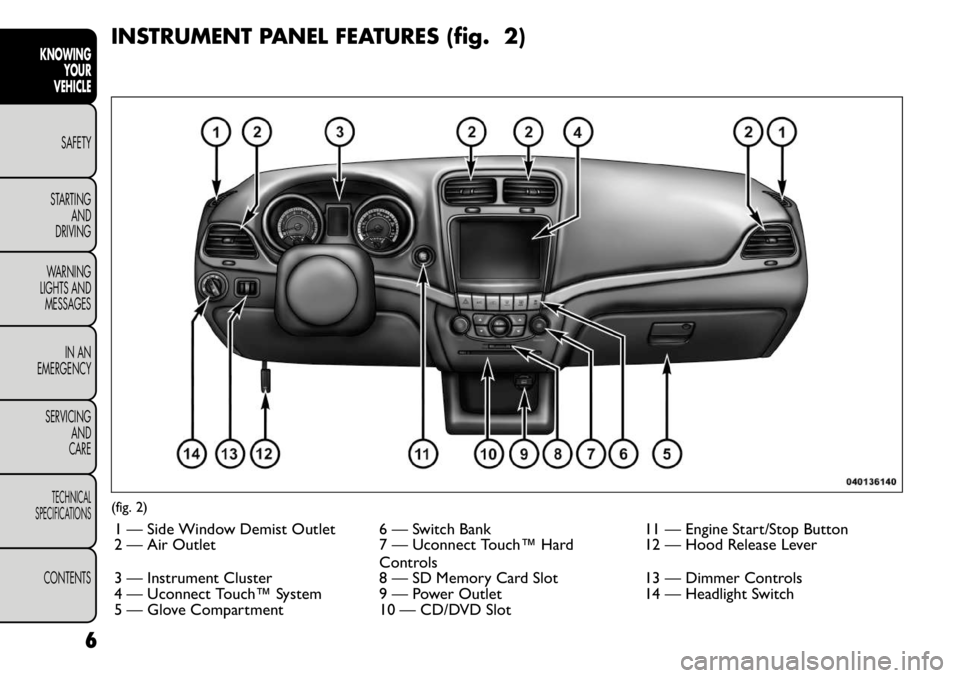
INSTRUMENT PANEL FEATURES (fig. 2)(fig. 2)1 — Side Window Demist Outlet 6 — Switch Bank 11 — Engine Start/Stop Button
2 — Air Outlet 7 — Uconnect Touch™ Hard Controls12 — Hood Release Lever
3 — Instrument Cluster 8 — SD Memory Card Slot 13 — Dimmer Controls
4 — Uconnect Touch™ System 9 — Power Outlet 14 — Headlight Switch
5 — Glove Compartment 10 — CD/DVD Slot
6
KNOWING YOUR
VEHICLE
SAFETY
STARTING AND
DRIVING
WARNING
LIGHTS AND
MESSAGES
IN AN
EMERGENCY
SERVICING AND
CARETECHNICAL
SPECIFICATIONSCONTENTS
Page 32 of 267
Uconnect TOUCH™ SETTINGS
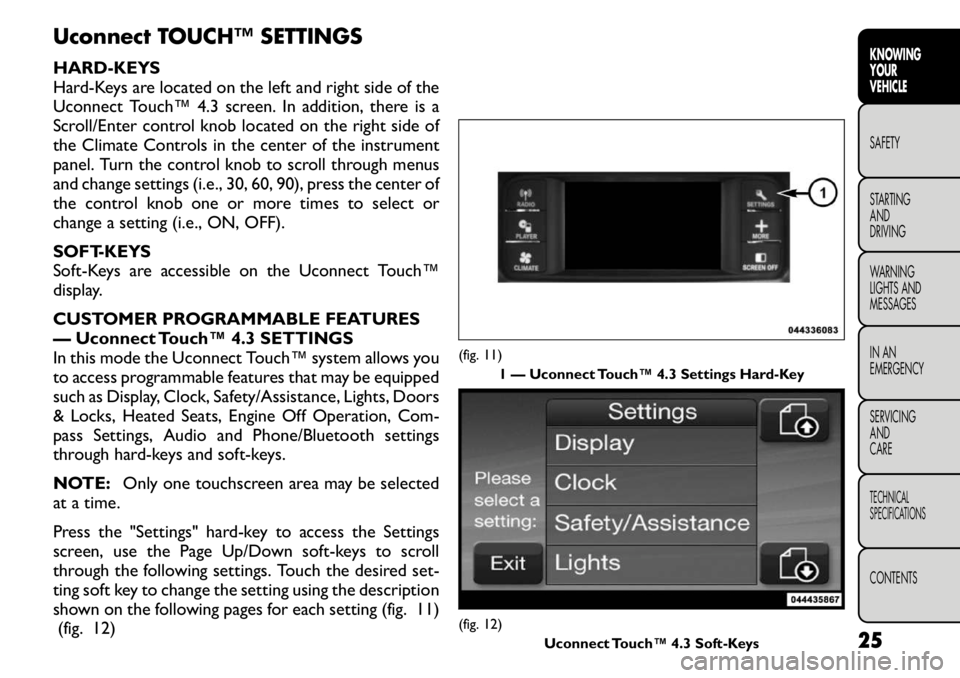
HARD-KEYS
Hard-Keys are located on the left and right side of the
Uconnect Touch™ 4.3 screen. In addition, there is a
Scroll/Enter control knob located on the right side of
the Climate Controls in the center of the instrument
panel. Turn the control knob to scroll through menus
and change settings (i.e., 30, 60, 90), press the center of
the control knob one or more times to select or
change a setting (i.e., ON, OFF).
SOFT-KEYS
Soft-Keys are accessible on the Uconnect Touch™
display.
CUSTOMER PROGRAMMABLE FEATURES
— Uconnect Touch™ 4.3 SETTINGS
In this mode the Uconnect Touch™ system allows you
to access programmable features that may be equipped
such as Display, Clock, Safety/Assistance, Lights, Doors
& Locks, Heated Seats, Engine Off Operation, Com-
pass Settings, Audio and Phone/Bluetooth settings
through hard-keys and soft-keys.
NOTE:Only one touchscreen area may be selected
at a time.
Press the "Settings" hard-key to access the Settings
screen, use the Page Up/Down soft-keys to scroll
through the following settings. Touch the desired set-
ting soft key to change the setting using the description
shown on the following pages for each setting (fig. 11) (fig. 12)
(fig. 11)
1 — Uconnect Touch™ 4.3 Settings Hard-Key(fig. 12) Uconnect Touch™ 4.3 Soft-Keys 25
KNOWING
YOURVEHICLESAFETY
STARTING ANDDRIVING
WARNING
LIGHTS AND
MESSAGES
IN AN
EMERGENCY
SERVICING AND
CARETECHNICAL
SPECIFICATIONSCONTENTS
Page 37 of 267
press the 0 seconds, 45 seconds, 5 minutes or 10 min-
utes soft-key followed by pressing the arrow back
soft-key.
Compass Settings
Variance
Press the Variance soft-key to change this display.
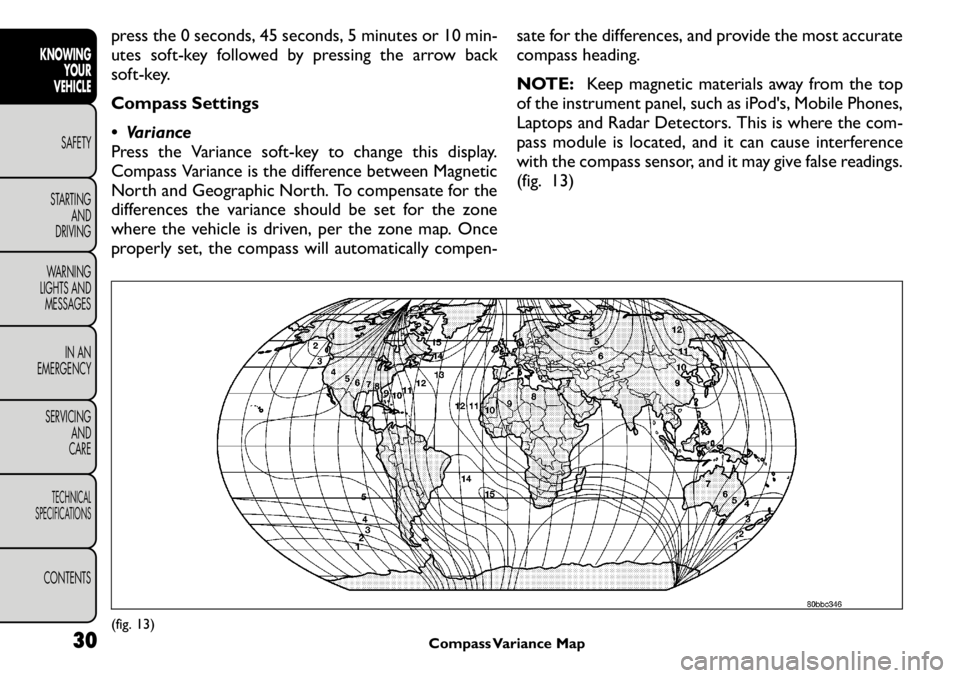
Compass Variance is the difference between Magnetic
North and Geographic North. To compensate for the
differences the variance should be set for the zone
where the vehicle is driven, per the zone map. Once
properly set, the compass will automatically compen-sate for the differences, and provide the most accurate
compass heading.
NOTE:
Keep magnetic materials away from the top
of the instrument panel, such as iPod's, Mobile Phones,
Laptops and Radar Detectors. This is where the com-
pass module is located, and it can cause interference
with the compass sensor, and it may give false readings.
(fig. 13)(fig. 13) Compass Variance Map
30
KNOWING
YOUR
VEHICLE
SAFETY
STARTING AND
DRIVING
WARNING
LIGHTS AND
MESSAGES
IN AN
EMERGENCY
SERVICING AND
CARETECHNICAL
SPECIFICATIONSCONTENTS
Page 43 of 267
Engine Off Options
Easy Exit Seat
This feature provides automatic driver seat positioning
to enhance driver mobility when entering and exiting
the vehicle. To make your selection, press the Easy Exit
Seats soft-key, select On or Off followed by pressing
the arrow back soft-key.
Engine Off Power Delay
When this feature is selected, the power window
switches, radio, Uconnect™ phone system (if
equipped), DVD video system (if equipped), power
sunroof (if equipped), and power outlets will remain
active for up to 10 minutes after the ignition is cycled
OFF. Opening either front vehicle door will cancel this
feature. To change the Engine Off Power Delay status
press the 0 seconds, 45 seconds, 5 minutes or 10 min-
utes soft-key followed by pressing the arrow back
soft-key.
Headlight Off Delay
When this feature is selected, the driver can choose to
have the headlights remain on for 0, 30, 60, or 90 sec-
onds when exiting the vehicle. To change the Headlight
Off Delay status press the 0, 30, 60 or 90 soft-key
followed by pressing the arrow back soft-key.Compass Settings
Variance
Compass Variance is the difference between Magnetic
North and Geographic North. To compensate for the
differences the variance should be set for the zone
where the vehicle is driven, per the zone map. Once
properly set, the compass will automatically compen-
sate for the differences, and provide the most accurate
compass heading.
NOTE:
Keep magnetic materials away from the top
of the instrument panel, such as iPod's, Mobile Phones,
Laptops and Radar Detectors. This is where the com-
pass module is located, and it can cause interference
with the compass sensor, and it may give false readings.
(fig. 15)
36
KNOWING YOUR
VEHICLE
SAFETY
STARTING AND
DRIVING
WARNING
LIGHTS AND
MESSAGES
IN AN
EMERGENCY
SERVICING AND
CARETECHNICAL
SPECIFICATIONSCONTENTS
Page 50 of 267
WARNING!
Adjusting a seat while the vehicle is
moving is dangerous. The sudden move-
ment of the seat could cause you to lose control.
The seat belt might not be adjusted properly and
you could be injured. Adjust the seat only while
the vehicle is parked.
Do not ride with the seatback reclined so that
the shoulder belt is no longer resting against your
chest . In a collision you could slide under the seat
belt and be seriously or even fatally injured. Use
the recliner only when the vehicle is parked. DRIVER'S SEAT HEIGHT ADJUSTMENT —
IF EQUIPPED
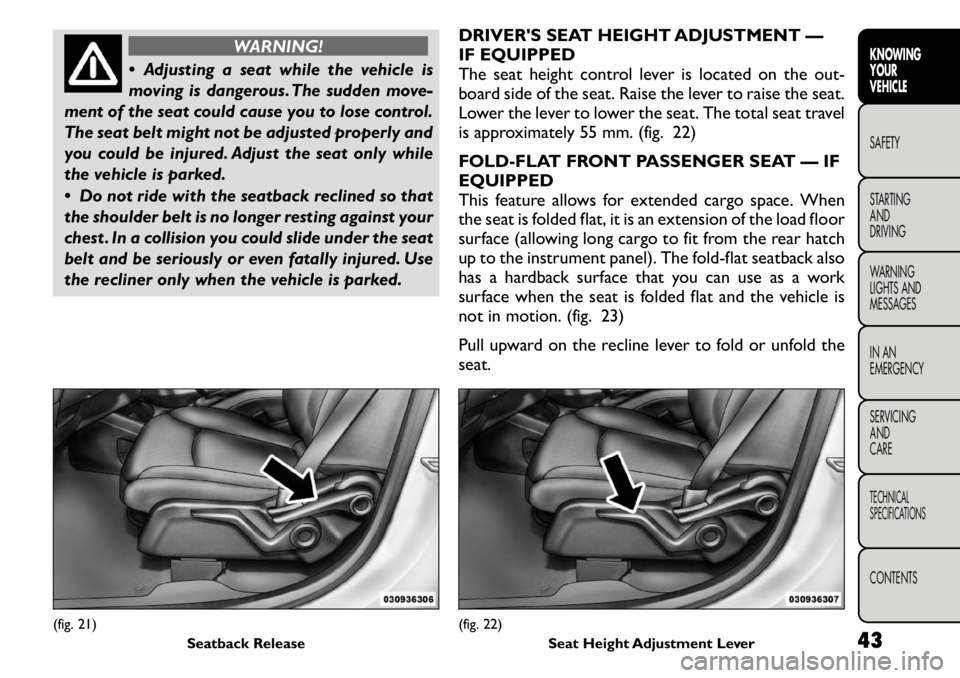
The seat height control lever is located on the out-
board side of the seat. Raise the lever to raise the seat.
Lower the lever to lower the seat. The total seat travel
is approximately 55 mm. (fig. 22)
FOLD-FLAT FRONT PASSENGER SEAT — IF EQUIPPED
This feature allows for extended cargo space. When
the seat is folded flat, it is an extension of the load floor
surface (allowing long cargo to fit from the rear hatch
up to the instrument panel). The fold-flat seatback also
has a hardback surface that you can use as a work
surface when the seat is folded flat and the vehicle is
not in motion. (fig. 23)
Pull upward on the recline lever to fold or unfold the seat.
(fig. 21)
Seatback Release
(fig. 22)Seat Height Adjustment Lever 43
KNOWING
YOURVEHICLESAFETY
STARTING ANDDRIVING
WARNING
LIGHTS AND
MESSAGES
IN AN
EMERGENCY
SERVICING AND
CARETECHNICAL
SPECIFICATIONSCONTENTS
Page 63 of 267
CLIMATE CONTROLS
GENERAL OVERVIEW
The air conditioning and heating system is designed to
make you comfortable in all types of weather. This
system can be operated through either the Automatic
Climate Controls on the instrument panel or through
the Uconnect Touch™ system display.
When the Uconnect Touch™ system is in different
modes (Radio, Player, Settings, More, etc.) the driver
and passenger temperature settings will be indicated at
the top of the display.
Hard-Keys
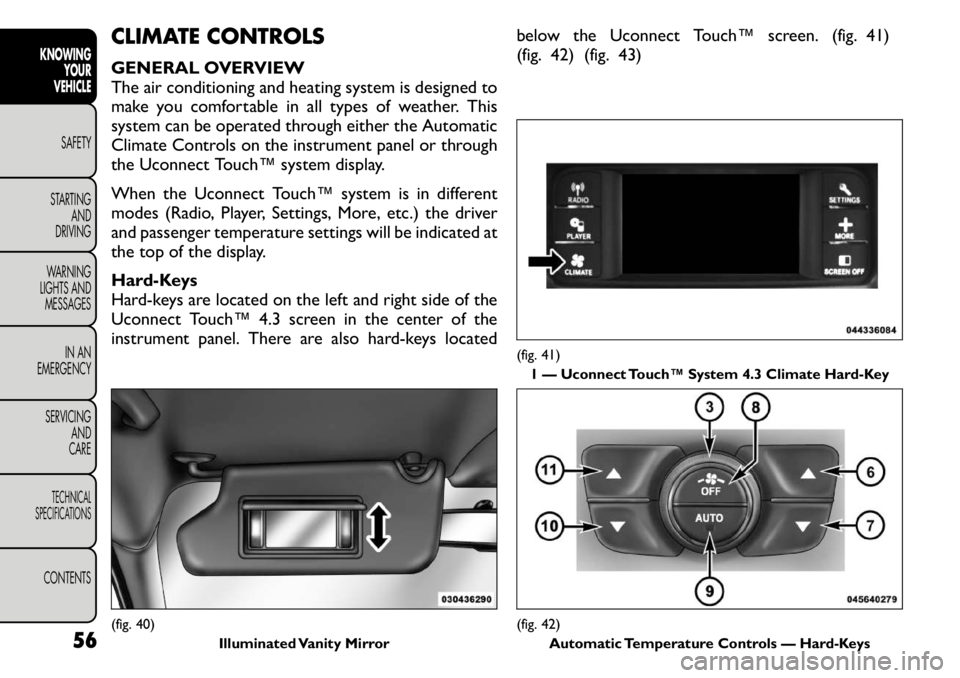
Hard-keys are located on the left and right side of the
Uconnect Touch™ 4.3 screen in the center of the
instrument panel. There are also hard-keys locatedbelow the Uconnect Touch™ screen. (fig. 41)
(fig. 42) (fig. 43)(fig. 40)
Illuminated Vanity Mirror
(fig. 41)
1 — Uconnect Touch™ System 4.3 Climate Hard-Key(fig. 42) Automatic Temperature Controls — Hard-Keys
56
KNOWING
YOUR
VEHICLE
SAFETY
STARTING AND
DRIVING
WARNING
LIGHTS AND
MESSAGES
IN AN
EMERGENCY
SERVICING AND
CARETECHNICAL
SPECIFICATIONSCONTENTS
Page 66 of 267
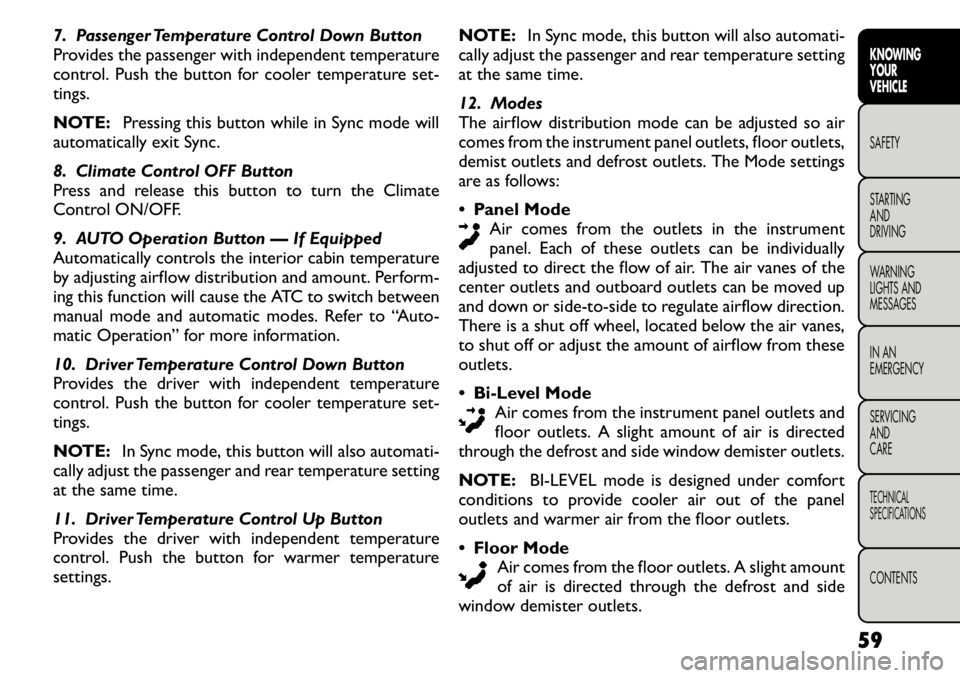
7. Passenger Temperature Control Down Button
Provides the passenger with independent temperature
control. Push the button for cooler temperature set-tings.
NOTE:Pressing this button while in Sync mode will
automatically exit Sync.
8. Climate Control OFF Button
Press and release this button to turn the Climate
Control ON/OFF.
9. AUTO Operation Button — If Equipped
Automatically controls the interior cabin temperature
by adjusting airflow distribution and amount. Perform-
ing this function will cause the ATC to switch between
manual mode and automatic modes. Refer to “Auto-
matic Operation” for more information.
10. Driver Temperature Control Down Button
Provides the driver with independent temperature
control. Push the button for cooler temperature set-tings.
NOTE: In Sync mode, this button will also automati-
cally adjust the passenger and rear temperature setting
at the same time.
11. Driver Temperature Control Up Button
Provides the driver with independent temperature
control. Push the button for warmer temperaturesettings. NOTE:
In Sync mode, this button will also automati-
cally adjust the passenger and rear temperature setting
at the same time.
12. Modes
The airflow distribution mode can be adjusted so air
comes from the instrument panel outlets, floor outlets,
demist outlets and defrost outlets. The Mode settings
are as follows: Panel Mode
Air comes from the outlets in the instrument
panel. Each of these outlets can be individually
adjusted to direct the flow of air. The air vanes of the
center outlets and outboard outlets can be moved up
and down or side-to-side to regulate airflow direction.
There is a shut off wheel, located below the air vanes,
to shut off or adjust the amount of airflow from theseoutlets. Bi-Level Mode
Air comes from the instrument panel outlets and
floor outlets. A slight amount of air is directed
through the defrost and side window demister outlets.
NOTE: BI-LEVEL mode is designed under comfort
conditions to provide cooler air out of the panel
outlets and warmer air from the floor outlets. Floor Mode
Air comes from the floor outlets. A slight amount
of air is directed through the defrost and side
window demister outlets.
59KNOWING
YOURVEHICLESAFETY
STARTING ANDDRIVING
WARNING
LIGHTS AND
MESSAGES
IN AN
EMERGENCY
SERVICING AND
CARETECHNICAL
SPECIFICATIONSCONTENTS
Page 69 of 267
REAR AUTOMATIC TEMPERATURE
CONTROL (ATC) — IF EQUIPPED
The rear ATC system has floor air outlets at the rear
right side of the 3rd Row seats and overhead outlets at
each outboard rear seating position. The system pro-
vides heated air through the floor outlets or cool,
dehumidified air through the headliner outlets.
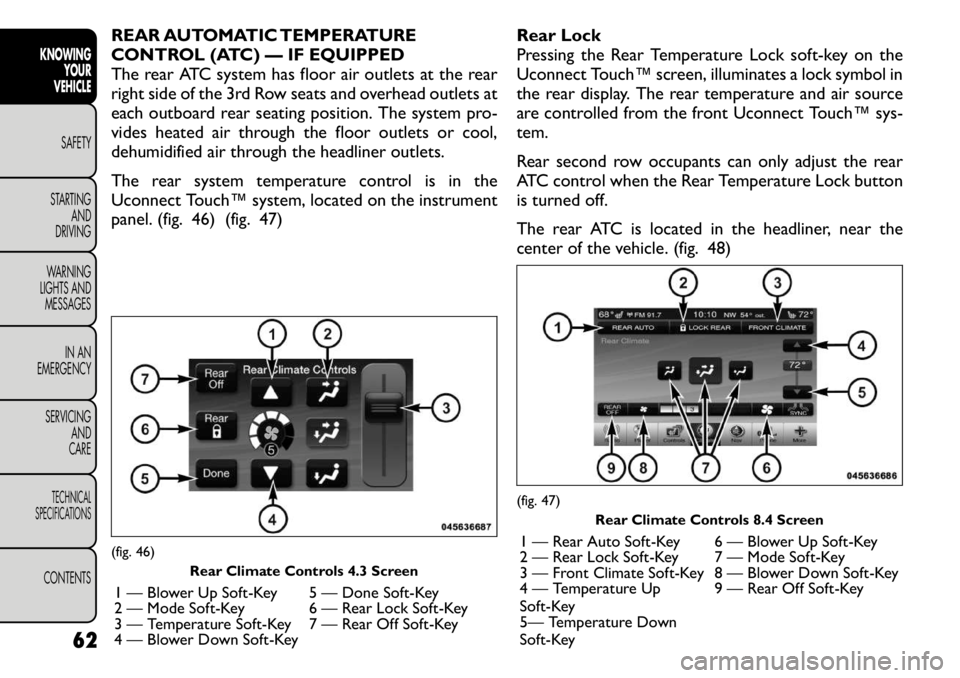
The rear system temperature control is in the
Uconnect Touch™ system, located on the instrument
panel. (fig. 46) (fig. 47)Rear Lock
Pressing the Rear Temperature Lock soft-key on the
Uconnect Touch™ screen, illuminates a lock symbol in
the rear display. The rear temperature and air source
are controlled from the front Uconnect Touch™ sys-
tem.
Rear second row occupants can only adjust the rear
ATC control when the Rear Temperature Lock button
is turned off.
The rear ATC is located in the headliner, near the
center of the vehicle. (fig. 48)(fig. 46)
Rear Climate Controls 4.3 Screen
1 — Blower Up Soft-Key 5 — Done Soft-Key
2 — Mode Soft-Key 6 — Rear Lock Soft-Key
3 — Temperature Soft-Key 7 — Rear Off Soft-Key
4 — Blower Down Soft-Key
(fig. 47) Rear Climate Controls 8.4 Screen
1 — Rear Auto Soft-Key 6 — Blower Up Soft-Key
2 — Rear Lock Soft-Key 7 — Mode Soft-Key
3 — Front Climate Soft-Key 8 — Blower Down Soft-Key
4 — Temperature Up
Soft-Key 9 — Rear Off Soft-Key
5— Temperature Down
Soft-Key
62
KNOWING
YOUR
VEHICLE
SAFETY
STARTING AND
DRIVING
WARNING
LIGHTS AND
MESSAGES
IN AN
EMERGENCY
SERVICING AND
CARETECHNICAL
SPECIFICATIONSCONTENTS
Page 73 of 267
LIGHTS
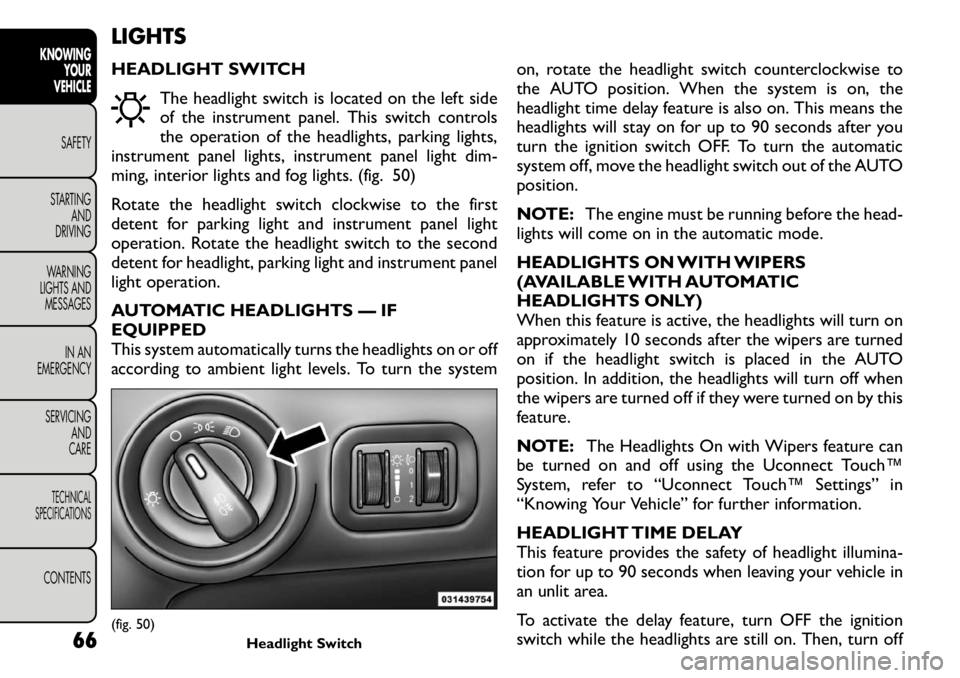
HEADLIGHT SWITCHThe headlight switch is located on the left side
of the instrument panel. This switch controls
the operation of the headlights, parking lights,
instrument panel lights, instrument panel light dim-
ming, interior lights and fog lights. (fig. 50)
Rotate the headlight switch clockwise to the first
detent for parking light and instrument panel light
operation. Rotate the headlight switch to the second
detent for headlight, parking light and instrument panel
light operation.
AUTOMATIC HEADLIGHTS — IF EQUIPPED
This system automatically turns the headlights on or off
according to ambient light levels. To turn the system on, rotate the headlight switch counterclockwise to
the AUTO position. When the system is on, the
headlight time delay feature is also on. This means the
headlights will stay on for up to 90 seconds after you
turn the ignition switch OFF. To turn the automatic
system off, move the headlight switch out of the AUTOposition.
NOTE:
The engine must be running before the head-
lights will come on in the automatic mode.
HEADLIGHTS ON WITH WIPERS
(AVAILABLE WITH AUTOMATIC
HEADLIGHTS ONLY)
When this feature is active, the headlights will turn on
approximately 10 seconds after the wipers are turned
on if the headlight switch is placed in the AUTO
position. In addition, the headlights will turn off when
the wipers are turned off if they were turned on by this
feature.
NOTE: The Headlights On with Wipers feature can
be turned on and off using the Uconnect Touch™
System, refer to “Uconnect Touch™ Settings” in
“Knowing Your Vehicle” for further information.
HEADLIGHT TIME DELAY
This feature provides the safety of headlight illumina-
tion for up to 90 seconds when leaving your vehicle in
an unlit area.
To activate the delay feature, turn OFF the ignition
switch while the headlights are still on. Then, turn off(fig. 50) Headlight Switch
66
KNOWING
YOUR
VEHICLE
SAFETY
STARTING AND
DRIVING
WARNING
LIGHTS AND
MESSAGES
IN AN
EMERGENCY
SERVICING AND
CARETECHNICAL
SPECIFICATIONSCONTENTS
Page 75 of 267
NOTE:The fog lights will operate with the low beam
headlights or parking lights on. However, selecting the
high beam headlights will turn off the fog lights.
MULTIFUNCTION LEVER
The multifunction lever controls the operation of the
turn signals, headlight beam selection and passing lights.
The multifunction lever is located on the left side of the
steering column.
TURN SIGNALS
Move the multifunction lever up or down and the
arrows on each side of the instrument cluster flash to
show proper operation of the front and rear turn signallights.
NOTE:
• If either light remains on and does not flash, or there
is a very fast flash rate, check for a defective outside
light bulb. If an indicator fails to light when the lever is
moved, it would suggest that the indicator bulb is
defective.
• A “Turn Signal On” message will appear in the EVIC
(if equipped) and a continuous chime will sound if the
vehicle is driven more than 1.6 km with either turn
signal on.
LANE CHANGE ASSIST
Tap the lever up or down once, without moving beyond
the detent, and the turn signal (right or left) will flash
three times then automatically turn off. HIGH/LOW BEAM SWITCH
Push the multifunction lever away from you to switch
the headlights to high beam. Pull the multifunction lever
toward you to switch the headlights back to low beam.
FLASH-TO-PASS
You can signal another vehicle with your headlights by
lightly pulling the multifunction lever toward you. This
will turn on the high beams headlights until the lever is
released.
INTERIOR LIGHTS
The interior lights come on when a door is opened.
To protect the battery, the interior lights will turn off
automatically 10 minutes after the ignition switch is
moved to the LOCK position. This will occur if the
interior lights were switched on manually or are on
because a door is open. This includes the glove box
light, but not the trunk light. To restore interior light
operation, either turn the ignition switch ON or cycle
the light switch.
DIMMER CONTROLS
The dimmer control is part of the headlight switch and
is located on the left side of the instrument panel.
(fig. 52)
Rotating the left dimmer control upward with the
parking lights or headlights on will increase the bright-
ness of the instrument panel lights.
68
KNOWING YOUR
VEHICLE
SAFETY
STARTING AND
DRIVING
WARNING
LIGHTS AND
MESSAGES
IN AN
EMERGENCY
SERVICING AND
CARETECHNICAL
SPECIFICATIONSCONTENTS