stop start FIAT FREEMONT 2014 1.G Workshop Manual
[x] Cancel search | Manufacturer: FIAT, Model Year: 2014, Model line: FREEMONT, Model: FIAT FREEMONT 2014 1.GPages: 388, PDF Size: 4.13 MB
Page 263 of 388
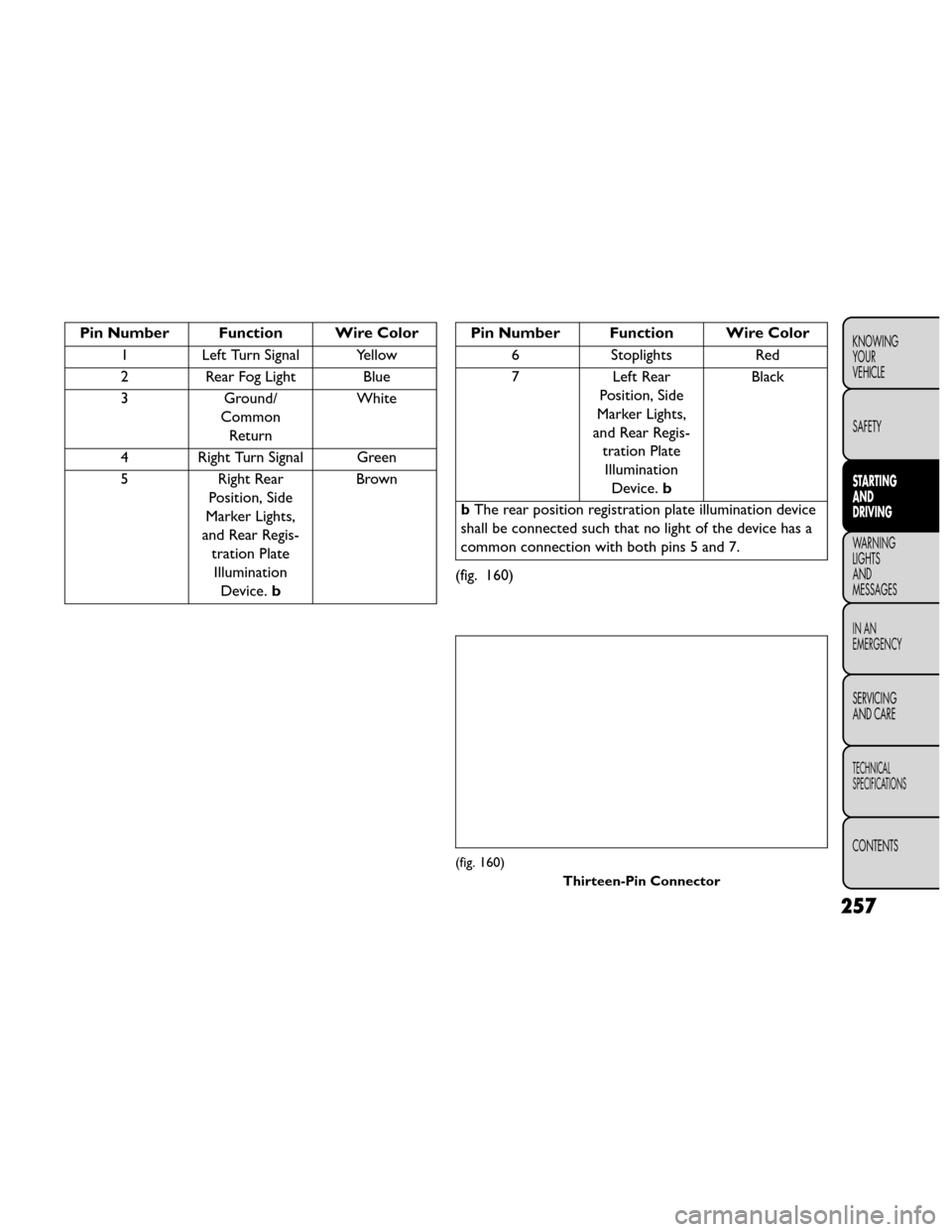
Pin Number Function Wire Color1 Left Turn Signal Yellow
2 Rear Fog Light Blue
3 Ground/
Common Return White
4 Right Turn Signal Green
5 Right Rear
Position, Side
Marker Lights,
and Rear Regis- tration PlateIllumination Device. b BrownPin Number Function Wire Color
6 Stoplights Red
7 Left Rear Position, Side
Marker Lights,
and Rear Regis- tration PlateIllumination Device. b Black
b The rear position registration plate illumination device
shall be connected such that no light of the device has a
common connection with both pins 5 and 7.
(fig. 160)
(fig. 160) Thirteen-Pin Connector
257
KNOWING
YOUR
VEHICLE
SAFETY
STARTING
AND
DRIVING
WARNING
LIGHTS
AND
MESSAGES
IN AN
EMERGENCY
SERVICING
AND CARE
TECHNICAL
SPECIFICATIONS
CONTENTS
Page 264 of 388
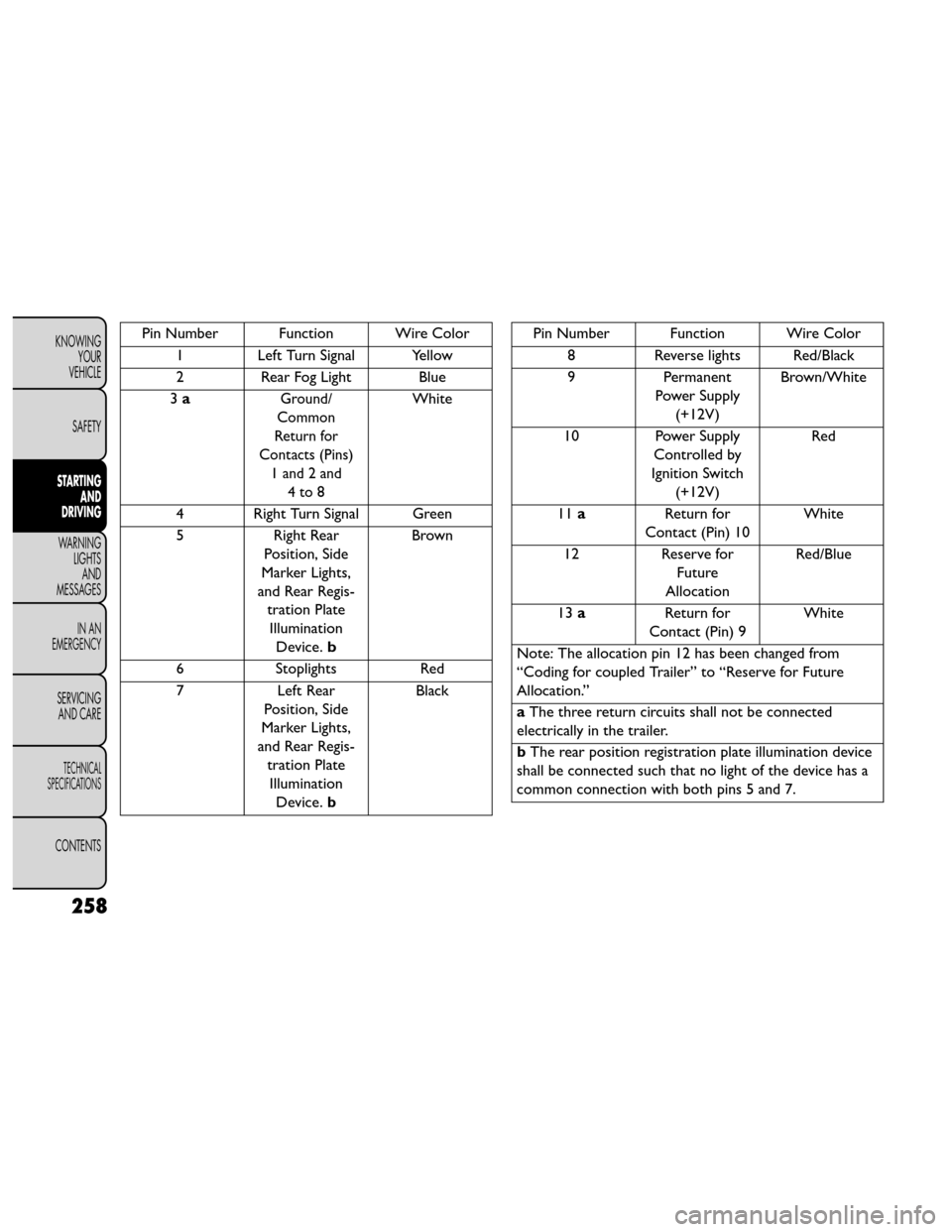
Pin Number Function Wire Color1 Left Turn Signal Yellow
2 Rear Fog Light Blue
3 a
Ground/
Common
Return for
Contacts (Pins) 1 and 2 and 4to8White
4 Right Turn Signal Green
5 Right Rear
Position, Side
Marker Lights,
and Rear Regis- tration PlateIllumination Device. b Brown
6 Stoplights Red
7 Left Rear
Position, Side
Marker Lights,
and Rear Regis- tration PlateIllumination Device. b Black
Pin Number Function Wire Color
8 Reverse lights Red/Black
9 Permanent
Power Supply (+12V) Brown/White
10 Power Supply Controlled by
Ignition Switch (+12V) Red
11 a Return for
Contact (Pin) 10 White
12 Reserve for
Future
Allocation Red/Blue
13 a Return for
Contact (Pin) 9 White
Note: The allocation pin 12 has been changed from
“Coding for coupled Trailer” to “Reserve for Future
Allocation.”
a The three return circuits shall not be connected
electrically in the trailer.
b The rear position registration plate illumination device
shall be connected such that no light of the device has a
common connection with both pins 5 and 7.
258
KNOWING YOUR
VEHICLE
SAFETY
STARTING AND
DRIVING
WARNING LIGHTSAND
MESSAGES
IN AN
EMERGENCY
SERVICING AND CARE
TECHNICAL
SPECIFICATIONS
CONTENTS
Page 265 of 388
TOWING TIPS
Before setting out on a trip, practice turning, stopping,
and backing up the trailer in an area located away from
heavy traffic.
Manual Transmission (for versions/markets,
where provided)
If using a manual transmission vehicle for trailer towing,
all starts must be in FIRST gear to avoid clutch slippage.
Automatic Transmission (for versions/
markets,where provided)
The DRIVE range can be selected when towing. How-
ever, if frequent shifting occurs while in DRIVE, use the
AutoStick® shift control to manually select a lower
gear.
NOTE:Using a lower gear while operating the vehicle
under heavy loading conditions will improve perfor-
mance and extend transmission life by reducing exces-
sive shifting and heat build up. This action will also
provide better engine braking.
If you REGULARLY tow a trailer for more than 45 min-
utes of continuous operation, then change the trans-
mission fluid and automatic transmission filter as speci-
fied for “police, taxi, fleet, or frequent trailer towing.”
Refer to the “Maintenance Schedule” for the proper
maintenance intervals. NOTE:
Check the transmission fluid level (four-speed
transmission only) before towing. The six-speed trans-
mission does not require a fluid level check before
towing. If, however, you notice fluid leakage or trans-
mission malfunction, see your authorized dealer imme-
diately for assistance.
Electronic Speed Control (for versions/
markets, where provided)
• Do not use in hilly terrain or with heavy loads.
• When using the speed control, if you experience speed drops greater than 16 km/h, disengage until
you can get back to cruising speed.
• Use speed control in flat terrain and with light loads to maximize fuel efficiency.
AutoStick®
• When using the AutoStick® shift control, select the highest gear that allows for adequate performance
and avoids frequent downshifts. For example, choose
“4” if the desired speed can be maintained. Choose
“3” or “2” if needed to maintain the desired speed.
• To prevent excess heat generation, avoid continuous driving at high RPM. Reduce vehicle speed as neces-
sary to avoid extended driving at high RPM. Return
to a higher gear or vehicle speed when grade and
road conditions allow.
259
KNOWING
YOUR
VEHICLE
SAFETY
STARTING
AND
DRIVING
WARNING
LIGHTS
AND
MESSAGES
IN AN
EMERGENCY
SERVICING
AND CARE
TECHNICAL
SPECIFICATIONS
CONTENTS
Page 266 of 388
Cooling System
To reduce potential for engine and transmission over-
heating, take the following actions:
City Driving
When stopped for short periods, shift the transmission
into NEUTRAL and increase engine idle speed.
Highway Driving
Reduce speed.
Air Conditioning
Turn off temporarily.
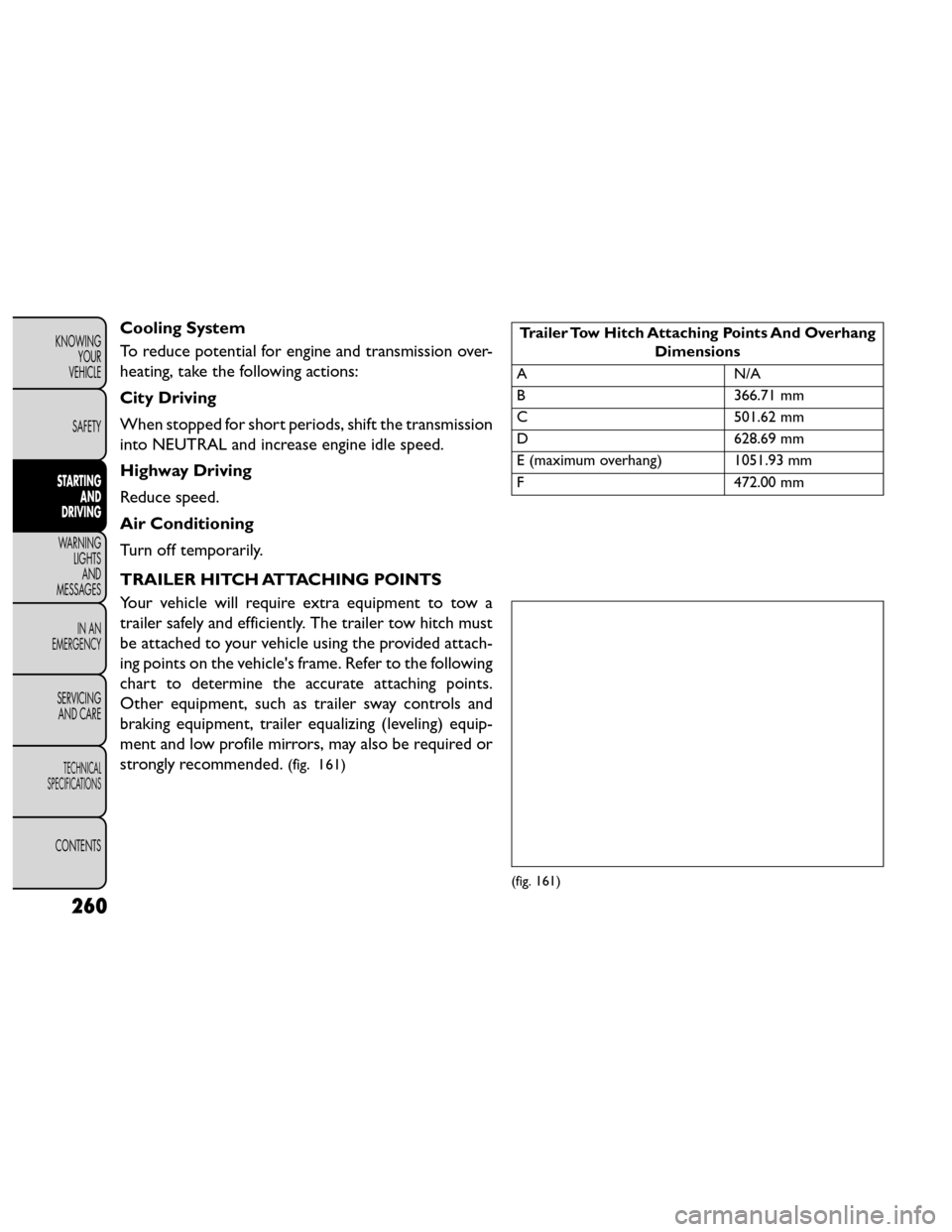
TRAILER HITCH ATTACHING POINTS
Your vehicle will require extra equipment to tow a
trailer safely and efficiently. The trailer tow hitch must
be attached to your vehicle using the provided attach-
ing points on the vehicle's frame. Refer to the following
chart to determine the accurate attaching points.
Other equipment, such as trailer sway controls and
braking equipment, trailer equalizing (leveling) equip-
ment and low profile mirrors, may also be required or
strongly recommended.
(fig. 161)
Trailer Tow Hitch Attaching Points And OverhangDimensions
AN /A
B 366.71 mm
C 501.62 mm
D 628.69 mm
E (maximum overhang) 1051.93 mm
F 472.00 mm
(fig. 161)
260
KNOWING
YOUR
VEHICLE
SAFETY
STARTING AND
DRIVING
WARNING LIGHTSAND
MESSAGES
IN AN
EMERGENCY
SERVICING AND CARE
TECHNICAL
SPECIFICATIONS
CONTENTS
Page 271 of 388
3. Electronic Stability Control (ESC) Activation/
Malfunction Indicator Light (for versions/markets,
where provided)The “ESC Activation/Malfunction Indicator
Light” in the instrument cluster will come on
when the ignition switch is turned to the
ON/RUN position. It should go out with the
engine running. If the “ESC Activation/Malfunction In-
dicator Light” comes on continuously with the engine
running, a malfunction has been detected in the ESC
system. If this light remains on after several ignition
cycles, and the vehicle has been driven several kilome-
ters at speeds greater than 48 km/h, see your autho-
rized dealer as soon as possible to have the problem
diagnosed and corrected.
NOTE:
The “ESC Off Indicator Light” and the “ESC Activation/
Malfunction Indicator Light” come on momentarily each
time the ignition switch is turned to ON/RUN.
Each time the ignition is turned to ON/RUN, the ESC
system will be ON, even if it was turned off previously.
The ESC system will make buzzing or clicking sounds
when it is active. This is normal; the sounds will stop
when ESC becomes inactive following the maneuver
that caused the ESC activation. 4. Turn Signal Indicator Light
The left or right arrow will flash in unison
with the corresponding front and rear turn
signal lights when the turn signal switch is
operated. (Refer to “Lights” in “Knowing
Your Vehicle” for further information).
NOTE:
A chime will sound if the vehicle is driven more than
1.6 km with either turn signal on.
Check for an inoperative outside light bulb if either
indicator flashes at a rapid rate.
5. High Beam Indicator This light shows that the high beam headlights
are on. Pull the multifunction lever on the left
side of the steering column toward you to switch to
low beam. (Refer to “Lights” in “Knowing Your Vehicle”
for further information).
6. Front Fog Light Indicator (for versions/markets,
where provided) This indicator will illuminate when the front fog
lights are on. (Refer to “Lights” in “Knowing
Your Vehicle” for further information).
265
KNOWING
YOUR
VEHICLE
SAFETY
STARTING
AND
DRIVING
WARNING
LIGHTS
AND
MESSAGES
IN AN
EMERGENCY
SERVICING
AND CARE
TECHNICAL
SPECIFICATIONS
CONTENTS
Page 272 of 388
7. Odometer Display / Electronic Vehicle
Information Center (EVIC) Display
Odometer
The odometer display shows the total distance the
vehicle has been driven.
Electronic Vehicle Information Center (EVIC)
Display
The Electronic Vehicle Information Center (EVIC) fea-
tures a driver-interactive display that is located in the
instrument cluster. For further information, refer to
“Electronic Vehicle Information Center (EVIC)” in
“Knowing Your Vehicle”.
8. Park/Headlight ON IndicatorThis indicator will illuminate when the park
lights or headlights are turned on. (Refer to
“Lights” in “Knowing Your Vehicle” for fur-
ther information). 9. Tire Pressure Monitoring Telltale Light
Each tire, including the spare (if provided),
should be checked monthly when cold and
inflated to the inflation pressure recom-
mended by the vehicle manufacturer on the
vehicle placard or tire inflation pressure label.
As an added safety feature, your vehicle has been
equipped with a tire pressure monitoring system
(TPMS) that illuminates a low tire pressure telltale
when one or more of your tires is significantly under-
inflated. Accordingly, when the low tire pressure tell-
tale light illuminates, you should stop and check your
tires as soon as possible, and inflate them to the proper
pressure. Driving on a significantly under-inflated tire
causes the tire to overheat and can lead to tire failure.
Under-inflation also reduces fuel efficiency and tire
tread life, and may affect the vehicle’s handling and
stopping ability.
266
KNOWING YOUR
VEHICLE
SAFETY
STARTING AND
DRIVING
WARNING LIGHTSAND
MESSAGES
IN AN
EMERGENCY
SERVICING AND CARE
TECHNICAL
SPECIFICATIONS
CONTENTS
Page 274 of 388
11. Brake Warning LightThis light monitors various brake functions,
including brake fluid level and parking brake
application. If the brake light turns on it may
indicate that the parking brake is applied, that
the brake fluid level is low, or that there is a problem
with the anti-lock brake system reservoir.
If the light remains on when the parking brake has been
disengaged, and the fluid level is at the full mark on the
master cylinder reservoir, it indicates a possible brake
hydraulic system malfunction or that a problem with
the Brake Booster has been detected by the Anti-Lock
Brake System (ABS) / Electronic Stability Program
(ESP) system. In this case, the light will remain on until
the condition has been corrected. If the problem is
related to the brake booster, the ABS pump will run
when applying the brake and a brake pedal pulsation
may be felt during each stop.
The dual brake system provides a reserve braking
capacity in the event of a failure to a portion of the
hydraulic system. A leak in either half of the dual brake
system is indicated by the Brake Warning Light, which
will turn on when the brake fluid level in the master
cylinder has dropped below a specified level.
The light will remain on until the cause is corrected. NOTE:
The light may flash momentarily during sharp
cornering maneuvers, which change fluid level condi-
tions. The vehicle should have service performed, and
the brake fluid level checked.
If brake failure is indicated, immediate repair is neces-
sary.
WARNING!
Driving a vehicle with the red brake light
on is dan gerous
. Part of the brake sys-
tem may have failed. It will take longer to stop
the vehicle. You could have a collision. Have the
vehicle checked immediately.
Vehicles equipped with the Anti-Lock Brake System
(ABS), are also equipped with Electronic Brake Force
Distribution (EBD). In the event of an EBD failure, the
Brake Warning Light will turn on along with the ABS
Light. Immediate repair to the ABS system is required.
Operation of the Brake Warning Light can be checked
by turning the ignition switch from the OFF position to
the ON/RUN position. The light should illuminate for
approximately two seconds. The light should then turn
off unless the parking brake is applied or a brake fault is
detected. If the light does not illuminate, have the light
inspected by an authorized dealer.
268
KNOWING YOUR
VEHICLE
SAFETY
STARTING AND
DRIVING
WARNING LIGHTSAND
MESSAGES
IN AN
EMERGENCY
SERVICING AND CARE
TECHNICAL
SPECIFICATIONS
CONTENTS
Page 292 of 388
avoid injecting sealant into them. The TIREFIT Seal-
ant is only intended to seal punctures less than 6 mm
diameter in the tread of your vehicle.
• Do not lift or carry the TIREFIT kit by the hoses.
WARNING!
• Do not attempt to seal a tire on the
side of
the vehicle close to traffic . Pull
far enough off the road to avoid the danger of
being hit when using the TIREFIT kit .
• Do not use TIREFIT or drive the vehicle under
the following circumstances:
–If the puncture in the tire tread is approxi-
mately6mmorlarger.
– If the tire has any sidewall damage.
– If the tire has any damage from driving with
extremely low tire pressure.
– If the tire has any damage from driving on a
flat tire.
– If the wheel has any damage.
– If you are unsure of the condition of the tire or
the wheel.
• Keep TIREFIT away from open flame or heat
source.
(Continued)(Continued)
• A loose TIREFIT kit thrown forward in a colli-
sion or hard stop could endanger the occupants
of the vehicle. Always stow the TIREFIT kit in the
place provided. Failure to follow these warnings
can result in injuries that are serious or fatal to
you, your passengers, and others around you.
• Take care not to allow the contents of TIREFIT
to come in contact with hair, eyes, or clothing.
TIREFIT is harmful if inhaled, swallowed, or ab-
sorbed through the skin: It causes skin, eye, and
respiratory irritation. Flush immediately with
plenty of water if there is any contact with eyes
or skin. Change clothing as soon as possible, if
there is any contact with clothing.
• TIREFIT Sealant solution contains latex. In case
of allergic reaction or rash, consult a physician
immediately. Keep TIREFIT out of reach of chil-
dren. If swallowed, rinse mouth immediately with
plenty of water and drink plenty of water. Do not
induce vomiting! Consult a physician immedi-
ately.
• Use the gloves provided in the Accessor y Stor-
age Compartment (located on the bottom of the
air pump) when operating the TIREFIT kit .
286
KNOWING YOUR
VEHICLE
SAFETY
STARTING AND
DRIVING
WARNING LIGHTSAND
MESSAGES
IN AN
EMERGENCY
SERVICING AND CARE
TECHNICAL
SPECIFICATIONS
CONTENTS
Page 293 of 388
SEALING A TIRE WITH TIREFIT
(A) Whenever You Stop To Use TIREFIT:
1. Pull over to a safe location and turn on the vehicle’sHazard Warning flashers.
2. Verify that the valve stem (on the wheel with the deflated tire) is in a position that is near to the
ground. This will allow the TIREFIT Hoses (6) and
(7) to reach the valve stem and keep the TIREFIT kit
flat on the ground. This will provide the best posi-
tioning of the kit when injecting the sealant into the
deflated tire and running the air pump. Move the
vehicle as necessary to place the valve stem in this
position before proceeding.
3. Place the transmission in PARK (auto transmission) or in Gear (manual transmission) and turn Off the
ignition.
4. Set the parking brake.
(B) Setting Up To Use TIREFIT:
1. Push in the Mode Select Knob (5) and turn to the Sealant Mode position.
2. Uncoil the Sealant Hose (6) and then remove the cap from the fitting at the end of the hose.
3. Place the TIREFIT kit flat on the ground next to the deflated tire. 4. Remove the cap from the valve stem and then screw
the fitting at the end of the Sealant Hose (6) onto
the valve stem.
5. Uncoil the Power Plug (8) and insert the plug into the vehicle’s 12 Volt power outlet.
NOTE: Do not remove foreign objects (e.g., screws or
nails) from the tire.
(C) Injecting TIREFIT Sealant Into The
Deflated Tire:
• Always start the engine before turning ON the TIREFIT kit.
NOTE: Manual transmission vehicles must have the
parking brake engaged and the shift lever in NEUTRAL.
• After pressing the Power Button (4), the sealant (white fluid) will flow from the Sealant Bottle (1)
through the Sealant Hose (6) and into the tire.
NOTE: Sealant may leak out through the puncture in
the tire.
If the sealant (white fluid) does not flow within
0 – 10 seconds through the Sealant Hose (6):
1. Press the Power Button (4) to turn Off the TIREFIT kit. Disconnect the Sealant Hose (6) from the valve
stem. Make sure the valve stem is free of debris.
Reconnect the Sealant Hose (6) to the valve stem.
287
KNOWING
YOUR
VEHICLE
SAFETY
STARTING
AND
DRIVING
WARNING
LIGHTS
AND
MESSAGES
IN AN
EMERGENCY
SERVICING
AND CARE
TECHNICAL
SPECIFICATIONS
CONTENTS
Page 295 of 388
•The metal end fitting from Power Plug
(8) may get hot after use, so it should be
handled carefully.
• Failure to reinstall the cap on the fitting at the
end of the Sealant Hose (6) can result in sealant
contacting your skin, clothing, and the vehicle’s
interior. It can also result in sealant contacting
internalTIREFIT kit components which may cause
permanent damage to the kit .
(D) Drive Vehicle:
Immediately after injecting sealant and inflating the tire,
drive the vehicle 8 km or 10 minutes to ensure distri-
bution of the TIREFIT Sealant within the tire. Do not
exceed 88 km/h.
WARNING!
TIREFIT is not a permanent flat tire
repair. Hav
e the tire inspected and re-
paired or replaced after using TIREFIT. Do not
exceed 88 km/h until the tire is repaired or
replaced. Failure to follow this warning can result
in injuries that are serious or fatal to you, your
passengers, and others around you. (E) After Driving:
Pull over to a safe location. Refer to “Whenever You
Stop to Use TIREFIT” before continuing.
1. Turn the Mode Select Knob (5) to the Air Mode
position.
2. Uncoil the power plug and insert the plug into the vehicle's 12 Volt power outlet.
3. Uncoil the Air Pump Hose (7) (black in color) and screw the fitting at the end of hose (7) onto the
valve stem.
4. Check the pressure in the tire by reading the Pres- sure Gauge (3).
If tire pressure is less than 1.3 Bar, the tire is too
badly damaged. Do not attempt to drive the vehicle
further. Call for assistance.
If the tire pressure is 1.3 bar or higher:
1. Press the Power Button (4) to turn on TIREFIT and inflate the tire to the pressure indicated on the tire
and loading information label on the driver-side
door opening.
NOTE: If the tire becomes over-inflated, press the
Deflation Button to reduce the tire pressure to the
recommended inflation pressure before continuing.
289
KNOWING
YOUR
VEHICLE
SAFETY
STARTING
AND
DRIVING
WARNING
LIGHTS
AND
MESSAGES
IN AN
EMERGENCY
SERVICING
AND CARE
TECHNICAL
SPECIFICATIONS
CONTENTS