power FIAT FREEMONT 2015 1.G Owner's Manual
[x] Cancel search | Manufacturer: FIAT, Model Year: 2015, Model line: FREEMONT, Model: FIAT FREEMONT 2015 1.GPages: 412, PDF Size: 3.37 MB
Page 125 of 412
minimized. If the buffeting occurs with the rear win-
dows open, open the front and rear windows together
to minimize the buffeting. If the buffeting occurs with
the sunroof open, adjust the sunroof opening to mini-
mize the buffeting or open any window.
SUNROOF MAINTENANCE
Use only a nonabrasive cleaner and a soft cloth to clean
the glass panel.
IGNITION OFF OPERATION
The power sunroof switch will remain active for up to
10 minutes after the ignition switch is turned to the
LOCK position. Opening either front door will cancel
this feature.
NOTE:The delay time is programmable using the
Uconnect® system. Refer to “Uconnect® Settings” for
further information.DOOR LOCKS
MANUAL DOOR LOCKS
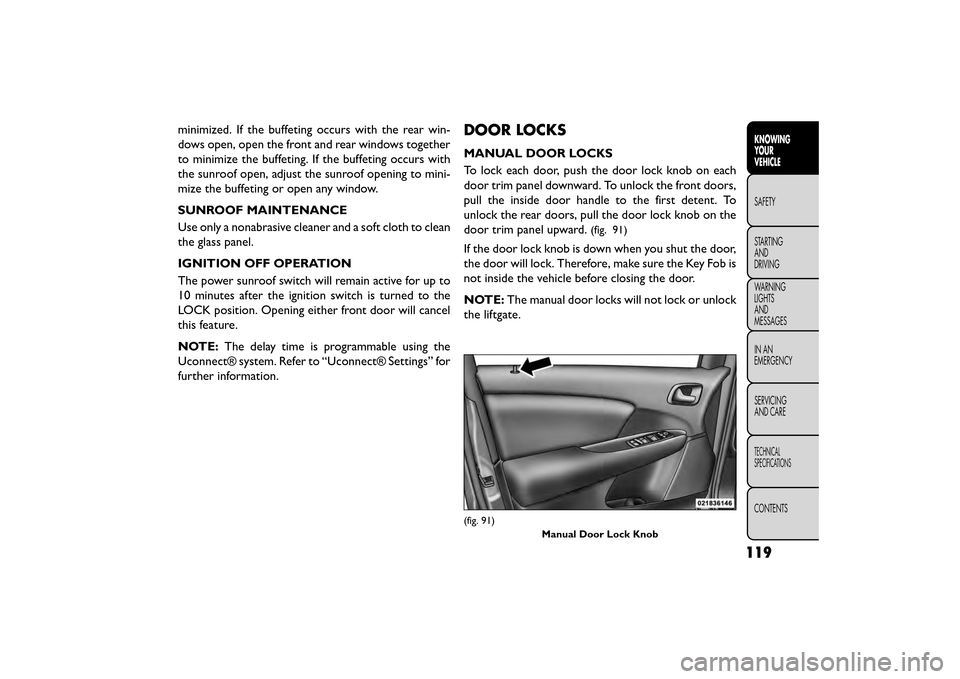
To lock each door, push the door lock knob on each
door trim panel downward. To unlock the front doors,
pull the inside door handle to the first detent. To
unlock the rear doors, pull the door lock knob on the
door trim panel upward.
(fig. 91)
If the door lock knob is down when you shut the door,
the door will lock. Therefore, make sure the Key Fob is
not inside the vehicle before closing the door.
NOTE: The manual door locks will not lock or unlock
the liftgate.
(fig. 91)
Manual Door Lock Knob
119
KNOWING
YOUR
VEHICLE
SAFETY
STAR
TING
AND
DRIVING
WARNING
LIGHTS
AND
MESSAGES
IN AN
EMERGENCY
SERVICING
AND CARE
TECHNICAL
SPECIFICATIONS
CONTENTS
Page 126 of 412
WARNING!
• For personal security and safety in the
e v
ent of a collision, lock the vehicle
doors before you drive as well as when you park
and leave the vehicle.
• When leaving the vehicle, always remove the
Key Fob from the vehicle and lock your vehicle.
Unsupervised use of vehicle equipment may
cause severe personal injuries or death.
• Never leave children alone in a vehicle, or with
access to an unlocked vehicle. Allowing children
to be in a vehicle unattended is dangerous for a
number of reasons. A child or others could be
seriously or fatally injured. Children should be
warned not to touch the parking brake, brake
pedal or the transmission gear selector.
• Do not leave the Key Fob in or near the vehicle,
or in a location accessible to children, and do not
leave the ignition of a vehicle equipped with
Keyless Enter-N-Go™ in the ACC or ON/RUN
mode. A child could operate power windows,
other controls, or move the vehicle. POWER DOOR LOCKS
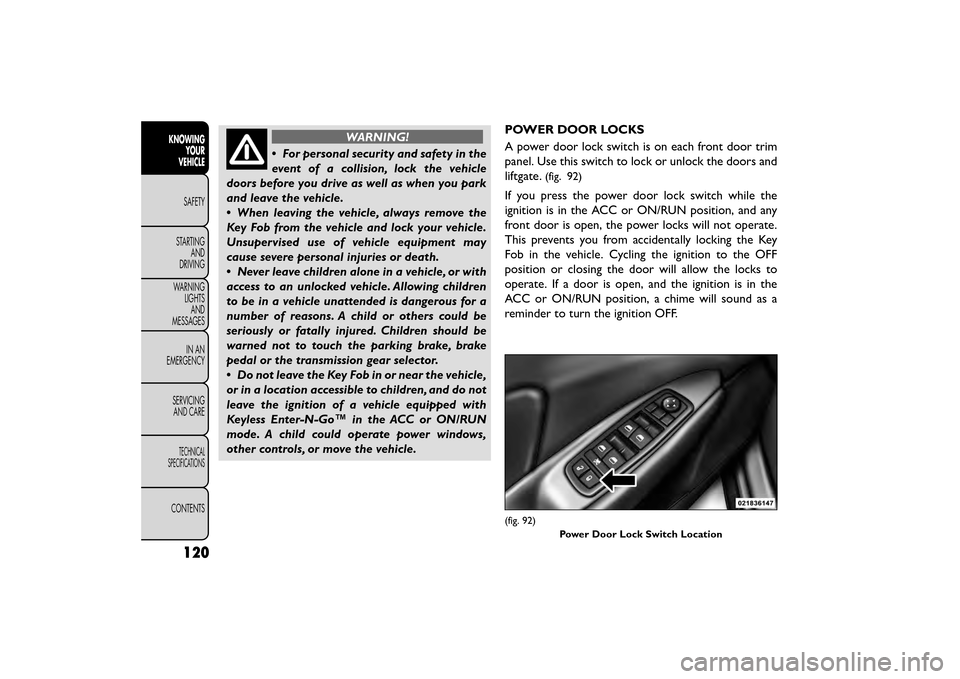
A power door lock switch is on each front door trim
panel. Use this switch to lock or unlock the doors and
liftgate.
(fig. 92)
If you press the power door lock switch while the
ignition is in the ACC or ON/RUN position, and any
front door is open, the power locks will not operate.
This prevents you from accidentally locking the Key
Fob in the vehicle. Cycling the ignition to the OFF
position or closing the door will allow the locks to
operate. If a door is open, and the ignition is in the
ACC or ON/RUN position, a chime will sound as a
reminder to turn the ignition OFF.
(fig. 92)
Power Door Lock Switch Location
120
KNOWINGYOUR
VEHICLE
SAFETY
STAR
TINGAND
DRIVING
WARNING LIGHTSAND
MESSAGES
IN AN
EMERGENCY
SERVICINGAND CARE
TECHNICAL
SPECIFICATIONS
CONTENTS
Page 127 of 412
Automatic Door Locks — (for versions/
markets, where provided)
The auto door lock feature default condition is dis-
abled. When enabled, the door locks will lock auto-
matically when the vehicle's speed exceeds 24 km/h.
The auto door lock feature can be enabled or disabled
by your authorized dealer per written request of the
customer. Please see your authorized dealer for ser-
vice.
Automatic Unlock Doors On Exit
The doors will unlock automatically on vehicles with
power door locks if:
1. The Automatic Unlock Doors On Exit feature isenabled.
2. The vehicle was in motion, then speed returned to 0 km/h and the transmission shift lever is placed in
PARK.
3. Any door is opened.
4. The doors were not previously unlocked.
To change the current setting, refer to “Uconnect®
Settings” in “Knowing Your Vehicle” for further infor-
mation. NOTE:
Use the Automatic Unlock Doors On Exit
feature in accordance with local laws.
Automatic Unlock Doors On Exit
Programming
The Automatic Unlock Doors On Exit feature can be
enabled or disabled as follows:
• For vehicles equipped with the Uconnect®, refer to “Uconnect® Settings” in “Knowing Your Vehicle” for
further information.
NOTE: Use the Automatic Unlock Doors On Exit
feature in accordance with local laws.
CHILD-PROTECTION DOOR LOCK SYSTEM
— REAR DOORS
To provide a safer environment for small children riding
in the rear seats, the rear doors are equipped with a
Child-Protection Door Lock system.
121
KNOWING
YOUR
VEHICLE
SAFETY
STAR
TING
AND
DRIVING
WARNING
LIGHTS
AND
MESSAGES
IN AN
EMERGENCY
SERVICING
AND CARE
TECHNICAL
SPECIFICATIONS
CONTENTS
Page 133 of 412
WINDOWS
POWER WINDOWS
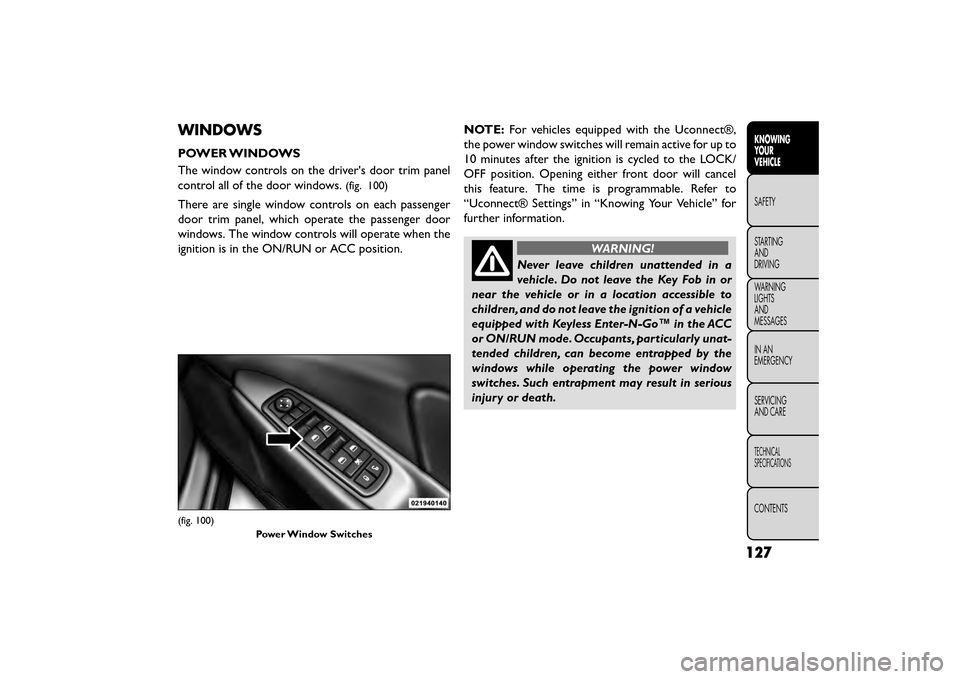
The window controls on the driver's door trim panel
control all of the door windows.
(fig. 100)
There are single window controls on each passenger
door trim panel, which operate the passenger door
windows. The window controls will operate when the
ignition is in the ON/RUN or ACC position.NOTE:
For vehicles equipped with the Uconnect®,
the power window switches will remain active for up to
10 minutes after the ignition is cycled to the LOCK/
OFF position. Opening either front door will cancel
this feature. The time is programmable. Refer to
“Uconnect® Settings” in “Knowing Your Vehicle” for
further information.
WARNING!
Never leave children unattended in a
vehi cle
. Do not leave the Key Fob in or
near the vehicle or in a location accessible to
children, and do not leave the ignition of a vehicle
equipped with Keyless Enter-N-Go™ in the ACC
or ON/RUN mode. Occupants, particularly unat-
tended children, can become entrapped by the
windows while operating the power window
switches. Such entrapment may result in serious
injury or death.
(fig. 100)
Power Window Switches
127
KNOWING
YOUR
VEHICLE
SAFETY
STAR
TING
AND
DRIVING
WARNING
LIGHTS
AND
MESSAGES
IN AN
EMERGENCY
SERVICING
AND CARE
TECHNICAL
SPECIFICATIONS
CONTENTS
Page 134 of 412
AUTO-DOWN FEATURE
The driver's power window switch has an Auto-down
feature. Press the window switch past the first detent,
release, and the window will go down automatically.
To open the window part way, press the window
switch to the first detent and release it when you want
the window to stop.
To stop the window from going all the way down during
the Auto-down operation, pull up on the switch briefly.
AUTO-UP FEATURE WITH ANTI-PINCH
PROTECTION
On some models, the driver and front passenger
power window switches have an Auto-up feature. Pull
the window switch up to the second detent, release,
and the window will go up automatically.
To stop the window from going all the way up during
the Auto-up operation, push down on the switch
briefly.
To close the window part way, pull the window switch
up to the first detent and release it when you want the
window to stop.NOTE:
• If the window runs into any obstacle during Auto-
closure, it will reverse direction and then go back
down. Remove the obstacle and use the window
switch again to close the window.
• Any impact due to rough road conditions may trigger the auto-reverse function unexpectedly during auto-
closure. If this happens, pull the switch lightly to the
first detent and hold to close window manually.
WARNING!
There is no anti-pinch protection when
th e
window is almost closed. To avoid
personal injury, be sure to clear your arms, hands,
fingers, and objects from the window path before
closing the window. Such entrapment may result
in serious injury.
RESET
It may be necessary at some point in time to reactivate
the Auto-up/Auto-down feature. To do so, perform
the following steps:
1. Pull the window switch up to close the window completely and continue to hold the switch up for
an additional two seconds after the window is
closed.
128
KNOWING YOUR
VEHICLE
SAFETY
STAR
TINGAND
DRIVING
WARNING LIGHTSAND
MESSAGES
IN AN
EMERGENCY
SERVICINGAND CARE
TECHNICAL
SPECIFICATIONS
CONTENTS
Page 136 of 412
LIFTGATE
The liftgate can be unlocked or locked pushing the
UNLOCK or LOCK button on the Remote Keyless
Entry (RKE) transmitter, the Keyless Enter-N-Go™
(Passive Entry) LOCK/UNLOCK button underneath
the left side of the accent bar, which is located on the
liftgate below the glass or by activating the power door
lock switch located on either front door trim panel.
For further information on Keyless Enter-N-Go™
(Passive Entry), refer to “Keyless Enter-N-Go™” in
“Things To Know Before Starting Your Vehicle”.
NOTE:The liftgate cannot be unlocked or locked with
the manual door lock plungers on the door trim panels
or the door lock cylinder on the driver's door.
To open the unlocked liftgate, squeeze the handle and
pull the liftgate toward you. Gas props will raise and
support the liftgate in the open position. NOTE:
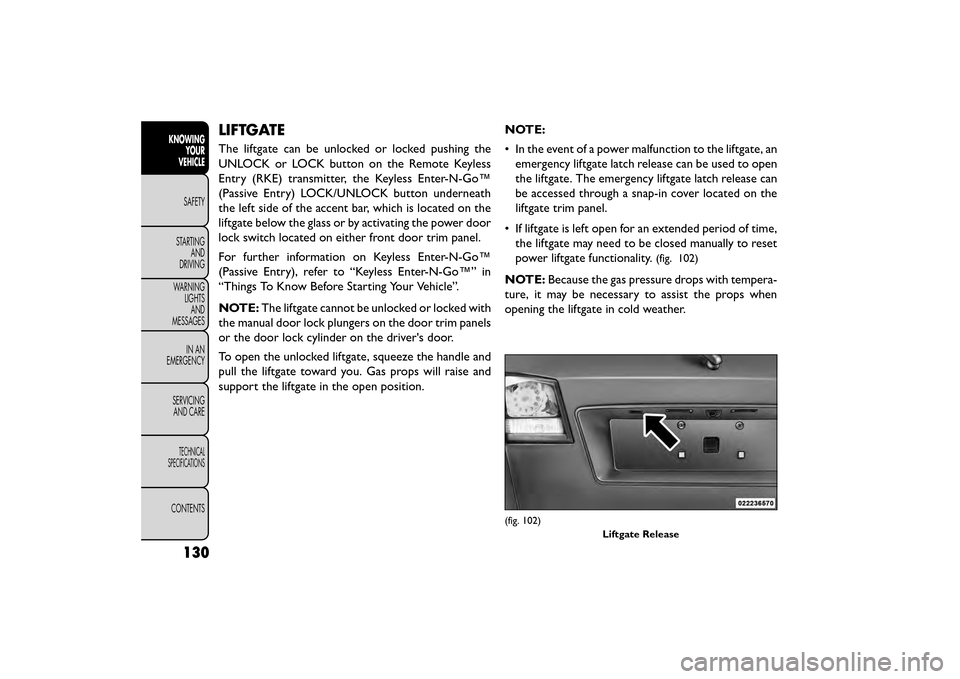
• In the event of a power malfunction to the liftgate, an
emergency liftgate latch release can be used to open
the liftgate. The emergency liftgate latch release can
be accessed through a snap-in cover located on the
liftgate trim panel.
• If liftgate is left open for an extended period of time, the liftgate may need to be closed manually to reset
power liftgate functionality.
(fig. 102)
NOTE: Because the gas pressure drops with tempera-
ture, it may be necessary to assist the props when
opening the liftgate in cold weather.
(fig. 102)
Liftgate Release
130
KNOWINGYOUR
VEHICLE
SAFETY
STAR
TINGAND
DRIVING
WARNING LIGHTSAND
MESSAGES
IN AN
EMERGENCY
SERVICINGAND CARE
TECHNICAL
SPECIFICATIONS
CONTENTS
Page 146 of 412
BRAKE SYSTEM
Your vehicle is equipped with dual hydraulic
brake systems. If either of the two hydraulic
systems loses normal capability, the remaining system
will still function. However, there will be some loss of
overall braking effectiveness. This will be evident by
increased pedal travel during application and greater
pedal force required to slow or stop the vehicle. In
addition, if the malfunction is caused by a leak in the
hydraulic system, the “Brake System Warning Light”
will turn on as the brake fluid level drops in the master
cylinder.
In the event power assist is lost for any reason (i.e.,
repeated brake applications with the engine OFF) the
brakes will still function. However, the effort required
to brake the vehicle will be much greater than that
required with the power system operating.
WARNING!
• Riding the brakes can lead to brake
f ailure
and possibly a collision. Driving
with your foot resting or riding on the brake
pedal can result in abnormally high brake tem-
peratures, excessive lining wear, and possible
brake damage.You would not have your full brak-
ing capacity in an emergency.
• Driving a vehicle with the “Brake Warning
Light” on is dangerous. A significant decrease in
braking performance or vehicle stability during
braking may occur. It will take you longer to stop
the vehicle or will make your vehicle harder to
control. You could have a collision. Have the ve-
hicle checked immediately.
140
KNOWING YOUR
VEHICLE
SAFETY
STAR
TINGAND
DRIVING
WARNING LIGHTSAND
MESSAGES
IN AN
EMERGENCY
SERVICINGAND CARE
TECHNICAL
SPECIFICATIONS
CONTENTS
Page 150 of 412
TRACTION CONTROL SYSTEM (TCS)
This system monitors the amount of wheel spin of each
of the driven wheels. If wheel spin is detected, brake
pressure is applied to the slipping wheel(s) and engine
power is reduced to provide enhanced acceleration
and stability. A feature of the TCS system, Brake Lim-
ited Differential (BLD), functions similar to a limited
slip differential and controls the wheel spin across a
driven axle. If one wheel on a driven axle is spinning
faster than the other, the system will apply the brake of
the spinning wheel. This will allow more engine torque
to be applied to the wheel that is not spinning. This
feature remains active even if TCS and ESC are in the
“Partial Off ” mode. Refer to “Electronic Stability Con-
trol (ESC)” for further information.
ELECTRONIC ROLL MITIGATION (ERM)
This system anticipates the potential for wheel lift by
monitoring the driver’s steering wheel input and the
speed of the vehicle. When ERM determines that the
rate of change of the steering wheel angle and vehicle's
speed are sufficient to potentially cause wheel lift, it
then applies the appropriate brake and may also reduce
engine power to lessen the chance that wheel lift will
occur. ERM will only intervene during very severe or
evasive driving maneuvers. ERM can only reduce the
chance of wheel lift occurring during severe or evasive
driving maneuvers. It cannot prevent wheel lift due toother factors, such as road conditions, leaving the
roadway, or striking objects or other vehicles.
WARNING!
Many factors, such as vehicle loading,
road c on
ditions, and driving conditions,
influence the chance that wheel lift or rollover
may occur. ERM cannot prevent all wheel lift or
rollovers, especially those that involve leaving the
roadway or striking objects or other vehicles.The
capabilities of an ERM-equipped vehicle must
never be exploited in a reckless or dangerous
manner, which could jeopardize the user's safety
or the safety of others.
ELECTRONIC STABILITY CONTROL (ESC)
This system enhances directional control and stability
of the vehicle under various driving conditions. ESC
corrects for over-steering and under-steering the ve-
hicle by applying the brake of the appropriate wheel.
Engine power may also be reduced to help the vehicle
maintain the desired path.
The ESC uses sensors in the vehicle to determine the
path that the driver intends to steer the vehicle and
compares it to the actual path of the vehicle. When the
actual path does not match the intended path, the ESC
144
KNOWING YOUR
VEHICLE
SAFETY
STAR
TINGAND
DRIVING
WARNING LIGHTSAND
MESSAGES
IN AN
EMERGENCY
SERVICINGAND CARE
TECHNICAL
SPECIFICATIONS
CONTENTS
Page 152 of 412
Partial Off
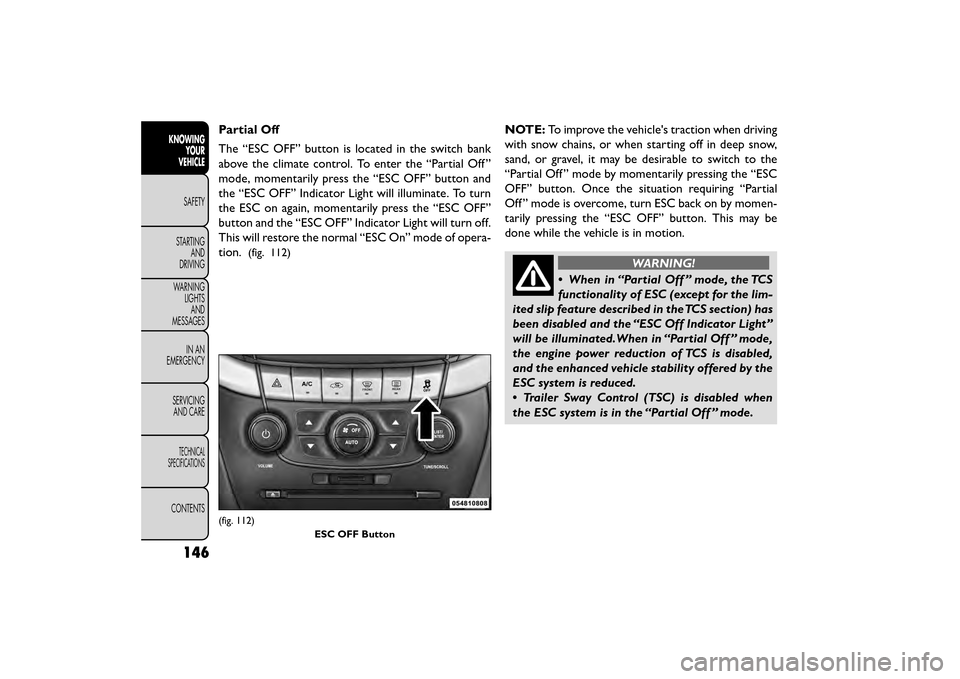
The “ESC OFF” button is located in the switch bank
above the climate control. To enter the “Partial Off ”
mode, momentarily press the “ESC OFF” button and
the “ESC OFF” Indicator Light will illuminate. To turn
the ESC on again, momentarily press the “ESC OFF”
button and the “ESC OFF” Indicator Light will turn off.
This will restore the normal “ESC On” mode of opera-
tion.
(fig. 112)
NOTE:To improve the vehicle's traction when driving
with snow chains, or when starting off in deep snow,
sand, or gravel, it may be desirable to switch to the
“Partial Off ” mode by momentarily pressing the “ESC
OFF” button. Once the situation requiring “Partial
Off ” mode is overcome, turn ESC back on by momen-
tarily pressing the “ESC OFF” button. This may be
done while the vehicle is in motion.
WARNING!
• When in “Partial Off ” mode, the TCS
fun ct
ionality of ESC (except for the lim-
ited slip feature described in the TCS section) has
been disabled and the “ESC Off Indicator Light”
will be illuminated.When in “Partial Off ” mode,
the engine power reduction of TCS is disabled,
and the enhanced vehicle stability offered by the
ESC system is reduced.
• Trailer Sway Control (TSC) is disabled when
the ESC system is in the “Partial Off ” mode.
(fig. 112)
ESC OFF Button
146
KNOWINGYOUR
VEHICLE
SAFETY
STAR
TINGAND
DRIVING
WARNING LIGHTSAND
MESSAGES
IN AN
EMERGENCY
SERVICINGAND CARE
TECHNICAL
SPECIFICATIONS
CONTENTS
Page 155 of 412
TRAILER SWAY CONTROL (TSC)
TSC uses sensors in the vehicle to recognize an exces-
sively swaying trailer. TSC activates automatically once
the excessively swaying trailer is recognized. When
TSC is functioning, the “ESC Activation/Malfunction
Indicator Light” will flash, the engine power will be
reduced, and you will feel the brake being applied to
individual wheels in an attempt to stop the trailer from
swaying.
NOTE:The TSC is disabled when the ESC system is in
the “Partial Off ” mode.
WARNING!
• TSC cannot stop all trailers from
s w
aying. Always use caution when tow-
ing a trailer and follow the tongue weight recom-
mendations. Refer to “Trailer Towing” in “Starting
and Driving” for further information.
• If TSC activates while towing a trailer, stop the
vehicle at the nearest safe location and adjust
the trailer load to eliminate the trailer sway.
• Failure to follow these warnings can result in an
accident or serious personal injury.
ONBOARD DIAGNOSTIC SYSTEM —
OBD II
Your vehicle is equipped with a sophisticated onboard
diagnostic system called OBD II. This system monitors
the performance of the emissions, engine, and auto-
matic transmission control systems. When these sys-
tems are operating properly, your vehicle will provide
excellent performance and fuel economy, as well as
engine emissions well within current government regu-
lations.
If any of these systems require service, the OBD II
system will turn on the “Malfunction Indicator Light”
(MIL). It will also store diagnostic codes and other
information to assist your service technician in making
repairs. Although your vehicle will usually be drivable
and not need towing, see your authorized dealer for
service as soon as possible.
• Prolonged driving with the MIL on
could cause further damage to the emis-
sion control system. It could also affect
fuel economy and driveability.The vehicle must be
serviced before any emissions tests can be per-
formed.
• If the MIL is flashing while the engine is running,
severe catalytic converter damage and power loss
will soon occur. Immediate service is required.
149
KNOWING
YOUR
VEHICLE
SAFETY
STAR
TING
AND
DRIVING
WARNING
LIGHTS
AND
MESSAGES
IN AN
EMERGENCY
SERVICING
AND CARE
TECHNICAL
SPECIFICATIONS
CONTENTS