battery FIAT FREEMONT 2016 1.G User Guide
[x] Cancel search | Manufacturer: FIAT, Model Year: 2016, Model line: FREEMONT, Model: FIAT FREEMONT 2016 1.GPages: 412, PDF Size: 3.36 MB
Page 121 of 412
•Many accessories that can be plugged
in draw power from the vehicle's battery,
even when not in use (i.e., cellular
phones, etc .). Eventually, if plugged in long
enough, the vehicle's battery will discharge suffi-
ciently to degrade battery life and/or prevent the
engine from starting.
• Accessories that draw higher power (i.e., cool-
ers, vacuum cleaners, lights, etc .) will degrade the
battery even more quickly. Only use these inter-
mittently and with greater caution.
• After the use of high power draw accessories, or
long periods of the vehicle not being started (with
accessories still plugged in), the vehicle must be
driven a sufficient length of time to allow the
alternator to recharge the vehicle's battery.
• Power outlets are designed for accessory plugs
only. Do not hang any type of accessory or acces-
sory bracket from the plug.CUPHOLDERS
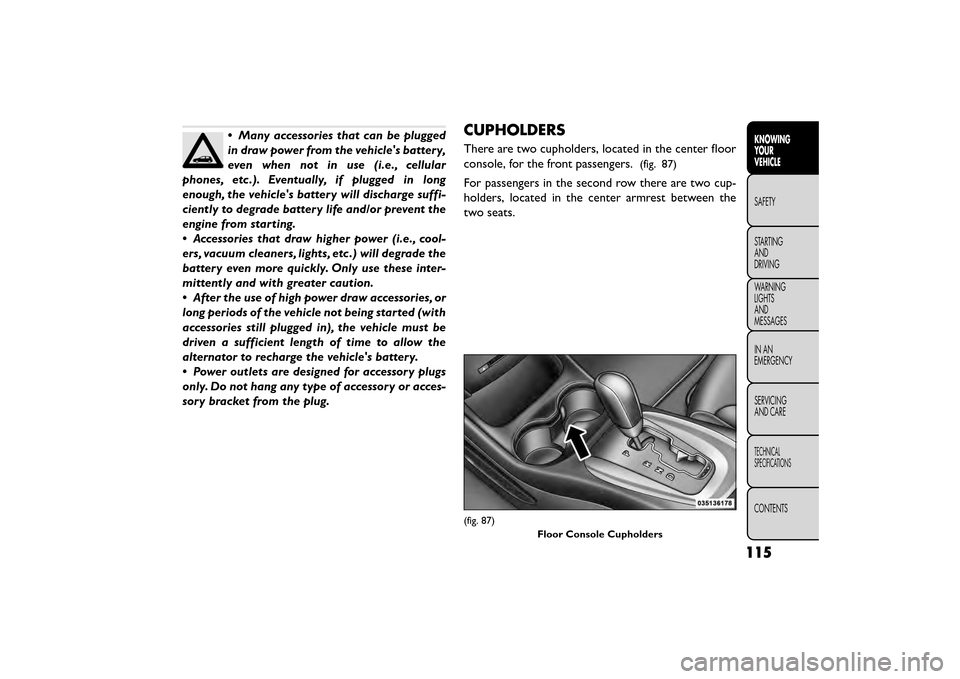
There are two cupholders, located in the center floor
console, for the front passengers.
(fig. 87)
For passengers in the second row there are two cup-
holders, located in the center armrest between the
two seats.
(fig. 87)
Floor Console Cupholders
115
KNOWING
YOUR
VEHICLE
SAFETY
STAR
TING
AND
DRIVING
WARNING
LIGHTS
AND
MESSAGES
IN AN
EMERGENCY
SERVICING
AND CARE
TECHNICAL
SPECIFICATIONS
CONTENTS
Page 132 of 412
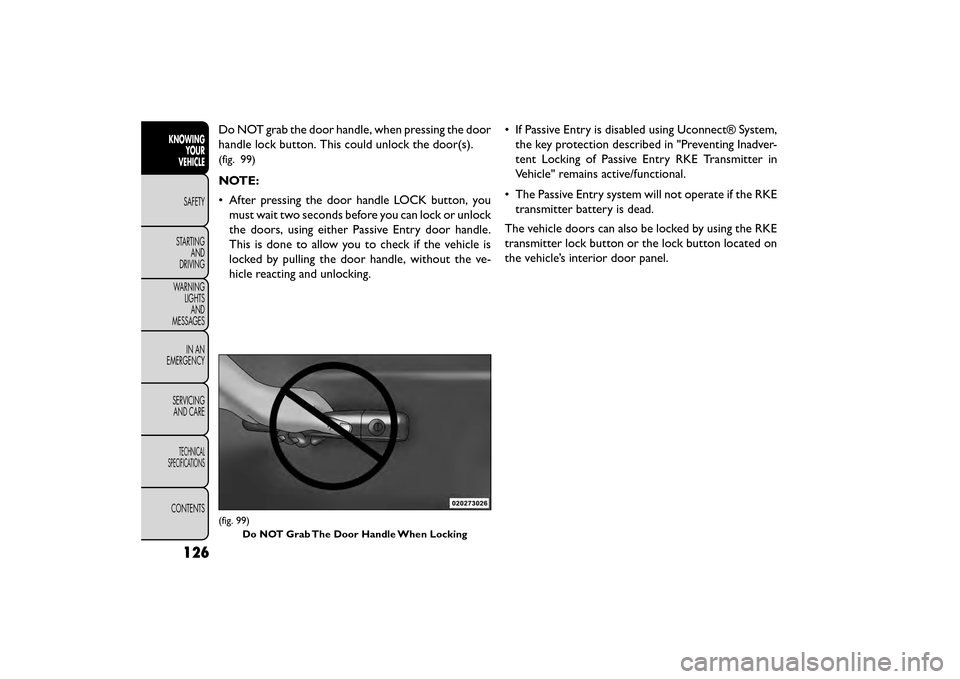
Do NOT grab the door handle, when pressing the door
handle lock button. This could unlock the door(s).
(fig. 99)
NOTE:
• After pressing the door handle LOCK button, youmust wait two seconds before you can lock or unlock
the doors, using either Passive Entry door handle.
This is done to allow you to check if the vehicle is
locked by pulling the door handle, without the ve-
hicle reacting and unlocking. • If Passive Entry is disabled using Uconnect® System,
the key protection described in "Preventing Inadver-
tent Locking of Passive Entry RKE Transmitter in
Vehicle" remains active/functional.
• The Passive Entry system will not operate if the RKE transmitter battery is dead.
The vehicle doors can also be locked by using the RKE
transmitter lock button or the lock button located on
the vehicle’s interior door panel.
(fig. 99) Do NOT Grab The Door Handle When Locking
126
KNOWING YOUR
VEHICLE
SAFETY
STAR
TINGAND
DRIVING
WARNING LIGHTSAND
MESSAGES
IN AN
EMERGENCY
SERVICINGAND CARE
TECHNICAL
SPECIFICATIONS
CONTENTS
Page 185 of 412
Replacing The Remote Control Batteries
The remote control requires two AAA batteries for
operation. To replace the batteries:
• Locate the battery compartment on the back of theremote, then slide the battery cover downward.
• Replace the batteries, making sure to orient them according to the polarity diagram shown.
• Replace the battery compartment cover.
Headphones Operation
The headphones receive two separate channels of
audio using an infrared transmitter from the video
screen.
If no audio is heard after increasing the volume control,
verify that the screen is turned on and in the down
position and that the channel is not muted and the
headphone channel selector switch is on the desired
channel. If audio is still not heard, check that fully
charged batteries are installed in the headphones.
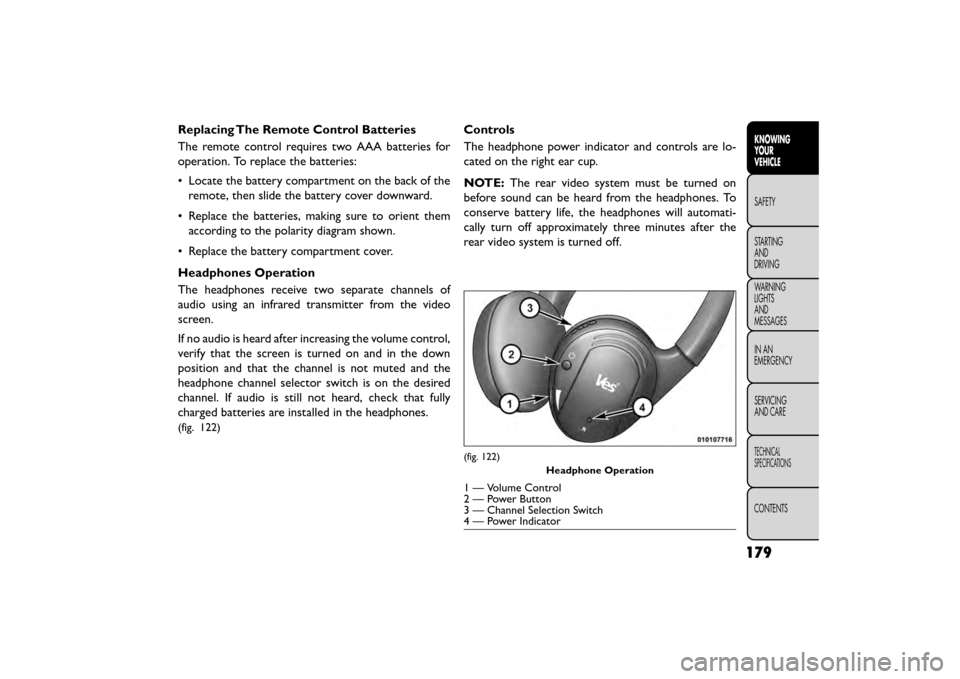
(fig. 122)
Controls
The headphone power indicator and controls are lo-
cated on the right ear cup.
NOTE: The rear video system must be turned on
before sound can be heard from the headphones. To
conserve battery life, the headphones will automati-
cally turn off approximately three minutes after the
rear video system is turned off.
(fig. 122)
Headphone Operation
1 — Volume Control
2 — Power Button
3 — Channel Selection Switch
4 — Power Indicator
179
KNOWING
YOUR
VEHICLE
SAFETY
STAR
TING
AND
DRIVING
WARNING
LIGHTS
AND
MESSAGES
IN AN
EMERGENCY
SERVICING
AND CARE
TECHNICAL
SPECIFICATIONS
CONTENTS
Page 186 of 412
Changing The Audio Mode For Headphones
1. Ensure the Remote Control channel/screen selec-tor switch is in the same position as the headphone
selector switch.
NOTE:
• When both switches are on Channel 1, the Remote is controlling Channel 1 and the headphones are
tuned to the audio of the VES™ Channel 1.
• When both switches are on Channel 2, the Remote is controlling Channel 2 and the headphones are
tuned to the audio of the VES™ Channel 2.
2. Push the MODE button on the remote control.
3. If the video screen is displaying a video source (such as a DVD Video), pushing STATUS shows the status
on a popup banner at the bottom of the screen.
Pushing the MODE button will advance to the next
mode. When the mode is in an audio only source
(such as FM), the Mode Selection menu appears on
screen.
4. When the Mode Selection menu appears on screen, use the cursor buttons on the remote control to
navigate to the available modes and push the EN-
TER button to select the new mode.
5. To cancel out of the Mode Selection menu, push the BACK button on the remote control. Replacing The Headphone Batteries
Each set of headphones requires two AAA batteries for
operation. To replace the batteries:
• Locate the battery compartment on the left ear cup
of the headphones, and then slide the battery cover
downward.
• Replace the batteries, making sure to orient them according to the polarity diagram shown.
• Replace the battery compartment cover.
Unwired® Stereo Headphone Lifetime
Limited Warranty
Who Does This Warranty Cover? This warranty
covers the initial user or purchaser ("you" or "your") of
this particular Unwired Technology LLC ("Unwired")
wireless headphone ("Product"). The warranty is not
transferable.
How Long Does The Coverage Last? This war-
ranty lasts as long as you own the Product.
What DoesThis Warranty Cover? Except as speci-
fied below, this warranty covers any Product that in
normal use is defective in workmanship or materials.
180
KNOWING YOUR
VEHICLE
SAFETY
STAR
TINGAND
DRIVING
WARNING LIGHTSAND
MESSAGES
IN AN
EMERGENCY
SERVICINGAND CARE
TECHNICAL
SPECIFICATIONS
CONTENTS
Page 208 of 412
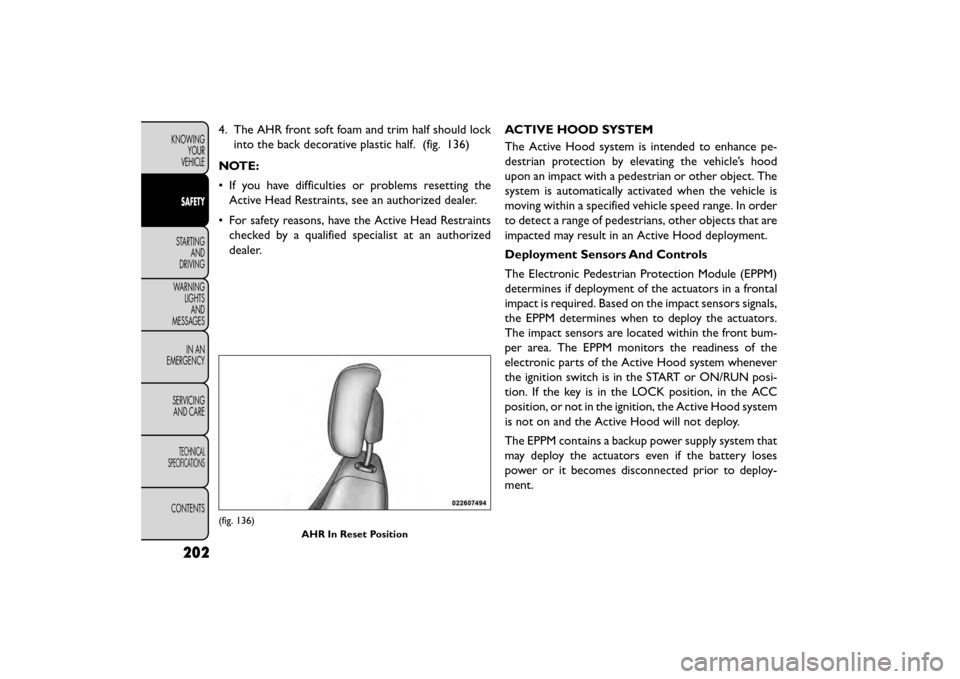
4. The AHR front soft foam and trim half should lockinto the back decorative plastic half. (fig. 136)
NOTE:
• If you have difficulties or problems resetting the Active Head Restraints, see an authorized dealer.
• For safety reasons, have the Active Head Restraints checked by a qualified specialist at an authorized
dealer. ACTIVE HOOD SYSTEM
The Active Hood system is intended to enhance pe-
destrian protection by elevating the vehicle’s hood
upon an impact with a pedestrian or other object. The
system is automatically activated when the vehicle is
moving within a specified vehicle speed range. In order
to detect a range of pedestrians, other objects that are
impacted may result in an Active Hood deployment.
Deployment Sensors And Controls
The Electronic Pedestrian Protection Module (EPPM)
determines if deployment of the actuators in a frontal
impact is required. Based on the impact sensors signals,
the EPPM determines when to deploy the actuators.
The impact sensors are located within the front bum-
per area. The EPPM monitors the readiness of the
electronic parts of the Active Hood system whenever
the ignition switch is in the START or ON/RUN posi-
tion. If the key is in the LOCK position, in the ACC
position, or not in the ignition, the Active Hood system
is not on and the Active Hood will not deploy.
The EPPM contains a backup power supply system that
may deploy the actuators even if the battery loses
power or it becomes disconnected prior to deploy-
ment.
(fig. 136)
AHR In Reset Position
202
KNOWINGYOUR
VEHICLE
SAFETY
STARTING AND
DRIVING
WARNING LIGHTSAND
MESSAGES
IN
AN
EMERGENCY
SERVICINGAND CARE
TECHNICAL
SPECIFICATIONS
CONTENTS
Page 218 of 412
Do not drive your vehicle after the air bags have
deployed. If you are involved in another collision, the
air bags will not be in place to protect you.
WARNING!
Deployed air bags and seat belt preten-
sion er
s cannot protect you in another
collision. Have the air bags, seat belt pretension-
ers, and the seat belt retractor assemblies re-
placed by an authorized dealer immediately.
Also, have the Occupant Restraint Controller Sys-
tem serviced as well.
NOTE:
• Air bag covers may not be obvious in the interior trim, but they will open during air bag deployment.
• After any collision, the vehicle should be taken to an authorized dealer immediately. ENHANCED ACCIDENT RESPONSE
SYSTEM
In the event of an impact, if the communication net-
work remains intact, and the power remains intact,
depending on the nature of the event, the ORC will
determine whether to have the Enhanced Accident
Response System perform the following functions:
• Cut off fuel to the engine.
• Flash hazard lights as long as the battery has power
or until the ignition switch is turned to the “OFF”
position.
• Turn on the interior lights, which remain on as long as the battery has power or until the ignition switch
is turned to the “OFF” position.
• Unlock the doors automatically.
SYSTEM RESET PROCEDURE
In order to reset the Enhanced Accident Response
System functions after an event, the ignition switch
must be changed from ignition START or ON/RUN to
ignition OFF.
212
KNOWING YOUR
VEHICLE
SAFETY
STARTING AND
DRIVING
WARNING LIGHTSAND
MESSAGES
IN
AN
EMERGENCY
SERVICINGAND CARE
TECHNICAL
SPECIFICATIONS
CONTENTS
Page 219 of 412
AIR BAG WARNING LIGHTThe air bags must be ready to inflate for your
protection in a collision. The Occupant Re-
straint Controller (ORC) monitors the inter-
nal circuits and interconnecting wiring asso-
ciated with air bag system electrical components.
The ORC monitors the readiness of the electronic
parts of the air bag system whenever the ignition
switch is in the START or ON/RUN position. If the
ignition switch is in the OFF position or in the ACC
position, the air bag system is not on and the air bags
will not inflate
The ORC contains a backup power supply system that
may deploy the air bags even if the battery loses power
or it becomes disconnected prior to deployment.
The ORC turns on the Air Bag Warning Light
in the
instrument panel for approximately four to eight sec-
onds for a self-check when the ignition switch is first
turned to the ON/RUN position. After the self-check,
the Air Bag Warning Light will turn off. If the ORC
detects a malfunction in any part of the system, it turns
on the Air Bag Warning Light, either momentarily or
continuously. A single chime will sound to alert you if
the light comes on again after initial startup. The ORC also includes diagnostics that will illuminate
the instrument panel Air Bag Warning Light if a mal-
function is detected that could affect the air bag sys-
tem. The diagnostics also record the nature of the
malfunction. While the air bag system is designed to be
maintenance free, if any of the following occurs, have an
authorized dealer service the air bag system immedi-
ately.
• The Air Bag Warning Light does not come on during
the four to eight seconds when the ignition switch is
first turned to the ON/RUN position.
• The Air Bag Warning Light remains on after the four to eight-second interval.
• The Air Bag Warning Light comes on intermittently or remains on while driving.
NOTE: If the speedometer, tachometer, or any engine
related gauges are not working, the Occupant Re-
straint Controller (ORC) may also be disabled. In this
condition the air bags may not be ready to inflate for
your protection. Have an authorized dealer service the
air bag system immediately.
213
KNOWING
YOUR
VEHICLE
SAFETY
STARTING
AND
DRIVING
WARNING
LIGHTS
AND
MESSAGES
IN
AN
EMERGENCY
SERVICING
AND CARE
TECHNICAL
SPECIFICATIONS
CONTENTS
Page 245 of 412
NOTE:If the ignition switch is left in the ACC or RUN
(engine not running) position and the transmission is in
PARK, the system will automatically time out after 30
minutes of inactivity and the ignition will switch to the
OFF position.
ENGINE START/STOP Button Functions –
With Driver’s Foot OFF The Brake Pedal (In
PARK Or NEUTRAL Position)
The ENGINE START/STOP button operates similar to
an ignition switch. It has four positions, OFF, ACC,
RUN and START. To change the ignition switch posi-
tions without starting the vehicle and use the accesso-
ries follow these steps.
• Starting with the ignition switch in the OFF position:
• Press the ENGINE START/STOP button once to change the ignition switch to the ACC position,
• Press the ENGINE START/STOP button a second time to change the ignition switch to the RUN
position,
• Press the ENGINE START/STOP button a third time to return the ignition switch to the OFF position. EXTREME COLD WEATHER
(BELOW −29°C)
To ensure reliable starting at these temperatures, use
of an externally powered electric engine block heater is
recommended.
IF ENGINE FAILS TO START
WARNING!
• Never pour fuel or other flammable
li qui
ds into the throttle body air inlet
opening in an attempt to start the vehicle. This
could result in a flash fire causing serious per-
sonal injury.
• Do not attempt to push or tow your vehicle to
get it started. Unburned fuel could enter the
catalytic converter and once the engine has
started, ignite and damage the converter and
vehicle. If the vehicle has a discharged battery,
booster cables may be used to obtain a start from
a booster battery or the battery in another ve-
hicle.This type of start can be dangerous if done
improperly. Refer to “Jump Starting” in “In An
Emergency” for further information.
239
KNOWING
YOUR
VEHICLE
SAFETY
STARTING
AND
DRIVING
WARNING
LIGHTS
AND
MESSAGES
IN AN
EMERGENC
Y
SERVICING
AND CARE
TECHNICAL
SPECIFICATIONS
CONTENTS
Page 285 of 412
IN AN EMERGENCY
JUMP-STARTING
If your vehicle has a discharged battery it can be
jump-started using a set of jumper cables and a battery
in another vehicle or by using a portable battery
booster pack. Jump-starting can be dangerous if done
improperly so please follow the procedures in this
section carefully.
WARNING!
Do not attempt jump-starting if the bat-
tery is
frozen. It could rupture or explode
and cause personal injury.
Do not use a portable battery booster
pack or any other booster source with a
system voltage greater than 12 Volts or
damage to the battery, starter motor, alternator
or electrical system may occur.
NOTE: When using a portable battery booster pack
follow the manufacturer's operating instructions and
precautions. PREPARATIONS FOR JUMP-START
The battery in your vehicle is located between the left
front headlight assembly and the left front wheel splash
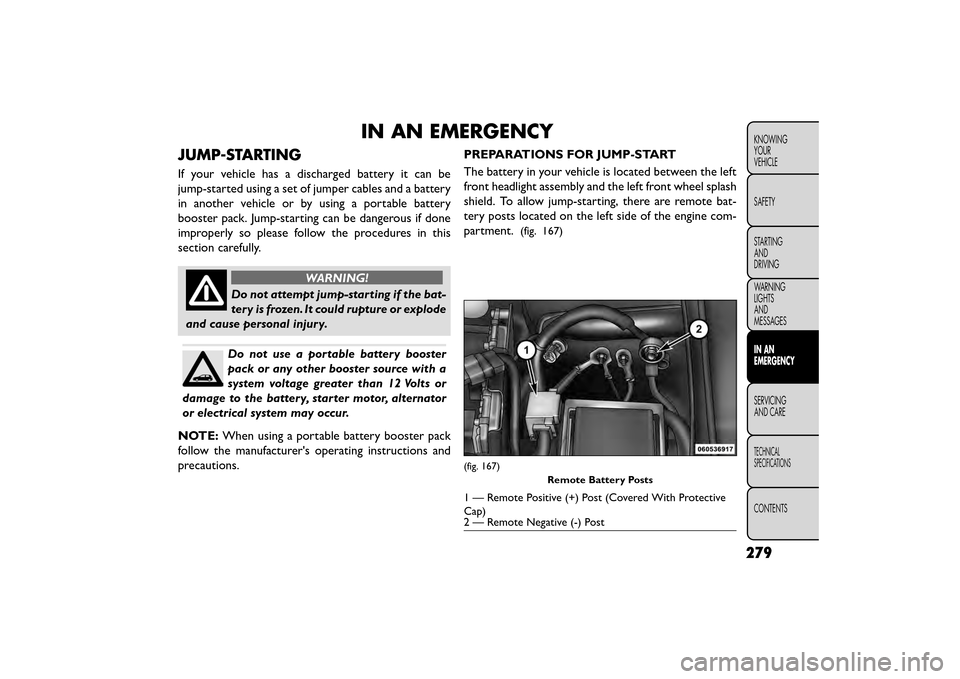
shield. To allow jump-starting, there are remote bat-
tery posts located on the left side of the engine com-
partment.
(fig. 167)
(fig. 167)
Remote Battery Posts
1 — Remote Positive (+) Post (Covered With Protective
Cap)
2 — Remote Negative (-) Post
279
KNOWING
YOUR
VEHICLE
SAFETY
STARTING
AND
DRIVING
WARNING
LIGHTS
AND
MESSAGES
IN AN
EMERGENCY
SERVICING
AND
CARE
TECHNICAL
SPECIFICATIONS
CONTENTS
Page 286 of 412
WARNING!
• Take care to avoid the radiator cooling
f an
whenever the hood is raised. It can
start anytime the ignition switch is ON.You can
be injured by moving fan blades.
• Remove any metal jewelry such as rings, watch
bands and bracelets that could make an inadver-
tent electrical contact . You could be seriously
injured.
• Batteries contain sulfuric acid that can burn
your skin or eyes and generate hydrogen gas
which is flammable and explosive. Keep open
flames or sparks away from the battery.
1. Set the parking brake, shift the automatic transmis- sion into PARK and the manual transmission into
gear and turn the ignition to LOCK.
2. Turn off the heater, radio, and all unnecessary elec- trical accessories.
3. Remove the protective cover over the remote posi- tive (+)battery post. To remove the cover, press
the locking tab and pull upward on the cover.
4. If using another vehicle to jump-start the battery, park the vehicle within the jumper cables reach, set
the parking brake and make sure the ignition is OFF.
WARNING!
Do not allow vehicles to touch each
oth er
as this could establish a ground
connection and personal injury could result .
JUMP-STARTING PROCEDURE
WARNING!
Failure to follow this jump-starting pro-
cedure c
ould result in personal injury or
property damage due to battery explosion.
Failure to follow these procedures could
result in damage to the charging system
of the booster vehicle or the discharged
vehicle.
Connecting The Jumper Cables
1. Connect the positive (+)end of the jumper cable to
the remote positive (+)post of the discharged
vehicle.
2. Connect the opposite end of the positive (+)
jumper cable to the positive (+)post of the booster
battery.
3. Connect the negative end (-)of the jumper cable to
the negative (-)post of the booster battery.
280
KNOWING
YOUR
VEHICLE
SAFETY
STARTING AND
DRIVING
WARNING LIGHTSAND
MESSAGES
IN AN
EMERGENCY
SER VICING
AND
CARE
TECHNICAL
SPECIFICATIONS
CONTENTS