service FIAT FREEMONT 2016 1.G Owner's Manual
[x] Cancel search | Manufacturer: FIAT, Model Year: 2016, Model line: FREEMONT, Model: FIAT FREEMONT 2016 1.GPages: 412, PDF Size: 3.36 MB
Page 163 of 412
The EVIC will also display a "SERVICE TPM SYSTEM"
message for a minimum of five seconds when a system
fault related to an incorrect sensor location fault is
detected. In this case, the "SERVICE TPM SYSTEM"
message is then followed with a graphic display with
pressure values still shown. This indicates that the
pressure values are still being received from the TPM
sensors but they may not be located in the correct
vehicle position. The system still needs to be serviced
as long as the "SERVICE TPM SYSTEM" message is
displayed.
NOTE:
1. The compact spare tire does not have a tire pres-sure monitoring sensor. Therefore, the TPMS will
not monitor the pressure in the compact spare tire.
2. If you install the compact spare tire in place of a road tire that has a pressure below the low-pressure
warning limit, upon the next ignition switch cycle,
the TPMS Telltale Light will remain on and a chime
will sound. In addition, the graphic in the EVIC will
still display a different color pressure value. An
"Inflate Tire to XXX" message will also be displayed. 3. After driving the vehicle for up to 20 minutes above
25 km/h, the TPMS Telltale Light will flash on and off
for 75 seconds and then remain on solid. In addition,
the EVIC will display a "SERVICE TPM SYSTEM"
message for a minimum of five seconds and then
display dashes (- -) in place of the pressure value.
4. For each subsequent ignition switch cycle, a chime will sound, the TPMS Telltale Light will flash on and
off for 75 seconds and then remain on solid, and the
EVIC will display a "SERVICE TPM SYSTEM" mes-
sage for a minimum of five seconds and then display
dashes (- -) in place of the pressure value.
5. Once you repair or replace the original road tire and reinstall it on the vehicle in place of the compact
spare, the TPMS will update automatically. In addi-
tion, the TPMS Telltale Light will turn off and the
graphic in the EVIC will display a new pressure value
instead of dashes (- -), as long as no tire pressure is
below the low-pressure warning limit in any of the
four active road tires. The vehicle may need to be
driven for up to 20 minutes above 25 km/h in order
for the TPMS to receive this information.
157
KNOWING
YOUR
VEHICLE
SAFETY
STAR
TING
AND
DRIVING
WARNING
LIGHTS
AND
MESSAGES
IN AN
EMERGENCY
SERVICING
AND CARE
TECHNICAL
SPECIFICATIONS
CONTENTS
Page 164 of 412
TPMS Deactivation And Reactivation
The TPMS can be deactivated if replacing all four wheel
and tire assemblies (road tires) with wheel and tire
assemblies that do not have TPMS Sensors, such as
when installing winter wheel and tire assemblies on
your vehicle.
To deactivate the TPMS, first, replace all four wheel and
tire assemblies (road tires) with those not equipped
with TPM Sensors. Then, drive the vehicle for 20
minutes above 25 km/h. The TPMS will chime and the
Tire Pressure Monitoring Telltale Light will flash on and
off for 75 seconds and then remain on solid. In addition,
the Electronic Vehicle Information Center (EVIC) will
display a “SERVICE TPM SYSTEM” text message, and
the graphic will display “- -“ in place of four tire
pressure values. Upon the next ignition switch cycle,
the TPMS will no longer chime or turn on the Tire
Pressure Monitoring Telltale Light, or display the text
message in the EVIC. However, the graphic will still
display “- -.“To reactivate the TPMS, first, replace all four wheel and
tire assemblies (road tires) with those equipped with
TPM Sensors. Then, drive the vehicle for up to 20
minutes above 25 km/h. The TPMS will chime, the Tire
Pressure Monitoring Telltale Light will flash on and off
for 75 seconds, the EVIC will display a “SERVICE TPM
SYSTEM” text message, and the graphic will display tire
pressure values to show that the TPMS is receiving
sensor data.
GENERAL INFORMATION
Transmitter and receivers operate on a carrier fre-
quency of 433.92 MHz as required by EEC regulations.
These devices must be certified to conform to specific
regulations in each individual country. Two sets of
regulations are involved: ETS (European Telecommuni-
cation Standard) 300–220, which most countries use,
and German BZT federal regulation 225Z125, which is
based on ETC 300–220 but has additional unique re-
quirements. Other defined requirements are noted in
ANNEX VI of COMMISSION DIRECTIVE 95/56/EC.
Operation is subject to the following two conditions:
• This device may not cause harmful interference.
• This device must accept any interference received,
including interference that may cause undesired op-
eration.
158
KNOWING YOUR
VEHICLE
SAFETY
STAR
TINGAND
DRIVING
WARNING LIGHTSAND
MESSAGES
IN AN
EMERGENCY
SERVICINGAND CARE
TECHNICAL
SPECIFICATIONS
CONTENTS
Page 168 of 412
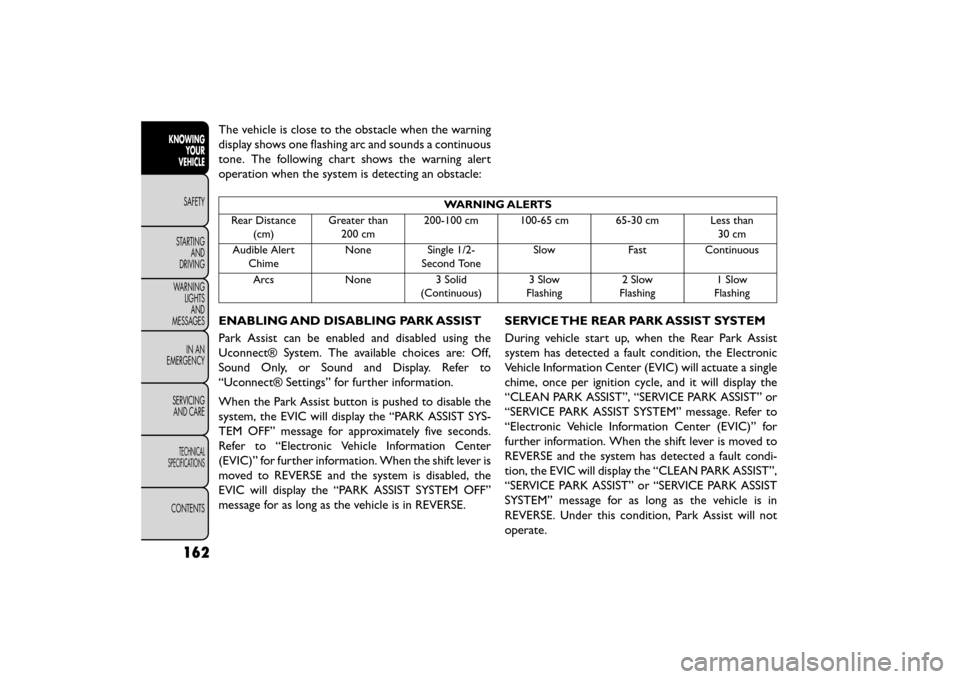
The vehicle is close to the obstacle when the warning
display shows one flashing arc and sounds a continuous
tone. The following chart shows the warning alert
operation when the system is detecting an obstacle:
WARNING ALERTS
Rear Distance (cm) Greater than
200 cm 200-100 cm 100-65 cm 65-30 cm Less than
30 cm
Audible Alert Chime None Single 1/2-
Second Tone Slow
FastContinuous
Arcs None3 Solid
(Continuous) 3 Slow
Flashing 2 Slow
Flashing 1 Slow
Flashing
ENABLING AND DISABLING PARK ASSIST
Park Assist can be enabled and disabled using the
Uconnect® System. The available choices are: Off,
Sound Only, or Sound and Display. Refer to
“Uconnect® Settings” for further information.
When the Park Assist button is pushed to disable the
system, the EVIC will display the “PARK ASSIST SYS-
TEM OFF” message for approximately five seconds.
Refer to “Electronic Vehicle Information Center
(EVIC)” for further information. When the shift lever is
moved to REVERSE and the system is disabled, the
EVIC will display the “PARK ASSIST SYSTEM OFF”
message for as long as the vehicle is in REVERSE. SERVICE THE REAR PARK ASSIST SYSTEM
During vehicle start up, when the Rear Park Assist
system has detected a fault condition, the Electronic
Vehicle Information Center (EVIC) will actuate a single
chime, once per ignition cycle, and it will display the
“CLEAN PARK ASSIST”, “SERVICE PARK ASSIST” or
“SERVICE PARK ASSIST SYSTEM” message. Refer to
“Electronic Vehicle Information Center (EVIC)” for
further information. When the shift lever is moved to
REVERSE and the system has detected a fault condi-
tion, the EVIC will display the “CLEAN PARK ASSIST”,
“SERVICE PARK ASSIST” or “SERVICE PARK ASSIST
SYSTEM” message for as long as the vehicle is in
REVERSE. Under this condition, Park Assist will not
operate.
162
KNOWING
YOUR
VEHICLE
SAFETY
STAR
TINGAND
DRIVING
WARNING LIGHTSAND
MESSAGES
IN AN
EMERGENCY
SERVICINGAND CARE
TECHNICAL
SPECIFICATIONS
CONTENTS
Page 169 of 412
If “CLEAN PARK ASSIST” appears in the Electronic
Vehicle Information Center (EVIC) make sure the
outer surface and the underside of the rear fascia/
bumper is clean and clear of snow, ice, mud, dirt or
other obstruction and then cycle the ignition. If the
message continues to appear see an authorized dealer.
If “SERVICE PARK ASSIST” or “SERVICE PARK ASSIST
SYSTEM” appears in the EVIC, see your authorized
dealer.
CLEANING THE PARK ASSIST SYSTEM
Clean the sensors with water, car wash soap and a soft
cloth. Do not use rough or hard cloths. Do not scratch
or poke the sensors. Otherwise, you could damage the
sensors.
PARK ASSIST SYSTEM USAGE
PRECAUTIONS
NOTE:
• Ensure that the rear bumper is free of snow, ice,mud, dirt and debris to keep the Park Assist system
operating properly.
• Jackhammers, large trucks, and other vibrations could affect the performance of Park Assist. • When you turn Park Assist off, the EVIC will display
“PARK ASSIST SYSTEM OFF.” Furthermore, once
you turn Park Assist off, it remains off until you turn
it on again, even if you cycle the ignition key.
• When you move the shift lever to the REVERSE position and Park Assist is turned off, the EVIC will
display the “PARK ASSIST SYSTEM OFF” message
for as long as the vehicle is in REVERSE.
• Clean the Park Assist sensors regularly, taking care not to scratch or damage them. The sensors must
not be covered with ice, snow, slush, mud, dirt or
debris. Failure to do so can result in the system not
working properly. The Park Assist system might not
detect an obstacle behind the fascia/bumper, or it
could provide a false indication that an obstacle is
behind the fascia/bumper.
• Ensure that the Park Assist system is turned OFF if objects such as bicycle carriers, trailer hitches, etc.,
are placed within 30 cm from the rear fascia/bumper
while driving the vehicle. Failure to do so can result in
the system misinterpreting a close object as a sensor
problem, causing the “SERVICE PARK ASSIST” mes-
sage to be displayed in the EVIC.
163
KNOWING
YOUR
VEHICLE
SAFETY
STAR
TING
AND
DRIVING
WARNING
LIGHTS
AND
MESSAGES
IN AN
EMERGENCY
SERVICING
AND CARE
TECHNICAL
SPECIFICATIONS
CONTENTS
Page 195 of 412
iPod®/USB/MP3 CONTROL (for
versions/markets, where
provided)
This feature allows an iPod® or external USB device to
be plugged into the USB port.
iPod® control supports Mini, 4G, Photo, Nano, 5G
iPod® and iPhone® devices. Some iPod® software
versions may not fully support the iPod® control
features. Please visit Apple’s website for software up-
dates.
For further information, refer to the Uconnect® User’s
Manual.
CD/DVD DISC MAINTENANCE
To keep a CD/DVD in good condition, take the follow-
ing precautions:
1. Handle the disc by its edge; avoid touching thesurface.
2. If the disc is stained, clean the surface with a soft cloth, wiping from center to edge.
3. Do not apply paper or tape to the disc; avoid scratching the disc.
4. Do not use solvents such as benzene, thinner, clean- ers, or anti-static sprays.
5. Store the disc in its case after playing.
6. Do not expose the disc to direct sunlight.
7. Do not store the disc where temperatures may become too high.
NOTE: If you experience difficulty in playing a particu-
lar disc, it may be damaged (e.g., scratched, reflective
coating removed, a hair, moisture or dew on the disc)
oversized, or have protection encoding. Try a known
good disc before considering disc player service.
189
KNOWING
YOUR
VEHICLE
SAFETY
STAR
TING
AND
DRIVING
WARNING
LIGHTS
AND
MESSAGES
IN AN
EMERGENCY
SERVICING
AND CARE
TECHNICAL
SPECIFICATIONS
CONTENTS
Page 209 of 412
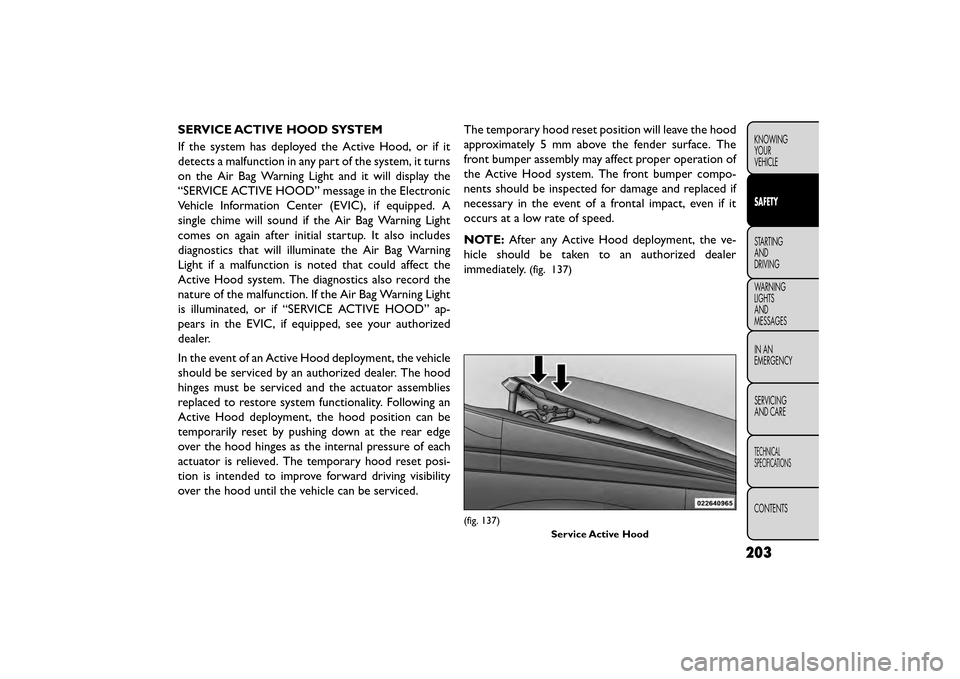
SERVICE ACTIVE HOOD SYSTEM
If the system has deployed the Active Hood, or if it
detects a malfunction in any part of the system, it turns
on the Air Bag Warning Light and it will display the
“SERVICE ACTIVE HOOD” message in the Electronic
Vehicle Information Center (EVIC), if equipped. A
single chime will sound if the Air Bag Warning Light
comes on again after initial startup. It also includes
diagnostics that will illuminate the Air Bag Warning
Light if a malfunction is noted that could affect the
Active Hood system. The diagnostics also record the
nature of the malfunction. If the Air Bag Warning Light
is illuminated, or if “SERVICE ACTIVE HOOD” ap-
pears in the EVIC, if equipped, see your authorized
dealer.
In the event of an Active Hood deployment, the vehicle
should be serviced by an authorized dealer. The hood
hinges must be serviced and the actuator assemblies
replaced to restore system functionality. Following an
Active Hood deployment, the hood position can be
temporarily reset by pushing down at the rear edge
over the hood hinges as the internal pressure of each
actuator is relieved. The temporary hood reset posi-
tion is intended to improve forward driving visibility
over the hood until the vehicle can be serviced.The temporary hood reset position will leave the hood
approximately 5 mm above the fender surface. The
front bumper assembly may affect proper operation of
the Active Hood system. The front bumper compo-
nents should be inspected for damage and replaced if
necessary in the event of a frontal impact, even if it
occurs at a low rate of speed.
NOTE:
After any Active Hood deployment, the ve-
hicle should be taken to an authorized dealer
immediately.
(fig. 137)
(fig. 137)
Service Active Hood
203
KNOWING
YOUR
VEHICLE
SAFETY
STARTING
AND
DRIVING
WARNING
LIGHTS
AND
MESSAGES
IN
AN
EMERGENCY
SERVICING
AND CARE
TECHNICAL
SPECIFICATIONS
CONTENTS
Page 210 of 412
To prevent possible damage, do not slam
the rear of the hood to reset it . Press the
rear of the hood down until an audible
and tactile detent is detected (approximately 5
mm above the fender). This should secure both
hood hinge reset mechanisms.
WARNING!
• Ignoring the Air Bag Warning Light in
y our
instrument panel or the “SERVICE
ACTIVE HOOD” message in the EVIC could mean
you won’t have the Active Hood to enhance pe-
destrian protection. If the light does not come on
as a bulb check when the ignition is first turned
on, stays on after you start the vehicle, or if it
comes on as you drive, see your authorized
dealer.
• Modifications to any part of the Active Hood
system could cause it to fail when you need it . Do
not modify the components or wiring. Do not
modify the front bumper, vehicle body structure,
or add an aftermarket front bumper or cover.
• It is dangerous to try to repair any part of the
Active Hood system yourself. Be sure to tell any-
one who works on your vehicle that it has an
Active Hood system.
(Continued)
WARNING! (Continued)
• Do not attempt to modify any part of your
Active Hood system.The Active Hood may deploy
accidentally or may not function properly if
modifications are made. Take your vehicle to an
authorized dealer for any hood service.
• Drivers must be aware of pedestrians. Always
be sure to check for pedestrians, animals, other
vehicles, and obstructions.You are responsible for
safety and must continue to pay attention to
your surroundings. Failure to do so can result in
serious injury or death.
204
KNOWING YOUR
VEHICLE
SAFETY
STARTING AND
DRIVING
WARNING LIGHTSAND
MESSAGES
IN
AN
EMERGENCY
SERVICINGAND CARE
TECHNICAL
SPECIFICATIONS
CONTENTS
Page 218 of 412
Do not drive your vehicle after the air bags have
deployed. If you are involved in another collision, the
air bags will not be in place to protect you.
WARNING!
Deployed air bags and seat belt preten-
sion er
s cannot protect you in another
collision. Have the air bags, seat belt pretension-
ers, and the seat belt retractor assemblies re-
placed by an authorized dealer immediately.
Also, have the Occupant Restraint Controller Sys-
tem serviced as well.
NOTE:
• Air bag covers may not be obvious in the interior trim, but they will open during air bag deployment.
• After any collision, the vehicle should be taken to an authorized dealer immediately. ENHANCED ACCIDENT RESPONSE
SYSTEM
In the event of an impact, if the communication net-
work remains intact, and the power remains intact,
depending on the nature of the event, the ORC will
determine whether to have the Enhanced Accident
Response System perform the following functions:
• Cut off fuel to the engine.
• Flash hazard lights as long as the battery has power
or until the ignition switch is turned to the “OFF”
position.
• Turn on the interior lights, which remain on as long as the battery has power or until the ignition switch
is turned to the “OFF” position.
• Unlock the doors automatically.
SYSTEM RESET PROCEDURE
In order to reset the Enhanced Accident Response
System functions after an event, the ignition switch
must be changed from ignition START or ON/RUN to
ignition OFF.
212
KNOWING YOUR
VEHICLE
SAFETY
STARTING AND
DRIVING
WARNING LIGHTSAND
MESSAGES
IN
AN
EMERGENCY
SERVICINGAND CARE
TECHNICAL
SPECIFICATIONS
CONTENTS
Page 219 of 412
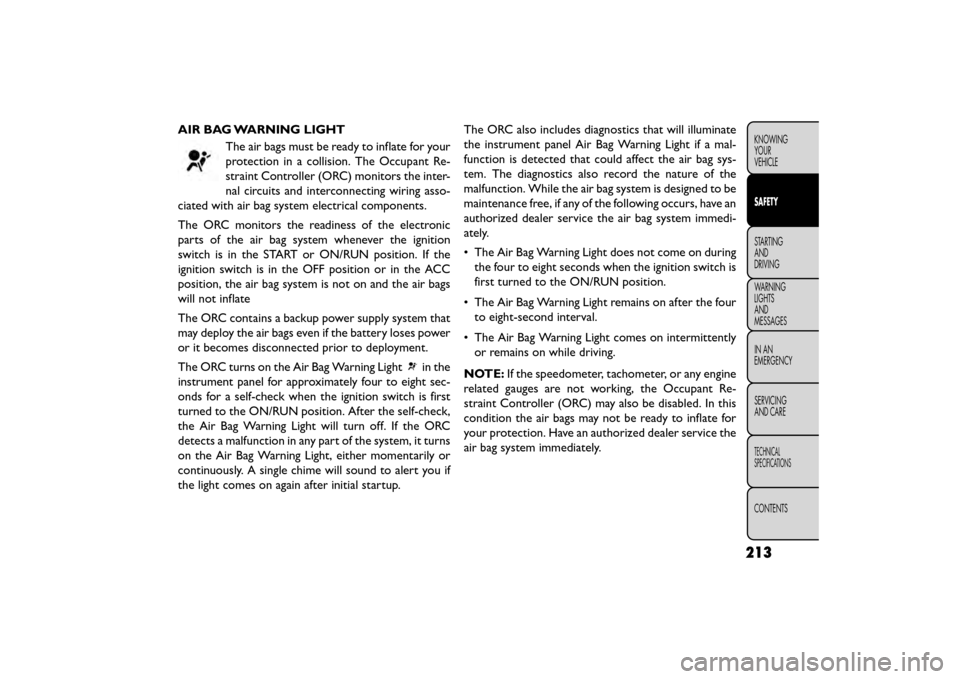
AIR BAG WARNING LIGHTThe air bags must be ready to inflate for your
protection in a collision. The Occupant Re-
straint Controller (ORC) monitors the inter-
nal circuits and interconnecting wiring asso-
ciated with air bag system electrical components.
The ORC monitors the readiness of the electronic
parts of the air bag system whenever the ignition
switch is in the START or ON/RUN position. If the
ignition switch is in the OFF position or in the ACC
position, the air bag system is not on and the air bags
will not inflate
The ORC contains a backup power supply system that
may deploy the air bags even if the battery loses power
or it becomes disconnected prior to deployment.
The ORC turns on the Air Bag Warning Light
in the
instrument panel for approximately four to eight sec-
onds for a self-check when the ignition switch is first
turned to the ON/RUN position. After the self-check,
the Air Bag Warning Light will turn off. If the ORC
detects a malfunction in any part of the system, it turns
on the Air Bag Warning Light, either momentarily or
continuously. A single chime will sound to alert you if
the light comes on again after initial startup. The ORC also includes diagnostics that will illuminate
the instrument panel Air Bag Warning Light if a mal-
function is detected that could affect the air bag sys-
tem. The diagnostics also record the nature of the
malfunction. While the air bag system is designed to be
maintenance free, if any of the following occurs, have an
authorized dealer service the air bag system immedi-
ately.
• The Air Bag Warning Light does not come on during
the four to eight seconds when the ignition switch is
first turned to the ON/RUN position.
• The Air Bag Warning Light remains on after the four to eight-second interval.
• The Air Bag Warning Light comes on intermittently or remains on while driving.
NOTE: If the speedometer, tachometer, or any engine
related gauges are not working, the Occupant Re-
straint Controller (ORC) may also be disabled. In this
condition the air bags may not be ready to inflate for
your protection. Have an authorized dealer service the
air bag system immediately.
213
KNOWING
YOUR
VEHICLE
SAFETY
STARTING
AND
DRIVING
WARNING
LIGHTS
AND
MESSAGES
IN
AN
EMERGENCY
SERVICING
AND CARE
TECHNICAL
SPECIFICATIONS
CONTENTS
Page 220 of 412
WARNING!
Ignoring the Air Bag Warning Light in
your ins
trument panel could mean you
won’t have the air bags to protect you in a
collision. If the light does not come on as a bulb
check when the ignition is first turned on, stays
on after you start the vehicle, or if it comes on as
you drive, have an authorized dealer service the
air bag system immediately.
MAINTAINING YOUR AIR BAG SYSTEM
WARNING!
• Modifications to any part of the air
bag sys
tem could cause it to fail when
you need it . You could be injured if the air bag
system is not there to protect you. Do not modify
the components or wiring, including adding any
kind of badges or stickers to the steering wheel
hub trim cover or the upper right side of the
instrument panel. Do not modify the front bum-
per, vehicle body structure, or add aftermarket
side steps or running boards.
(Continued)
WARNING! (Continued)
• It is dangerous to try to repair any part of the
air bag system yourself. Be sure to tell anyone
who works on your vehicle that it has an air bag
system.
• Do not attempt to modify any part of your air
bag system.The air bag may inflate accidentally
or may not function properly if modifications are
made.Take your vehicle to an authorized dealer
for any air bag system service. If your seat , includ-
ing your trim cover and cushion, needs to be
serviced in any way (including removal or
loosening/tightening of seat attachment bolts),
take the vehicle to your authorized dealer. Only
manufacturer approved seat accessories may be
used. If it is necessary to modify the air bag
system for persons with disabilities, contact your
authorized dealer.
214
KNOWING YOUR
VEHICLE
SAFETY
STARTING AND
DRIVING
WARNING LIGHTSAND
MESSAGES
IN
AN
EMERGENCY
SERVICINGAND CARE
TECHNICAL
SPECIFICATIONS
CONTENTS