manual transmission FIAT FULLBACK 2016 1.G Owners Manual
[x] Cancel search | Manufacturer: FIAT, Model Year: 2016, Model line: FULLBACK, Model: FIAT FULLBACK 2016 1.GPages: 312, PDF Size: 13.67 MB
Page 5 of 312
USE OF THE OWNER HANDBOOK
OPERATING INSTRUCTIONS
Each time direction instructions (left/right or forwards/backwards) about the vehicle are given, these must be intended as
regarding an occupant in the driver's seat. Special cases not complying with this rule will be properly specified in the text.
The figures in the Owner Handbook are provided by way of example only: this might imply that some details of the image do
not correspond to the actual arrangement of your vehicle. In addition, the Handbook has been conceived considering vehicles
with steering wheel on the left side; it is therefore possible that on vehicles with steering wheel on the right side, some controls
position or construction is not exactly mirror-like with respect to the figure.
To identify the chapter with the information needed you can consult the index at the end of this Owner Handbook .
Chapters can be rapidly identified with dedicated graphic tabs, at the side of each odd page. A few pages further there is a key
for getting to know the chapter order and the relevant symbols in the tabs. There is anyway a textual indication of the current
chapter at the side of each even page.
Abbreviations used in this Owner Handbook:
LHD— Left-Hand Drive
RHD— Right-Hand Drive
M/T— Manual Transmission
A/T— Automatic Transmission
This manual explains operation of LHD ans RHD vehicles. Illustrations represent LHD operation. Depending on the item,
however, RHD illustrations may also appear.
Page 13 of 312
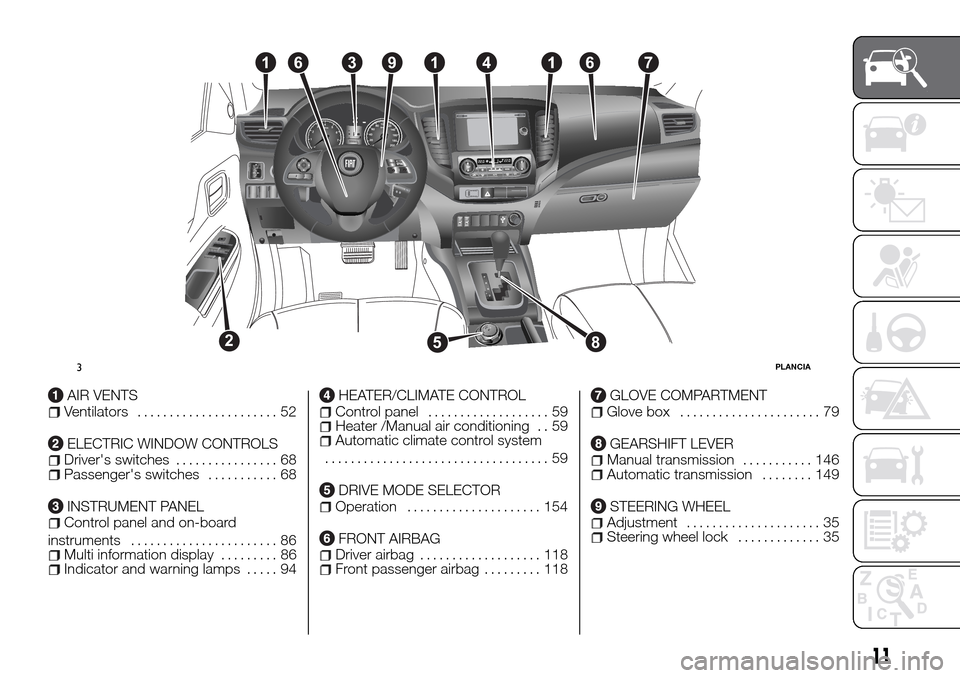
AIR VENTSVentilators...................... 52
ELECTRIC WINDOW CONTROLSDriver's switches................ 68Passenger's switches........... 68
INSTRUMENT PANELControl panel and on-board
instruments....................... 86
Multi information display......... 86Indicator and warning lamps..... 94
HEATER/CLIMATE CONTROLControl panel................... 59Heater /Manual air conditioning . . 59Automatic climate control system
................................... 59
DRIVE MODE SELECTOROperation..................... 154
FRONT AIRBAGDriver airbag................... 118Front passenger airbag......... 118
GLOVE COMPARTMENTGlove box...................... 79
GEARSHIFT LEVERManual transmission........... 146Automatic transmission........ 149
STEERING WHEELAdjustment..................... 35Steering wheel lock............. 35
16
528
3914167
3PLANCIA
11
Page 70 of 312
Setting change method Hold down
the rear window demister switch for
about 10 seconds or more. When the
setting is changed from enable to
disable 3 sounds are emitted and the
indicator lamp flashes 3 times. When
the setting is changed from disable to
enable 2 sounds are emitted and the
indicator lamp flashes 3 times.
NOTE The factory setting is “Disable
automatic rear window demister”.
WARNING
60)For safety, make sure you have a clear
view through all windows.
IMPORTANT
18)When using the air conditioning, the
idling speed may slightly increase as the air
conditioning compressor is switched on/off
automatically. While the vehicle with an
automatic transmission is stationary, fully
depress the brake pedal to prevent the
vehicle from creeping.
19)When using the mode selection dial
between the
andpositions, prevent
fogging by moving the air selection lever to
select outside air (refer to “Air selection
lever”).
20)Use of the
(recirculation) position
for extended time may cause the windows
to fog up.21)If the outside air is dusty or otherwise
contaminated, or if high cooling
performance is desired, set air selection
lever to the
(recirculation) position and
the temperature control dial all the way to
the right. Switch to the
(outside)
position periodically to increase ventilation
so that the windows do not become
fogged up.
IMPORTANT
2)The system uses a coolant that is
compatible with the laws in force in the
countries where the vehicle is sold, R134a
or R1234yf (indicated on a specific plate in
the engine compartment). The use of other
coolants affects the efficiency and condition
of the system. Also the compressor
coolants used must be compatible with the
indicated coolant.
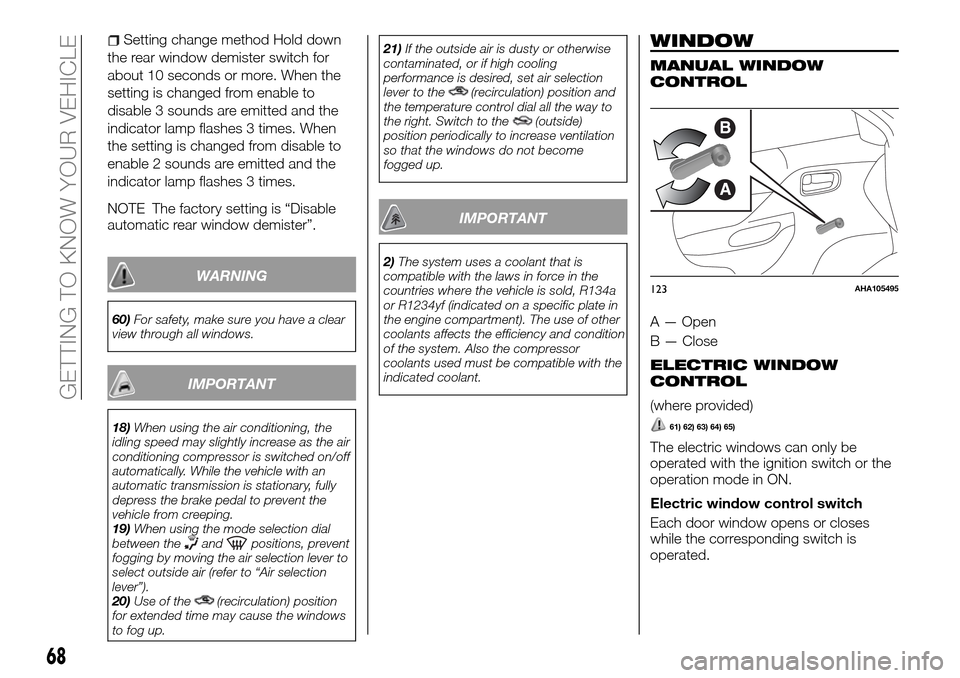
WINDOW
MANUAL WINDOW
CONTROL
A — Open
B — Close
ELECTRIC WINDOW
CONTROL
(where provided)
61) 62) 63) 64) 65)
The electric windows can only be
operated with the ignition switch or the
operation mode in ON.
Electric window control switch
Each door window opens or closes
while the corresponding switch is
operated.
B
A
123AHA105495
68
GETTING TO KNOW YOUR VEHICLE
Page 134 of 312
STARTING AND DRIVING
Let’s get to the "heart" of the vehicle:
seeing how you can exploit all of its
potential to the full.
We’ll look at how to drive it safely in any
situation, so that it can be a welcome
companion, with our comfort and our
wallets in mind.ECONOMICAL DRIVING........133
DRIVING, ALCOHOL AND DRUGS .134
SAFE DRIVING TECHNIQUES. . . .134
RUNNING-IN
RECOMMENDATIONS.........135
PARKING BRAKE............139
PARKING.................140
STARTING AND STOPPING THE
ENGINE..................141
TURBOCHARGER OPERATION . . .145
MANUAL TRANSMISSION......146
AUTOMATIC TRANSMISSION
SPORT MODE 5A/T..........149
EASY SELECT 4WD..........154
SUPER SELECT 4WD II........162
REAR DIFFERENTIAL LOCK.....166
4 WHEEL DRIVE OPERATION. . . .170
CAUTIONS ON HANDLING OF
4 WHEEL DRIVE VEHICLES.....173
BRAKING SYSTEM...........175
CRUISE CONTROL...........176
REAR VIEW CAMERA.........180
132
STARTING AND DRIVING
Page 148 of 312
IMPORTANT
85)Do not run the engine at high speeds
(for example, by revving it or by
accelerating rapidly) immediately after
starting it.
86)Do not stop the engine immediately
after high-speed or uphill driving. First allow
the engine to idle to give the turbocharger a
chance to cool down.
MANUAL
TRANSMISSION
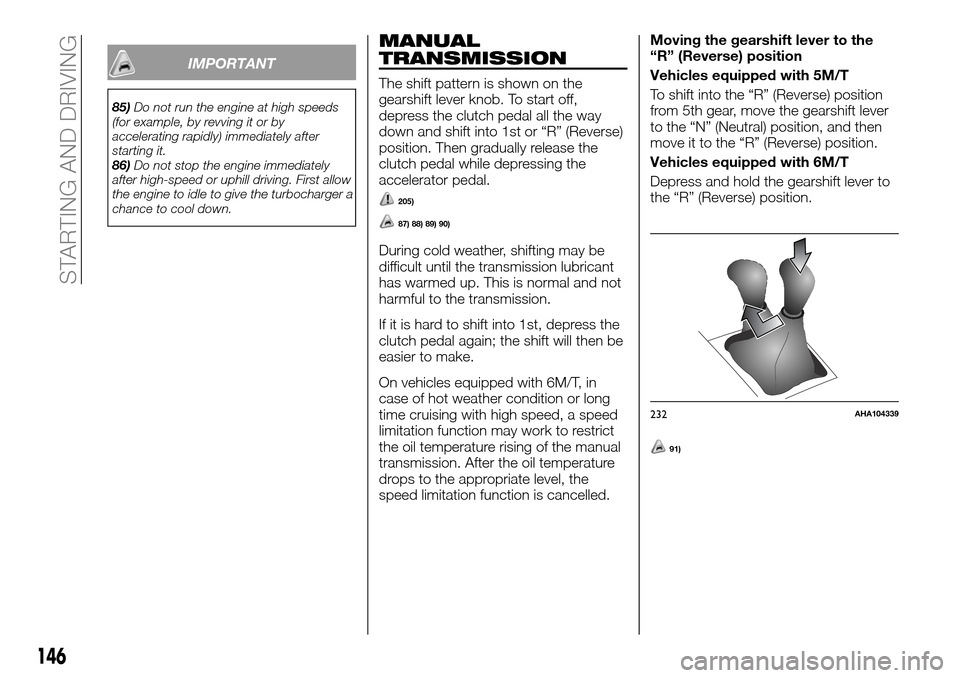
The shift pattern is shown on the
gearshift lever knob. To start off,
depress the clutch pedal all the way
down and shift into 1st or “R” (Reverse)
position. Then gradually release the
clutch pedal while depressing the
accelerator pedal.
205)
87) 88) 89) 90)
During cold weather, shifting may be
difficult until the transmission lubricant
has warmed up. This is normal and not
harmful to the transmission.
If it is hard to shift into 1st, depress the
clutch pedal again; the shift will then be
easier to make.
On vehicles equipped with 6M/T, in
case of hot weather condition or long
time cruising with high speed, a speed
limitation function may work to restrict
the oil temperature rising of the manual
transmission. After the oil temperature
drops to the appropriate level, the
speed limitation function is cancelled.Moving the gearshift lever to the
“R” (Reverse) position
Vehicles equipped with 5M/T
To shift into the “R” (Reverse) position
from 5th gear, move the gearshift lever
to the “N” (Neutral) position, and then
move it to the “R” (Reverse) position.
Vehicles equipped with 6M/T
Depress and hold the gearshift lever to
the “R” (Reverse) position.
91)
232AHA104339
146
STARTING AND DRIVING
Page 151 of 312
AUTOMATIC
TRANSMISSION
SPORT MODE 5A/T
(where provided)
During running-in period or immediately
after reconnection of the battery cable,
there may be a case where gear shifts
are not made smoothly. This does not
indicate a faulty transmission. Gear
shifts will become smooth after the
transmission has been shifted several
times by the electronic control system.
Selector lever operation
The transmission has 5 forward gears
and 1 reverse gear.
The individual gears are selected
automatically, depending on the speed
of the vehicle and the position of the
accelerator pedal.
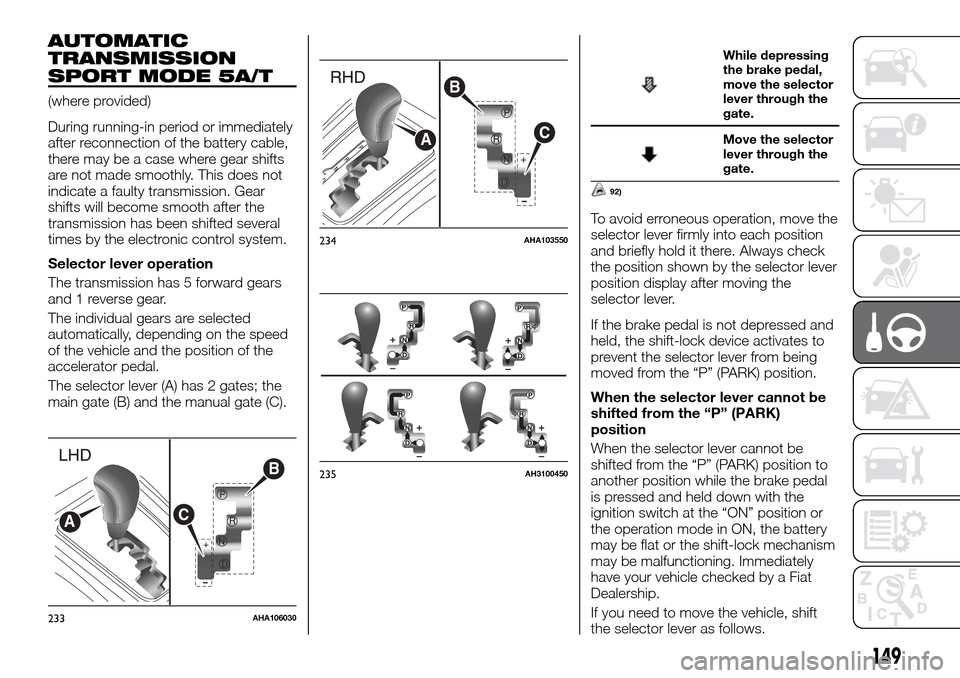
The selector lever (A) has 2 gates; the
main gate (B) and the manual gate (C).
While depressing
the brake pedal,
move the selector
lever through the
gate.
Move the selector
lever through the
gate.
92)
To avoid erroneous operation, move the
selector lever firmly into each position
and briefly hold it there. Always check
the position shown by the selector lever
position display after moving the
selector lever.
If the brake pedal is not depressed and
held, the shift-lock device activates to
prevent the selector lever from being
moved from the “P” (PARK) position.
When the selector lever cannot be
shifted from the “P” (PARK)
position
When the selector lever cannot be
shifted from the “P” (PARK) position to
another position while the brake pedal
is pressed and held down with the
ignition switch at the “ON” position or
the operation mode in ON, the battery
may be flat or the shift-lock mechanism
may be malfunctioning. Immediately
have your vehicle checked by a Fiat
Dealership.
If you need to move the vehicle, shift
the selector lever as follows.
+
P
R
N
D
B
CA
233AHA106030
+
B
C
A
234AHA103550
235AH3100450
149
Page 153 of 312
Selector lever positions
“P” PARK
This position locks the transmission to
prevent the vehicle from moving. The
engine can be started in this position.
“R” REVERSE
This position is to back up.
93)
“N” NEUTRAL
At this position the transmission is
disengaged. It is the same as the
neutral position on a manual
transmission, and should only be used
when the vehicle is stationary for an
extended length of time during driving,
such as in a traffic jam.
94) 95) 96)
“D” DRIVE
This position is used for most city and
highway driving. The transmission will
automatically change its gear
depending on road and driving
conditions.
97)
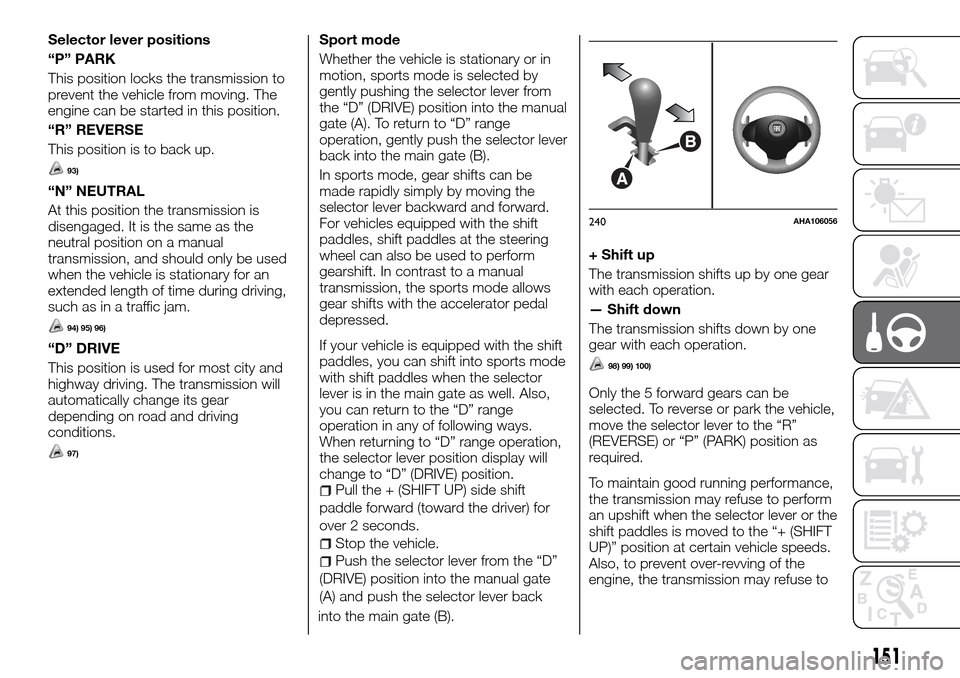
Sport mode
Whether the vehicle is stationary or in
motion, sports mode is selected by
gently pushing the selector lever from
the “D” (DRIVE) position into the manual
gate (A). To return to “D” range
operation, gently push the selector lever
back into the main gate (B).
In sports mode, gear shifts can be
made rapidly simply by moving the
selector lever backward and forward.
For vehicles equipped with the shift
paddles, shift paddles at the steering
wheel can also be used to perform
gearshift. In contrast to a manual
transmission, the sports mode allows
gear shifts with the accelerator pedal
depressed.
If your vehicle is equipped with the shift
paddles, you can shift into sports mode
with shift paddles when the selector
lever is in the main gate as well. Also,
you can return to the “D” range
operation in any of following ways.
When returning to “D” range operation,
the selector lever position display will
change to “D” (DRIVE) position.
Pull the + (SHIFT UP) side shift
paddle forward (toward the driver) for
over 2 seconds.
Stop the vehicle.
Push the selector lever from the “D”
(DRIVE) position into the manual gate
(A) and push the selector lever back
into the main gate (B).
+ Shift up
The transmission shifts up by one gear
with each operation.
— Shift down
The transmission shifts down by one
gear with each operation.
98) 99) 100)
Only the 5 forward gears can be
selected. To reverse or park the vehicle,
move the selector lever to the “R”
(REVERSE) or “P” (PARK) position as
required.
To maintain good running performance,
the transmission may refuse to perform
an upshift when the selector lever or the
shift paddles is moved to the “+ (SHIFT
UP)” position at certain vehicle speeds.
Also, to prevent over-revving of the
engine, the transmission may refuse to
B
A
240AHA106056
151
Page 161 of 312
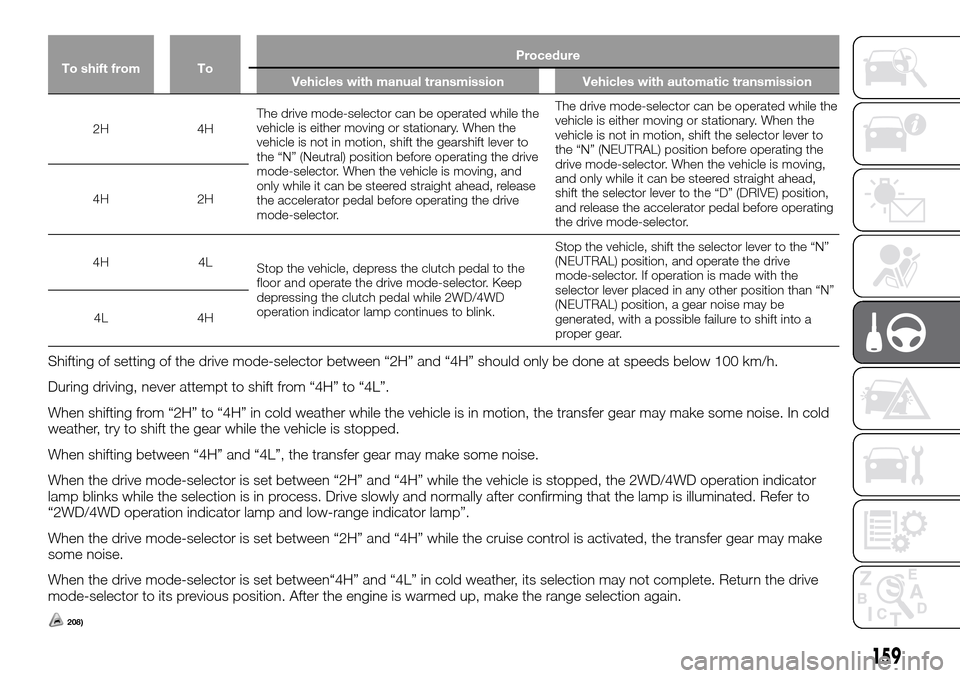
To shift from ToProcedure
Vehicles with manual transmission Vehicles with automatic transmission
2H 4HThe drive mode-selector can be operated while the
vehicle is either moving or stationary. When the
vehicle is not in motion, shift the gearshift lever to
the “N” (Neutral) position before operating the drive
mode-selector. When the vehicle is moving, and
only while it can be steered straight ahead, release
the accelerator pedal before operating the drive
mode-selector.The drive mode-selector can be operated while the
vehicle is either moving or stationary. When the
vehicle is not in motion, shift the selector lever to
the “N” (NEUTRAL) position before operating the
drive mode-selector. When the vehicle is moving,
and only while it can be steered straight ahead,
shift the selector lever to the “D” (DRIVE) position,
and release the accelerator pedal before operating
the drive mode-selector. 4H 2H
4H 4L
Stop the vehicle, depress the clutch pedal to the
floor and operate the drive mode-selector. Keep
depressing the clutch pedal while 2WD/4WD
operation indicator lamp continues to blink.Stop the vehicle, shift the selector lever to the “N”
(NEUTRAL) position, and operate the drive
mode-selector. If operation is made with the
selector lever placed in any other position than “N”
(NEUTRAL) position, a gear noise may be
generated, with a possible failure to shift into a
proper gear. 4L 4H
Shifting of setting of the drive mode-selector between “2H” and “4H” should only be done at speeds below 100 km/h.
During driving, never attempt to shift from “4H” to “4L”.
When shifting from “2H” to “4H” in cold weather while the vehicle is in motion, the transfer gear may make some noise. In cold
weather, try to shift the gear while the vehicle is stopped.
When shifting between “4H” and “4L”, the transfer gear may make some noise.
When the drive mode-selector is set between “2H” and “4H” while the vehicle is stopped, the 2WD/4WD operation indicator
lamp blinks while the selection is in process. Drive slowly and normally after confirming that the lamp is illuminated. Refer to
“2WD/4WD operation indicator lamp and low-range indicator lamp”.
When the drive mode-selector is set between “2H” and “4H” while the cruise control is activated, the transfer gear may make
some noise.
When the drive mode-selector is set between“4H” and “4L” in cold weather, its selection may not complete. Return the drive
mode-selector to its previous position. After the engine is warmed up, make the range selection again.
208)
159
Page 163 of 312
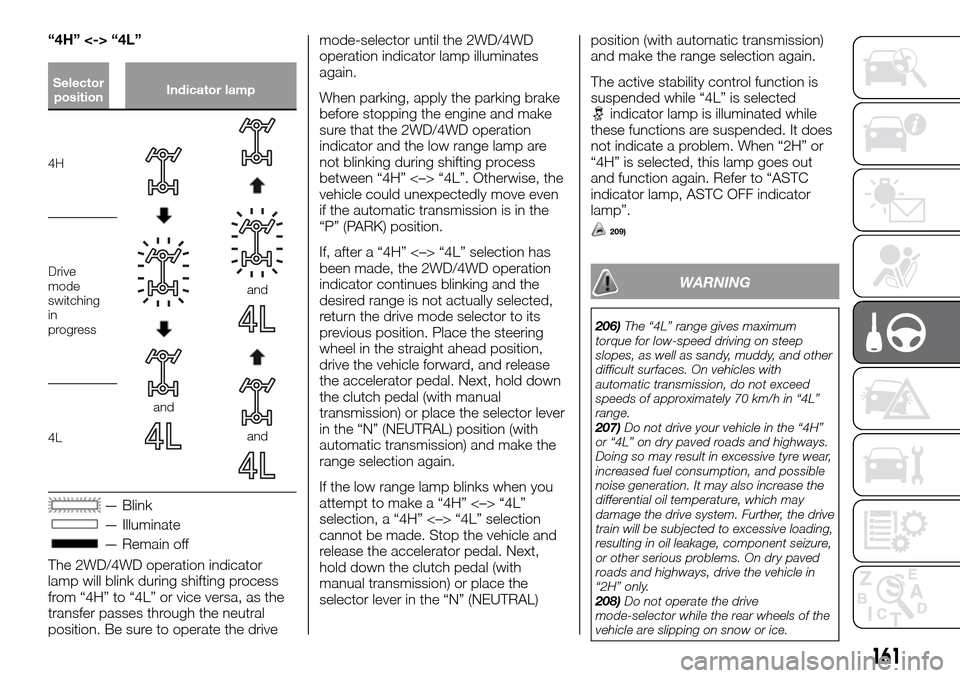
“4H” <-> “4L”
Selector
positionIndicator lamp
4H
and
and
and
Drive
mode
switching
in
progress
4L
— Blink
— Illuminate
— Remain off
The 2WD/4WD operation indicator
lamp will blink during shifting process
from “4H” to “4L” or vice versa, as the
transfer passes through the neutral
position. Be sure to operate the drivemode-selector until the 2WD/4WD
operation indicator lamp illuminates
again.
When parking, apply the parking brake
before stopping the engine and make
sure that the 2WD/4WD operation
indicator and the low range lamp are
not blinking during shifting process
between “4H” <–> “4L”. Otherwise, the
vehicle could unexpectedly move even
if the automatic transmission is in the
“P” (PARK) position.
If, after a “4H” <–> “4L” selection has
been made, the 2WD/4WD operation
indicator continues blinking and the
desired range is not actually selected,
return the drive mode selector to its
previous position. Place the steering
wheel in the straight ahead position,
drive the vehicle forward, and release
the accelerator pedal. Next, hold down
the clutch pedal (with manual
transmission) or place the selector lever
in the “N” (NEUTRAL) position (with
automatic transmission) and make the
range selection again.
If the low range lamp blinks when you
attempt to make a “4H” <–> “4L”
selection, a “4H” <–> “4L” selection
cannot be made. Stop the vehicle and
release the accelerator pedal. Next,
hold down the clutch pedal (with
manual transmission) or place the
selector lever in the “N” (NEUTRAL)position (with automatic transmission)
and make the range selection again.
The active stability control function is
suspended while “4L” is selected
indicator lamp is illuminated while
these functions are suspended. It does
not indicate a problem. When “2H” or
“4H” is selected, this lamp goes out
and function again. Refer to “ASTC
indicator lamp, ASTC OFF indicator
lamp”.
209)
WARNING
206)The “4L” range gives maximum
torque for low-speed driving on steep
slopes, as well as sandy, muddy, and other
difficult surfaces. On vehicles with
automatic transmission, do not exceed
speeds of approximately 70 km/h in “4L”
range.
207)Do not drive your vehicle in the “4H”
or “4L” on dry paved roads and highways.
Doing so may result in excessive tyre wear,
increased fuel consumption, and possible
noise generation. It may also increase the
differential oil temperature, which may
damage the drive system. Further, the drive
train will be subjected to excessive loading,
resulting in oil leakage, component seizure,
or other serious problems. On dry paved
roads and highways, drive the vehicle in
“2H” only.
208)Do not operate the drive
mode-selector while the rear wheels of the
vehicle are slipping on snow or ice.
161
Page 167 of 312
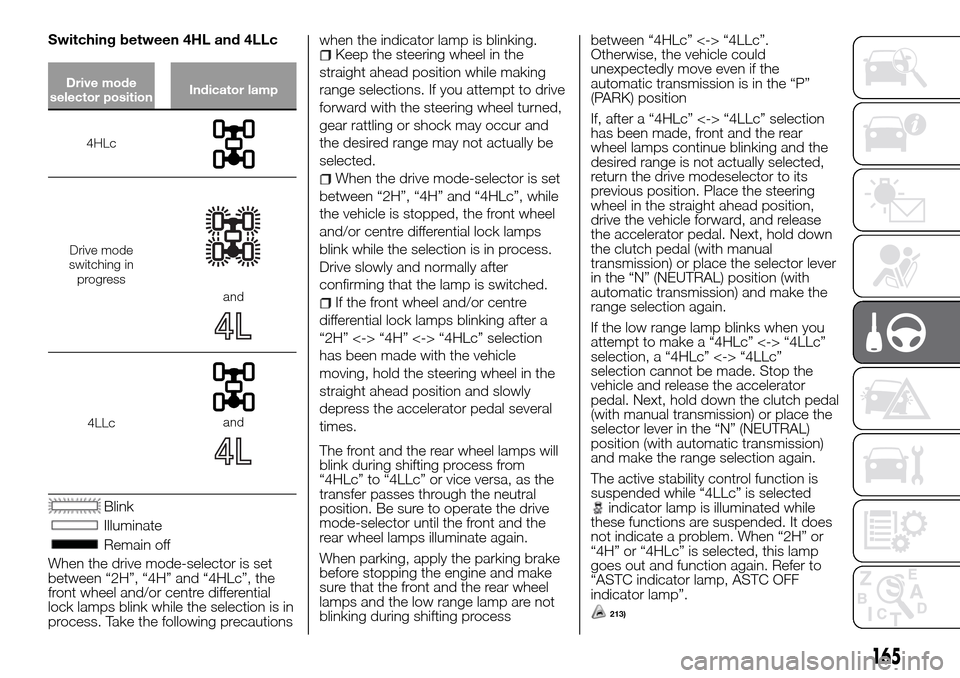
Switching between 4HL and 4LLc
Drive mode
selector positionIndicator lamp
4HLc
Drive mode
switching in
progress
and
4LLcand
Blink
Illuminate
Remain off
When the drive mode-selector is set
between “2H”, “4H” and “4HLc”, the
front wheel and/or centre differential
lock lamps blink while the selection is in
process. Take the following precautionswhen the indicator lamp is blinking.
Keep the steering wheel in the
straight ahead position while making
range selections. If you attempt to drive
forward with the steering wheel turned,
gear rattling or shock may occur and
the desired range may not actually be
selected.
When the drive mode-selector is set
between “2H”, “4H” and “4HLc”, while
the vehicle is stopped, the front wheel
and/or centre differential lock lamps
blink while the selection is in process.
Drive slowly and normally after
confirming that the lamp is switched.
If the front wheel and/or centre
differential lock lamps blinking after a
“2H” <-> “4H” <-> “4HLc” selection
has been made with the vehicle
moving, hold the steering wheel in the
straight ahead position and slowly
depress the accelerator pedal several
times.
The front and the rear wheel lamps will
blink during shifting process from
“4HLc” to “4LLc” or vice versa, as the
transfer passes through the neutral
position. Be sure to operate the drive
mode-selector until the front and the
rear wheel lamps illuminate again.
When parking, apply the parking brake
before stopping the engine and make
sure that the front and the rear wheel
lamps and the low range lamp are not
blinking during shifting processbetween “4HLc” <-> “4LLc”.
Otherwise, the vehicle could
unexpectedly move even if the
automatic transmission is in the “P”
(PARK) position
If, after a “4HLc” <-> “4LLc” selection
has been made, front and the rear
wheel lamps continue blinking and the
desired range is not actually selected,
return the drive modeselector to its
previous position. Place the steering
wheel in the straight ahead position,
drive the vehicle forward, and release
the accelerator pedal. Next, hold down
the clutch pedal (with manual
transmission) or place the selector lever
in the “N” (NEUTRAL) position (with
automatic transmission) and make the
range selection again.
If the low range lamp blinks when you
attempt to make a “4HLc” <-> “4LLc”
selection, a “4HLc” <-> “4LLc”
selection cannot be made. Stop the
vehicle and release the accelerator
pedal. Next, hold down the clutch pedal
(with manual transmission) or place the
selector lever in the “N” (NEUTRAL)
position (with automatic transmission)
and make the range selection again.
The active stability control function is
suspended while “4LLc” is selected
indicator lamp is illuminated while
these functions are suspended. It does
not indicate a problem. When “2H” or
“4H” or “4HLc” is selected, this lamp
goes out and function again. Refer to
“ASTC indicator lamp, ASTC OFF
indicator lamp”.
213)
165