radio FIAT IDEA 2008 1.G Connect NavPlus Manual
[x] Cancel search | Manufacturer: FIAT, Model Year: 2008, Model line: IDEA, Model: FIAT IDEA 2008 1.GPages: 165
Page 23 of 165
23
CONNECT NAV+
At the screen bottom there are the
functions that can be activated by press-
ing the corresponding multifunction
keys 16-fig. 1, on the front panel:
– FMactivates, on successive push-
es FM1, FM2, FM3, FMAST, FM1… ra-
dio bands in a loop.
– AMactivates, on successive push-
es MW, LW, AMAST, MW… radio
bands in a loop
– CD activates CD
– CDCactivates CD Changer
– 1-6buttons (short push), select a
pre-stored station
– 1-6 buttons (long push), store the
currently active station at the select-
ed button
– AFalternative frequency search
on/off
– TAtraffic information on/off.Tuning
This function seeks stations in the
chosen band.
Proceed as follows:
– select the frequency band (FM1,
FM2, FM3, MW, LW) pressing the
“SRC” key repeatedly 2-fig. 1;
– press key “
¯¯” 5-fig. 1or “˙˙”
6-fig. 1to start the search for tuning
the next or previous station that can
be received.
If the “TA” function is on (traffic in-
formation), the tuner only seeks sta-
tions that broadcast traffic bulletins.
If the “PTY” function is on, the tuner
only seeks stations with the selected
PTY program (see paragraph "PTY-
PROG TYPE function”).Manual station storage
The station being heard can be
stored in the range chosen with key-
pad buttons 16-fig. 1numbered from
“1” to “6” at the bottom of the main
screen.
Keep one of these keys pressed un-
til the display shows the number of the
key with which the station has been
stored; a confirmation beep will indi-
cate that the station has been stored.
021-059 Connect IDEA GB 17-01-2008 13:33 Pagina 23
Page 25 of 165
25
CONNECT NAV+
The operations to be carried out for
each of the above two conditions are
listed below.
1) If you wish to receive traffic in-
formation while listening to a CD, be-
fore inserting the CD, tune to a sta-
tion enabled to broadcast traffic in-
formation (TP) and turn the TA func-
tion on. If, while playing the CD, this
station broadcasts traffic information,
CD playing will be temporarily
stopped and resumed automatically at
the end of the message.
If the CD player is already operat-
ing and, at the same time, you wish to
receive traffic information, actuating
the TA function will cause the radio to
tune to the latest station listened to
on the FM band (if the station controls
the “TP”); otherwise, automatic
search will be started to find a station
that controls the “TP”.2) To receive traffic information
though not listening to the radio:
– turn on the TA function, so that
the display shows the abbreviation
“TA”;
– tune to a station enabled to broad-
cast traffic information so that “TP”
is shown on the display;
This way, if that station broadcasts
traffic information, this will be heard
at a minimum predefined volume.
A telephone call has higher priority
than traffic message.IMPORTANT In certain countries,
radio stations exist which though the
TP function is active (the display shows
“TP”), do not broadcast traffic infor-
mation.
If the radio is operating on the AM
band, selecting the FM band will cause
the latest listened station to be tuned.
If the selected station does not send
traffic information (the “TP” writing
does not appear on the display), au-
tomatic search will be started to seek
an enabled station to which the radio
will tune.
If the volume is changed during a traf-
fic bulletin the value is not shown on
the display and the new value is kept
only for the bulletin in progress.
021-059 Connect IDEA GB 17-01-2008 13:33 Pagina 25
Page 26 of 165
26
CONNECT NAV+
– With AF OFF the radio will not
tune the strongest station automati-
cally and it will have to be found man-
ually using the tuner buttons.
To turn on/off this function, press
briefly one of the keypad keys 16-fig.
1set near the icon key AF.
When the AF function is on, the
display shows “AF” and the wording
on the icon key is darkened.
The RDS channel name (if available)
is still shown on the display.“FREQUENCY” FUNCTION
The “Frequency” function enables to
tune the required radio station by
turning knob 15-fig. 1clockwise or
counter-clockwise.
To turn the “Frequency” function on,
turn knob 15-fig. 1to select the cor-
responding icon key and then press it.
To turn this function off, press again
knob 15-fig. 1. AF - SEEKING ALTERNATIVE
FREQUENCIES
Within the RDS system the radio can
work in two different modes:
– AF ON: alternative frequency
search on;
– AF OFF: alternative frequency
search off.
When the signal of the RDS station
tuned weakens, the following two cas-
es may occur:
– With AF ON the RDS system ac-
tivates automatic tuning of the opti-
mum frequency of the station chosen,
with the stations enabled, therefore
the radio is automatically tuned to the
station with the strongest signal that
is broadcasting the same programme.
During the journey it will thus be pos-
sible to continue listening to the sta-
tion chosen without having to change
the frequency when changing area. Of
course, the station being listened to
must be receivable in the area the car
is crossing.
021-059 Connect IDEA GB 17-01-2008 13:33 Pagina 26
Page 27 of 165
27
CONNECT NAV+
During automatic storage the display
shows “Autostore”.
Stations will be stored automatically
on the preset keys from “1” to “6” of
the keypad16-fig. 1. After storage,
the radio tunes automatically to the
first station of the FMAST band, cor-
responding to the frequency stored on
the preset key “1” of the keypad 16-
fig. 1.
Every station is stored only once, ex-
cept in the case of regional pro-
grammes, which in certain cases might
be stored twice.The behaviour of the set during Au-
tostore is as follows:
– pressing one of the preset keys
from “1” to “6” the automatic storage
process is interrupted and the station
stored with that key is tuned
– changing the audio source (Radio,
CD, CD-Changer) during the auto-
matic storage process, the Autostore
function is interrupted. “Autostore” FUNCTION
(AUTOMATIC STATION
STORAGE)
After selecting the AMAST or
FMAST band, to turn on the Auto-
store function (automatic station stor-
age), select the “AUTOSTORE” icon
with the knob 15-fig. 1then press it
to confirm.
When this function is on, the radio
automatically stores the stations with
the strongest signal:
– 6 FM stations in the FMAST band
or
– 6 AM stations in the AMAST band.
021-059 Connect IDEA GB 17-01-2008 13:33 Pagina 27
Page 29 of 165
29
CONNECT NAV+
LOC/DX function
(tuner sensitivity adjustment)
With this function it is possible to
change the sensitivity of automatic ra-
dio station searching. When low sen-
sitivity “LOC” is set, only stations with
excellent reception are sought; when
high sensitivity “DX” is set, all the sta-
tions are sought. If you are in an area
with a large number of broadcasters
and you want the ones with the
strongest signal, choose low sensitivi-
ty “LOC”.
To choose between low or high
tuner sensitivity, select the “LOC/DX”
function with the knob 15-fig. 1and
then press it repeatedly. The abbre-
viation of the sensitivity chosen will be
shown on the display:
– LOC = low sensitivity;
– DX = high sensitivity.Mono/Stereo function
To pass from “Mono” to “Stereo” or
vice versa, select “Mono/Stereo” by
turning the knob 15-fig. 1and press
it to confirm. This function is only
available on FM band.
When stereo reception is on the dis-
play shows “STEREO”, when it is off
the display shows “MONO”.
When the signal of the station tuned
is weak, to improve the sound quality,
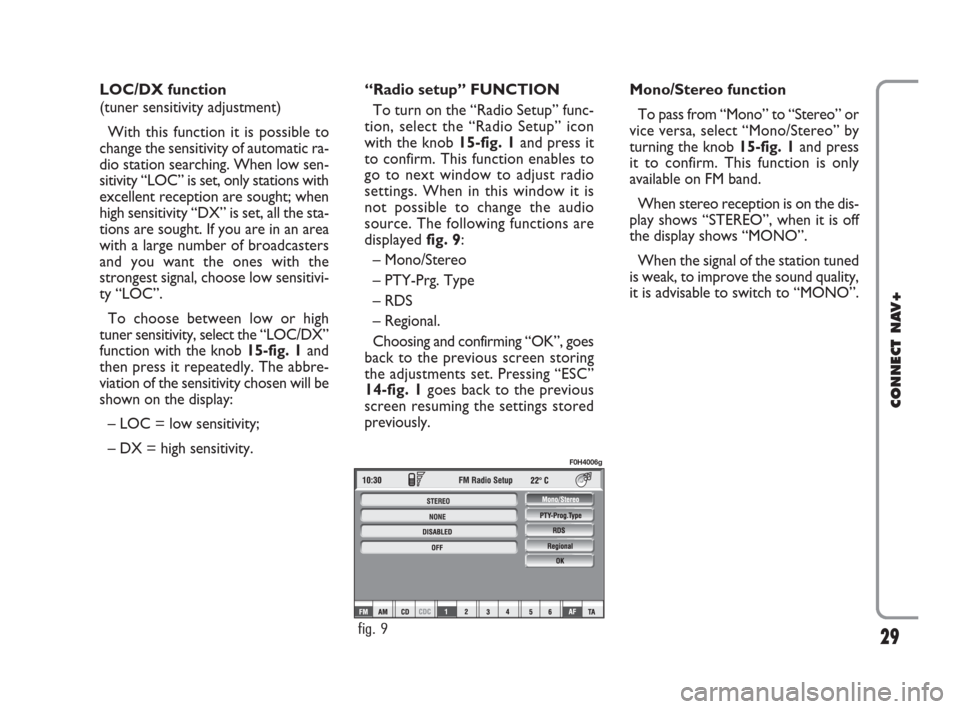
it is advisable to switch to “MONO”. “Radio setup” FUNCTION
To turn on the “Radio Setup” func-
tion, select the “Radio Setup” icon
with the knob 15-fig. 1and press it
to confirm. This function enables to
go to next window to adjust radio
settings. When in this window it is
not possible to change the audio
source. The following functions are
displayed fig. 9:
– Mono/Stereo
– PTY-Prg. Type
– RDS
– Regional.
Choosing and confirming “OK”, goes
back to the previous screen storing
the adjustments set. Pressing “ESC”
14-fig. 1goes back to the previous
screen resuming the settings stored
previously.
fig. 9
F0H4006g
021-059 Connect IDEA GB 17-01-2008 13:33 Pagina 29
Page 36 of 165
36
CONNECT NAV+
To turn the function on/off, proceed
as follows:
– select the “Reg. Autom. Vol.” func-
tion by turning the knob 15-fig. 1and
press it to confirm;
– turn the knob 15-fig. 1again to se-
lect a setting or turn the function off,
then press the knob 15-fig. 1.
The display shows the current status
of the function.
OK
Select “OK” by turning and pressing
the knob 15-fig. 1to enter and store
the settings. Auto Vol. Cont. function
(volume changing with speed)
With the “Auto Vol. Cont.” function
it is possible to automatically adjust the
radio volume level to the speed of the
car, increasing it as the speed increas-
es to maintain the correct ratio with
the noise level in the passenger com-
partment.
The adjustment levels available are:
– OFF
(function off)
– 1 (min)
– 2
– 3
– 4
– 5
– 6
– 7
(max). OK
Select “OK” by turning and pressing
the knob 15-fig. 1to enter and store
the settings.
021-059 Connect IDEA GB 17-01-2008 13:33 Pagina 36
Page 51 of 165
51
CONNECT NAV+
“Compression” FUNCTION
This function optimizes MP3 CD
sound quality when playing it in the car.
To turn this function on/off, select
the “Compression” icon with the
knob 15-fig. 1and press it.
When the “Compression” function
is on, symbol “✓” is shown near the
corresponding icon.
“Scan” FUNCTION
(BRIEF PLAYBACK)
The “Scan” function is turned on/off
selecting the relevant icon key with
the knob 15-fig. 1and pressing it.
When this function is on, all the MP3
CD tracks are played for about 10 sec-
onds in the actual sequence on the
MP3 CD or the preset playlist is
played (depending on “Playlist” en-
able/disable).
To turn the function off, select the
“Scan” icon and press the knob 15-
fig. 1again. “Shuffle” FUNCTION
(RANDOM PLAYING)
To turn the “Shuffle” function on/off,
turn the knob 15-fig. 1 and press it af-
ter selecting the function.
When the Shuffle function is on, the
display shows “SHUFFLE”.
With this function on, the MP3 CD
tracks or the playlist are played in ran-
dom sequence (depending on
“Playlist” enable/disable).
To turn the function off, select the
“Shuffle” icon and press the knob 15-
fig. 1 again. “Audio setup” FUNCTION
(AUDIO ADJUSTMENTS)
To access the audio setup menu
while listening to a MP3 CD, select the
“Setup” icon rotating the knob 15-
fig. 1and press it to confirm.
For the description of the different
functions available in the menu, refer
to the corresponding paragraph in sec-
tion “RADIO MODE”.
021-059 Connect IDEA GB 17-01-2008 13:33 Pagina 51
Page 53 of 165
53
CONNECT NAV+
Starting from “Stop” state (stop
playing by pressing “
˙/I I” 9-fig. 1, user
can modify the playlist by means of the
“Define playlist” function or set a track
sequence by means of the “Playlist”
function. It is then possible to play the
MP3 CD by pressing again “
˙/I I” 9-
fig. 1(“Play” key).
PLAYING MP3 CD
When a MP3 CD (to which a play list
has not been matched previously) is
put into the player, the radio naviga-
tion system will start playing auto-
matically from the first piece of the
first folder available in the CD, then
it will go on in a sequence. After all of
the pieces found in a folder have been
played, the pieces found in the next
folder of the CD will be played.
Before starting to play the first track
of the new folder, the display shows
for five seconds the new folder name.The main screen shows also the fol-
lowing information:
– audio source (MP3);
– when available, author and song
name fig. 28, or file name fig. 29;
– current track numberfig. 28;
– current status of MP3 CD source
(play fig. 28, pause fig. 30, stopfig.
31);
– CD time information;
– list of available tracks;
– TA, SHUFFLE, REPEAT… accord-
ing to the active function.
Icon keys on the right of the screen
are all enabled, excluding “Define
playlist” and “Playlist” under “Play” and
“Pause” conditions fig. 28 and 30; stop
the MP3 CD (“Stop”) fig. 31to enable
these two functions.When playing MP3 CD, buttons
“
¯¯”5-fig. 1and “˙˙” 6-fig. 1on
the left of the CONNECT Nav+ key-
pad, perform the following functions:
– pressing the keys briefly will allow
you to shift to the previous/following
piece of the play list; shifting from one
section of the CD to the next one will
involve displaying the name of the new
folder for a few instants;
– with long push skips to previ-
ous/next 10 track with respect to one
being played (provided the folder is
not empty). Should there be in the
folder 10 tracks preceding or follow-
ing the track being played then, skip to
first track of the previous or next fold-
er with respect to the one being
played will take place. During this op-
eration the name of the new folder is
displayed for five seconds.
021-059 Connect IDEA GB 17-01-2008 13:33 Pagina 53
Page 106 of 165
106
CONNECT NAV+
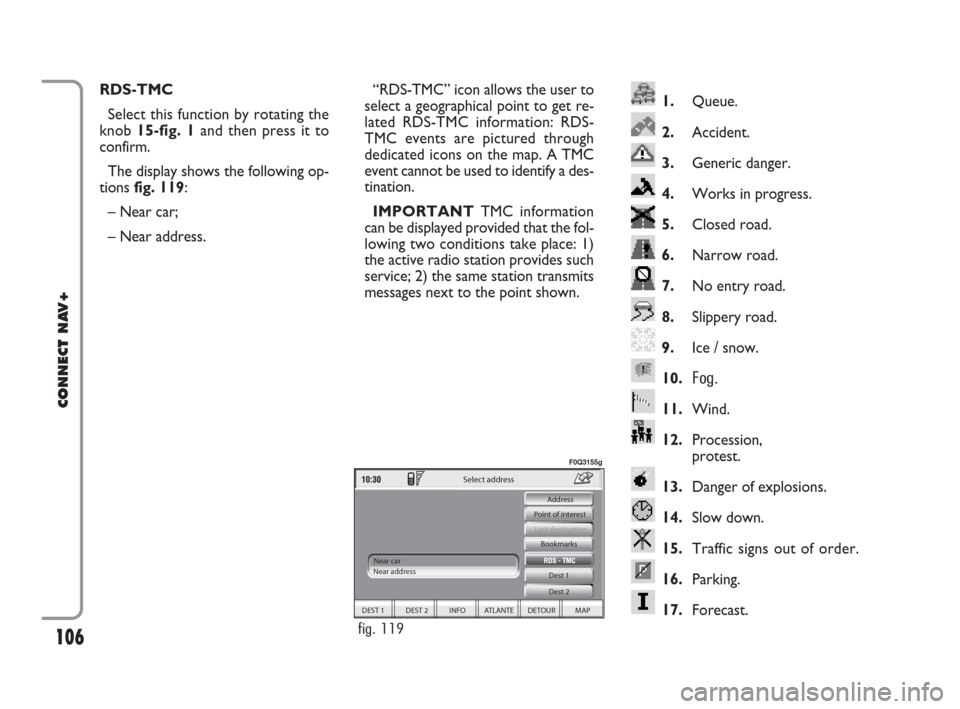
1.Queue.
2.Accident.
3.Generic danger.
4.Works in progress.
5.Closed road.
6.Narrow road.
7.No entry road.
8.Slippery road.
9.Ice / snow.
10.
Fog.
11.Wind.
12.Procession,
protest.
13.Danger of explosions.
14.Slow down.
15.Traffic signs out of order.
16.Parking.
17.Forecast.
RDS-TMC
Select this function by rotating the
knob 15-fig. 1and then press it to
confirm.
The display shows the following op-
tions fig. 119:
– Near car;
– Near address.“RDS-TMC” icon allows the user to
select a geographical point to get re-
lated RDS-TMC information: RDS-
TMC events are pictured through
dedicated icons on the map. A TMC
event cannot be used to identify a des-
tination.
IMPORTANTTMC information
can be displayed provided that the fol-
lowing two conditions take place: 1)
the active radio station provides such
service; 2) the same station transmits
messages next to the point shown.
DEST 1 DEST 2 INFO ATLANTE DETOUR MAP Dest 1
Dest 2 Bookmarks
Last destination
Select address
Near car
Near address Point of interest Address
fig. 119
F0Q3155g
092-115 Connect IDEA GB 17-01-2008 13:34 Pagina 106
Page 124 of 165
124Nero603 46 620 CONNECT CROMA ING
124
CONNECT NAV+
GENERAL INFORMATION
With the “Voice recognition” func-
tion the user can control the CON-
NECT Nav+ by voice. By means of
“Voice recognition”, the user can
send commands to the system to the
system through a microphone: short
push on
}1-fig. 1set on front pan-
el enables voice command interpre-
tation; CONNECT Nav+ will then
provide voice help to guide the user
get the required function.
Press again
}1-fig. 1to stop pro-
cedure.Voice recognition is performed in
two ways:
– voice recognition without
voice identification;
– voice recognition with voice
identification.
Commands without voice identi-
ficationactivate the main system
functions (TEL, RADIO, CD etc.).
Commands with voice identifica-
tionmakes it possible to enter / recall
names in the phone directory and/or
navigation addresses.
In the first case (voice recognition
without voice identification), the sys-
tem is able to receive the voice com-
mands regardless of the user’s sex and
voice tone and inflexion.No preliminary training phase is re-
quired, just follow the instructions giv-
en by the system each time.
In the second case (voice recognition
with voice identification), the system
is able to recognise the required com-
mand comparing the voice command
pronounced to the corresponding
voice sample previously stored by the
user.
IMPORTANTThe voice recogni-
tion and message store operations are
immediately interrupted in the event
of incoming calls; in this case, at the
end of the call, the whole operation
must be repeated. Conversely, in-
coming SMS text messages do not in-
terrupt the operations.
V V
O O
I I
C C
E E
R R
E E
C C
O O
G G
N N
I I
T T
I I
O O
N N
124-140 Connect IDEA GB 17-01-2008 13:37 Pagina 124