Auto door FIAT LINEA 2007 1.G Owners Manual
[x] Cancel search | Manufacturer: FIAT, Model Year: 2007, Model line: LINEA, Model: FIAT LINEA 2007 1.GPages: 230, PDF Size: 3.31 MB
Page 5 of 230
4
SAFETY
DEVICES
CORRECT USE
OF THE
CAR
WARNING
LIGHTS AND
MESSAGES
IN AN
EMERGENCY
CAR
MAINTENANCE
TECHNICAL
SPECIFICATIONS
INDEX
DASHBOARD
AND CONTROLSDASHBOARD........................................................................ 5
SYMBOLS ............................................................................... 6
THE FIAT CODE SYSTEM.................................................. 6
THE KEYS .............................................................................. 8
ALARM ................................................................................... 11
IGNITION DEVICE.............................................................. 13
INSTRUMENT PANEL ........................................................ 14
INSTRUMENTS..................................................................... 16
DIGITAL DISPLAY ............................................................... 18
MULTIFUNCTION DISPLAY ............................................ 23
RECONFIGURABLE MULTIFUNCTION DISPLAY ....... 32
TRIP COMPUTER ................................................................ 42
FRONT SEATS ..................................................................... 44
REAR SEATS .......................................................................... 45
HEAD RESTRAINTS............................................................. 45
STEERING WHEEL .............................................................. 47
REARVIEW MIRRORS......................................................... 47
HEATING AND VENTILATION...................................... 49
MANUAL CLIMATE CONTROL SYSTEM .................... 53
AUTOMATIC CLIMATE CONTROL SYSTEM ............ 59EXTERNAL LIGHTS ............................................................ 66
WINDOW WASHING....................................................... 68
CRUISE CONTROL ............................................................ 70
CEILING LIGHTS.................................................................. 72
CONTROLS........................................................................... 75
FUEL CUT-OFF SWITCH .................................................. 77
INTERIOR FITTINGS........................................................... 78
DOORS .................................................................................. 82
POWER WINDOWS........................................................... 83
BOOT ...................................................................................... 86
BONNET................................................................................. 88
ROOF RACK/SKI RACK .................................................... 90
HEADLIGHTS........................................................................ 91
ABS SYSTEM ......................................................................... 92
ESP SYSTEM .......................................................................... 93
EOBD SYSTEM ..................................................................... 96
PARKING SENSORS ........................................................... 97
SOUND SYSTEM.................................................................. 99
ACCESSORIES PURCHASED BY THE OWNER .......... 100
AT THE FILLING STATION ............................................. 101
PROTECTING THE ENVIRONMENT............................. 102
DD D
A A
S S
H H
B B
O O
A A
R R
D D
A A
N N
D D
C C
O O
N N
T T
R R
O O
L L
S S
Page 19 of 230
18
SAFETY
DEVICES
CORRECT USE
OF THE
CAR
WARNING
LIGHTS AND
MESSAGES
IN AN
EMERGENCY
CAR
MAINTENANCE
TECHNICAL
SPECIFICATIONS
INDEX
DASHBOARD
AND CONTROLS
DIGITAL DISPLAY
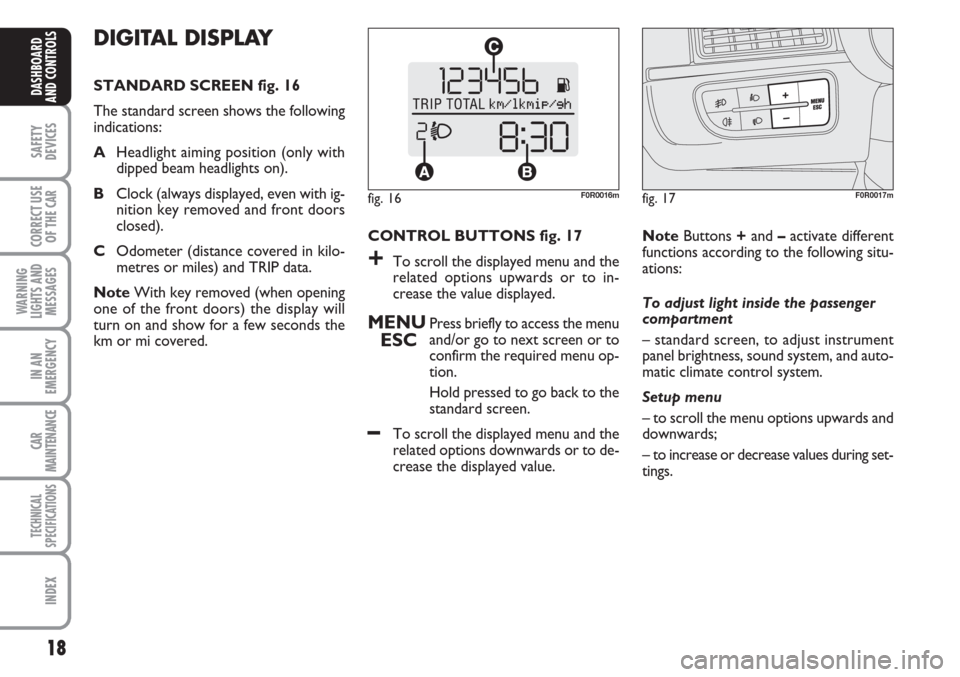
STANDARD SCREEN fig. 16
The standard screen shows the following
indications:
AHeadlight aiming position (only with
dipped beam headlights on).
BClock (always displayed, even with ig-
nition key removed and front doors
closed).
COdometer (distance covered in kilo-
metres or miles) and TRIP data.
NoteWith key removed (when opening
one of the front doors) the display will
turn on and show for a few seconds the
km or mi covered.CONTROL BUTTONS fig. 17
+To scroll the displayed menu and the
related options upwards or to in-
crease the value displayed.
MENU
ESCPress briefly to access the menu
and/or go to next screen or to
confirm the required menu op-
tion.
Hold pressed to go back to the
standard screen.
–To scroll the displayed menu and the
related options downwards or to de-
crease the displayed value. NoteButtons +and –activate different
functions according to the following situ-
ations:
To adjust light inside the passenger
compartment
– standard screen, to adjust instrument
panel brightness, sound system, and auto-
matic climate control system.
Setup menu
– to scroll the menu options upwards and
downwards;
– to increase or decrease values during set-
tings.
fig. 16F0R0016mfig. 17F0R0017m
Page 24 of 230
23
SAFETY
DEVICES
CORRECT USE
OF THE
CAR
WARNING
LIGHTS AND
MESSAGES
IN AN
EMERGENCY
CAR
MAINTENANCE
TECHNICAL
SPECIFICATIONS
INDEX
DASHBOARD
AND CONTROLS
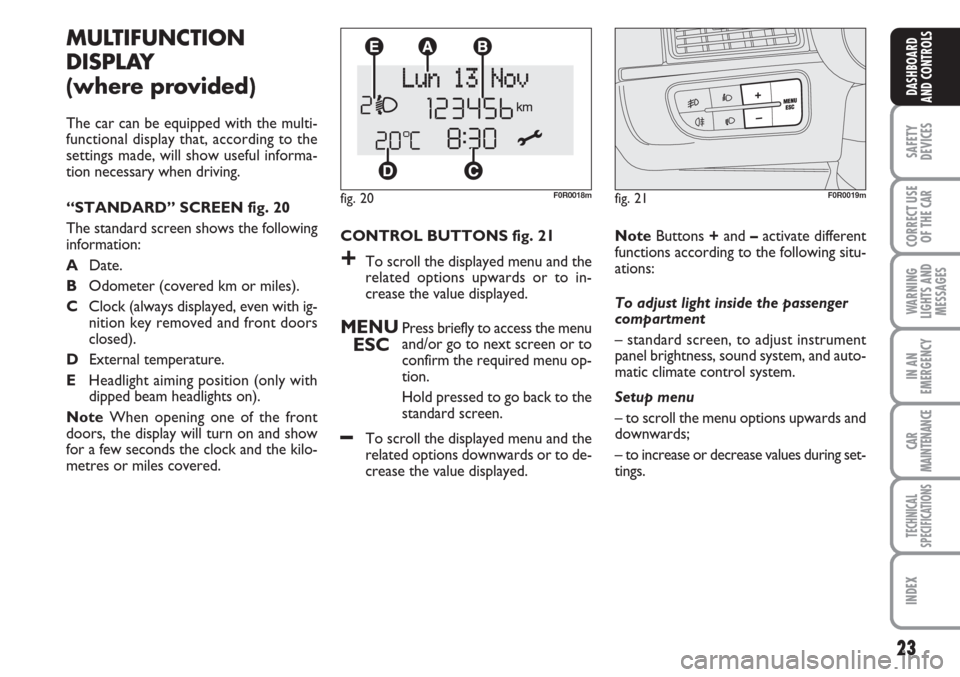
CONTROL BUTTONS fig. 21
+To scroll the displayed menu and the
related options upwards or to in-
crease the value displayed.
MENU
ESCPress briefly to access the menu
and/or go to next screen or to
confirm the required menu op-
tion.
Hold pressed to go back to the
standard screen.
–To scroll the displayed menu and the
related options downwards or to de-
crease the value displayed.
MULTIFUNCTION
DISPLAY
(where provided)
The car can be equipped with the multi-
functional display that, according to the
settings made, will show useful informa-
tion necessary when driving.
“STANDARD” SCREEN fig. 20
The standard screen shows the following
information:
ADate.
BOdometer (covered km or miles).
CClock (always displayed, even with ig-
nition key removed and front doors
closed).
DExternal temperature.
EHeadlight aiming position (only with
dipped beam headlights on).
NoteWhen opening one of the front
doors, the display will turn on and show
for a few seconds the clock and the kilo-
metres or miles covered.
fig. 20F0R0018m
NoteButtons +and –activate different
functions according to the following situ-
ations:
To adjust light inside the passenger
compartment
– standard screen, to adjust instrument
panel brightness, sound system, and auto-
matic climate control system.
Setup menu
– to scroll the menu options upwards and
downwards;
– to increase or decrease values during set-
tings.
fig. 21F0R0019m
Page 29 of 230
28
SAFETY
DEVICES
CORRECT USE
OF THE
CAR
WARNING
LIGHTS AND
MESSAGES
IN AN
EMERGENCY
CAR
MAINTENANCE
TECHNICAL
SPECIFICATIONS
INDEX
DASHBOARD
AND CONTROLS
Automatic door locking with car
running (Autoclose)
When activated (On), this function locks
automatically the doors when the car
speed exceeds 20 km/h.
This function is available on all versions
and may only be switched off by means
of the multifunctional display or reconfig-
urable multifunctional display.
To activate (On) or to deactivate (Off) this
function proceed as follows:
– briefly press button MENU ESCto dis-
play the three sub-menus;
– briefly press button MENU ESC: (On)
or (Off) will flash on the display (accord-
ing to previous setting);
– press button +or –for setting;
– briefly press button MENU ESCto
go back to the menu screen or press the
button for long to go back to the stan-
dard screen without storing settings.
– hold MENU ESCpressed to go back
to the standard screen or main menu ac-
cording to the points of the menu where
you are at. Audio repetition (See radio)
With this function the display repeats in-
formation relevant to the sound system.
– Radio: tuned radio station frequency or
RDS message, automatic tuning activation
or AutoSTore;
– CD audio, CD MP3: track number;
– CD Changer: CD number and track
number;
To activate (On) or to deactivate (Off)
sound system info displaying proceed as
follows:
– briefly press MENU ESC: (On) or (Off)
will flash on the display (according to pre-
vious setting);
– press button +or –for setting;
– briefly press button MENU ESCto go
back to the menu screen or press the but-
ton for long to go back to the standard
screen without storing settings.Set units (Unit of measure)
With this function it is possible to set the
units through three sub-menus: “Distances”,
“Consumption” and “Temperature”.
Proceed as follows to set the required unit:
– briefly press button MENU ESCto dis-
play the three sub-menus;
– press button +or –to surf the three sub-
menus;
– select the required sub-menu and then
press briefly button MENU ESC;
– when accessing the “Distances”submenu:
briefly press MENU ESC: either “km” or
“mi” will appear on the display (according
to the previous setting);
– press + or –to make your choice;
Page 39 of 230
38
SAFETY
DEVICES
CORRECT USE
OF THE
CAR
WARNING
LIGHTS AND
MESSAGES
IN AN
EMERGENCY
CAR
MAINTENANCE
TECHNICAL
SPECIFICATIONS
INDEX
DASHBOARD
AND CONTROLS
See radio
(Repeat audio information)
This function is used to display informa-
tion relevant to the sound system.
– Radio: tuned radio station frequency or
RDS message, automatic tuning activation
or AutoSTore;
– CD audio, CD MP3: track number;
– CD Changer: CD number and track
number;
To activate (On) or to deactivate (Off)
sound system info displaying proceed as
follows:
– briefly press button MENU ESC: (On)
or (Off) will flash on the display (accord-
ing to previous setting);
– press button +or –for setting;
– briefly press button MENU ESCto go
back to the menu screen or press the but-
ton for long to go back to the standard
screen without storing settings.Autoclose
(Automatic door lock operation
with car running)
When activated (On), this function locks
automatically the doors when the car
speed exceeds 20 km/h.
This function is available on all versions
and may only be switched off by means
of the multifunctional display or reconfig-
urable multifunctional display.
Proceed as follows to switch this function
on or off:
- briefly press button MENU ESCto dis-
play a submenu;
– briefly press button MENU ESC: (On)
or (Off) will flash on the display (accord-
ing to previous setting);
– press button +or –for setting;
– briefly press button MENU ESCto go
back to the menu screen or press the but-
ton for long to go back to the standard
screen without storing settings.
– hold MENU ESCpressed to go back to
the standard screen or main menu accord-
ing to the points of the menu where you are
at.Unit of measure (Set units)
This function may be used to set the unit
for measure in three submenus: “Dis-
tances”, “Consumption” and “Tempera-
ture”.
Proceed as follows to set the required
unit:
– briefly press button MENU ESCto dis-
play the three sub-menus;
– press button +or –to browse the three
submenus;
– select the required submenu and then
press briefly buttonMENU ESC;
– when accessing the “Distance” submenu:
briefly press MENU ESC: either “km” or
“mi” will appear on the display (accord-
ing to the previous setting);
– press button +or –for setting;
– when accessing the “Consumption” sub-
menu: briefly press MENU ESC: either
“km/l ”, “l/100km” or “mpg” will appear
on the display (according to the previous
setting);
If the distance unit set is “km” the fuel con-
sumption unit will be displayed in km/l or
l/100km.
Page 49 of 230
48
SAFETY
DEVICES
CORRECT USE
OF THE
CAR
WARNING
LIGHTS AND
MESSAGES
IN AN
EMERGENCY
CAR
MAINTENANCE
TECHNICAL
SPECIFICATIONS
INDEX
DASHBOARD
AND CONTROLS
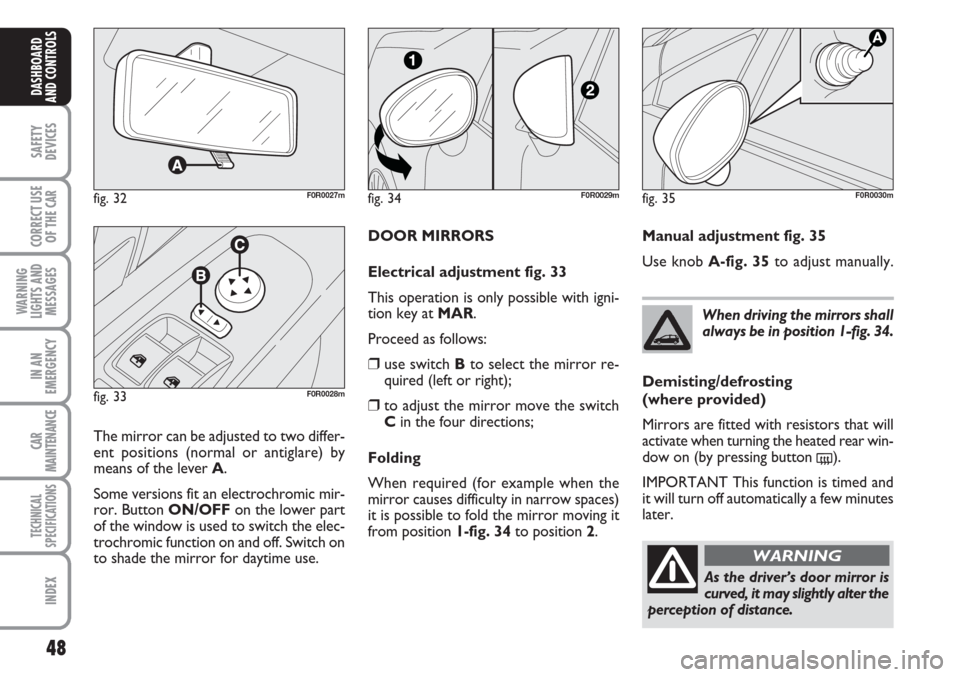
DOOR MIRRORS
Electrical adjustment fig. 33
This operation is only possible with igni-
tion key at MAR.
Proceed as follows:
❒use switch Bto select the mirror re-
quired (left or right);
❒to adjust the mirror move the switch
Cin the four directions;
Folding
When required (for example when the
mirror causes difficulty in narrow spaces)
it is possible to fold the mirror moving it
from position 1-fig. 34 to position 2.
fig. 32F0R0027m
fig. 33F0R0028m
The mirror can be adjusted to two differ-
ent positions (normal or antiglare) by
means of the lever A.
Some versions fit an electrochromic mir-
ror. Button ON/OFFon the lower part
of the window is used to switch the elec-
trochromic function on and off. Switch on
to shade the mirror for daytime use.When driving the mirrors shall
always be in position 1-fig. 34.
As the driver’s door mirror is
curved, it may slightly alter the
perception of distance.
WARNING
fig. 34F0R0029mfig. 35F0R0030m
Manual adjustment fig. 35
Use knob A-fig. 35to adjust manually.
Demisting/defrosting
(where provided)
Mirrors are fitted with resistors that will
activate when turning the heated rear win-
dow on (by pressing button
().
IMPORTANT This function is timed and
it will turn off automatically a few minutes
later.
Page 53 of 230
52
SAFETY
DEVICES
CORRECT USE
OF THE
CAR
WARNING
LIGHTS AND
MESSAGES
IN AN
EMERGENCY
CAR
MAINTENANCE
TECHNICAL
SPECIFICATIONS
INDEX
DASHBOARD
AND CONTROLS
FRONT WINDOW FAST
DEMISTING/
DEFROSTING (WINDSCREEN
AND SIDE WINDOWS)
Proceed as follows:
❒turn knob Ato the red sector;
❒switch internal air recirculation off;
❒turn knob Cto -;
❒knob Bturned to 4 -(max. fan
speed).
After demisting/defrosting, operate the
controls to restore the required comfort.Window demisting
In the event of considerable outside mois-
ture and/or rain and/or considerable dif-
ferences in temperature inside and outside
the passenger compartment, perform the
following preventive demisting procedure:
❒turn knob Ato the red sector;
❒switch internal air recirculation off;
❒turn knob Cto -. Change it to posi-
tion con
®if demisting is insufficient;
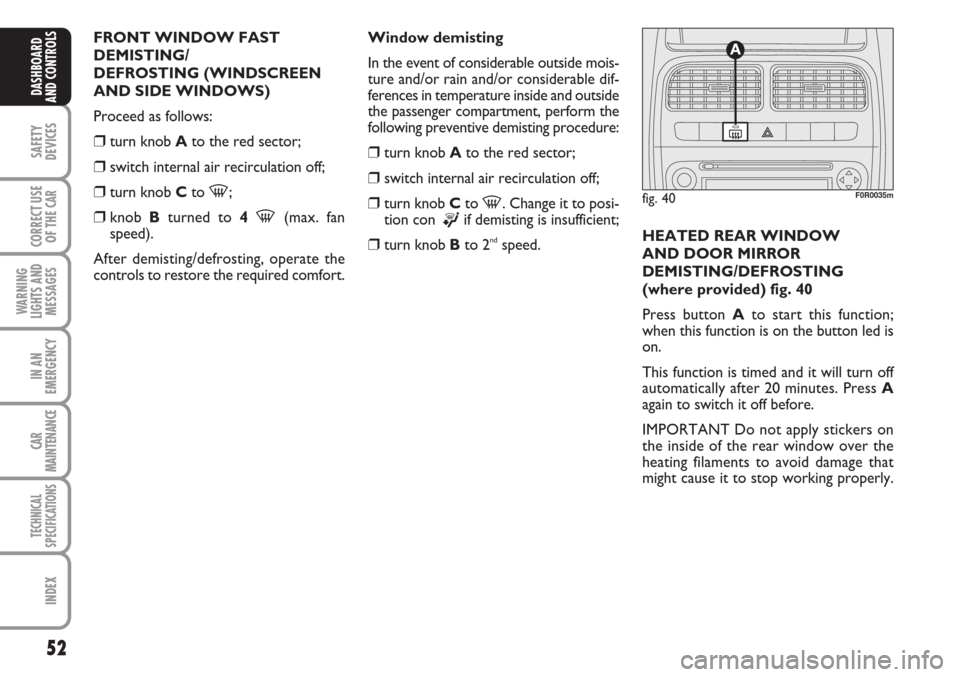
❒turn knob Bto 2ndspeed.HEATED REAR WINDOW
AND DOOR MIRROR
DEMISTING/DEFROSTING
(where provided) fig. 40
Press button Ato start this function;
when this function is on the button led is
on.
This function is timed and it will turn off
automatically after 20 minutes. Press A
again to switch it off before.
IMPORTANT Do not apply stickers on
the inside of the rear window over the
heating filaments to avoid damage that
might cause it to stop working properly.
fig. 40F0R0035m
Page 58 of 230
57
SAFETY
DEVICES
CORRECT USE
OF THE
CAR
WARNING
LIGHTS AND
MESSAGES
IN AN
EMERGENCY
CAR
MAINTENANCE
TECHNICAL
SPECIFICATIONS
INDEX
DASHBOARD
AND CONTROLS
Window demisting
In the event of considerable outside mois-
ture and/or rain and/or considerable dif-
ferences in temperature inside and outside
the passenger compartment, perform the
following preventive demisting procedure:
❒turn knob Ato the red sector;
❒switch internal air recirculation off;
❒turn knob Cto -and change it back
to
®if demisting does not improve;
❒turn knob Bto 2ndspeed.
IMPORTANT The climate control system
is very useful to prevent window misting
up in presence of high humidity since it
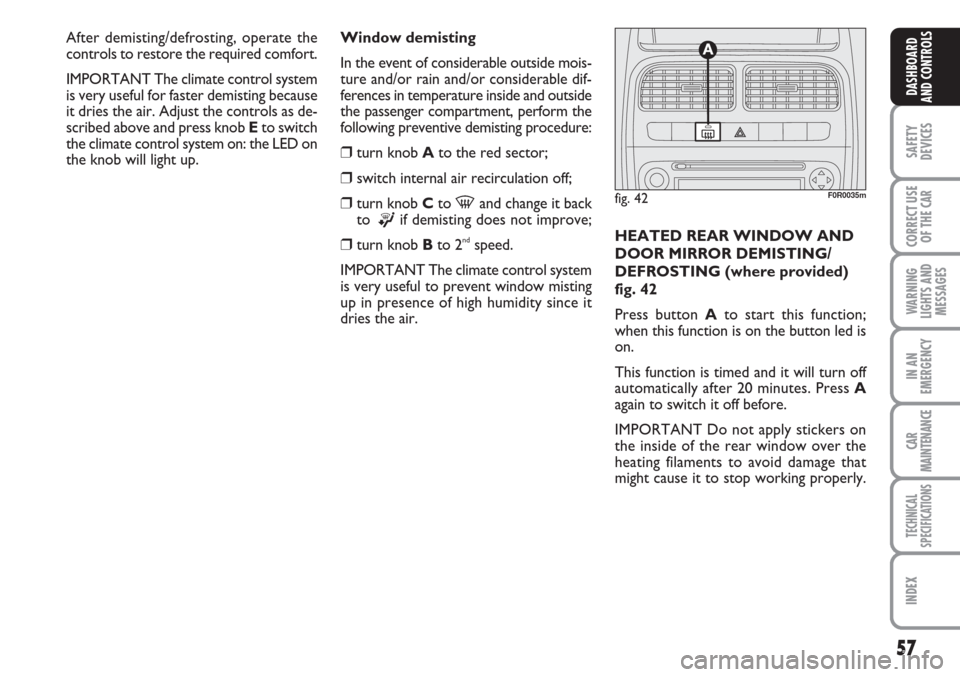
dries the air.HEATED REAR WINDOW AND
DOOR MIRROR DEMISTING/
DEFROSTING (where provided)
fig. 42
Press button Ato start this function;
when this function is on the button led is
on.
This function is timed and it will turn off
automatically after 20 minutes. Press A
again to switch it off before.
IMPORTANT Do not apply stickers on
the inside of the rear window over the
heating filaments to avoid damage that
might cause it to stop working properly.
fig. 42F0R0035m
After demisting/defrosting, operate the
controls to restore the required comfort.
IMPORTANT The climate control system
is very useful for faster demisting because
it dries the air. Adjust the controls as de-
scribed above and press knob Eto switch
the climate control system on: the LED on
the knob will light up.
Page 73 of 230
72
SAFETY
DEVICES
CORRECT USE
OF THE
CAR
WARNING
LIGHTS AND
MESSAGES
IN AN
EMERGENCY
CAR
MAINTENANCE
TECHNICAL
SPECIFICATIONS
INDEX
DASHBOARD
AND CONTROLS
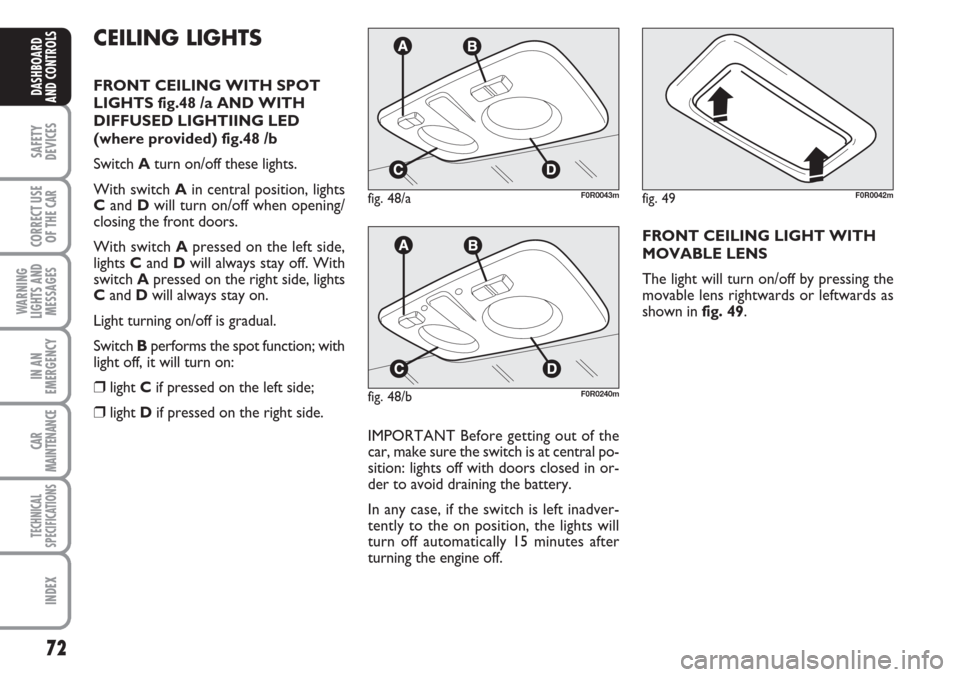
CEILING LIGHTS
FRONT CEILING WITH SPOT
LIGHTS fig.48 /a AND WITH
DIFFUSED LIGHTIING LED
(where provided) fig.48 /b
Switch Aturn on/off these lights.
With switch Ain central position, lights
Cand Dwill turn on/off when opening/
closing the front doors.
With switch Apressed on the left side,
lights Cand Dwill always stay off. With
switch Apressed on the right side, lights
Cand Dwill always stay on.
Light turning on/off is gradual.
Switch Bperforms the spot function; with
light off, it will turn on:
❒light Cif pressed on the left side;
❒light Dif pressed on the right side.
IMPORTANT Before getting out of the
car, make sure the switch is at central po-
sition: lights off with doors closed in or-
der to avoid draining the battery.
In any case, if the switch is left inadver-
tently to the on position, the lights will
turn off automatically 15 minutes after
turning the engine off.
fig. 48/aF0R0043m
FRONT CEILING LIGHT WITH
MOVABLE LENS
The light will turn on/off by pressing the
movable lens rightwards or leftwards as
shown in fig. 49.
fig. 48/bF0R0240m
fig. 49F0R0042m
Page 74 of 230
73
SAFETY
DEVICES
CORRECT USE
OF THE
CAR
WARNING
LIGHTS AND
MESSAGES
IN AN
EMERGENCY
CAR
MAINTENANCE
TECHNICAL
SPECIFICATIONS
INDEX
DASHBOARD
AND CONTROLS
Ceiling light timing
On certain versions to facilitate getting
in/out of the car at night or with poor
lighting, 2 different timed switching on
modes have been provided.LIGHT TIMING WHEN GETTING INTO THE CAR
Lights will turn on as follows:
❒for about 10 seconds when opening
front doors;
❒for about 3 minutes when opening one
of the side doors;
❒for about 10 seconds when closing the
doors.
Timing will stop when turning the ignition
key to MAR.
LIGHT TIMING WHEN GETTING OUT
OF THE CAR
After removing the key from the ignition
switch, the ceiling lights will turn on as fol-
lows:
❒within 2 minutes from turning the en-
gine off for about 10 seconds;
❒when opening one of the side doors for
about 3 minutes;
❒when closing one of the doors for
about 10 seconds.
Timing will stop automatically when lock-
ing the doors.