red warning lights FIAT PANDA 2009 169 / 2.G User Guide
[x] Cancel search | Manufacturer: FIAT, Model Year: 2009, Model line: PANDA, Model: FIAT PANDA 2009 169 / 2.GPages: 226, PDF Size: 5.29 MB
Page 22 of 226
21KNOW YOUR
VEHICLESAFETY
CORRECT USE
OF THE CAR
WARNING LIGHTS
AND MESSAGES
IN
AN EMERGENCY
CAR
MAINTENANCE
TECHNICAL
SPECIFICATIONS
INDEX
Press the button MODE for long:
– to return to the set up menu if you are in the main menu;
– to return to the main menu if you are at another point
of the menu (e.g.: at submenu option setting level, at sub-
menu level or at main menu option setting level);
– to save only the changes stored by the user (and con-
firmed by pressing button MODE).
The setup menu is timed; when quitting the menu due to
timing expiry, only the changes already stored by the user
(and confirmed by pressing briefly the button MODE) will
be saved. Selecting “Date” and “Set Clock”:
– briefly press the button MODE to select the first value
to be changed (e.g. hours/minutes or year/month/day);
– press buttons + or −(with a single press) to select the
new setting;
– briefly press the button MODE to store the new setting
and at the same time go to the next setup menu option. If
the processed option is the last one, the system brings you
back to the previously selected menu option.
001-030 PANDA EN 7-10-2009 13:40 Pagina 21
Page 24 of 226
23KNOW YOUR
VEHICLESAFETY
CORRECT USE
OF THE CAR
WARNING LIGHTS
AND MESSAGES
IN
AN EMERGENCY
CAR
MAINTENANCE
TECHNICAL
SPECIFICATIONS
INDEX
Trip B On/Off (trip B data)
This function can be used to activate (On) or deactivate
(Off) the Trip B displaying (partial trip).
For further information see “Trip computer”.
Proceed as follows to switch the function on and off:
– briefly press the button MODE: “On” or “Off” flash on
the display (depending on the previous setting);
– press the button + or − to select;
– briefly press the button MODE to go back to the menu
screen or press the button for a prolonged time to go back
to the standard screen without storing the settings.
Setting the clock (Set time)
This function enables to set the clock through two sub-
menus: “Time” and “Format”.
To carry out the adjustment, proceed as follows:
– briefly press the button MODE, the display will show the
two submenus “Time” and “Format”;
– press the button
+or − to switch between the two
submenus;
– once you have selected the submenu to be changed,
press the button MODE briefly;
– when accessing the “Time” submenu:briefly press the but-
ton MODE : “hours” will flash on the display;
– press the button + or − for setting;
– briefly press the button MODE: “minutes” starts flash-
ing on the display;
– press the button + or − for setting; Speed limit (Speed Beep)
This function is used to set the car speed limit (km/h or
mph); the driver is immediately alerted when this limit is
exceeded (see chapter “Warning lights and messages”).
To set the desired speed limit, proceed as follows:
– briefly press the button MODE: the display will show the
wording “Speed Beep”;
– press button
+or
−to select speed limit activation (On)
or deactivation (Off);
– if the function has been activated (On), press the but-
tons + or − to select the required speed limit and then
press MODE to confirm.
NOTE The possible setting is between 30 and 250 km/h, or
between 20 and 155 mph depending on the previously set unit
see “Setting the distance unit” – “Measurement units” de-
scribed below. The setting will increase/decrease by five units
each time the button + /
−
is pressed. Hold the button
+/
−pressed to increase/decrease the setting rapidly and au-
tomatically. Complete the setting by single pressing the but-
ton when you approach the required value.
– press the button MODE briefly to return to the menu
screen or press the button for a prolonged time to go back
to the standard screen without storing settings.
To cancel the setting, proceed as follows:
– briefly press the button MODE: “On” flashes on the
display;
– press the button −: “Off” flashes on the display;
– briefly press the button MODE to go back to the menu
screen or press the button for a prolonged time to go back
to the standard screen without storing the settings.
001-030 PANDA EN 7-10-2009 13:40 Pagina 23
Page 25 of 226
24
KNOW YOUR
VEHICLE
SAFETY
CORRECT USE
OF THE CAR
WARNING LIGHTS
AND MESSAGES
IN
AN EMERGENCY
CAR
MAINTENANCE
TECHNICAL
SPECIFICATIONS
INDEX
Set date (Set date)
By this function you can update the date
(day – month – year).
Proceed as follows to update:
– briefly press the button MODE: “day” (dd) will start flash-
ing on the display;
– press the button + or − for setting;
– briefly press the button MODE: “month” (mm) will start
flashing on the display;
– press the button + or − for setting;
– briefly press the button MODE: “year” (yyyy) will start
flashing on the display;
– press the button + or − for setting.
NOTE The setting increases or decreases by one unit each
time the button + or − is pressed. Hold the button pressed
to increase/decrease the setting rapidly. Complete the set-
ting by briefly pressing the button when you approach the
required value.
– briefly press the button MODE to go back to the menu
screen or press the button for a prolonged time to go back
to the standard screen without storing the settings. – when accessing the “Format” submenu:briefly press the
button MODE: the display mode will flash on the display;
– press the button + or − to select “24h” or “12h”.
After setting, briefly press the button MODE to go back
to the submenu screen or hold the button down to go
back to the main menu screen without storing the new
settings.
– press the button MODE again for a longer time to go
back to the standard screen or to the main menu according
to the current menu level displayed.
001-030 PANDA EN 7-10-2009 13:40 Pagina 24
Page 26 of 226
25KNOW YOUR
VEHICLESAFETY
CORRECT USE
OF THE CAR
WARNING LIGHTS
AND MESSAGES
IN
AN EMERGENCY
CAR
MAINTENANCE
TECHNICAL
SPECIFICATIONS
INDEX
– briefly press the MODE button: “On” or “Off” will flash
on the display (depending on the previous setting);
– press the button + or − to select;
– briefly press the button MODE to go back to the sub-
menu screen or press the button for a prolonged time to
go back to the standard screen without storing settings;
– press the button MODE again for a longer time to go
back to the standard screen or to the main menu according
to the current menu level displayed.
Set units (Measurement units)
With this function it is possible to set the units through three
submenus: “Distances”, “Consumption” and “Temperature”.
To set the required unit proceed as follows:
– briefly press the button MODE to display the three
submenus;
– press the button + or − to switch between the three
submenus;
– once you have selected the submenu to be changed, press
the MODE button briefly;
– when accessing the “Distance” submenu:and briefly press the
button MODE and the display will show “km” or “mi”
(depending on the previous setting);
– press the button + or − to select; Audio repetition (See radio)
With this function the display shows information about the
sound system.
– Radio: selected radio station frequency or RDS message,
automatic tuning activation or AutoSTore;
– Audio CD, MP3 CD: track number;
– CD Changer: CD number and track number;
– Tape: operating mode.
To show the sound system information on the display (On)
or clear it (Off), proceed as follows:
– briefly press the button MODE: (On) or (Off) will flash
on the display (depending on the previous setting);
– press the button + or − to select;
– briefly press the button MODE to go back to the menu
screen or press the button for a prolonged time to go back
to the standard screen without storing the settings.
Automatic central door locking
with car running
(Autoclose)
When activated (On), this function locks automatically the
doors when the vehicle speed exceeds 20 km/h.
Proceed as follows to activate (On) or deactivate (Off) this
function:
– briefly press the button MODE to display one submenu;
001-030 PANDA EN 7-10-2009 13:40 Pagina 25
Page 27 of 226
26
KNOW YOUR
VEHICLE
SAFETY
CORRECT USE
OF THE CAR
WARNING LIGHTS
AND MESSAGES
IN
AN EMERGENCY
CAR
MAINTENANCE
TECHNICAL
SPECIFICATIONS
INDEX
Selecting the language (Language)
After setting, display messages can be shown in different
languages: Italian, German, English, Spanish, French, Por-
tuguese, Polish and Dutch.
To set the desired language, proceed as follows:
– briefly press the button MODE: the previously set “lan-
guage” will flash on the display;
– press the button + or − to select;
– briefly press the button MODE to go back to the menu
screen or press the button for a prolonged time to go back
to the standard screen without storing the settings.
Adjust the failure/warning buzzer volume
(Buzzer Volume)
With this function the volume of the buzzer which ac-
companies the display of any failure/warning can be ad-
justed according to 8 levels.
To set the desired volume, proceed as follows:
– briefly press the button MODE: the previously set
volume “level” will flash on the display;
– press the button + or − for setting;
– briefly press the button MODE to go back to the menu
screen or press the button for a prolonged time to go back
to the standard screen without storing the settings. – when accessing the “Consumption” submenu (for versions/
markets where provided): briefly press the button
MODE and the display will show “km/l”, “l/100km” or “mpg”
(depending on the previous setting);”
If the set distance unit is “km”, the fuel consumption unit
will be displayed in km/l or l/100km.
If the distance unit set is “mi” the fuel consumption unit
will be displayed in “mpg”.
– Press the button
+or − to select;
– When accessing the “Temperature” submenu: briefly press
the button MODE and the display will show “°C” or “°F”
(depending on the previous setting);
– Press the button +or − to select.
After setting, briefly press the button MODE to go back
to the submenu screen or press the button for a longer
time to go back to the main menu screen without stor-
ing settings.
– Press the button MODE again for a longer time to go
back to the standard screen or to the main menu according
to the current menu level displayed.
001-030 PANDA EN 7-10-2009 13:40 Pagina 26
Page 28 of 226
27KNOW YOUR
VEHICLESAFETY
CORRECT USE
OF THE CAR
WARNING LIGHTS
AND MESSAGES
IN
AN EMERGENCY
CAR
MAINTENANCE
TECHNICAL
SPECIFICATIONS
INDEX
Note The “Scheduled servicing plan” ensures car servic-
ing every 20,000 km (or 12,000 miles). This is automati-
cally displayed when the ignition key is in the MAR posi-
tion, from 2,000 km (or the equivalent in miles) before the
service and reappears every 200 km (or the equivalent
in miles). Below 200 km servicing indications are more fre-
quent. The displaying will be in kilometres or miles de-
pending on the measurement unit settings. When the next
scheduled servicing is approaching (“coupon”), the mes-
sage “Service” will appear on the display followed by
the number of kilometres or miles left when the key is
turned to MAR. Contact a Fiat Dealership to carry out any
service operation provided by the “Scheduled servicing
plan” and to reset the display.
Exit Menu
This is the last function that closes the cycle of settings
listed in the menu screen.
Briefly press the button MODE to go back to the standard
screen without storing the settings.
Press the button
–to return to the first menu option
(Speed Lim.). Adjust the button volume (Button Vol.)
This function is used to set the volume (8 levels) of the
beep accompanying the activation of the buttons MODE,
+ and –.
To set the desired volume, proceed as follows:
– briefly press the button MODE: the previously set
volume “level” will flash on the display;
– press the button + or – for setting;
– briefly press the button MODE to go back to the menu
screen or press the button for a prolonged time to go back
to the standard screen without storing the settings.
Scheduled Servicing (Service)
By this function you can display information about the
mileage intervals for car servicing.
To consult this display, proceed as follows:
– briefly press the button MODE: the display shows ser-
vice requirements in km or mi according to the previous
setting (see paragraph “Measurement units”);
– briefly press the button MODE to go back to the menu
screen or press the button for a prolonged time to go back
to the standard screen.
001-030 PANDA EN 7-10-2009 13:40 Pagina 27
Page 29 of 226
28
KNOW YOUR
VEHICLE
SAFETY
CORRECT USE
OF THE CAR
WARNING LIGHTS
AND MESSAGES
IN
AN EMERGENCY
CAR
MAINTENANCE
TECHNICAL
SPECIFICATIONS
INDEX
– Average consumption B (for versions/markets where
provided)
– Average speed B
– Trip time B (driving time).
NOTE “Trip B” function can be excluded (see paragraph
“Trip B on”). “‘Range to empty” cannot be reset.
Values displayed
Range (for versions/markets where provided)
This value shows the distance that the car can still cover
before needing fuel, assuming that driving conditions are
kept unvaried. The display will show the reading “----”
when the following events take place:
– range value lower than 50 km (or 30 mi)
– car parked with engine running for long.
Trip distance
This value shows the distance covered from the start of
the new mission.Average consumption (for versions/markets where provided)This value shows the average consumption from the start
of the new mission.Instant consumption (for versions/markets where provided)This indicates instant fuel consumption and it is constant-
ly updated. The display will show “----” if the car is parked
with the engine running.
TRIP COMPUTER (for versions/markets, where provided)
General features
The “Trip computer” is provided on cars fitted with mul-
tifunction display or reconfigurable multifunction display.
With ignition key at MAR, the “Trip computer” displays
information about the operating status of the car. This
function comprises the “General trip” concerning the
“complete mission” of the car (journey) and “Trip B”, (on-
ly available on reconfigurable multifunction display), con-
cerning the partial mission of the car; this function is in-
cluded in the general trip information (as shown in fig. 30).
Both functions can be reset (reset means start of a new
journey).
“General Trip” displays the figures relating to:
– Range to empty (for versions/markets, where provided)
– Trip distance
– Average consumption (for versions/markets where pro-
vided)
– Instant consumption (for versions/markets where pro-
vided)
– Average speed
– Trip time (driving time).
“Trip B”, available on the reconfigurable multifunction dis-
play only, shows only the figures relating to:
– Trip distance B
001-030 PANDA EN 7-10-2009 13:40 Pagina 28
Page 37 of 226
F0Z0039m
fig. 40
On Actual versions, the door mirror can be adjusted from
the outside; to adjust it directly press slightly the four
corners of the mirror.
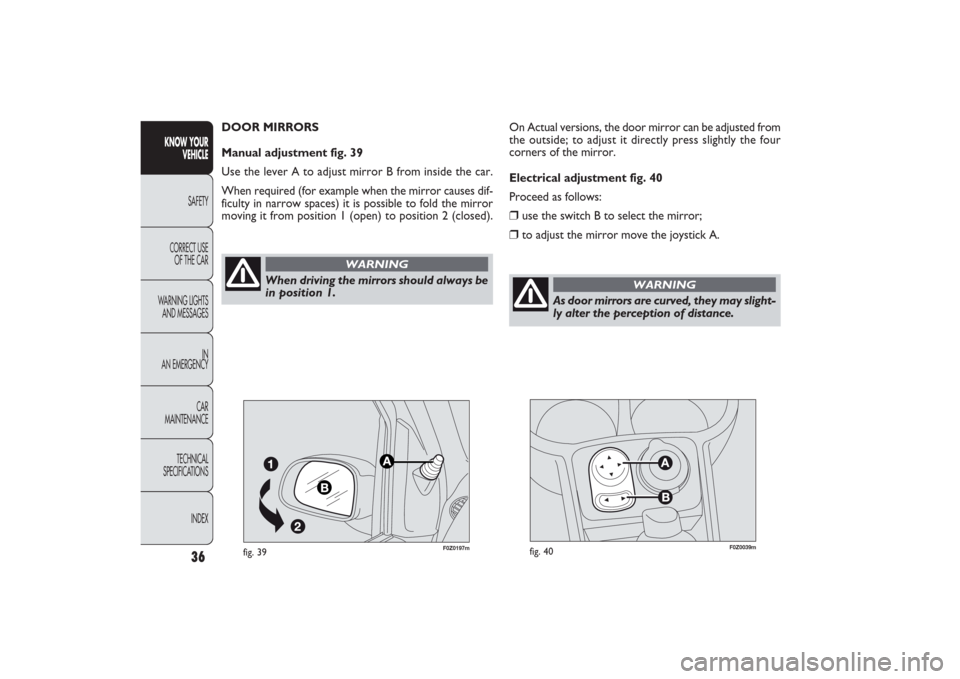
Electrical adjustment fig. 40
Proceed as follows:❒
use the switch B to select the mirror;
❒
to adjust the mirror move the joystick A.
36
KNOW YOUR
VEHICLE
SAFETY
CORRECT USE
OF THE CAR
WARNING LIGHTS
AND MESSAGES
IN
AN EMERGENCY
CAR
MAINTENANCE
TECHNICAL
SPECIFICATIONS
INDEX
As door mirrors are curved, they may slight-
ly alter the perception of distance.
WARNING
F0Z0197m
fig. 39
When driving the mirrors should always be
in position 1.
WARNING
DOOR MIRRORS
Manual adjustment fig. 39
Use the lever A to adjust mirror B from inside the car.
When required (for example when the mirror causes dif-
ficulty in narrow spaces) it is possible to fold the mirror
moving it from position 1 (open) to position 2 (closed).
031-064 PANDA EN 7-10-2009 13:43 Pagina 36
Page 38 of 226
37
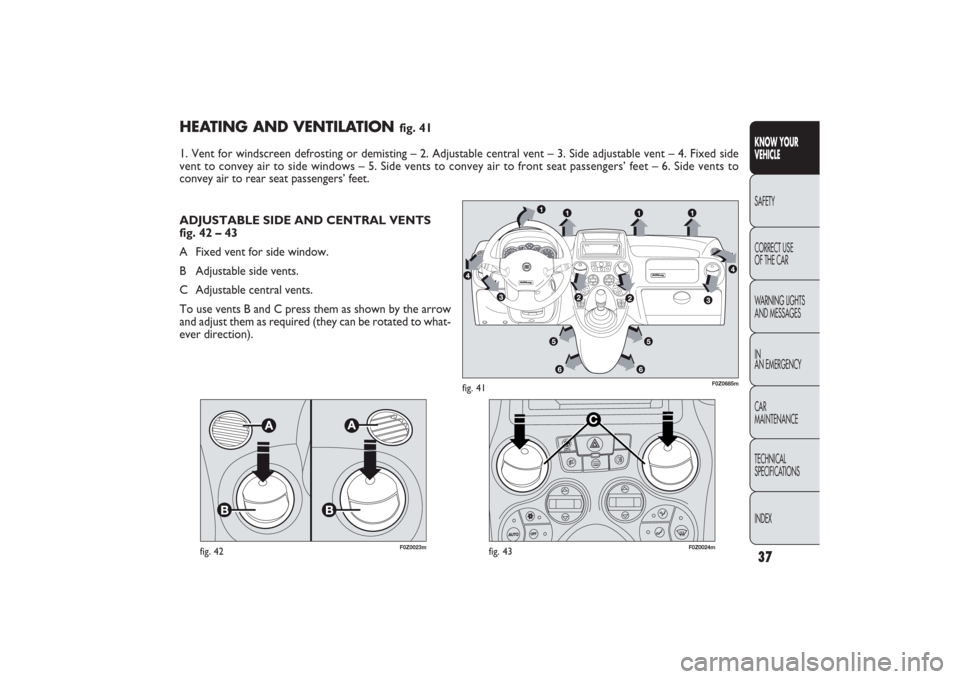
HEATING AND VENTILATION
fig. 41
1. Vent for windscreen defrosting or demisting – 2. Adjustable central vent – 3. Side adjustable vent – 4. Fixed side
vent to convey air to side windows – 5. Side vents to convey air to front seat passengers’ feet – 6. Side vents to
convey air to rear seat passengers’ feet.
KNOW YOUR
VEHICLESAFETY
CORRECT USE
OF THE CAR
WARNING LIGHTS
AND MESSAGES
IN
AN EMERGENCY
CAR
MAINTENANCE
TECHNICAL
SPECIFICATIONS
INDEX
F0Z0023m
fig. 42
C
I
TY
F0Z0024m
fig. 43
F0Z0685m
fig. 41
ADJUSTABLE SIDE AND CENTRAL VENTS
fig. 42 – 43
A Fixed vent for side window.
B Adjustable side vents.
C Adjustable central vents.
To use vents B and C press them as shown by the arrow
and adjust them as required (they can be rotated to what-
ever direction).
031-064 PANDA EN 7-10-2009 13:43 Pagina 37
Page 39 of 226
F0Z0022m
fig. 44
It is advisable to switch the internal air recirculation on while
standing in queues or in tunnels to prevent the introduc-
tion of polluted air. However, it is better not to use the
function for long periods, particularly if there are many peo-
ple on board, to prevent the windows from misting inside.
IMPORTANT The inside air recirculation system makes it
possible to reach the required heating or cooling condi-
tions faster. Do not use the air recirculation function on
rainy/cold days as it would considerably increase the pos-
sibility of the windows misting inside.
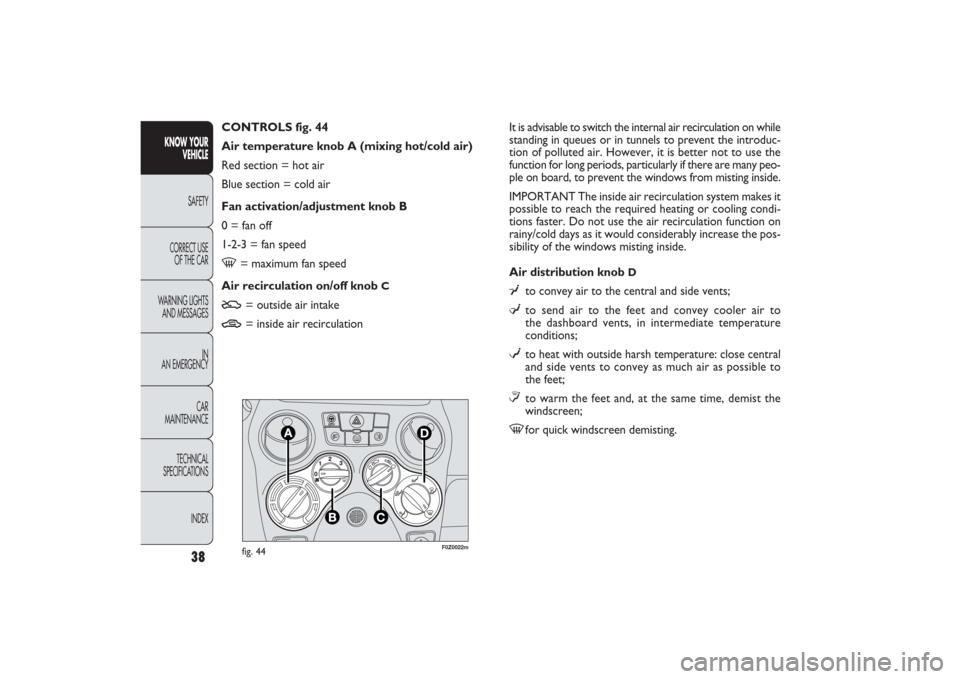
Air distribution knob
D
¥
to convey air to the central and side vents;
μ
to send air to the feet and convey cooler air to
the dashboard vents, in intermediate temperature
conditions;
w
to heat with outside harsh temperature: close central
and side vents to convey as much air as possible to
the feet;
≤to warm the feet and, at the same time, demist the
windscreen;
-
for quick windscreen demisting. CONTROLS fig. 44
Air temperature knob A (mixing hot/cold air)
Red section = hot air
Blue section = cold air
Fan activation/adjustment knob B
0 = fan off
1-2-3 = fan speed
-
= maximum fan speed
Air recirculation on/off knob
C
U
= outside air intake
T
= inside air recirculation
38
KNOW YOUR
VEHICLE
SAFETY
CORRECT USE
OF THE CAR
WARNING LIGHTS
AND MESSAGES
IN
AN EMERGENCY
CAR
MAINTENANCE
TECHNICAL
SPECIFICATIONS
INDEX
031-064 PANDA EN 7-10-2009 13:43 Pagina 38