change time FIAT PANDA 2017 319 / 3.G User Guide
[x] Cancel search | Manufacturer: FIAT, Model Year: 2017, Model line: PANDA, Model: FIAT PANDA 2017 319 / 3.GPages: 216, PDF Size: 19.25 MB
Page 120 of 216
144)The vehicle's driving characteristics
will be modified with the space-saver wheel
fitted. Avoid violent acceleration and
braking, abrupt steering and fast cornering.
The overall duration of the space-saver
wheel is about 3000 km, after which the
relevant tyre must be replaced with another
one of the same type. Never install a
traditional tyre on a rim designed to be
used as a space-saver wheel. Have the
wheel repaired and refitted as soon as
possible. Using two or more space-saver
wheels at the same time is forbidden.
Do not apply grease to the bolt threads
before fitting: they could come unscrewed.
145)The jack is a tool developed and
designed only for changing a wheel, if a
tyre gets punctured or damaged, on the
vehicle with which it is supplied or on other
vehicles of the same model. Any other
use, e.g. to jack up other vehicle models or
different things, is strictly prohibited. Never
use for maintenance or repair activities
under the car or to exchange the
summer/winter wheels and vice versa.
Never go under the raised vehicle. If any
work under the vehicle is necessary,
contact the Fiat Service Network. Incorrect
positioning of the jack may cause the
raised vehicle to fall: use only in the
positions indicated. Do not use the jack for
loads higher than the one shown on its
label. Never start the engine with vehicle
raised. If the vehicle is raised more than
necessary, everything can become more
unstable, with the risk of the vehicle
dropping violently. Thus, lift the vehicle only
as needed in order to access the spare
wheel.146)If the hub cap is not fitted correctly, it
may come off when the car is travelling.
Never tamper with the inflation valve. Never
introduce tools of any kind between rim
and tyre. Check tyre and space-saver
wheel pressures regularly, complying with
the values given in the "Technical
specifications" chapter.
WARNING
53)When turning the jack handle make
sure that it can turn freely without scraping
your hand against the ground. The moving
components of the jack ("worm screw"
and joints) can also cause injuries: avoid
touching them. If you come into contact
with lubricating grease, clean yourself
thoroughly.
54)Contact a Fiat Dealership as soon as
possible to have the correct tightening
of the wheel bolts checked.
“Fix&Go Airflat” kit
The kit is located in the luggage
compartment under the load platform
cover.
The kit is composed of:
a spray bottle A fig. 115 with the
sealant, equipped with filling pipe B,
separated by the compressor C;
compressor C with pressure gauge,
fitting valve to couple the bottle A,
cable with supply socket D and pipe E
to restore pressure (this is inside the
body as shown);
adhesive label on the spray bottle A,
with the message "max. 80 km/h" to
be placed where the driver can easily
see it (for example on the dashboard)
after repairing the tyre;
instruction booklet, explaining the
quick and correct use of the Fix&Go;
a pair of protective gloves.
118
IN AN EMERGENCY
Page 128 of 216
SCHEDULED
SERVICING
Correct servicing is crucial for
guaranteeing a long life for the vehicle
under the best conditions. For this
reason, Fiat has planned a series of
checks and services at fixed distance
intervals and, where provided, at fixed
time intervals, as described in the
Scheduled Servicing Plan.
Before each service, it is always
necessary to carefully follow the
instructions in the Scheduled Servicing
Plan (e.g. periodically check level of
fluids, tyre pressure, etc.).
Scheduled Servicing is offered by all
Fiat Dealerships according to a set time
schedule. If, during each operation, in
addition to the ones scheduled, the
need arises for further replacements or
repairs, these may be carried out with
the owner's explicit agreement only.
If your vehicle is used frequently for
towing, the interval between one
service operation and the next should
be reduced.IMPORTANT Scheduled Servicing
interventions are set out by the
Manufacturer. Failure to have them
carried out may invalidate the warranty.
It is advisable to inform a Fiat
Dealership of any small operating
irregularities without waiting for the next
service.
PERIODIC CHECKS
Every1,000km or before long
journeys, check and if necessary, top
up: engine coolant level; brake fluid
level; screen washer fluid level; tyre
inflation pressure and condition; lighting
system operation (headlights, direction
indicators, hazard warning lights, etc.);
screen washer/wiper system operation
and positioning/wear of windscreen/
rear window wiper blades.
Every3,000km, check and top up if
required: engine oil level.DEMANDING USE OF THE
CAR
If the vehicle is used under one of the
following conditions: towing a trailer
or motorhome; dusty roads; short (less
than 7-8 km) and repeated journeys
with sub-zero outside temperatures;
engine often idling or driving long
distances at low speed or long periods
of inactivity, the following checks must
be carried out more often than
indicated in the Scheduled Servicing
Plan:
check front disc brake pad condition
and wear;
check cleanliness of bonnet and
luggage compartment locks,
cleanliness and lubrication of linkage;
visually inspect conditions of:
engine, gearbox, transmission, pipes
and hoses (exhaust/fuel system/brakes)
and rubber elements (gaiters/sleeves/
bushes, etc.);
check battery charge and battery
fluid level (electrolyte);
visually inspect conditions of the
accessory drive belts;
check and, if necessary, change
engine oil and replace oil filter / pollen
filter / air cleaner.
126
SERVICING AND CARE
Page 143 of 216
WARNING
158)Never smoke while working in the
engine compartment: gas and inflammable
vapours may be present, with the risk of
fire.
159)Be very careful when working in the
engine compartment when the engine
is hot: you may get burned.
160)The cooling system is pressurised. If
necessary, only replace the plug with
another original or the operation of the
system may be adversely affected. Do not
remove the reservoir plug when the engine
is hot: you risk scalding yourself.
161)Do not travel with the windscreen
washer fluid reservoir empty: the
windscreen washer is essential for
improving visibility. Some commercial
windscreen washer additives are
flammable. The engine compartment
contains hot components which may set it
on fire.
162)Brake fluid is poisonous and highly
corrosive. In the event of accidental
contact, immediately wash the affected
parts with water and mild soap. Then rinse
thoroughly. Call a doctor immediately if
swallowed.
163)The symbol
, on the brake fluid
container indicates if a brake fluid is
synthetic or mineralbased. Use of mineral
type fluids will damage the special rubber
seals of the braking system beyond repair.164)Battery fluid is poisonous and
corrosive. Avoid contact with the skin and
eyes. Keep naked flames and sources
of sparks away from the battery: risk of
explosion and fire.
165)Using the battery with insufficient
fluid irreparably damages the battery and
may cause an explosion.
166)If the car will be unused for an
extended period of time in extremely cold
weather conditions, remove the battery
and store it in a heated area to avoid
it freezing.
167)Always wear appropriate goggles
when working on or near the battery.
WARNING
59)Be careful not to confuse the various
types of fluids while topping up: they
are not compatible with each other!
Topping up with an unsuitable fluid could
severely damage your vehicle.
60)The oil level must never exceed the
MAX reference.
61)Do not add oil with specifications other
than those of the oil already existing in
the engine.
62)PARAFLU
UPantifreeze is used in the
engine cooling system. Use the same fluid
as in the cooling system when topping
up. PARAFLU
UPcannot be mixed with any
other type of fluid. If this occurs, do not
start the engine and contact your Fiat
Dealership immediately.63)Prevent brake fluid, which is highly
corrosive, from coming into contact with
painted parts. Should it happen,
immediately wash with water.
64)Incorrect installation of electric and
electronic devices may cause severe
damage to your car. After purchasing your
vehicle, if you wish to install any
accessories (anti-theft, phone, etc.),
contact a Fiat Dealership, which
will suggest the most appropriate devices
for your vehicle, and will, most importantly,
advise you if a higher capacity battery
needs to be installed.
WARNING
3)Used engine oil and oil filters contain
substances which are harmful to the
environment. To change the oil and filters,
we advise you to contact a Fiat Dealership.
4)Used transmission fluid contains
substances that are harmful to the
environment. It is advisable to have the oil
changed by a Fiat Dealership where it
will be disposed of respecting the
environment and according to legal
requirements.
5)Batteries contain substances which are
very dangerous for the environment. For
battery replacement, contact a Fiat
Dealership.
141
Page 180 of 216
RADIO
178) 179) 180) 181) 182) 183)
The radio has been designed according
to the specifications of the passenger
compartment, with a personalised
design matching the style of the
dashboard perfectly.
TIPS
Road safety
Please, learn how to use all different
radio functions (e.g. save stations)
before beginning to drive.
Care and maintenance
Clean the cover with a soft anti-static
cloth only. Cleaning and polishing
products may damage the surface.
ANTITHEFT PROTECTION
The radio is equipped with an anti-theft
protection system based on the
exchange of information between the
radio and the electronic control unit
(Body Computer) present on the
vehicle.
This system guarantees maximum
safety and prevents the secret code
from being entered each time the radio
power supply is disconnected.If the check has a positive outcome, the
radio will start to function, whereas if
the comparison codes are not the
same or if the electronic control unit
(Body Computer) is replaced, the
device will ask the user to enter the
secret code according to the procedure
described in the paragraph below.
Entering the secret code
When the radio is switched on, if the
password is requested, the display will
show "Radio code" for about 2
seconds, followed by four dashes "- - -
-".
The secret code is made up of four
digits from 1 to 6, each corresponding
to one of the dashes.
To enter the first digit of the code, press
the button corresponding to the
pre-selected stations (from 1 to 6).
Enter the other code digits in the same
way.
If the four digits are not entered within
20 seconds, the display shows the text
"Enter code----".Ifthis occurs, it is
not considered an incorrect code entry.
After entering the fourth digit (within
20 seconds), the car radio will work.
If an incorrect code is entered, the radio
will emit a sound and the display
shows the text "Radio blocked/wait" to
notify the user of the need to enter
the correct code.Each time the user enters an incorrect
code, the waiting time will gradually
increase (1 min, 2 min, 4 min, 8 min, 16
min, 30 min,1h, 2h, 4h, 8h, 16h, 24h)
up to a maximum of 24 hours.
The waiting time will be shown on the
display with the text "Radio blocked/
wait". After the text has disappeared it
is possible to start the code entering
procedure again.
Vehicle radio passport
This document certifies the ownership
of the vehicle radio. The radio passport
shows the radio model, serial number
and secret code.
IMPORTANT Keep the radio passport in
a safe place so that you can give the
information to the relevant authorities if
the radio is stolen.
In the case of loss of the vehicle radio
passport, contact the Fiat Dealership,
taking an ID document and the vehicle
ownership documents.
178
MULTIMEDIA
Page 184 of 216
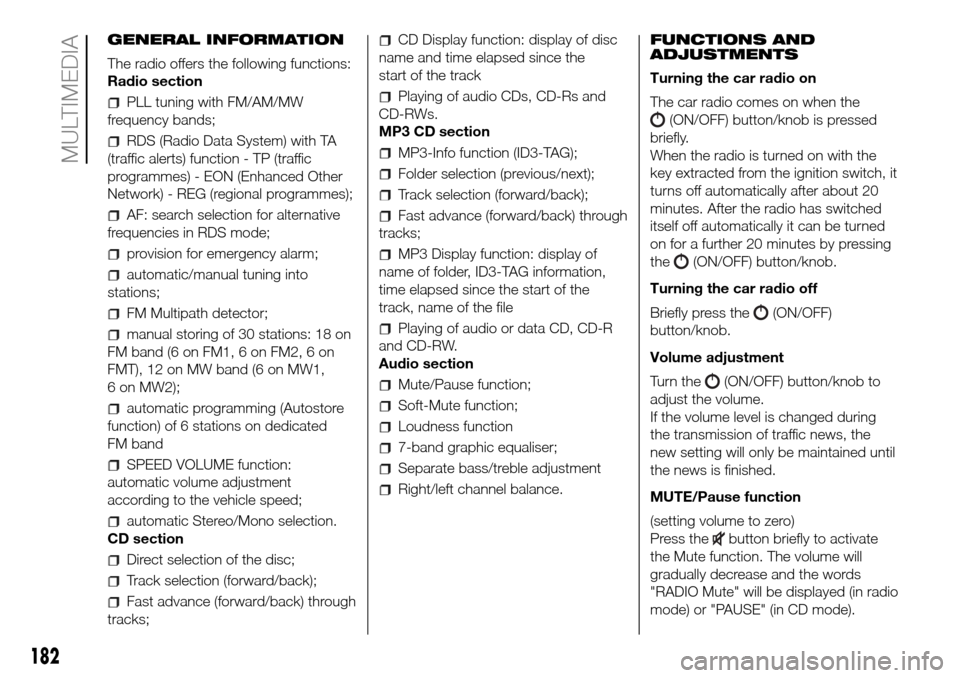
GENERAL INFORMATION
The radio offers the following functions:
Radio section
PLL tuning with FM/AM/MW
frequency bands;
RDS (Radio Data System) with TA
(traffic alerts) function - TP (traffic
programmes) - EON (Enhanced Other
Network) - REG (regional programmes);
AF: search selection for alternative
frequencies in RDS mode;
provision for emergency alarm;
automatic/manual tuning into
stations;
FM Multipath detector;
manual storing of 30 stations: 18 on
FM band (6 on FM1, 6 on FM2, 6 on
FMT), 12 on MW band (6 on MW1,
6 on MW2);
automatic programming (Autostore
function) of 6 stations on dedicated
FM band
SPEED VOLUME function:
automatic volume adjustment
according to the vehicle speed;
automatic Stereo/Mono selection.
CD section
Direct selection of the disc;
Track selection (forward/back);
Fast advance (forward/back) through
tracks;
CD Display function: display of disc
name and time elapsed since the
start of the track
Playing of audio CDs, CD-Rs and
CD-RWs.
MP3 CD section
MP3-Info function (ID3-TAG);
Folder selection (previous/next);
Track selection (forward/back);
Fast advance (forward/back) through
tracks;
MP3 Display function: display of
name of folder, ID3-TAG information,
time elapsed since the start of the
track, name of the file
Playing of audio or data CD, CD-R
and CD-RW.
Audio section
Mute/Pause function;
Soft-Mute function;
Loudness function
7-band graphic equaliser;
Separate bass/treble adjustment
Right/left channel balance.FUNCTIONS AND
ADJUSTMENTS
Turning the car radio on
The car radio comes on when the
(ON/OFF) button/knob is pressed
briefly.
When the radio is turned on with the
key extracted from the ignition switch, it
turns off automatically after about 20
minutes. After the radio has switched
itself off automatically it can be turned
on for a further 20 minutes by pressing
the
(ON/OFF) button/knob.
Turning the car radio off
Briefly press the
(ON/OFF)
button/knob.
Volume adjustment
Turn the
(ON/OFF) button/knob to
adjust the volume.
If the volume level is changed during
the transmission of traffic news, the
new setting will only be maintained until
the news is finished.
MUTE/Pause function
(setting volume to zero)
Press the
button briefly to activate
the Mute function. The volume will
gradually decrease and the words
"RADIO Mute" will be displayed (in radio
mode) or "PAUSE" (in CD mode).
182
MULTIMEDIA
Page 185 of 216
Press thebutton again to deactivate
the Mute function. The volume will
gradually increase until it reaches the
level set previously.
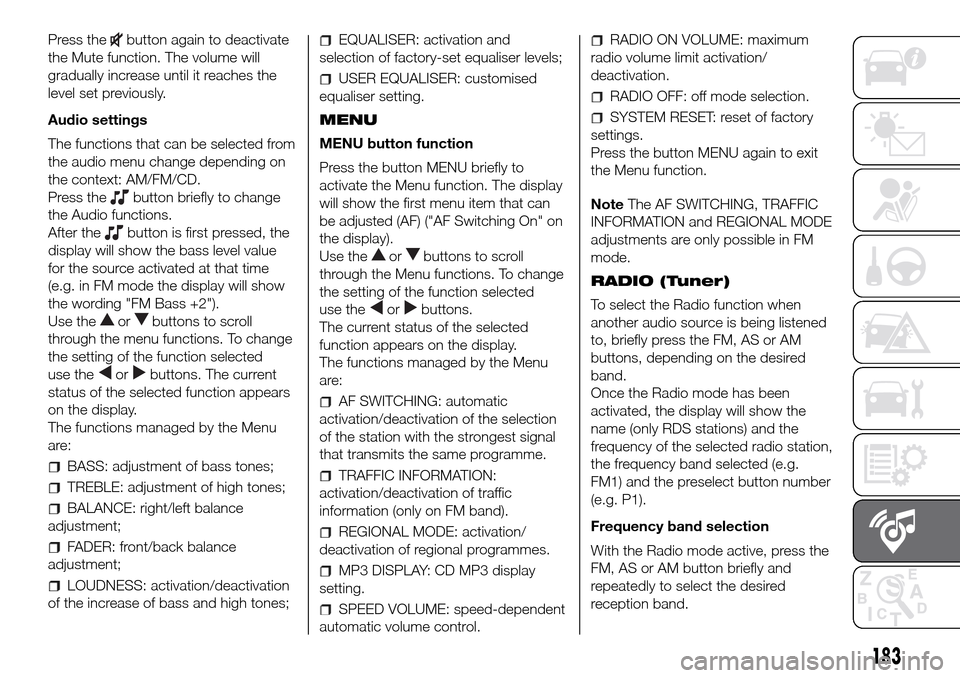
Audio settings
The functions that can be selected from
the audio menu change depending on
the context: AM/FM/CD.
Press the
button briefly to change
the Audio functions.
After the
button is first pressed, the
display will show the bass level value
for the source activated at that time
(e.g. in FM mode the display will show
the wording "FM Bass +2").
Use the
orbuttons to scroll
through the menu functions. To change
the setting of the function selected
use the
orbuttons. The current
status of the selected function appears
on the display.
The functions managed by the Menu
are:
BASS: adjustment of bass tones;
TREBLE: adjustment of high tones;
BALANCE: right/left balance
adjustment;
FADER: front/back balance
adjustment;
LOUDNESS: activation/deactivation
of the increase of bass and high tones;
EQUALISER: activation and
selection of factory-set equaliser levels;
USER EQUALISER: customised
equaliser setting.
MENU
MENU button function
Press the button MENU briefly to
activate the Menu function. The display
will show the first menu item that can
be adjusted (AF) ("AF Switching On" on
the display).
Use the
orbuttons to scroll
through the Menu functions. To change
the setting of the function selected
use the
orbuttons.
The current status of the selected
function appears on the display.
The functions managed by the Menu
are:
AF SWITCHING: automatic
activation/deactivation of the selection
of the station with the strongest signal
that transmits the same programme.
TRAFFIC INFORMATION:
activation/deactivation of traffic
information (only on FM band).
REGIONAL MODE: activation/
deactivation of regional programmes.
MP3 DISPLAY: CD MP3 display
setting.
SPEED VOLUME: speed-dependent
automatic volume control.
RADIO ON VOLUME: maximum
radio volume limit activation/
deactivation.
RADIO OFF: off mode selection.
SYSTEM RESET: reset of factory
settings.
Press the button MENU again to exit
the Menu function.
NoteThe AF SWITCHING, TRAFFIC
INFORMATION and REGIONAL MODE
adjustments are only possible in FM
mode.
RADIO (Tuner)
To select the Radio function when
another audio source is being listened
to, briefly press the FM, AS or AM
buttons, depending on the desired
band.
Once the Radio mode has been
activated, the display will show the
name (only RDS stations) and the
frequency of the selected radio station,
the frequency band selected (e.g.
FM1) and the preselect button number
(e.g. P1).
Frequency band selection
With the Radio mode active, press the
FM, AS or AM button briefly and
repeatedly to select the desired
reception band.
183
Page 187 of 216
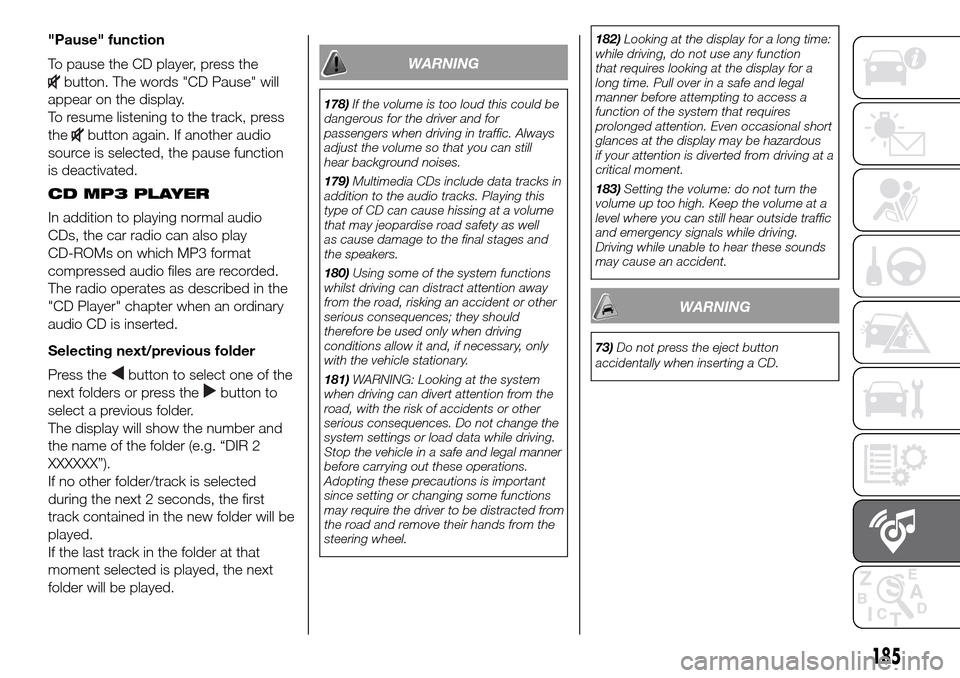
"Pause" function
To pause the CD player, press the
button. The words "CD Pause" will
appear on the display.
To resume listening to the track, press
the
button again. If another audio
source is selected, the pause function
is deactivated.
CD MP3 PLAYER
In addition to playing normal audio
CDs, the car radio can also play
CD-ROMs on which MP3 format
compressed audio files are recorded.
The radio operates as described in the
"CD Player" chapter when an ordinary
audio CD is inserted.
Selecting next/previous folder
Press the
button to select one of the
next folders or press the
button to
select a previous folder.
The display will show the number and
the name of the folder (e.g. “DIR 2
XXXXXX”).
If no other folder/track is selected
during the next 2 seconds, the first
track contained in the new folder will be
played.
If the last track in the folder at that
moment selected is played, the next
folder will be played.
WARNING
178)If the volume is too loud this could be
dangerous for the driver and for
passengers when driving in traffic. Always
adjust the volume so that you can still
hear background noises.
179)Multimedia CDs include data tracks in
addition to the audio tracks. Playing this
type of CD can cause hissing at a volume
that may jeopardise road safety as well
as cause damage to the final stages and
the speakers.
180)Using some of the system functions
whilst driving can distract attention away
from the road, risking an accident or other
serious consequences; they should
therefore be used only when driving
conditions allow it and, if necessary, only
with the vehicle stationary.
181)WARNING: Looking at the system
when driving can divert attention from the
road, with the risk of accidents or other
serious consequences. Do not change the
system settings or load data while driving.
Stop the vehicle in a safe and legal manner
before carrying out these operations.
Adopting these precautions is important
since setting or changing some functions
may require the driver to be distracted from
the road and remove their hands from the
steering wheel.182)Looking at the display for a long time:
while driving, do not use any function
that requires looking at the display for a
long time. Pull over in a safe and legal
manner before attempting to access a
function of the system that requires
prolonged attention. Even occasional short
glances at the display may be hazardous
if your attention is diverted from driving at a
critical moment.
183)Setting the volume: do not turn the
volume up too high. Keep the volume at a
level where you can still hear outside traffic
and emergency signals while driving.
Driving while unable to hear these sounds
may cause an accident.
WARNING
73)Do not press the eject button
accidentally when inserting a CD.
185
Page 188 of 216
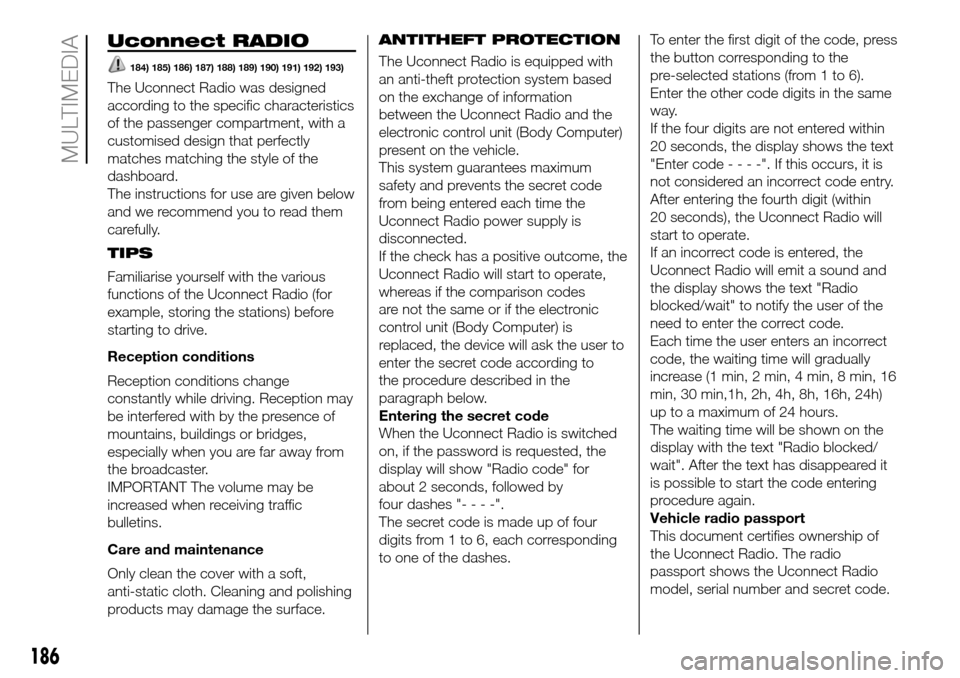
Uconnect RADIO
184) 185) 186) 187) 188) 189) 190) 191) 192) 193)
The Uconnect Radio was designed
according to the specific characteristics
of the passenger compartment, with a
customised design that perfectly
matches matching the style of the
dashboard.
The instructions for use are given below
and we recommend you to read them
carefully.
TIPS
Familiarise yourself with the various
functions of the Uconnect Radio (for
example, storing the stations) before
starting to drive.
Reception conditions
Reception conditions change
constantly while driving. Reception may
be interfered with by the presence of
mountains, buildings or bridges,
especially when you are far away from
the broadcaster.
IMPORTANT The volume may be
increased when receiving traffic
bulletins.
Care and maintenance
Only clean the cover with a soft,
anti-static cloth. Cleaning and polishing
products may damage the surface.ANTITHEFT PROTECTION
The Uconnect Radio is equipped with
an anti-theft protection system based
on the exchange of information
between the Uconnect Radio and the
electronic control unit (Body Computer)
present on the vehicle.
This system guarantees maximum
safety and prevents the secret code
from being entered each time the
Uconnect Radio power supply is
disconnected.
If the check has a positive outcome, the
Uconnect Radio will start to operate,
whereas if the comparison codes
are not the same or if the electronic
control unit (Body Computer) is
replaced, the device will ask the user to
enter the secret code according to
the procedure described in the
paragraph below.
Entering the secret code
When the Uconnect Radio is switched
on, if the password is requested, the
display will show "Radio code" for
about 2 seconds, followed by
four dashes "----".
The secret code is made up of four
digits from 1 to 6, each corresponding
to one of the dashes.To enter the first digit of the code, press
the button corresponding to the
pre-selected stations (from 1 to 6).
Enter the other code digits in the same
way.
If the four digits are not entered within
20 seconds, the display shows the text
"Enter code----".Ifthis occurs, it is
not considered an incorrect code entry.
After entering the fourth digit (within
20 seconds), the Uconnect Radio will
start to operate.
If an incorrect code is entered, the
Uconnect Radio will emit a sound and
the display shows the text "Radio
blocked/wait" to notify the user of the
need to enter the correct code.
Each time the user enters an incorrect
code, the waiting time will gradually
increase (1 min, 2 min, 4 min, 8 min, 16
min, 30 min,1h, 2h, 4h, 8h, 16h, 24h)
up to a maximum of 24 hours.
The waiting time will be shown on the
display with the text "Radio blocked/
wait". After the text has disappeared it
is possible to start the code entering
procedure again.
Vehicle radio passport
This document certifies ownership of
the Uconnect Radio. The radio
passport shows the Uconnect Radio
model, serial number and secret code.
186
MULTIMEDIA
Page 196 of 216
GENERAL INFORMATION
The Uconnect Radio is equipped with
the following functions:
Radio section
PLL tuning with FM/AM/MW
frequency bands (where present);
RDS (Radio Data System) with TA
(traffic alerts) function - TP (traffic
programmes) - EON (Enhanced Other
Network) - REG (regional programmes);
AF: search selection for alternative
frequencies in RDS mode;
automatic/manual tuning into
stations;
FM Multipath detector;
manual storing of 36 or 54 stations:
18 in the FM band (6 in FM-A, 6 in
FM-B and 6 in FM-C) and 18 in AM (6
in AM-A, 6 in AM-B and 6 in AM-C) and
18 in DAB (where present);
SPEED VOLUME function:
automatic volume adjustment
according to the vehicle speed;
automatic Stereo/Mono selection.
Audio section
Mute function;
Soft-Mute function;
Loudness function
7-band graphic equaliser;
Separate bass/treble adjustment
Right/left channel balance.Bluetooth®
For theBluetooth® function, see the
description in the dedicated paragraph.
USB/iPod section
For the USB/iPod function, see the
description in the dedicated paragraph.
AUX section
AUX source selection;
AUX Offset function: alignment of
the portable device volume with that of
the other sources;
Portable player playback.
NoteIt is not possible to view the AUX
source info on the radio display
FUNCTIONS AND
ADJUSTMENTS
Switching on
The Uconnect Radio comes on when
the
(ON/OFF) button/knob is
pressed briefly.
If the Uconnect Radio is switched on
when the key is removed from the
ignition, it will switch off automatically
after about 20 minutes (if this time
has been set). After the Uconnect
Radio has switched itself off
automatically it can be turned on for a
further 20 minutes by pressing the
(ON/OFF) button.Switching off
Long press on button
(ON/OFF).
Volume adjustment
To adjust the volume, turn the twist
control
.
If the volume level is changed during
the transmission of traffic news, the
new setting will only be maintained until
the news is finished.
Mute Function
(setting volume to zero)
Press the
/button on the
steering wheel to activate the Mute
function. In the Radio source, the word
“MUTE” will appear, associated with
the active source.
Press the
/button on the
steering wheel again to deactivate the
Mute function.
Audio settings
The functions that can be selected from
the audio menu change depending on
the context: AM/FM and DAB (where
present)/USB/iPod/Bluetooth®/AUX.
Press the AUDIO button briefly to
change the Audio functions. After the
AUDIO button is first pressed, the
display will show the bass level value
for the source activated at that time
(e.g. in FM mode the display will show
the wording "FM Bass +2").
194
MULTIMEDIA
Page 197 of 216
Use theorbuttons to scroll
through the menu functions. To change
the setting of the function selected
use the
orbuttons.
The current status of the selected
function appears on the display.
The functions managed by the Menu
are:
BASS: adjustment of bass tones;
TREBLE: adjustment of high tones;
BALANCE: right/left balance
adjustment;
FADER: front/back balance
adjustment;
LOUDNESS: activation/deactivation
of the increase of bass and high tones;
EQUALISER: activation and
selection of factory-set equaliser levels;
MY EQ: customised equaliser
setting.
MENU
MENU button functions
Press the button MENU briefly to
activate the Menu function.
Use the
orbuttons to scroll
through the menu functions. To change
the setting of the function selected
use the
orbuttons.
The functions managed by the Menu
are:
AF SWITCHING: automatic
activation/deactivation of the selection
of the station with the strongest signal
that transmits the same programme.
NoteFM following in DAB (where
provided; the radio switches
automatically to FM in case of low DAB
signal and back to DAB as soon as
the signal is available) is enabled by
enabling AF.
TRAFFIC INFORMATION: activation/
deactivation of traffic information.
NoteTraffic information is enabled only
if tuned to the station broadcasting
the announcement.
DAB INFO CATEGORIES (only
enabled for DAB sources): single
category enable/disable (Financial,
News flash, Program info, Spec event,
Sport report, Warning, Weather).
REGIONAL MODE: activation/
deactivation of regional programmes.
MP3 DISPLAY: MP3 display setting.
SPEED VOLUME: speed-dependent
automatic volume control.
RADIO ON VOLUME: maximum
radio volume limit activation/
deactivation.
RADIO OFF: off mode selection.
SYSTEM RESET: reset of factory
settings.Press the button MENU again to exit
the Menu function.
NoteThe AF SWITCHING, TRAFFIC
INFORMATION and REGIONAL MODE
adjustments are only possible in FM
mode.
RADIO (Tuner)
To select the Radio function while
listening to another audio source, briefly
press the RADIO button several times
to select the desired band, FM AM
or DAB (where present).
Once the Radio mode has been
activated, the display will show the
name (only RDS stations) and the
frequency of the selected radio station,
the frequency band selected (e.g.
FMA) and the preselect button number
(e.g. P1).
Each time the button is pressed, the
FM, AM and DAB bands (where
present) are selected cyclically.
Preset buttons
The buttons numbered from 1 to 6 are
used to set the following preset
stations:
18 in the FM band (6 in FM-A, 6 in
FM-B and 6 in FM-C);
18 in the AM band (6 in AM-A, 6 in
AM-B and 6 in AM-C).
195