change time FIAT PANDA 2017 319 / 3.G Owner's Manual
[x] Cancel search | Manufacturer: FIAT, Model Year: 2017, Model line: PANDA, Model: FIAT PANDA 2017 319 / 3.GPages: 216, PDF Size: 19.25 MB
Page 200 of 216
Previous track
To return to the previous track, using
manual interaction: while listening to a
digital track, press
(steering wheel
controls) or
(Uconnect Radio
controls) (where present).
Change audio source
To change the active audio source
(Radio, USB/iPod, Tuner,Bluetooth®
Audio) press theSRC/OKorMEDIA
button on the front panel of the Ucon-
nect Radio, or, with voice interaction:
say “Select source USB/iPod, Radio,
Bluetooth® Audio”.
NoteWhile playingBluetooth® audio,
there could be some incorrect displays
related to the phone. This is not due to
the radio, but depends on the informa-
tion sent by the phone.
BLUETOOTH® DEVICE
IMPORTANT NOTES
Access to the phonebook copied
onto the system is possible only when
the mobile phone from which it has
been copied is connected.
The names stored on the SIM card
or in your mobile phone memory can
be transferred to the system in different
ways, depending on the model of
mobile phone.Getting to know the voice
commands
When talking to the system, you can
always use the voice command "Help"
to obtain detailed instructions on the
voice commands available for each
interactive stage.
Pairing a Bluetooth® device
NoteThis operation should be carried
out only with the vehicle stationary.
To pair your mobile phone with the
system, proceed as follows.
Manual procedure:
Activate the Main Menu by pressing
theMENUbutton;
select the SETTINGS option, then
the "Pairing" option.
Voice procedure:
Pressand say “Settings”. Then,
at the end of the message, say
"Pairing".
The system will show a PIN number
on the display to be used for pairing.
Using the search function of theBlu-
etooth® devices of your phone, search
for the “Radio BT” device.
When prompted, enter the PIN code
displayed on the instrument panel
using your mobile phone keypad. If
pairing is successful, the system will
say "Connecting" and at the end the
display will show, as confirmation, the
ID of the paired mobile phone.
Once the device has been paired, if the
function is supported by the phone,
the system automatically asks to
download the phonebook onto the
Uconnect Radio.
NoteAfter updating the phone
software, for proper operation, it is
recommended to remove the phone
from the list of devices linked to the
radio, delete the previous system
pairing also from the list ofBluetooth®
devices on the phone and make a new
pairing.
Making a phone call
Press the steering wheel control
and say “Call” and the name of the
contact in the phonebook.
If the name is recognised, the
system will display the information for
the contact on the display.
The system will ask you to confirm
your request. To make the call, say
"Yes"; otherwise, say "No".
198
MULTIMEDIA
Page 201 of 216
Alternatively, it is possible to call a
number that is not in the phonebook by
saying the number one figure at a
time.
Managing an incoming call
When a call is received, the system will
display the caller's ID, where available.
The incoming call will be signalled by
your mobile phone's personalised
ringtones (the availability of this function
depends on the specific features of
your phone).
Answering a call:
To answer the call, press;
To end the call, pressfor more
than 1 second.
To reject a call: press.
To ignore a call and not hear the ring
tone, press
/.
Putting a phone call on HOLD
To place a call in progress on HOLD
and disable the microphone in order to
be able to speak without being heard
by the person you are talking to, press
/.VOICE COMMANDS
Global commands
SELECT MEDIA SOURCE;
SELECT RADIO SOURCE;
SELECT PHONE SOURCE;
CALL or DIAL;
READ MESSAGE;
SETTINGS;
HELP;
CANCEL;
REPEAT.
Phone commands
DIAL;
CALL (followed by name);
CALL (followed by number);
CALL BACK;
READ LAST;
Audio Bluetooth®/USB/iPod Com-
mands
PLAY;
PAUSE;
STOP.Radio
SELECT BAND “FM” “AM” or
“DAB”.
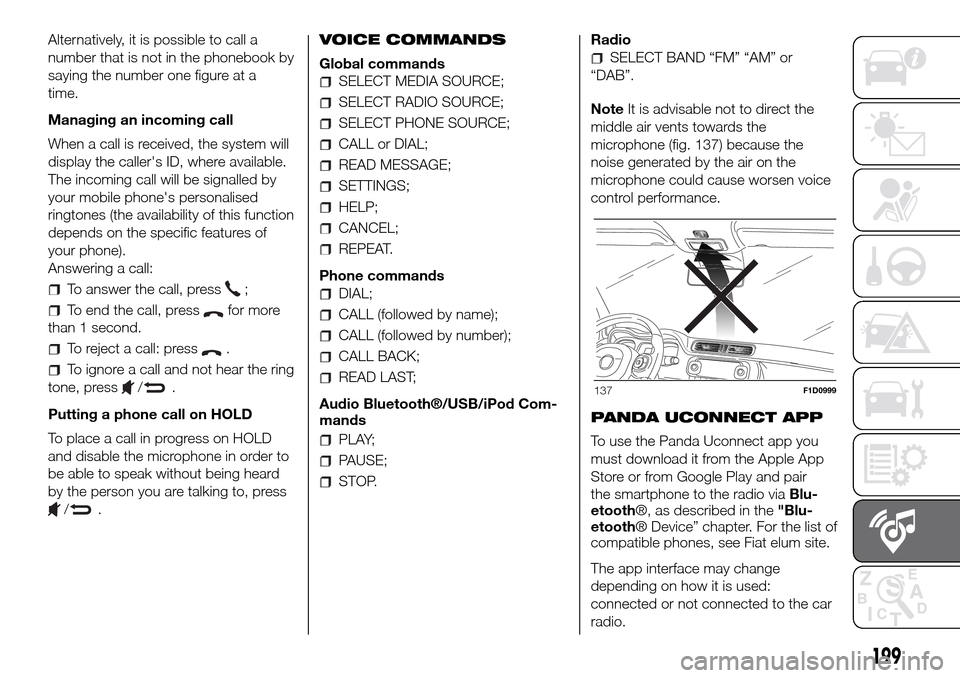
NoteIt is advisable not to direct the
middle air vents towards the
microphone (fig. 137) because the
noise generated by the air on the
microphone could cause worsen voice
control performance.
PANDA UCONNECT APP
To use the Panda Uconnect app you
must download it from the Apple App
Store or from Google Play and pair
the smartphone to the radio viaBlu-
etooth®, as described in the"Blu-
etooth® Device” chapter. For the list of
compatible phones, see Fiat elum site.
The app interface may change
depending on how it is used:
connected or not connected to the car
radio.
137F1D0999
199
Page 202 of 216
When it is connected via Blu-
etooth®, you can interact with the
radio through the screen of your smart-
phone. You can listen to you favourite
music by selecting the source, the track
or the radio station desired. You can
also view the phonebook, your car
handbook and, if necessary, call for
assistance.
When it is not connected, you can
have all the information about the state
of your car with my:Car and indications
about your driving style with eco:Drive.
You can also find your car easily if
you do not remember where you
parked it.
WARNING
184)If the volume is too loud this could be
dangerous for the driver and for
passengers when driving in traffic. Always
adjust the volume so that you can still
hear background noises.
185)The use of some of the system's
features whilst driving can divert attention
away from the road, with the risk of
causing accidents or other serious
consequences; therefore they must only be
used when the driving conditions allow
and, where necessary, only when the
vehicle is stationary.186)Read and follow these instructions:
before using your system, read and follow
all the safety information and instructions in
this manual. Failure to observe the
precautions found in this manual may lead
to an accident or other serious
consequences.
187)Keep the manual in the car: if it is kept
in the car, the manual will become
something quick and easy to consult for
those not familiar with the system. Ensure
that everyone has access to the manual
and reads the instructions and the safety
information carefully before using the
system for the first time.
188)Warning: looking at the system when
driving can divert attention from the road,
with the risk of accidents or other serious
consequences. Do not change system
settings or enter data non-verbally (using
the manual controls) while driving. Stop the
vehicle in a safe and legal manner before
carrying out these operations. Adopting
these precautions is important since setting
or changing some functions might require
the driver to be distracted away from
the road and remove his or her hands from
the steering wheel.
189)Voice commands: the system
functions can be carried out using only
voice commands. The use of voice
commands when driving allows you to
manage the system without taking your
hands off the steering wheel.190)Looking at the display for a long time:
while driving, do not use any function
that requires looking at the display for a
long time. Pull over in a safe and legal
manner before attempting to access a
function of the system that requires
prolonged attention. Even occasional quick
glances at the display can be dangerous
if the driver's attention is diverted at a
critical moment.
191)Setting the volume: do not turn the
volume up too high. When driving, keep the
volume at a level that allows you to hear
the traffic outside and emergency sirens.
Driving while unable to hear these sounds
may cause an accident.
192)Using the voice recognition: the voice
recognition software is based on a
statistical process that is subject to error. It
is your responsibility to monitor voice
recognition functions included in the
system and address any errors.
193)Danger of distraction: the functions
may require manual settings (not using
voice commands). Attempting to perform
such setup or insert data while driving
can seriously distract your attention and
could cause an accident or other serious
consequences. Stop the vehicle in a safe
and legal manner before carrying out these
operations.
200
MULTIMEDIA
Page 204 of 216
CONTROL PANEL AND ON-BOARD INSTRUMENTS
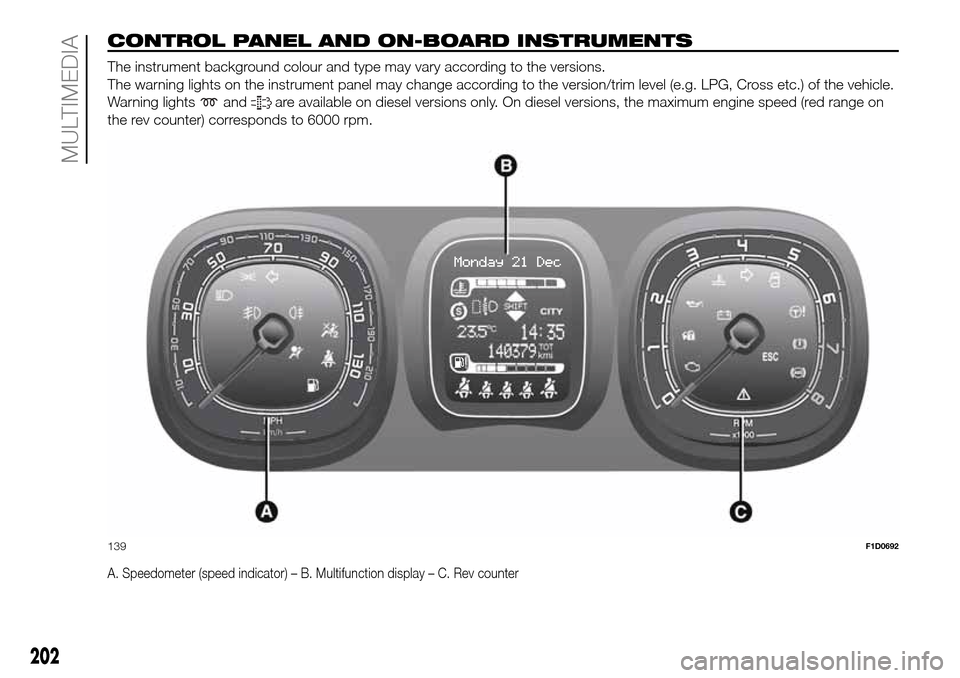
The instrument background colour and type may vary according to the versions.
The warning lights on the instrument panel may change according to the version/trim level (e.g. LPG, Cross etc.) of the vehicle.
Warning lights
andare available on diesel versions only. On diesel versions, the maximum engine speed (red range on
the rev counter) corresponds to 6000 rpm.
A. Speedometer (speed indicator) – B. Multifunction display – C. Rev counter
139F1D0692
202
MULTIMEDIA