time FIAT PUNTO EVO 2010 1.G User Guide
[x] Cancel search | Manufacturer: FIAT, Model Year: 2010, Model line: PUNTO EVO, Model: FIAT PUNTO EVO 2010 1.GPages: 270, PDF Size: 8.34 MB
Page 22 of 270
Hour
(Setting the clock)
With this function, it is possible to set the time.
To do so, proceed as follows:
– briefly press MENU ESC: the “hours” will flash on the
display;
– press +or –to set the value;
– briefly press MENU ESC: the “minutes” will flash on the
display;
– press +or –to set the value;
– briefly press the MENU ESC button to go back to the
menu screen or hold the button down to go back to the
standard screen without saving.
bUZZ
(Adjusting the buzzer volume)
This function is used to adjust the volume of the audible
signal (buzzer) that sounds in the event of failure/warning
indications and when the MENU ESC, +and –buttons are
pressed.
To set the desired volume, proceed as follows:
– briefly press MENU ESC: the display will show the word-
ing (bUZZ);
– press +or –to select the required volume (adjustable
over 8 levels).
– briefly press the MENU ESC button to go back to the
menu screen or hold the button down to go back to the
standard screen without saving.Unit
(Setting the distance unit)
With this function, it is possible to set the distance unit.
To do so, proceed as follows:
– briefly press MENU ESC: the display will show the word-
ing (Unit) and the previously set unit (km or mi);
– press +or –to select the required distance unit.
– briefly press the MENU ESC button to go back to the
menu screen or hold the button down to go back to the
standard screen without saving.
CONTENTS TECHNICAL
SPECIFICATIONS SERVICING
AND CARE IN AN
EMERGENCY WARNING LIGHTS
AND MESSAGES STARTING
AND DRIVING SAFETY
KNOWING
YOUR
VEHICLE
21
001-036 PUNTO FL EN 4ed 18-01-2010 12:21 Pagina 21
Page 23 of 270
CONTENTS TECHNICAL
SPECIFICATIONSSERVICING
AND CAREIN AN
EMERGENCY WARNING LIGHTS
AND MESSAGESSTARTING
AND DRIVINGSAFETY
KNOWING
YOUR
VEHICLEBag P
(Passenger front and side airbag activation/
deactivation)
(for versions/markets where available)
This function is used to activate/deactivate the front pas-
senger’s air bag.
Proceed as follows:
❒press MENU ESC and, after the message BAG P OFF
(to deactivate) or BAG P On (to activate) is displayed
by pressing buttons +or –, press MENU ESC again;
❒the confirmation request message will be displayed;
❒press +or –to select YES (confirming activa-
tion/deactivation) or no (to abort);
❒briefly press MENU ESC to confirm setting and go back
to the menu screen or hold the button down to go back
to the standard screen without saving.drl
(activate/deactivate daytime running lights)
(for versions/markets where provided)
This function allows you to activate/deactivate the daytime
running lights.
Proceed as follows to switch this function on or off:
– press the MENU ESC button briefly: the display will show
a submenu;
– press the MENU ESC button briefly, the display will show
On or Off flashing depending on the previous setting;
– press +or –to change the setting;
– briefly press the MENU ESC button to go back to the
submenu screen or hold the button down to go back to
the main menu screen without saving;
– hold down MENU ESC again to go back to the standard
screen or main menu, depending on which point in the
menu you have reached.
22
001-036 PUNTO FL EN 4ed 18-01-2010 12:21 Pagina 22
Page 24 of 270
MULTIFUNCTION DISPLAY
(for versions/markets where provided)
The car can be equipped with the multifunction display
that, depending on previous settings, shows useful infor-
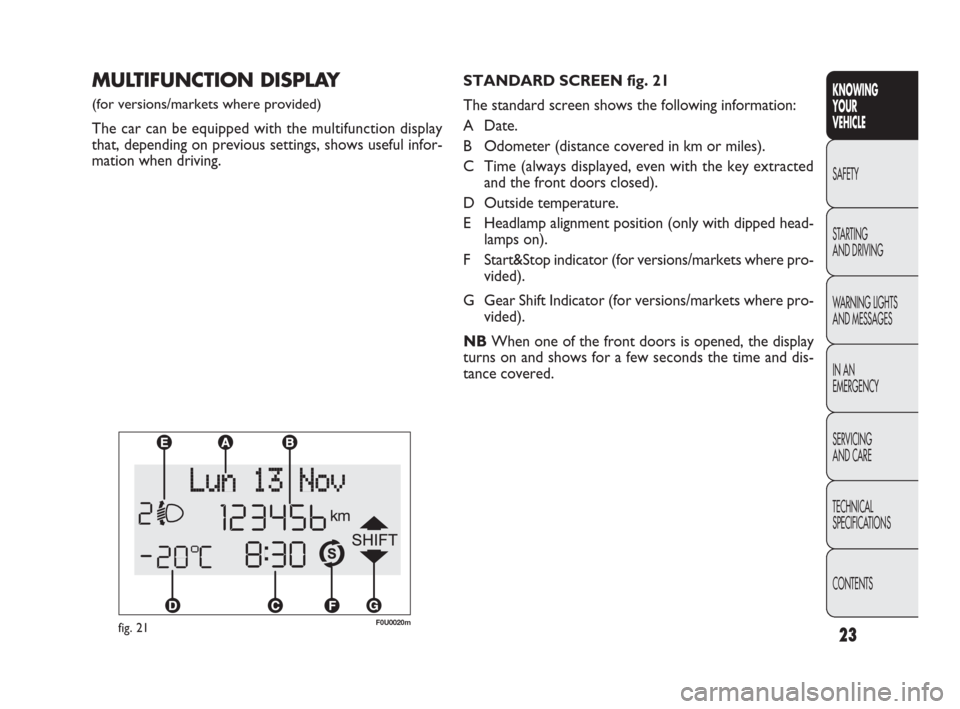
mation when driving.STANDARD SCREEN fig. 21
The standard screen shows the following information:
A Date.
B Odometer (distance covered in km or miles).
C Time (always displayed, even with the key extracted
and the front doors closed).
D Outside temperature.
E Headlamp alignment position (only with dipped head-
lamps on).
F Start&Stop indicator (for versions/markets where pro-
vided).
G Gear Shift Indicator (for versions/markets where pro-
vided).
NBWhen one of the front doors is opened, the display
turns on and shows for a few seconds the time and dis-
tance covered.
fig. 21F0U0020m
CONTENTS TECHNICAL
SPECIFICATIONS SERVICING
AND CARE IN AN
EMERGENCY WARNING LIGHTS
AND MESSAGES STARTING
AND DRIVING SAFETY
KNOWING
YOUR
VEHICLE
23
001-036 PUNTO FL EN 4ed 18-01-2010 12:21 Pagina 23
Page 25 of 270
24
KNOWING
YOUR
VEHICLE
SAFETY
STARTING
AND DRIVING
WARNING LIGHTS
AND MESSAGES
IN AN
EMERGENCY
SERVICING
AND CARE
TECHNICAL
SPECIFICATIONS
CONTENTS
fig. 24F0U2050g
RECONFIGURABLE
MULTIFUNCTION DISPLAY
(for versions/markets where provided)
The car may be equipped with a reconfigurable multi-
function display that, according to previous settings, will
show useful driving information.
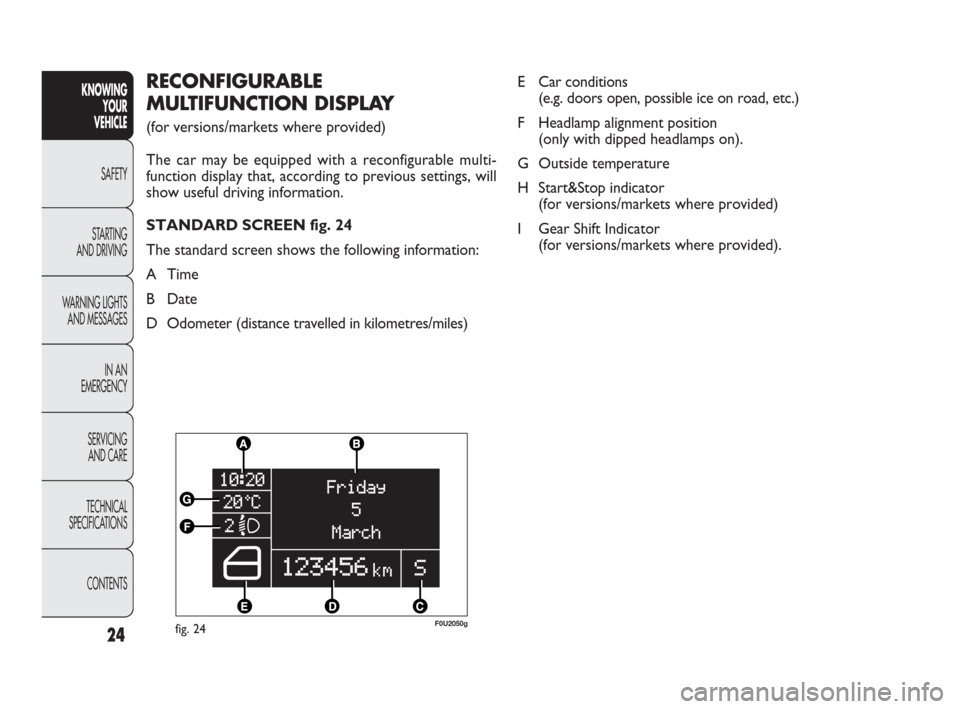
STANDARD SCREEN fig. 24
The standard screen shows the following information:
A Time
B Date
D Odometer (distance travelled in kilometres/miles)E Car conditions
(e.g. doors open, possible ice on road, etc.)
F Headlamp alignment position
(only with dipped headlamps on).
G Outside temperature
H Start&Stop indicator
(for versions/markets where provided)
I Gear Shift Indicator
(for versions/markets where provided).
001-036 PUNTO FL EN 4ed 18-01-2010 12:21 Pagina 24
Page 27 of 270
CONTENTS TECHNICAL
SPECIFICATIONSSERVICING
AND CAREIN AN
EMERGENCY WARNING LIGHTS
AND MESSAGESSTARTING
AND DRIVINGSAFETY
KNOWING
YOUR
VEHICLE
26
SETUP MENU
(multifunction display/
reconfigurable multifunction display)
The menu comprises a series of functions arranged in a
circle which can be selected through the +and –buttons
to access the different operations and settings described
in the following paragraphs. A submenu is provided for
some items (clock and unit setting).
The setup menu can be activated by pressing the MENU
ESC button briefly.
Press buttons +and – to scroll the setup menu options.
Management modes differ from each other according to
the option selected.
Selecting an option from the main menu without a submenu
– Briefly press MENU ESC to select the main menu option
you wish to set;
– Press +or –(with single presses) to select the new set-
ting;
– briefly press the MENU ESC button to store the new
setting and to go back to the main menu option selected
previously.Selecting an option from the main menu with a submenu:
– Briefly press the MENU ESC button to display the first
submenu option;
– Press +or –(with single presses) to scroll all the sub-
menu options;
– Briefly press the MENU ESC button to select the dis-
played submenu option and to open the relevant setup
menu;
– Press +or –(with single presses) to select the new set-
ting for this submenu option;
– Briefly press the MENU ESC button to store the new
setting and go back to the previous menu option.
Selecting “Date” and “Set time”:
– Briefly press MENU ESC to select the first value to
change (e.g. hours/minutes or year/month/day);
– Press +or –(with single presses) to select the new set-
ting;
– Briefly press MENU ESC to store the new setting and
go to the next setup menu option; if this is the last one
you will go back to the previous menu option.
001-036 PUNTO FL EN 4ed 18-01-2010 12:21 Pagina 26
Page 28 of 270
CONTENTS TECHNICAL
SPECIFICATIONS SERVICING
AND CARE IN AN
EMERGENCY WARNING LIGHTS
AND MESSAGES STARTING
AND DRIVING SAFETY
KNOWING
YOUR
VEHICLE
27
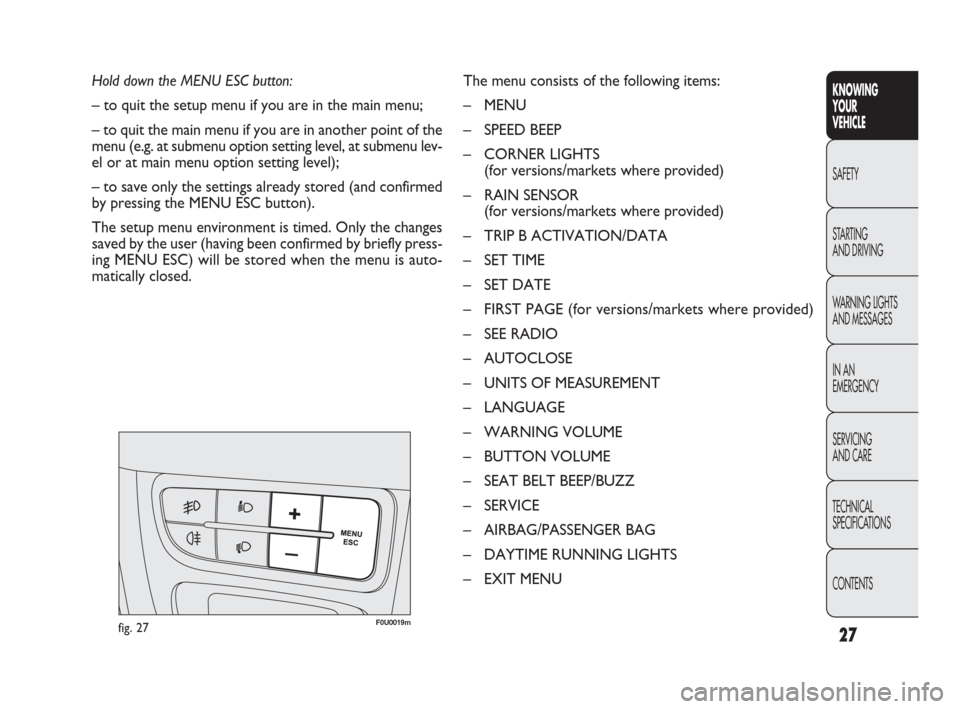
Hold down the MENU ESC button:
– to quit the setup menu if you are in the main menu;
– to quit the main menu if you are in another point of the
menu (e.g. at submenu option setting level, at submenu lev-
el or at main menu option setting level);
– to save only the settings already stored (and confirmed
by pressing the MENU ESC button).
The setup menu environment is timed. Only the changes
saved by the user (having been confirmed by briefly press-
ing MENU ESC) will be stored when the menu is auto-
matically closed.The menu consists of the following items:
– MENU
– SPEED BEEP
– CORNER LIGHTS
(for versions/markets where provided)
– RAIN SENSOR
(for versions/markets where provided)
– TRIP B ACTIVATION/DATA
– SET TIME
– SET DATE
– FIRST PAGE (for versions/markets where provided)
– SEE RADIO
– AUTOCLOSE
– UNITS OF MEASUREMENT
– LANGUAGE
– WARNING VOLUME
– BUTTON VOLUME
– SEAT BELT BEEP/BUZZ
– SERVICE
– AIRBAG/PASSENGER BAG
– DAYTIME RUNNING LIGHTS
– EXIT MENU
fig. 27F0U0019m
001-036 PUNTO FL EN 4ed 18-01-2010 12:21 Pagina 27
Page 29 of 270
CONTENTS TECHNICAL
SPECIFICATIONSSERVICING
AND CAREIN AN
EMERGENCY WARNING LIGHTS
AND MESSAGESSTARTING
AND DRIVINGSAFETY
KNOWING
YOUR
VEHICLE
28
DISPLAY FUNCTIONS
(see multifunction display
or reconfigurable multifunction
display)
SPEED BEEP
(Setting the speed limit)
This function is used to set the car speed limit (km/h or
mph); the driver is immediately alerted when this limit is
exceeded (see section “Warning lights and messages”).
To set the desired speed limit, proceed as follows:
– briefly press the MENU ESC button: the display will show
the words (Speed Beep);
– press +or –to select speed limit activation (On) or
deactivation (Off);
– when the function has been activated (On) by pressing
buttons +or –, select the speed limit and press MENU
ESC to confirm selection.NB You can select a speed between 30 and 200 km/h, or
20 and 125 mph depending on the selected unit, see “Set-
ting measurement unit (Unit)”. The setting will in-
crease/decrease by five units each time +/ –is pressed.
Hold down +/–to increase/decrease the setting rapidly.
Complete the setting with single presses of the button
when you approach the required setting.
– briefly press the MENU ESC button to go back to the
menu screen or hold the button down to go back to the
standard screen without saving.
To cancel the setting, proceed as follows:
– press the MENU ESC button briefly to make the dis-
play flash (On);
– press –: (Off) will flash on the display;
– briefly press the MENU ESC button to go back to the
menu screen or hold the button down to go back to the
standard screen without saving.
001-036 PUNTO FL EN 4ed 18-01-2010 12:21 Pagina 28
Page 31 of 270
30
KNOWING
YOUR
VEHICLE
SAFETY
STARTING
AND DRIVING
WARNING LIGHTS
AND MESSAGES
IN AN
EMERGENCY
SERVICING
AND CARE
TECHNICAL
SPECIFICATIONS
CONTENTS
TRIP B ACTIVATION/DATA
(Trip B enablement)
This function may be used to activate (On) or deactivate
(Off) the Trip B display (partial trip).
For more information see the “Trip computer” section.
For activation/deactivation, proceed as follows:
– briefly press MENU ESC: On or Off will flash on the dis-
play (depending on previous setting);
– press +or –to make your choice;
– briefly press the MENU ESC button to go back to the
menu screen or hold the button down to go back to the
standard screen without saving.SET TIME
(Setting the clock)
This function allows you to set the clock through two sub-
menus: “Time” and “Mode”.
To carry out the adjustment, proceed as follows:
– briefly press MENU ESC: the display will show the two
submenus “Time” and “Mode”;
– press +or –to switch between the two sub-menus;
– once you have selected a submenu, press MENU ESC
briefly;
– if selecting “Time”, briefly press MENU ESC – the “hours”
will flash on the display;
– press +or –to set the value;
– briefly press MENU ESC: the “minutes” will flash on the
display;
– press +or –to set the value;
– if selecting “Mode”,briefly press MENU ESC: the mode
will flash on the display;
– press +or –to select “24h” or “12h”.
001-036 PUNTO FL EN 4ed 18-01-2010 12:22 Pagina 30
Page 32 of 270
31
KNOWING
YOUR
VEHICLE
SAFETY
STARTING
AND DRIVING
WARNING LIGHTS
AND MESSAGES
IN AN
EMERGENCY
SERVICING
AND CARE
TECHNICAL
SPECIFICATIONS
CONTENTS
NB Each time the +or –buttons are pressed there is an
increase or decrease of one unit. Hold the button down
to increase/decrease the setting rapidly. Complete the set-
ting with single presses of the button when you approach
the required setting.
– briefly press the MENU ESC button to go back to the
menu screen or hold the button down to go back to the
standard screen without saving.
FIRST PAGE
(information displayed on the main screen)
(for versions/markets where available)
This function allows you to choose the information you
would like to see on the main screen. You can choose
to display the date or the turbocharger boost pressure.
To make your choice, proceed as follows:
– briefly press MENU ESC: “First page” will appear on
the display;
– briefly press MENU ESC again to show the display op-
tions: “Date” and “Engine info”;
– press +or –to select the information you wish to see
on the main page of the display; When you have made the required adjustments, briefly
press button MENU ESC to go back to the submenu
screen or hold the button down to go back to the main
menu screen without saving.
– hold down MENU ESC again to go back to the standard
screen or main menu, depending on which point in the
menu you have reached.
Set date
(Setting the date)
Using this function it is possible to change the date (day –
month – year).
To update, proceed as follows:
– briefly press MENU ESC: the day (dd) will flash on the
display;
– press +or –to set the value;
– briefly press MENU ESC: the month (mm) will flash on
the display;
– press +or –to set the value;
– briefly press MENU ESC: the year (yyyy) will flash on the
display;
– press the+oppure –button to make the adjustment.
001-036 PUNTO FL EN 4ed 18-01-2010 12:22 Pagina 31
Page 37 of 270
36
KNOWING
YOUR
VEHICLE
SAFETY
STARTING
AND DRIVING
WARNING LIGHTS
AND MESSAGES
IN AN
EMERGENCY
SERVICING
AND CARE
TECHNICAL
SPECIFICATIONS
CONTENTS
AIRBAG/PASSENGER BAG
(Passenger front and side airbag activation/
deactivation)
(for versions/markets where available)
This function is used to activate/deactivate the front pas-
senger’s air bag.
Proceed as follows:
❒press MENU ESC and, after the message BAG P OFF
(to deactivate) or BAG P On (to activate) is displayed
by pressing buttons +or –, press MENU ESC again;
❒the display will show the confirmation request message;
❒press +or –to select either Yes (to confirm activa-
tion/deactivation) or No (to abort);
❒briefly press MENU ESC to confirm setting and go back
to the menu screen or hold the button down to go back
to the standard screen without saving.DAYTIME RUNNING LIGHTS (D.R.L.)
(for versions/markets where provided)
This function allows you to activate/deactivate the daytime
running lights.
Proceed as follows to switch this function on or off:
– press the MENU ESC button briefly: the display will show
a submenu;
– press the MENU ESC button briefly, the display will show
On or Off flashing depending on the previous setting;
– press +or –to change the setting;
– briefly press the MENU ESC button to go back to the
submenu screen or hold the button down to go back to
the main menu screen without saving;
– hold down MENU ESC again to go back to the standard
screen or main menu, depending on which point in the
menu you have reached.
EXIT MENU
This function closes the cycle of settings listed in the menu
screen.
Briefly press MENU ESC to go back to the standard screen
without saving.
Press –to return to the first menu option (Speed Beep).
001-036 PUNTO FL EN 4ed 18-01-2010 12:22 Pagina 36