time FIAT PUNTO EVO 2010 1.G Owner's Manual
[x] Cancel search | Manufacturer: FIAT, Model Year: 2010, Model line: PUNTO EVO, Model: FIAT PUNTO EVO 2010 1.GPages: 270, PDF Size: 8.34 MB
Page 38 of 270
37
Values displayed
Outside temperature
Indicates the temperature outside the vehicle passenger
compartment.
Range
This indicates the approximate distance that may be trav-
elled with the fuel remaining in the tank, assuming that dri-
ving conditions do not change. The display will show the
reading “----” when the following events take place:
– value lower than 50 km (or 30 mi)
– car left parked with engine running for a long time.
Distance travelled
This value shows the distance covered from the start of
the new journey.
Average consumption
This value shows the approximate average fuel consump-
tion from the start of the new journey.
Current consumption
Indicates the fuel consumption. The value is constantly up-
dated. The message “----” will appear on the display if the
car is parked with the engine running.
Average speed
This value shows the car’s average speed based on the
overall time elapsed since the start of the new journey.TRIP COMPUTER
Introduction
The Trip computer is used to display information on car
operation when the key is turned to MAR. This function
allows you to define two separate trips, called “Trip A”
and “Trip B”, for monitoring the car’s “complete mission”
(journey) in a reciprocally independent manner.
Both functions can be reset (reset – start of a new jour-
ney).
“Trip A” is used to display the figures relating to:
– Outside temperature
– Range
– Distance travelled
– Average consumption
– Current consumption
– Average speed
– Journey time (driving time).
“Trip B”, available on multifunction display only, is used to
display the figures relating to:
– Distance travelled B
– Average consumption B
– Average speed B
– Travel time B (driving time).
NB“Trip B” functions may be excluded (see “Trip B on”).
“Range” and “Instant consumption” parameters cannot be
reset.
KNOWING
YOUR
VEHICLE
SAFETY
STARTING
AND DRIVING
WARNING LIGHTS
AND MESSAGES
IN AN
EMERGENCY
SERVICING
AND CARE
TECHNICAL
SPECIFICATIONS
CONTENTS
037-081 PUNTO FL EN 4ed 18-01-2010 12:23 Pagina 37
Page 39 of 270
38
F0U0022mfig. 28
New journey
The new journey begins after:
– “manual” resetting by the user, by pressing the relevant
button;
– “automatic” resetting, when the distance travelled reach-
es 99,999.9 km or when the journey time reaches 99.59
(99 hours and 59 minutes);
– disconnection and subsequent reconnection of the bat-
tery.
IMPORTANT The reset operation when “Trip A” details
are being displayed resets only the information associat-
ed with this function.
IMPORTANT The reset operation when “Trip B” details
are being displayed resets only the information associat-
ed with this function.
Start trip procedure
With the ignition key in the MAR position, reset by press-
ing the TRIP button and keeping it pressed for more than
2 seconds.
Trip Exit
To quit the Trip function: keep MENU ESC pressed for
over 2 seconds. Journey time
This value shows the time elapsed since the start of the
new journey.
IMPORTANT If information is not available, the message
“----” will appear instead of the Trip Computer values.
Counting of the different values will resume regularly when
normal operation is restored. This will not reset any of the
values displayed before the failure nor start a new jour-
ney.
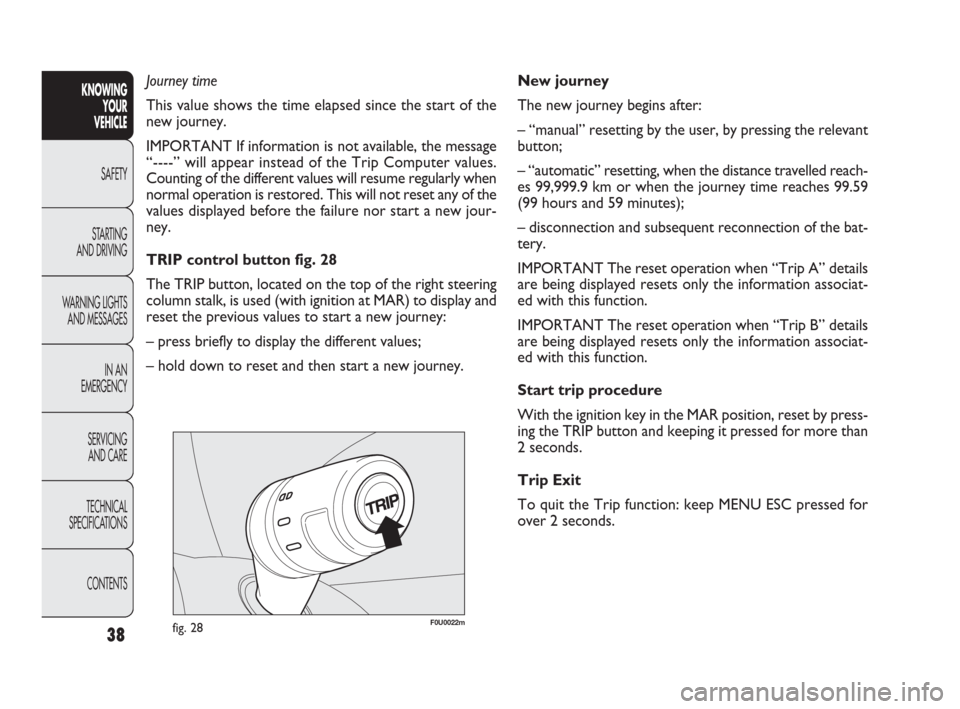
TRIP control button fig. 28
The TRIP button, located on the top of the right steering
column stalk, is used (with ignition at MAR) to display and
reset the previous values to start a new journey:
– press briefly to display the different values;
– hold down to reset and then start a new journey.KNOWING
YOUR
VEHICLE
SAFETY
STARTING
AND DRIVING
WARNING LIGHTS
AND MESSAGES
IN AN
EMERGENCY
SERVICING
AND CARE
TECHNICAL
SPECIFICATIONS
CONTENTS
037-081 PUNTO FL EN 4ed 18-01-2010 12:23 Pagina 38
Page 42 of 270
The fabric upholstery of your car is designed
to withstand normal wear and tear for
a long time. Some precautions are howev-
er needed. Avoid prolonged rubbing against cloth-
ing accessories, such as metal buckles, bosses,
Velcro strips and the like, which by applying a high
pressure on the fabric in a small area could cause
the breakage of some threads and damage the up-
holstery.
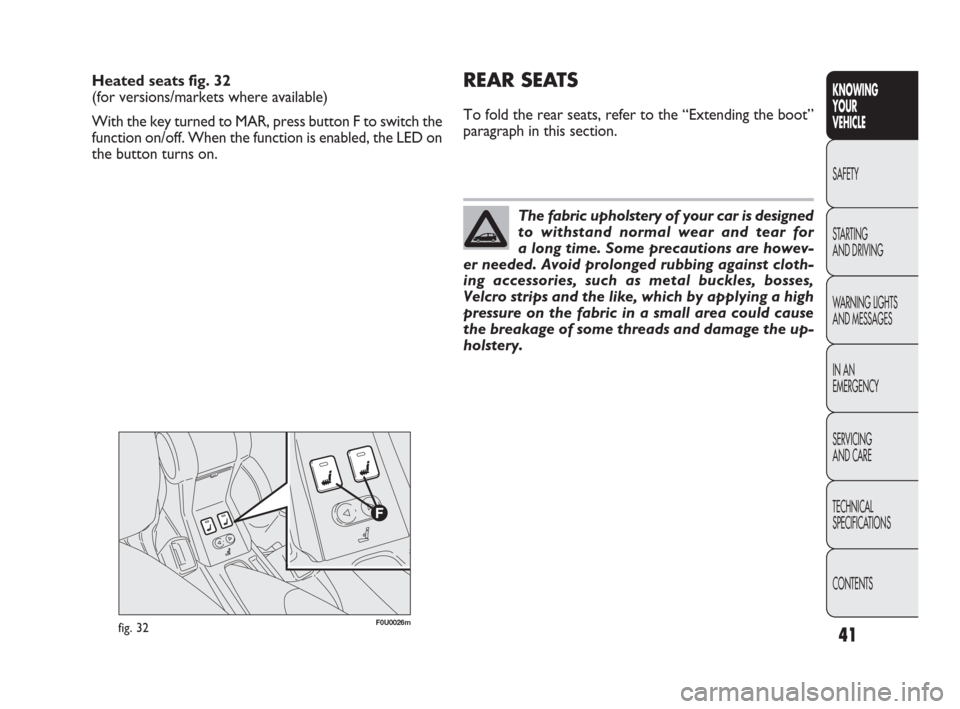
Heated seats fig. 32
(for versions/markets where available)
With the key turned to MAR, press button F to switch the
function on/off. When the function is enabled, the LED on
the button turns on.REAR SEATS
To fold the rear seats, refer to the “Extending the boot”
paragraph in this section.
fig. 32F0U0026m
41
KNOWING
YOUR
VEHICLE
SAFETY
STARTING
AND DRIVING
WARNING LIGHTS
AND MESSAGES
IN AN
EMERGENCY
SERVICING
AND CARE
TECHNICAL
SPECIFICATIONS
CONTENTS
037-081 PUNTO FL EN 4ed 18-01-2010 12:23 Pagina 41
Page 47 of 270
As the driver’s wing mirror is curved, it may
slightly alter the perception of distance.
WARNING
Defrosting/demisting
(for versions/markets where provided)
The mirrors are fitted with resistors that are activated
when the heated rear windscreen is turned on (by press-
ing button
().
IMPORTANT This function is timed and it will turn off au-
tomatically after a few minutes.
46
KNOWING
YOUR
VEHICLE
SAFETY
STARTING
AND DRIVING
WARNING LIGHTS
AND MESSAGES
IN AN
EMERGENCY
SERVICING
AND CARE
TECHNICAL
SPECIFICATIONS
CONTENTS
F0U0033mfig. 39
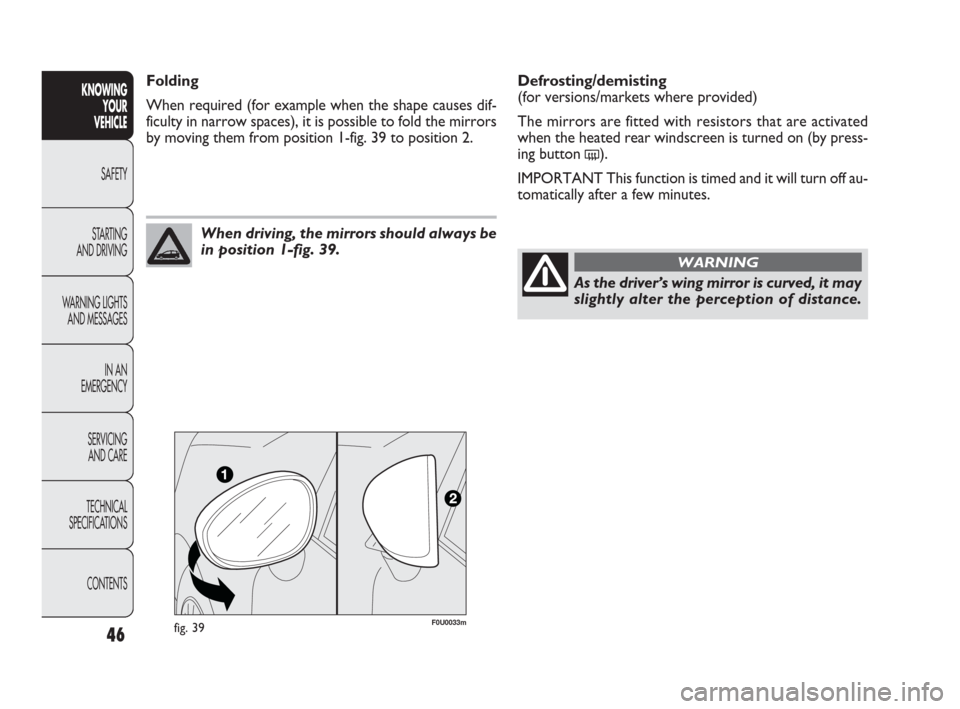
When driving, the mirrors should always be
in position 1-fig. 39.
Folding
When required (for example when the shape causes dif-
ficulty in narrow spaces), it is possible to fold the mirrors
by moving them from position 1-fig. 39 to position 2.
037-081 PUNTO FL EN 4ed 18-01-2010 12:23 Pagina 46
Page 50 of 270
49
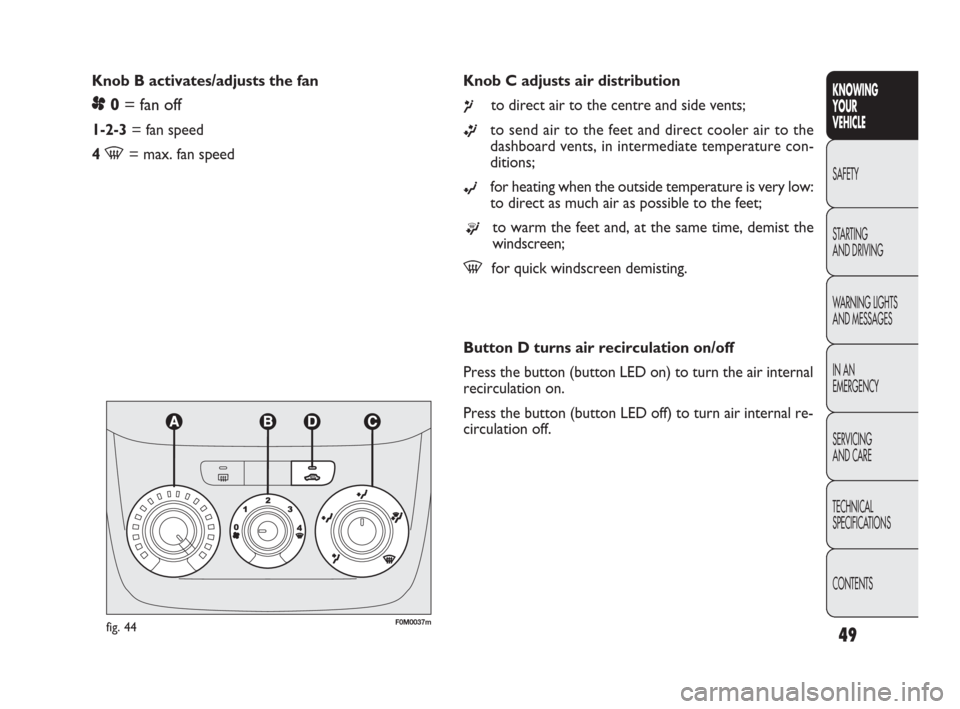
Knob C adjusts air distribution
¶to direct air to the centre and side vents;
ßto send air to the feet and direct cooler air to the
dashboard vents, in intermediate temperature con-
ditions;
©for heating when the outside temperature is very low:
to direct as much air as possible to the feet;
®to warm the feet and, at the same time, demist the
windscreen;
-for quick windscreen demisting. Knob B activates/adjusts the fan
p0= fan off
1-2-3= fan speed
4
-= max. fan speed
KNOWING
YOUR
VEHICLE
SAFETY
STARTING
AND DRIVING
WARNING LIGHTS
AND MESSAGES
IN AN
EMERGENCY
SERVICING
AND CARE
TECHNICAL
SPECIFICATIONS
CONTENTS
fig. 44F0M0037m
Button D turns air recirculation on/off
Press the button (button LED on) to turn the air internal
recirculation on.
Press the button (button LED off) to turn air internal re-
circulation off.
037-081 PUNTO FL EN 4ed 18-01-2010 12:23 Pagina 49
Page 52 of 270
❒turn knob C to -or to position ®if the windows
do not demist;
❒turn knob B to 2nd speed.
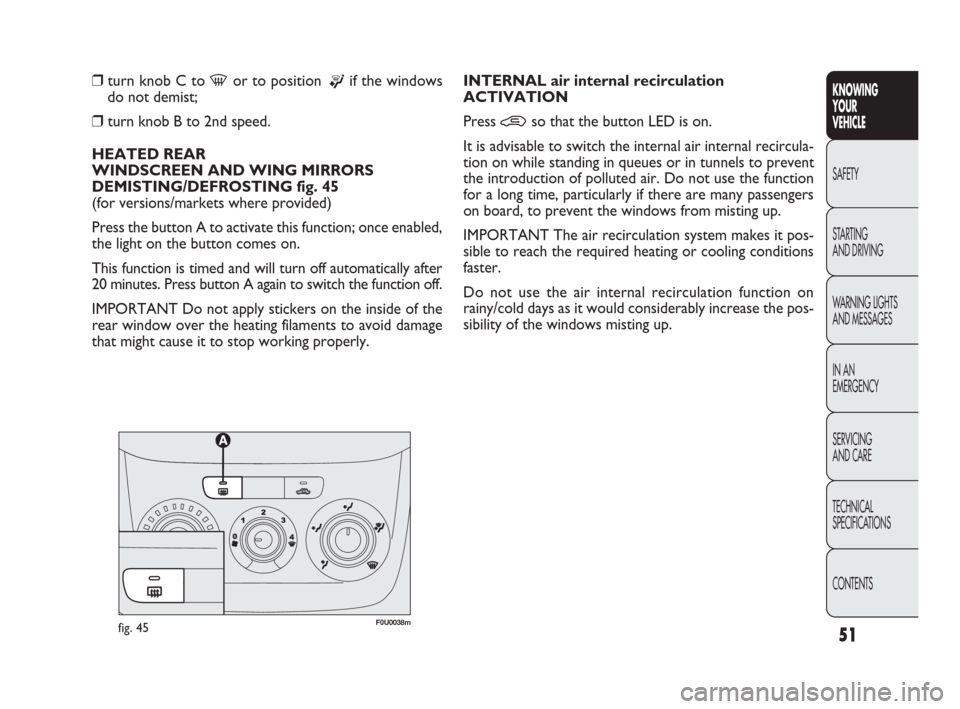
HEATED REAR
WINDSCREEN AND WING MIRRORS
DEMISTING/DEFROSTING fig. 45
(for versions/markets where provided)
Press the button A to activate this function; once enabled,
the light on the button comes on.
This function is timed and will turn off automatically after
20 minutes. Press button A again to switch the function off.
IMPORTANT Do not apply stickers on the inside of the
rear window over the heating filaments to avoid damage
that might cause it to stop working properly.INTERNAL air internal recirculation
ACTIVATION
Press
•so that the button LED is on.
It is advisable to switch the internal air internal recircula-
tion on while standing in queues or in tunnels to prevent
the introduction of polluted air. Do not use the function
for a long time, particularly if there are many passengers
on board, to prevent the windows from misting up.
IMPORTANT The air recirculation system makes it pos-
sible to reach the required heating or cooling conditions
faster.
Do not use the air internal recirculation function on
rainy/cold days as it would considerably increase the pos-
sibility of the windows misting up.
fig. 45F0U0038m
51
KNOWING
YOUR
VEHICLE
SAFETY
STARTING
AND DRIVING
WARNING LIGHTS
AND MESSAGES
IN AN
EMERGENCY
SERVICING
AND CARE
TECHNICAL
SPECIFICATIONS
CONTENTS
037-081 PUNTO FL EN 4ed 18-01-2010 12:23 Pagina 51
Page 53 of 270
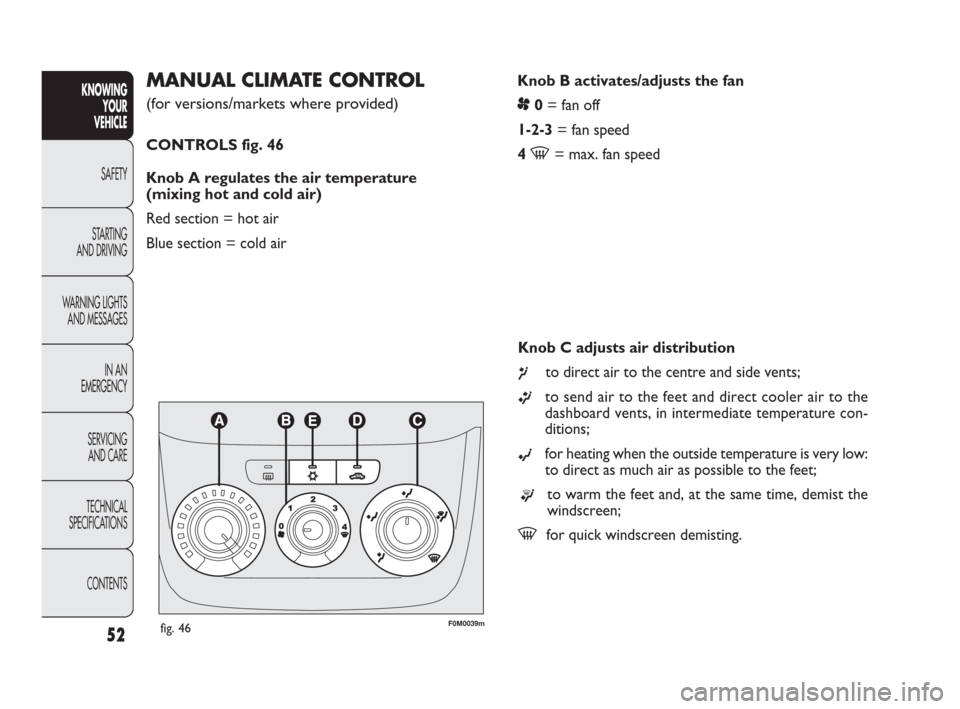
Knob B activates/adjusts the fan
p0= fan off
1-2-3= fan speed
4
-= max. fan speed
MANUAL CLIMATE CONTROL
(for versions/markets where provided)
CONTROLS fig. 46
Knob A regulates the air temperature
(mixing hot and cold air)
Red section = hot air
Blue section = cold air
52
KNOWING
YOUR
VEHICLE
SAFETY
STARTING
AND DRIVING
WARNING LIGHTS
AND MESSAGES
IN AN
EMERGENCY
SERVICING
AND CARE
TECHNICAL
SPECIFICATIONS
CONTENTS
fig. 46F0M0039m
Knob C adjusts air distribution
¶to direct air to the centre and side vents;
ßto send air to the feet and direct cooler air to the
dashboard vents, in intermediate temperature con-
ditions;
©for heating when the outside temperature is very low:
to direct as much air as possible to the feet;
®to warm the feet and, at the same time, demist the
windscreen;
-for quick windscreen demisting.
037-081 PUNTO FL EN 4ed 18-01-2010 12:23 Pagina 52
Page 56 of 270
The system uses R134a refrigerant fluid
which does not harm the environment in
the event of accidental leakage. Never use
R12 fluid which is not compatible with the system
components.
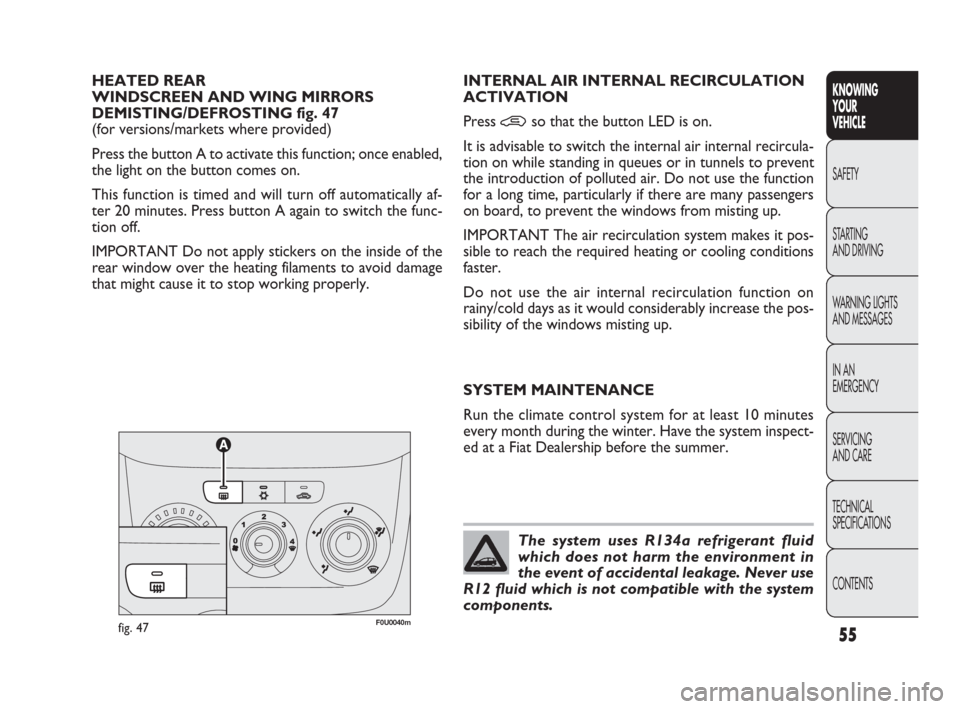
HEATED REAR
WINDSCREEN AND WING MIRRORS
DEMISTING/DEFROSTING fig. 47
(for versions/markets where provided)
Press the button A to activate this function; once enabled,
the light on the button comes on.
This function is timed and will turn off automatically af-
ter 20 minutes. Press button A again to switch the func-
tion off.
IMPORTANT Do not apply stickers on the inside of the
rear window over the heating filaments to avoid damage
that might cause it to stop working properly.INTERNAL AIR INTERNAL RECIRCULATION
ACTIVATION
Press
•so that the button LED is on.
It is advisable to switch the internal air internal recircula-
tion on while standing in queues or in tunnels to prevent
the introduction of polluted air. Do not use the function
for a long time, particularly if there are many passengers
on board, to prevent the windows from misting up.
IMPORTANT The air recirculation system makes it pos-
sible to reach the required heating or cooling conditions
faster.
Do not use the air internal recirculation function on
rainy/cold days as it would considerably increase the pos-
sibility of the windows misting up.
SYSTEM MAINTENANCE
Run the climate control system for at least 10 minutes
every month during the winter. Have the system inspect-
ed at a Fiat Dealership before the summer.
fig. 47F0U0040m
55
KNOWING
YOUR
VEHICLE
SAFETY
STARTING
AND DRIVING
WARNING LIGHTS
AND MESSAGES
IN AN
EMERGENCY
SERVICING
AND CARE
TECHNICAL
SPECIFICATIONS
CONTENTS
037-081 PUNTO FL EN 4ed 18-01-2010 12:23 Pagina 55
Page 58 of 270
57
SWITCHING ON THE CLIMATE CONTROL
SYSTEM
The system can be activated by pressing any of the but-
tons; it is, however, advisable to set the desired temper-
atures on the display, then press the AUTO button.
The climate control system allows you to customise the
temperatures (driver side and passenger side) with a max-
imum difference of 7°C.
The climate control system compressor works only with
the engine running and with an outside temperature of
above 4°C.
AUTOMATIC FUNCTION OF THE CLIMATE
CONTROL SYSTEM (AUTO function)
Press the AUTO button; the system will automatically ad-
just:
❒the amount of air introduced into the passenger com-
partment;
❒the distribution of air inside the passenger compartment;
cancelling any previous manual settings.
During climate control system automatic operation, the
words FULL AUTO appear on the display.
During automatic operation it is still possible to adjust the
set temperature and carry out the following operations
manually:
❒adjust fan speed;
❒select air distribution;
❒switch air recirculation and AQS function on/off;
❒switch on the climate control system compressor.REGULATING THE FAN SPEED
Press button
pto increase/decrease the fan speed.
The 12 possible speeds are indicated by bars lighting up on
the display:
❒max fan speed = all bars lit;
❒min. fan speed = one bar lit.
The fan can be disabled (no bars lit) only if the climate con-
trol compressor has been switched off by pressing but-
ton
❄.
To restore automatic fan speed control after a manual ad-
justment, press AUTO.
RAPID FRONT WINDOWS DEMISTING/
DEFROSTING (MAX-DEF function)
Press button
-to automatically activate the timed op-
eration of all the functions required to rapidly
demist/defrost the windscreen and front side windows.
KNOWING
YOUR
VEHICLE
SAFETY
STARTING
AND DRIVING
WARNING LIGHTS
AND MESSAGES
IN AN
EMERGENCY
SERVICING
AND CARE
TECHNICAL
SPECIFICATIONS
CONTENTS
It is advisable not to use the air recircula-
tion function when the outside tempera-
ture is low to prevent the windows from rapidly
misting up.
WARNING
037-081 PUNTO FL EN 4ed 18-01-2010 12:23 Pagina 57
Page 59 of 270
These functions are:
❒climate control compressor engagement (with an out-
side temperature above 4°C);
❒switching off, if previously on, of the interior air recir-
culation (the LED on button
Tshould be off);
❒switching on of heated rear windscreen (the LED on
button
-should be on) and wing mirror heater coils;
❒setting maximum air temperature;
❒activation of air flow.
DEMISTING/DEFROSTING OF HEATED REAR
WINDSCREEN AND WING MIRRORS
Press button (to activate; when this function is on, the
button LED lights up.
This function is timed and will turn off automatically after
20 minutes. Press (again to disable the function in ad-
vance.
IMPORTANT Do not apply stickers on the inside of the
rear window over the heating filaments to avoid damage
that might cause it to stop working properly.
IMPORTANT Press
Tto introduce air from the out-
side (in this case the LED on the button should be off).ACTIVATION OF INTERIOR AIR
RECIRCULATION AND ENABLEMENT
OF AQS FUNCTION (Air Quality System)
Press button
T.
Air recirculation is carried out according to three possi-
ble operating modes:
❒automatic control, signalled by the AQS sign on the dis-
play and the LED on button
Tbeing off;
❒permanently off (air recirculation always off with intro-
duction of external air), indicated by the LED on but-
ton
Tbeing off;
❒permanently on (air recirculation always on), signalled
by the LED on button
Tbeing lit up.
When OFF is pressed, the climate control system automatically
activates air recirculation (the LED on button
Tshould be
on). It is still possible to activate outside air recirculation (LED on
the button is off) and vice versa, by pressing button
T.
With the OFF button pressed (LED on the button is lit
up), it is not possible to enable the AQS (Air Quality Sys-
tem) function.
IMPORTANT The air recirculation system makes it pos-
sible to reach the required heating or cooling conditions
faster. It is not advisable to switch the air recirculation
on when it is rainy/cold or the windows might mist up, es-
pecially if the climate control is not turned on. It is advis-
able to switch the internal air internal recirculation on
while standing in queues or in tunnels to prevent the in-
troduction of polluted air. Do not use the function for
a long time, particularly if there are many passengers on
board, to prevent the windows from misting up.
58
KNOWING
YOUR
VEHICLE
SAFETY
STARTING
AND DRIVING
WARNING LIGHTS
AND MESSAGES
IN AN
EMERGENCY
SERVICING
AND CARE
TECHNICAL
SPECIFICATIONS
CONTENTS
037-081 PUNTO FL EN 4ed 18-01-2010 12:23 Pagina 58