MAR FIAT PUNTO EVO 2010 1.G Owner's Manual
[x] Cancel search | Manufacturer: FIAT, Model Year: 2010, Model line: PUNTO EVO, Model: FIAT PUNTO EVO 2010 1.GPages: 270, PDF Size: 8.34 MB
Page 37 of 270
36
KNOWING
YOUR
VEHICLE
SAFETY
STARTING
AND DRIVING
WARNING LIGHTS
AND MESSAGES
IN AN
EMERGENCY
SERVICING
AND CARE
TECHNICAL
SPECIFICATIONS
CONTENTS
AIRBAG/PASSENGER BAG
(Passenger front and side airbag activation/
deactivation)
(for versions/markets where available)
This function is used to activate/deactivate the front pas-
senger’s air bag.
Proceed as follows:
❒press MENU ESC and, after the message BAG P OFF
(to deactivate) or BAG P On (to activate) is displayed
by pressing buttons +or –, press MENU ESC again;
❒the display will show the confirmation request message;
❒press +or –to select either Yes (to confirm activa-
tion/deactivation) or No (to abort);
❒briefly press MENU ESC to confirm setting and go back
to the menu screen or hold the button down to go back
to the standard screen without saving.DAYTIME RUNNING LIGHTS (D.R.L.)
(for versions/markets where provided)
This function allows you to activate/deactivate the daytime
running lights.
Proceed as follows to switch this function on or off:
– press the MENU ESC button briefly: the display will show
a submenu;
– press the MENU ESC button briefly, the display will show
On or Off flashing depending on the previous setting;
– press +or –to change the setting;
– briefly press the MENU ESC button to go back to the
submenu screen or hold the button down to go back to
the main menu screen without saving;
– hold down MENU ESC again to go back to the standard
screen or main menu, depending on which point in the
menu you have reached.
EXIT MENU
This function closes the cycle of settings listed in the menu
screen.
Briefly press MENU ESC to go back to the standard screen
without saving.
Press –to return to the first menu option (Speed Beep).
001-036 PUNTO FL EN 4ed 18-01-2010 12:22 Pagina 36
Page 38 of 270
37
Values displayed
Outside temperature
Indicates the temperature outside the vehicle passenger
compartment.
Range
This indicates the approximate distance that may be trav-
elled with the fuel remaining in the tank, assuming that dri-
ving conditions do not change. The display will show the
reading “----” when the following events take place:
– value lower than 50 km (or 30 mi)
– car left parked with engine running for a long time.
Distance travelled
This value shows the distance covered from the start of
the new journey.
Average consumption
This value shows the approximate average fuel consump-
tion from the start of the new journey.
Current consumption
Indicates the fuel consumption. The value is constantly up-
dated. The message “----” will appear on the display if the
car is parked with the engine running.
Average speed
This value shows the car’s average speed based on the
overall time elapsed since the start of the new journey.TRIP COMPUTER
Introduction
The Trip computer is used to display information on car
operation when the key is turned to MAR. This function
allows you to define two separate trips, called “Trip A”
and “Trip B”, for monitoring the car’s “complete mission”
(journey) in a reciprocally independent manner.
Both functions can be reset (reset – start of a new jour-
ney).
“Trip A” is used to display the figures relating to:
– Outside temperature
– Range
– Distance travelled
– Average consumption
– Current consumption
– Average speed
– Journey time (driving time).
“Trip B”, available on multifunction display only, is used to
display the figures relating to:
– Distance travelled B
– Average consumption B
– Average speed B
– Travel time B (driving time).
NB“Trip B” functions may be excluded (see “Trip B on”).
“Range” and “Instant consumption” parameters cannot be
reset.
KNOWING
YOUR
VEHICLE
SAFETY
STARTING
AND DRIVING
WARNING LIGHTS
AND MESSAGES
IN AN
EMERGENCY
SERVICING
AND CARE
TECHNICAL
SPECIFICATIONS
CONTENTS
037-081 PUNTO FL EN 4ed 18-01-2010 12:23 Pagina 37
Page 39 of 270
38
F0U0022mfig. 28
New journey
The new journey begins after:
– “manual” resetting by the user, by pressing the relevant
button;
– “automatic” resetting, when the distance travelled reach-
es 99,999.9 km or when the journey time reaches 99.59
(99 hours and 59 minutes);
– disconnection and subsequent reconnection of the bat-
tery.
IMPORTANT The reset operation when “Trip A” details
are being displayed resets only the information associat-
ed with this function.
IMPORTANT The reset operation when “Trip B” details
are being displayed resets only the information associat-
ed with this function.
Start trip procedure
With the ignition key in the MAR position, reset by press-
ing the TRIP button and keeping it pressed for more than
2 seconds.
Trip Exit
To quit the Trip function: keep MENU ESC pressed for
over 2 seconds. Journey time
This value shows the time elapsed since the start of the
new journey.
IMPORTANT If information is not available, the message
“----” will appear instead of the Trip Computer values.
Counting of the different values will resume regularly when
normal operation is restored. This will not reset any of the
values displayed before the failure nor start a new jour-
ney.
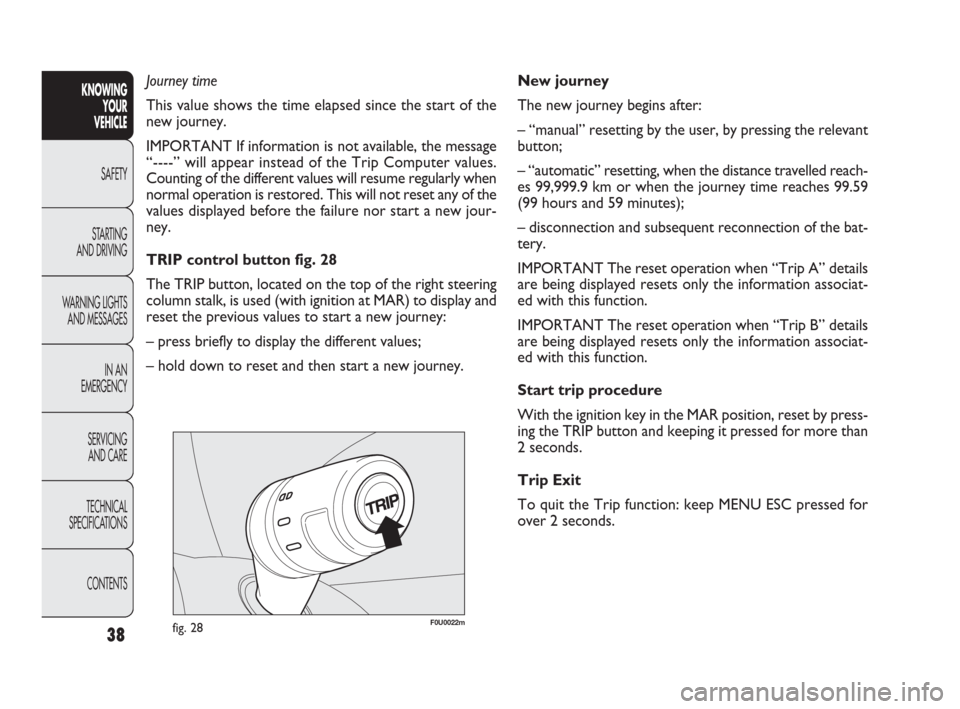
TRIP control button fig. 28
The TRIP button, located on the top of the right steering
column stalk, is used (with ignition at MAR) to display and
reset the previous values to start a new journey:
– press briefly to display the different values;
– hold down to reset and then start a new journey.KNOWING
YOUR
VEHICLE
SAFETY
STARTING
AND DRIVING
WARNING LIGHTS
AND MESSAGES
IN AN
EMERGENCY
SERVICING
AND CARE
TECHNICAL
SPECIFICATIONS
CONTENTS
037-081 PUNTO FL EN 4ed 18-01-2010 12:23 Pagina 38
Page 40 of 270
39
F0U0023mfig. 29
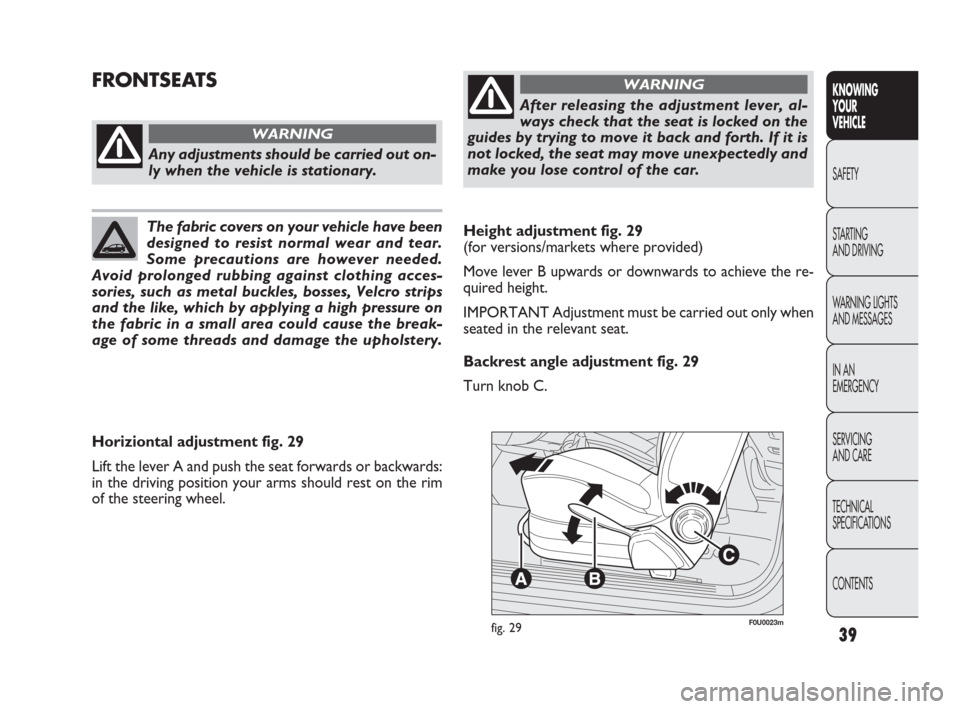
Horiziontal adjustment fig. 29
Lift the lever A and push the seat forwards or backwards:
in the driving position your arms should rest on the rim
of the steering wheel.
Any adjustments should be carried out on-
ly when the vehicle is stationary.
WARNING
After releasing the adjustment lever, al-
ways check that the seat is locked on the
guides by trying to move it back and forth. If it is
not locked, the seat may move unexpectedly and
make you lose control of the car.
WARNING
The fabric covers on your vehicle have been
designed to resist normal wear and tear.
Some precautions are however needed.
Avoid prolonged rubbing against clothing acces-
sories, such as metal buckles, bosses, Velcro strips
and the like, which by applying a high pressure on
the fabric in a small area could cause the break-
age of some threads and damage the upholstery.
FRONTSEATS
Height adjustment fig. 29
(for versions/markets where provided)
Move lever B upwards or downwards to achieve the re-
quired height.
IMPORTANT Adjustment must be carried out only when
seated in the relevant seat.
Backrest angle adjustment fig. 29
Turn knob C.
KNOWING
YOUR
VEHICLE
SAFETY
STARTING
AND DRIVING
WARNING LIGHTS
AND MESSAGES
IN AN
EMERGENCY
SERVICING
AND CARE
TECHNICAL
SPECIFICATIONS
CONTENTS
037-081 PUNTO FL EN 4ed 18-01-2010 12:23 Pagina 39
Page 41 of 270
For maximum protection, keep the back
of your seat upright, lean back into it and
make sure the seat belt fits closely across your
chest and hips.
WARNING
Always check that the seat is properly
locked on the guides by trying to push it
backwards and forwards.
WARNING
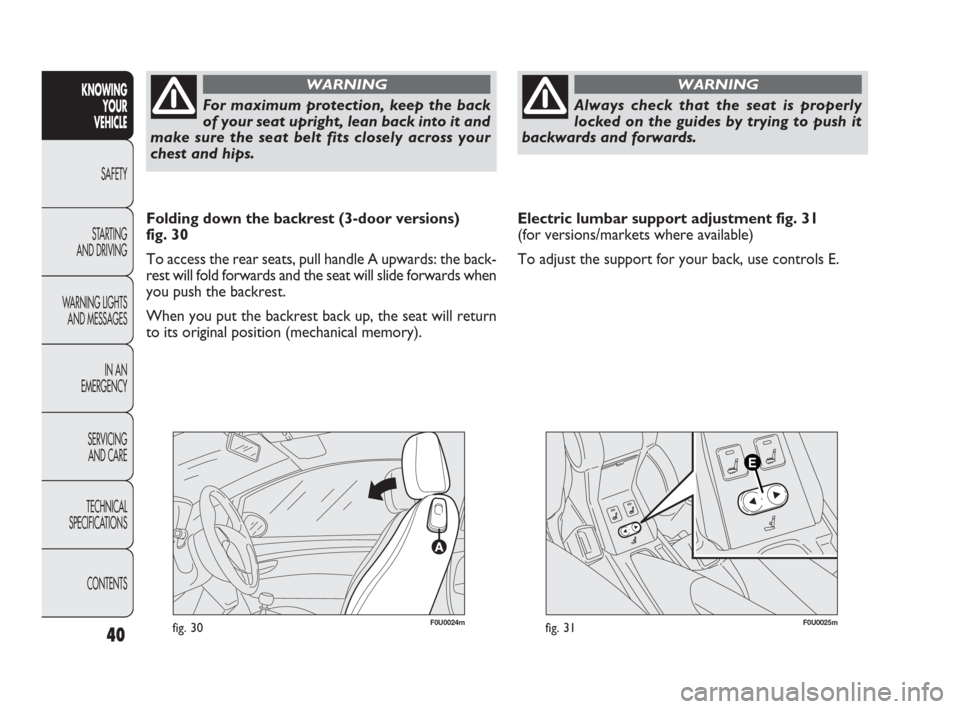
Folding down the backrest (3-door versions)
fig. 30
To access the rear seats, pull handle A upwards: the back-
rest will fold forwards and the seat will slide forwards when
you push the backrest.
When you put the backrest back up, the seat will return
to its original position (mechanical memory).Electric lumbar support adjustment fig. 31
(for versions/markets where available)
To adjust the support for your back, use controls E.
fig. 31F0U0025mfig. 30F0U0024m
40
KNOWING
YOUR
VEHICLE
SAFETY
STARTING
AND DRIVING
WARNING LIGHTS
AND MESSAGES
IN AN
EMERGENCY
SERVICING
AND CARE
TECHNICAL
SPECIFICATIONS
CONTENTS
037-081 PUNTO FL EN 4ed 18-01-2010 12:23 Pagina 40
Page 42 of 270
The fabric upholstery of your car is designed
to withstand normal wear and tear for
a long time. Some precautions are howev-
er needed. Avoid prolonged rubbing against cloth-
ing accessories, such as metal buckles, bosses,
Velcro strips and the like, which by applying a high
pressure on the fabric in a small area could cause
the breakage of some threads and damage the up-
holstery.
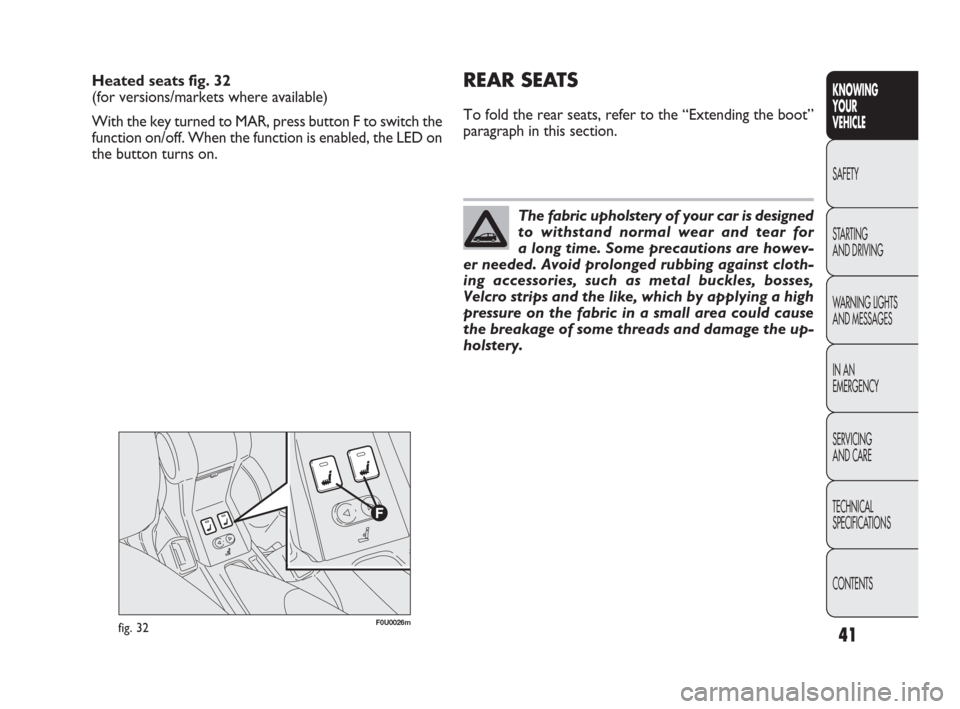
Heated seats fig. 32
(for versions/markets where available)
With the key turned to MAR, press button F to switch the
function on/off. When the function is enabled, the LED on
the button turns on.REAR SEATS
To fold the rear seats, refer to the “Extending the boot”
paragraph in this section.
fig. 32F0U0026m
41
KNOWING
YOUR
VEHICLE
SAFETY
STARTING
AND DRIVING
WARNING LIGHTS
AND MESSAGES
IN AN
EMERGENCY
SERVICING
AND CARE
TECHNICAL
SPECIFICATIONS
CONTENTS
037-081 PUNTO FL EN 4ed 18-01-2010 12:23 Pagina 41
Page 44 of 270
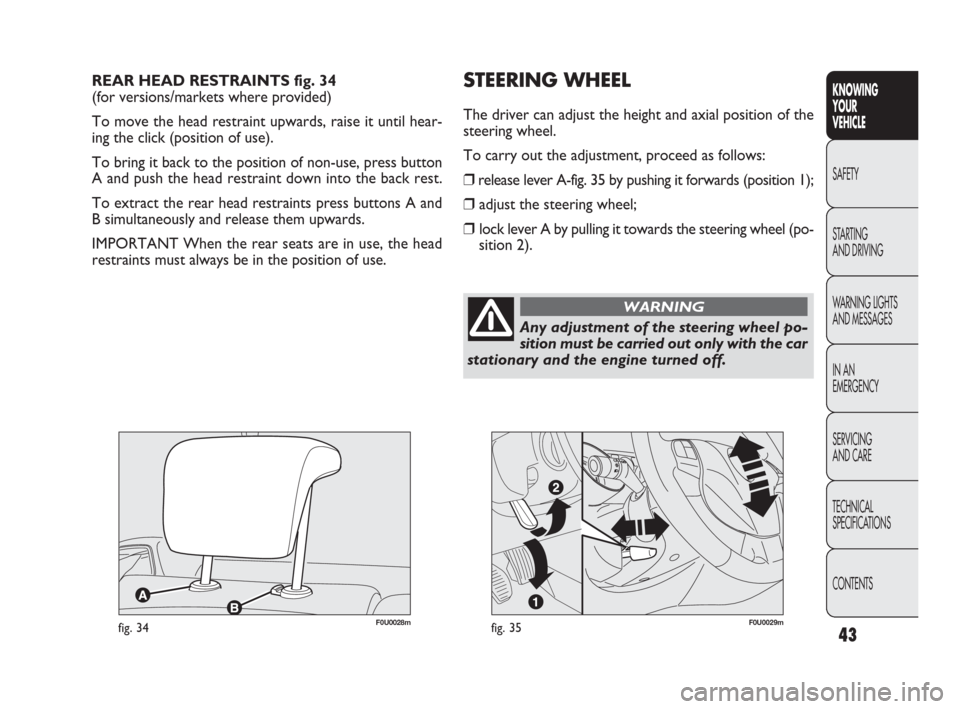
REAR HEAD RESTRAINTS fig. 34
(for versions/markets where provided)
To move the head restraint upwards, raise it until hear-
ing the click (position of use).
To bring it back to the position of non-use, press button
A and push the head restraint down into the back rest.
To extract the rear head restraints press buttons A and
B simultaneously and release them upwards.
IMPORTANT When the rear seats are in use, the head
restraints must always be in the position of use.
Any adjustment of the steering wheel po-
sition must be carried out only with the car
stationary and the engine turned off.
WARNING
STEERING WHEEL
The driver can adjust the height and axial position of the
steering wheel.
To carry out the adjustment, proceed as follows:
❒release lever A-fig. 35 by pushing it forwards (position 1);
❒adjust the steering wheel;
❒lock lever A by pulling it towards the steering wheel (po-
sition 2).
fig. 35F0U0029mfig. 34F0U0028m
43
KNOWING
YOUR
VEHICLE
SAFETY
STARTING
AND DRIVING
WARNING LIGHTS
AND MESSAGES
IN AN
EMERGENCY
SERVICING
AND CARE
TECHNICAL
SPECIFICATIONS
CONTENTS
037-081 PUNTO FL EN 4ed 18-01-2010 12:23 Pagina 43
Page 45 of 270
44
F0U0030mfig. 36
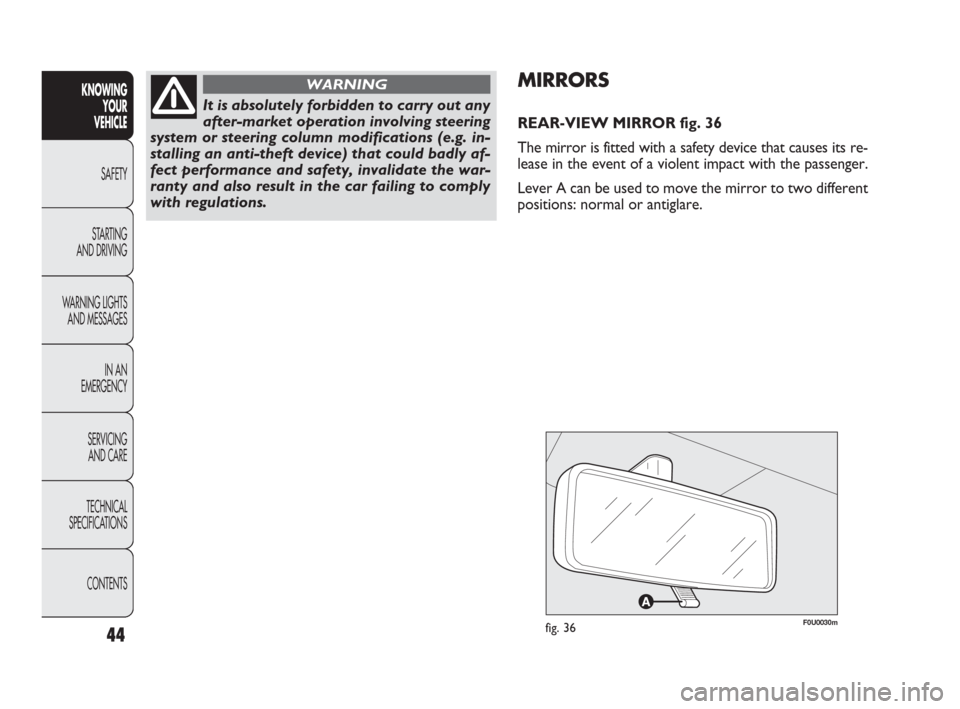
MIRRORS
REAR-VIEW MIRROR fig. 36
The mirror is fitted with a safety device that causes its re-
lease in the event of a violent impact with the passenger.
Lever A can be used to move the mirror to two different
positions: normal or antiglare.
KNOWING
YOUR
VEHICLE
SAFETY
STARTING
AND DRIVING
WARNING LIGHTS
AND MESSAGES
IN AN
EMERGENCY
SERVICING
AND CARE
TECHNICAL
SPECIFICATIONS
CONTENTS
It is absolutely forbidden to carry out any
after-market operation involving steering
system or steering column modifications (e.g. in-
stalling an anti-theft device) that could badly af-
fect performance and safety, invalidate the war-
ranty and also result in the car failing to comply
with regulations.
WARNING
037-081 PUNTO FL EN 4ed 18-01-2010 12:23 Pagina 44
Page 46 of 270
45
F0U0032mfig. 38
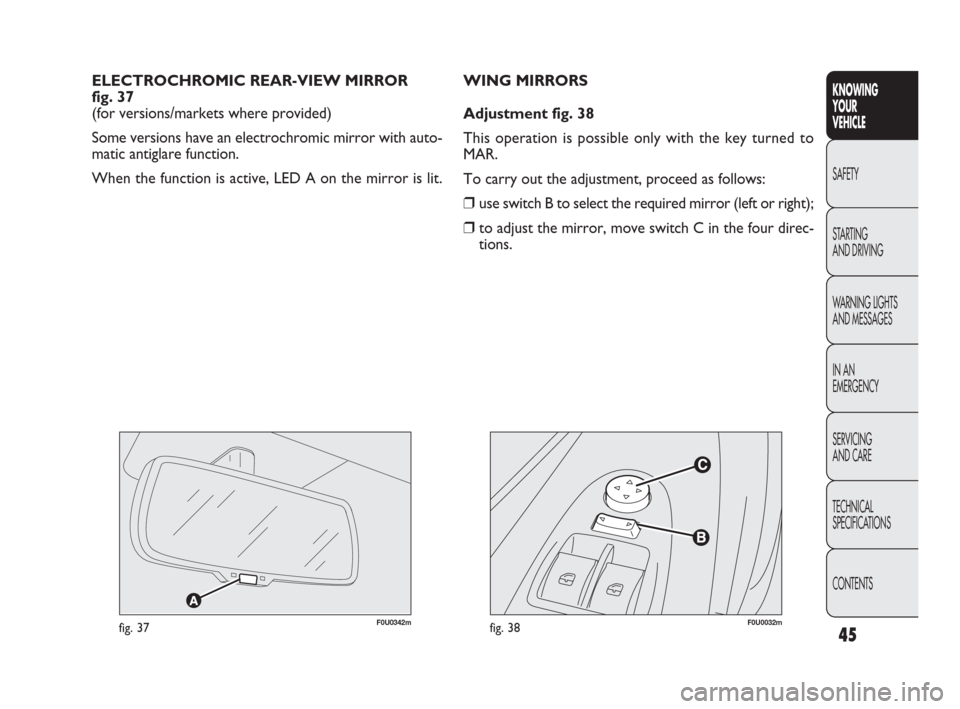
WING MIRRORS
Adjustment fig. 38
This operation is possible only with the key turned to
MAR.
To carry out the adjustment, proceed as follows:
❒use switch B to select the required mirror (left or right);
❒to adjust the mirror, move switch C in the four direc-
tions. ELECTROCHROMIC REAR-VIEW MIRROR
fig. 37
(for versions/markets where provided)
Some versions have an electrochromic mirror with auto-
matic antiglare function.
When the function is active, LED A on the mirror is lit. KNOWING
YOUR
VEHICLE
SAFETY
STARTING
AND DRIVING
WARNING LIGHTS
AND MESSAGES
IN AN
EMERGENCY
SERVICING
AND CARE
TECHNICAL
SPECIFICATIONS
CONTENTS
F0U0342mfig. 37
037-081 PUNTO FL EN 4ed 18-01-2010 12:23 Pagina 45
Page 47 of 270
As the driver’s wing mirror is curved, it may
slightly alter the perception of distance.
WARNING
Defrosting/demisting
(for versions/markets where provided)
The mirrors are fitted with resistors that are activated
when the heated rear windscreen is turned on (by press-
ing button
().
IMPORTANT This function is timed and it will turn off au-
tomatically after a few minutes.
46
KNOWING
YOUR
VEHICLE
SAFETY
STARTING
AND DRIVING
WARNING LIGHTS
AND MESSAGES
IN AN
EMERGENCY
SERVICING
AND CARE
TECHNICAL
SPECIFICATIONS
CONTENTS
F0U0033mfig. 39
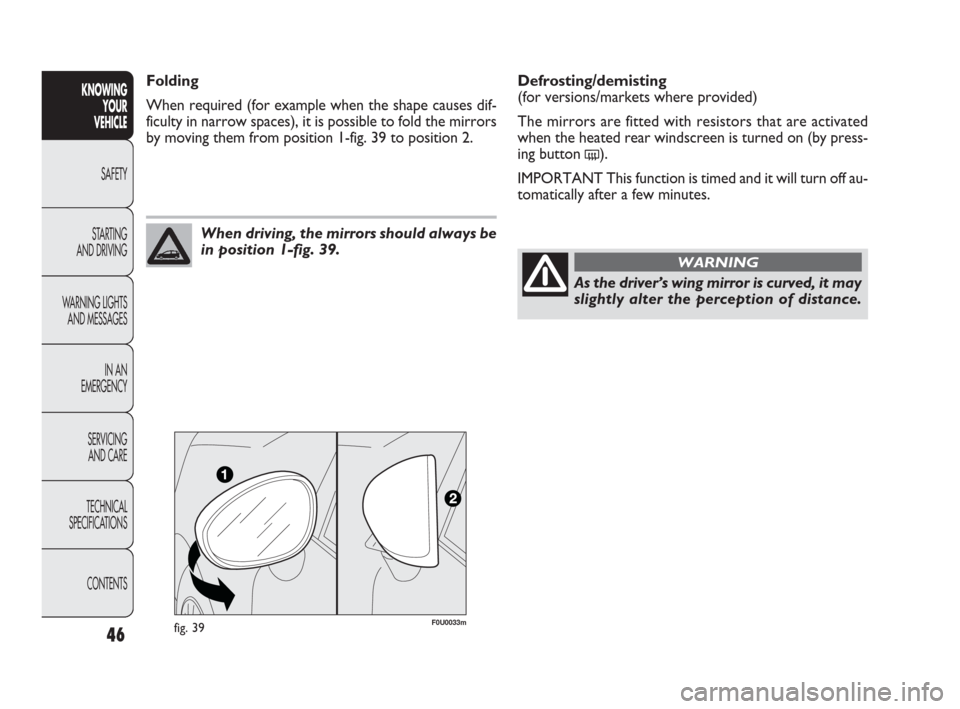
When driving, the mirrors should always be
in position 1-fig. 39.
Folding
When required (for example when the shape causes dif-
ficulty in narrow spaces), it is possible to fold the mirrors
by moving them from position 1-fig. 39 to position 2.
037-081 PUNTO FL EN 4ed 18-01-2010 12:23 Pagina 46