lock FIAT QUBO 2016 1.G Owners Manual
[x] Cancel search | Manufacturer: FIAT, Model Year: 2016, Model line: QUBO, Model: FIAT QUBO 2016 1.GPages: 231, PDF Size: 5.02 MB
Page 7 of 231
KNOW YOUR VEHICLE
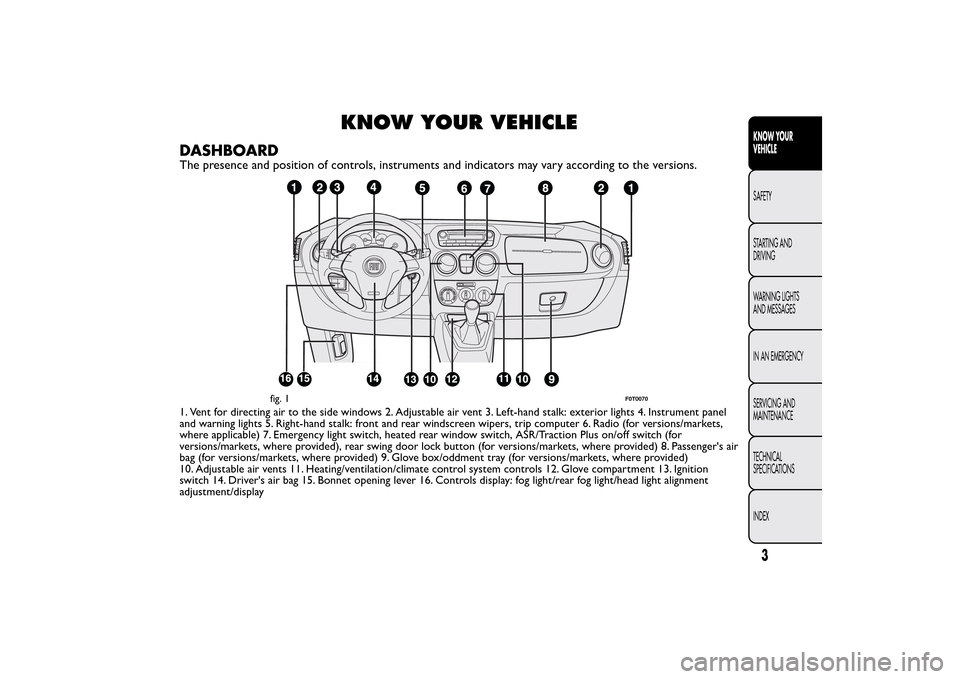
DASHBOARDThe presence and position of controls, instruments and indicators may vary according to the versions.1. Vent for directing air to the side windows 2. Adjustable air vent 3. Left-hand stalk: exterior lights 4. Instrument panel
and warning lights 5. Right-hand stalk: front and rear windscreen wipers, trip computer 6. Radio (for versions/markets,
where applicable) 7. Emergency light switch, heated rear window switch, ASR/Traction Plus on/off switch (for
versions/markets, where provided), rear swing door lock button (for versions/markets, where provided) 8. Passenger's air
bag (for versions/markets, where provided) 9. Glove box/oddment tray (for versions/markets, where provided)
10. Adjustable air vents 11. Heating/ventilation/climate control system controls 12. Glove compartment 13. Ignition
switch 14. Driver's air bag 15. Bonnet opening lever 16. Controls display: fog light/rear fog light/head light alignment
adjustment/display
fig. 1
F0T0070
3KNOW YOUR
VEHICLESAFETY
STARTING AND
DRIVING
WARNING LIGHTS
AND MESSAGES
IN AN EMERGENCY
SERVICING AND
MAINTENANCE
TECHNICAL
SPECIFICATIONS
INDEX
Page 10 of 231
❒If the warning light
(or symbol on the display)
stays on, repeat the procedure described above
leaving the key at STOP for longer than 30
seconds. If the problem persists, contact the Fiat
Dealership.
❒The code is not recognised if the warning light
(or symbol on the display) stays on. In this
case, turn the key to STOP and then to MAR; if it
is still locked, try again with the other keys that
come with the vehicle. If you still cannot start the
engine, perform the emergency start procedure
(see chapter “In an emergency”) and then contact
the Fiat Dealership.The electronic components inside the key
may be damaged if the key is subjected
to sharp knocks.
KEYSKEY WITHOUT REMOTE CONTROL
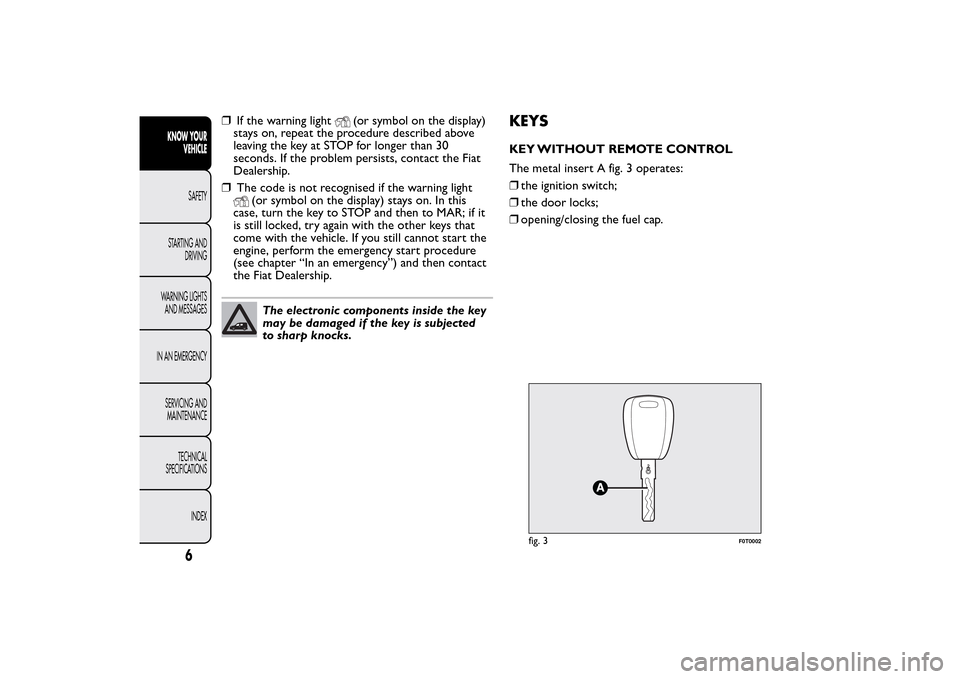
The metal insert A fig. 3 operates:
❒the ignition switch;
❒the door locks;
❒opening/closing the fuel cap.
fig. 3
F0T0002
6
KNOW YOUR
VEHICLE
SAFETY
STARTING AND
DRIVING
WARNING LIGHTS
AND MESSAGES
IN AN EMERGENCY
SERVICING AND
MAINTENANCE
TECHNICAL
SPECIFICATIONS
INDEX
Page 11 of 231
KEY WITH REMOTE CONTROL
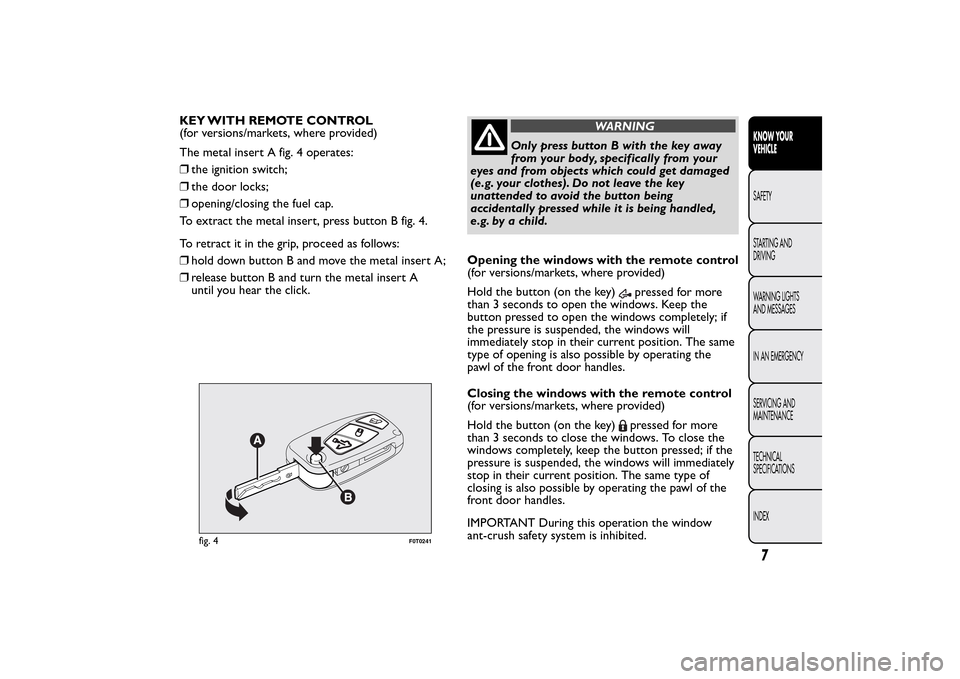
(for versions/markets, where provided)
The metal insert A fig. 4 operates:
❒the ignition switch;
❒the door locks;
❒opening/closing the fuel cap.
To extract the metal insert, press button B fig. 4.
To retract it in the grip, proceed as follows:
❒hold down button B and move the metal insert A;
❒release button B and turn the metal insert A
until you hear the click.
WARNING
Only press button B with the key away
from your body, specifically from your
eyes and from objects which could get damaged
(e.g. your clothes). Do not leave the key
unattended to avoid the button being
accidentally pressed while it is being handled,
e.g. by a child.
Opening the windows with the remote control
(for versions/markets, where provided)
Hold the button (on the key)
pressed for more
than 3 seconds to open the windows. Keep the
button pressed to open the windows completely; if
the pressure is suspended, the windows will
immediately stop in their current position. The same
type of opening is also possible by operating the
pawl of the front door handles.
Closing the windows with the remote control
(for versions/markets, where provided)
Hold the button (on the key)pressed for more
than 3 seconds to close the windows. To close the
windows completely, keep the button pressed; if the
pressure is suspended, the windows will immediately
stop in their current position. The same type of
closing is also possible by operating the pawl of the
front door handles.
IMPORTANT During this operation the window
ant-crush safety system is inhibited.
fig. 4
F0T0241
7KNOW YOUR
VEHICLESAFETY
STARTING AND
DRIVING
WARNING LIGHTS
AND MESSAGES
IN AN EMERGENCY
SERVICING AND
MAINTENANCE
TECHNICAL
SPECIFICATIONS
INDEX
Page 12 of 231
Changing battery - key with remote control
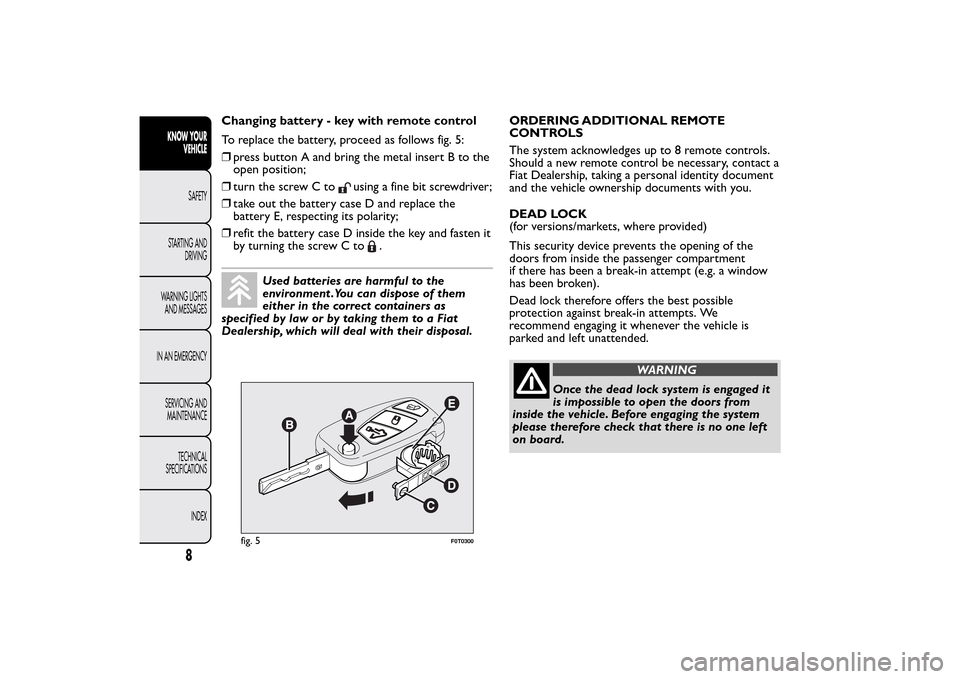
To replace the battery, proceed as follows fig. 5:
❒press button A and bring the metal insert B to the
open position;
❒turn the screw C to
using a fine bit screwdriver;
❒take out the battery case D and replace the
battery E, respecting its polarity;
❒refit the battery case D inside the key and fasten it
by turning the screw C to
.
Used batteries are harmful to the
environment .You can dispose of them
either in the correct containers as
specified by law or by taking them to a Fiat
Dealership, which will deal with their disposal.ORDERING ADDITIONAL REMOTE
CONTROLS
The system acknowledges up to 8 remote controls.
Should a new remote control be necessary, contact a
Fiat Dealership, taking a personal identity document
and the vehicle ownership documents with you.
DEAD LOCK
(for versions/markets, where provided)
This security device prevents the opening of the
doors from inside the passenger compartment
if there has been a break-in attempt (e.g. a window
has been broken).
Dead lock therefore offers the best possible
protection against break-in attempts. We
recommend engaging it whenever the vehicle is
parked and left unattended.
WARNING
Once the dead lock system is engaged it
is impossible to open the doors from
inside the vehicle. Before engaging the system
please therefore check that there is no one left
on board.
fig. 5
F0T0300
8
KNOW YOUR
VEHICLE
SAFETY
STARTING AND
DRIVING
WARNING LIGHTS
AND MESSAGES
IN AN EMERGENCY
SERVICING AND
MAINTENANCE
TECHNICAL
SPECIFICATIONS
INDEX
Page 13 of 231
WARNING
If the remote control battery is flat , the
system can be engaged by inser ting
the metal key in the door lock as described
previously: in this case, the device only remains
active for the rear doors.
Switching the device on
The system is automatically enabled on all the doors
by pressing button
twice on the key with remote
control.
The direction indicators flash twice to let you know
that the device is active.
If one or more of the doors is not perfectly shut, the
dead lock device will not be activated, thus
preventing a person getting into the car through the
open door and, on shutting, it, remaining stuck
inside the passenger compartment.
Switching the device off
The system is disabled automatically on every door
when:
❒by unlocking the doors;
❒by turning the ignition key to the ON position.
ALARM(for versions/markets, where provided)
The alarm, in addition to all the previously described
remote control functions, is controlled by the
receiver located under the dashboard near the fuse
box.
ALARM TRIPPING
The alarm trips in the following cases:
❒unauthorised opening of a door, the bonnet, the
tailgate or a sliding side door (if present)
(perimeter protection)
❒unauthorized operation of the starting device (key
turned on using a key that is not enabled)
❒cutting of the battery leads
❒moving presence inside the passenger
compartment (volumetric protection)
❒anomalous lifting/tilting of the vehicle.
Depending on the market, the activation of the alarm
causes the activation of the siren and the direction
indicators (for about 26 seconds). Alarm tripping and
the number of cycles depend on the sales market.
There are a maximum number of acoustic/visual
cycles. When this is reached the system returns to
normal operation.
Volumetric and antilifting protections are disabled by
pressing the control button installed on the front
dashboard (see paragraph "Antilift protections).
9KNOW YOUR
VEHICLESAFETY
STARTING AND
DRIVING
WARNING LIGHTS
AND MESSAGES
IN AN EMERGENCY
SERVICING AND
MAINTENANCE
TECHNICAL
SPECIFICATIONS
INDEX
Page 14 of 231
IMPORTANT The engine immobilizer function is
ensured by the Fiat CODE which is automatically
activated when the key is extracted from the ignition.
TURNING THE ALARM ON
With the doors and bonnet closed and the ignition
key either turned to STOP or removed, point the
key with the remote control towards the vehicle and
press and release button
.
Except for some markets, the system produces an
acoustic warning (beep) and enables door locking.
A self-diagnostic stage precedes the turning on of the
alarm: if a fault is detected, the system produces
another acoustic signal.
In this case switch off the alarm by pressing
,
check that all the doors, bonnet and tailgate are
closed correctly; then switch the alarm back on by
pressing
.
If a door or the bonnet is not properly shut, it will
be excluded from the testing by the alarm system.
A fault has occurred in system operation if the alarm
produces an acoustic signal even when the doors,
bonnet and boot are correctly closed. Go to a
Fiat Dealership.
IMPORTANT The alarm does not come on when the
central locking is activated using the metal insert in
the key.
IMPORTANT The alarm is configured to comply with
the regulations existing in different countries.TURNING THE ALARM OFF
Press button
on the key with the remote control.
The following operations are performed (excluding
specific markets):
❒direction indicators flash briefly twice
❒two short beeps
❒door are unlocked.
IMPORTANT The alarm is not turned off using the
door are opened using the metal insert in the key.
VOLUMETRIC/ANTILIFTING PROTECTION
The side windows must be completely closed for
correct operation of the protection.
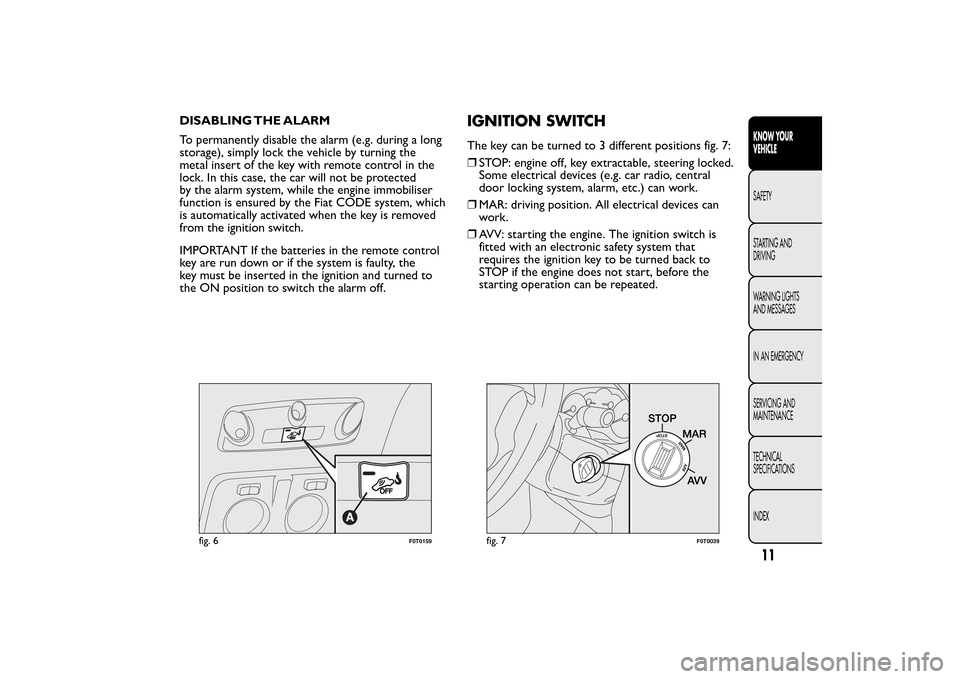
If necessary, the function can be turned off (if, for
example, you are leaving a pet in the car) by pressing
button A fig. 6 on the front courtesy light before
activating turning the alarm on.
The LED on the button will flash for several seconds
when the function is turned off. The volumetric/
antitilting protection must be deactivated each time
the instrument panel is switched off.
BREAK-IN ATTEMPT INDICATION
The warning light
comes on or the symbol
appears on the display with a specific message (see
"Warning lights and messages" when the panel lights
up according to vehicle version) to indicate a
break-in attempt.
10KNOW YOUR
VEHICLE
SAFETY
STARTING AND
DRIVING
WARNING LIGHTS
AND MESSAGES
IN AN EMERGENCY
SERVICING AND
MAINTENANCE
TECHNICAL
SPECIFICATIONS
INDEX
Page 15 of 231
DISABLING THE ALARM
To permanently disable the alarm (e.g. during a long
storage), simply lock the vehicle by turning the
metal insert of the key with remote control in the
lock. In this case, the car will not be protected
by the alarm system, while the engine immobiliser
function is ensured by the Fiat CODE system, which
is automatically activated when the key is removed
from the ignition switch.
IMPORTANT If the batteries in the remote control
key are run down or if the system is faulty, the
key must be inserted in the ignition and turned to
the ON position to switch the alarm off.
IGNITION SWITCHThe key can be turned to 3 different positions fig. 7:
❒STOP: engine off, key extractable, steering locked.
Some electrical devices (e.g. car radio, central
door locking system, alarm, etc.) can work.
❒MAR: driving position. All electrical devices can
work.
❒AVV: starting the engine. The ignition switch is
fitted with an electronic safety system that
requires the ignition key to be turned back to
STOP if the engine does not start, before the
starting operation can be repeated.
fig. 6
F0T0159
fig. 7
F0T0039
11KNOW YOUR
VEHICLESAFETY
STARTING AND
DRIVING
WARNING LIGHTS
AND MESSAGES
IN AN EMERGENCY
SERVICING AND
MAINTENANCE
TECHNICAL
SPECIFICATIONS
INDEX
Page 16 of 231
STEERING LOCK
Engagement
When the key is at STOP, remove the key and turn
the steering wheel until it locks.
Disengagement
Move the steering wheel slightly as you turn the
ignition key to MAR.
WARNING
Never extract the key while the vehicle
is moving.The steering wheel should lock
automatically as soon as it is turned.This also
applies to cases in which the vehicle is towed. It
is absolutely forbidden to carr y out any
after-market operation involving steering
system or steering column modifications (e.g.
installation of anti-theft device) that could
badly affect performance and safety, invalidate
the warranty and also result in the car failing
to comply with regulations.
INSTRUMENTSThe instrument background colour and type may
vary according to the version.
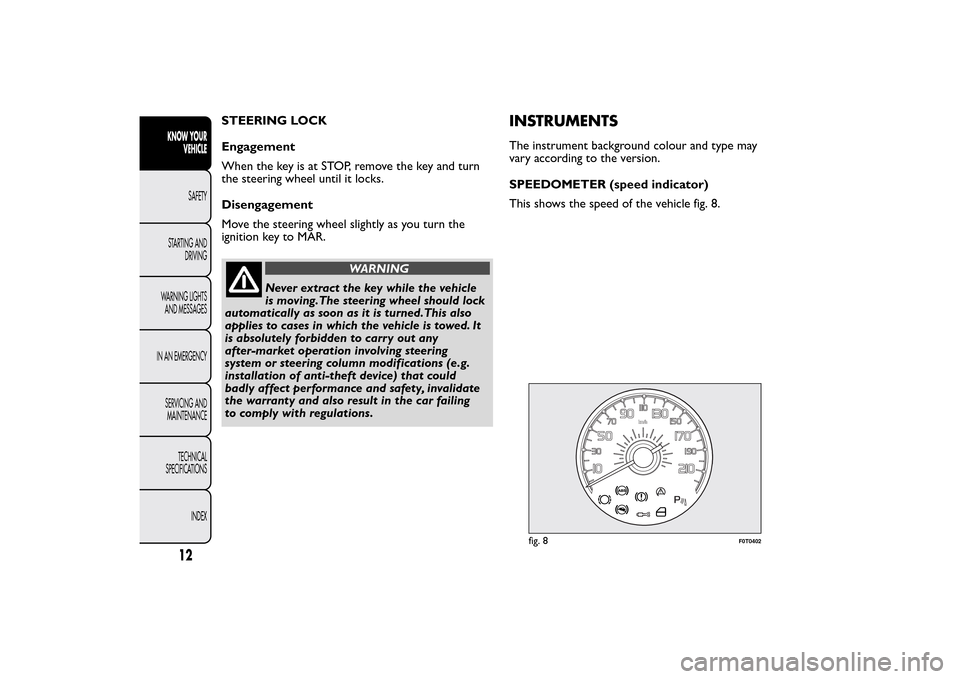
SPEEDOMETER (speed indicator)
This shows the speed of the vehicle fig. 8.
fig. 8
F0T0402
12KNOW YOUR
VEHICLE
SAFETY
STARTING AND
DRIVING
WARNING LIGHTS
AND MESSAGES
IN AN EMERGENCY
SERVICING AND
MAINTENANCE
TECHNICAL
SPECIFICATIONS
INDEX
Page 21 of 231
Setup menu function
The menu fig. 13 comprises a series of functions in
"circular" arrangement, which can be selected by
pressing the
and
buttons to access the
different operations and settings described in the
following paragraphs. A submenu is provided for
some items (clock and unit setting).
The setup menu can be activated by pressing the
MENU ESC button briefly.
Press buttons
or
to scroll the setup menu
options.
Management modes differ according to the option
selected.
Selecting an option from the main menu without a
submenu:
- briefly press MENU ESC to select the main menu
option you wish to set;
- press
or
(with single presses) to select the
new setting;
- a short press on button MENU ESC will store the
setting and then return to the same main menu
option that was first selected.
Selecting an option from the main menu with a
submenu:
- briefly press the MENU ESC button to display the
first submenu option;
- press
or
(with single presses) to scroll all
the submenu options;- briefly press the MENU ESC button to select the
displayed submenu option and to open the relevant
setup menu;
- press
or
(with single presses) to select the
new setting for this submenu option;
- briefly press the MENU ESC button to store the
new setting and go back to the previous menu
option.
Selecting “Date” and “Set time”:
- briefly press MENU ESC to select the first value to
change (e.g. hours/minutes or year/month/day);
- press
or
(with single presses) to select the
new setting;
- briefly press MENU ESC to store the new setting
and go to the next setup menu option: if this is
the last one you will go back to the previous menu
option.
Hold down MENU ESC:
- to quit the set up menu if you are in the main
menu;
- to quit the main menu if you are in another point of
the menu (e.g. at submenu option setting level, at
submenu level or at main menu option setting level);
- to save only the settings already stored (and
confirmed by pressing the MENU ESC button).
The setup menu page is timed. Only the changes
already stored by pressing the MENU ESC button are
saved when you come out of the menu.
17KNOW YOUR
VEHICLESAFETY
STARTING AND
DRIVING
WARNING LIGHTS
AND MESSAGES
IN AN EMERGENCY
SERVICING AND
MAINTENANCE
TECHNICAL
SPECIFICATIONS
INDEX
Page 23 of 231
For activation/deactivation, proceed as follows:
- briefly press MENU ESC: On or Off will flash on
the display (depending on previous setting);
- press
or
to make your choice;
- press the MENU ESC button briefly to return to
the menu screen or give the button a long press
to return to the standard screen without storing.
Setting the clock (Set time)
This function allows you to set the clock through
two submenus: “Time” and “Mode”.
To carry out the adjustment, proceed as follows:
- briefly press the MENU ESC button and two
submenus (Time and Format) are displayed;
– press
or
to switch between the two
sub-menus;
- once you have selected a submenu, press MENU
ESC briefly;
- if selecting “Time”, briefly press MENU ESC - the
“hours” will flash on the display;
- press the
or
button to make the
adjustment;
- briefly press the MENU ESC button, which makes
the display flash the minutes;
- press the
or
button to make the
adjustment;
- when you select “Mode”, pressing MENU ESC
makes the mode flash on the display;- press the
or
button to carry out the
selection in 24h or 12h mode.
When you have made the required adjustments,
press SET ESC to go back to the submenu screen or
hold the button down to go back to the main menu
screen without saving.
- hold down MENU ESC again to go back to the
standard screen or main menu, depending on which
point in the menu you have reached.
Set date (Set Date)
This function allows updating of the date (day -
month - year).
To update, proceed as follows:
- briefly press MENU ESC: the day (dd) will flash on
the display;
- press the
or
button to make the
adjustment;
- briefly press MENU ESC: the month (mm) will flash
on the display;
- press the
or
button to make the
adjustment;
- briefly press MENU ESC: the year (yyyy) will flash
on the display;
- press the
or
button to make the
adjustment.
19KNOW YOUR
VEHICLESAFETY
STARTING AND
DRIVING
WARNING LIGHTS
AND MESSAGES
IN AN EMERGENCY
SERVICING AND
MAINTENANCE
TECHNICAL
SPECIFICATIONS
INDEX