lock FIAT QUBO 2017 1.G User Guide
[x] Cancel search | Manufacturer: FIAT, Model Year: 2017, Model line: QUBO, Model: FIAT QUBO 2017 1.GPages: 260, PDF Size: 4.74 MB
Page 25 of 260
NoteThe setting will increase or decrease by one
unit each time the
orbutton is pressed.
Keeping the button pressed causes an automatic
rapid value increase/decrease. Complete the
adjustment with single presses of the button when
you approach the desired value.
- press theSET
button briefly to go back to the
menu screen or hold the button down to go back
to the standard screen without saving.
Audio information (See radio)
This function is used to display radio information.
- Radio: selected radio station frequency or RDS
message, automatic tuning activation or AutoSTore;
- Audio CD, MP3 CDs: track number;
- CD Changer: CD number and track number;
To show the sound system information on
the display (On) or clear it (Off ), proceed as follows:
- briefly press theSET
button to make the
display flash (On) or (Off ) according to what was
previously set;
- press button
orto select;
- press theSET
button briefly to go back to the
menu screen or hold the button down to go back
to the standard screen without saving.Automatic central locking with vehicle
moving (Autoclose)
After activation (On), this function allows the
automatic locking of the doors when the speed
exceeds 20 km/h.
Proceed as follows to activate (On) or deactivate
(Off ) this function:
- press theSET
button briefly to display a
submenu;
- briefly press theSET
button to make the
display flash (On) or (Off ) according to what was
previously set;
- press button
orto select;
briefly press theSET
button to return to the
submenu screen or hold the button down to return
to the main menu screen without saving;
- press theSET
button again to return to the
standard screen or to the main menu according
to where you are in the menu.
Setting the unit of measurement
This function allows the setting of a unit of
measurement via three submenus: Distance,
Consumption and Temperature.
To set the desired unit of measurement, proceed as
follows:
- briefly press theSET
button to display the
three submenus;
21
KNOWING YOUR
VEHICLE
SAFETY
STARTING AND
DRIVING
WARNING LIGHTS
AND MESSAGES
IN AN EMERGENCY
SERVICING AND
CARE
TECHNICAL DATA
INDEX
Page 31 of 260
SEATS
FRONT SEATS
WARNING
All adjustments must be made with the
vehicle stationary.
Lengthwise adjustment
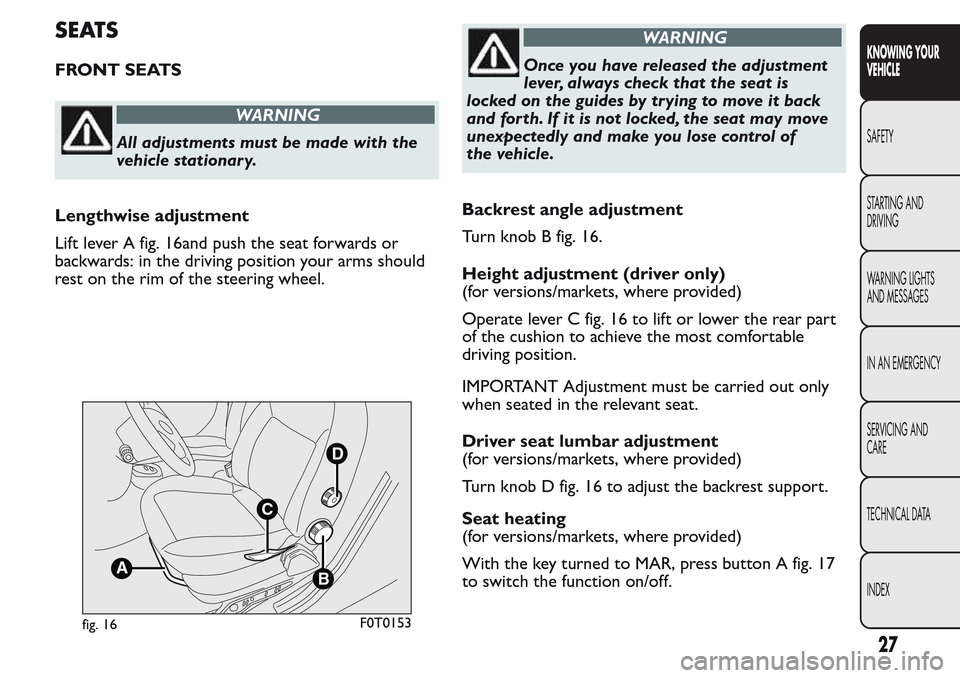
Lift lever A fig. 16and push the seat forwards or
backwards: in the driving position your arms should
rest on the rim of the steering wheel.
WARNING
Once you have released the adjustment
lever, always check that the seat is
locked on the guides by trying to move it back
and forth. If it is not locked, the seat may move
unexpectedly and make you lose control of
the vehicle.
Backrest angle adjustment
Turn knob B fig. 16.
Height adjustment (driver only)
(for versions/markets, where provided)
Operate lever C fig. 16 to lift or lower the rear part
of the cushion to achieve the most comfortable
driving position.
IMPORTANT Adjustment must be carried out only
when seated in the relevant seat.
Driver seat lumbar adjustment
(for versions/markets, where provided)
Turn knob D fig. 16 to adjust the backrest support.
Seat heating
(for versions/markets, where provided)
With the key turned to MAR, press button A fig. 17
to switch the function on/off.
B
D
C
A
fig. 16F0T0153
27
KNOWING YOUR
VEHICLE
SAFETY
STARTING AND
DRIVING
WARNING LIGHTS
AND MESSAGES
IN AN EMERGENCY
SERVICING AND
CARE
TECHNICAL DATA
INDEX
Page 34 of 260
FIXED PARTITION (for N1 4 seat
versions)
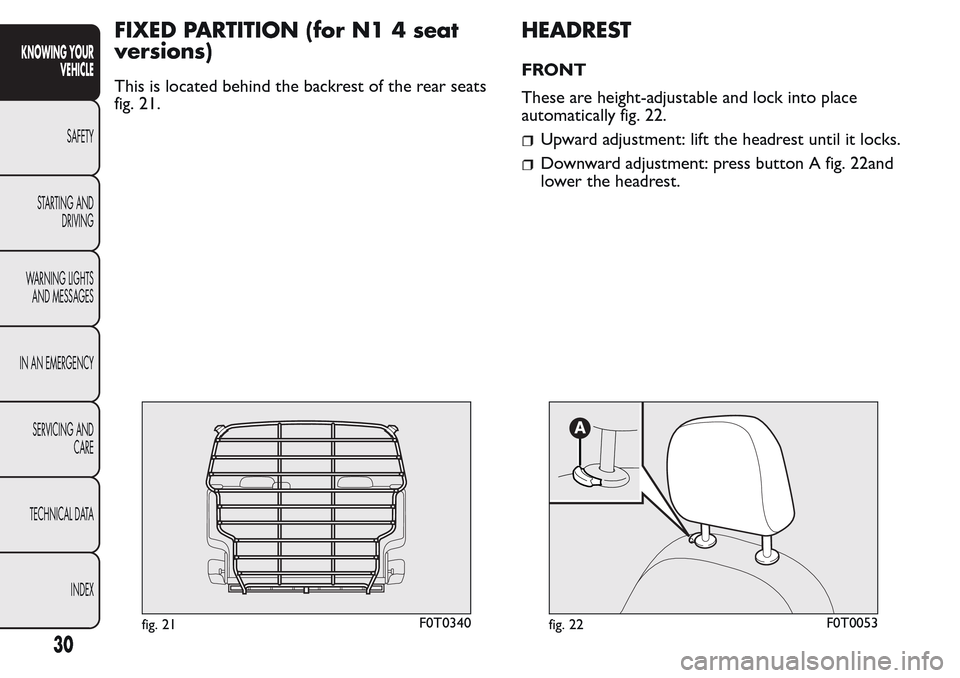
This is located behind the backrest of the rear seats
fig. 21.
HEADREST
FRONT
These are height-adjustable and lock into place
automatically fig. 22.
Upward adjustment: lift the headrest until it locks.
Downward adjustment: press button A fig. 22and
lower the headrest.
fig. 21F0T0340fig. 22F0T0053
30
KNOWING YOUR
VEHICLE
SAFETY
STARTING AND
DRIVING
WARNING LIGHTS
AND MESSAGES
IN AN EMERGENCY
SERVICING AND
CARE
TECHNICAL DATA
INDEX
Page 36 of 260
STEERING WHEEL
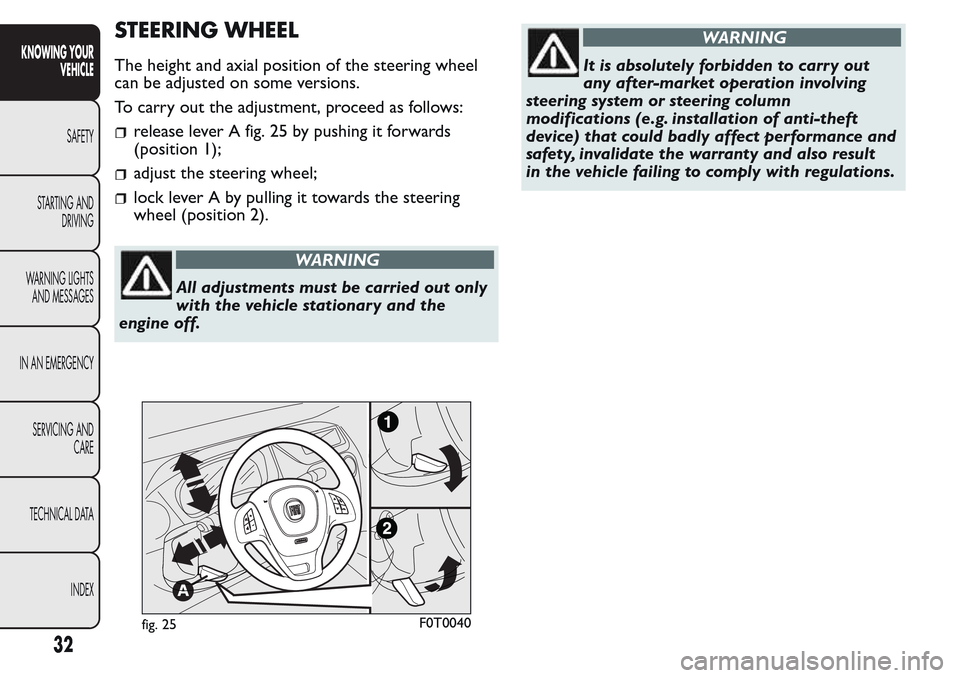
The height and axial position of the steering wheel
can be adjusted on some versions.
To carry out the adjustment, proceed as follows:
release lever A fig. 25 by pushing it forwards
(position 1);
adjust the steering wheel;
lock lever A by pulling it towards the steering
wheel (position 2).
WARNING
All adjustments must be carried out only
with the vehicle stationary and the
engine off.
WARNING
It is absolutely forbidden to carr y out
any after-market operation involving
steering system or steering column
modifications (e.g. installation of anti-theft
device) that could badly affect performance and
safety, invalidate the warranty and also result
in the vehicle failing to comply with regulations.
fig. 25F0T0040
32
KNOWING YOUR
VEHICLE
SAFETY
STARTING AND
DRIVING
WARNING LIGHTS
AND MESSAGES
IN AN EMERGENCY
SERVICING AND
CARE
TECHNICAL DATA
INDEX
Page 38 of 260
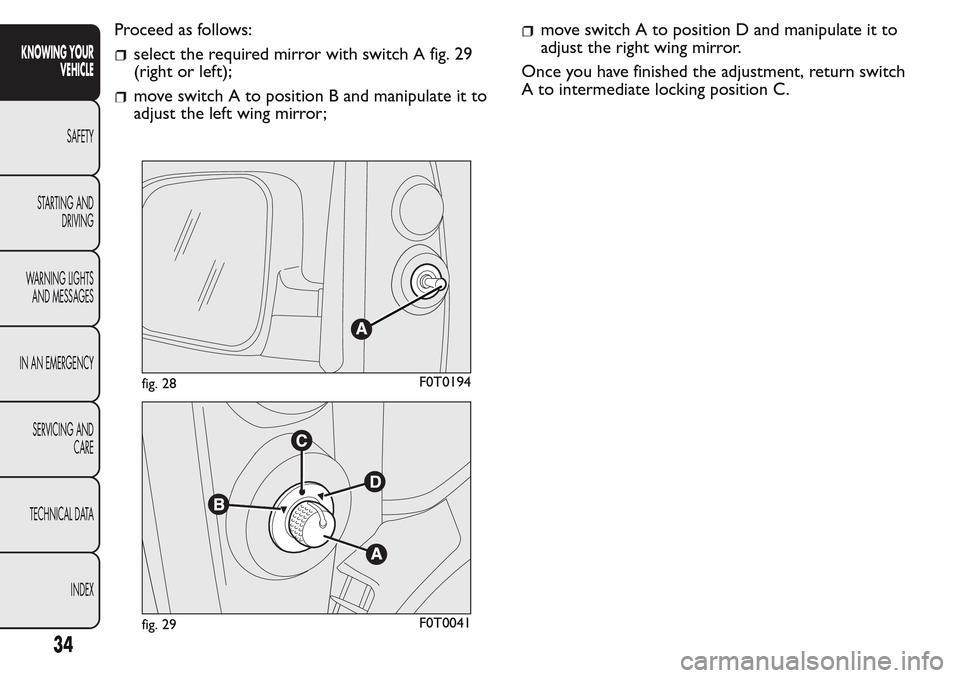
Proceed as follows:
select the required mirror with switch A fig. 29
(right or left);
move switch A to position B and manipulate it to
adjust the left wing mirror;
move switch A to position D and manipulate it to
adjust the right wing mirror.
Once you have finished the adjustment, return switch
A to intermediate locking position C.
fig. 28F0T0194
fig. 29F0T0041
34
KNOWING YOUR
VEHICLE
SAFETY
STARTING AND
DRIVING
WARNING LIGHTS
AND MESSAGES
IN AN EMERGENCY
SERVICING AND
CARE
TECHNICAL DATA
INDEX
Page 54 of 260
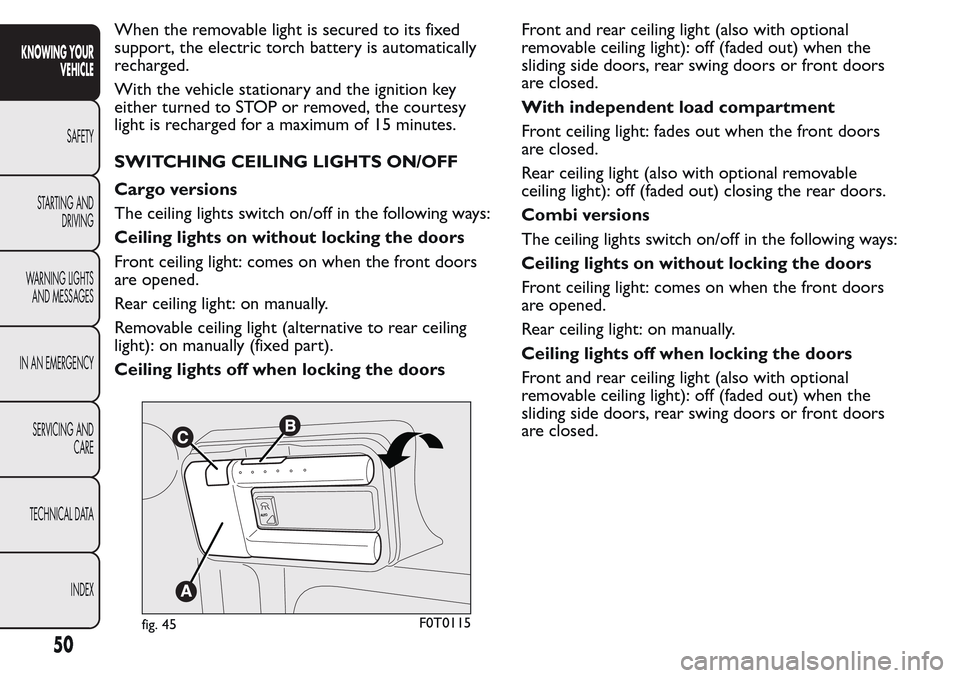
When the removable light is secured to its fixed
support, the electric torch battery is automatically
recharged.
With the vehicle stationary and the ignition key
either turned to STOP or removed, the courtesy
light is recharged for a maximum of 15 minutes.
SWITCHING CEILING LIGHTS ON/OFF
Cargo versions
The ceiling lights switch on/off in the following ways:
Ceiling lights on without locking the doors
Front ceiling light: comes on when the front doors
are opened.
Rear ceiling light: on manually.
Removable ceiling light (alternative to rear ceiling
light): on manually (fixed part).
Ceiling lights off when locking the doorsFront and rear ceiling light (also with optional
removable ceiling light): off (faded out) when the
sliding side doors, rear swing doors or front doors
are closed.
With independent load compartment
Front ceiling light: fades out when the front doors
are closed.
Rear ceiling light (also with optional removable
ceiling light): off (faded out) closing the rear doors.
Combi versions
The ceiling lights switch on/off in the following ways:
Ceiling lights on without locking the doors
Front ceiling light: comes on when the front doors
are opened.
Rear ceiling light: on manually.
Ceiling lights off when locking the doors
Front and rear ceiling light (also with optional
removable ceiling light): off (faded out) when the
sliding side doors, rear swing doors or front doors
are closed.
A
UT
O
fig. 45F0T0115
50
KNOWING YOUR
VEHICLE
SAFETY
STARTING AND
DRIVING
WARNING LIGHTS
AND MESSAGES
IN AN EMERGENCY
SERVICING AND
CARE
TECHNICAL DATA
INDEX
Page 58 of 260
WARNING
Do not use the ashtray as a waste paper
basket : it may catch fire in contact
with cigarette stubs.
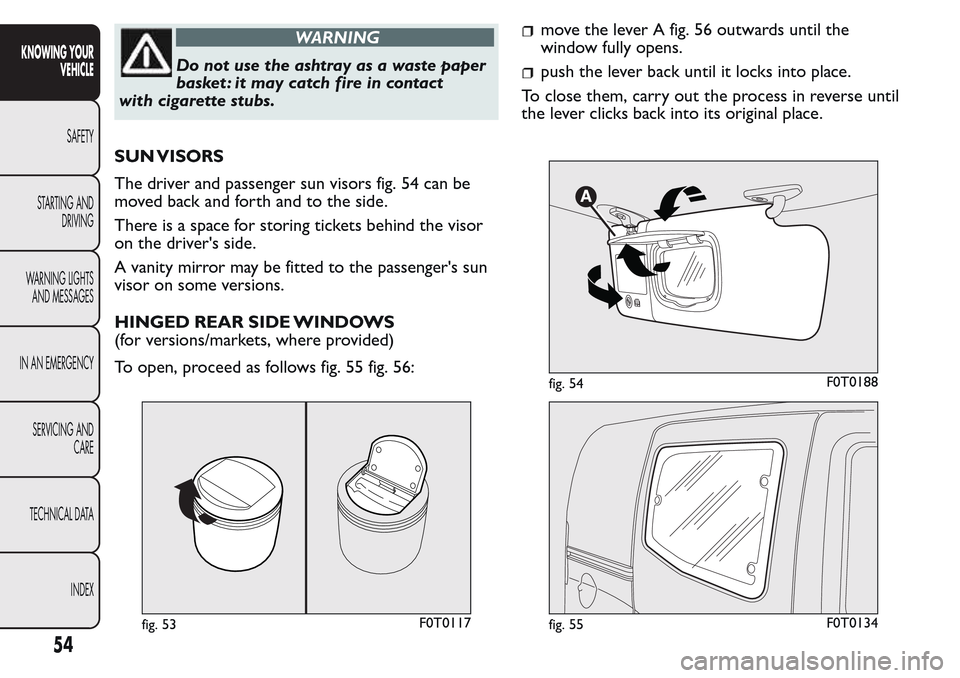
SUN VISORS
The driver and passenger sun visors fig. 54 can be
moved back and forth and to the side.
There is a space for storing tickets behind the visor
on the driver's side.
A vanity mirror may be fitted to the passenger's sun
visor on some versions.
HINGED REAR SIDE WINDOWS
(for versions/markets, where provided)
To open, proceed as follows fig. 55 fig. 56:
move the lever A fig. 56 outwards until the
window fully opens.
push the lever back until it locks into place.
To close them, carry out the process in reverse until
the lever clicks back into its original place.
fig. 53F0T0117
fig. 54F0T0188
fig. 55F0T0134
54
KNOWING YOUR
VEHICLE
SAFETY
STARTING AND
DRIVING
WARNING LIGHTS
AND MESSAGES
IN AN EMERGENCY
SERVICING AND
CARE
TECHNICAL DATA
INDEX
Page 59 of 260
DOORS
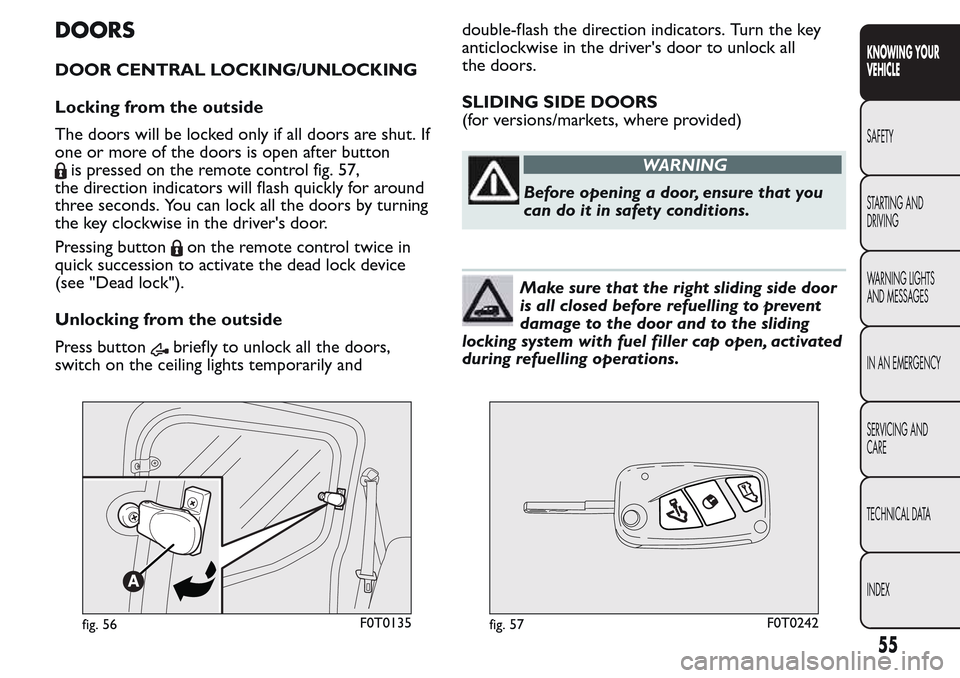
DOOR CENTRAL LOCKING/UNLOCKING
Locking from the outside
The doors will be locked only if all doors are shut. If
one or more of the doors is open after button
is pressed on the remote control fig. 57,
the direction indicators will flash quickly for around
three seconds. You can lock all the doors by turning
the key clockwise in the driver's door.
Pressing button
on the remote control twice in
quick succession to activate the dead lock device
(see "Dead lock").
Unlocking from the outside
Press button
briefly to unlock all the doors,
switch on the ceiling lights temporarily anddouble-flash the direction indicators. Turn the key
anticlockwise in the driver's door to unlock all
the doors.
SLIDING SIDE DOORS
(for versions/markets, where provided)
WARNING
Before opening a door, ensure that you
can do it in safety conditions.
Make sure that the right sliding side door
is all closed before refuelling to prevent
damage to the door and to the sliding
locking system with fuel filler cap open, activated
during refuelling operations.
fig. 56F0T0135fig. 57F0T0242
55
KNOWING YOUR
VEHICLE
SAFETY
STARTING AND
DRIVING
WARNING LIGHTS
AND MESSAGES
IN AN EMERGENCY
SERVICING AND
CARE
TECHNICAL DATA
INDEX
Page 60 of 260
WARNING
The right sliding side door cannot be
opened with the fuel flap open during
refuelling.
On Cargo versions, the sliding side door is fitted
with a spring-loaded latch that stops the door from
opening any further. To lock it, simply push the
door as far as it will go; to unlock it, pull forward
firmly.
In any case, make sure that the door is properly
hooked to the system which keeps the door fully
open.
WARNING
Do not leave the sliding side door open
when the vehicle is parked on a
gradient . A knock could release the latch leaving
the door free to move.
WARNING
Before leaving the vehicle parked with
sliding doors open, always check that
the latch is engaged.Opening/closing from the outside
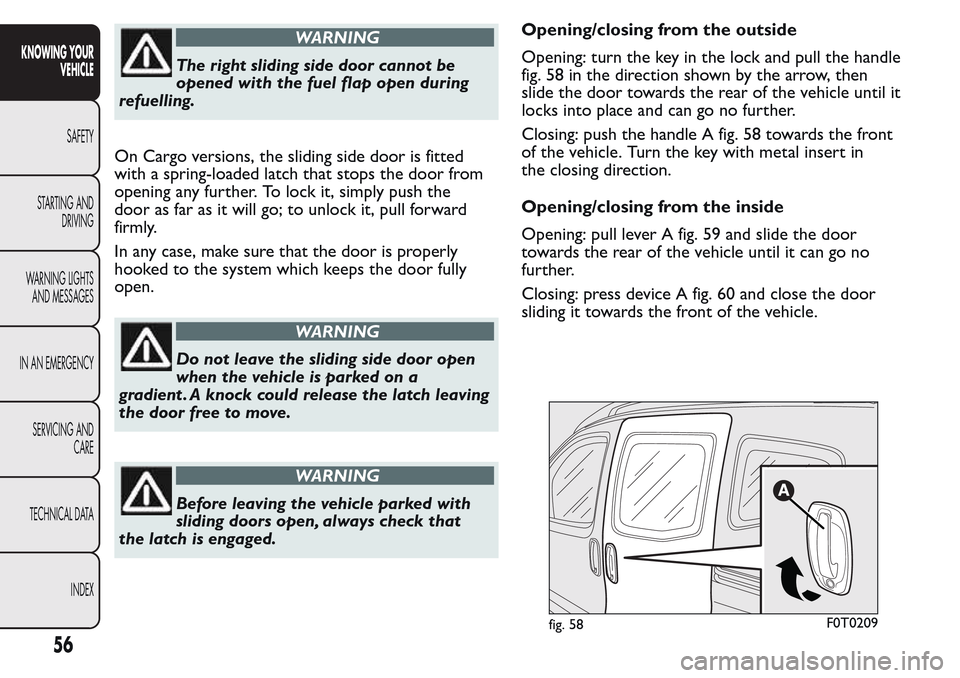
Opening: turn the key in the lock and pull the handle
fig. 58 in the direction shown by the arrow, then
slide the door towards the rear of the vehicle until it
locks into place and can go no further.
Closing: push the handle A fig. 58 towards the front
of the vehicle. Turn the key with metal insert in
the closing direction.
Opening/closing from the inside
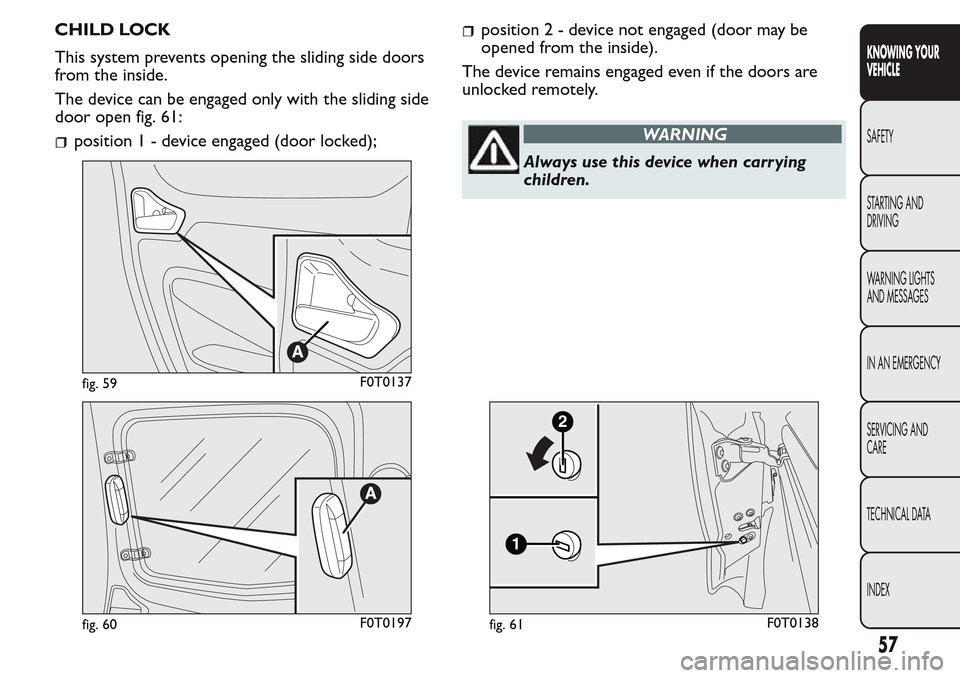
Opening: pull lever A fig. 59 and slide the door
towards the rear of the vehicle until it can go no
further.
Closing: press device A fig. 60 and close the door
sliding it towards the front of the vehicle.
fig. 58F0T0209
56
KNOWING YOUR
VEHICLE
SAFETY
STARTING AND
DRIVING
WARNING LIGHTS
AND MESSAGES
IN AN EMERGENCY
SERVICING AND
CARE
TECHNICAL DATA
INDEX
Page 61 of 260
CHILD LOCK
This system prevents opening the sliding side doors
from the inside.
The device can be engaged only with the sliding side
door open fig. 61:
position1-device engaged (door locked);
position2-device not engaged (door may be
opened from the inside).
The device remains engaged even if the doors are
unlocked remotely.
WARNING
Always use this device when carr ying
children.
fig. 59F0T0137
fig. 60F0T0197
1
2
fig. 61F0T0138
57
KNOWING YOUR
VEHICLE
SAFETY
STARTING AND
DRIVING
WARNING LIGHTS
AND MESSAGES
IN AN EMERGENCY
SERVICING AND
CARE
TECHNICAL DATA
INDEX