light FIAT SEDICI 2009 2.G User Guide
[x] Cancel search | Manufacturer: FIAT, Model Year: 2009, Model line: SEDICI, Model: FIAT SEDICI 2009 2.GPages: 270, PDF Size: 3.44 MB
Page 47 of 270
The pretensioner is located in each front
seat belt retractor. The pretensioner tight-
ens the seat belt so the belt fits the oc-
cupant’s body more snugly in the event of
a frontal crash. The retractors will remain
locked after the pretensioners are acti-
vated. Upon activation, some noise will oc-
cur and some smoke may be released.
These conditions are not harmful and do
not indicate a fire in the vehicle.
The driver and all passengers must be
properly restrained by wearing seat belts
at all times, whether or not a pretension-
er is equipped at their seating position, to
minimize the risk of severe injury or death
in the event of a crash.
Sit fully back in the seat; sit up straight; do
not lean forward or sideways. Adjust the
belt so the lap portion of the belt is worn
low across the pelvis, not across the waist.
Please refer to the “Seat Adjustment” sec-
tion and the instructions and precautions
about the seat belts in this “Seat Belts and
Child Restraint Systems” section for de-
tails on proper seat and seat belt adjust-
ments.
Service on or around the
pretensioner system compo-
nents or wiring must be performed
only by an authorized Fiat Dealership
who is specially trained. Improper ser-
vice could result in unintended acti-
vation of pretensioners or could ren-
der the pretensioner inoperative. Ei-
ther of these two conditions may re-
sult in personal injury.
WARNING
To prevent damage or unintended activa-
tion of the pretensioners, be sure the bat-
tery is disconnected and the ignition switch
has been in the “LOCK” position for at
least 90 seconds before performing any
electrical service work on your Fiat.
Do not touch pretensioner system com-
ponents or wiring. The wires are wrapped
with yellow tape or yellow tubing, and the
couplers are yellow. When scrapping your
Fiat, ask your Fiat Dealership, body repair
shop, or scrap yard for assistance. Please note that the pretensioners along
with the air bags will activate only in se-
vere frontal collisions. They are not de-
signed to activate in rear impacts, side im-
pacts, rollovers, or minor frontal colli-
sions. The pretensioners can be activat-
ed only once. If the pretensioners are ac-
tivated (that is, if the air bags are activat-
ed), have the pretensioner system ser-
viced by an authorized Fiat Dealership as
soon as possible.
If the “AIR BAG” light on the instrument
cluster does not blink or come on briefly
when the ignition switch is turned to the
“ON” position, stays on for more than 10
seconds, or comes on while driving, the
pretensioner system or the air bag system
may not work properly. Have both sys-
tems inspected by an authorized Fiat Deal-
ership as soon as possible.
46
009-056 SEDICI LUM FL GB 1E 19-06-2009 14:11 Pagina 46
Page 49 of 270
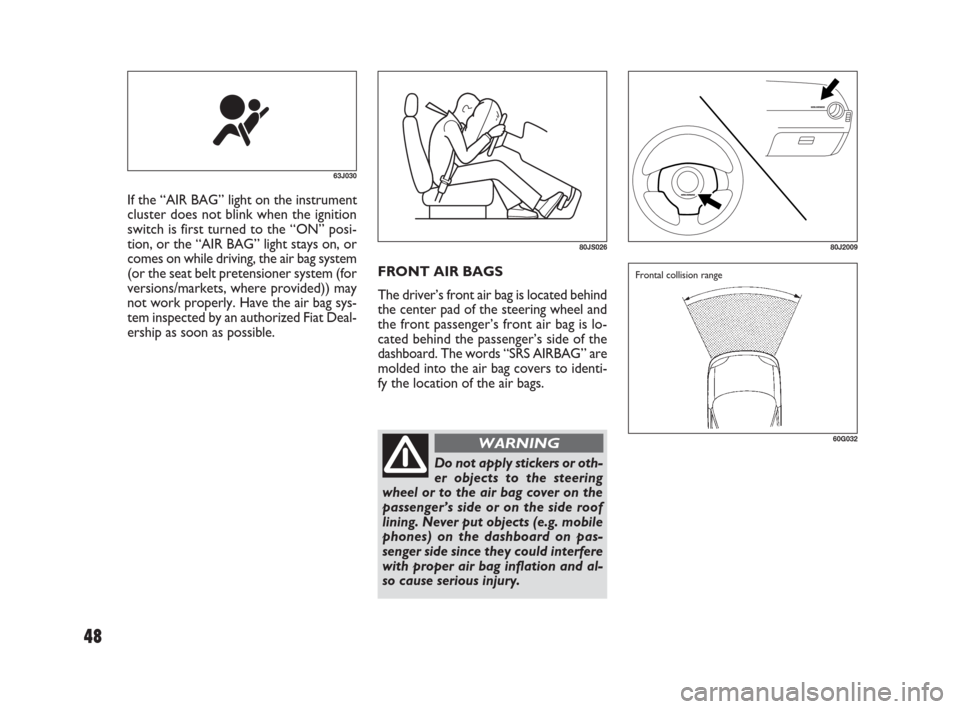
FRONT AIR BAGS
The driver’s front air bag is located behind
the center pad of the steering wheel and
the front passenger’s front air bag is lo-
cated behind the passenger’s side of the
dashboard. The words “SRS AIRBAG” are
molded into the air bag covers to identi-
fy the location of the air bags. If the “AIR BAG” light on the instrument
cluster does not blink when the ignition
switch is first turned to the “ON” posi-
tion, or the “AIR BAG” light stays on, or
comes on while driving, the air bag system
(or the seat belt pretensioner system (for
versions/markets, where provided)) may
not work properly. Have the air bag sys-
tem inspected by an authorized Fiat Deal-
ership as soon as possible.
63J030
80JS02680J2009
60G032
Frontal collision range
Do not apply stickers or oth-
er objects to the steering
wheel or to the air bag cover on the
passenger’s side or on the side roof
lining. Never put objects (e.g. mobile
phones) on the dashboard on pas-
senger side since they could interfere
with proper air bag inflation and al-
so cause serious injury.
WARNING
48
009-056 SEDICI LUM FL GB 1E 19-06-2009 14:11 Pagina 48
Page 58 of 270
57
S S
T T
E E
E E
R R
I I
N N
G G
C C
O O
L L
U U
M M
N N
C C
O O
N N
T T
R R
O O
L L
S S
60G405
IGNITION SWITCH ............................................................ 58
LIGHTING/TURN SIGNAL CONTROL LEVER............ 63
WINDSHIELD WIPER AND WASHER LEVER............. 65
REAR WINDOW WIPER/WASHER SWITCH
(for versions/markets, where provided)........................... 66
TILT STEERING LOCK LEVER
(for versions/markets, where provided)........................... 67
REMOTE AUDIO CONTROLS
(for versions/markets, where provided)........................... 68
HORN...................................................................................... 68
CRUISE CONTROL
(for versions/markets, where provided)........................... 692
057-070 SEDICI LUM FL GB 1E 19-06-2009 10:32 Pagina 57
Page 59 of 270
58
IGNITION SWITCH
VEHICLE WITHOUT KEYLESS
START SYSTEM
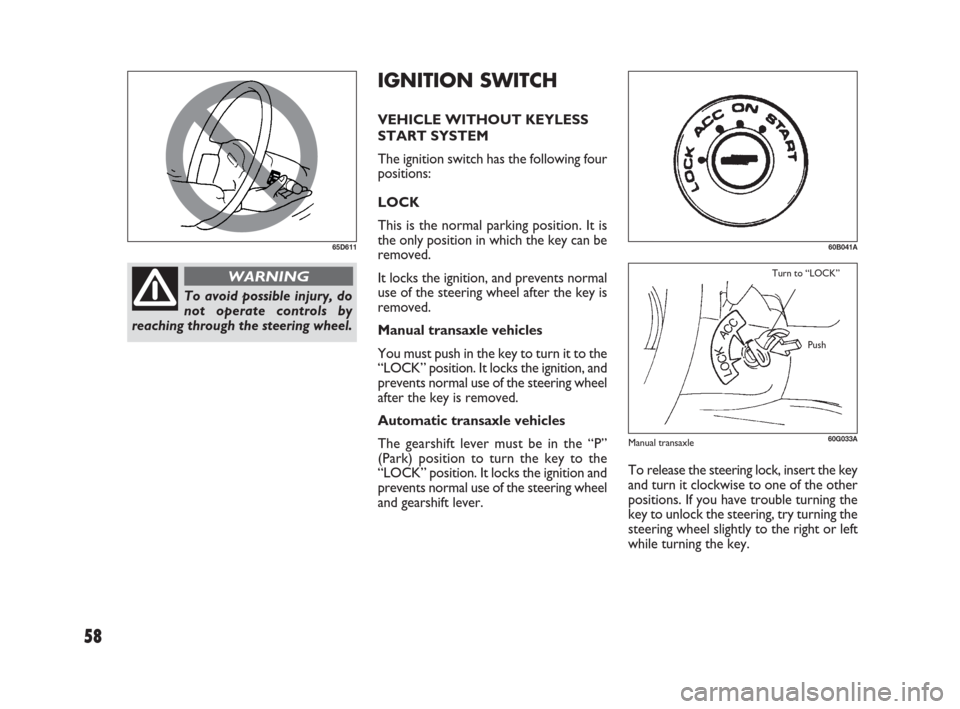
The ignition switch has the following four
positions:
LOCK
This is the normal parking position. It is
the only position in which the key can be
removed.
It locks the ignition, and prevents normal
use of the steering wheel after the key is
removed.
Manual transaxle vehicles
You must push in the key to turn it to the
“LOCK” position. It locks the ignition, and
prevents normal use of the steering wheel
after the key is removed.
Automatic transaxle vehicles
The gearshift lever must be in the “P”
(Park) position to turn the key to the
“LOCK” position. It locks the ignition and
prevents normal use of the steering wheel
and gearshift lever.
65D611
To avoid possible injury, do
not operate controls by
reaching through the steering wheel.
WARNING
60G033A
Turn to “LOCK”
Push
60B041A
To release the steering lock, insert the key
and turn it clockwise to one of the other
positions. If you have trouble turning the
key to unlock the steering, try turning the
steering wheel slightly to the right or left
while turning the key.
Manual transaxle
057-070 SEDICI LUM FL GB 1E 19-06-2009 10:32 Pagina 58
Page 61 of 270
60
❒If the keyless start system red indicator
light illuminates, the remote controller
may not be in the vehicle or the battery
of the remote controller may be unre-
liable. The red indicator light will turn
off within several seconds after the re-
mote controller is returned in the ve-
hicle except in the rear luggage area.
When the remote controller is in the ve-
hicle except the rear luggage area, you can
turn the ignition switch without using an
ignition key.
NOTE
❒If the battery of the remote controller
runs down or there are strong radio
waves or noise, the operating range
may be narrower or the remote con-
troller may be inoperative.
❒If the remote controller is too close to
the door glass, it may not operate.
❒The ignition switch may not turn when
the remote controller is on the instru-
ment panel, in the glove box, in the
door pocket, in the sun visor or on the
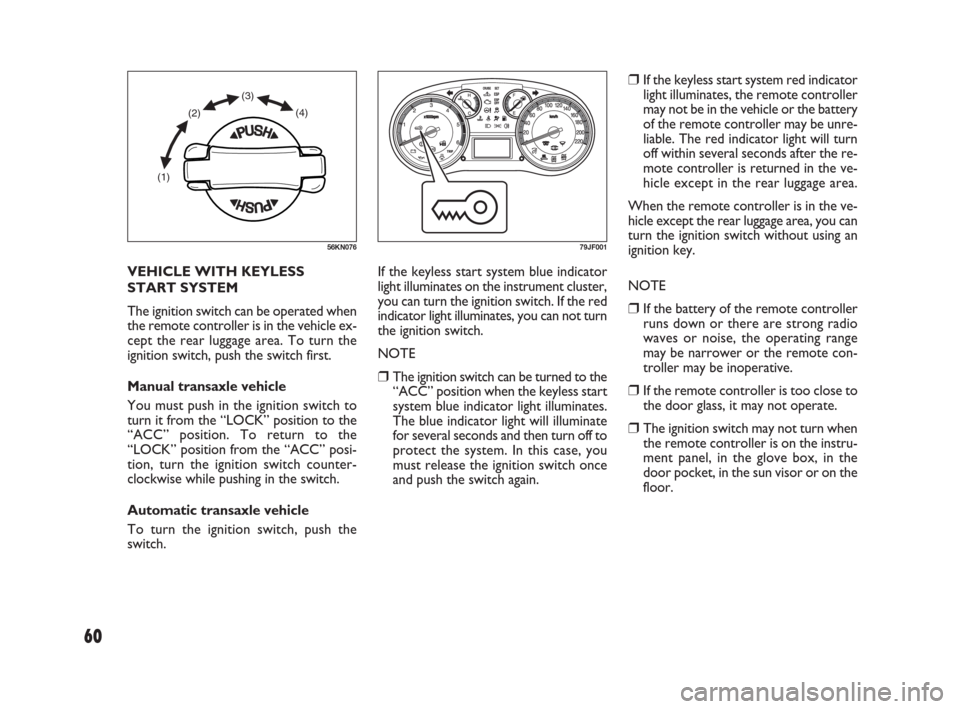
floor. VEHICLE WITH KEYLESS
START SYSTEM
The ignition switch can be operated when
the remote controller is in the vehicle ex-
cept the rear luggage area. To turn the
ignition switch, push the switch first.
Manual transaxle vehicle
You must push in the ignition switch to
turn it from the “LOCK” position to the
“ACC” position. To return to the
“LOCK” position from the “ACC” posi-
tion, turn the ignition switch counter-
clockwise while pushing in the switch.
Automatic transaxle vehicle
To turn the ignition switch, push the
switch.If the keyless start system blue indicator
light illuminates on the instrument cluster,
you can turn the ignition switch. If the red
indicator light illuminates, you can not turn
the ignition switch.
NOTE
❒The ignition switch can be turned to the
“ACC” position when the keyless start
system blue indicator light illuminates.
The blue indicator light will illuminate
for several seconds and then turn off to
protect the system. In this case, you
must release the ignition switch once
and push the switch again.
(1)(2)(3)
(4)
56KN07679JF001
057-070 SEDICI LUM FL GB 1E 19-06-2009 10:32 Pagina 60
Page 62 of 270
61
IMPORTANT The remote controller is
a sensitive electronic instrument. To avoid
damaging the remote controller:
❒Do not expose it to impacts, moisture
or high temperature such as on the
dashboard under direct sunlight.
❒Keep the remote controller away from
magnetic objects such as a television.
You can also turn the ignition switch by
inserting the ignition key into the slot.
If you leave any of the doors open with the
ignition switch in the “ACC” position for
a while (and no key inserted), the engine
may not start when you turn the ignition
switch to “START”. If the engine does not
start, close all doors completely or turn
the ignition switch back to the “LOCK”
position, then start the engine.
The ignition switch has the following four
positions:ACC (2)
Accessories such as the radio can oper-
ate, but the engine is off.
ON (3)
This is the normal operating position. All
electrical systems are on.
START (4)
This is the position for starting the engine
using the starter motor. The switch should
be released from this position as soon as
the engine starts.
Ignition switch reminder
(When using the keyless start system)
A buzzer sounds intermittently to remind
you to return the ignition switch to the
“LOCK” position if it is in the “ACC” po-
sition when the driver’s door is opened. LOCK (1)
This is the normal parking position. It is
the only position in which the key can be
removed. It locks the ignition, and pre-
vents normal use of the steering wheel.
If your vehicle is equipped with the auto-
matic transaxle key inter lock system, the
ignition switch can be turned to the
“LOCK” position only when the gearshift
lever is in the “P” (Park) position.
To release the steering lock, turn the ig-
nition switch clockwise to one of the oth-
er positions. If you have trouble turning
the ignition switch to unlock the steer-
ing, try turning the steering wheel slightly
to the right or left while turning the
switch.
Manual transaxle vehicle
You must push in the ignition switch to
turn it from the “LOCK” position to the
“ACC” position. To return to the
“LOCK” position from the “ACC” posi-
tion, turn the ignition switch counter-
clockwise while pushing in the switch.
Automatic transaxle vehicle
To turn the ignition switch, push the
switch.
057-070 SEDICI LUM FL GB 1E 19-06-2009 10:32 Pagina 61
Page 64 of 270
63
Lights “On” reminder
(for versions/markets, where provided)
A buzzer/chime sounds to remind you to
turn off the lights if they are left on when
the ignition key is removed and the dri-
ver’s door is opened.Day time running light control
(for versions/markets, where provided)
When the engine is started, this system
turns on all lights. But this control is can-
celed when the light control lever is
turned to any position other than “OFF”.
LIGHTING/TURN
SIGNAL CONTROL
LEVER
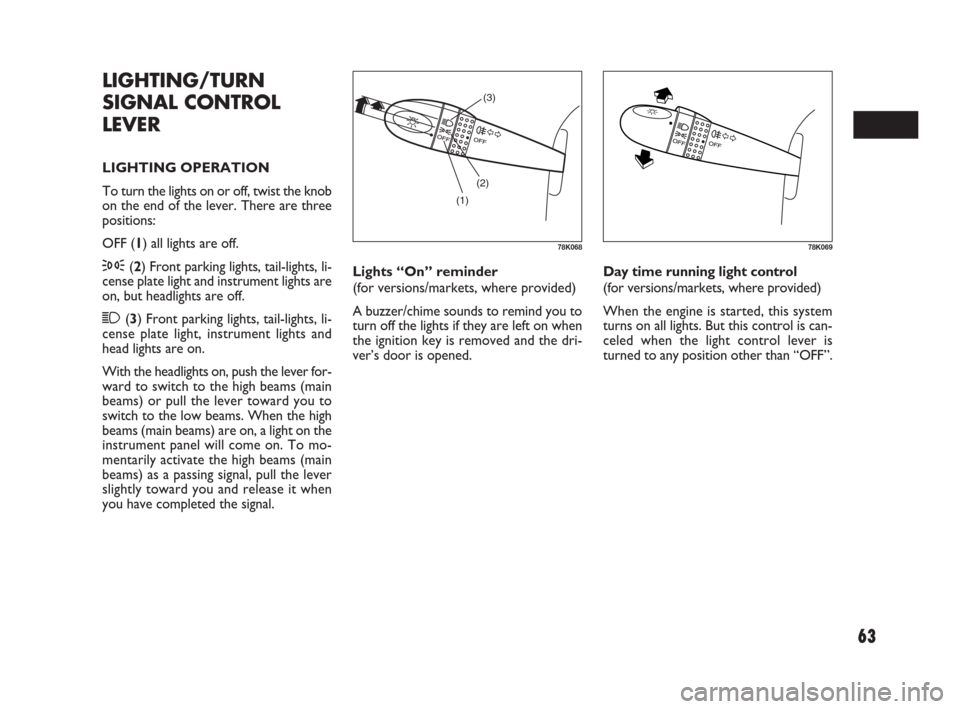
LIGHTING OPERATION
To turn the lights on or off, twist the knob
on the end of the lever. There are three
positions:
OFF (1) all lights are off.
3(2) Front parking lights, tail-lights, li-
cense plate light and instrument lights are
on, but headlights are off.
1(3) Front parking lights, tail-lights, li-
cense plate light, instrument lights and
head lights are on.
With the headlights on, push the lever for-
ward to switch to the high beams (main
beams) or pull the lever toward you to
switch to the low beams. When the high
beams (main beams) are on, a light on the
instrument panel will come on. To mo-
mentarily activate the high beams (main
beams) as a passing signal, pull the lever
slightly toward you and release it when
you have completed the signal.
(1)(2)(3)
78K06878K069
057-070 SEDICI LUM FL GB 1E 19-06-2009 10:32 Pagina 63
Page 65 of 270
64
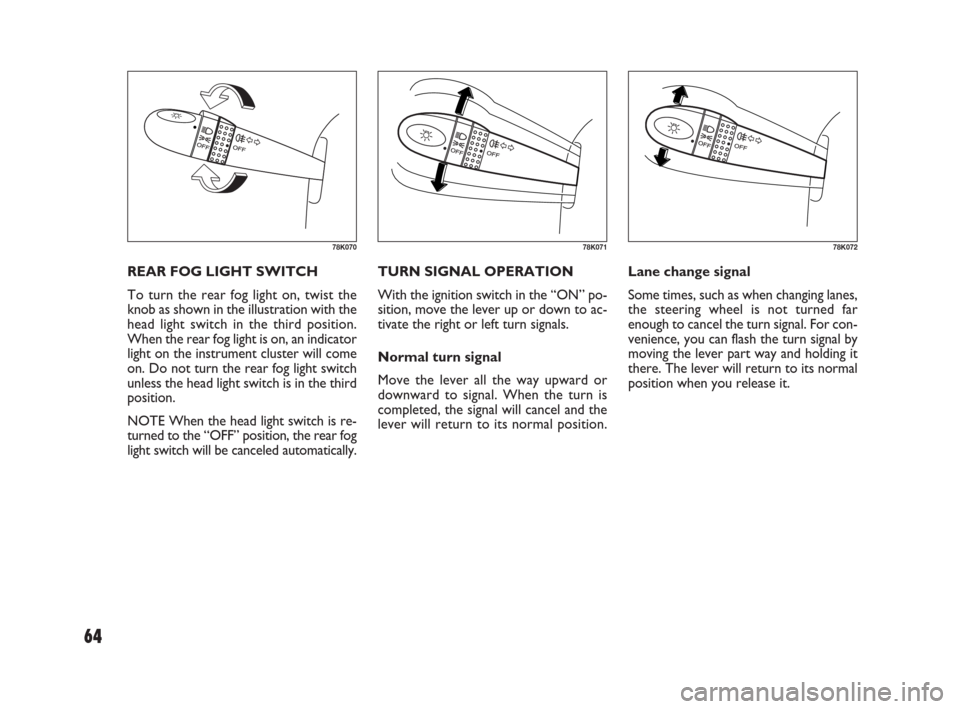
TURN SIGNAL OPERATION
With the ignition switch in the “ON” po-
sition, move the lever up or down to ac-
tivate the right or left turn signals.
Normal turn signal
Move the lever all the way upward or
downward to signal. When the turn is
completed, the signal will cancel and the
lever will return to its normal position.Lane change signal
Some times, such as when changing lanes,
the steering wheel is not turned far
enough to cancel the turn signal. For con-
venience, you can flash the turn signal by
moving the lever part way and holding it
there. The lever will return to its normal
position when you release it. REAR FOG LIGHT SWITCH
To turn the rear fog light on, twist the
knob as shown in the illustration with the
head light switch in the third position.
When the rear fog light is on, an indicator
light on the instrument cluster will come
on. Do not turn the rear fog light switch
unless the head light switch is in the third
position.
NOTE When the head light switch is re-
turned to the “OFF” position, the rear fog
light switch will be canceled automatically.
78K07078K07178K072
057-070 SEDICI LUM FL GB 1E 19-06-2009 10:32 Pagina 64
Page 66 of 270
65
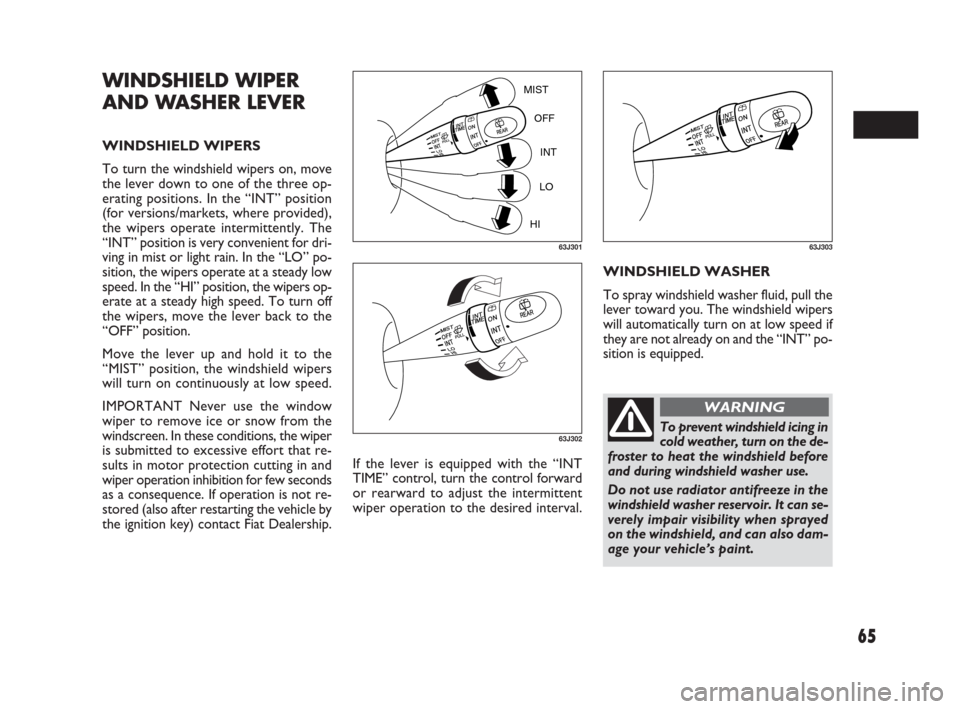
If the lever is equipped with the “INT
TIME” control, turn the control forward
or rearward to adjust the intermittent
wiper operation to the desired interval.WINDSHIELD WASHER
To spray windshield washer fluid, pull the
lever toward you. The windshield wipers
will automatically turn on at low speed if
they are not already on and the “INT” po-
sition is equipped.
WINDSHIELD WIPER
AND WASHER LEVER
WINDSHIELD WIPERS
To turn the windshield wipers on, move
the lever down to one of the three op-
erating positions. In the “INT” position
(for versions/markets, where provided),
the wipers operate intermittently. The
“INT” position is very convenient for dri-
ving in mist or light rain. In the “LO” po-
sition, the wipers operate at a steady low
speed. In the “HI” position, the wipers op-
erate at a steady high speed. To turn off
the wipers, move the lever back to the
“OFF” position.
Move the lever up and hold it to the
“MIST” position, the windshield wipers
will turn on continuously at low speed.
IMPORTANT Never use the window
wiper to remove ice or snow from the
windscreen. In these conditions, the wiper
is submitted to excessive effort that re-
sults in motor protection cutting in and
wiper operation inhibition for few seconds
as a consequence. If operation is not re-
stored (also after restarting the vehicle by
the ignition key) contact Fiat Dealership.
MIST
OFF
INT
LO
HI
63J301
63J302
63J303
To prevent windshield icing in
cold weather, turn on the de-
froster to heat the windshield before
and during windshield washer use.
Do not use radiator antifreeze in the
windshield washer reservoir. It can se-
verely impair visibility when sprayed
on the windshield, and can also dam-
age your vehicle’s paint.
WARNING
057-070 SEDICI LUM FL GB 1E 19-06-2009 10:32 Pagina 65
Page 70 of 270
69
(2)
(1)
(4)
(3) (6)
(5)
FSUV1650
CRUISE CONTROL
(for versions/markets, where provided)
Cruise Control is an electronic device to
assist driving, which makes it possible to
maintain the vehicle at the desired speed
without the need to press the accelerator.
The device must only be used in particu-
lar safety conditions, at a speed above 40
km/h (25 mph), on long stretches of strai-
ght, dry road with little change in speed
(e.g. motorways). Therefore it is not re-
commended to use this device on extra-
urban roads with traffic. Do not use it in
cities.
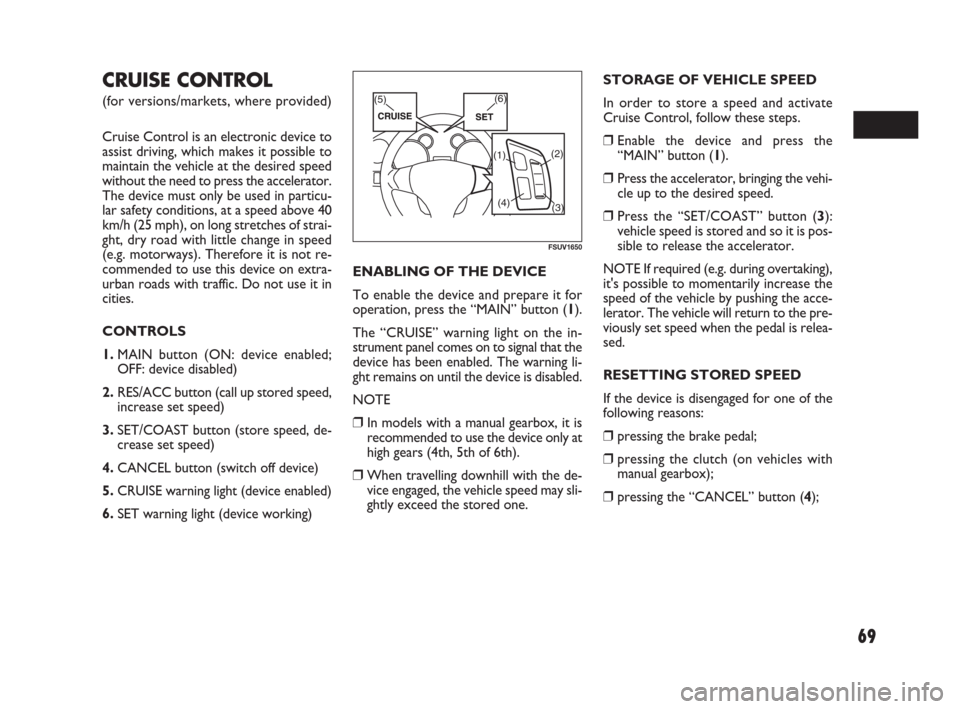
CONTROLS
1.MAIN button (ON: device enabled;
OFF: device disabled)
2.RES/ACC button (call up stored speed,
increase set speed)
3.SET/COAST button (store speed, de-
crease set speed)
4.CANCEL button (switch off device)
5.CRUISE warning light (device enabled)
6.SET warning light (device working)ENABLING OF THE DEVICE
To enable the device and prepare it for
operation, press the “MAIN” button (1).
The “CRUISE” warning light on the in-
strument panel comes on to signal that the
device has been enabled. The warning li-
ght remains on until the device is disabled.
NOTE
❒ In models with a manual gearbox, it is
recommended to use the device only at
high gears (4th, 5th of 6th).
❒ When travelling downhill with the de-
vice engaged, the vehicle speed may sli-
ghtly exceed the stored one.STORAGE OF VEHICLE SPEED
In order to store a speed and activate
Cruise Control, follow these steps.
❒ Enable the device and press the
“MAIN” button (1).
❒ Press the accelerator, bringing the vehi-
cle up to the desired speed.
❒ Press the “SET/COAST” button (3):
vehicle speed is stored and so it is pos-
sible to release the accelerator.
NOTE If required (e.g. during overtaking),
it's possible to momentarily increase the
speed of the vehicle by pushing the acce-
lerator. The vehicle will return to the pre-
viously set speed when the pedal is relea-
sed.
RESETTING STORED SPEED
If the device is disengaged for one of the
following reasons:
❒ pressing the brake pedal;
❒ pressing the clutch (on vehicles with
manual gearbox);
❒ pressing the “CANCEL” button (4);
057-070 SEDICI LUM FL GB 1E 19-06-2009 10:32 Pagina 69