manual radio set FIAT SEDICI 2009 2.G Owners Manual
[x] Cancel search | Manufacturer: FIAT, Model Year: 2009, Model line: SEDICI, Model: FIAT SEDICI 2009 2.GPages: 270, PDF Size: 3.44 MB
Page 115 of 270
114
NOTE The Auto Volume Control (AVC)
function automatically adjusts (increas-
es/decreases) the sound volume in accor-
dance with vehicle speed.
RADIO
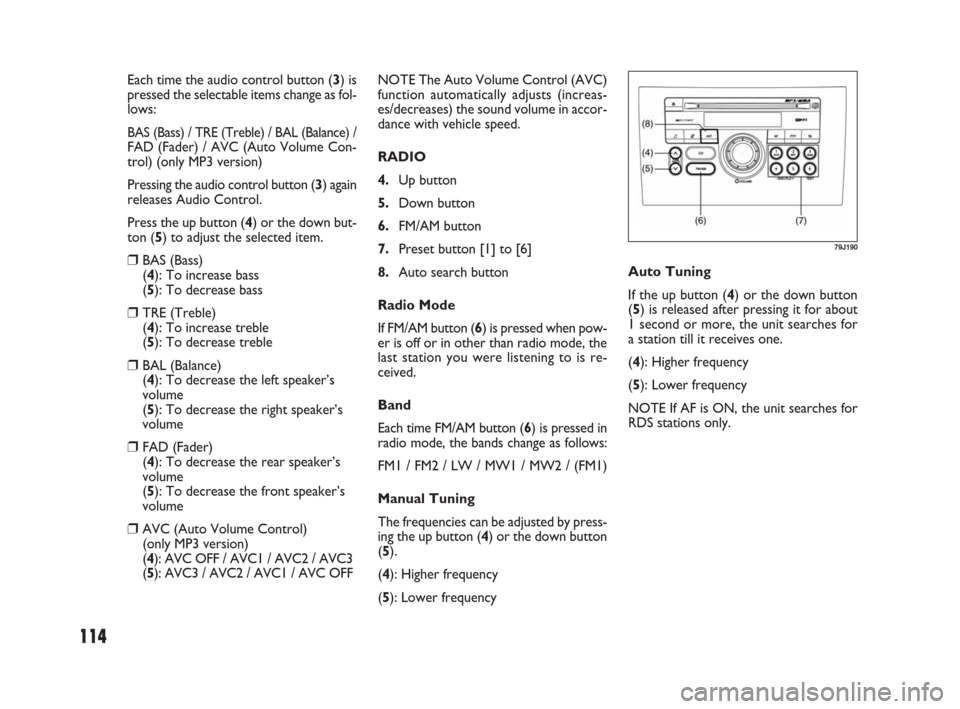
4.Up button
5.Down button
6.FM/AM button
7.Preset button [1] to [6]
8.Auto search button
Radio Mode
If FM/AM button (6) is pressed when pow-
er is off or in other than radio mode, the
last station you were listening to is re-
ceived.
Band
Each time FM/AM button (6) is pressed in
radio mode, the bands change as follows:
FM1 / FM2 / LW / MW1 / MW2 / (FM1)
Manual Tuning
The frequencies can be adjusted by press-
ing the up button (4) or the down button
(5).
(4): Higher frequency
(5): Lower frequency Each time the audio control button (3) is
pressed the selectable items change as fol-
lows:
BAS (Bass) / TRE (Treble) / BAL (Balance) /FAD (Fader) / AVC (Auto Volume Con-
trol) (only MP3 version)
Pressing the audio control button (3) again
releases Audio Control.
Press the up button (4) or the down but-
ton (5) to adjust the selected item.
❒BAS (Bass)
(4): To increase bass
(5): To decrease bass
❒TRE (Treble)
(4): To increase treble
(5): To decrease treble
❒BAL (Balance)
(4): To decrease the left speaker’s
volume
(5): To decrease the right speaker’s
volume
❒FAD (Fader)
(4): To decrease the rear speaker’s
volume
(5): To decrease the front speaker’s
volume
❒AVC (Auto Volume Control)
(only MP3 version)
(4): AVC OFF / AVC1 / AVC2 / AVC3
(5): AVC3 / AVC2 / AVC1 / AVC OFFAuto Tuning
If the up button (4) or the down button
(5) is released after pressing it for about
1 second or more, the unit searches for
a station till it receives one.
(4): Higher frequency
(5): Lower frequency
NOTE If AF is ON, the unit searches for
RDS stations only.
79J190
071-128 SEDICI LUM FL GB 1E 19-06-2009 12:05 Pagina 114
Page 116 of 270
115
NOTE
❒Auto Preset can be released by press-
ing the auto search button (8) while au-
to preset is in process.
❒Stations can be preset for FM1, FM2,
LW, MW1, and MW2 respectively.
❒Up to six stations can be preset. If sta-
tions in good receiving condition are
not found, the number of stations pre-
set may be less than six.
❒After you have preset stations, the sta-
tion preset under the button with num-
ber [1] is received. If none of stations
is found, the unit is reset to the pre-
ceding frequency.
❒When stations are preset, the new da-
ta is written over the old data.
❒If AF is ON, only RDS stations are pre-
set.
Preset Station Calling
By pressing any of the preset buttons (7)
with numbers [1] to [6], the correspond-
ing station preset can be received.
NOTE If the button for a station not pre-
set is pressed, the unit displays “- - -”. Manual Preset
If any of the preset buttons (7) with num-
bers [1] to [6] is pressed for about 2 sec-
onds or more, the station received cor-
responding to the pressed button is pre-
set.
NOTE
❒Stations can be preset for FM1, FM2,
LW, MW1, and MW2 respectively.
❒When stations are preset, the new da-
ta is written over the old data.
Auto Preset
By pressing auto search button (8) for
about 2 seconds or longer, six stations in
good receiving condition on the band now
selected can be automatically preset.RDS (Radio Data System)
1.Power on/off knob – Volume control
knob
4.Up button
5.Down button
9.Auto frequency button
10.Traffic announcement button
11.Program type button
What is RDS?
Some FM stations are broadcasting added
data compatible with RDS. This radio set of-
fers convenient functions using such data.
RDS service availability varies with areas.
Please understand the following functions
are not available in some areas.
❒ AF (Alternative Frequency)
The unit searches for a station in better
receiving condition that emits the same
programme as now received, and auto-
matically selects that station.
071-128 SEDICI LUM FL GB 1E 19-06-2009 12:05 Pagina 115
Page 125 of 270
124
TROUBLESHOOTING
If you suspect something is wrong, then please check and take steps as described below.
If the described suggestions do not solve the problem, it is recommended to take the unit to your nearest dealer.
Common
Problem Possible cause Possible solution
A lot of noise
Unable to operate
A mobile phone is used nearby.
The security function is on.If you are going to use a mobile phone, use it
away from the unit.
If the unit displays “SEC”, enter your user ID.
If the unit displays “HELP”, consult your dealer.
Radio
Problem Possible cause Possible solution
A lot of noise
Unable to receive by auto
tuning
Unable to preset stations
of signals powerful enough
by auto preset
Tune it exactly to the station.
Pick up a station by manual tuning.
Turn AF off.
Turn AF off. The unit is not exactly tuned in to
the station.
There is no station emitting signals
powerful enough.
If AF is ON, the unit searches for RDS
stations only.
If AF is ON, only RDS stations will be
preset.
071-128 SEDICI LUM FL GB 1E 19-06-2009 12:05 Pagina 124