warning FIAT SPIDER ABARTH 2017 Owners Manual
[x] Cancel search | Manufacturer: FIAT, Model Year: 2017, Model line: SPIDER ABARTH, Model: FIAT SPIDER ABARTH 2017Pages: 292, PDF Size: 9.24 MB
Page 147 of 292
Warning!Never place a rear-facing child restraint
in front of an air bag. A deploying
passenger front air bag can cause death or
serious injury to a child 12 years or
younger, including a child in a rear-facing
child restraint.
Only use a rear-facing child restraint in a
vehicle with a rear seat.
Children 12 years or younger should
always ride buckled up in a vehicle with a
rear seat.
Warning!No objects should be placed over or
near the air bag on the instrument panel or
steering wheel because any such objects
could cause harm if the vehicle is in a
collision severe enough to cause the air
bag to inflate.
Do not put anything on or around the air
bag covers or attempt to open them
manually. You may damage the air bags
and you could be injured because the air
bags may no longer be functional. The
protective covers for the air bag cushions
are designed to open only when the air
bags are inflating.
Relying on the air bags alone could lead
to more severe injuries in a collision. The air
bags work with your seat belt to restrain
you properly. In some collisions, air bags won’t deploy at all. Always wear your seat
belts even though you have air bags.
Maintaining Your Air Bag
System
Warning!Modifications to any part of the air bag
system could cause it to fail when you
need it. You could be injured if the air bag
system is not there to protect you. Do not
modify the components or wiring, including
adding any kind of badges or stickers to
the steering wheel hub trim cover or the
upper right side of the instrument panel. Do
not modify the front bumper, vehicle body
structure, or add aftermarket side steps or
running boards.
It is dangerous to try to repair any part
of the air bag system yourself. Be sure to
tell anyone who works on your vehicle that
it has an air bag system.
Do not attempt to modify any part of your
air bag system. The air bag may inflate
accidentally or may not function properly if
modifications are made. Take your vehicle to
an authorized dealer for any air bag system
service. If your seat, including your trim cover
and cushion, needs to be serviced in any way
(including removal or loosening/tightening of
seat attachment bolts), take the vehicle to
your authorized dealer. Only manufacturer
approved seat accessories may be used. If it
is necessary to modify the air bag system for
persons with disabilities, contact your
authorized dealer. EVENT DATA
RECORDER (EDR) This vehicle is equipped with an event
data recorder (EDR).
The main purpose of an EDR is to
record, in certain crash or near
crash-like situations, such as an air bag
deployment or hitting a road obstacle,
data that will assist in understanding
how a vehicle’s systems performed.
The EDR is designed to record data
related to vehicle dynamics and safety
systems for a short period of time,
typically 30 seconds or less.
The EDR in this vehicle is designed to
record such data as:
How various systems in your vehicle
were operating.
Whether or not the driver and
passenger safety belts were
buckled/fastened.
How far (if at all) the driver was
pushing the accelerator and/or brake
pedal.
How fast the vehicle was traveling.
This data can help provide a better
understanding of the circumstances in
which crashes and injuries occur.
145
Page 149 of 292
CONSTANT
MONITORING The following components of the Air
Bag systems are monitored by a
diagnostic system:
Crash Sensors, And Diagnostic
Module (Sas Unit)
Front Air Bag Sensors
Air Bag Modules
Side Crash Sensors
Air Bag/Seat Belt Pretensioner
System Warning Light
Seat Belt Pretensioners
Related Wiring
With Passenger Occupant
Classification System
Passenger Air Bag Deactivation
Indicator Light
Passenger Occupant Classification
Sensor
Passenger Occupant Classification
Module — If Equipped
The diagnostic module continuously
monitors the system's readiness. This
begins when the ignition is switched
ON and continues while the vehicle is
being driven.
147
Page 151 of 292
STARTING THE
ENGINE Starting The Engine
Before starting the engine, adjust the
seat, the interior rear view mirrors, and
the door mirrors, and fasten the seat
belt correctly.
Warning!When leaving the vehicle, always remove
the key fob from the vehicle and lock your
vehicle.
Never leave children alone in a vehicle,
or with access to an unlocked vehicle.
Allowing children to be in a vehicle
unattended is dangerous for a number of
reasons. A child or others could be
seriously or fatally injured. Children should
be warned not to touch the parking brake,
brake pedal or the transmission gear
selector.
Do not leave the key fob in or near the
vehicle, or in a location accessible to
children, and do not leave the ignition of a
vehicle equipped with Advanced Keyless
Entry in the ACC or ON/RUN mode. A child
could operate power windows, other
controls, or move the vehicle.
Do not leave children or animals inside
parked vehicles in hot weather. Interior heat
build-up may cause serious injury or death. Never press the accelerator pedal for
starting the engine.
Models Equipped With A
Manual Transmission
Proceed as follows:
1. Engage the parking brake and place
the gear selector in NEUTRAL.
2. Place the start button in the ACC
mode.
3. Fully depress the clutch pedal
without touching the accelerator.
4. Place the start button in the ON
mode, push and release it as soon as
the engine starts. If the engine does not
start within 10 seconds, push the start
button to OFF mode and wait for
10-15 seconds before repeating the
starting procedure.
Models Equipped With
An Automatic
Transmission
Proceed as follows:
1. Engage the parking brake and place
the gear selector to P (PARK) or N
(NEUTRAL).
2. Fully depress the brake pedal
without touching the accelerator.
3. Place the start button in the ACC
mode. 4. Place the start button in the ON
mode, push and release it as soon as
the engine starts. If the engine does not
start within 10 seconds, push the start
button to OFF mode and wait for
10-15 seconds before repeating the
starting procedure.
Cold Weather Operation
Regarding Cold Start Disable
When the ambient temperature is
extremely low, the engine may not
crank even when the engine starting
procedure is performed. At this time,
the Cold Start Disable Indicator light in
the instrument cluster flashes. However,
this does not indicate a problem.
Perform the necessary procedures (see
“Warning lights And Messages”
paragraph in “Getting To Know Your
Instrument Panel” chapter).
Regarding Ice Breaker
When the ambient temperature is low,
the start of cranking may be delayed
after engine starting procedure is
performed. At this time, the Cold Start
Disable Indicator light in the instrument
cluster illumintes. However, this does
not indicate a problem.
Refer to your authorized dealer
regarding other related parts which are
to be input such as function name,
operating scenario (condition) of each
function, indicator operation, and user
operation/procedure information.
149
Page 153 of 292
Warning!Riding the brakes can lead to brake
failure and possibly a collision. Driving with
your foot resting or riding on the brake
pedal can result in abnormally high brake
temperatures, excessive lining wear, and
possible brake damage. You would not
have your full braking capacity in an
emergency.
Driving a vehicle with the “Brake
Warning Light” on is dangerous. A
significant decrease in braking performance
or vehicle stability during braking may
occur. It will take you longer to stop the
vehicle or will make your vehicle harder to
control. You could have a collision. Have
the vehicle checked immediately.
Caution!Wear shoes appropriate for driving in order
to avoid your shoe contacting the brake
pedal when depressing the accelerator
pedal.
Parking Brake
Note: Driving with the parking brake on
will cause excessive wear of the brake
parts. Warning!Never leave children alone in a vehicle,
or with access to an unlocked vehicle.
Allowing children to be in a vehicle
unattended is dangerous for a number of
reasons. A child or others could be
seriously or fatally injured. Children should
be warned not to touch the park brake,
brake pedal or the gear selector.
Do not leave the key fob in or near the
vehicle or in a location accessible to
children. A child could operate power
windows, other controls, or move the
vehicle.
Be sure the park brake is fully
disengaged before driving; failure to do so
can lead to brake failure and a collision.
Always fully apply the park brake when
leaving your vehicle, or it may roll and
cause damage or injury. Also be certain to
leave a manual transmission in REVERSE
(R) or FIRST (1st) gear. Failure to do so may
allow the vehicle to roll and cause damage
or injury.
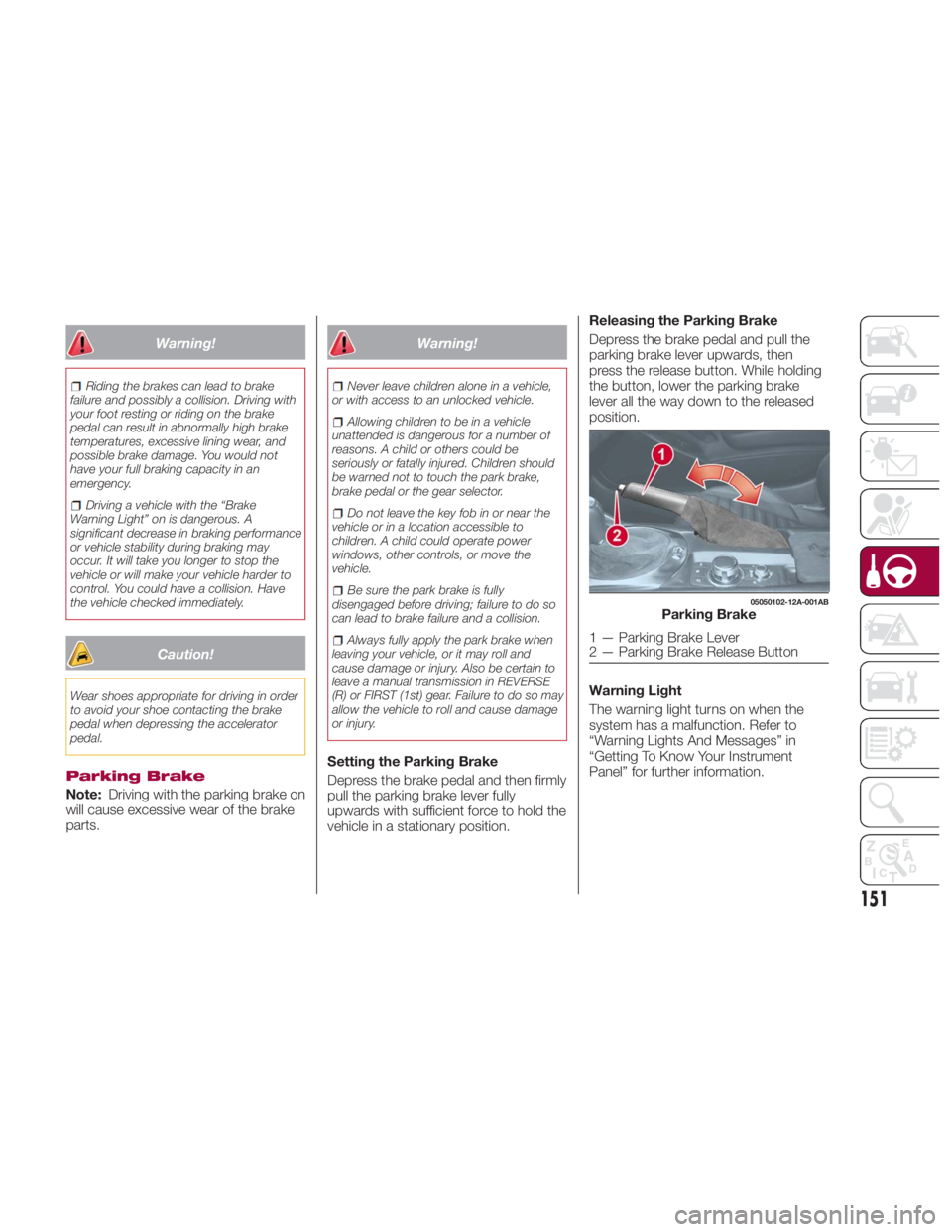
Setting the Parking Brake
Depress the brake pedal and then firmly
pull the parking brake lever fully
upwards with sufficient force to hold the
vehicle in a stationary position. Releasing the Parking Brake
Depress the brake pedal and pull the
parking brake lever upwards, then
press the release button. While holding
the button, lower the parking brake
lever all the way down to the released
position.
Warning Light
The warning light turns on when the
system has a malfunction. Refer to
“Warning Lights And Messages” in
“Getting To Know Your Instrument
Panel” for further information. 05050102-12A-001AB
Parking Brake
1 — Parking Brake Lever
2 — Parking Brake Release Button
151
Page 154 of 292
Brake Pad Wear Indicator
When the disc brake pads become
worn, the built-in wear indicators
contact the rotors. This causes a
screeching noise to warn that the pads
should be replaced. When you hear this
noise contact your authorized dealer as
soon as possible.
Brake Assist
During emergency braking situations
when it is necessary to depress the
brake pedal with greater force, the
brake assist system provides braking
assistance, thus enhancing braking
performance. When the brake pedal is
depressed hard or depressed more
quickly, the brakes apply more firmly.
Note:
When the brake pedal is depressed
hard or depressed more quickly, the
pedal will feel softer but the brakes will
apply more firmly. This is a normal
effect of the brake assist operation and
does not indicate a malfunction.
When the brake pedal is depressed
hard or depressed more quickly, a
motor/pump operation noise may be
heard. This is a normal effect of the
brake assist and does not indicate a
malfunction.
The brake assist equipment does
not supersede the functionality of the
vehicle's main braking system. MANUAL
TRANSMISSION Manual Transmission
Warning!You or others could be injured if you leave
the vehicle unattended without having the
park brake fully applied. The park brake
should always be applied when the driver
is not in the vehicle, especially on an
incline.
Caution!Never drive with your foot resting on the
clutch pedal, or attempt to hold the vehicle
on a hill with the clutch pedal partially
engaged, as this will cause abnormal wear
on the clutch.
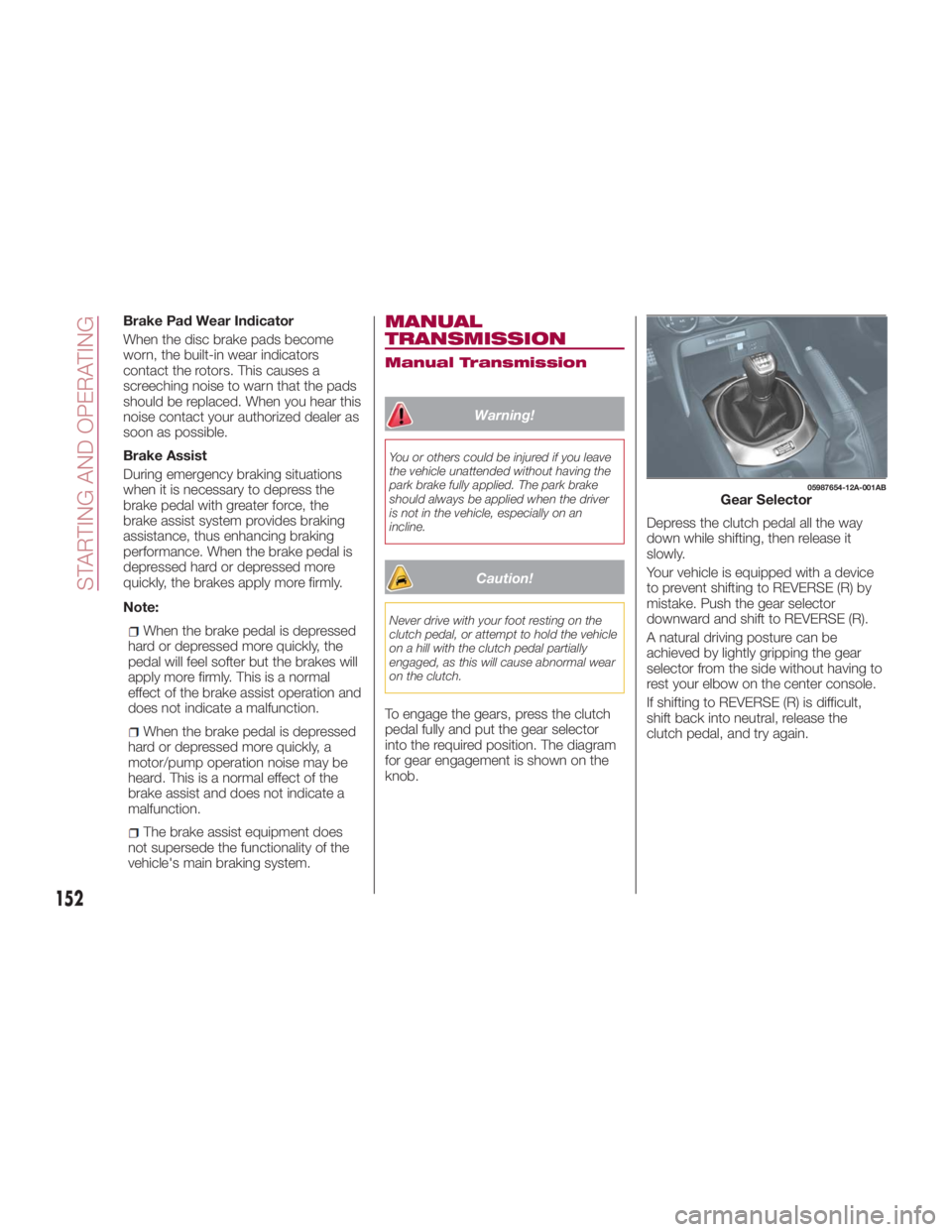
To engage the gears, press the clutch
pedal fully and put the gear selector
into the required position. The diagram
for gear engagement is shown on the
knob. Depress the clutch pedal all the way
down while shifting, then release it
slowly.
Your vehicle is equipped with a device
to prevent shifting to REVERSE (R) by
mistake. Push the gear selector
downward and shift to REVERSE (R).
A natural driving posture can be
achieved by lightly gripping the gear
selector from the side without having to
rest your elbow on the center console.
If shifting to REVERSE (R) is difficult,
shift back into neutral, release the
clutch pedal, and try again. 05987654-12A-001AB
Gear Selector
152
STARTING AND OPERATING
Page 155 of 292
With Parking Sensor System
When the gear selector is shifted to the
REVERSE (R) position with the ignition
placed in the ON mode, the parking
sensor system is activated an audible
sound is heard.
Caution!Keep your foot off the clutch pedal
except when shifting gears. Also, do not
use the clutch to hold the vehicle on an hill
or grade. Riding the clutch will cause
needless clutch wear and damage.
Do not apply any excessive lateral force
to the gear selector when changing from
fifth to fourth gear. This could lead to the
accidental selection of second gear, which
could result in damage to the transmission.
Make sure the vehicle comes to a
complete stop before shifting to REVERSE
(R). Shifting to REVERSE (R) while the
vehicle is still moving may damage the
transmission.
Reverse can only be engaged when the
vehicle is completely stationary. With the
engine running, wait at least two seconds
with the clutch pedal fully pressed before
engaging reverse to prevent damage to the
gears. AUTOMATIC
TRANSMISSION — IF
EQUIPPED Shift Interlock
This vehicle is equipped with an
interlock system that holds the
transmission gear selector in PARK (P)
unless the brakes are applied. To shift
the transmission out of PARK (P), the
ignition must be placed in the ON/RUN
mode (engine running or not) and the
brake pedal must be pressed.
Warning!It is dangerous to shift out of PARK or
NEUTRAL if the engine speed is higher
than idle speed. If your foot is not firmly
pressing the brake pedal, the vehicle could
accelerate quickly forward or in reverse.
You could lose control of the vehicle and hit
someone or something. Only shift into gear
when the engine is idling normally and your
foot is firmly pressing the brake pedal.
Unintended movement of a vehicle
could injure those in or near the vehicle. As
with all vehicles, you should never exit a
vehicle while the engine is running. Before
exiting a vehicle, always apply the park
brake, shift the transmission into PARK,
and turn the ignition OFF. When the ignition
is in the OFF mode, the transmission is
locked in PARK, securing the vehicle
against unwanted movement. When leaving the vehicle, always make
sure the ignition is in the OFF mode,
remove the key fob from the vehicle, and
lock the vehicle.
Never leave children alone in a vehicle,
or with access to an unlocked vehicle.
Allowing children to be in a vehicle
unattended is dangerous for a number of
reasons. A child or others could be
seriously or fatally injured. Children should
be warned not to touch the parking brake,
brake pedal or the transmission gear
selector.
Do not leave the key fob in or near the
vehicle (or in a location accessible to
children), and do not leave the ignition in
the ACC or ON/RUN mode. A child could
operate power windows, other controls, or
move the vehicle.
Caution!Damage to the transmission may occur if
the following precautions are not observed:
Shift into or out of PARK or REVERSE
only after the vehicle has come to a
complete stop.
Do not shift between PARK, REVERSE,
NEUTRAL, or DRIVE when the engine is
above idle speed.
Before shifting into any gear, make sure
your foot is firmly pressing the brake pedal.
153
Page 156 of 292
The gear selector must be in PARK (P)
or NEUTRAL (N) to operate the starter.
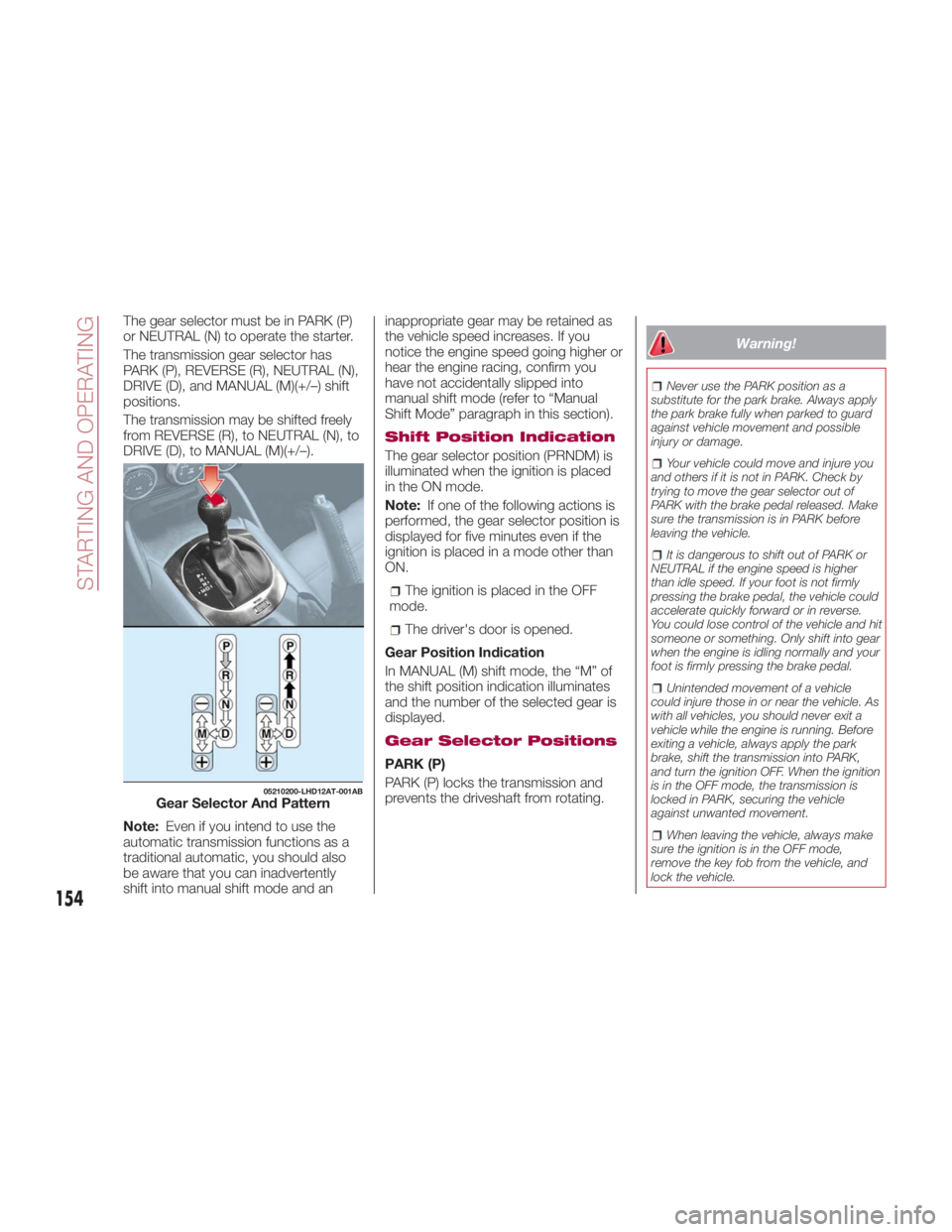
The transmission gear selector has
PARK (P), REVERSE (R), NEUTRAL (N),
DRIVE (D), and MANUAL (M)(+/–) shift
positions.
The transmission may be shifted freely
from REVERSE (R), to NEUTRAL (N), to
DRIVE (D), to MANUAL (M)(+/–).
Note: Even if you intend to use the
automatic transmission functions as a
traditional automatic, you should also
be aware that you can inadvertently
shift into manual shift mode and an inappropriate gear may be retained as
the vehicle speed increases. If you
notice the engine speed going higher or
hear the engine racing, confirm you
have not accidentally slipped into
manual shift mode (refer to “Manual
Shift Mode” paragraph in this section).
Shift Position Indication
The gear selector position (PRNDM) is
illuminated when the ignition is placed
in the ON mode.
Note: If one of the following actions is
performed, the gear selector position is
displayed for five minutes even if the
ignition is placed in a mode other than
ON.
The ignition is placed in the OFF
mode.
The driver's door is opened.
Gear Position Indication
In MANUAL (M) shift mode, the “M” of
the shift position indication illuminates
and the number of the selected gear is
displayed.
Gear Selector Positions
PARK (P)
PARK (P) locks the transmission and
prevents the driveshaft from rotating. Warning! Never use the PARK position as a
substitute for the park brake. Always apply
the park brake fully when parked to guard
against vehicle movement and possible
injury or damage.
Your vehicle could move and injure you
and others if it is not in PARK. Check by
trying to move the gear selector out of
PARK with the brake pedal released. Make
sure the transmission is in PARK before
leaving the vehicle.
It is dangerous to shift out of PARK or
NEUTRAL if the engine speed is higher
than idle speed. If your foot is not firmly
pressing the brake pedal, the vehicle could
accelerate quickly forward or in reverse.
You could lose control of the vehicle and hit
someone or something. Only shift into gear
when the engine is idling normally and your
foot is firmly pressing the brake pedal.
Unintended movement of a vehicle
could injure those in or near the vehicle. As
with all vehicles, you should never exit a
vehicle while the engine is running. Before
exiting a vehicle, always apply the park
brake, shift the transmission into PARK,
and turn the ignition OFF. When the ignition
is in the OFF mode, the transmission is
locked in PARK, securing the vehicle
against unwanted movement.
When leaving the vehicle, always make
sure the ignition is in the OFF mode,
remove the key fob from the vehicle, and
lock the vehicle.05210200-LHD12AT-001AB
Gear Selector And Pattern
154
STARTING AND OPERATING
Page 157 of 292
Never leave children alone in a vehicle,
or with access to an unlocked vehicle.
Allowing children to be in a vehicle
unattended is dangerous for a number of
reasons. A child or others could be
seriously or fatally injured. Children should
be warned not to touch the park brake,
brake pedal or the transmission gear
selector.
Do not leave the key fob in or near the
vehicle (or in a location accessible to
children), and do not leave the ignition in
the ACC or ON/RUN mode. A child could
operate power windows, other controls, or
move the vehicle.
Caution!Before moving the transmission gear
selector out of PARK, you must place the
ignition from the LOCK/OFF mode to the
ON/RUN mode, and also press the brake
pedal. Otherwise, damage to the gear
selector could result.
DO NOT race the engine when shifting
from PARK or NEUTRAL into another gear
range, as this can damage the drivetrain.
Note:
Shifting into PARK (P), NEUTRAL
(N) or REVERSE (R) while the vehicle is
moving can damage your
transmission. Shifting into DRIVE (D) or REVERSE
(R) when the engine is running faster
than idle can damage the
transmission.
REVERSE (R)
This range is for moving the vehicle
backward. Shift into REVERSE only
after the vehicle has come to a
complete stop.
With Parking Sensor system : when
the gear selector is shifted to the
REVERSE (R) position with the ignition
placed in the ON mode, the parking
sensor system is activated and an
audible sound is heard.
NEUTRAL (N)
In NEUTRAL (N), the wheels and
transmission are not locked. The vehicle
will roll freely even on the slightest
incline unless the parking brake or
brakes are applied.
Warning!Do not coast in NEUTRAL and never turn
off the ignition to coast down a hill. These
are unsafe practices that limit your
response to changing traffic or road
conditions. You might lose control of the
vehicle and have a collision. Note: Do not shift into NEUTRAL (N)
when driving the vehicle. Doing so will
damage the transmission. Press the
parking brake or depress the brake
pedal before moving the gear selector
from NEUTRAL (N) to prevent the
vehicle from moving unexpectedly.
DRIVE (D)
DRIVE (D) is the normal driving position.
From a stop, the transmission will
automatically shift through all available
gears.
MANUAL (M)
MANUAL (M) is the manual shift mode
position. Gears can be shifted up or
down by operating the gear selector.
(Refer to “Manual Shift Mode”
paragraph in this section).
Warning!Do not downshift for additional engine
braking on a slippery surface. The drive
wheels could lose their grip and the vehicle
could skid, causing a collision or personal
injury.
155
Page 161 of 292
SPEED CONTROL Speed Control
This is an electronically controlled
driving assistance feature that allows
the desired vehicle speed to be
maintained, without having to press the
accelerator pedal.
This feature can be used at a speed
above 25 mph (40 km/h) on long
stretches of dry, straight roads with few
variations (e.g. motorways).
It is therefore not recommended to use
this feature on city roads with traffic. Do
not use it in town.
Warning!Do not use Speed Control under the
following conditions:
hilly terrain
steep inclines
heavy or unsteady traffic
slippery or winding roads
similar restrictions that require
inconsistent speed
Using the Speed Control under the
following conditions is dangerous and
could result in loss of vehicle control. Activation / Deactivation
Note: When the ignition is placed in
the OFF position, the system status
before it was turned off is stored. For
example, if the ignition is placed in the
OFF position while the Speed Control is
operating, the system will be operable
when the ignition is placed in the ON
position the next time.
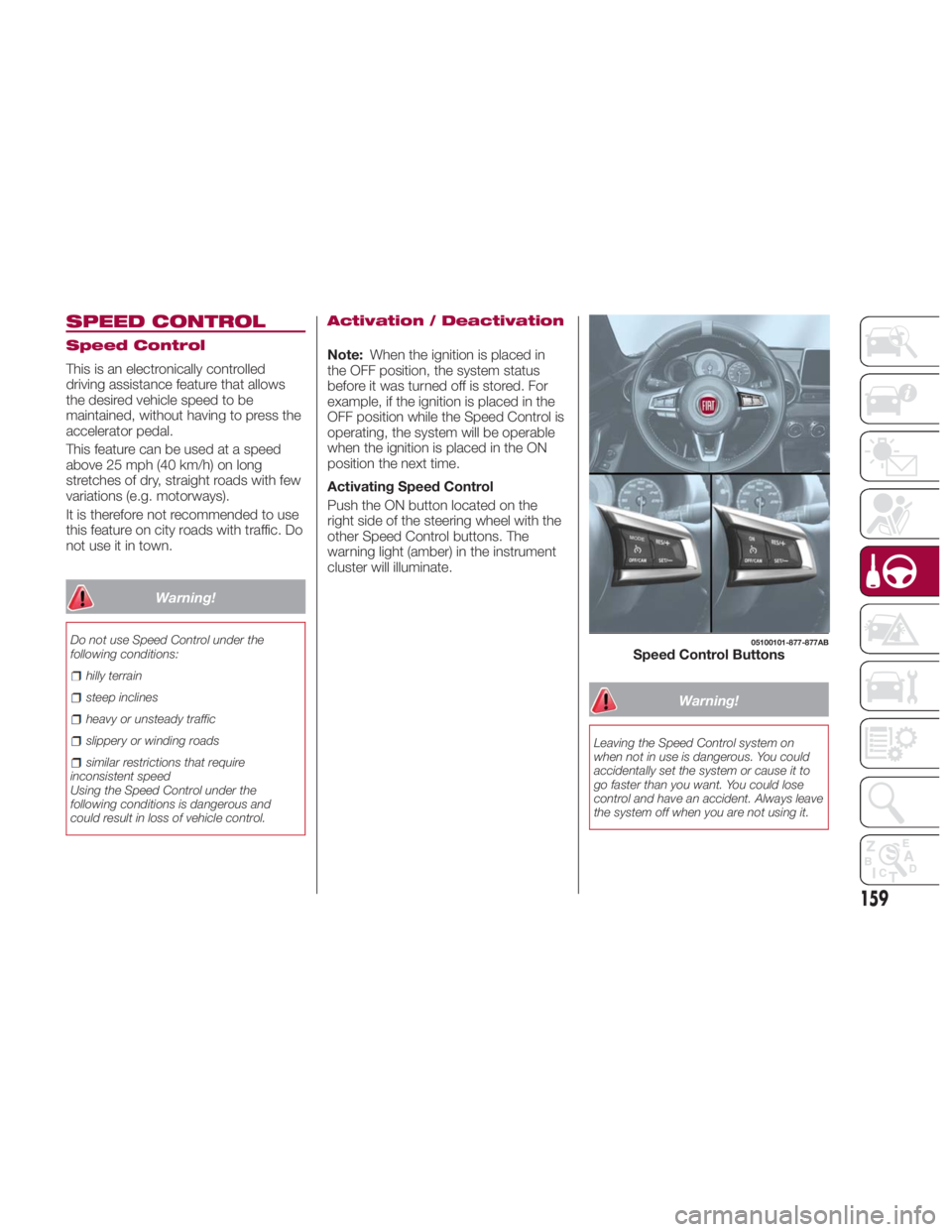
Activating Speed Control
Push the ON button located on the
right side of the steering wheel with the
other Speed Control buttons. The
warning light (amber) in the instrument
cluster will illuminate.
Warning!Leaving the Speed Control system on
when not in use is dangerous. You could
accidentally set the system or cause it to
go faster than you want. You could lose
control and have an accident. Always leave
the system off when you are not using it. 05100101-877-877AB
Speed Control Buttons
159
Page 162 of 292
Deactivating Speed Control
Push the OFF/CAN button. The
warning light (amber) in the
instrument cluster turns off.
When a speed has been set :the
warning light (green) in the
instrument cluster is illuminated, push
and hold the OFF/CAN button or push
the OFF/CAN button twice to
deactivate.
When a speed has not been set :the
warning light (amber) in the
instrument cluster is illuminated, push
the OFF/CAN button to deactivate.
Setting A Desired Speed
Proceed as follows:
1. Activate the Speed Control device
by pushing the ON button. The cruise
warning light (amber) illuminates.
2. Accelerate to the desired speed,
which must be more than 25 mph
(40 km/h).
3. Set the Speed Control by pushing
the SET (-) button at the desired speed.
The Speed Control is set at the
moment the SET (-) button is pushed.
Release the accelerator pedal
simultaneously. The
warning light
(green) illuminates.
Note: The Speed Control setting
cannot be performed under the
following conditions: Automatic transmission: the gear
selector is in the PARK or NEUTRAL
position.
Manual transmission: the gear
selector is in the NEUTRAL position or
when the clutch is disengaged (clutch
is depressed).
The parking brake is applied.
Release the SET (-) button at the
desired speed, otherwise the speed will
continue decreasing while the SET (-)
button is pushed and held (except
when the accelerator pedal is
depressed).
Note:
Release the SET (-) button at the
desired speed, otherwise the speed
will continue decreasing while the SET
(-) button is pushed and held (except
when the accelerator pedal is
depressed).
On a steep grade, the vehicle may
momentarily slow down while
ascending, or speed up while
descending.
The Speed Control will cancel if the
vehicle speed decreases below
16 mph (25 km/h) when climbing a
steep incline.
The Speed Control may cancel at
about 9 mph (15 km/h) below the
preset speed such as when climbing a
long, steep incline. The vehicle’s set speed is displayed in
the instrument cluster.
Increasing Speed
To increase speed using the Speed
Control buttons:
Push the RES (+) button and hold it ,
your vehicle will accelerate. Release the
button at the desired speed.
Push the RES (+) button and release
it immediately , to adjust the set speed.
Multiple pushes of the button will
increase the set speed according to the
number of times it is pushed.
Increasing speed with a single RES
(+) button operation:
If the instrument cluster display for
vehicle speed is indicated in mph:
speed will increase in 1 mph
increments.
If the instrument cluster display for
vehicle speed is indicated in km/h:
speed will increase in 1 km/h
increments.
To increase speed using
accelerator pedal:
Press the accelerator pedal to
accelerate to the desired speed.
Push the SET (-) button and release it
immediately. This new set speed will be
saved.
160
STARTING AND OPERATING