warning FIAT SPIDER ABARTH 2017 Owners Manual
[x] Cancel search | Manufacturer: FIAT, Model Year: 2017, Model line: SPIDER ABARTH, Model: FIAT SPIDER ABARTH 2017Pages: 292, PDF Size: 9.24 MB
Page 163 of 292
Note: Accelerate the vehicle to speed
up temporarily with the accelerator
pedal when the Speed Control is on.
Increasing the speed will not interfere
with, or change the set speed. Take
your foot off the accelerator to return to
the set speed.
Decreasing Speed
To decrease speed using the Speed
Control buttons:
Push the SET (-) button and hold it ,
the vehicle will gradually slow down.
Release the button at the desired
speed.
Push the SET (-) button and release
it immediately to adjust the set speed.
Multiple button pushes will decrease
the set speed according to the number
of times it is pushed.
Decreasing speed with a single SET
(-) button operation:
If the instrument cluster display for
vehicle speed is indicated in mph: the
speed will decrease in 1 mph
increments.
If the instrument cluster display for
vehicle speed is indicated in km/h: the
speed will decrease in 1 km/h
increments. Resume Speed
If any other method besides the
OFF/CAN button was used to cancel
cruising speed (such as applying the
brake pedal or pressing in the clutch
pedal) and the system is still activated,
the most recent set speed will
automatically resume when the RES (+)
button is pushed.
If vehicle speed is below 25 mph
(40 km/h), increase the vehicle speed
up to 16 mph (25 km/h) or more and
push RES (+) button.
Temporarily Canceling
The System
Warning!Leaving the Speed Control system on
when not in use is dangerous. You could
accidentally set the system or cause it to
go faster than you want. You could lose
control and have an accident. Always leave
the system OFF when you are not using it.
To temporarily cancel the system, use
one of these methods:
Slightly press the brake pedal.
Press the clutch pedal (if equipped
with a manual transmission). Push OFF/CAN button.
If the RES (+) button is pushed when
the vehicle speed is 25 mph (40 km/h)
or higher, the system reverts to the
previously set speed.
Note: If any of the following conditions
occur, the Speed Control system is
temporarily canceled:
The parking brake is applied.
Automatic Transmission: the
gear selector is in the PARK or
NEUTRAL position.
Manual Transmission: the gear
selector is in the NEUTRAL position.
Automatic Transmission: the
Speed Control cannot be canceled
while driving in manual mode (gear
selector shifted from D to M position).
Therefore, engine braking will not be
applied even if the transmission is
shifted down to a lower gear. If
deceleration is required, lower the set
speed or press the brake pedal.
When the Speed Control system is
temporarily canceled, the speed cannot
be reset.
161
Page 165 of 292
REAR PARK ASSIST
— IF EQUIPPED Rear Park Assist
Warning!Do not rely completely on the parking
sensor system and be sure to confirm the
safety around your vehicle visually when
driving. This system can assist the driver in
operating the vehicle in the forward and
backward directions while parking. The
detection ranges of the sensors are limited,
therefore, driving the vehicle while relying
only on the system may cause an accident.
Always confirm the safety around your
vehicle visually when driving.
Parking and other potentially dangerous
maneuvers are, however, always the
driver’s responsibility. When performing
these operations, always make sure that
there are no other people (especially
children) or animals on the route you want
to drive into. The parking sensors are an
aid for the driver, but the driver must never
allow their attention to lapse during
potentially dangerous maneuvers, even
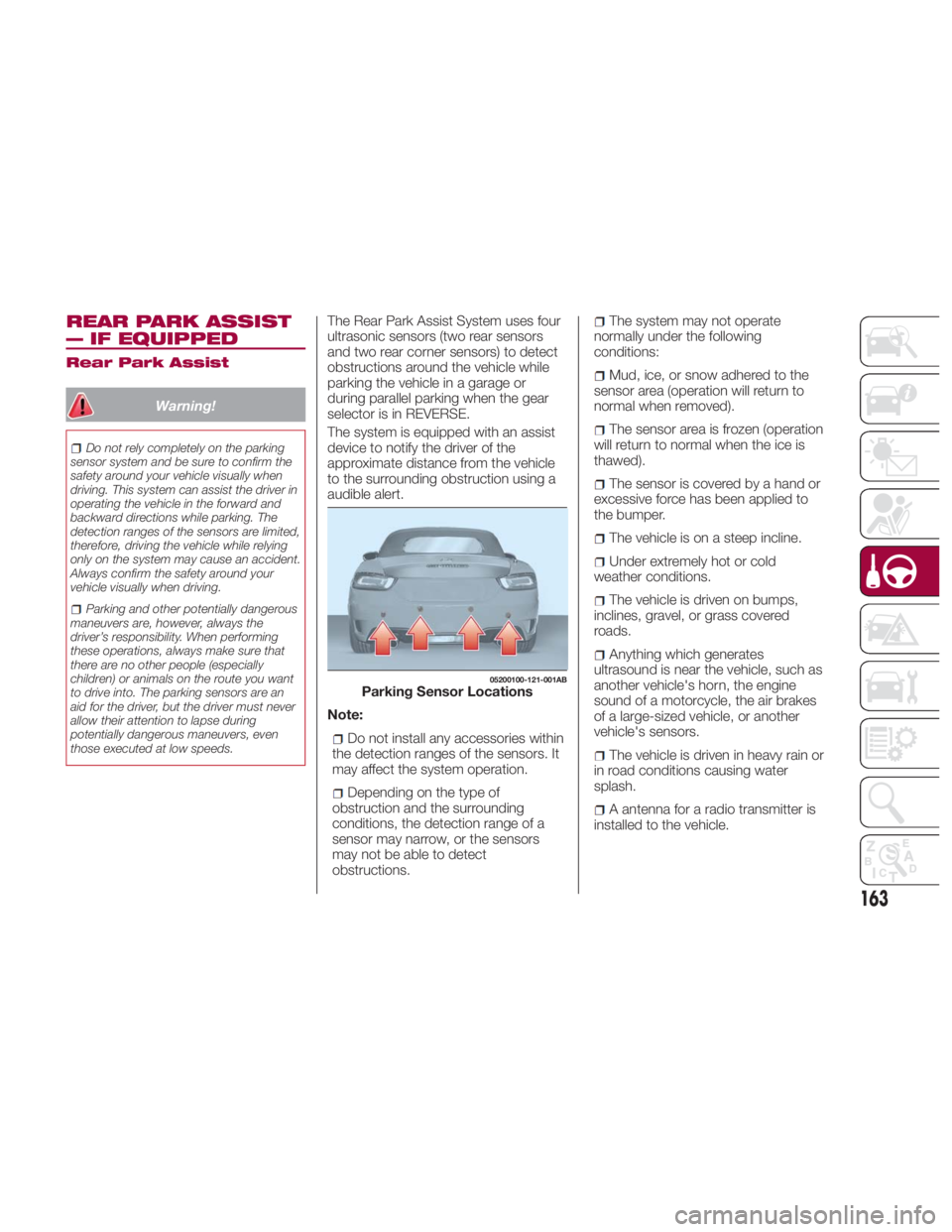
those executed at low speeds. The Rear Park Assist System uses four
ultrasonic sensors (two rear sensors
and two rear corner sensors) to detect
obstructions around the vehicle while
parking the vehicle in a garage or
during parallel parking when the gear
selector is in REVERSE.
The system is equipped with an assist
device to notify the driver of the
approximate distance from the vehicle
to the surrounding obstruction using a
audible alert.
Note:
Do not install any accessories within
the detection ranges of the sensors. It
may affect the system operation.
Depending on the type of
obstruction and the surrounding
conditions, the detection range of a
sensor may narrow, or the sensors
may not be able to detect
obstructions. The system may not operate
normally under the following
conditions:
Mud, ice, or snow adhered to the
sensor area (operation will return to
normal when removed).
The sensor area is frozen (operation
will return to normal when the ice is
thawed).
The sensor is covered by a hand or
excessive force has been applied to
the bumper.
The vehicle is on a steep incline.
Under extremely hot or cold
weather conditions.
The vehicle is driven on bumps,
inclines, gravel, or grass covered
roads.
Anything which generates
ultrasound is near the vehicle, such as
another vehicle's horn, the engine
sound of a motorcycle, the air brakes
of a large-sized vehicle, or another
vehicle's sensors.
The vehicle is driven in heavy rain or
in road conditions causing water
splash.
A antenna for a radio transmitter is
installed to the vehicle. 05200100-121-001AB
Parking Sensor Locations
163
Page 168 of 292
When A Warning Alert Is Activated
The system notifies the driver of an obstacle by activating the audible alert. Beep How To Check
The audible alert is not heard. The system may have a malfunction. Contact an authorized dealer as soon as
possible.
When the engine is turned ON, or if the parking sensor
detects a problem while driving, an intermittent audible
alert is heard one to four time s(*). Remove any foreign material from the sensor area. If the system continues to sound
the audible alert, contact an authorized dealer as soon as possible.
( * ) The number of times the audible alert is heard changes depending on the malfunction location.
166
STARTING AND OPERATING
Page 169 of 292
PARKVIEW REAR
BACKUP CAMERA —
IF EQUIPPED Operation
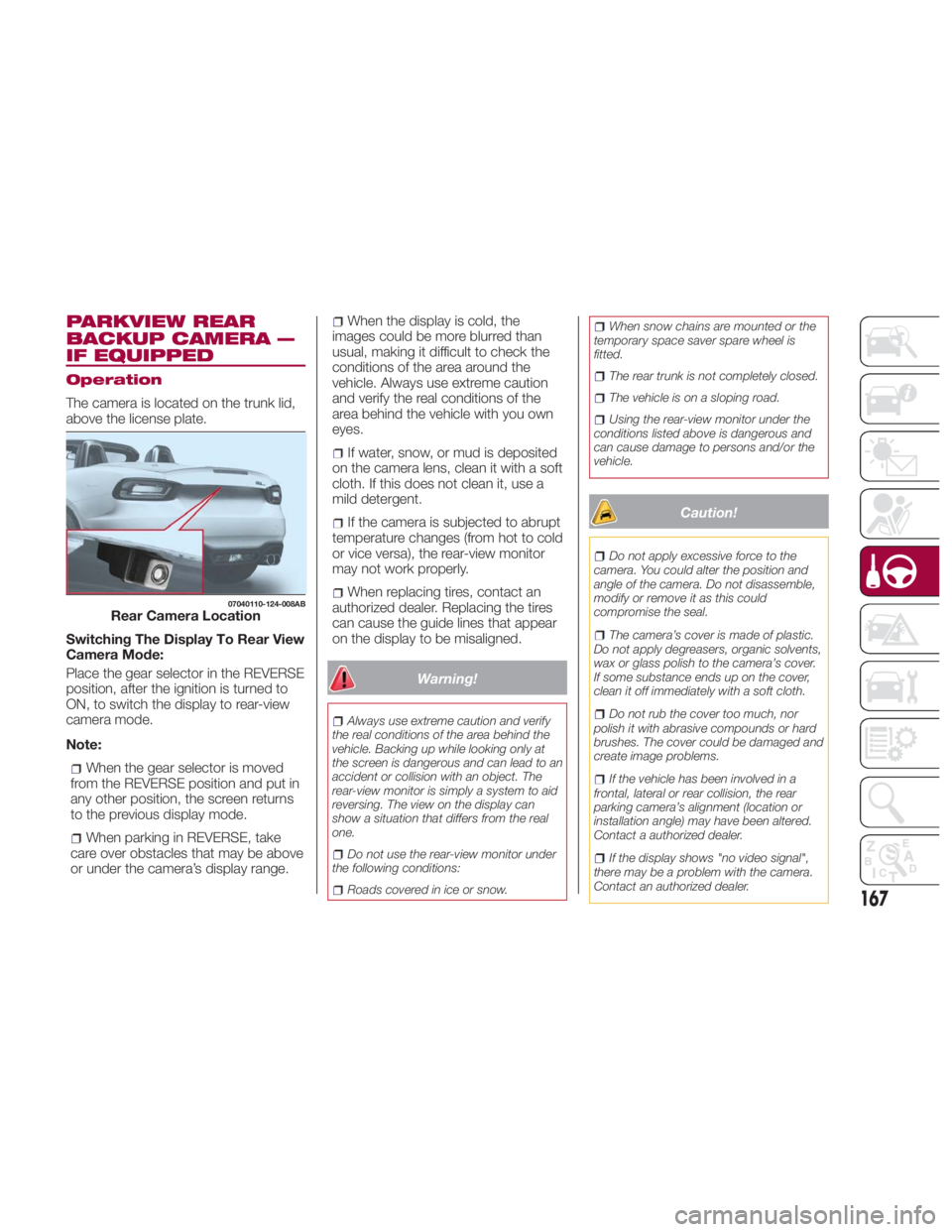
The camera is located on the trunk lid,
above the license plate.
Switching The Display To Rear View
Camera Mode:
Place the gear selector in the REVERSE
position, after the ignition is turned to
ON, to switch the display to rear-view
camera mode.
Note:
When the gear selector is moved
from the REVERSE position and put in
any other position, the screen returns
to the previous display mode.
When parking in REVERSE, take
care over obstacles that may be above
or under the camera’s display range. When the display is cold, the
images could be more blurred than
usual, making it difficult to check the
conditions of the area around the
vehicle. Always use extreme caution
and verify the real conditions of the
area behind the vehicle with you own
eyes.
If water, snow, or mud is deposited
on the camera lens, clean it with a soft
cloth. If this does not clean it, use a
mild detergent.
If the camera is subjected to abrupt
temperature changes (from hot to cold
or vice versa), the rear-view monitor
may not work properly.
When replacing tires, contact an
authorized dealer. Replacing the tires
can cause the guide lines that appear
on the display to be misaligned.
Warning!Always use extreme caution and verify
the real conditions of the area behind the
vehicle. Backing up while looking only at
the screen is dangerous and can lead to an
accident or collision with an object. The
rear-view monitor is simply a system to aid
reversing. The view on the display can
show a situation that differs from the real
one.
Do not use the rear-view monitor under
the following conditions:
Roads covered in ice or snow. When snow chains are mounted or the
temporary space saver spare wheel is
fitted.
The rear trunk is not completely closed.
The vehicle is on a sloping road.
Using the rear-view monitor under the
conditions listed above is dangerous and
can cause damage to persons and/or the
vehicle.
Caution! Do not apply excessive force to the
camera. You could alter the position and
angle of the camera. Do not disassemble,
modify or remove it as this could
compromise the seal.
The camera’s cover is made of plastic.
Do not apply degreasers, organic solvents,
wax or glass polish to the camera’s cover.
If some substance ends up on the cover,
clean it off immediately with a soft cloth.
Do not rub the cover too much, nor
polish it with abrasive compounds or hard
brushes. The cover could be damaged and
create image problems.
If the vehicle has been involved in a
frontal, lateral or rear collision, the rear
parking camera’s alignment (location or
installation angle) may have been altered.
Contact a authorized dealer.
If the display shows "no video signal",
there may be a problem with the camera.
Contact an authorized dealer.07040110-124-008AB
Rear Camera Location
167
Page 171 of 292
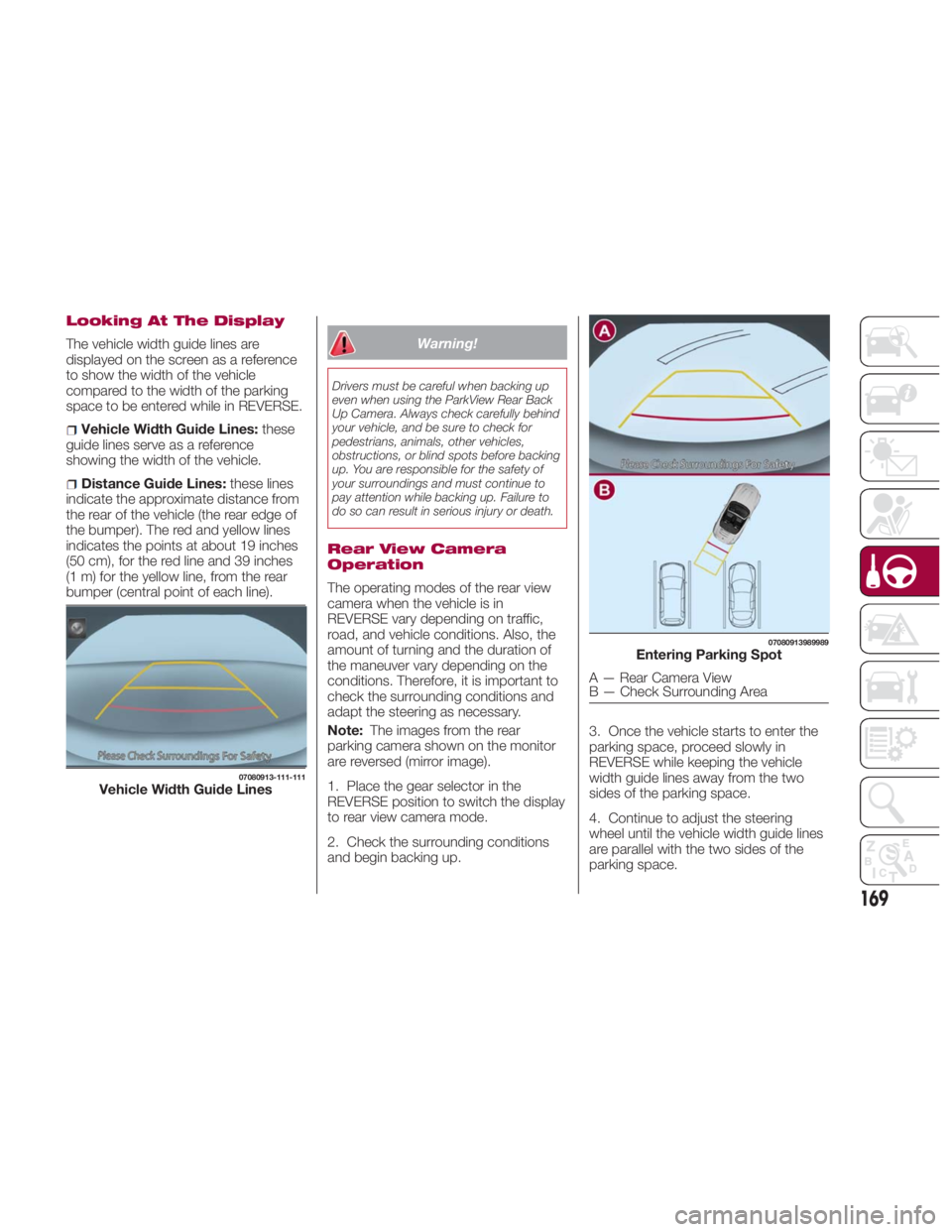
Looking At The Display
The vehicle width guide lines are
displayed on the screen as a reference
to show the width of the vehicle
compared to the width of the parking
space to be entered while in REVERSE.
Vehicle Width Guide Lines: these
guide lines serve as a reference
showing the width of the vehicle.
Distance Guide Lines: these lines
indicate the approximate distance from
the rear of the vehicle (the rear edge of
the bumper). The red and yellow lines
indicates the points at about 19 inches
(50 cm), for the red line and 39 inches
(1 m) for the yellow line, from the rear
bumper (central point of each line). Warning!Drivers must be careful when backing up
even when using the ParkView Rear Back
Up Camera. Always check carefully behind
your vehicle, and be sure to check for
pedestrians, animals, other vehicles,
obstructions, or blind spots before backing
up. You are responsible for the safety of
your surroundings and must continue to
pay attention while backing up. Failure to
do so can result in serious injury or death.
Rear View Camera
Operation
The operating modes of the rear view
camera when the vehicle is in
REVERSE vary depending on traffic,
road, and vehicle conditions. Also, the
amount of turning and the duration of
the maneuver vary depending on the
conditions. Therefore, it is important to
check the surrounding conditions and
adapt the steering as necessary.
Note: The images from the rear
parking camera shown on the monitor
are reversed (mirror image).
1. Place the gear selector in the
REVERSE position to switch the display
to rear view camera mode.
2. Check the surrounding conditions
and begin backing up. 3. Once the vehicle starts to enter the
parking space, proceed slowly in
REVERSE while keeping the vehicle
width guide lines away from the two
sides of the parking space.
4. Continue to adjust the steering
wheel until the vehicle width guide lines
are parallel with the two sides of the
parking space.07080913-111-111
Vehicle Width Guide Lines 07080913989989
Entering Parking Spot
A — Rear Camera View
B — Check Surrounding Area
169
Page 174 of 292
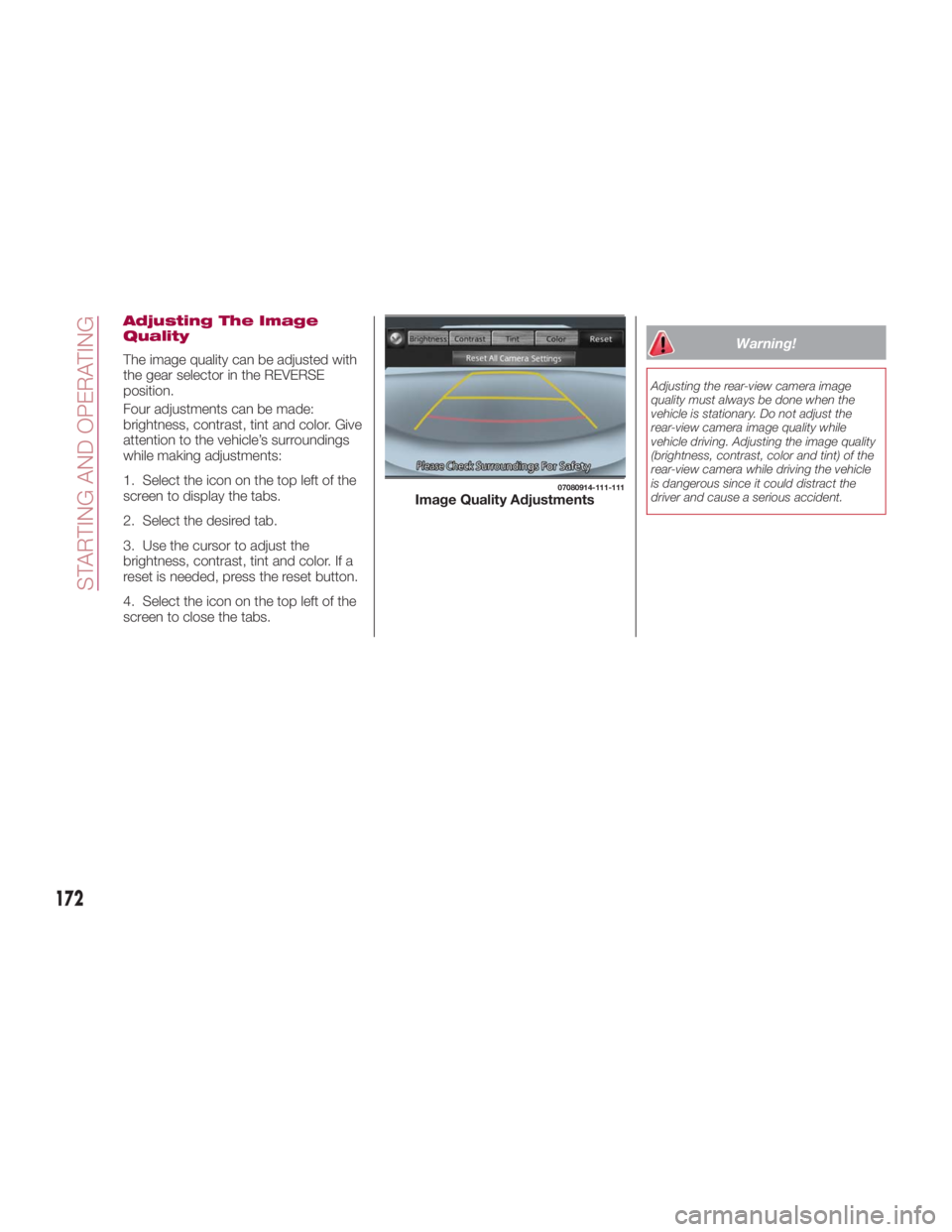
Adjusting The Image
Quality
The image quality can be adjusted with
the gear selector in the REVERSE
position.
Four adjustments can be made:
brightness, contrast, tint and color. Give
attention to the vehicle’s surroundings
while making adjustments:
1. Select the icon on the top left of the
screen to display the tabs.
2. Select the desired tab.
3. Use the cursor to adjust the
brightness, contrast, tint and color. If a
reset is needed, press the reset button.
4. Select the icon on the top left of the
screen to close the tabs. Warning!Adjusting the rear-view camera image
quality must always be done when the
vehicle is stationary. Do not adjust the
rear-view camera image quality while
vehicle driving. Adjusting the image quality
(brightness, contrast, color and tint) of the
rear-view camera while driving the vehicle
is dangerous since it could distract the
driver and cause a serious accident. 07080914-111-111
Image Quality Adjustments
172
STARTING AND OPERATING
Page 177 of 292
Carbon Monoxide
Warnings
Warning!Carbon monoxide (CO) in exhaust gases is
deadly. Follow the precautions below to
prevent carbon monoxide poisoning:
Do not inhale exhaust gases. They
contain carbon monoxide, a colorless and
odorless gas, which can kill. Never run the
engine in a closed area, such as a garage,
and never sit in a parked vehicle with the
engine running for an extended period. If
the vehicle is stopped in an open area with
the engine running for more than a short
period, adjust the ventilation system to
force fresh, outside air into the vehicle.
Guard against carbon monoxide with
proper maintenance. Have the exhaust
system inspected every time the vehicle is
raised. Have any abnormal conditions
repaired promptly. Until repaired, drive with
all side windows fully open.
Refueling Procedure
Fuel Filler Door
Note: Always use only a designated
FCA fuel filler cap or an approved
equivalent, available at your authorized
dealer. The wrong cap can result in a
serious malfunction of the fuel and
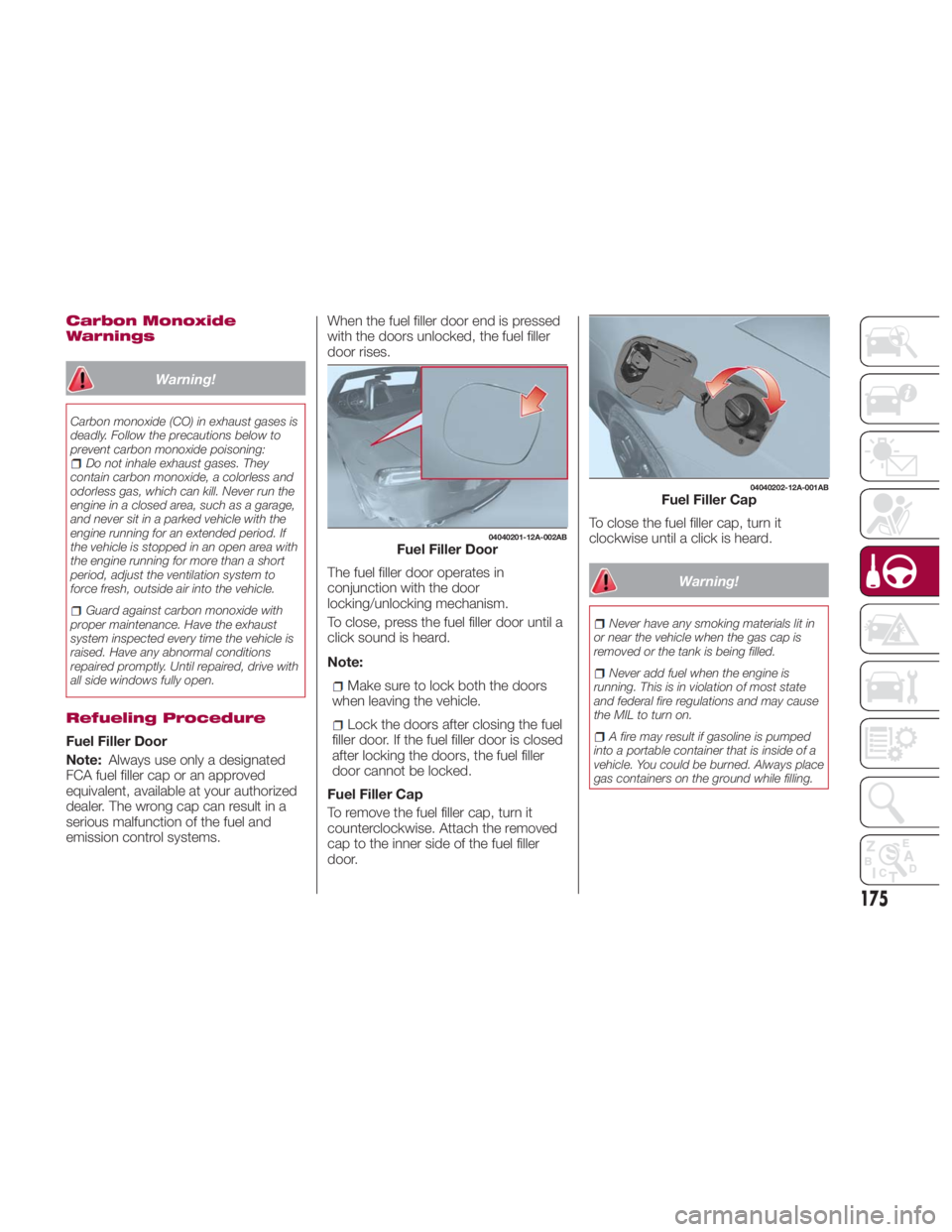
emission control systems. When the fuel filler door end is pressed
with the doors unlocked, the fuel filler
door rises.
The fuel filler door operates in
conjunction with the door
locking/unlocking mechanism.
To close, press the fuel filler door until a
click sound is heard.
Note:
Make sure to lock both the doors
when leaving the vehicle.
Lock the doors after closing the fuel
filler door. If the fuel filler door is closed
after locking the doors, the fuel filler
door cannot be locked.
Fuel Filler Cap
To remove the fuel filler cap, turn it
counterclockwise. Attach the removed
cap to the inner side of the fuel filler
door. To close the fuel filler cap, turn it
clockwise until a click is heard.
Warning! Never have any smoking materials lit in
or near the vehicle when the gas cap is
removed or the tank is being filled.
Never add fuel when the engine is
running. This is in violation of most state
and federal fire regulations and may cause
the MIL to turn on.
A fire may result if gasoline is pumped
into a portable container that is inside of a
vehicle. You could be burned. Always place
gas containers on the ground while filling. 04040201-12A-002AB
Fuel Filler Door 04040202-12A-001AB
Fuel Filler Cap
175
Page 181 of 292
For more traction in starting on
slippery surfaces such as ice or packed
snow, use sand, rock salt, chains,
carpeting, or other nonslip material
under the rear wheels.
Note: Use snow chains only on the
rear wheels.
Floor Mat Safety
Information
Always use floor mats designed to fit
the footwell of your vehicle. Use only
floor mats that leave the pedal area
unobstructed and that are firmly
secured so that they cannot slip out of
position and interfere with the pedals or
impair safe operation of your vehicle in
other ways. Warning!An improperly attached, damaged, folded,
or stacked floor mat, or damaged floor mat
fasteners may cause your floor mat to
interfere with the accelerator, brake, or
clutch pedals and cause a loss of vehicle
control. To prevent SERIOUS INJURY or
DEATH:
ALWAYS securely attach your floor
mat using the floor mat fasteners. DO NOT
install your floor mat upside down or turn
your floor mat over. Lightly pull to confirm
mat is secured using the floor mat
fasteners on a regular basis.
ALWAYS REMOVE THE EXISTING
FLOOR MAT FROM THE VEHICLE
before installing any other floor mat.
NEVER install or stack an additional floor
mat on top of an existing floor mat.
ONLY install floor mats designed to fit
your vehicle. NEVER install a floor mat that
cannot be properly attached and secured
to your vehicle. If a floor mat needs to be
replaced, only use a FCA approved floor
mat for the specific make, model, and year
of your vehicle.
ONLY use the driver’s side floor mat on
the driver’s side floor area. To check for
interference, with the vehicle properly
parked with the engine off, fully depress the
accelerator, the brake, and the clutch pedal
(if present) to check for interference. If your
floor mat interferes with the operation of
any pedal, or is not secure to the floor,
remove the floor mat from the vehicle and
place the floor mat in your trunk. ONLY use the passenger’s side floor mat
on the passenger’s side floor area.
ALWAYS make sure objects cannot fall
or slide into the driver’s side floor area
when the vehicle is moving. Objects can
become trapped under accelerator, brake,
or clutch pedals and could cause a loss of
vehicle control.
NEVER place any objects under the floor
mat (e.g., towels, keys, etc.). These objects
could change the position of the floor mat
and may cause interference with the
accelerator, brake, or clutch pedals.
If the vehicle carpet has been removed
and re-installed, always properly attach
carpet to the floor and check the floor mat
fasteners are secure to the vehicle carpet.
Fully depress each pedal to check for
interference with the accelerator, brake, or
clutch pedals then re-install the floor mats.
It is recommended to only use mild soap
and water to clean your floor mats. After
cleaning, always check your floor mat has
been properly installed and is secured to
your vehicle using the floor mat fasteners
by lightly pulling mat.
Rocking The Vehicle
Note: Too much rocking may cause
engine overheating, transmission failure,
and tire damage.
If you must rock the vehicle to free it
from snow, sand or mud, depress the
accelerator slightly and slowly move the
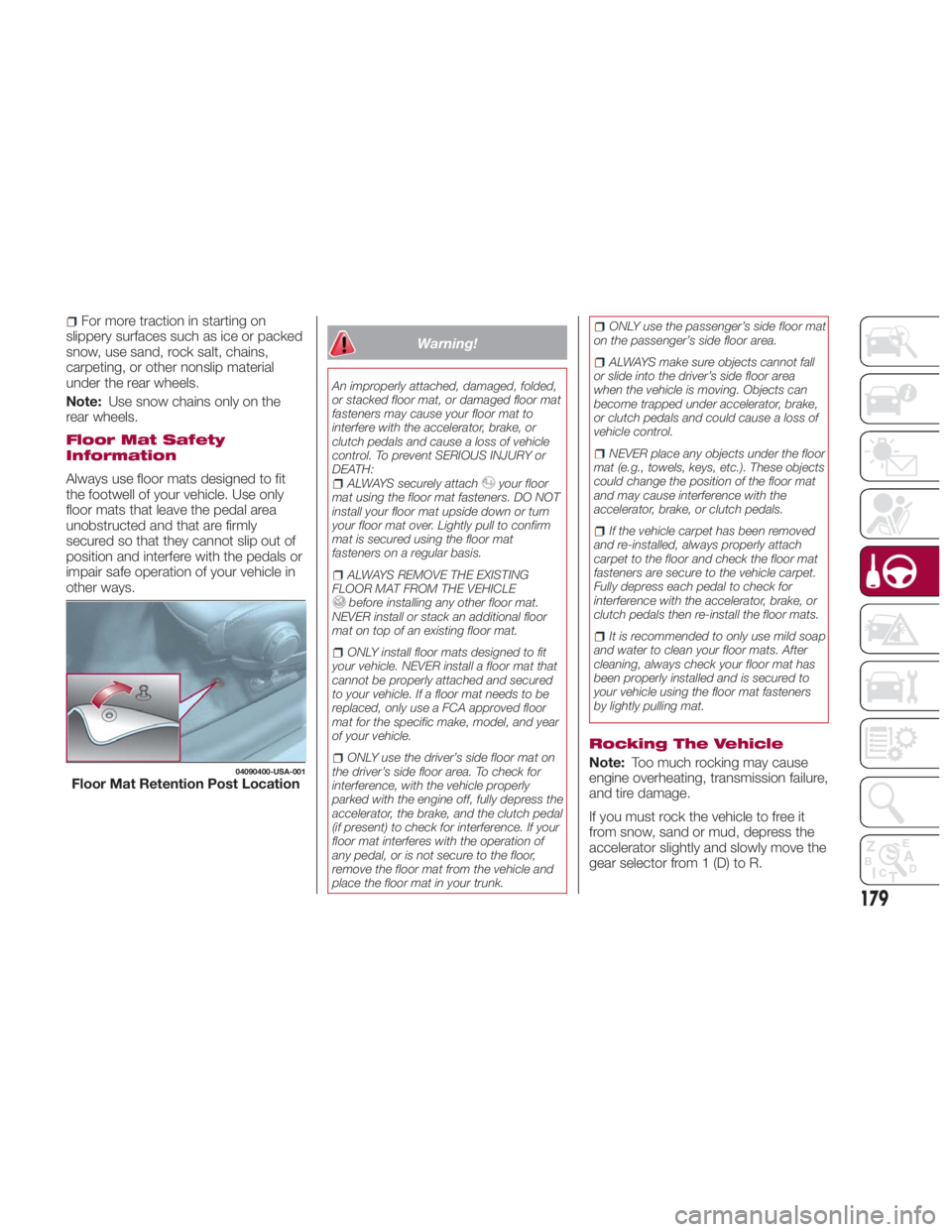
gear selector from 1 (D) to R.04090400-USA-001
Floor Mat Retention Post Location
179
Page 182 of 292

Warning!Fast spinning tires can be dangerous.
Forces generated by excessive wheel
speeds may cause damage, or even
failure, of the axle and tires. A tire could
explode and injure someone. Do not spin
your vehicle's wheels faster than 30 mph
(48 km/h) or for longer than 30 seconds
continuously without stopping when you
are stuck and do not let anyone near a
spinning wheel, no matter what the speed.
Caution!When “rocking” a stuck vehicle by
shifting between DRIVE and REVERSE, do
not spin the wheels faster than 15 mph
(24 km/h), or drivetrain damage may result.
Revving the engine or spinning the
wheels too fast may lead to transmission
overheating and failure. It can also damage
the tires. Do not spin the wheels above
30 mph (48 km/h) while in gear (no
transmission shifting occurring).
Winter Driving
Carry emergency gear, including tire
chains, window scraper, flares, a small
shovel, jumper leads, and a small bag
of sand or salt. Contact an authorized dealer to check
the following:
Have the proper ratio of antifreeze in
the radiator.
Inspect the battery and its leads.
Cold reduces battery capacity.
Use an engine oil appropriate for the
lowest ambient temperatures that the
vehicle will be driven in.
Inspect the ignition system for
damage and loose connections.
Use winter windshield washer fluid
that will not freeze.
Note:
Remove snow before driving. Snow
left on the windshield is dangerous as
it could obstruct vision.
Drive slowly. Braking performance
can be adversely affected if snow or
ice adheres to the brake components.
If this situation occurs, drive the vehicle
slowly, releasing the accelerator pedal
and lightly applying the brakes several
times until the brake performance
returns to normal.
Do not open or close the soft top when
the temperature is 41 °F (5 °C) or less.
The material of the soft top could be
damaged by freezing. Do not apply excessive force to a
window scraper when removing ice or
frozen snow on the mirror glass and
windshield.
Never use warm or hot water for
removing snow or ice from windows
and mirrors as it could result in the
glass cracking.
Snow Tires
If your vehicle is equipped with the tire
pressure monitoring system (vehicle
with run-flat tires), the system may not
function correctly when using tires with
steel wire reinforcement in the
sidewalls.
Use Snow Tires on all Four Wheels :
Do not exceed the maximum
permissible speed for your snow tires or
legal speed limits.
When snow tires are used, select the
specified size and pressure.
Tire Chains
Check local regulations before using tire
chains.
If your vehicle is equipped with the
TPMS system, the system may not
function correctly when using tire
chains.
180
STARTING AND OPERATING
Page 183 of 292
Install the chains on the rear tires only.
Do not use chains on the front tires.
Note:
Chains may affect handling.
Do not go faster than 30 mph
(50 km/h) or the chain manufacturer's
recommended limit, whichever is lower.
Drive carefully and avoid bumps,
holes, and sharp turns.
Avoid locked-wheel braking.
Do not use chains on roads that are
free of snow or ice. The tires and
chains could be damaged.
Chains may scratch or chip
aluminium wheels.
Warning!Using tires of different size and type (M+S,
Snow) between front and rear axles can
cause unpredictable handling. You could
lose control and have a collision. Caution!To avoid damage to your vehicle or tires,
observe the following precautions:
Because of restricted traction device
clearance between tires and other
suspension components, it is important
that only traction devices in good condition
are used. Broken devices can cause
serious damage. Stop the vehicle
immediately if noise occurs that could
indicate device breakage. Remove the
damaged parts of the device before further
use.
Install device as tightly as possible and
then retighten after driving about ½ mile
(0.8 km).
Do not exceed 30 mph (48 km/h).
Drive cautiously and avoid severe turns
and large bumps, especially with a loaded
vehicle.
Do not drive for a prolonged period on
dry pavement.
Observe the traction device
manufacturer’s instructions on the method
of installation, operating speed, and
conditions for use. Always use the
suggested operating speed of the device
manufacturer’s if it is less than 30 mph
(48 km/h).
Do not use traction devices on a
compact spare tire. Driving In Flooded Area
Note: Do not drive the vehicle on
flooded roads as it could cause short
circuit of electrical/electronic parts, or
water enters the engine and causes it
to lock up (hydro-lock) and stall. If the
vehicle has been immersed in water
contact your authorized dealer.
Although your vehicle is capable of
driving through shallow standing water,
consider the following Cautions and
Warnings before doing so.
Warning! Driving through standing water limits
your vehicle’s traction capabilities. Do not
exceed 5 mph (8 km/h) when driving
through standing water.
Driving through standing water limits
your vehicle’s braking capabilities, which
increases stopping distances. Therefore,
after driving through standing water, drive
slowly and lightly press on the brake pedal
several times to dry the brakes.
Failure to follow these warnings may
result in injuries that are serious or fatal to
you, your passengers, and others around
you.
181