change time FIAT SPIDER ABARTH 2017 User Guide
[x] Cancel search | Manufacturer: FIAT, Model Year: 2017, Model line: SPIDER ABARTH, Model: FIAT SPIDER ABARTH 2017Pages: 292, PDF Size: 9.24 MB
Page 43 of 292
System Activation
With the ignition switched to ACC or
OFF, pull the headlight control lever
rearward and the low beam headlights
will turn on.
The headlights turn off after a period of
time after all doors are closed.
The time until the headlights turn off
after all of the doors are closed can be
changed through the Connect system.
The headlights turn off if the lever is
pulled again while the headlights are on,
or after three minutes of no further
action after the first pull of the lever.
Front Fog Lights
The front fog light can be activated
when the ignition is in the ON position
and the headlights or parking lights are
on.
Activation
Turn the headlight switch to the
or
position.
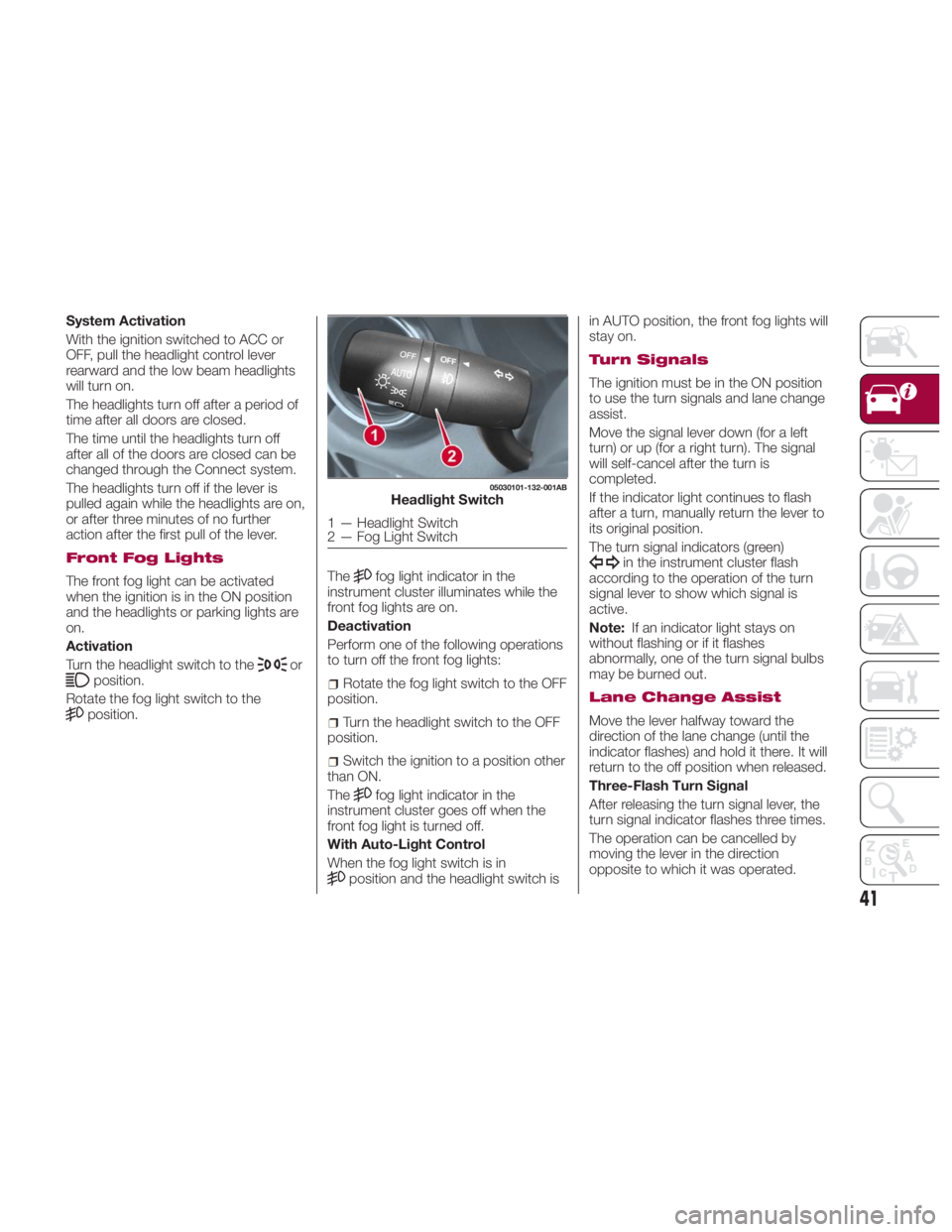
Rotate the fog light switch to the
position. The fog light indicator in the
instrument cluster illuminates while the
front fog lights are on.
Deactivation
Perform one of the following operations
to turn off the front fog lights:
Rotate the fog light switch to the OFF
position.
Turn the headlight switch to the OFF
position.
Switch the ignition to a position other
than ON.
The
fog light indicator in the
instrument cluster goes off when the
front fog light is turned off.
With Auto-Light Control
When the fog light switch is in
position and the headlight switch is in AUTO position, the front fog lights will
stay on.
Turn Signals
The ignition must be in the ON position
to use the turn signals and lane change
assist.
Move the signal lever down (for a left
turn) or up (for a right turn). The signal
will self-cancel after the turn is
completed.
If the indicator light continues to flash
after a turn, manually return the lever to
its original position.
The turn signal indicators (green)
in the instrument cluster flash
according to the operation of the turn
signal lever to show which signal is
active.
Note: If an indicator light stays on
without flashing or if it flashes
abnormally, one of the turn signal bulbs
may be burned out.
Lane Change Assist
Move the lever halfway toward the
direction of the lane change (until the
indicator flashes) and hold it there. It will
return to the off position when released.
Three-Flash Turn Signal
After releasing the turn signal lever, the
turn signal indicator flashes three times.
The operation can be cancelled by
moving the lever in the direction
opposite to which it was operated. 05030101-132-001AB
Headlight Switch
1 — Headlight Switch
2 — Fog Light Switch
41
Page 61 of 292
Pre-Programming The
System
Note: It is recommended that a new
battery be placed in the hand-held
transmitter of the device being
programmed to HomeLink for quicker
training and accurate transmission of
the radio-frequency signal.
Proceed as follows:
1. Verify that there is a remote control
transmitter available for the device you
would like to program.
2. Disconnect the power to the device.
Programming The
System
Note: When programming a garage
door opener or a gate, disconnect the
power to these devices before
programming. Continuous operation of
the devices could damage the motor.
The HomeLink system provides three
buttons which can be individually
selected and programmed using the
transmitters for current, on-market
devices as follows:
1. Disconnect power to the device
being programmed.
2. Position the end of your handheld
transmitter one to three inches (2.5 -
7.5 cm) away from the HomeLink
button you wish to program while
keeping the indicator light in view.
3. Simultaneously press and hold both
the chosen HomeLink and hand-held transmitter buttons. Do not release
the buttons until step four has been
completed.
4. After the HomeLink indicator light
changes from a slow to a rapidly
blinking light, release both the
HomeLink and hand-held transmitter
buttons.
5. Connect power to the device being
programmed.
6. Firmly press and hold the
programmed HomeLink button for five
seconds, and then release it. Perform
this operation two times to activate the
door or gate. If the door or gate does
not activate, press and hold the
just-trained HomeLink button and
observe the indicator light. If the
indicator light stays on constantly, programming is complete and your
device should activate when the
HomeLink button is pressed and
released.
Note: To program the remaining two
HomeLink buttons, begin with step
one.
7. If the indicator light blinks rapidly for
two seconds and then turns to a
constant light, continue with
“Programming” steps (see below) to
complete the programming of a rolling
code equipped device (most commonly
a garage door opener).
8. At the garage door opener receiver
(motor-head unit) in the garage, locate
the “learn” or “smart” button. This can
usually be found where the hanging
antenna wire is attached to the
motorhead unit.
9. Press and release the “learn” or
“smart” button (the name and color of
the button may vary by manufacturer).
Note: Complete the programming
within 30 seconds.
10. Return to the vehicle and firmly
press, hold for two seconds and
release the programmed HomeLink
button. Repeat the “ press/hold/
release ” sequence a second time, and,
depending on the brand of the garage
door opener (or other rolling code
equipped device), repeat this sequence
a third time to complete the
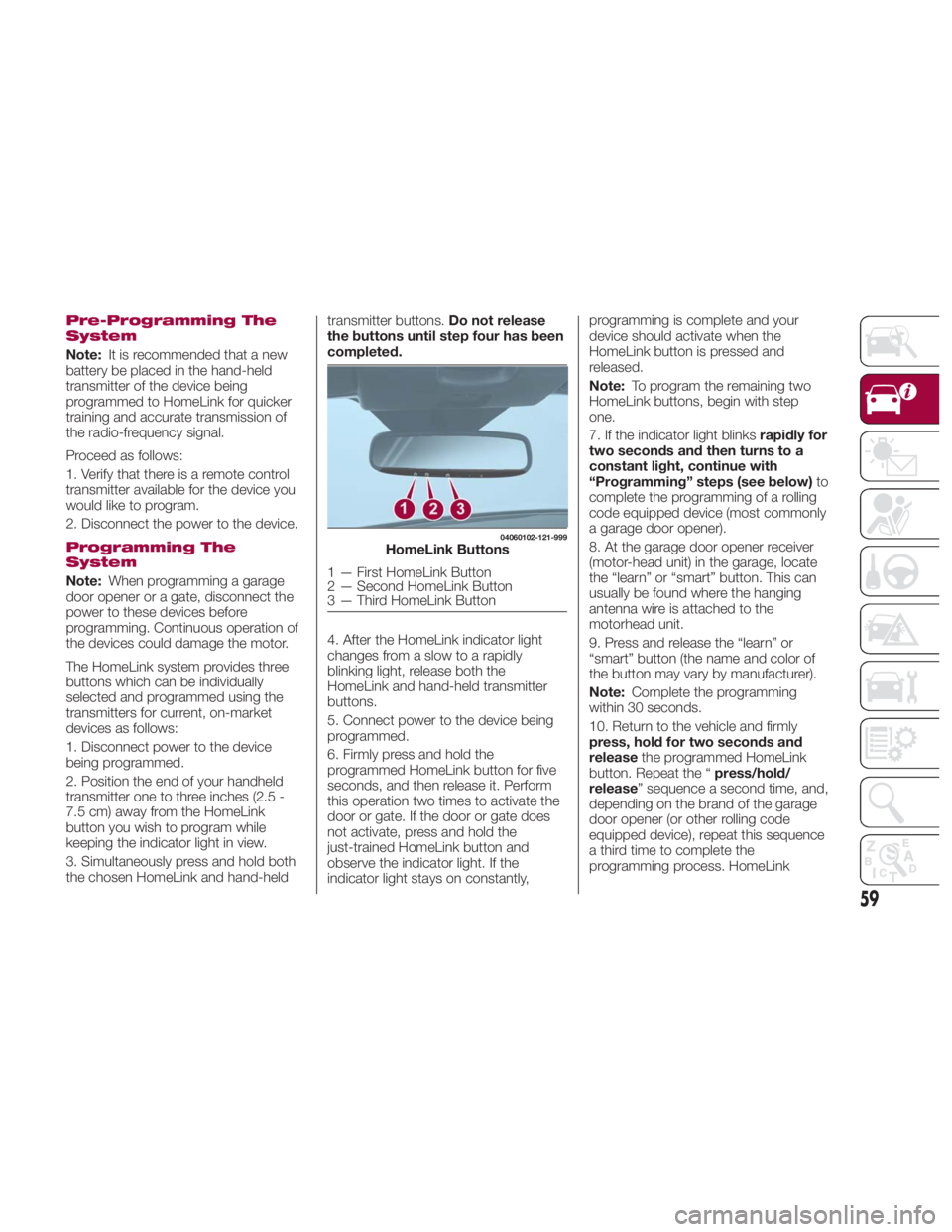
programming process. HomeLink 04060102-121-999
HomeLink Buttons
1 — First HomeLink Button
2 — Second HomeLink Button
3 — Third HomeLink Button
59
Page 80 of 292
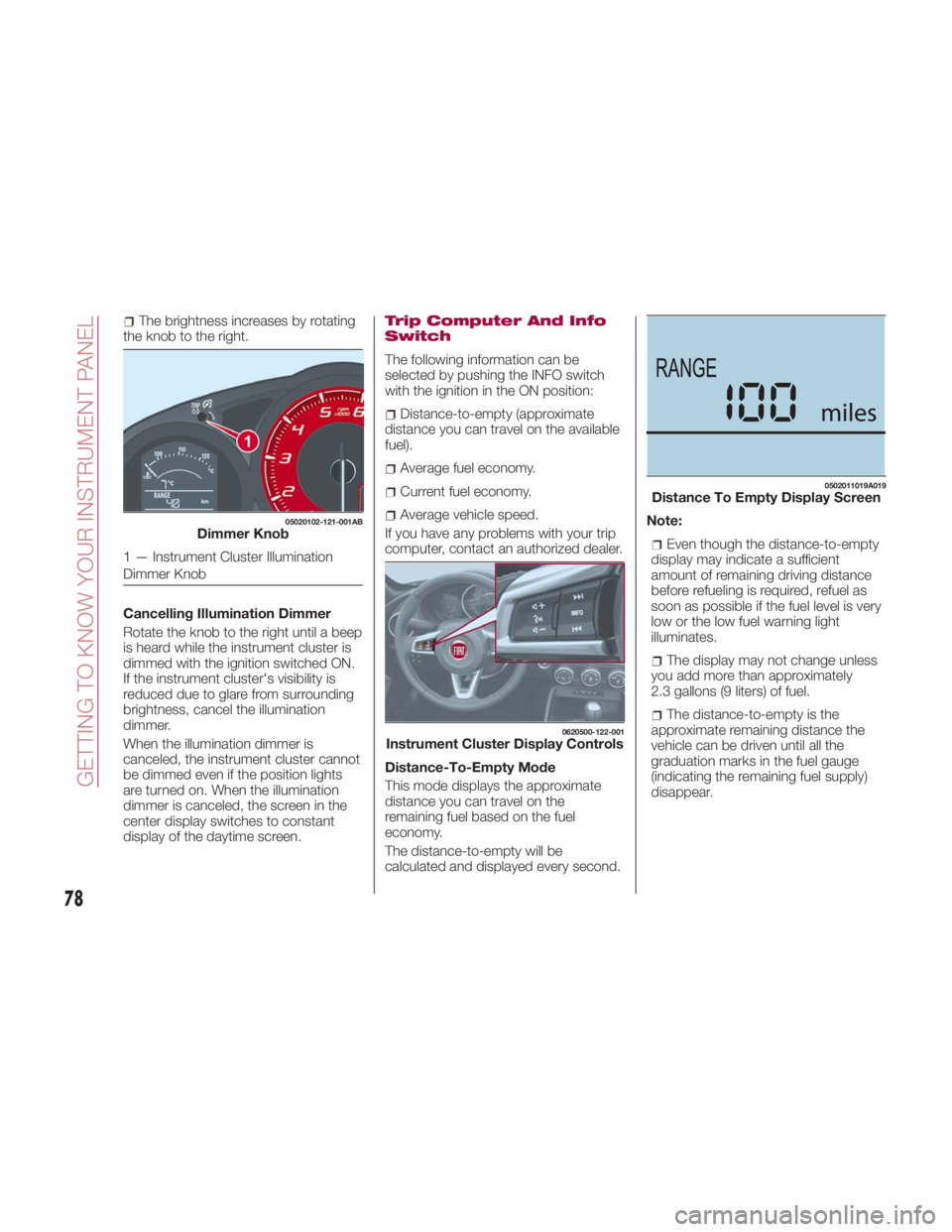
The brightness increases by rotating
the knob to the right.
Cancelling Illumination Dimmer
Rotate the knob to the right until a beep
is heard while the instrument cluster is
dimmed with the ignition switched ON.
If the instrument cluster's visibility is
reduced due to glare from surrounding
brightness, cancel the illumination
dimmer.
When the illumination dimmer is
canceled, the instrument cluster cannot
be dimmed even if the position lights
are turned on. When the illumination
dimmer is canceled, the screen in the
center display switches to constant
display of the daytime screen. Trip Computer And Info
Switch
The following information can be
selected by pushing the INFO switch
with the ignition in the ON position:
Distance-to-empty (approximate
distance you can travel on the available
fuel).
Average fuel economy.
Current fuel economy.
Average vehicle speed.
If you have any problems with your trip
computer, contact an authorized dealer.
Distance-To-Empty Mode
This mode displays the approximate
distance you can travel on the
remaining fuel based on the fuel
economy.
The distance-to-empty will be
calculated and displayed every second. Note:
Even though the distance-to-empty
display may indicate a sufficient
amount of remaining driving distance
before refueling is required, refuel as
soon as possible if the fuel level is very
low or the low fuel warning light
illuminates.
The display may not change unless
you add more than approximately
2.3 gallons (9 liters) of fuel.
The distance-to-empty is the
approximate remaining distance the
vehicle can be driven until all the
graduation marks in the fuel gauge
(indicating the remaining fuel supply)
disappear.05020102-121-001AB
Dimmer Knob
1 — Instrument Cluster Illumination
Dimmer Knob 0620500-122-001
Instrument Cluster Display Controls 0502011019A019
Distance To Empty Display Screen
78
GETTING TO KNOW YOUR INSTRUMENT PANEL
Page 104 of 292
Message Indicated On
Display
If a message is displayed in the center
display, take appropriate action (in a
calm manner) according to the
displayed message.
If the following messages are displayed
in the center display, a vehicle system
may be malfunctioning:
Engine Coolant Temperature
High : displays if the engine coolant
temperature has increased excessively.
Charging System Malfunction :
displays if the charging system has a
malfunction.
Temperature Warning :the
following message is displayed when
the temperature around the center
display is high. Lowering the
temperature of the inside of the vehicle
or the temperature around the center
display by avoiding direct sunlight is
recommended.
Stop the vehicle in a safe place and
contact an authorized dealer.
Warning Sound Is
Activated
Lights-On Reminder
If lights are on and the ignition is placed
in the ACC position, or the ignition is
placed in the OFF position, a
continuous beep sound will be heard
when the driver's door is opened. Note:
When the ignition is placed in the
ACC position, the “Ignition Not Cycled
Off Warning Beep” overrides the
lights-on reminder.
A personalized function is available
to change the sound volume for the
lights-on reminder.
Air Bag/Seat Belt Pretensioner
System Warning Beep
If there is a problem with the air
bag/seat belt pretensioner systems and
the warning light illumination, a warning
beep sound will be heard for about
5 seconds every minute.
The air bag and seat belt pretensioner
system warning beep sound will
continue to be heard for approximately
35 minutes. Contact an authorized
dealer as soon as possible.
Caution!Do not drive the vehicle with the air
bag/seat belt pretensioner system warning
beep sounding. Driving the vehicle with the
air bag/seat belt pretensioner system
warning beep sounding is dangerous. In a
collision, the air bags and the seat belt
pretensioner system will not deploy and this
could result in death or serious injury.
Contact an authorized dealer as soon as
possible. Seat Belt Warning Beep
Except Mexico
If the driver's seat belt is not fastened
when the ignition is in the ON position,
a beep sound will be heard for about
six seconds.
If the driver or the passengers seat belt
is not fastened and the vehicle is driven
at a speed faster than about 12 MPH
(20 km/h), a beep sound will be heard
again for a specified period of time.
Until a seat belt is fastened or a given
period of time has elapsed, the beep
sound will not stop even if the vehicle
speed falls below 12 MPH (20 km/h).
Note:
To allow the passenger occupant
classification sensor to function
properly, do not place and sit on an
additional seat cushion on the
passengers seat. The sensor may not
function properly because the
additional seat cushion could cause
sensor interference.
If a small child is seated on the
passengers seat, the warning beep
may not operate.
Mexico
If the vehicle speed exceeds about
12 MPH (20 km/h) with the driver or
passengers seat belt unfastened, a
warning beep sounds continuously. If
the seat belt remains unfastened, the
beep sound stops once and then
102
GETTING TO KNOW YOUR INSTRUMENT PANEL
Page 108 of 292
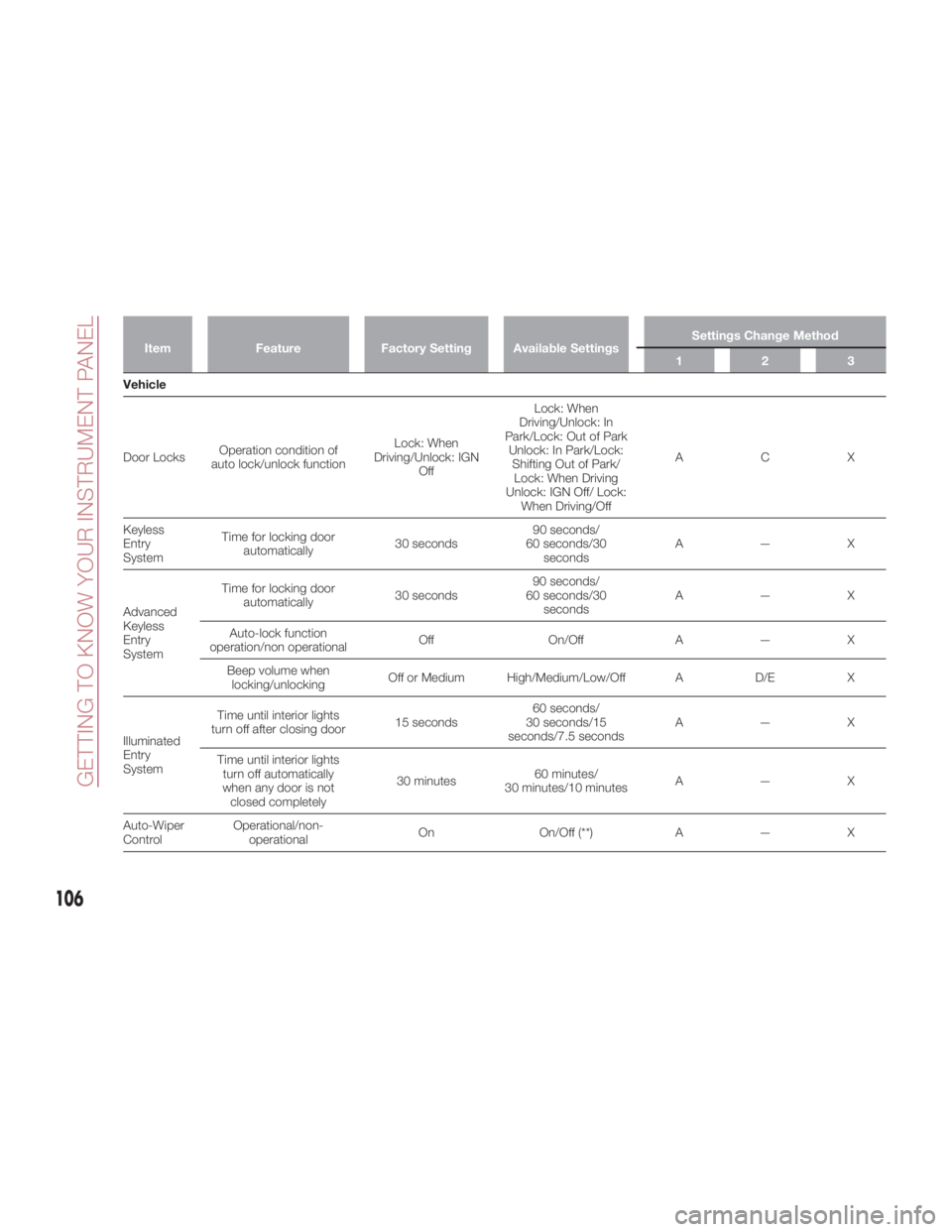
Item Feature Factory Setting Available Settings Settings Change Method
123
Vehicle
Door
Locks Operation condition of
auto lock/unlock function Lock: When
Driving/Unlock: IGN
Off Lock: When
Driving/Unlock: In
Park/Lock: Out of Park
Unlock: In Park/Lock:
Shifting Out of Park/
Lock: When Driving
Unlock: IGN Off/ Lock:
When Driving/Off ACX
Keyless
Entry
System Time for locking door
automatically 30 seconds 90 seconds/
60 seconds/30
seconds A—X
Advanced
Keyless
Entry
System Time for locking door
automatically 30 seconds 90 seconds/
60 seconds/30
seconds A—X
Auto-lock function
operation/non operational Off On/Off A — X
Beep volume when
locking/unlocking Off or Medium High/Medium/Low/Off A D/E X
Illuminated
Entry
System Time until interior lights
turn off after closing door 15 seconds 60 seconds/
30 seconds/15
seconds/7.5 seconds A—X
Time until interior lights
turn off automatically
when any door is not
closed completely 30 minutes 60 minutes/
30 minutes/10 minutes A—X
Auto-Wiper
Control Operational/non-
operational On On/Off (**) A — X
106
GETTING TO KNOW YOUR INSTRUMENT PANEL
Page 109 of 292
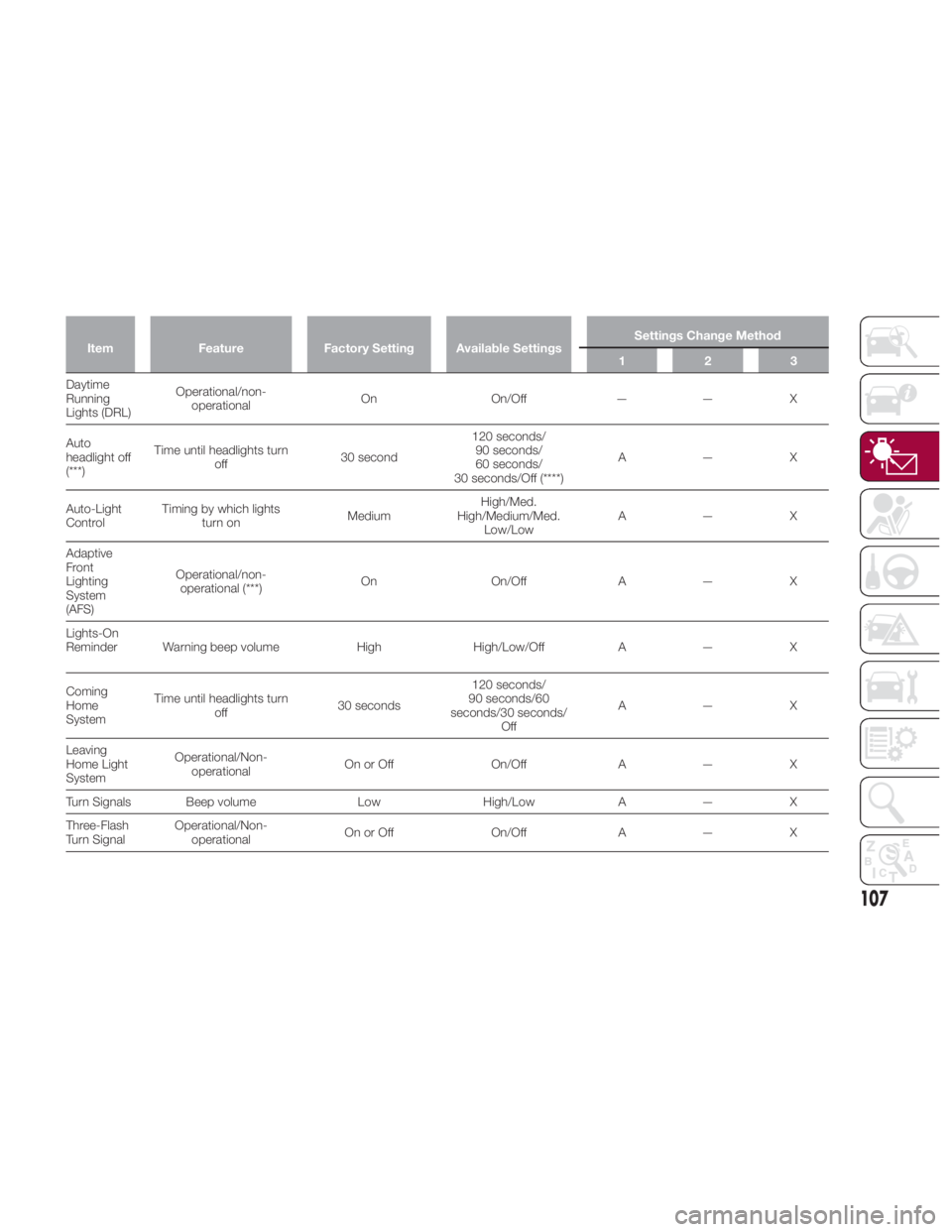
Item Feature Factory Setting Available Settings Settings Change Method
123
Daytime
Running
Lights
(DRL) Operational/non-
operational On On/Of f — — X
Auto
headlight off
(***) Time until headlights turn
off 30 second 120 seconds/
90 seconds/
60 seconds/
30 seconds/Off (****) A—X
Auto-Light
Control Timing by which lights
turn on Medium High/Med.
High/Medium/Med.
Low/Low A—X
Adaptive
Front
Lighting
System
(AFS) Operational/non-
operational (***) On On/Off A — X
Lights-On
Reminder Warning beep volume High High/Low/Off A — X
Coming
Home
System Time until headlights turn
off 30 seconds 120 seconds/
90 seconds/60
seconds/30 seconds/
Off A—X
Leaving
Home Light
System Operational/Non-
operational On or Off On/Off A — X
Turn Signals Beep volume Low High/Low A — X
Three-Flash
Turn Signal Operational/Non-
operational On or Off On/Off A — X
107
Page 117 of 292
Activation / Deactivation
The Blind Spot Monitoring (BSM)
system will operate when all of the
following conditions are met:
The ignition is ON.
The BSM switch is pushed and the
warning light in the instrument cluster is
turned off.
The vehicle speed is 19 mph
(30km/h)orfaster. The BSM system will not operate under
the following conditions:
The vehicle speed falls below about
15 mph (25 km/h) even though the
warning light is turned off.
The gear selector is shifted to
REVERSE.
In the following cases, the warning light
in the instrument cluster illuminates and
operation of the BSM system is
deactivated.
A problem with the system (including
the BSM warning lights) is detected.
A large change in position of a rear
radar sensor on the vehicle has
occurred.
There is a large accumulation of
snow or ice on the rear bumper near a
rear radar sensor . Remove any snow,
ice or mud on the rear bumper.
Driving on snow covered roads for
long periods.
The temperature near the rear radar
sensors becomes extremely hot due to
driving for long periods on inclines
during warm weather.
The battery voltage has decreased.
If the warning light in the instrument
cluster remains illuminated, have the
vehicle inspected at an authorized
dealer as soon as possible.
Note: Under the following conditions,
the rear radar sensors cannot detect objects, or it may be difficult to detect
them:
A vehicle is in the detection area at
the rear in an adjacent driving lane but
it does not approach. The BSM system
determines the condition based on
radar detection data.
A vehicle is traveling alongside your
vehicle at nearly the same speed for an
extended period of time.
Vehicles approaching in the
opposite direction.
A vehicle in an adjacent driving lane
is attempting to pass your vehicle.
A vehicle is in an adjacent lane on a
road with extremely wide driving lanes.
The detection area of the rear radar
sensors is set at the road width of
expressways.
In the following cases, the activation of
the BSM warning lights and the audible
alert may not occur, or they may be
delayed:
A vehicle makes a lane change from
a driving lane two lanes over to an
adjacent lane.
Driving on steep inclines.
Crossing the summit of a hill or
mountain pass.
The turning radius is small (making a
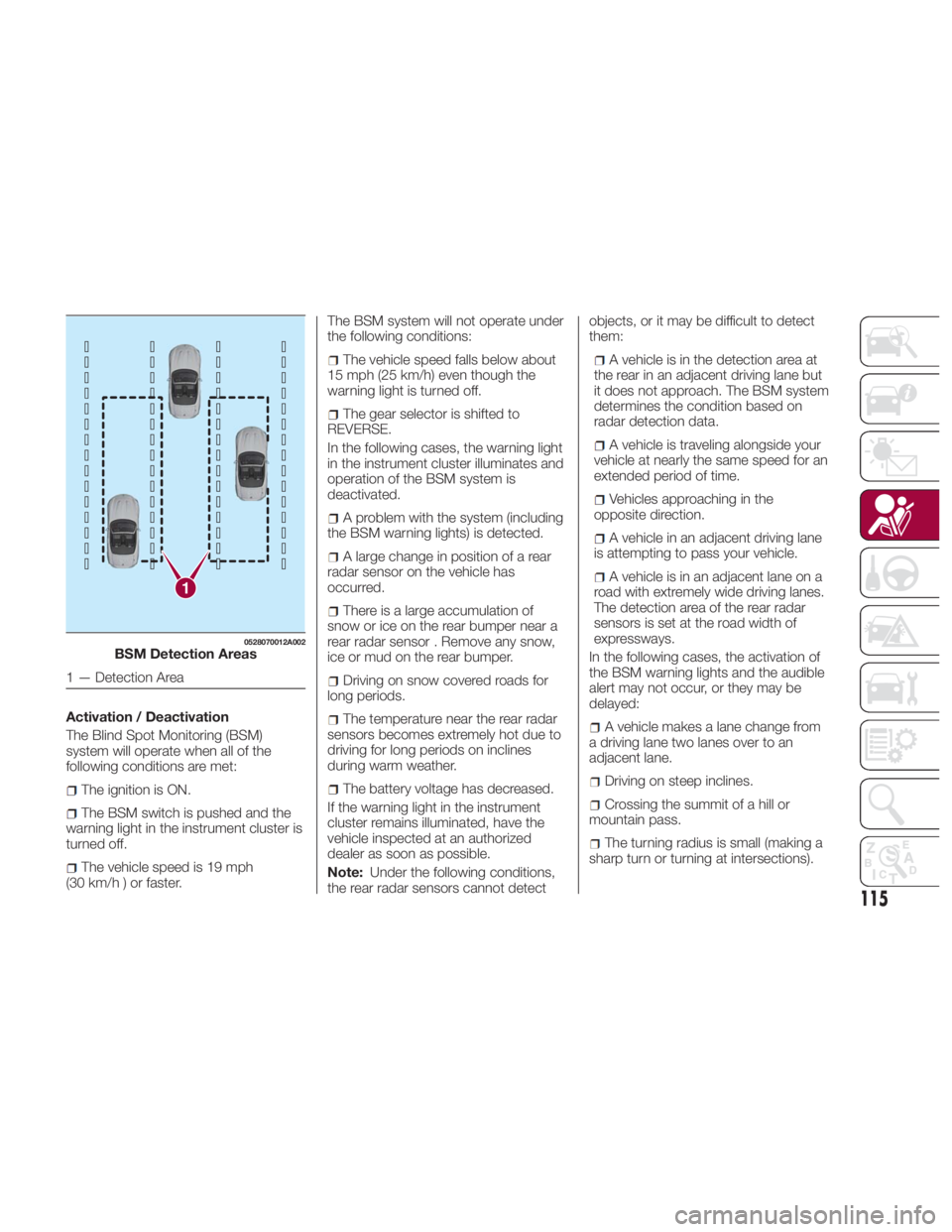
sharp turn or turning at intersections).1 0528070012A002
BSM Detection Areas
1 — Detection Area
115
Page 124 of 292
The following regulatory statement
applies to all radio frequency (RF)
devices equipped in this vehicle:
This device complies with Part 15 of the
FCC Rules and with Industry Canada
license-exempt RSS standard(s).
Operation is subject to the following
two conditions:
(1) This device may not cause harmful
interference, and
(2) This device must accept any
interference received, including
interference that may cause undesired
operation.
Note: Changes or modifications not
expressly approved by the party
responsible for compliance could void
the user’s authority to operate the
equipment. OCCUPANT
RESTRAINT
SYSTEMS The most important safety equipment
of the vehicle comprise the following
protection systems:
Seat Belts
SBA (Seat Belt Alert) System
Head Restraints
Child Restraint Systems
Front Air Bags And Side Air Bags
Read the information given in the
following pages with the utmost care.
It is of fundamental importance that the
protection systems are used in the
correct way to guarantee the maximum
possible safety level for the driver and
the passengers. SEAT BELT
SYSTEMS Buckle up even though you are an
excellent driver, even on short trips.
Someone on the road may be a poor
driver and could cause a collision that
includes you. This can happen far away
from home or on your own street.
Research has shown that seat belts
save lives, and they can reduce the
seriousness of injuries in a collision.
Some of the worst injuries happen
when people are thrown from the
vehicle. Seat belts reduce the possibility
of ejection and the risk of injury caused
by striking the inside of the vehicle.
Everyone in a motor vehicle should be
belted at all times.
122
SAFETY
Page 134 of 292
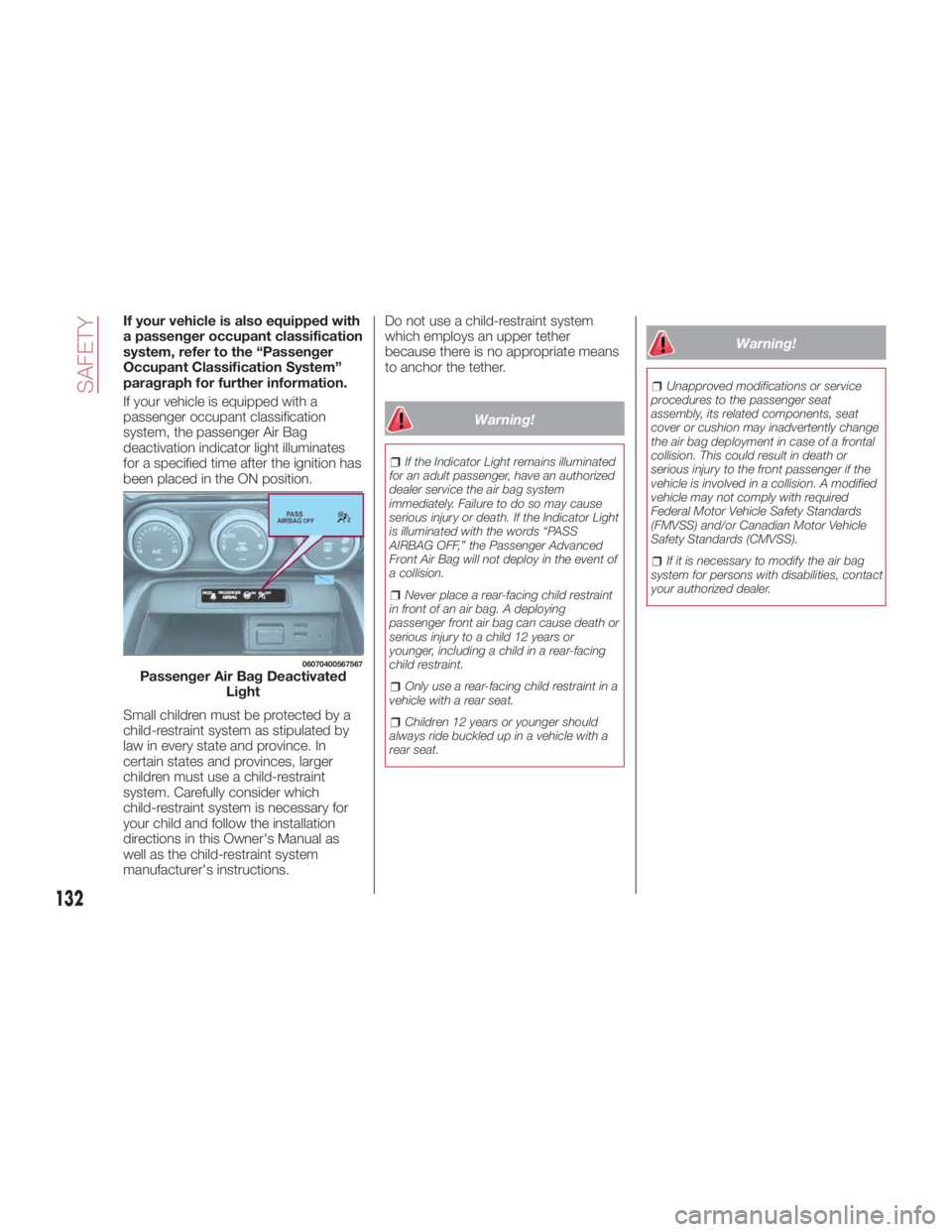
If your vehicle is also equipped with
a passenger occupant classification
system, refer to the “Passenger
Occupant Classification System”
paragraph for further information.
If your vehicle is equipped with a
passenger occupant classification
system, the passenger Air Bag
deactivation indicator light illuminates
for a specified time after the ignition has
been placed in the ON position.
Small children must be protected by a
child-restraint system as stipulated by
law in every state and province. In
certain states and provinces, larger
children must use a child-restraint
system. Carefully consider which
child-restraint system is necessary for
your child and follow the installation
directions in this Owner's Manual as
well as the child-restraint system
manufacturer's instructions. Do not use a child-restraint system
which employs an upper tether
because there is no appropriate means
to anchor the tether.
Warning!If the Indicator Light remains illuminated
for an adult passenger, have an authorized
dealer service the air bag system
immediately. Failure to do so may cause
serious injury or death. If the Indicator Light
is illuminated with the words “PASS
AIRBAG OFF,” the Passenger Advanced
Front Air Bag will not deploy in the event of
a collision.
Never place a rear-facing child restraint
in front of an air bag. A deploying
passenger front air bag can cause death or
serious injury to a child 12 years or
younger, including a child in a rear-facing
child restraint.
Only use a rear-facing child restraint in a
vehicle with a rear seat.
Children 12 years or younger should
always ride buckled up in a vehicle with a
rear seat. Warning! Unapproved modifications or service
procedures to the passenger seat
assembly, its related components, seat
cover or cushion may inadvertently change
the air bag deployment in case of a frontal
collision. This could result in death or
serious injury to the front passenger if the
vehicle is involved in a collision. A modified
vehicle may not comply with required
Federal Motor Vehicle Safety Standards
(FMVSS) and/or Canadian Motor Vehicle
Safety Standards (CMVSS).
If it is necessary to modify the air bag
system for persons with disabilities, contact
your authorized dealer.06070400567567
Passenger Air Bag Deactivated
Light
132
SAFETY
Page 159 of 292
Manual Shift Mode
The manual shift mode gives you the
feel of driving a manual transmission
vehicle by allowing you to operate the
gear selector manually.
This allows you to control engine rpm
and torque to the drive wheels much
like a manual transmission when more
control is desired.
To change to MANUAL (M) shift mode,
shift the gear selector from DRIVE (D) to
MANUAL (M). To return to automatic
shift mode, shift the gear selector from
MANUAL (M) to DRIVE (D).
You can shift between DRIVE (D) and
MANUAL (M) mode at any time, without
taking your foot off the accelerator.
Note:
If you change to manual shift mode
when the vehicle is stopped, the gear
will shift to M1.
If you change to manual shift mode
while the vehicle is moving it will remain
in the current gear until a manual shift
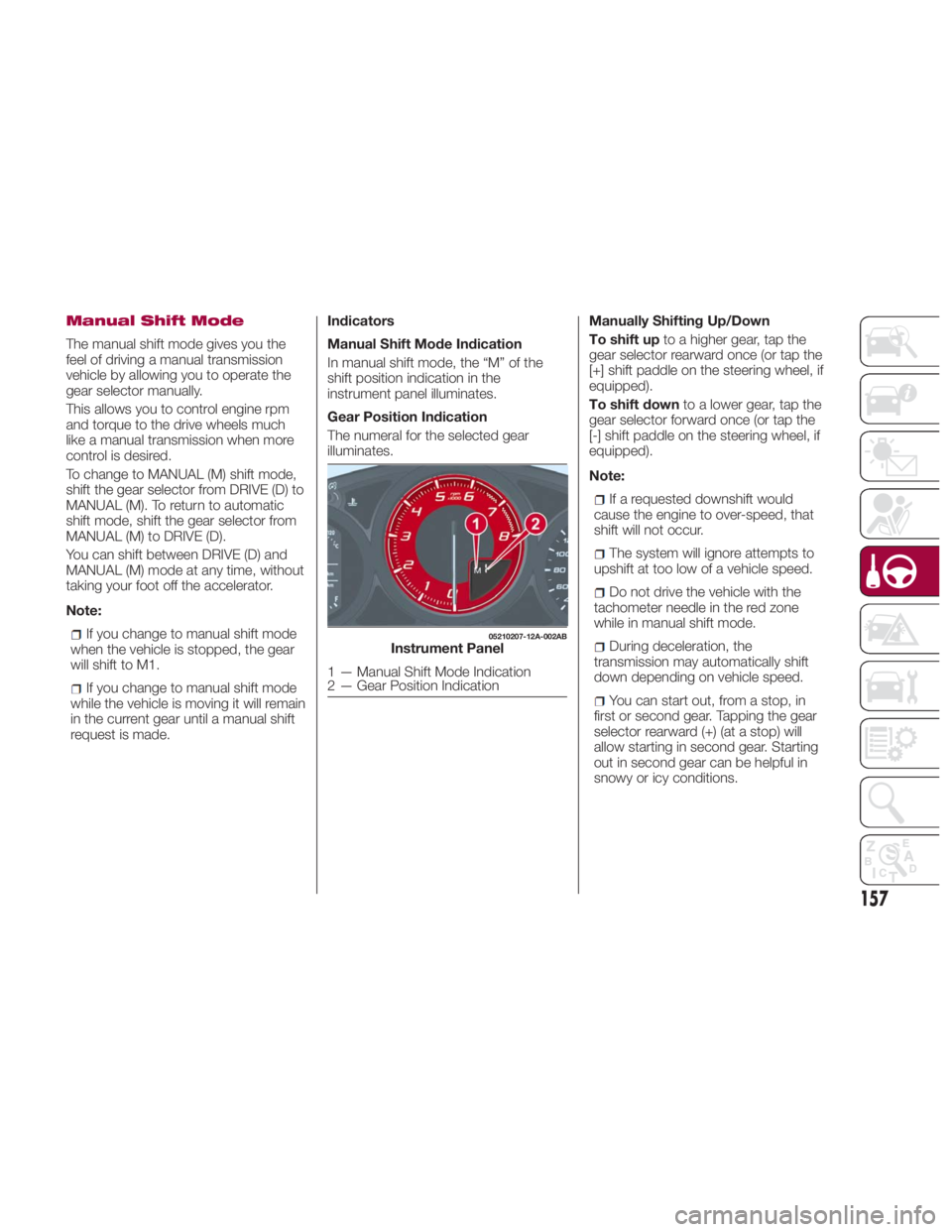
request is made. Indicators
Manual Shift Mode Indication
In manual shift mode, the “M” of the
shift position indication in the
instrument panel illuminates.
Gear Position Indication
The numeral for the selected gear
illuminates. Manually Shifting Up/Down
To shift up to a higher gear, tap the
gear selector rearward once (or tap the
[+] shift paddle on the steering wheel, if
equipped).
To shift down to a lower gear, tap the
gear selector forward once (or tap the
[-] shift paddle on the steering wheel, if
equipped).
Note:
If a requested downshift would
cause the engine to over-speed, that
shift will not occur.
The system will ignore attempts to
upshift at too low of a vehicle speed.
Do not drive the vehicle with the
tachometer needle in the red zone
while in manual shift mode.
During deceleration, the
transmission may automatically shift
down depending on vehicle speed.
You can start out, from a stop, in
first or second gear. Tapping the gear
selector rearward (+) (at a stop) will
allow starting in second gear. Starting
out in second gear can be helpful in
snowy or icy conditions. 05210207-12A-002AB
Instrument Panel
1 — Manual Shift Mode Indication
2 — Gear Position Indication
157